


What is ROLLBACK in SQL?
 FREE
FREE

ROLLBACK leads the current transaction to traverse back, i.e., it reverts all the updates performed by the SQL statements and restores the database to the way it was before the first statement of the transaction process.
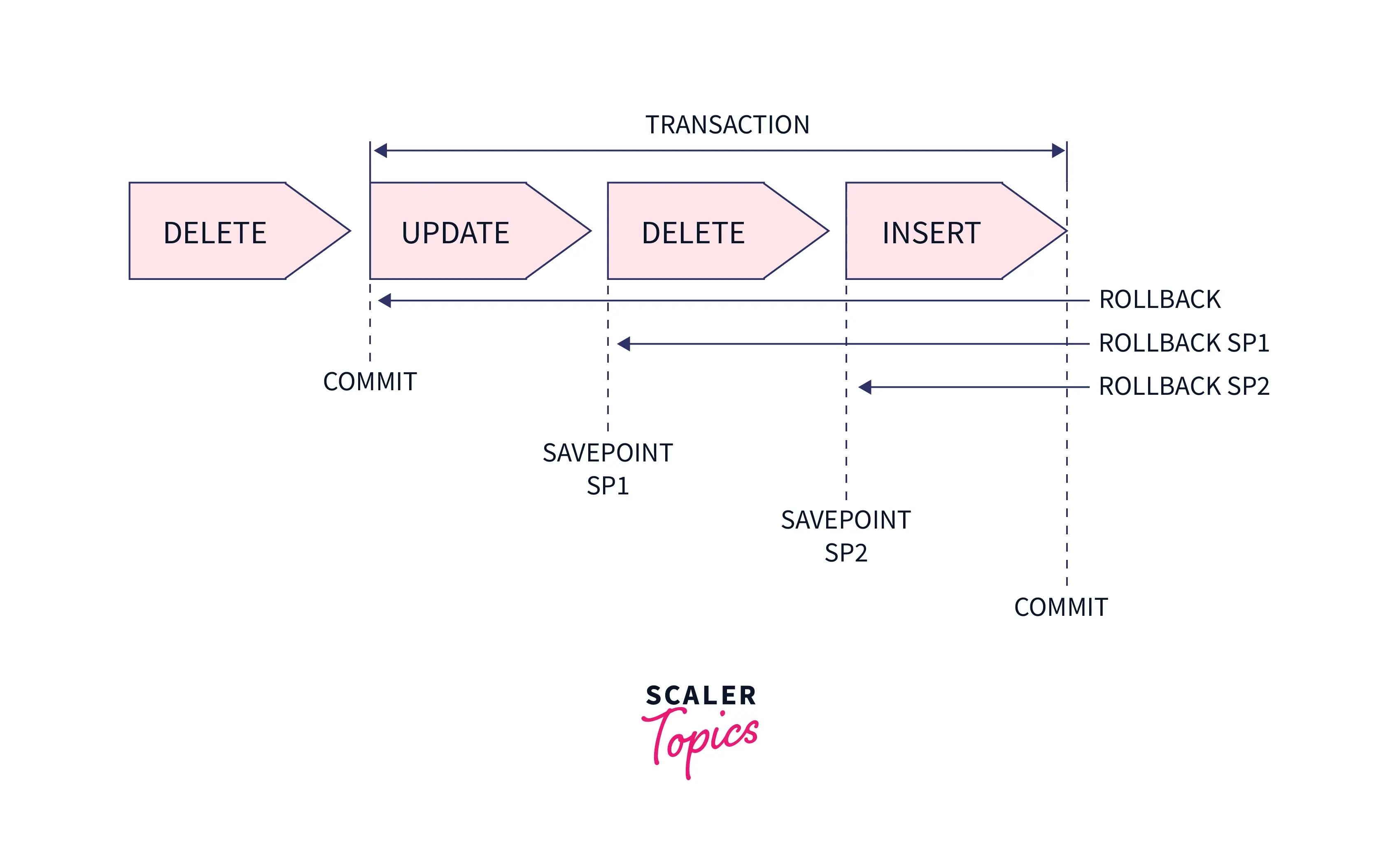
These are a few factors on which ROLLBACK is usually decided on:
- Duration for which the transaction has been running
- Already updated data by transaction
- Data yet to be updated by the transaction process.
Note: Data changes captured in the log files get discarded and are not reflected in the database. Old values can be restored by ROLLBACK using the log entries. That is why this process is also known as "Undoing".
Syntax:
Build an AI-First Career, Master the Complete Skillset
Choose from our industry-leading programs designed for career success
Modern Software and AI Engineering Program
Master full-stack development with AI integration


 +1000 more
Modern Data Science and ML with specialisation in AI
Advanced data science techniques with AI specialization
+1000 moreAdvanced AIML with Specialisation in Agentic AI
Deep dive into AIML with focus on Agentic systems
+1000 moreDevOps, Cloud & AI Platform Engineering
Build and manage AI-powered cloud infrastructure
+1000 moreAI Engineering Advanced Certification by IIT-Roorkee
Premier AI engineering certification from IIT-Roorkee

AI Forward Deployed Engineer Program
Full-stack engineering, production AI and client-facing consulting
+1000 moreHow to Rollback Deleted Data in SQL?
Let's see now how to restore deleted data using SQL.
Say we have a table chocolate_storedb
| Prod_ID | brand | chocolate | sales/day |
|---|---|---|---|
| 055 | Nestle | Milky Bar | 10000000 |
| 056 | Amul | Dark Chocolate | 500000 |
| 057 | Gandour | Safari | 200000 |
| 058 | Cadbury | Dairy Milk | 1000000 |
| 059 | Nestle | Kitkat | 500000 |
Let's delete all the contents from this table.
All contents are now deleted from the table.
Let us now use ROLLBACK and then select command to see the table.
Output:
| Prod_ID | brand | chocolate | sales/day |
|---|---|---|---|
| 055 | Nestle | Milky Bar | 10000000 |
| 056 | Amul | Dark Chocolate | 500000 |
| 057 | Gandour | Safari | 200000 |
| 058 | Cadbury | Dairy Milk | 1000000 |
| 059 | Nestle | Kitkat | 500000 |
Hence, we see that the data is restored after using the ROLLBACK command in SQL.
How to Rollback Updated Query in SQL?
Let us take the same table, chocolate_storedb, and update the sales value.
| Prod_ID | brand | chocolate | sales/day |
|---|---|---|---|
| 055 | Nestle | Milky Bar | 100000 |
| 056 | Amul | Dark Chocolate | 5000 |
| 057 | Gandour | Safari | 2000 |
| 058 | Cadbury | Dairy Milk | 10000 |
| 059 | Nestle | Kitkat | 5000 |
We see the output here as an updated table.
Let's now use ROLLBACK to restore the table.
Output:
| Prod_ID | brand | chocolate | sales/day |
|---|---|---|---|
| 055 | Nestle | Milky Bar | 10000000 |
| 056 | Amul | Dark Chocolate | 500000 |
| 057 | Gandour | Safari | 200000 |
| 058 | Cadbury | Dairy Milk | 1000000 |
| 059 | Nestle | Kitkat | 500000 |
Hence, here we see that the ROLLBACK command restored the table after getting updated.
Example of ROLLBACK in SQL
Let's say we create the following students_table.
| student_id | student_name | age | marks_scored |
|---|---|---|---|
| 207 | Sylvia Plath | 22 | 94 |
| 208 | John Keats | 21 | 82 |
| 209 | Rudyard Kipling | 22 | 87 |
| 210 | W.B Yeats | 21 | 76 |
| 211 | T.S Eliot | 20 | 98 |
This deletes the row, and the table appears as:
| student_id | student_name | age | marks_scored |
|---|---|---|---|
| 207 | Sylvia Plath | 22 | 94 |
| 208 | John Keats | 21 | 82 |
| 209 | Rudyard Kipling | 22 | 87 |
| 211 | T.S Eliot | 20 | 98 |
Now we use ROLLBACK
and on viewing the table again using the select command, we see the table back to its original form.
Final output:
| student_id | student_name | age | marks_scored |
|---|---|---|---|
| 207 | Sylvia Plath | 22 | 94 |
| 208 | John Keats | 21 | 82 |
| 209 | Rudyard Kipling | 22 | 87 |
| 210 | W.B Yeats | 21 | 76 |
| 211 | T.S Eliot | 20 | 98 |
We see an undo of the changes made.
How Scaler Transformed Careers in Different Fields
Scaler learners achieved 2.5x salary growth with average post-Scaler CTC reaching ₹23L.
 Google
 Amazon
 Microsoft
 Flipkart
 Adobe1200+ more
Learn More
To learn more about SQL in detail click here.
Conclusion
- We learned that ROLLBACK in SQL is a method of undoing the changes made to the database.
- The old values are therefore restored, and the database disk changes are discarded. Now that we know how to revert back the changes in a database, it's time to play around with some SQL codes on your editor.




