




Quick answer first: low-code/no-code development in generative AI means building AI-powered apps, chatbots, and workflows using visual builders and plain-language prompts instead of writing code from scratch. “No-code” means literally zero code, drag, drop, type a prompt, done. “Low-code” means mostly visual, with the option to drop in a script, an API call, or a bit of custom logic when the visual blocks run out of road.
Gartner has been fairly bullish about where this is headed, projecting that around 75% of new enterprise applications will be built using low-code technologies by 2026, up from under 25% in 2020, with non-IT “citizen developers” making up roughly 80% of that user base. Whether or not those exact numbers land precisely on target, the direction is hard to argue with: the barrier to building something with AI has dropped a lot, and the barrier to building something good, reliable, and production-ready has dropped a lot less.
This guide covers what low-code and no-code actually mean in a GenAI context, why it matters right now, the categories of tools worth knowing, a worked example of building a support assistant without code, where the approach genuinely breaks down, and what to learn next if you want to go further. If you’re new to the underlying concepts, Scaler’s generative AI overview is a good companion.
Low-Code vs No-Code: What They Mean in Generative AI
The two terms get used interchangeably a lot, which causes more confusion than it should, because the line between them is actually pretty simple.
No-code tools give you a finished interface: drag blocks, fill in forms, write prompts in plain English, and the platform handles everything underneath. You never see, and never need to see, a line of code. Low-code tools give you the same visual-first experience, but with an escape hatch, a code step, a custom function, an API call you configure yourself, for the bits that the pre-built blocks don’t cover.
Transform Your Career
Choose from our industry-leading programs designed for career success
Modern Software and AI Engineering Program
Master full-stack development with AI integration


 +1000 more
Modern Data Science and ML with specialisation in AI
Advanced data science techniques with AI specialization
+1000 more
Advanced AIML with Specialisation in Agentic AI
Deep dive into AIML with focus on Agentic systems
+1000 more
DevOps, Cloud & AI Platform Engineering
Build and manage AI-powered cloud infrastructure
+1000 more
AI Engineering Advanced Certification by IIT-Roorkee
Premier AI engineering certification from IIT-Roorkee

In a GenAI context specifically, both ends of this spectrum are powered by the same underlying ingredients: a large language model (LLM) doing the actual “thinking,” prompts that instruct it, and increasingly, retrieval-augmented generation (RAG), where the model is given relevant documents or data to reference before answering, and agents, which are setups where the model can take multi-step actions (call tools, search, write files) rather than just respond once. No-code tools wrap all of this in a UI; low-code tools let you peek under the hood and adjust the wiring.
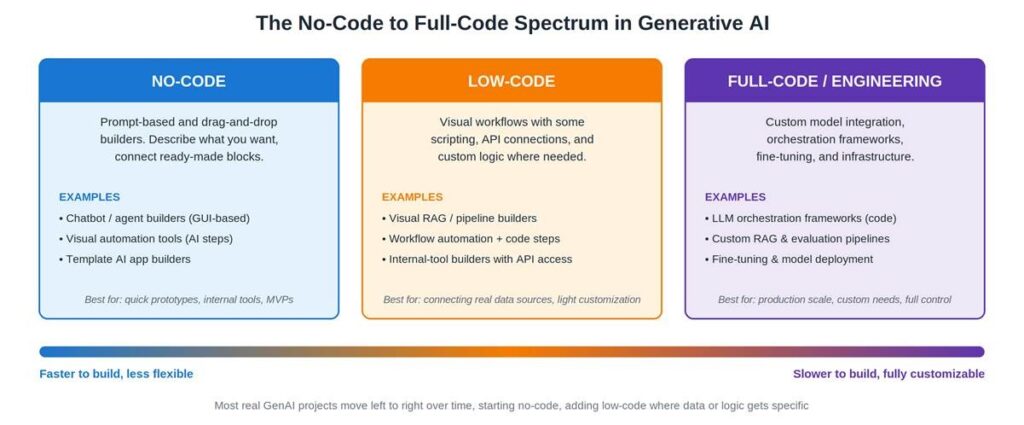
It’s a spectrum rather than three hard boxes, and most real projects don’t pick one lane and stay there. They start on the left, where it’s cheap to be wrong, and drift right as specific requirements pile up.
Why Low-Code/No-Code Matters for GenAI Right Now
Two things collided to make this moment different from previous waves of “no-code is the future” hype (and there have been a few of those).
First, LLMs are unusually good at being the “engine” behind a no-code tool, because so much of what they do is itself driven by natural language instructions. A no-code chatbot builder doesn’t need to abstract away some complicated backend logic, the logic is a prompt, which is already a format non-developers are comfortable writing.
Second, the talent gap is real and the demand isn’t slowing down. Gartner’s projection that citizen developers will outnumber professional developers roughly 4:1 at large enterprises by 2026 isn’t really about no-code being “better,” it’s about there simply not being enough engineers to build every internal tool, chatbot, and workflow automation that every team now wants. No-code fills that gap, imperfectly but usefully.
There’s also a lower barrier to entry than most people expect, and it shows up in adjacent data too: GitHub’s 2025 Octoverse report found that roughly 80% of new developers on the platform start using AI coding assistants within their first week. The expectation that “you describe it, the tool does most of the work” is becoming the default, not the exception, across both code and no-code tooling. For the broader “why now” context, Scaler’s artificial intelligence overview covers the underlying shift driving all of this.
Categories of No-Code/Low-Code GenAI Tools
Rather than naming specific products (which rebrand, merge, and pivot roughly every quarter in this space), it’s more useful to think in terms of what job each category of tool is actually doing.
| Category | What It Does | Roughly Equivalent To |
| Prompt / chatbot builders | Visual interface to design conversation flows, system prompts, and basic logic for a chatbot or assistant | A no-code wrapper around prompt engineering and conversation design |
| Visual RAG / knowledge-base builders | Upload documents, connect a knowledge source, and let the model answer questions grounded in that content | A drag-and-drop front end for retrieval-augmented generation |
| Workflow automation platforms (AI-enabled) | Connect triggers, actions, and AI steps across apps, e.g. “when a form is submitted, summarise it and post to Slack” | Glue logic plus an LLM step in the middle |
| AI agent builders | Define goals, tools, and permissions for an AI to take multi-step actions semi-autonomously | A visual configuration layer over an agent framework |
| Internal app / interface builders | Build a UI (forms, dashboards, internal tools) that calls AI models as part of the app logic | A low-code front end with an LLM API as one of the data sources |
None of these categories are mutually exclusive, plenty of platforms straddle two or three of them, and that’s fine. The useful question isn’t “which category is best” but “which job am I actually trying to get done.” If prompt structure itself feels shaky, Scaler’s prompt engineering guide is worth reading before picking a tool, since a badly written prompt behaves badly no matter how nice the drag-and-drop interface around it is.
How to Build a GenAI App Without Code: A Sample Workflow
To make this concrete, here’s roughly what building a simple no-code support assistant looks like, the kind of thing that answers “what’s your refund policy” using your actual documentation instead of making something up.
1. Pick a builder with chatbot and knowledge-base features. Most platforms in this category bundle both, so you’re not stitching two separate tools together for a first attempt.
2. Upload your source documents. FAQs, policy pages, product docs, whatever the assistant should “know.” The platform chunks and indexes this in the background, this is the RAG part, happening without you needing to configure it manually.
3. Write the system prompt. This is the one part that’s genuinely still “prompt engineering,” even in a no-code tool: tone, scope (“only answer questions about our refund and shipping policies”), and what to do when it doesn’t know something (“say so, and suggest contacting support”).
4. Configure fallback and escalation. Decide what happens when the assistant can’t answer, hand off to a human, log the question, or both. This step gets skipped constantly and is usually where “the bot just made something up” complaints come from.
5. Test with real questions, including weird ones. Not the five questions you wrote while building it, the messy, oddly-phrased, slightly off-topic ones real users actually send.
6. Embed or connect it. Most tools offer a widget, an API endpoint, or a direct integration with a messaging platform, plug it into wherever the conversation needs to happen.
That’s genuinely it, for a first version. No model training, no servers, no deployment pipeline. The underlying mechanics, embeddings, vector search, prompt assembly, are all handled by the platform. If you want to understand what’s happening under that hood (useful even if you never touch it directly), Scaler’s large language models page explains the core mechanics in plain terms.



Where No-Code Hits Its Limits (and Why Engineering Still Wins)
Here’s the part most no-code marketing pages gloss over, and it’s worth being straight about it: no-code is genuinely excellent at getting to a working prototype, and genuinely limited at getting that prototype through production. The two are different problems, and the second one is where engineering effort tends to actually go.
• Customization ceiling: once your logic needs something the platform’s blocks don’t support, branching that depends on multiple data sources, custom scoring, anything genuinely novel, you’re either waiting on the vendor or working around the tool rather than with it.
• Cost at scale: no-code platforms often price per seat, per workflow run, or per token through a markup. Fine for a prototype with a handful of users, noticeably more expensive than calling an API directly once usage grows.
• Evaluation and testing: “does this work” is easy to check by hand for ten test questions. Systematically evaluating thousands of edge cases, tracking accuracy over time, and catching regressions when you update a prompt is something most no-code tools don’t do well, if at all.
• Debugging when it goes wrong: “the bot said something weird to a customer” is much harder to root-cause in a visual builder than in a codebase where you can trace exactly what was sent to the model, with what context, and why.
• Security and data handling: where your data goes, how it’s stored, and who can access it matters a lot more once real customer or company data is involved, and no-code platforms vary wildly in how transparent and configurable this is.
• Quality of AI-assisted output, generally: even in software development broadly, less than half of AI-generated code reportedly gets accepted without modification by developers. The same caution applies to AI-generated logic inside no-code workflows, it often gets you most of the way, and the remaining gap is where the actual engineering judgment lives.
None of this means no-code was a waste of time, quite the opposite. It’s usually the fastest way to find out whether an idea is worth building properly, before committing engineering time to it. The honest framing is: no-code de-risks the idea, engineering hardens the implementation. McKinsey’s ongoing State of AI research consistently finds that organisations capturing real value from AI are the ones pairing fast experimentation with proper engineering investment where it counts, not picking one over the other.
How to Level Up From No-Code to Real AI Engineering (Real)
If a no-code prototype proved the idea and you’re now hitting the ceiling above, the path forward is fairly well-trodden, and it doesn’t require starting from zero.
• Start with prompts and APIs: learn to call an LLM API directly. This alone removes a lot of the “why can’t I customize this” friction, and prompt skills transfer completely from the no-code tool you already used.
• Learn RAG properly: understand embeddings, vector databases, and chunking strategies, the things the no-code platform was doing for you automatically, and not always well, for your specific data.
• Get comfortable with evaluation: build a habit of testing prompt and pipeline changes against a fixed set of test cases, rather than “try it and see if it feels right.”
• Understand fine-tuning, and when it’s actually warranted: which, for most use cases, is less often than people assume, prompting and RAG solve the majority of cases, but it’s worth knowing when they don’t.
• Pick up deployment basics: getting something from “works on my machine” to “works reliably for other people” is its own skill, and it’s where a lot of prototypes quietly die.
If this is the direction you want to go, the underlying machine learning fundamentals make everything above click faster, and Scaler’s data science course and broader courses cover this progression in a structured way. The Academy programs in particular are built around exactly this kind of “from prototype to production” progression, useful if self-directed learning has gotten you partway and you want the rest of the path mapped out.
On the broader employability question, the World Economic Forum’s Future of Jobs Report 2025 lists AI and big data skills among the fastest-growing skill categories employers are prioritising, alongside, not instead of, the kind of general technology literacy that no-code tools are good at building first. The two reinforce each other rather than competing.

Free Courses by top Scaler instructors
The FAQs
Q1. What’s the difference between low-code and no-code in GenAI?
No-code means building entirely through visual interfaces and plain-language prompts, with zero code involved. Low-code means mostly visual, with the option to add custom scripts, API calls, or logic for cases the pre-built blocks don’t cover. Think of it as a spectrum rather than two separate categories, most platforms sit somewhere along it, and many let you move further along as your needs grow.
Q2. Can I build a real AI app with no coding?
Yes! For prototypes, internal tools, and many genuinely useful small applications, no-code is often sufficient on its own. The limits tend to show up around heavy customization, scale, cost efficiency, rigorous evaluation, and debugging, exactly the areas covered in the limitations section above. “Real” and “production-grade at scale” aren’t always the same bar.
Q3. Are no-code AI tools free?
Most offer a free tier that’s genuinely usable for learning and small prototypes, usually with limits on usage volume, number of workflows, or which AI models you can access. Paid tiers scale with usage (often per-seat or per-run pricing, sometimes with a markup on the underlying AI model costs), and that’s typically where the cost-at-scale limitation becomes noticeable.
Q4. Do I still need to learn to code for an AI career?
Honestly, yes, if the goal is a career building AI systems rather than using AI tools. No-code is a genuinely good entry point and a useful skill in its own right for product, ops, and non-technical roles, but the roles focused on building, customizing, and maintaining AI systems at scale still rest on programming, data, and systems fundamentals. The good news is that no-code experience isn’t wasted time, it builds intuition for what these systems do, which makes the underlying concepts easier to learn afterward.
Q5. What should I learn first?
If you’re completely new, start with a no-code tool to build something small and get a feel for how prompts, knowledge sources, and AI responses interact, it’s the fastest way to build intuition. From there, move to prompt engineering and API basics, then RAG concepts, in roughly that order. Trying to learn fine-tuning or infrastructure first, before the basics of how these systems behave, tends to be where people get discouraged and quit. Good luck!
