




In 2026, system design is no longer something you can ignore if you’re aiming for mid or senior roles. It often ends up taking around 40-50% of the interview, and more importantly, many candidates even struggle in this area.
And you’ll understand this gap once you truly face the set expectations. Now, writing code will have to be taken care of for sure, but what truly gets evaluated is how you think about systems when they start to scale. How requests are handled, how services interact, and what trade-offs you make. These are the same kinds of problems companies like Amazon, Uber, and Netflix deal with every day.
We also understand that it becomes a little challenging to find a linear path to learning system design. Most people don’t know how to approach the curriculum or what to focus on first, which is why having a clear system design roadmap or learning path can become immensely helpful.
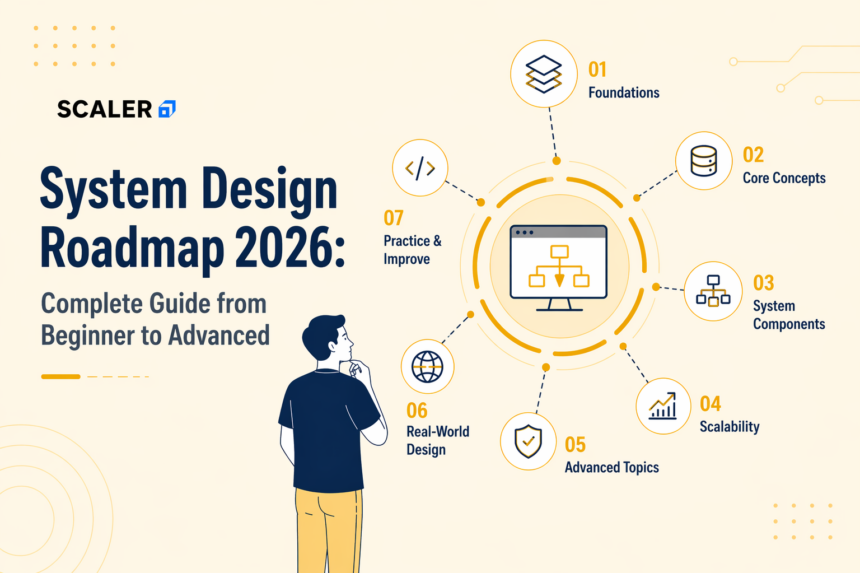
Hence, here is a detailed roadmap for you! You can check out subjects, learning resources, and various important factors revolving around system design.
What Is System Design?
You can call system design a blueprint, which involves designing the architecture of an application, including its services, data storage, communication patterns, and deployment infrastructure, to ensure it meets functional and non-functional requirements. The key aspects that you ned to keep in mind are – HLD, LLD, and Scalable performance.
For Eg, when you load an Instagram feed, internally it goes through multiple components and layers just to keep delivering the results quickly, smoothly, and efficiently to millions of users.
Stop learning AI in fragments—master a structured AI Engineering Course with hands-on GenAI systems with IIT Roorkee CEC Certification



Sounds interesting, right? So, now that you have a bit of an idea, let’s move on to the fundamentals you should already know before beginning, and a detailed roadmap thereafter.
Prerequisites Before Starting the System Design Roadmap
Before leaning forward to system design, please make sure that you are familiar with the following concepts:
1. Programming Fundamentals
You should be able to understand at least one programming language and how backend applications work. This includes understanding APIs, request-response flow, basic data structures, and how your code interacts with databases or external services. You don’t necessarily need knowledge of advanced concepts yet, but you should be able to build simple applications.
2. Networking Basics (HTTP, TCP/IP, DNS)
You must have a basic understanding of HTTP, DNS, and TCP/IP. Like, HTTP is used for communication between client and server, DNS maps domain names to IP addresses, and TCP/IP ensures reliable data transmission.
3. Database Fundamentals (SQL & NoSQL)
You should also have some understanding of SQL and NoSQL databases. SQL is used for structured, relational data with strong consistency, while NoSQL is used for flexible schemas and large-scale distributed data.
Once you are done forming the base, it’ll be much easier for you to follow the next steps in the system design roadmap!
To make things easier to follow, here’s a quick snapshot of how the entire roadmap is laid out.
| Phase | Focus Area | Key Topics |
| Phase 1 (Weeks 1-4) | Foundations | Client-Server, APIs (REST, GraphQL, gRPC), Databases, Caching, Scaling Basics |
| Phase 2 (Weeks 5-10) | Core System Design | Load Balancing, Sharding & Replication, CAP Theorem, Trade-offs, Message Queues, Microservices, Cloud Basics |
| Phase 3 (Weeks 11-16) | Advanced Concepts | Distributed Systems, Rate Limiting, Event-Driven Systems, Observability, Metrics, Security |
| Low-Level Design | Code-Level Design | SOLID Principles, Design Patterns, Class Diagrams, Object Modeling |
| Interview Preparation | Application of Concepts | Problem Solving Framework, Common Design Problems, Pattern Recognition |
With that overview in mind, let’s go through each phase in detail.
System Design Roadmap: Phase 1 – Foundations (Weeks 1-4)
This phase should take a month to complete, but don’t forget to be dedicated to the end!
Here, you should focus on building the basic understanding required for system design. You should be able to write simple programs and understand APIs and data flow in an application. Your goal for this particular phase should be to build enough clarity so you can follow system design concepts without getting blocked by fundamentals.
Client-Server Architecture
The client server model works on a request-response cycle. It is architecturally divided into 1-Tier, 2-Tier, 3-Tier, and N-Tier. This model is preferable to use in applications since it has the most functional working, where the clients send requests, and the servers process them to return the responses. It helps in easing management and scalability, but one thing you must keep in check is that it comes with immense risk and can be quite costly. So, while learning more about this, pay attention to the details where you can avoid mishaps as much as possible.
APIs: REST vs GraphQL vs gRPC
REST, GraphQL, and gRPC are the 3 common ways of communication of APIs.
You should focus on:
- REST: Standard HTTP-based, resource-oriented – this one is easy to implement and can be used for simple client-server communication
- GraphQL: Flexible querying, reduces over/under-fetching – this is used when clients require a very specific kind of data.
- gRPC: High-performance communication, not typically used for public APIs – usually used for Internal service-to-service communication.
When you study this topic, make sure to understand its use cases well. As they all are sufficient in their own ways, it is best to get a good idea of which API type to use where for the best results.
Databases: SQL vs NoSQL – When to Use What
SQL is usually used when the data has a defined structure and relationships that need to be maintained. Typical cases are things like account data or transactions. NoSQL is usually picked when that structure starts becoming restrictive, especially with data that grows fast or doesn’t follow a fixed format.
Hence, these topics become quite important to cover, and you must also remember that in reality, systems don’t really commit to one. They use whatever works better for that part of the problem.
You can learn more about them through the Free SQL vs NoSQL Online Course with Certificate.
Caching Strategies (Redis, Memcached, CDN)
Caching strategies are used to avoid having to do repeated work. But what does repeated work mean? Basically, when data is being requested again and again, it becomes more convenient to have it stored somewhere instead of hitting the database every time.
Tools like Redis or Memcached are commonly used to keep frequently accessed data in memory, which helps in reducing response time. CDNs are used for static content and serve it closer to the user’s location.
It works well for read-heavy systems, but keeping cached data in sync with the source is something you have to handle carefully.
Scaling Basics
There’s a time when traffic keeps on growing, and at that time, it becomes essential to understand the ways to handle that extra load. One option is to scale vertically by adding more resources, CPU, and memory to a single server. Another approach is to scale horizontally, where the workload is spread across multiple servers instead of relying on just one. Most modern systems lean towards horizontal scaling since it’s easier to distribute traffic and avoid a single point of failure.
Check out: Horizontal Scaling Vs Vertical Scaling to understand this better.
System Design Roadmap: Phase 2 – Core Concepts (Weeks 5-10)
In this phase, you will move from understanding individual components to designing systems that handle high traffic, large data volumes, and failures.
Here are some key concepts that you must focus on:
Load Balancing & Reverse Proxies
When the traffic increases, sending all requests to a single server quickly becomes a bottleneck. In this case, Load balancers are used, since they help in distributing requests across multiple servers so no single instance gets overwhelmed.
You can also use reverse proxies, which handle things like routing requests, caching responses, and adding a layer of security before traffic reaches the application. This becomes extremely important once systems start scaling, because availability and performance depend on how well traffic is managed across services.
To practice this better, you can look into tools like Nginx or HAProxy, as it gives a clearer picture of how load balancing and reverse proxies are actually implemented.
Database Sharding, Replication & Partitioning
Managing data is quite important once you reach this stage. Here are some of the practices you must follow;
- Sharding: Distributes data across multiple databases to handle large-scale data
- Replication: Maintains copies of data for fault tolerance and high availability
- Partitioning: Organizes data into smaller segments for efficient querying
These techniques are essential for scaling data storage and improving reliability.
CAP Theorem & Consistency Models
CAP theorem states that a distributed system cannot simultaneously guarantee consistency, availability, and partition tolerance. Systems make trade-offs based on requirements, choosing between strong consistency and eventual consistency.
You can check out: CAP Theorem and Caching in System Design Simplified to get a better understanding.
System Design Trade-offs
System design decisions involve trade-offs depending on use case and scale:
- Consistency vs Availability
- Latency vs Cost
- SQL vs NoSQL
- Monolith vs Microservices
Understanding these trade-offs is critical for both practically applicable systems and interviews.
Message Queues (Kafka, RabbitMQ)
Message queues enable asynchronous processing by decoupling components. Tasks such as logging, notifications, and background jobs are processed independently, improving system responsiveness and scalability.
Master structured AI Engineering + GenAI hands-on, earn IIT Roorkee CEC Certification at ₹40,000
Microservices vs Monolith Architecture
You’ll have to understand the difference between the two
- Monolith: Single codebase, simpler to develop and deploy
- Microservices: Distributed services, better scalability,ity and flexibility
Systems often start as monoliths and transition to microservices as complexity and scale increase.
Cloud & Infrastructure Basics
Modern system design relies on cloud infrastructure for scalability and deployment.
- Compute: Virtual servers (e.g., EC2)
- Storage: Object storage (e.g., S3)
- Managed databases: Scalable database services (e.g., RDS)
- Containers: Docker for packaging applications
- Orchestration: Kubernetes for managing services
Cloud platforms simplify scaling, deployment, and infrastructure management.
System Design Roadmap: Phase 3 – Advanced Topics (Weeks 11-16)
The last phase and the advanced one! This phase covers distributed systems, fault tolerance, and performance at scale. You will focus on handling failures, managing traffic, and ensuring reliability across multiple services.
Distributed Systems Fundamentals
Modern systems run across multiple servers and locations. This introduces challenges such as network latency, partial failures, and data inconsistency. Designing distributed systems requires handling communication between services while maintaining reliability and performance.
Consistent Hashing & Rate Limiting
- Consistent hashing distributes data or requests evenly across nodes, minimizing disruption when nodes are added or removed.
- Rate limiting controls the number of incoming requests to prevent system overload and ensure stability
Both are essential for managing traffic in large-scale systems.
Event-Driven Architecture
Event-driven systems process actions based on events rather than synchronous request flows. Services communicate through events, enabling loose coupling, better scalability, and asynchronous processing.
Observability: Logging, Monitoring, Alerting
Observability provides visibility into system behavior.
- Logging: Records system events for debugging
- Monitoring: Tracks system health in real time
- Alerting: Notifies when thresholds or failures occur
This is critical for identifying and resolving issues in production systems.
Performance & System Metrics
System performance is evaluated using key metrics:
- Latency: Time taken to process a request
- Throughput: Number of requests handled per second
- Error rate: Frequency of failed requests
- Availability: System uptime and reliability (SLA/SLO)
These metrics guide optimization and scaling decisions.
Security Basics in System Design
Security ensures that systems remain protected at scale.
- Authentication: Verifying user identity
- Authorization: Controlling access to resources
- Encryption: Protecting data in transit and at rest
- Rate limiting: Preventing abuse and denial-of-service attacks
Security considerations are integrated into system design from the start.
Low-Level Design Roadmap
So far, most of what you’ve looked at is high-level. You’re thinking about systems as a whole, how things connect, how they scale. This is where you should construct a carefully made low-level design roadmap.
SOLID Principles & Design Patterns
SOLID principles are used as guidelines for writing scalable code that is manageable, and design patterns provide standard solutions to common design problems.
These concepts might feel a bit abstract at first, but they help you write code that’s easier to manage and extend. You don’t need to memorize the patterns as such. But just try to understand why they’re used.
Class Diagrams & Object Modeling
At this level, you will start thinking about how different objects relate to each other. What classes you need, how they interact, and how responsibilities are divided. It’s basically about structuring your code in a way that makes sense. Drawing it out sometimes helps more than writing it directly.
LLD Practice Problems (Parking Lot, BookMyShow, etc.)
This is where things start to click. Once you are done with theoretical understanding, it’ll be quite fun to design things. But yes, problems like designing a parking lot or something like BookMyShow might seem simple at first, but they force you to think through details.
System Design Interview Preparation Roadmap
Now this is extremely important!
We have seen so many students being well-prepared, knowing everything, but the competition out there just makes these technical rounds (with no exaggerations) just deadly. But hey, worry not. Once you genuinely get the hang of tricky questions with enough practice, your mind will automatically think of the best answers to give.
Framework for Answering System Design Questions
You can keep these steps in mind while answering the questions in the interview –
1. Start by clarifying the problem – Since the question is often open-ended, the interview usually begins by discussing a particular concept/problem/project. Details around scale, users, and constraints can be spoken about here, and whatever the conversation goes here, will follow what comes next in the interview.
2. Lay out a simple structure – Once the problem is clearer, you’ll have to form a basic structure revolving around it. This usually means identifying the main components and how they connect, without going too deep too soon.
3. Build on the design gradually – With a structure in place, the discussion moves into specific parts of the system. Different components are explored in more detail, and the design starts to evolve step by step.
4. Think through trade-offs and constraints – As the design becomes more detailed, different approaches come up. Some decisions favour performance, others favour consistency or simplicity, and these trade-offs shape how the system is refined.
5. Keep the reasoning clear throughout – Across all of this, what matters most is how the thinking is communicated. Even if the design changes along the way, a clear explanation makes it easier to follow and evaluate.
Top 15 System Design Interview Problems
Once you go through a few system design interviews, the problems start feeling less random. The names might change, but the underlying patterns repeat.
Some problems focus on handling large amounts of data, others on real-time communication, and a few on maintaining consistency under load. Over time, you start recognising these patterns rather than treating each question as completely new.
Here are some of the most common ones that come up:
- URL Shortener
- Chat System
- News Feed
- Notification System
- File Storage (like Dropbox)
- Rate Limiter
- Search System
- Ride Sharing (Uber-like)
- Video Streaming (YouTube/Netflix)
- Social Media Timeline
- Logging System
- Payment System
- E-commerce Platform
- Web Crawler
- API Gateway / Rate Limiter
Each of these tends to highlight a different part of system design. A chat system leans more towards real-time communication, a news feed brings in caching and data distribution, while something like file storage pushes you to think about consistency and large data handling.
So, the major point here is to just practice well enough so that spotting errors comes just naturally to you! You can also check out some practice interview questions here: Top System Design Interview Questions – InterviewBit.
Read These Important Roadmaps: More Paths to Career Success
FAQs
Q1. How long does it take to learn system design from scratch?
Learning system design can take around 12-16 weeks to get familiar with the basics. But mostly it depends on your schedule and where you’re starting from. You will be able to understand various concepts at an earlier stage, but you’ll need to practice regularly to completely get a hang of it.
Q2. Is system design required for frontend developers?
Not really, at least not in the same way.
Most frontend roles don’t go deep into system design, but having a basic idea still helps. You end up understanding things like APIs or performance a bit better. It’s not something you have to know early on, but it does start to matter more as you gain experience.
Q3. What is the difference between HLD and LLD?
HLD is more like the big picture. You’re looking at how the system is structured overall, what parts are involved, and how they connect.
LLD is more detailed. It’s about how things are actually built, like how classes are designed or how different parts work at a code level.
Q4: Can I learn system design without a CS degree?
You can, if you’re following a system design for beginners approach, things will feel slow at first, but it gets easier with practice.
Some concepts might feel unfamiliar at first, but once you start going through problems and seeing how things work, it starts making more sense.
Q5. What are the top system design interview questions for 2026?
Some common ones you’ll keep seeing are:
- Design a URL shortener
- Design a chat system
- Design a news feed
- Design a notification system
- Design a file storage system
These don’t really change much. The question might be framed differently, but it usually comes down to the same kind of thinking.
