




Embedded systems are everywhere. From the chip in your washing machine, the ECU in a car, the firmware running on a hospital monitor and yet none of that is web development. It’s a different kind of engineering, one where your code has to be correct and fast and small, often all at once, and where a bug doesn’t just crash a browser tab.
This roadmap is for ECE/EEE students, freshers, C programmers curious about hardware, and software developers thinking about firmware or IoT roles. It answers five things starting from what embedded systems actually are, what to learn first, which boards and tools to use, what projects to build, to which career paths exist in embedded software, firmware, automotive, robotics, and real-time systems.
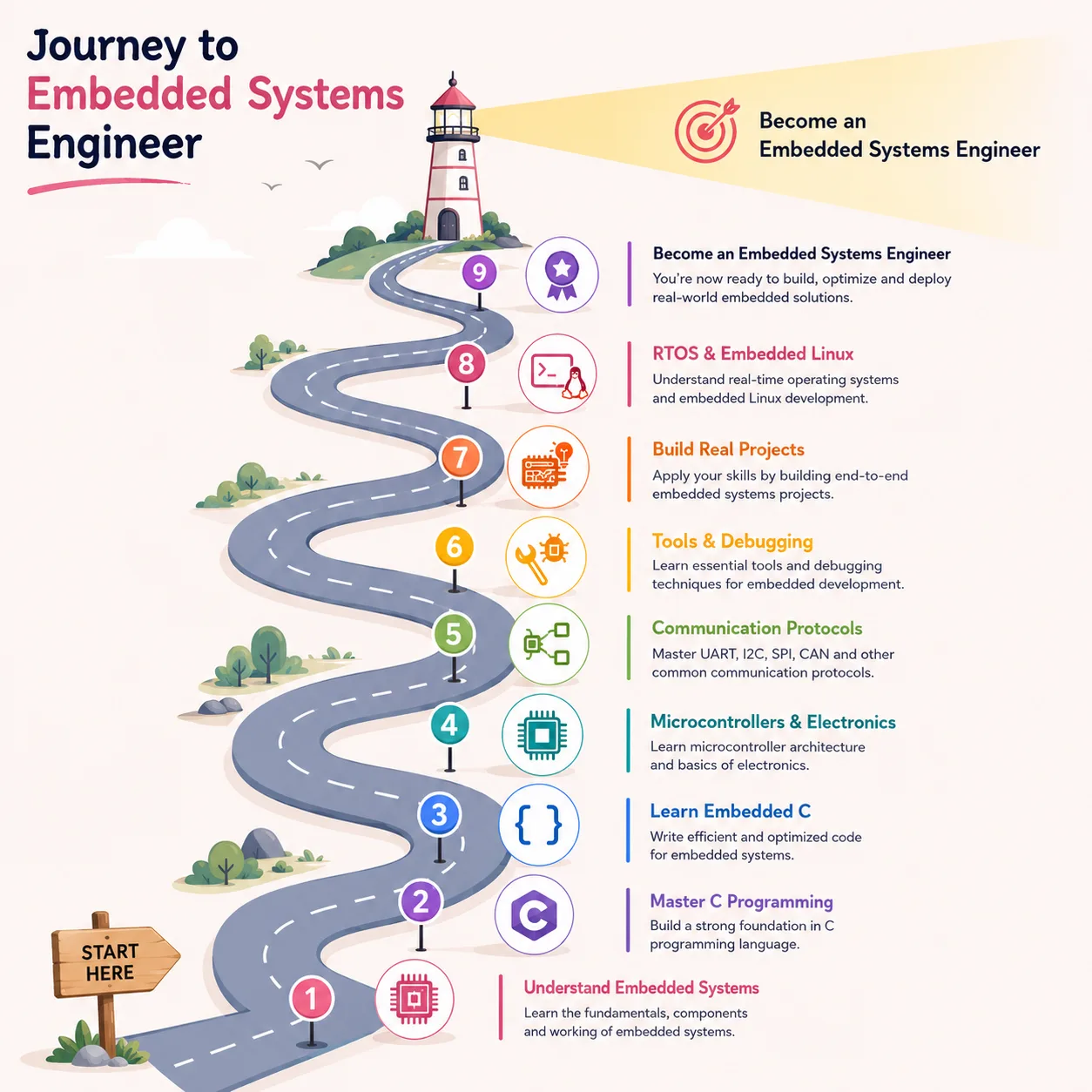
We’ve structured this as a proper learning journey, from C and electronics basics all the way to production firmware and job-readiness. One must try not to skip stages. The field rewards people who understand the foundations, not people who jumped straight to FreeRTOS after a YouTube binge.
The Course Snapshot
Here’s your embedded systems roadmap as a table:
| Stage | Focus Area | What You Learn |
|---|---|---|
| 0 | Understand the field | Embedded systems, firmware, hardware-software interaction, career roles |
| 1 | Prerequisites | C, basic electronics, digital logic, Linux/terminal, Git |
| 2 | Embedded C | Pointers, memory, bit manipulation, volatile, structs, register-level thinking |
| 3 | Microcontroller programming | GPIO, timers, interrupts, UART, SPI, I2C, ADC, PWM |
| 4 | Tools | IDEs, cross-compilers, flashing tools, JTAG/SWD, logic analyzer, oscilloscope |
| 5 | Projects | LED blink → sensor reading → motor control → IoT device → RTOS scheduler |
| 6 | RTOS & embedded OS basics | Tasks, scheduling, queues, semaphores, FreeRTOS |
| 7 | Advanced topics | Bootloaders, firmware updates, power optimization, production debugging |
| 8 | Career path | Embedded software, firmware, IoT, automotive, robotics, embedded Linux |
Transform Your Career
Choose from our industry-leading programs designed for career success
Modern Software and AI Engineering Program
Master full-stack development with AI integration


 +1000 more
AI Forward Deployed Engineer with Specialisation in AI applications
Build and deploy AI solutions for real-world business problems
+1000 more
Modern Data Science and ML with specialisation in AI
Advanced data science techniques with AI specialization
+1000 more
Advanced AIML with Specialisation in Agentic AI
Deep dive into AIML with focus on Agentic systems
+1000 more
DevOps, Cloud & AI Platform Engineering
Build and manage AI-powered cloud infrastructure
+1000 more
AI Engineering Advanced Certification by IIT-Roorkee
Premier AI engineering certification from IIT-Roorkee

Embedded Systems Roadmap at a Glance
| Stage | Goal | What to Learn | Output |
| Awareness | Understand the field | Embedded systems, firmware, hardware-software roles | Know what you're signing up for |
| Readiness | Foundation check | C basics, electronics, digital logic, Linux, Git | Clear checklist before starting |
| Embedded C | Hardware-aware code | Pointers, volatile, bitwise ops, macros, structs | Write register-level C |
| Microcontrollers | Control hardware | GPIO, timers, interrupts, ADC, PWM | Blink LEDs, read sensors |
| Protocols | Device communication | UART, SPI, I2C, CAN basics | Sensor-to-MCU projects |
| Tools | Build and debug | GCC, Keil, STM32CubeIDE, JTAG, logic analyzer | Flash and debug firmware |
| RTOS / OS | Real-time behavior | Tasks, scheduling, FreeRTOS, queues, semaphores | Multi-task embedded app |
| Advanced | Production readiness | Bootloaders, OTA updates, power optimization | Production-grade firmware |
| Career | Job targeting | Role-specific skills and portfolio | Job-ready developer |
Why Learn Embedded Systems in 2026?
The market for embedded software engineers has been quietly growing for years. Majorly, the sector of Automotives is a big driver since modern cars run on tens of millions of lines of embedded code. So does industrial automation, medical devices, consumer electronics, defense, and of course the entire IoT ecosystem, which hasn't stopped growing despite what some several misguided attempts and startup headlines suggested it would do.
What makes embedded systems different from general software development is the constraint stack. You're often working with kilobytes of RAM, not gigabytes. Latency requirements are in microseconds. Power consumption matters because some devices run on a battery for years. There's no OS to catch your mistakes. When you dereference a null pointer on an MCU with no MMU, something catches fire. And sometimes quite literally.
This field rewards precision, curiosity about hardware, and low-level problem solving. If you enjoy understanding how things actually work rather than just calling an API, this is a good place to be.
To understand what this career actually looks like day to day, Scaler's Embedded Software Engineer guide covers roles, responsibilities, and what companies actually look for.
On the IoT side, if you're thinking about connected devices and sensor-to-cloud architectures, start with IoT Architecture to understand how embedded hardware fits into larger systems.
What You Should Know Before You Begin?
The honest checklist before jumping into embedded systems:
• You can write and compile C code and not just 'Hello World,' but functions, pointers, and arrays
• You understand binary and hexadecimal notation. You'll be reading datasheets that say things like 0x3F5 constantly.
• Basic digital logic, starting from what a logic gate is, what HIGH and LOW mean, to what a clock signal does.
• You're comfortable in a Linux terminal. Not expert level, but you can navigate directories, run commands, and read error output without panicking.
• You know what Git is and have used it.
• Debugging mindset, so that, when something doesn't work, your first instinct is to isolate the problem, not restart the computer.
You do NOT need to know PCB design. You don't need VLSI, advanced signals theory, or power electronics on day one. Those come later, if at all, depending on your specialization.
If C pointers, memory, or compilation feel shaky, fix that first. Embedded C is just C that controls hardware, the "controls hardware" part only makes sense when the C part is solid.
Scaler's free C Tutorial is a solid place to build or reinforce those foundations.
Stage 1: Learning C Deeply Before Embedded C
This isn't gatekeeping, rather it's practical. Embedded C doesn't add a layer of complexity on top of regular C. In fact, all it does is remove the safeguards. There's no garbage collector, no exception handling, no dynamic memory manager watching over you here. When you write to a memory address, something happens at that address, and that is it.
The C topics you actually need for embedded work:
• Data types and sizes and why int being 16-bit on some platforms matters.
• Pointers and pointer arithmetic. You will write uint32_t* reg = (uint32_t*)0x40021000 and that needs to feel normal.
• Structs and unions as they are used constantly for register maps and protocol frames.
• Bitwise operators: &, |, ^, ~, <<, >>. These are your most-used tools in firmware.
• Stack vs heap memory even though in many embedded systems there's no heap at all.
• Compilation and linking, so that you know what a header file actually does, what the linker does, why multiple definition errors happen.
• The volatile keyword, this one is critical, covered in Stage 2, but make sure you understand what "optimizer" means first.
C vs Embedded C: The Differences
| Aspect | C (General) | Embedded C |
| Target | Desktop/server OS | Microcontroller, bare-metal or RTOS |
| Memory | OS-managed, GBs available | Kilobytes to megabytes, manually managed |
| Standard library | Full libc available | Partial or none (no printf on most MCUs) |
| volatile keyword | Rarely needed | Essential for hardware registers and ISR flags |
| Optimization | Compiler can freely optimize | Must control when/how optimizer runs |
| Portability | Largely portable | Often MCU-specific, uses vendor headers |
| Debugging | GDB, print statements | JTAG, SWD, logic analyzers, oscilloscopes |
Start with the free C Tutorial at Scaler if you want structured coverage from basics to memory and compilation.

Free Courses by top Scaler instructors
Stage 2: Moving from C to Embedded C Programming
The biggest mental shift is this is that, in embedded C, variables and pointers don't just represent data, they represent physical locations on a chip. A pointer to 0x40021000 might be a GPIO control register; writing to it turns a pin on and reading from it tells you the current pin state.
The key Embedded C concepts you need to make sure you remember starting now:
• Volatile: Tells the compiler not to optimize away reads/writes to a variable because it can change outside the normal program flow, just like an ISR updating a flag, or a hardware register changing on its own.
• Memory-mapped I/O: Peripherals on MCUs are controlled by writing to specific memory addresses. You define pointers to those addresses and treat them as registers.
• Bit manipulation: Setting a bit (reg |= (1 << 5)), clearing a bit (reg &= ~(1 << 5)), and toggling (reg ^= (1 << 5)) are everyday operations.
• Structs for register maps: Vendors provide header files that define peripheral registers as structs. Understanding this makes reading STM32 or AVR code much easier.
• Macros and #define: Used everywhere in embedded code for pin definitions, register addresses, and bit masks.
• Interrupt Service Routines (ISR): Functions that run when hardware events fire. They have strict rules, short, fast, no blocking, careful variable sharing with main code.
The difference between someone who 'learned C' and someone who can write Embedded C is usually right here. This stage takes time. Try to lay the foundations using this.
Stage 3: Coming across Microcontrollers and Basic Electronics
A microcontroller (MCU) is a single chip with a processor, RAM, flash memory, and a bunch of peripherals aka timers, ADCs, UARTs, SPI, I2C that are all built in. It's not a microprocessor (which needs external memory and peripherals). The distinction matters when someone asks you in an interview.
Microcontroller vs Microprocessor
| Feature | Microcontroller (MCU) | Microprocessor (MPU) |
| Memory | Built-in Flash + RAM (KB–MB range) | Requires external RAM and storage |
| Peripherals | GPIO, UART, SPI, I2C, ADC built-in | External ICs needed |
| OS | Bare-metal or lightweight RTOS | Full OS (Linux, Android) |
| Examples | STM32, Arduino, ESP32, PIC, AVR | Raspberry Pi (BCM), i.MX6, Intel Atom |
| Power | Milliwatts to microwatts | Watts range |
| Use cases | IoT nodes, sensors, motor control, appliances | Edge computing, gateways, HMIs |
Board Comparison: Where to Start
| Board | MCU/SoC | Best For | Difficulty |
| Arduino Uno | ATmega328P (8-bit AVR) | Absolute beginners, prototyping, learning GPIOs | Easy |
| ESP32 | Xtensa LX6 dual-core | IoT, WiFi/BT projects, slightly more RAM | Easy-Medium |
| STM32 (Nucleo/Discovery) | ARM Cortex-M series | Professional firmware dev, industry-standard | Medium |
| Raspberry Pi Pico | RP2040 dual Cortex-M0+ | MicroPython or C, affordable ARM learning | Easy-Medium |
| 8051 / PIC | Legacy 8-bit MCUs | Academic labs, legacy systems understanding | Medium |
For most learners, you can start with Arduino (it gets out of your way easy), move to ESP32 for wireless projects, then do serious work on STM32. The STM32 ecosystem is what you'll see in the real industry.
Stage 4: Understanding Peripheral Communication Protocols
Once you can blink an LED and read a button, you'll want to connect sensors, displays, and other modules. This part requires understanding how chips talk to each other.
Protocol Comparison: UART vs SPI vs I2C vs CAN
| Protocol | Wires | Speed | Topology | Common Use |
| UART | 2 (TX, RX) | Up to ~5 Mbps | Point-to-point | GPS, Bluetooth modules, serial debug |
| SPI | 4 (MOSI, MISO, SCK, CS) | Up to 50+ Mbps | One master, multiple slaves | Displays, SD cards, flash memory |
| I2C | 2 (SDA, SCL) | 100 kbps – 3.4 Mbps | Multi-master, multi-slave bus | Temperature sensors, OLED screens, IMUs |
| CAN | 2 differential (CANH, CANL) | Up to 1 Mbps (FD: 8 Mbps) | Bus topology, multi-node | Automotive ECUs, industrial networks |
UART is the simplest to start with because it's essentially just 'send bytes.' I2C is great for sensors because it uses only two wires and can have multiple devices on the same bus. SPI is faster and more reliable for high-speed transfers. CAN is its own world and very important if you're going automotive.
When devices start sending data to networks and cloud systems, embedded knowledge starts overlapping with IoT Architecture, it is worth understanding that bigger picture even early on.
Stage 5: Getting into Embedded Tools, IDEs, Compilers, and Debugging
One of the more confusing parts of starting embedded systems is that the toolchain isn't obvious. You're not just installing an IDE and pressing Run. You're cross-compiling, flashing firmware over JTAG, and sometimes debugging with a logic analyzer probe touching actual physical pins.
Embedded Development Tools Overview
| Category | Tools | Why It Matters |
| Compiler | GCC (arm-none-eabi-gcc), Clang | Cross-compiles C/C++ for target MCU architecture |
| IDE | STM32CubeIDE, Keil MDK, VS Code + PlatformIO | Project management, code editing, debugging integration |
| Build System | Makefiles, CMake | Automates compilation, linking, and flashing steps |
| Flashing Tool | ST-LINK, OpenOCD, J-Link, avrdude | Loads firmware binary into MCU flash memory |
| Debug Interface | JTAG, SWD, GDB | Set breakpoints, inspect variables, step through firmware |
| Hardware Debug | Logic analyzer, oscilloscope | See actual signals on GPIO, UART, SPI, I2C lines |
| Serial Monitor | PuTTY, screen, Arduino Serial Monitor | Read UART debug output from the board |
The logic analyzer is underrated because when your I2C sensor isn't responding and you can't tell if it's your code or your wiring, a logic analyzer is who shows you exactly what's on the bus. The best part? It saves hours!
Beginners often skip the oscilloscope and logic analyzer. Even a cheap 8-channel USB logic analyzer (around ₹1000–1500) is invaluable. An oscilloscope helps when you're debugging signal integrity issues or checking PWM waveforms.
Stage 6: The Practical Pathway in Embedded Systems via Projects (Beginner to Advanced)
Projects are how you actually learn embedded systems. Reading datasheets is necessary. Writing firmware that makes hardware do something is what makes the knowledge stick.
Project Progression Table
| Level | Project | Skills Practiced |
| Beginner | LED blink with GPIO | Register config, output control, delay timing |
| Beginner | Button input with debounce | GPIO input, pull-ups, edge detection, debouncing logic |
| Beginner | Temperature sensor read (LM35/DS18B20) | ADC or 1-Wire protocol, sensor reading |
| Beginner | LCD/OLED display with I2C | I2C protocol, display driver integration |
| Intermediate | UART data logger to PC | Serial communication, formatted output, timing |
| Intermediate | Motor control with PWM | PWM generation, motor driver ICs, feedback loops |
| Intermediate | Low-power wireless sensor node (ESP32) | Deep sleep, WiFi, MQTT, battery optimization |
| Intermediate | Sensor dashboard (ESP32 + web server) | HTTP server on MCU, data visualization basics |
| Advanced | FreeRTOS task scheduler demo | Multi-tasking, semaphores, queues, priority management |
| Advanced | Custom bootloader | Memory layout, linker scripts, firmware loading sequence |
| Advanced | CAN-based vehicle data logger | CAN protocol, DBC files, multi-ECU communication |
| Advanced | Embedded Linux app on Raspberry Pi | Cross-compilation, device files, process management |
Build in this order, the LED blink isn't just a 'hello world', rather it's your first proof that your toolchain works, your flashing setup is correct, and your code is actually running on the chip. Every embedded engineer has a war story about spending three hours debugging what turned out to be a 'board not flashing' problem.
For IoT projects that involve data dashboards, cloud backends, or APIs, Scaler's Full Stack Developer Course can fill the software side if you need it.
Scaler Placement Report and Statistics
Scaler learners achieved 2.5x salary growth with average post-Scaler CTC reaching ₹23L.
 Google
 Amazon
 Microsoft
 Flipkart
 Adobe
1200+ more
Adobe
1200+ more
Stage 7: RTOS and Embedded Operating Systems
Bare-metal programming works fine for simple, single-task firmware. When your system needs to handle multiple concurrent tasks such as reading a sensor, driving a motor, sending UART data, and responding to user input, all with timing requirements, bare-metal gets messy fast. That's where an RTOS helps.
Bare-Metal vs RTOS vs Embedded Linux
| Aspect | Bare-Metal | RTOS (e.g., FreeRTOS) | Embedded Linux |
| Complexity | Low | Medium | High |
| Resource use | Minimal | Small overhead (few KB) | Requires MB of RAM + storage |
| Real-time | Deterministic if coded carefully | Hard real-time capable | Soft real-time only |
| Concurrency | Manual (super-loop, flags) | Tasks, queues, semaphores, timers | Processes, threads, kernel scheduler |
| Debugging | GDB + hardware probes | GDB + RTOS-aware debug views | GDB, strace, syslog |
| When to use | Simple, single-task, tiny MCUs | Multiple tasks, timing constraints, mid-range MCUs | Complex apps, networking, file systems, high-end SoCs |
FreeRTOS is the most common RTOS in the industry as it runs on everything from STM32 to ESP32 to NXP chips. You can start there. Learning tasks, queues, semaphores, and software timers and this covers 90% of what you'll use in practice.
Don't start with RTOS before you're comfortable with bare-metal microcontroller programming. The RTOS API is not the hard part, instead the hard part is understanding what's happening underneath, from context switching and stack usage, to priority inversion. Those make sense only when you already know what interrupts and timing constraints look like without an OS.
Scaler's Embedded Operating System resource covers real-time scheduling concepts, task management, and embedded OS theory in a structured way.
The broader concepts of OS scheduling, processes, and memory management are covered in Scaler's Operating System Tutorial, quite a useful foundational reading before RTOS deep-dives.
Stage 8: Diving into Embedded Linux and Advanced Deployment
Embedded Linux is a different beast from microcontroller programming. You're suddenly dealing with a full OS kernel, device trees, kernel modules, systemd services, and build systems like Yocto or Buildroot. It typically runs on higher-end SoCs, think Raspberry Pi, NXP i.MX, Qualcomm platforms for IoT gateways, and automotive infotainment systems.
The learning path here:
• Linux basics on a Raspberry Pi, knowing about processes, file system, device files in /dev, GPIO via sysfs or libgpiod.
• Cross-compilation by building an ARM binary on your x86 laptop and deploying to the target board.
• Shell scripting and Makefiles for automation.
• Device drivers at a conceptual level (character devices, kernel modules), you don't need to write a driver on day one, but understanding the model helps enormously.
• Bootloaders: U-Boot is the most common. Understanding the boot sequence (bootloader → kernel → init → your app) matters for production work.
• Buildroot or Yocto at a high level, so you know how custom embedded Linux images are built for specific hardware.
This is where embedded engineering starts overlapping with systems software engineering. If you're targeting embedded Linux roles specifically, a solid OS fundamentals background matters more than it does for pure microcontroller work.
Embedded Systems Career Path: Roles, Skills, and Growth
Embedded systems is not just one job. It's a family of related roles with different tool stacks, domain knowledge, and seniority levels. Here's how the main roles break down:
| Role | Focus | Key Skills | Common Industries |
| Embedded Software Engineer | Firmware, peripheral drivers, MCU programming | C/Embedded C, RTOS, debugging, protocols | Consumer electronics, industrial, IoT |
| Firmware Engineer | Low-level firmware, bootloaders, hardware bring-up | C, register-level programming, JTAG, memory management | Electronics OEMs, semiconductor vendors |
| Embedded Linux Engineer | Linux on embedded hardware, device drivers | Linux internals, C, cross-compilation, Yocto | Automotive, networking, advanced IoT |
| IoT Engineer | Connected device development, cloud integration | MCU programming, MQTT, cloud platforms, networking | IoT product companies, smart home |
| Automotive Embedded Engineer | ECU software, AUTOSAR, functional safety | C, CAN/LIN/Ethernet, MISRA-C, ISO 26262 | OEMs, Tier-1 suppliers, EV companies |
| Robotics Engineer | Motion control, sensor fusion, real-time control | C/C++, ROS, kinematics, RTOS, embedded Linux | Robotics companies, defense, automation |
| Device Driver Developer | OS-hardware interface, kernel modules | Linux kernel, C, hardware interfaces | Semiconductor companies, SBC vendors |
| Validation/Test Engineer | Embedded software testing, HIL testing | Scripting, test frameworks, protocol analyzers | Automotive, aerospace, medical devices |
What recruiters actually look for in junior embedded roles is a GitHub repository with real projects, demonstrated C/Embedded C knowledge (not just 'I know C'), understanding of at least one communication protocol at a practical level, and some debugging experience. The debugging part often separates candidates who've just done tutorials from those who've actually built something.
Data structures and algorithms matter for embedded interviews too, especially at larger companies. Scaler's Data Structures Tutorial covers the fundamentals you'll need.
If you need stronger CS fundamentals, software engineering discipline, and structured interview preparation alongside embedded work, Scaler Academy's Modern Software and AI Engineering program covers those foundations in depth.
The Tough Part: Embedded Systems Interview Preparation
Embedded C interviews are notorious for testing the kind of thing textbooks often skip. One can expect questions on:
• Pointers and double pointers and not just syntax, but what's happening in memory.
• The volatile keyword, when to use it, what happens if you don't, practical examples with ISRs and hardware registers.
• Bit manipulation with clarities on concepts like set, clear, toggle, check a specific bit in a register.
• Stack vs heap and what goes where, why embedded systems often avoid dynamic allocation entirely.
• Endianness, what it means, how to detect it, why it matters in protocol implementations.
• Interrupt service routines, and what they are, rules for writing them, how to safely share data between an ISR and main code.
• Race conditions and critical sections, what they are in embedded context, how mutexes and disabling interrupts help.
• Memory layout, specifically the code section, data section, BSS, stack, heap, and where they live on an MCU.
• RTOS basics and what a task is, how the scheduler works, difference between semaphores and mutexes.
Beyond theory, companies doing serious embedded work will often give you a take-home project or a whiteboard exercise involving reading a datasheet register description and writing initialization code. This is where people who have actually built projects have a real advantage.
Add these to your resume: at least one MCU project with a real protocol (I2C/SPI/UART), one RTOS project, any debugging story where you found a subtle hardware-related bug, and a GitHub link.
Scaler's Embedded Software Engineer guide covers interview expectations, role requirements, and what the job actually involves in practice.
Scaler Alumni and Their Success Stories
Free Learning vs Structured Course: What Should You Choose & Why?
Free resources cover a lot. You can learn C from documentation and tutorials, experiment with Arduino, read STM32 reference manuals, and work through FreeRTOS examples without spending anything. Many working embedded engineers did exactly that.
Where free learning tends to break down:
• Weak C foundation, because it's easy to skip the hard parts (memory, pointers, compilation) when there's no structure forcing you through them.
• No project direction, suddenly you have a board but you don't know what to build next.
• Interview preparation, because knowing how to blink an LED is different from being interview-ready.
• RTOS and embedded Linux as these topics have a lot of unofficial resources of inconsistent quality.
• Career transition specially if you're switching from a web or software background, structured guidance on embedded-specific CS fundamentals helps.
| Situation | Free Learning Enough? | What Might Help |
| Student with time, solid C foundation | Yes, for building project skills | Free C, OS, embedded resources |
| ECE graduate, weak programming | Partially | Structured C + Embedded OS + project guidance |
| Software dev switching to embedded | Partially | Need hardware fundamentals + embedded-specific C depth |
| Targeting automotive/safety-critical roles | Less likely | Formal courses, certifications, structured prep matter more |
| Preparing for embedded interviews at product companies | Harder | DSA + C depth + project portfolio + structured interview prep |
For programming and CS fundamentals: C Tutorial,
OS concepts: Operating System Tutorial,
RTOS/embedded OS: Embedded Operating System.
For structured software engineering foundations, DSA, and career support: Scaler Academy.
Read These Important Roadmaps: More Paths to Career Success
FAQs
What is the best embedded systems roadmap for beginners?
Start with C (and properly at that! know pointers, memory, compilation), learn digital basics and binary/hex, then move to a beginner board like Arduino or STM32. Build projects progressively: GPIO → sensors → protocols → RTOS → IoT. Don't jump to advanced topics before the fundamentals are solid.
Is C required for embedded systems?
Yes, practically speaking, at least? C is the lingua franca of embedded software. C++ is used in some domains (automotive, robotics), but almost all embedded systems work has C as a foundation. Rust is gaining ground in safety-critical areas, but knowing C is still required for most jobs.
What is the difference between C and Embedded C?
Embedded C is C used with hardware-specific constraints and extensions: volatile for hardware registers, direct memory addressing, interrupt handling, limited or no standard library, and compiler-specific extensions for interrupt functions and memory attributes. The language is the same but the environment is different.
Which microcontroller should beginners start with?
Arduino (ATmega328P) for absolute beginners, because the abstraction layer is helpful when you're just starting. Move to ESP32 for wireless projects. Then STM32 for industry-relevant skills. Don't stay on Arduino forever; the industry doesn't use it.
What tools are used in embedded systems development?
GCC cross-compiler for building, Keil or STM32CubeIDE or PlatformIO for the development environment, OpenOCD or J-Link for flashing and debugging, a logic analyzer for inspecting serial buses, and an oscilloscope for signal debugging. Git for version control is non-negotiable even for solo projects.
Is embedded systems a good career?
Yes! Especially in automotive, industrial automation, medical devices, and IoT. Demand has been steady, salaries are competitive, and the field has relatively less talent saturation compared to web development. The learning curve is steeper, which keeps the barrier higher.
How long does it take to learn embedded systems?
From C basics to your first real project: 3–6 months of consistent effort. To reach junior embedded engineer level (confident with MCUs, protocols, debugging, and RTOS basics): 9–18 months depending on starting point, hours invested, and project depth.
Should I learn RTOS or embedded Linux first?
RTOS first, almost always. FreeRTOS on an STM32 or ESP32 gives you real-time scheduling experience in a contained environment. Embedded Linux requires more resources, a more complex setup, and a deeper understanding of OS concepts. Get comfortable with bare-metal and RTOS before moving to Linux.
Is Arduino enough to start embedded systems?
For starting, yes! For careers, unfortunately nope. Arduino abstracts away most of the low-level hardware details that embedded engineers deal with daily. It's a useful prototyping tool, but you need to work closer to the metal (register-level, Embedded C, real hardware peripherals) to be employable in most embedded roles.
Can software engineers move into embedded systems?
Yes, and it's increasingly common! The main gaps are usually: hardware basics (signals, power, how peripherals work), C at a systems level (not just syntax), and the debugging context shift (hardware probes instead of just print statements). Software engineers who learn these adapts well to embedded roles, especially in IoT, embedded Linux, or tooling-heavy firmware teams.
