




Why do some people get incredible results from ChatGPT while others get generic answers? The difference is often not the AI model itself but the quality of the prompt.
AI tools like ChatGPT, Claude, Gemini, and Copilot have today become a part of various applications such as coding, writing articles, researching, and analyzing data. However, the quality of AI-generated outputs is largely based on how the request is phrased.
Here comes the need for prompt engineering. With proper prompt engineering, you can get high-quality outputs by telling AI what you need and how you need it.
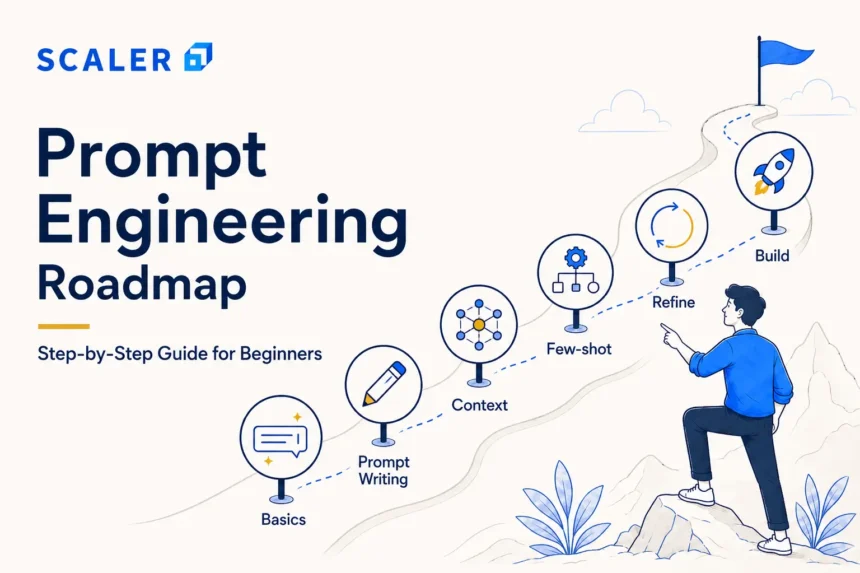
In this guide, you will learn the complete prompt engineering roadmap and understand whether a prompt engineering course is the right next step for your learning goals.
To learn more about prompt engineering, you can check out: What is Prompt Engineering? Definition & Key Concepts
Why Learn Prompt Engineering in 2026?
In today’s world, we have AI tools available for any activity you could possibly think of, like coding, research, writing, analytics, and productivity. But after using them for some time, one finds out that the quality of the results generated by them largely relies on the prompts provided. And that is why prompt engineering becomes an essential skill in the year 2026. It’s not really a way to trick AI but a more precise way to get your work done for a better outcome.
Free Agentic AI Course
with Certification
Learn LLMs, prompt engineering, RAG & agentic AI — hands-on. Earn an industry-recognised certificate at zero cost.
What Is Prompt Engineering?
Prompt engineering is the process of crafting better prompts for artificial intelligence systems to yield better results. The difference in the outputs that ChatGPT, Claude, Gemini, and many other LLMs produce is quite substantial when different prompts are used to trigger them into action.
Using a straightforward prompt will give rather generalized answers, whereas structuring a prompt in the correct way enables artificial intelligence to know precisely what it's supposed to do.
For example:
| Weak Prompt | Better Prompt |
| “Write a blog about JavaScript.” | “Write a beginner-friendly introduction about JavaScript in a conversational developer tone within 120 words.” |
The second prompt does a better job because the AI gets a clear picture of what kind of answer is required from it.
What Should You Know Before Learning Prompt Engineering?
Before deciding how to learn prompt engineering, it is important to understand that the skill focuses more on clear communication and problem-solving than on programming.
One of the best things about prompt engineering is that even beginners can start without programming, AI, or complicated mathematics knowledge. If you can communicate your needs to the AI application, you are already ready for prompt engineering studies.
But as you approach advanced levels of using AI workflows, the knowledge of Python, AI, API, data handling, AI basics, and model evaluations will come in handy.
You are ready to start learning prompt engineering if you can clearly define a task, provide proper context, review whether an AI response is useful or inaccurate, experiment with different prompts, curious about AI tools and workflows.
The best thing is that prompt engineering for beginners requires very little technical background, making it one of the most accessible AI skills to start learning today.
Here is a step-by-step guide for you!
Stage 1 - Learn the Building Blocks of a Good Prompt
One of the biggest mistakes beginners make is treating prompts like simple one-line commands. In reality, better prompts usually contain enough detail for the AI to properly understand the task and expected output.
| Prompt Element | Why It Matters | Example |
| Task | Explains what the AI should do | “Write a LinkedIn post.” |
| Role | Helps set perspective or expertise | “Act like a frontend developer.” |
| Context | Gives background information | “The post is for beginners learning React.” |
| Constraints | Sets limits or rules | “Keep it under 150 words.” |
| Output Format | Defines how the response should look | “Return the answer in bullet points.” |
| Examples | Shows the expected style or structure | “Use a format similar to this example.” |
| Tone | Controls writing style | “Use a conversational tone.” |
| Audience | Defines who the content is for | “Explain it for college students.” |
| Success Criteria | Explains what makes the output useful | “Make the explanation simple and practical.l” |
If you want to learn more about it: Prompt Engineering Basics: What It Is & How It Works
Stage 2 - Move from Vague Prompts to Clear Instructions
The reason why AI gives generic answers is that the prompt itself is too vague. The more specific and structured the prompt is, the better the output usually becomes. Here are some examples:
| Weak Prompt | Better Prompt |
| “Write a blog about Python.” | “Write a beginner-friendly introduction to Python in a conversational tone within 150 words.” |
| “Fix this code.” | “Find the bug in this JavaScript function and explain the fix step by step.” |
| “Summarize this article.” | “Summarize this article in 5 short bullet points for beginners.” |
A good prompt usually explains:
- What the task is
- What kind of output is expected
- Who the output is for
- Any important constraints or context
This helps the AI generate more relevant responses instead of generic answers.
Stage 3 - Learn Core Prompting Patterns
Once the basics become clear, you should look into some common prompting patterns that can help you generate more structured and reliable outputs.
| Prompting Pattern | What It Does | Example |
| Role Prompting | Assigns a role to the AI | “Act like a front-end developer.” |
| Zero-Shot Prompting | Gives instructions without examples | “Explain REST APIs for beginners.” |
| Few-Shot Prompting | Uses examples before the actual task | “Here are 2 sample product descriptions. Write a third one in the same style.” |
| Template Prompting | Reuses a fixed prompt structure | “Role + Task + Context + Output Format” |
| Structured Output Prompting | Controls response format | “Return the answer in a table.” |
| Persona Prompts | Targets a specific audience or personality | “Explain this like a teacher speaking to college students.” |
| Refinement Prompts | Improves an existing response | “Rewrite this in a simpler tone.” |
| Critique Prompts | Reviews or evaluates output | “Review this answer and point out mistakes.” |
These techniques form the foundation of ChatGPT prompt engineering and can also be applied across other AI platforms such as Claude and Gemini.
Stage 4 - Use Prompt Templates for Repeatable Workflows
Once you start using AI tools regularly, writing prompts from scratch every single time becomes inefficient. And that is why it is best to prepare prompt templates because they help create more consistent and repeatable workflows.
These prompt templates are commonly used for emails, summaries, research notes, study plans, SQL queries, resume edits, product briefs, content outlines, and many other day-to-day tasks.
A simple reusable prompt structure usually looks like this:
| Prompt Element | Purpose |
| Role | Defines who the AI should act like |
| Task | Explains what needs to be done |
| Context | Provides background information |
| Constraints | Sets limits or rules |
| Output Format | Defines how the response should look |
| Quality Check | Verifies whether the output meets expectations |
For example, instead of writing random prompts repeatedly, many people use structured templates like: “Act like a data analyst. Analyze this SQL query result, summarize the key insights in bullet points, keep the explanation beginner-friendly, and highlight any unusual trends.”
To learn about Python SQL in detail: Python and SQL for Data Science
Stage 5 - Evaluate AI Responses Before Using Them
The AI models can produce very convincing responses; however, this doesn’t mean that the information presented is accurate at all times. At times, the AI can hallucinate facts, lack contextual information, provide outdated information, and make false claims with great confidence.
For that reason, the verification of AI-generated responses is an important aspect of prompt engineering. Instead of using responses blindly, one should always verify crucial information before using the output, especially for tasks related to coding, research, analysis, medicine, law, or business.
Here are some of the things to check before accepting an AI response:
- Accuracy of the information
- Relevance to the original task
- Missing context or incomplete explanations
- Incorrect assumptions
- Edge cases or exceptions
- Proper sources or citations when needed
The better you become at reviewing AI outputs, the more reliable your AI-assisted workflows usually become.
You can also check out: Artificial Intelligence Tutorial
Stage 6 - Apply Prompt Engineering to Real Use Cases
There are many useful ways to use prompt engineering. Here are some:
| Role | Common Prompt Engineering Use Cases |
| Students | Study notes, summaries, assignments, and interview preparation |
| Developers | Debugging, code generation, documentation, and API explanations |
| Data Analysts | SQL queries, dashboard summaries, and data insights |
| Marketers | Content ideas, ad copies, SEO outlines, and campaign planning |
| Product Managers | PRDs, feature summaries, and user story generation |
| Teachers | Lesson planning, quizzes, and simplified explanations |
| HR Teams | Resume screening, interview questions, and email drafts |
| Support Teams | Customer response templates and ticket summaries |
| Founders & Professionals | Research, meeting notes, productivity tasks, and workflow automation |
At the same time, better prompts only save time when the output is properly reviewed. AI can still generate inaccurate or incomplete information, which is why you must verify the AI-produced content at every step.
Stage 7 - Build Prompt Engineering Projects
The best way to learn about prompt engineering is to build projects and practice through them. Developing these projects will give an understanding of how prompts work in practical AI processes.
Some of the popular projects that a beginner can develop include prompt libraries, AI-based study assistants, resume bots for getting feedback from AI, assistants to help generate marketing content, SQL queries generation, research summaries using AI, meeting notes assistants, customer service response generators, and interview coaches.
Building practical projects can also help you prepare for prompt engineering interview questions that assess your ability to design, test, and refine prompts.
Stage 8 - Learn Prompt Engineering for ChatGPT, Claude, Gemini, and Other AI Tools
The main tenets of prompting technology are essentially the same for all platforms, including ChatGPT, Claude, Gemini, and similar AI agents. Instructions, context, limitations, and well-formulated prompts tend to work in the same way irrespective of the specific system used.
On the other hand, each system differs from the other in many ways. Certain systems work well with extensive context, some work well with files, some are better when it comes to multimodal input/output or memory, and other aspects.
Therefore, the science of prompt engineering is not so much about knowing prompts for a particular platform, but rather knowing how to construct prompts for any given AI system.
Stage 9 - Move Beyond Prompting into GenAI Skills
Prompt engineering is generally the initial step for interaction with an AI system, yet AI systems utilize a wide variety of elements other than just writing prompts. As you progress further on your journey into generative AI, you'll encounter terms such as APIs, embeddings, RAG, vector databases, AI agents, language model evaluation, guardrails, and AI safety.
This skill set becomes essential when creating AI-based products. It is equally important to know that jobs involving advanced AI and ML require a lot more skills than just prompt engineering; skills like Python, machine learning, data manipulation, and AI evaluation, among others.
While prompt engineering jobs do exist, employers typically expect candidates to combine prompting skills with domain expertise, AI fundamentals, and practical project experience.
To know more about the detailed syllabus on Gen AI, check out: Generative AI Syllabus 2026
Prompt Engineering Learning Path by Career Goal
Every learner has a different goal to learn prompt engineering, and that is why your learning pattern must be different in accordance with your expected outcome. While the fundamentals remain the same, the skills and projects you focus on can vary based on your role
| Type of Learner | Focus Areas | Projects | Recommended Additional Skills | Recommended resources |
| Student | Study prompts, research, summaries | AI study assistant | AI fundamentals | Data Science Course |
| Marketer | SEO, content, ad copy prompts | Content planner | Generative AI, analytics | Advanced AI & ML Course |
| Data Analyst | SQL, reporting, data insights | SQL query helper | Python, ML, visualization | Data Analyst Course |
| Developer | Coding, debugging, documentation | AI coding assistant | APIs, RAG, AI agents | Advanced AI & ML Course |
| Product Manager | PRDs, user stories, and feedback analysis | Product assistant | AI product design | Advanced AI & ML Course |
| AI Career Aspirant | Prompt design, evaluation | Prompt library, chatbot | GenAI, ML, AI agents | How to Become a Prompt Engineer |
| Working Professional | Productivity, research, automation | Workflow assistant | AI integrations | Data Science Course |
Free Prompt Engineering Course vs Structured AI Course - What Should You Choose?
Resources available free of charge for prompt engineering are generally sufficient for beginners to gain an understanding of prompting techniques and enhance AI performance. This approach should be considered the most effective for beginners as it will allow you to gain practical experience and avoid dealing with sophisticated AI technologies at the beginning of your journey.
But it would help a lot if you had structured education when your objectives go further than stopping at the basics. Such goals may include building AI solutions, working with GenAI, mastering RAG, creating LLM applications, learning basic concepts related to machine learning, or switching to an AI career. It largely comes down to whether you aim to use AI or develop it later.
A prompt engineering course free of cost can be an excellent starting point for experimenting with prompting techniques before investing in more advanced training. Some learners also look for a free prompt engineering course with a certificate to validate their skills and demonstrate AI knowledge to employers.
Here are some links that might be helpful:
- Prompt Engineering Basics
- Artificial Intelligence Tutorial
- Advanced AI & Machine Learning Course with Agentic AI
Common Prompt Engineering Mistakes Beginners Should Avoid
Many prompt engineering issues don't come from using the wrong AI tool; they come from expecting the AI to fill in missing details. If a prompt only says "Write an article about AI" or "Create a study plan," the model has to make assumptions about the audience, tone, length, and goal. The more context you provide, the more useful the response is likely to be.
Another habit that often leads to disappointing outputs is leaving the format open-ended. AI models generally perform better when they know exactly what you're expecting, whether that's a table, checklist, email, report, step-by-step guide, or social media post.
It's also common for beginners to treat the first response as the final answer. In reality, good prompt engineering is usually a back-and-forth process. A follow-up instruction, such as "make this more concise," "add examples," or "rewrite this for beginners," can significantly improve the quality of the output.
Another mistake is trying to solve multiple unrelated problems in a single prompt. Asking an AI model to explain a concept, create a project plan, write code, and generate interview questions all at once often leads to shallow results. Breaking complex tasks into smaller prompts tends to produce more focused and accurate responses.
Finally, remember that AI-generated content should be reviewed before being used in assignments, reports, research, or professional work. While AI tools can save time and generate useful ideas, they can occasionally produce incorrect information, outdated references, or overly confident answers that require verification.
Read These Important Roadmaps: More Paths to Career Success
FAQs
1. What is the best prompt engineering roadmap for beginners?
The best way to learn prompt engineering is to go step by step, starting with prompt basics, prompt structure, and clear instructions before moving toward prompting patterns, AI workflows, projects, and advanced GenAI concepts.
2. How do I start learning prompt engineering?
The use of AI tools such as ChatGPT, Claude, or Gemini will help you get started, and learning to give the right prompts is key. It is often a good idea to learn how to frame prompts for your desired response.
3. Is prompt engineering easy to learn?
Yes, prompt engineering is generally beginner-friendly because it does not require advanced programming or AI knowledge at the start. Most beginners can start improving AI outputs with regular practice.
4. Do I need coding to learn prompt engineering?
No, coding is not mandatory for beginner-level prompt engineering. However, skills like Python, APIs, and AI fundamentals become useful when moving toward advanced GenAI workflows and AI applications.
5. What are the basics of prompt engineering?
The basics usually include understanding tasks, context, constraints, tone, examples, audience, and output formats. Clear and structured prompts generally produce better AI responses.
6. What are some prompt engineering examples?
Some common examples include content generation prompts, coding prompts, SQL query helpers, research summarizers, resume review prompts, interview preparation prompts, and workflow automation prompts.
7. How do I write better ChatGPT prompts?
Better ChatGPT prompts should include clear instructions, proper context, expected output format, constraints, and examples whenever needed. Specific prompts generally perform much better than vague requests.
8. What is the difference between prompt engineering and generative AI?
Prompt engineering mainly focuses on improving interactions with AI models using better prompts, while generative AI is a broader field that includes LLMs, AI models, embeddings, RAG, AI agents, and AI application development.
9. Is a free prompt engineering course enough?
Free prompt engineering resources are usually enough for learning the basics and improving productivity workflows. Structured learning becomes more useful for AI projects, GenAI systems, RAG, LLM apps, and AI career paths.
10. Can prompt engineering help me get a job?
Prompt engineering can be a valuable skill for developers, analysts, marketers, content teams, product managers, and AI-assisted workflows. However, advanced AI careers usually require additional skills like Python, machine learning, APIs, and GenAI concepts.
11. What projects should I build to practice prompt engineering?
As a beginner, you can try projects like prompt libraries, AI study assistants, resume feedback bots, SQL query helpers, meeting notes assistants, customer support response generators, and research summarizers.
12. What should I learn after prompt engineering?
After prompt engineering, many learners move toward GenAI concepts like APIs, embeddings, RAG, vector databases, AI agents, AI evaluation, machine learning basics, and production AI workflows.
13. Are prompt engineering jobs good for freshers?
Prompt engineering skills can help freshers improve productivity and work with AI-assisted tools more effectively. However, most AI-related jobs still require broader technical or domain-specific skills alongside prompting knowledge.
14. How long does it take to learn prompt engineering?
Most beginners can understand basic prompt engineering concepts within a few weeks of regular practice. Advanced AI workflows and GenAI concepts usually take longer and require hands-on projects.
