




Did you know that Java was released in 1995 and is still one of the most widely used programming languages nearly three decades later? In an industry where technologies change every few years, very few languages have worked for such a long time.
And the reason is quite simple. Java is used for everything from banking systems and enterprise software to backend services, cloud applications, and Android development. Even today, many companies continue to rely on Java because of its performance, reliability, massive ecosystem, and strong community support.
And we also understand that learning Java can feel overwhelming when you’re faced with hundreds of tutorials, frameworks, and interview preparation resources. Should you start with Core Java? When should you learn OOP, collections, multithreading, or Spring Boot? And which topics actually matter for projects and job interviews?
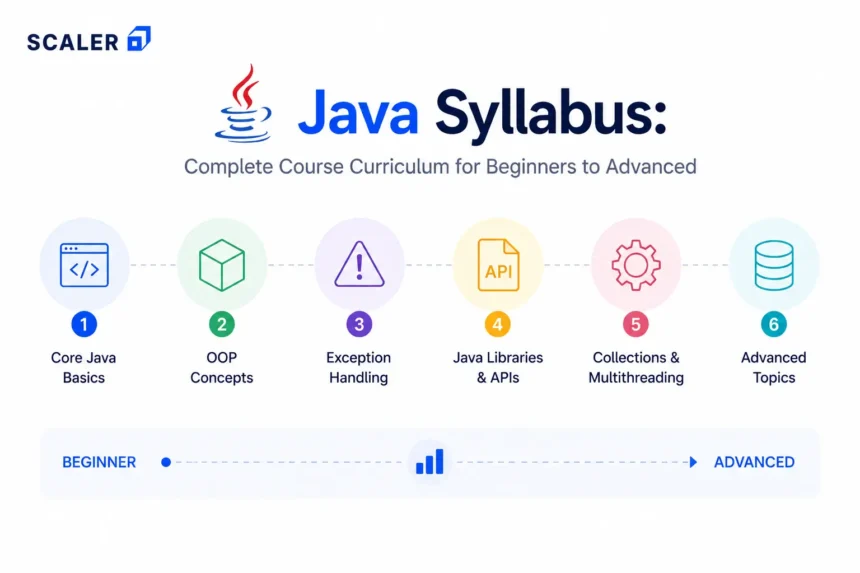
This Java syllabus answers those questions with a structured learning roadmap. We’ll cover what to learn, in what order, the practical skills each module develops, and how the journey progresses from Core Java concepts to backend development, projects, and interview preparation.
If you’d like to learn concepts alongside this roadmap, you can also explore Scaler’s Java Tutorial.
Quick Java Syllabus Snapshot
- Module 0: Prerequisites – Basic computer usage, logic building, command line basics, Git fundamentals, and a problem-solving mindset.
- Module 1: Java Setup and Fundamentals – JDK, JRE, JVM, IDE setup, first Java program, syntax, variables, data types, operators, and input/output.
- Module 2: Control Flow and Arrays – Conditional statements, loops, arrays, strings, methods, and basic problem-solving.
- Module 3: Object-Oriented Programming (OOP) – Classes, objects, constructors, inheritance, polymorphism, abstraction, encapsulation, and interfaces.
- Module 4: Core Java Utilities – Packages, access modifiers, wrapper classes, generics, enums, and annotation basics.
- Module 5: Collections Framework – Lists, Sets, Maps, Queues, iterators, hashing, Comparable, and Comparator.
- Module 6: Exception Handling and File Handling – Checked and unchecked exceptions, custom exceptions, file I/O, serialization, and error handling.
- Module 7: Multithreading and Concurrency – Threads, synchronization, executors, concurrency challenges, and thread management.
- Module 8: Java 8+ Features – Lambda expressions, streams, Optional, functional interfaces, and modern Java APIs.
- Module 9: Databases and JDBC – SQL basics, JDBC, CRUD operations, prepared statements, and database connectivity.
- Module 10: Backend Java and Spring Boot – Maven, Gradle, REST APIs, Spring Boot architecture, controllers, services, and repositories.
- Module 11: Testing, Debugging, and Deployment Basics – JUnit, logging, debugging techniques, version control, and deployment fundamentals.
- Module 12: Projects and Interview Preparation – Resume projects, coding practice, Java interview questions, collections, OOP, and backend interview preparation.
Complete Java Syllabus Roadmap
| Module | Skill You’ll Build | Topics Covered | Practical Outcome |
| Prerequisites | Creating a strong programming foundation | Basic logic, command line, Git basics, IDE setup, simple algorithms | Set up a Java development environment and run commands |
| Java Fundamentals | Writing and running Java programs | JDK, JRE, JVM, syntax, variables, data types, operators, input/output | Build and execute simple Java applications |
| Control Flow & Arrays | Solving programming problems logically | if-else, switch, loops, arrays, strings, methods | Solve beginner coding exercises |
| OOP in Java | Designing object-oriented applications | Classes, objects, constructors, inheritance, polymorphism, abstraction, encapsulation, interfaces | Build small object-oriented applications |
| Core Java Utilities | Writing cleaner and reusable code | Packages, access modifiers, wrapper classes, enums, annotations, generics | Organize larger applications using standard Java features |
| Collections Framework | Managing and processing data efficiently | ArrayList, LinkedList, Set, Map, Queue, HashMap, Comparable, Comparator | Use collections in coding problems and mini applications |
| Exception & File Handling | Building reliable applications | Checked and unchecked exceptions, custom exceptions, try-catch-finally, file I/O, serialization | Create programs that handle errors and files safely |
| Multithreading | Working with concurrent tasks | Thread lifecycle, Runnable, synchronization, executors, race conditions | Build simple concurrent Java applications |
| Java 8+ Features | Using modern Java development practices | Lambda expressions, streams, Optional, functional interfaces, Date-Time API | Refactor code using modern Java features |
| JDBC & Databases | Connecting applications to databases | SQL basics, JDBC, CRUD operations, prepared statements, DAO pattern | Build database-driven Java applications |
| Spring Boot & Backend Development | Building backend services and APIs | Maven, Gradle, REST APIs, Spring Boot, controllers, services, repositories | Develop a production-ready REST API |
| Testing & Deployment | Testing and shipping applications | JUnit, logging, debugging, GitHub workflows, deployment basics | Test, debug, and deploy Java projects confidently |
| Projects & Interview Preparation | Becoming industry and interview ready | Projects, coding questions, OOP, collections, Java 8, Spring Boot, interview preparation | Create a portfolio and prepare for technical interviews |
Now that you have an overview of the Java programming syllabus, let’s explore each module in detail and understand what to learn, how to practice it, and the skills you’ll gain along the way.
What Is Included in a Complete Java Syllabus?
A complete Java syllabus includes programming fundamentals such as variables, data types, operators, loops, arrays, strings, and methods. Once you are done with the basics, the next stage covers object-oriented programming, collections, exception handling, file handling, and multithreading.
The advanced part of the Java course syllabus typically includes Java 8 features, JDBC, databases, backend development with Spring Boot, testing, deployment, projects, and interview preparation.
Who Should Follow This Java Course Curriculum?
This roadmap is suitable for:
- BCA, BTech, and MCA students
- Freshers preparing for placements
- Backend development aspirants
- Full-stack learners
- Android developers
- DSA learners
- Working professionals transitioning into Java
Your focus areas may differ depending on your goal. Placement preparation usually requires strong fundamentals in OOP, collections, and coding problems. Backend development places greater emphasis on JDBC, databases, multithreading, and Spring Boot. Full-stack learners should combine Java with databases, APIs, and frontend technologies.
Absolute beginners can start with Java, but regular problem-solving practice should go hand in hand with learning syntax and concepts.
Prerequisites Before Starting Java
Basic computer literacy, logical thinking, and consistent practice are enough to get started.
Before beginning, make sure you’re familiar with:
- Installing software and development tools
- Using a terminal or command prompt
- Basic Git and GitHub concepts
- Following technical instructions
- Solving simple logical problems
These are enough to get started!
Java Syllabus – Mod (1-12)
If you’re new to Java, the syllabus can look much bigger than it actually is. Terms like multithreading, collections, JDBC, Spring Boot, and microservices sound intimidating when you see them together. But when you learn them in the right order, each topic starts feeling like a natural extension of the previous one.
So, let’s get started!
Module 1 – Java Setup, JVM, JDK, and First Program
Start with the Java ecosystem: JDK, JRE, JVM, bytecode, IDE setup, Java file structure, and the compile-run process. These concepts explain how Java programs move from source code to a running application.
A topic that you need to pay extra attention to here is the JVM (Java Virtual Machine). When a Java program is compiled, it is converted into bytecode. The JVM reads that bytecode and executes it on the target machine, which is why Java follows the “Write Once, Run Anywhere” principle.
A simple way to remember the flow is:
Java Code -> Bytecode -> JVM -> Execution
For practice, install Java on your system, configure an IDE such as IntelliJ IDEA or Eclipse, and run a simple Hello World program. Then repeat the same exercise from the terminal using javac and java commands. This will help you understand the working of an IDE.
By the end of this module, you should be able to:
- Install and configure Java
- Understand the roles of JDK, JRE, and JVM
- Compile and run Java programs
- Troubleshoot common setup issues
Module 2 – Java Syntax, Variables, Data Types, and Operators
This module introduces the building blocks used in almost every Java program. Focus on variables, data types, operators, type casting, input/output, comments, naming conventions, and basic code organization.
Here are the topics that you should make a note of –
| Topic | What You Should Learn |
| Variables | Store and update values |
| Data Types | Choose the right type for different kinds of data |
| Type Casting | Convert values between compatible data types |
| Operators | Perform arithmetic, comparison, and logical operations |
| Input/Output | Accept user input and display results |
| Comments | Improve readability and documentation |
| Naming Conventions | Write cleaner and more maintainable code |
You can start with a calculator project as it combines variables, operators, and user input in one program. After that, try building a marks calculator that computes percentages and grades, followed by a unit converter for temperature, distance, or currency values.
These exercises may be simple, but they will help you build the coding habits needed for loops, arrays, methods, and problem-solving in later modules.
Module 3 – Control Flow, Loops, Arrays, and Strings
Most beginner coding problems are solved using the topics covered in this module. Your focus here is on making decisions, repeating tasks, storing multiple values, and working with text data.
Key topics include:
- if-else statements
- switch statements
- for, while, and do-while loops
- break and continue
- Arrays and multidimensional arrays
- Strings and common string methods
- StringBuilder
A good way to learn these concepts is by combining them in small problem-solving exercises. For example, loops and conditionals are commonly used together to generate number patterns, while arrays are used to search, sort, and process collections of data. Strings introduce a different challenge because they require character-level operations such as counting occurrences, reversing text, or checking patterns.
Arrays and strings deserve extra attention because they appear repeatedly in coding rounds and technical interviews. Many beginner and intermediate programming questions are built around array traversal, searching, string manipulation, and pattern-based logic.
For practice, try building:
- A palindrome checker
- An array search program
- A string frequency counter
- Number pattern generators
By the end of this module, you should be able to translate simple problem statements into working Java programs.
Module 4 – Object-Oriented Programming in Java
If variables, loops, and arrays teach you how to write programs, OOP teaches you how to organize them.
This module covers:
- Classes and objects
- Methods and constructors
- this and super keywords
- Access modifiers
- Inheritance
- Polymorphism
- Encapsulation
- Abstraction
- Interfaces
- Abstract classes
- Composition
You’ll be able to learn this topic better by taking the system as a whole. Take a banking application as an example. An Account class can store account details, a SavingsAccount class can inherit common functionality, and interfaces can define behaviors shared across different account types. The same approach works for a library management system or a student management portal.
At this stage, concepts such as encapsulation and abstraction become easier to understand when you see how they help manage larger codebases.
Interviewers frequently use OOP to test conceptual understanding. Questions around inheritance, polymorphism, interfaces, abstract classes, and object relationships are common in both fresher and experienced Java developer interviews.
For hands-on practice, design one complete system, such as:
- Bank Account Management System
- Library Management System
- Student Management System
Remember! The goal is not to build a large application.
Focus on identifying classes, defining relationships between them, and applying OOP concepts naturally within the design.
Module 5 – Packages, Generics, Wrapper Classes, and Core Utilities
This module focuses on organizing codes.
Topics covered include:
- Packages and imports
- Access modifiers
- Wrapper classes
- Autoboxing and unboxing
- Enums
- Generics
- Annotations basics
- Common utility classes
Packages help in separating the related code into logical groups, while access modifiers control what can and cannot be accessed from outside a class. Wrapper classes are used when working with collections because data structures such as ArrayList store objects rather than primitive data types.
Generics are another important topic because they make code safer and reusable. So, instead of creating separate classes for integers, strings, or other data types, a single generic class can work with all of them.
You can practice for this module with exercises like:
- A reusable utility package for common operations
- A generic container class that stores different data types
- An enum-based application for managing user roles or statuses
Module 6 – Java Collections Framework
Collections solve a simple problem: how do you store, retrieve, search, sort, and organize large amounts of data efficiently?
This module introduces the most commonly used data structures in Java:
- List
- ArrayList
- LinkedList
- Set
- HashSet
- TreeSet
- Map
- HashMap
- TreeMap
- Queue
- Stack
- Iterators
- Comparable and Comparator
- Hashing fundamentals
The most important aspect of learning here is to focus on understanding when each one should be used.
| Collection | Best Used When | Common Operations | Interview Relevance |
| ArrayList | Frequent reads and indexed access | Add, get, update | Very common |
| LinkedList | Frequent insertions and deletions | Add, remove | Common |
| HashSet | Duplicate values are not allowed | Add, search | Common |
| TreeSet | Sorted unique data is required | Add, sort | Moderate |
| HashMap | Key-value storage | Put, get, remove | Extremely common |
| TreeMap | Sorted key-value storage | Put, search | Moderate |
| Queue | FIFO processing | Add a poll | Common |
| Stack | LIFO operations | Push, pop | Common |
The best way to learn its functioning is by trying and testing on practical examples/projects.
- Let’s take a contact book, which naturally introduces HashMap because names can be linked to phone numbers.
- An inventory manager combines lists, maps, and searching operations.
- A leaderboard system is useful for practicing sorting with Comparable and Comparator
- And a word-frequency counter demonstrates both hashing and maps.
Collections are also one of the most heavily tested areas in Java interviews. Questions often focus on differences between ArrayList and LinkedList, HashMap internals, hashing, sorting mechanisms, and choosing the right collection for a given scenario.
By the end of this module, you should be able to look at a problem and decide whether a List, Set, Map, Queue, or another collection is the right tool for the job.
Module 7 – Exception Handling and File Handling
Programs rarely run perfectly every time. Users enter unexpected inputs, files go missing, databases disconnect, and network requests fail. This module focuses on handling those situations without crashing the application.
The syllabus typically includes:
- Checked and unchecked exceptions
- try-catch-finally
- throw and throws
- Custom exceptions
- Exception handling best practices
- File I/O
- Byte streams and character streams
- Serialization
A good way to approach exception handling is to start thinking about failure scenarios first. What happens if a user enters text instead of a number? What if the required file doesn’t exist? What if an operation completes only partially?
Once exception handling is done, move into file operations. Start with reading and writing text files, then explore streams and serialization. These concepts are commonly used for configuration files, logs, reports, and data storage.
For practice, try building:
- A file-based expense tracker
- A log file parser
- A simple student record storage system
Module 8 – Multithreading and Concurrency Basics
Until now, every program has executed one task at a time. Multithreading introduces the idea of running multiple tasks concurrently within the same application.
Topics covered in this module include:
- Processes vs threads
- Thread class
- Runnable interface
- Thread lifecycle
- Synchronization
- Race conditions
- Executor framework basics
- Concurrent collections (high-level overview)
A browser can load images while responding to user clicks. A music app can continue playing audio while updating the interface. Both involve multiple tasks happening simultaneously.
Start by creating simple threads using the Thread class and the Runnable interface. Then explore what happens when multiple threads try to access the same shared resource. This naturally leads to synchronization and race conditions.
For example, imagine two threads updating the balance of the same bank account at the same time. Without synchronization, the final balance may become incorrect. Examples like this make concurrency concepts much easier to understand than theory alone.
You can take on these projects to practice this module:
- Parallel file processing
- Multi-threaded download simulation
- Simple producer-consumer implementation
And don’t worry! You don’t need to be great at advanced concurrency patterns at this stage. Your main aim should be to understand how Java manages multiple threads and where common synchronization problems come from.
After completing this module, you’ll have enough foundation to move into backend development, performance-focused applications, and more advanced system design concepts.
Module 9 – Java 8 and Modern Java Features
Many modern Java codebases look very different from older Java applications. That’s because Java 8 introduced features that reduced boilerplate code and changed how developers work with collections, data processing, and functional programming concepts.
This module covers:
- Lambda expressions
- Functional interfaces
- Method references
- Streams API
- Optional
- Date and Time API
- var basics
- Records and sealed classes (optional advanced topics)
You should focus on the Streas API here. Instead of writing multiple loops to process data, streams allow operations such as filtering, sorting, grouping, and aggregation in a more concise way.
For example, a list of student records can be filtered to show only students above a certain score, grouped by department, and sorted by marks using stream operations. Similar patterns appear frequently in e-commerce systems, reporting dashboards, and backend services.
Java 8 features also appear regularly in interviews, especially lambda expressions, streams, functional interfaces, and Optional. Many companies expect candidates to understand these concepts even for junior Java developer roles.
You can practice this module by building a report through a dataset:
- Filter students by grade
- Group orders by category
- Calculate average scores
- Find top-performing products
Module 10 – SQL, JDBC, and Database Connectivity
Until this point, most programs store data only while the application is running. Once the program closes, that data disappears. This module introduces permanent data storage by connecting Java applications to databases.
The syllabus typically includes:
- SQL fundamentals
- JDBC architecture
- DriverManager
- Connection
- Statement
- PreparedStatement
- ResultSet
- CRUD operations
- DAO pattern
- Transactions
- Connection management
You can learn more about it through a DBMS tutorial.
A typical workflow looks like this: Java Application -> JDBC -> Database.
Start by learning basic SQL operations such as creating tables, inserting records, updating data, and retrieving results. Then use JDBC to connect Java applications with a database such as MySQL or PostgreSQL.
As applications grow, direct database queries scattered throughout the code become difficult to manage. This is where patterns such as DAO (Data Access Object) can come of use because they separate business logic from database operations.
You can do a project like this one to understand the whole module:
Student Management System
- Add student records
- Update details
- Delete records
- Search students
- Store all data in a database
This project introduces CRUD operations, PreparedStatement usage, ResultSet processing, and transaction handling.
By the end of this module, you should be able to build applications that persist data beyond program execution, which is a major step toward backend development and enterprise Java applications.
Module 11 – Advanced Java and Backend Development with Spring Boot
Spring Boot is where many learners start building the kind of applications used in production environments. However, you’ll only understand the ways of working around ot after already working with Core Java, OOP, collections, databases, and JDBC.
This module typically includes:
- Maven and Gradle
- Dependency management
- REST APIs
- Spring Boot fundamentals
- Controllers
- Services
- Repositories
- DTOs
- Validation
- Error handling
- Basic security awareness
You’ll now be able to build applications that accept requests, process data, interact with databases, and return responses. That’s why Spring Boot is one of the most widely used frameworks for Java backend development.
You can learn this module by following the flow of a request. For example, when a user creates a task in a task management application, the request reaches a controller, passes through a service layer, gets stored through a repository, and finally returns a response to the user.
Here are some project ideas:
- Task Management API
- Employee Management System
- Book Management API
- E-commerce Inventory Service
At this stage, focus completely on understanding the architecture. Once the flow between controllers, services, repositories, and databases becomes clear, larger backend projects become much easier to build.
Module 12 – Testing, Debugging, Git, and Deployment Basics
Writing code is only part of software development. Projects also need testing, debugging, version control, documentation, and deployment.
This module covers:
- IDE debugging tools
- Logging fundamentals
- Unit testing with JUnit
- Git and GitHub workflows
- Maven builds
- Packaging JAR files
- Deployment basics
We have seen many beginners having a habit of relying on System.out.println() for debugging. While that works initially, professional projects use debuggers, logs, and tests to identify issues more efficiently.
Version control is equally important. Even a small project becomes easier to manage when changes are tracked through Git and stored on GitHub. Recruiters and hiring managers often review GitHub repositories, making project organization almost as important as the code itself.
For practice, take one of your earlier Java projects and make it presentation-ready:
- Add a proper README
- Create unit tests
- Use meaningful commit history
- Document setup steps
- Push the complete project to GitHub
By the end of this module, you should have the workflow skills needed to build, test, maintain, and share Java applications in a professional environment.
Java Projects to Include in the Syllabus
One thing we’d strongly recommend is building as you learn. It’s easy to keep pushing projects to “later,” but projects are often where concepts finally start making sense. They’re also one of the first things interviewers want to discuss, so the earlier you start, the better.
Beginner Projects
These projects focus on Java fundamentals, control flow, arrays, methods, and OOP basics.
- Calculator
- Student Grade System
- ATM Simulation
- Library Management Application
Intermediate Projects
These projects introduce collections, file handling, exception handling, and better application structure.
- File-Based Expense Tracker
- Inventory Management System
- Quiz Application
- Contact Manager
Advanced Projects
These projects combine Java, databases, APIs, and backend development concepts.
- JDBC CRUD Application
- Employee Management System
- Spring Boot REST API
- E-commerce Backend
- Beginner Microservices Project
And n, you don’t have to make 10-12 projects. 2-3 well-structured projects with clean code, documentation, and GitHub commits are enough.
Java Syllabus for Different Career Goals
If you’re learning Java for a specific goal, it helps to know which topics deserve the most attention and which ones can wait until later.
| Learner Goal | Prioritize | Can Be Learned Later |
| Student / Fresher | Core Java, OOP, Collections, Java Interview Questions | Spring Boot, Deployment |
| DSA Learner | Java Fundamentals, Arrays, Strings, Collections | JDBC, Backend Development |
| Backend Developer | OOP, Collections, Multithreading, JDBC, Spring Boot | Android-specific topics |
| Full-Stack Developer | Java, Databases, APIs, Spring Boot | Advanced Concurrency |
| Android Learner | Core Java, OOP, Collections | Spring Boot and Backend Frameworks |
| Working Professional | Modules related to current role and projects | Less relevant specialization areas |
For placement preparation, you should focus on time on OOP, collections, strings, arrays, and coding problems. For backend development, focus heavily on databases, APIs, Spring Boot, and application design. Learners targeting full-stack roles should combine Java with frontend technologies and database fundamentals.
How Long Does It Take to Complete the Java Syllabus?
The timeline honestly varies depending on person-to-person, but here is an estimated timeline if you are learning regularly:
| Stage | Estimated Time |
| Java Basics and Syntax | 2-3 Weeks |
| Core Java Fundamentals | 6-8 Weeks |
| OOP, Collections, and Intermediate Java | 1-2 Months |
| Advanced Java and JDBC | 1 Month |
| Spring Boot and Projects | 1-2 Months |
| Interview Readiness | 3-6 Months |
Java Syllabus vs Java Full Stack Syllabus
A Java syllabus teaches the language and backend fundamentals. A Java full-stack syllabus expands that foundation by adding frontend development, deployment, and application architecture.
| Area | Java Syllabus | Java Full Stack Syllabus |
| Java Fundamentals | ✓ | ✓ |
| OOP and Collections | ✓ | ✓ |
| Exception Handling | ✓ | ✓ |
| Java 8 Features | ✓ | ✓ |
| JDBC and Databases | ✓ | ✓ |
| Spring Boot | ✓ | ✓ |
| Frontend Development | ✗ | ✓ |
| APIs and Integration | Limited | ✓ |
| Deployment | Basic | ✓ |
| System Design Basics | Limited | ✓ |
| End-to-End Projects | Few | Multiple |
If your goal is Java development, placement preparation, or backend engineering, you can start with the Java Syllabus.
If you want to build complete web applications from the frontend to deployment, then you can go for a full-stack learning path.
Free Java Course vs Structured Java Program – What Should You Choose?
Free resources work well for learning Java fundamentals, syntax, OOP, collections, and basic projects. They are often enough to help beginners decide whether they enjoy programming before making a larger commitment.
As the learning journey progresses, the requirements often change. Interview preparation, DSA practice, full-stack projects, code reviews, mentorship, and placement preparation usually require more structure and accountability.
| Learning Goal | Free Resources Can Be Enough | Structured Program Helps More |
| Java Basics | ✓ | |
| Core Java | ✓ | |
| Small Projects | ✓ | |
| DSA Preparation | ✓ | |
| Placement Preparation | ✓ | |
| Large Full-Stack Projects | ✓ | |
| Mentorship and Peer Learning | ✓ | |
| Interview-Focused Roadmap | ✓ |
The best approach is often to start with free learning resources and move to a structured program only when your goals extend to a broader scope of learning.
Java Interview Preparation Topics
Most Java interviews combine language fundamentals, problem-solving, and project discussions. The exact topics vary by role, but certain areas appear consistently across fresher and experienced developer interviews.
Common interview topics include:
- Core Java questions
- OOP concepts
- Collections Framework
- Exception handling
- Multithreading and concurrency
- Java 8 streams and lambdas
- JDBC
- Spring Boot
- DSA and coding problems
- Project-based discussions
You can prepare pretty well for this by treating every module in this syllabus as a potential interview topic. If you have built a project using collections, databases, or Spring Boot, be ready to explain design decisions, challenges, and implementation details.
Before applying for interviews, make sure you can:
- Explain your projects without referring to notes
- Write basic Java programs from memory
- Answer common OOP and collections questions
- Solve array and string problems independently
- Explain how your application stores and processes data
- Discuss the technologies used in your projects
FAQs
1. What is included in a complete Java syllabus?
A complete Java syllabus typically covers Java fundamentals, control flow, arrays, strings, OOP, collections, exception handling, file handling, multithreading, Java 8 features, JDBC, databases, Spring Boot, projects, and interview preparation.
2. What is the Core Java syllabus?
The Core Java syllabus includes variables, data types, operators, loops, arrays, strings, methods, OOP concepts, collections, exception handling, file handling, and multithreading. These topics form the foundation for advanced Java development.
3. What is the Advanced Java syllabus?
Advanced Java usually covers JDBC, database connectivity, servlets, and JSP (in some curricula), Spring Boot, REST APIs, dependency management, testing, deployment, and enterprise application development concepts.
4. How long does it take to complete the Java syllabus?
Most learners can cover the complete Java syllabus in 4-6 months with consistent practice. The timeline may be shorter for learners focusing only on Core Java and longer for those building projects, learning DSA, and preparing for interviews.
5. Should I learn Java before Spring Boot?
Yes. Spring Boot builds on Core Java concepts such as OOP, collections, exception handling, and JDBC. Learning Spring Boot without a solid Java foundation often makes backend concepts harder to understand.
5. What projects should I build after learning Java?
Here are some ideas that you can try working on:
- Calculator or ATM Simulation
- Library or Student Management System
- Inventory Management System
- JDBC CRUD Application
- Spring Boot REST API
- E-commerce or Employee Management Backend
Also, remember to make your projects progressively more complex as your Java skills grow.
6. Should I learn DSA with Java?
Yes. If your goal is placements, software engineering roles, or coding interviews, learning Data Structures and Algorithms alongside Java is highly recommended. Java provides the programming language, while DSA helps with problem-solving and coding rounds. You can also look into structured learning programs like Scaler’s software engineering course for a detailed and more career-oriented learning experience.
7. What Java topics are important for interviews?
The most commonly asked topics include OOP, collections, exception handling, multithreading, Java 8 features, strings, arrays, JDBC, Spring Boot basics, and DSA-based coding questions. Interviewers also expect candidates to explain the projects listed on their resumes.
