




Despite the popularity of Python and JavaScript, C++ remains one of the best choices when it comes to DSA and competitive programming, and coding interviews too. As far as preparation for placements goes, you would definitely find yourself spending more time solving problems in C++ rather than any other language, not because of the preference of companies, but simply because of its efficiency.
The problem that most beginners face is not that C++ programming is tough but that they lack direction. One week, they are learning how to code loops, the following week they are learning how to use pointers, and before even getting a grip on them, they are solving LeetCode DSA questions.
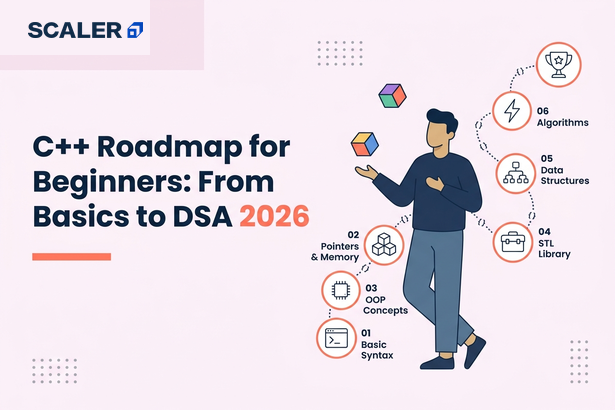
This C++ roadmap for beginners will help you learn C++ in the proper sequence. Starting with the basics, proceeding to OOP & memory management, followed by STL, and finally implementing all of that through DSA exercises/projects. And in the end, not only will you be able to code in C++, but you’ll also develop the skills required to crack placements and coding interviews.
Why Learn C++ in 2026 (and Why It Owns DSA)
- Blazing-fast performance: C++ is a compiled language, which ensures very high speed of execution and makes it a perfect language for high-speed execution.
- The Standard Template Library (STL): Containers like vector, map, set, priority_queue, along with algorithms such as sort() and lower_bound(), let you solve DSA problems efficiently instead of writing everything from scratch.
- The standard for competitive programming: platforms such as CodeChef and Codeforces have always been fond of using C++ language for a long time, primarily due to the speed and efficiency of C++ along with the STL library.
- Strong career opportunities: C++ is extensively employed not only in placement but also in gaming, embedded systems, high-frequency trading, web browsers, databases, and operating systems, among others, where speed and memory management are of paramount importance.
Transform Your Career
Choose from our industry-leading programs designed for career success
Modern Software and AI Engineering Program
Master full-stack development with AI integration


 +1000 more
AI Forward Deployed Engineer with Specialisation in AI applications
Build and deploy AI solutions for real-world business problems
+1000 more
Modern Data Science and ML with specialisation in AI
Advanced data science techniques with AI specialization
+1000 more
Advanced AIML with Specialisation in Agentic AI
Deep dive into AIML with focus on Agentic systems
+1000 more
DevOps, Cloud & AI Platform Engineering
Build and manage AI-powered cloud infrastructure
+1000 more
AI Engineering Advanced Certification by IIT-Roorkee
Premier AI engineering certification from IIT-Roorkee

However, not all tasks are best suited for C++. In case you want to start working on website development, automation, or AI, then Python would be much more suitable and have a much steeper learning curve. Java is still a great choice for creating enterprise software and mobile applications for Android.
But when it comes to placements or competitive programming and learning data structures and algorithms (DSA), C++ is still one of the best languages that you can opt for. Learning memory management, writing efficient code, and having the standard template library makes C++ an ideal language.
The rest of the roadmap is based on this philosophy. You will learn the language first, get knowledge of memory and object-oriented programming, gain expertise in STL, and finally implement all this using DSA and projects.
Wondering how long to learn C++? You can build a solid foundation in 6 – 8 weeks, while becoming placement-ready with STL, DSA, and projects typically takes 4 – 8 months of consistent practice.
The C++ Roadmap at a Glance (Month by Month)
Learning C++ isn’t about completing a course of the language but moving through the steps from the simplest programs to the algorithmic tasks that are difficult to solve. The roadmap below divides this process into four logical stages. This sequence will help you to overcome typical pitfalls and acquire necessary skills.
| Stage | Timeline | What You’ll Learn | Milestone |
| Stage 1: Core C++ Fundamentals | Months 1 – 2 | Syntax, variables, data types, operators, loops, functions, arrays, strings, and basic debugging | Write small C++ programs confidently and understand core programming concepts. |
| Stage 2: OOP & Memory Management | Months 2 – 3 | Classes, objects, inheritance, polymorphism, pointers, references, dynamic memory, and memory management | Build object-oriented applications and understand how memory works in C++. |
| Stage 3: STL Mastery | Months 3 – 4 | Vectors, maps, sets, priority queues, iterators, algorithms, and templates | Solve coding problems efficiently using the Standard Template Library instead of writing everything from scratch. |
| Stage 4: DSA & Projects | Months 4 – 8 | Data structures, algorithms, problem-solving patterns, competitive programming, and C++ projects | Solve 150–200 quality DSA problems, complete projects, and become placement-ready. |
Each step has its own objective. To start with, gain knowledge about the language. The second step will involve learning about the management of memory in C++ and OOP concepts of C++. The third and final step would be learning about STL, which is the most powerful aspect of the C++ language from the perspective of coding interviews.
The best way to learn C++ step by step is to build a strong foundation before moving on to advanced concepts like STL, memory management, and data structures.
Stage 1: Core C++ Fundamentals
Every C++ programmer begins with the same basic objective: to write quality code without having to concern yourself with algorithms or any other complicated parts of the C++ programming language. This stage is about building that foundation through knowledge of syntax, program execution, and basic problem-solving within C++.
Focus on these topics first:
- Syntax and Program Structure: Learn how a C++ program is organized, including headers, the main() function, namespaces, and basic coding conventions.
- Input and Output: Use cin and cout to read user input and display results while understanding how streams work.
- Variables, Data Types, and Operators: Learn how to declare variables, work with data types such as int, float, char, and bool, and use arithmetic, comparison, logical, and assignment operators.
- Control Flow: Build decision-making and repetition using if-else, switch, for, while, and do-while loops.
- Functions: Write reusable code by creating functions, passing parameters, returning values, and understanding scope.
- Arrays and Strings: Store and manipulate collections of data while learning the basics of indexing and iteration.
Take your time while understanding these concepts since whatever you study now about objects, STL, and DSA, everything depends upon how efficiently and effectively you can code in C++. This one-week extra time spent on building your basics will save you several months of struggle in the future.
New to C++? Build a strong foundation with Scaler’s free C++ course before moving on to advanced topics.
Completion Checklist
Before moving to Stage 2, make sure you can:
- Write C++ programs without referring to syntax notes.
- Use loops and conditional statements to solve basic programming problems.
- Break problems into reusable functions.
- Work confidently with arrays and strings.
- Debug simple compilation and runtime errors on your own.
Stage 2: OOP, Pointers & Memory
While Stage 1 is all about how to write C++ code, Stage 2 is when you will be learning how the language really functions. Most beginners find C++ difficult at this stage since you are not just learning its syntax anymore but also beginning to think about objects, memory, and the architecture of the program.
During this stage, focus on the following topics:
- Classes and Objects: Learn how to design models of real-life objects, write reusable code, and design large-scale applications through object-oriented programming.
- Inheritance and Polymorphism: Get an idea of sharing behavior through classes and how polymorphism can make the code more flexible and easier to maintain.
- Pointers and References: Learn how memory addresses work, when to use pointers, how references differ, and why they’re fundamental to C++.
- Stack vs Heap Memory: Understand where variables are stored, how dynamic memory allocation works, and when memory must be managed manually.
RAII (Resource Acquisition Is Initialization) is one such concept that should be known from the start. It basically means that instead of managing resources throughout your program, you tie the management to the lifetime of an object. As soon as an object is destroyed, the resources held by that object are released.
This does not in any way mean that you will find it difficult to learn all these things, as many students who are learning C++ have encountered the same problem. You do not have to understand everything about memory management, but you should know some basic things about memory and also know how to work with pointers, references, and objects.
Completion Checklist
Before moving to Stage 3, make sure you can:
- Create classes with constructors and member functions.
- Explain the difference between pointers and references.
- Understand when data lives on the stack versus the heap.
- Use inheritance and polymorphism in simple programs.
- Read and debug code that uses pointers without relying on trial and error.
Next comes the most exciting part of this roadmap: learning about the Standard Template Library (STL).
Stage 3: STL Mastery: The Real Unlock
This is the phase where your coding gets interesting. Until now, you have only been learning the syntax of C++. From now on, you will be learning how to use the Standard Template Library (STL), which is a library of data structures and functions that makes your life much easier since they reduce the amount of code that you would need to write. It is extremely important for placements as well as coding competitions.
Think of this section as the C++ STL roadmap, where you’ll learn the containers, algorithms, and templates that make solving DSA problems faster and more efficient.
Instead of implementing common data structures from scratch every time, you’ll learn how to use the STL effectively:
- vector: A dynamic array that’s used in most DSA problems because it’s flexible, efficient, and easy to work with.
- map and unordered_map: Store key-value pairs for fast lookups, frequency counting, and indexing.
- set and unordered_set: Maintain unique elements and perform efficient search operations.
- priority_queue: Implement heaps for scheduling, greedy algorithms, and graph problems.
- Iterators: Traverse STL containers efficiently and work seamlessly with generic algorithms.
- Algorithms: Master functions like sort(), lower_bound(), upper_bound(), binary_search(), and next_permutation() to solve problems with less code and better performance.
- Templates (Awareness): Understand how generic programming makes STL containers and algorithms reusable across different data types.
The major pitfall that beginners fall into is treating the STL as something to be “learned later.” The truth is that the STL is the reason behind the effectiveness of C++ in coding interviews. Once you become familiar with the proper choice of containers and use them with built-in algorithms, you will find yourself spending less time on boilerplate code and focusing on solving the problem. This is why experienced programmers can solve the same DSA problem using half the amount of code and in much less time.

Free Courses by top Scaler instructors
Completion Checklist
Before moving to Stage 4, make sure you can:
- Choose the right STL container for a given problem.
- Use iterators to traverse containers confidently.
- Solve problems using built-in algorithms like sort() and lower_bound().
- Understand when to use ordered vs. unordered containers.
- Read and write STL-based solutions without referring to documentation.
Now it’s time to implement what you have learned by putting all your skills to the test through DSA problems, coding questions, and actual C++ programming.
Stage 4: DSA in C++: The 150–200 Problem Framework
This stage is the heart of your C++ DSA roadmap. Learning C++ is only half the journey. The real goal is to solve the problems effectively. It is the phase where your programming skills will help you prepare for interviews through DSA practice. Instead of solving random problems, try to understand one topic at a time and the logic behind each question.
A practical target is to solve 150–200 high-quality problems, distributed across the most common interview topics.
| Topic | Suggested Problems | Focus Areas |
| Arrays & Strings | 30 – 40 | Traversal, prefix sums, sliding window, hashing |
| Two Pointers & Sliding Window | 15 – 20 | Pair problems, subarrays, string manipulation |
| Binary Search | 15 – 20 | Search space reduction, answer-based binary search |
| Stacks & Queues | 15 – 20 | Monotonic stack, expression evaluation, BFS basics |
| Linked Lists | 10 – 15 | Reversal, cycle detection, merge operations |
| Trees & Binary Search Trees | 25 – 30 | Traversals, recursion, lowest common ancestor |
| Graphs | 20 – 25 | BFS, DFS, shortest paths, topological sorting |
| Dynamic Programming | 20–30 | Memoization, tabulation, classic DP patterns |
Apart from topic-wise practice, solving questions on sites like LeetCode will help you in interviews, while CodeChef will help you get the hang of coding contests, and Codeforces will help in improving your speed of solving questions.
The most common beginner’s mistake is judging progress based on the number of solved questions. However, this is not correct because one needs to use pattern-based practice. Once you have solved the question, figure out how to do that and then go back to it after several days to see whether you can solve it without referring to your previous code.
Also Read: DSA Roadmap: Learn Data Structures and Algorithms [2026]
Completion Checklist
Before considering yourself placement-ready, make sure you can:
- Solve 150–200 quality DSA problems across the major topics.
- Choose the right STL container and algorithm without hesitation.
- Explain your solution and its time and space complexity.
- Solve medium-difficulty problems independently within interview time limits.
- Build one or two C++ projects that demonstrate clean code and problem-solving ability.
At this point, you should be able to move beyond just mastering C++ syntax into successfully using it within coding interviews, competitive programming, and even real software development projects. This is the ultimate goal of this roadmap.
Practice structures hands-on with Scaler’s free C++ Data Structures course
Scaler Placement Report and Statistics
Scaler learners achieved 2.5x salary growth with average post-Scaler CTC reaching ₹23L.
 Google
 Amazon
 Microsoft
 Flipkart
 Adobe
1200+ more
Adobe
1200+ more
Projects That Validate Your C++ Skills
Working on DSA questions will enhance your problem-solving abilities, and by working on projects, you will be able to prove your capabilities of coding using C++. Through this process, you will be able to learn how to organize your code, code using more than one file, debug lengthy code, and even beyond that.
Here are a few beginner-friendly projects that help showcase your C++ skills:
- Mini Database Management System: Create a basic console application that will enable the user to perform various operations like searching, updating, adding, and deleting entries using file handling and object-oriented programming concepts.
- Console-Based Game: Create games like Snake, Tic-Tac-Toe, Hangman, or Sudoku. These projects help you practice loops, conditionals, arrays, functions, and basic game logic while making learning more engaging.
- System Utility Tool: Develop a file organizer, calculator, text editor, or task manager that performs everyday operations through a command-line interface. These projects introduce modular programming and improve your understanding of file I/O and memory management.
- Student or Library Management System: Build an application that manages records using classes, inheritance, and file handling. It's a classic project that demonstrates object-oriented programming concepts and clean code organization.
Don't worry about building something overly ambitious. A polished project with clear code, proper documentation, and thoughtful design is far more impressive than an unfinished application packed with features. Focus on writing readable code, using Git for version control, and documenting your approach in a README so others can understand your work.
Looking for more ideas? Explore Scaler's collection of beginner-friendly C++ projects and start building your portfolio one project at a time.
Interviews, Competitive Programming & What's Next
Now that you've built a strong foundation in C++, mastered the STL, solved a substantial number of DSA problems, and completed a few practical projects, the next step is turning those skills into interview performance and long-term career growth.
If you're learning C++ for placements, don't just practice coding questions. Review the concepts interviewers frequently ask beyond DSA, including:
- Pointers, references, and memory management: Be ready to explain stack vs. heap memory, dynamic allocation, and common memory-related issues.
- Object-Oriented Programming: Understand inheritance, polymorphism, encapsulation, constructors, destructors, and virtual functions.
- STL Internals: Know when to use vector, map, unordered_map, set, and priority_queue, along with their time complexities and common use cases.
- Time and Space Complexity: Explain why your solution is efficient and discuss possible optimizations.
If competitive programming interests you, start participating in regular contests on CodeChef and Codeforces. Contests improve your speed, expose you to new problem-solving patterns, and help you think under time pressure skills that translate directly into technical interviews.
Finally, don't stop learning after mastering the basics. Familiarize yourself with Modern C++ (C++17 and C++20) features such as smart pointers, lambda expressions, structured bindings, auto, range-based loops, and move semantics. You don't need to master every feature immediately, but understanding modern C++ practices will help you write cleaner, safer, and more efficient code as you grow.
Whether your goal is placements, competitive programming, or systems programming, consistent practice is what turns C++ knowledge into real engineering skill.
Need help navigating through programming? Check out: Scaler's Software Development Program
Read These Important Roadmaps: More Paths to Career Success
FAQs
Q1. How long does it take to learn C++?
You can learn the core language in 6 - 8 weeks with consistent practice. Becoming comfortable with the STL, DSA, and placement-level problem solving typically takes 4 - 8 months following a structured roadmap.
Q2. Is C++ good for beginners?
Yes. C++ has a steeper learning curve than Python because of concepts like pointers and memory management, but it builds strong programming fundamentals and remains one of the best languages for DSA and competitive programming.
Q3. Should I learn C before C++?
No. Modern C++ can be learned directly without first studying C. While C knowledge is helpful, it isn't a prerequisite for learning object-oriented programming, the STL, or DSA in C++.
Q4. Why is C++ preferred for DSA and competitive programming?
C++ combines excellent execution speed with the Standard Template Library (STL), giving you efficient data structures and algorithms out of the box. That's why it's the preferred language for many coding interviews and competitive programming contests.
Q5. How many DSA problems should I solve?
Aim to solve 150 - 200 well-chosen problems covering major topics like arrays, trees, graphs, dynamic programming, and binary search. Focus on understanding problem-solving patterns rather than chasing a high question count.
Q6. Is C++ still in demand in 2026?
Yes. C++ continues to power systems programming, game development, embedded systems, high-frequency trading, and infrastructure software. It also remains one of the most popular languages for placement preparation and coding interviews in India.
