

Agentic AI: AI agent architecture diagram & Design
An AI agent architecture diagram provides a clear visual representation of how the key components of an agentic AI system interact. Instead of explaining an agent through lengthy descriptions, a well-designed diagram shows the flow between user inputs, perception, reasoning, memory, orchestration, tools, APIs, and external systems. This makes complex agent workflows easier to understand, design, document, and evaluate.
A typical AI agent architecture includes an LLM-powered reasoning layer that interprets tasks, decides what actions to take, and interacts with external tools. Memory and knowledge components provide relevant context, while an orchestration layer manages the agent's execution loop and determines when a task is complete. For more complex applications, multiple specialized agents can work together under an orchestrator, creating a multi-agent architecture.
Understanding an ai architecture diagram is useful for developers, AI engineers, and students working on agentic AI projects because it helps connect theoretical concepts with practical system design. This guide covers single-agent and multi-agent reference architectures, RAG and human-in-the-loop variations, common design patterns, diagram notation, and a repeatable process for creating AI architecture designs for real-world applications.
Agentic AI Architecture Diagram & Reference Design
A good ai agent architecture diagram does something prose can't: it shows you, at a glance, how perception, reasoning, memory, and action fit together, and where a system is likely to break. If you've ever tried to explain an agent's design in a meeting using only words, you've probably watched people's eyes glaze over right before someone asks “can you just draw it?”
This is especially true for agentic systems, where the interesting design decisions are almost entirely structural: which component talks to which, in what order, with what data. A paragraph describing a memory layer and a reasoning layer leaves the actual relationship between them ambiguous in a way a labeled arrow simply doesn't. That ambiguity is exactly where miscommunication between engineers, or between an engineer and a reviewer, tends to happen.
This module is that drawing, done properly. Rather than describing agent architecture in the abstract, it walks through two complete, reusable reference diagrams, one for a single agent, one for a multi-agent system, explains the notation so you can read any ai architecture diagram you encounter, and shows you how to adapt these designs to your own project rather than starting from a blank canvas.
Whether you're preparing an ai agent architecture diagram for a design review, studying for a system-design interview, or doing your own ai architecture design from scratch, the goal here is the same: a diagram precise enough to build from, not just a pretty picture.
Why an AI Agent Architecture Diagram Matters
An ai agent architecture diagram forces a kind of precision that prose descriptions let you skip past. When you have to draw a box for “memory” and connect it with an arrow to “reasoning,” you're forced to decide: does memory feed into every reasoning step, or only some? Is it read-only, or does the agent write back to it? Those are real design decisions that a text description can gloss over but a diagram cannot.
Where an AI Architecture Diagram Gets Used
- Design reviews, where a diagram anchors discussion of trade-offs before any code is written
- Onboarding, where a new engineer can understand a system's shape in minutes rather than reading through the codebase
- Documentation, where the diagram becomes the canonical reference for how the system is supposed to work
- Interviews, where being asked to sketch an ai agent architecture diagram is an increasingly common system-design question
Across all four of these contexts, the diagram is doing the same underlying job: converting a system that only exists clearly in one person's head into something a group of people can discuss, critique, and build from together. That's a genuinely different function from documentation written after the fact, a diagram drawn during design shapes the decisions themselves, not just the record of them.
Notation Used in This AI Architecture Design
Both reference diagrams below use a consistent, simple notation: a box per component, colored by role, connected by arrows showing the direction information or control flows. This isn't a formal standard like UML, agent architecture doesn't have one widely agreed notation yet, but keeping colors and shapes consistent across your own ai architecture diagram makes it far easier for someone else to read at a glance.
Build an AI-First Career, Master the Complete Skillset
Choose from our industry-leading programs designed for career success
Modern Software and AI Engineering Program
Master full-stack development with AI integration


 +1000 more
Modern Data Science and ML with specialisation in AI
Advanced data science techniques with AI specialization
+1000 moreAdvanced AIML with Specialisation in Agentic AI
Deep dive into AIML with focus on Agentic systems
+1000 moreDevOps, Cloud & AI Platform Engineering
Build and manage AI-powered cloud infrastructure
+1000 moreAI Engineering Advanced Certification by IIT-Roorkee
Premier AI engineering certification from IIT-Roorkee

AI Forward Deployed Engineer Program
Full-stack engineering, production AI and client-facing consulting
+1000 moreData Flow vs Control Flow
One distinction worth marking explicitly in any ai agent architecture diagram, even if the reference designs below don't visually separate them: some arrows represent data moving (a retrieved document, a search result) while others represent control moving (which component gets to act next). Conflating the two in a diagram is a common source of confusion, an arrow from orchestration to reasoning is mostly about control (“your turn”), while an arrow from memory to reasoning is mostly about data (“here's what you need to know”). If your own ai architecture diagram gets complex enough that this distinction matters, consider using solid lines for control flow and dashed lines for data flow.
| Color | Represents |
|---|---|
| Yellow | Trigger / entry point (user, event, schedule) |
| Blue | Perception, orchestration, and control-flow components |
| Green | Reasoning and execution (the LLM-driven agent itself) |
| Purple | Memory and knowledge storage |
| Red | Tools, APIs, and external actions |
Stop learning AI in fragments—master a structured AI Engineering Course with hands-on GenAI systems with IIT Roorkee CEC Certification


AI Engineering Course Advanced Certification by IIT-Roorkee CEC
A hands on AI engineering program covering Machine Learning, Generative AI, and LLMs - designed for working professionals & delivered by IIT Roorkee in collaboration with Scaler.
Enrol Now
Reference Design: Multi-Agent Architecture Diagram
Once a task genuinely spans multiple domains, research, then code, then review, then deployment, a single reasoning core becomes a bottleneck. This ai architecture diagram shows the reference pattern for splitting that work across specialized agents.
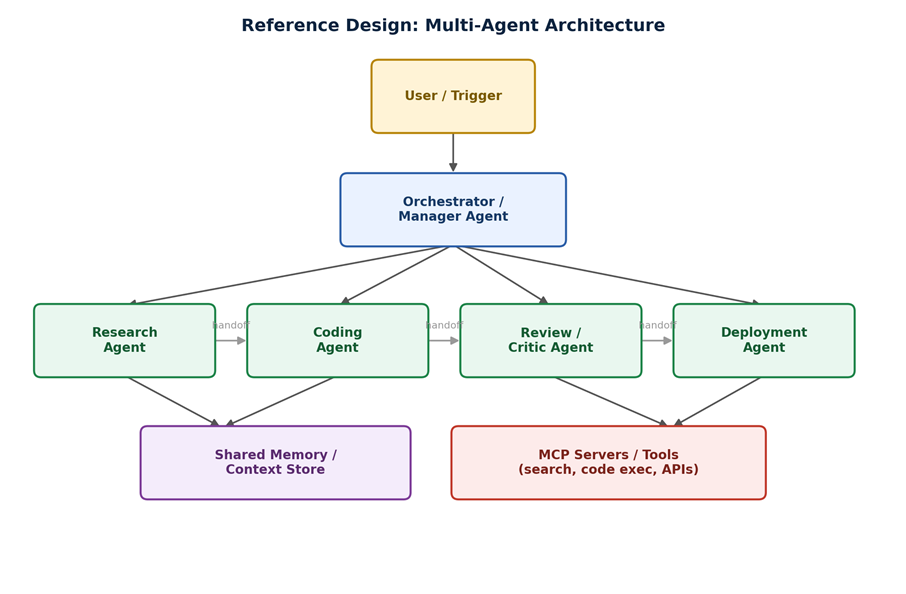
Above Image reference multi-agent architecture: an orchestrator dispatches work to specialized agents, which hand off sequentially and share a common memory store and tool layer. Reading the Multi-Agent AI Architecture Diagram
At the top, an orchestrator or manager agent receives the incoming task and decides which specialized agent should act first, in this design, a research agent, a coding agent, a review or critic agent, and a deployment agent, connected by handoff arrows showing the sequence. Both the research and coding agents draw on a shared memory and context store, so information gathered early in the pipeline is available later without being re-fetched. The review and deployment agents connect to a shared MCP-based tool layer, giving them access to code execution, search, and external APIs through one standardized interface rather than separate custom integrations per agent.
Adapting This AI Agent Architecture Diagram to Your Own System
Very few real systems need exactly four agents in exactly this sequence, treat the diagram as a template, not a fixed spec. If your task doesn't naturally split into distinct roles, you likely don't need a multi-agent architecture diagram at all; go back to the single-agent reference design instead. If it does split naturally, keep the same shape, one orchestrator, specialized agents with narrow responsibilities, shared memory, and a shared tool layer, and simply rename and re-scope the boxes for your specific domain.
Variation: Hierarchical Multi-Agent Diagram
A variation worth knowing sits between the two reference designs: hierarchical architecture, where a manager agent delegates to sub-teams rather than individual agents directly. Visually, this adds a middle layer, the orchestrator connects to two or three “team lead” agents, each of which connects to its own small group of specialized agents below it. This pattern shows up in this ai architecture diagram family once a system grows past roughly five or six agents, since a flat orchestrator managing that many peers directly starts to become a coordination bottleneck itself.
Real-World Reference Patterns by Use Case
-
Customer support: single-agent reference design with a RAG variation, tools limited to a knowledge base lookup and a ticketing-system API
-
Coding assistant: multi-agent reference design with research, coding, and review agents; tools centered on code execution and version control
-
Content pipeline: multi-agent reference design with research, writer, and editor agents sharing a document store instead of a general memory box
-
Infrastructure monitoring: single-agent reference design with a human-in-the-loop gate before any remediation action executes
Common Mistakes When Drawing an AI Architecture Diagram
-
Drawing every possible tool and integration instead of the core control flow, which buries the architecture in noise
-
Omitting the orchestration loop entirely, leaving readers to guess how or whether the system repeats steps
-
Showing memory as a single undifferentiated box when short-term and long-term memory behave very differently
-
Skipping failure and escalation paths, so the diagram only shows the happy path and hides where a human needs to step in
A useful test for any ai architecture diagram you draw: could someone unfamiliar with the project follow an arrow and correctly guess what happens if that step fails? If the answer is no, the diagram is documenting the intended path only, which is a weaker artifact than one that also shows where things go wrong and how the system responds.
Designing Your Own AI Architecture
Once you understand how to read these reference diagrams, doing your own ai architecture design follows a similar sequence every time, regardless of the specific system.
A Repeatable AI Architecture Design Process
-
Start with the trigger and the final output, what comes in, what must come out, before drawing anything in between
-
Decide single-agent or multi-agent based on whether the task splits into genuinely distinct roles, not by default complexity
-
Add memory only where the system needs to recall something beyond the current interaction, not as a default component
-
Add the tool layer last, once you know exactly what actions the system needs to take in the real world
-
Redraw the diagram after the first working version, the real architecture rarely matches the first sketch exactly
This sequence matters because it mirrors the order design decisions should actually be made, not just the order boxes happen to appear on the page. Teams that design the tool layer first, before deciding whether the task even needs an agent, tend to end up with over-engineered systems wrapped around a simple problem. Working trigger-to-output first, then filling in the middle, keeps the ai architecture design honest about what the system actually needs rather than what would be interesting to build.
How Scaler Transformed Careers in Different Fields
Scaler learners achieved 2.5x salary growth with average post-Scaler CTC reaching ₹23L.
 Google
 Amazon
 Microsoft
 Flipkart
 Adobe1200+ more
Tools for Drawing an AI Agent Architecture Diagram
You don't need specialized software for a first ai architecture diagram, a whiteboard or a simple tool like Excalidraw, Lucidchart, or even Google Slides is enough to communicate the core structure. What matters far more than the tool is precision: label every arrow with what actually flows along it (data, control, or both), and keep the color and shape conventions consistent so the diagram stays readable as the system grows.
Checking Whether Your Diagram Still Matches Reality
An ai agent architecture diagram is only useful while it accurately reflects the running system, and agentic projects tend to drift from their original design faster than most software, a tool gets added, a memory store gets swapped, an approval gate gets bypassed for a demo and never restored. Revisit the diagram at natural checkpoints: after the first working prototype, before a production deployment, and whenever a new team member needs to understand the system. A diagram that's a version behind reality is often worse than no diagram at all, since it actively misleads whoever's reading it.
Conclusion
A clear ai agent architecture diagram is one of the highest-leverage artifacts you can produce for an agentic project, it forces precision during design, speeds up onboarding, and gives reviewers something concrete to critique instead of an abstract description. The two reference designs in this module, single-agent and multi-agent, cover the large majority of real systems; most projects are a variation on one of these two shapes rather than something entirely new.
Whether you're doing ai architecture design for a portfolio project or a production system, start from whichever reference diagram matches your task's shape, adapt the boxes to your specific domain, and redraw it once the first version is working, the diagram that matches reality is more valuable than the one you sketched before writing any code. Scaler's Advanced AIML program with a specialisation in Agentic AI covers this design process hands-on, from first sketch to a working, deployed system.
The next time you're asked to explain an agentic system, in a review, an interview, or a design doc, reach for one of these reference diagrams as a starting template rather than freehand-sketching from scratch. Consistency in how you represent an ai architecture diagram, project after project, is what makes it a genuinely useful communication tool rather than a one-off illustration.
FAQs
What is an AI agent architecture diagram?
An AI agent architecture diagram is a visual map of how perception, reasoning, memory, and tools connect within an agentic system.
What should an AI architecture diagram include?
A good AI architecture diagram includes the trigger, reasoning core, memory, tool layer, and the orchestration loop connecting them.
Turn Learning into Career Growth
How do I start my own AI architecture design?
Start your AI architecture design by mapping the trigger and output, then choosing single-agent or multi-agent based on task complexity.
Is a multi-agent architecture diagram always better?
No, use a multi-agent AI agent architecture diagram only when a task splits into genuinely distinct roles; otherwise a single agent is simpler.
What tools can I use to draw an AI architecture diagram?
Excalidraw, Lucidchart, or even a whiteboard work well for an AI architecture diagram; the tool matters less than labeling arrows clearly.
Do all AI agents need a memory component in the diagram?
No, only include memory in an AI agent architecture diagram if the system needs to recall information beyond the current interaction.




