


Android Architecture
Overview
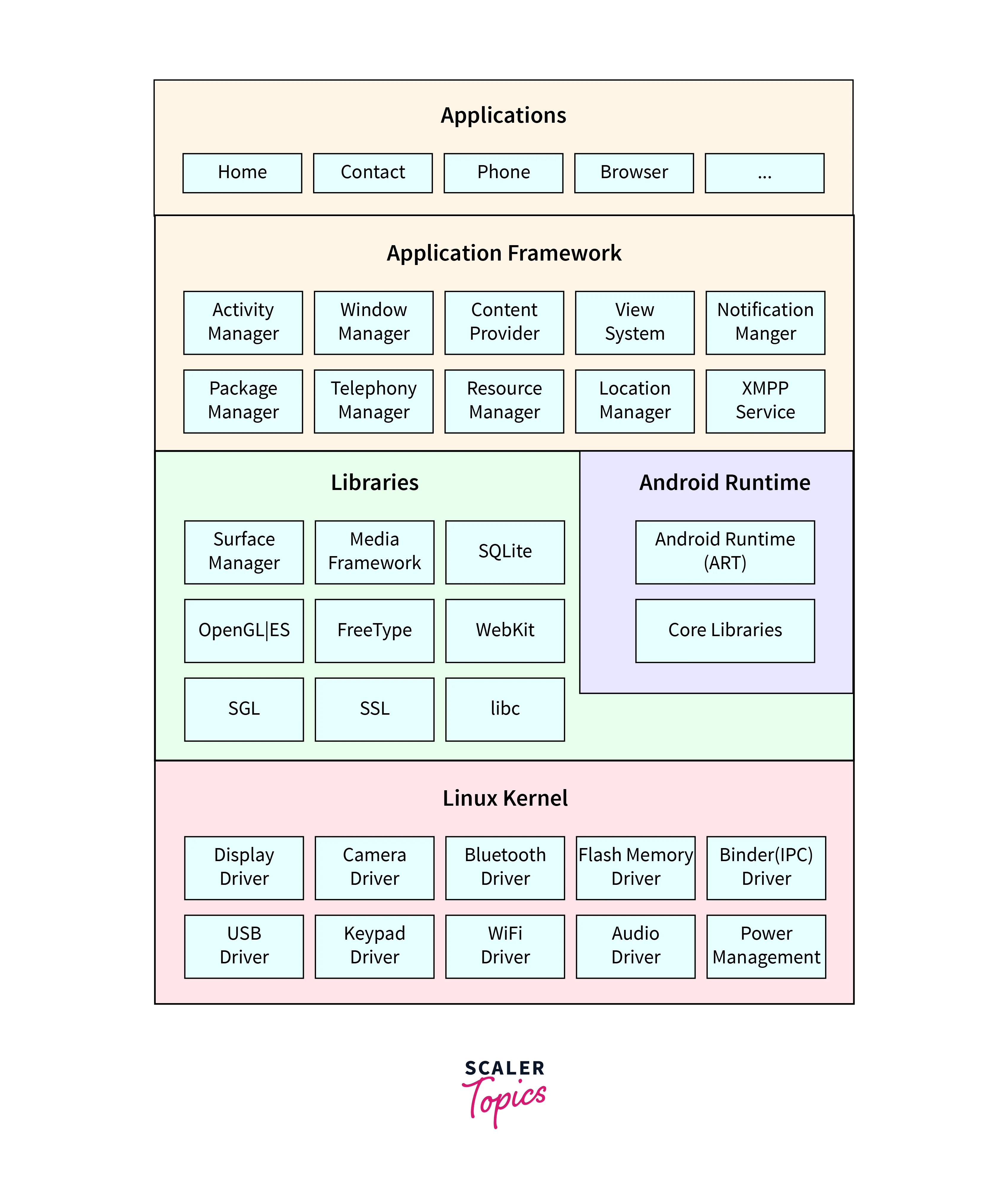
The Android architecture consists of various components that work together to provide a seamless user experience. These components include the Linux kernel, which acts as the foundation, the Hardware Abstraction Layer (HAL) that interacts with the device hardware, the native libraries that provide core functionality, the Android Runtime (ART) that runs and manages apps, the framework that provides high-level APIs, and the apps themselves. It's like a well-coordinated team that makes your Android device work smoothly!
Build an AI-First Career, Master the Complete Skillset
Choose from our industry-leading programs designed for career success
Modern Software and AI Engineering Program
Master full-stack development with AI integration


 +1000 more
Modern Data Science and ML with specialisation in AI
Advanced data science techniques with AI specialization
+1000 moreAdvanced AIML with Specialisation in Agentic AI
Deep dive into AIML with focus on Agentic systems
+1000 moreDevOps, Cloud & AI Platform Engineering
Build and manage AI-powered cloud infrastructure
+1000 moreAI Engineering Advanced Certification by IIT-Roorkee
Premier AI engineering certification from IIT-Roorkee

AI Forward Deployed Engineer Program
Full-stack engineering, production AI and client-facing consulting
+1000 moreApplications
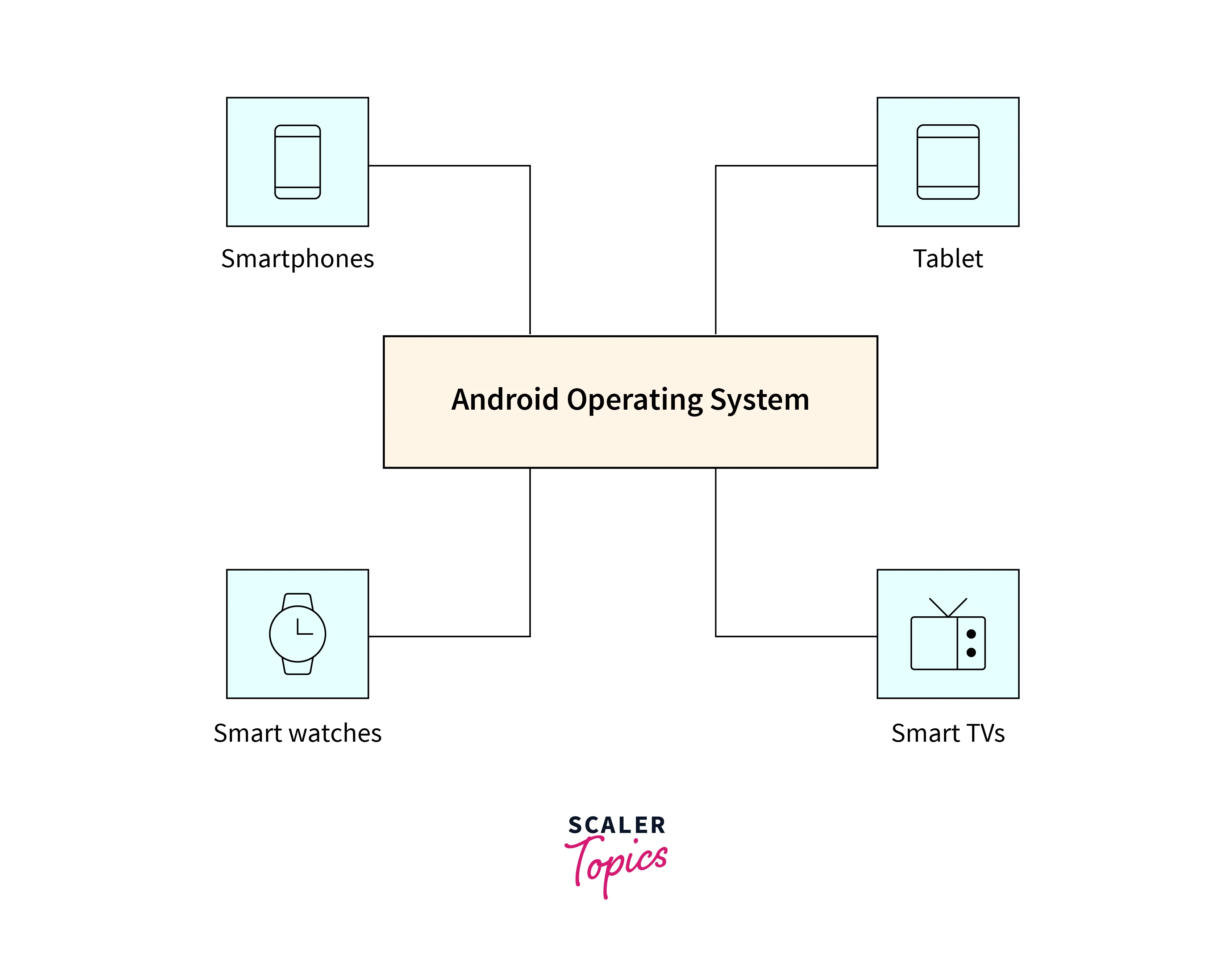
The Android architecture finds applications in a wide range of devices, including smartphones, tablets, smart TVs, wearables, and smart home devices. Its versatile framework and extensive library support empower developers to create various types of applications, such as social media platforms, productivity tools, gaming apps, e-commerce platforms, and more. The flexibility and scalability of the Android architecture make it a powerful platform for innovation and technological advancements. It's fascinating to witness how Android architecture drives the development of diverse applications across different industries.
Application Framework
The Android Application Framework is a robust set of tools, APIs, and resources that developers leverage to construct Android applications. It encompasses essential components such as Activities, Fragments, Services, Content Providers, and Broadcast Receivers, which facilitate the creation of interactive and responsive apps. Moreover, the framework offers a wide range of APIs for tasks such as accessing device sensors, handling user input, managing data storage, and interacting with system services. Additionally, it supports various UI elements, layouts, and themes to ensure visually appealing and consistent user interfaces. With the Android Application Framework, developers have a solid foundation to craft feature-rich and user-friendly applications for Android devices.
Key MileStones or Changes in Android Architecture
Over different Android versions, there have been key milestones and changes in the architecture. For example:
-
Android 4.0 (Ice Cream Sandwich): Introduced the Holo theme, which provided a consistent and modern look across devices.
-
Android 5.0 (Lollipop): Introduced Material Design, a new design language that focused on a clean and intuitive interface with vibrant colours and smooth animations.
-
Android 6.0 (Marshmallow): Introduced runtime permissions, giving users more control over app permissions by allowing them to grant or deny permissions at runtime.
-
Android 7.0 (Nougat): Introduced the Vulkan API, which provided high-performance 3D graphics rendering for games and other graphics-intensive applications.
-
Android 8.0 (Oreo): Introduced Project Treble, which modularized the Android framework to make it easier for device manufacturers to deliver timely software updates.
-
Android 9.0 (Pie): Introduced App Actions and Slices, which provided more contextual and interactive app experiences directly from search results and other surfaces.
-
Android 10: Introduced system-wide dark mode, enhanced privacy features, and improved gesture navigation.
These are just a few examples of the milestones and changes in the Android architecture over different versions. Each update brings new features, optimizations, and security enhancements to improve the overall user experience.
How Scaler Transformed Careers in Different Fields
Scaler learners achieved 2.5x salary growth with average post-Scaler CTC reaching ₹23L.
 Google
 Amazon
 Microsoft
 Flipkart
 Adobe1200+ more
Android Runtime
The Android Runtime (ART) is the managed runtime used by Android devices to run applications. It's responsible for executing and managing the code written in Java or Kotlin. ART uses ahead-of-time (AOT) compilation, where the bytecode of an app is compiled into native machine code during the installation process. This results in faster app startup times and improved overall performance. ART also includes features like just-in-time (JIT) compilation, garbage collection, and memory management to optimize app execution. With ART, Android devices can efficiently run a wide range of applications while providing a smooth and responsive user experience.
Platform/Native Libraries
Android platform/native libraries are a collection of pre-compiled code modules that provide essential functions and services to Android applications. These libraries include various components such as graphics rendering, multimedia processing, network communication, database management, and more. They are written in C/C++ and are accessible to developers through the Android Native Development Kit (NDK). By leveraging these libraries, developers can enhance the functionality and performance of their apps, as well as access low-level system resources. The platform/native libraries serve as a foundation for building powerful and feature-rich Android applications.
Turn Learning into Career Growth
Linux Kernel
The Linux kernel is the core component of the Android operating system. It acts as the bridge between the hardware and the software, providing essential functionalities such as device drivers, memory management, process management, and security. Android is built on top of the Linux kernel, leveraging its stability, security, and scalability. The Linux kernel handles various hardware interactions, allowing Android to support a wide range of devices. It also provides the foundation for Android's multi-tasking capabilities, power management, and resource allocation. The Linux kernel plays a crucial role in ensuring the smooth and efficient operation of the Android operating system.
Security Aspects in Android Architecture
Security is an important aspect of the Android architecture. The Linux kernel, which forms the foundation of Android, provides robust security features that help protect the system. It enforces process isolation, access control, and resource management, ensuring that each app runs in its own sandboxed environment. This prevents apps from interfering with each other or accessing sensitive data without proper permissions.
Android Runtime (ART) further enhances security through app sandboxing. Each app runs in its own instance of the virtual machine, isolating its execution environment and preventing unauthorized access to system resources. ART also uses Just-In-Time (JIT) compilation and ahead-of-time (AOT) compilation techniques to optimize app performance while maintaining security.
Conclusion
- The Android architecture consists of four main components: the Linux kernel, the libraries, the Android runtime, and the application framework.
- The Linux kernel serves as the foundation, providing hardware abstraction and core system services.
- The libraries offer essential functionalities like graphics rendering, multimedia processing, and network communication.
- The Android runtime includes the ART, which executes and manages app code, optimizing performance through ahead-of-time compilation.
- The application framework provides developers with high-level tools and APIs to create feature-rich Android apps.




