


Converting a Kotlin File to Java
Overview
Kotlin and Java are two popular programming languages Android development and beyond. While Kotlin offers concise and expressive code with enhanced safety features, Java remains a steadfast language that has been used for many years. As developers, we often encounter situations where we need to switch between these languages or collaborate with codebases written in different languages.
By the end of this guide, you'ill have gained a comprehensive understanding of how to convert Kotlin to Java, enabling you to navigate between the two languages.
Convert Kotlin to Java
To convert Kotlin to Java, you would require a solid understanding of both languages, as well as knowledge of the differences in their syntax, features, and underlying principles. It's essential to be aware that certain Kotlin constructs may not have a direct translation in Java, which may require some adjustments and refactoring.
Converting from Java to Kotlin is generally more straightforward than the reverse process. Kotlin is designed to be interoperable with Java, making it easier to convert Java code to Kotlin while still maintaining compatibility. Kotlin offers several modern language features that are not available in Java, so going from Kotlin to Java might require more extensive changes and adaptations.
Overall, both languages aim to promote interoperability, and with careful consideration and understanding of the differences between them, developers can effectively convert code between Kotlin and Java.
Why Convert Kotlin to Java?
Before diving into the conversion process, let's explore some compelling reasons why such a conversion may be necessary:
Understanding the Underlying Mechanisms: Convert Kotlin to Java can help us gain a deeper understanding of the code's inner workings, enabling us to comprehend the intricacies of the implementation.
Investigating Performance Concerns: Convert Kotlin to Java, we can analyze and compare performance differences between the two languages, identifying potential bottlenecks or areas for optimization.
Removing Kotlin from the Project: There may be instances where eliminating Kotlin from the project is desirable. Convert Kotlin to Java can facilitate this transition.
The Conversion Process:
The conversion from Kotlin to Java involves two main steps:
Compilation to JVM Bytecode: Initially, the Kotlin code is compiled into JVM bytecode, making it compatible with the Java Virtual Machine.
Decompilation to Java Code: Subsequently, the compiled bytecode is decompiled back into Java code, allowing us to obtain a Java representation of the original Kotlin source.

However, it is crucial to understand that this conversion process alone will not yield a fully functional production-ready code. Manual intervention is typically required to address any discrepancies and make necessary adjustments. Decompilation might not always generate code that adheres to best practices, necessitating further refinement.
Conversion Using Command Line Tools
Suppose you have a Kotlin file name OddNumbers.kt with the following content.
Code:
To convert it to Kotlin, follow these steps:
- Compile the code with this command in your terminal:
This command will compile the OddNumbers.kt and create a class file called OddNumbersKt.class.
- Decompile this file to Java. To do this, you can use FernFlower Link to FernFlower:. You can get the fernflower.jar by downloading the project and running the Gradle build. Once you have the JAR file, run the following command in the terminal:
Alternatively, you can also do it online here: javadecompilers Upload your OddNumbersKt.class file & selct the decompiler as FernFlower.
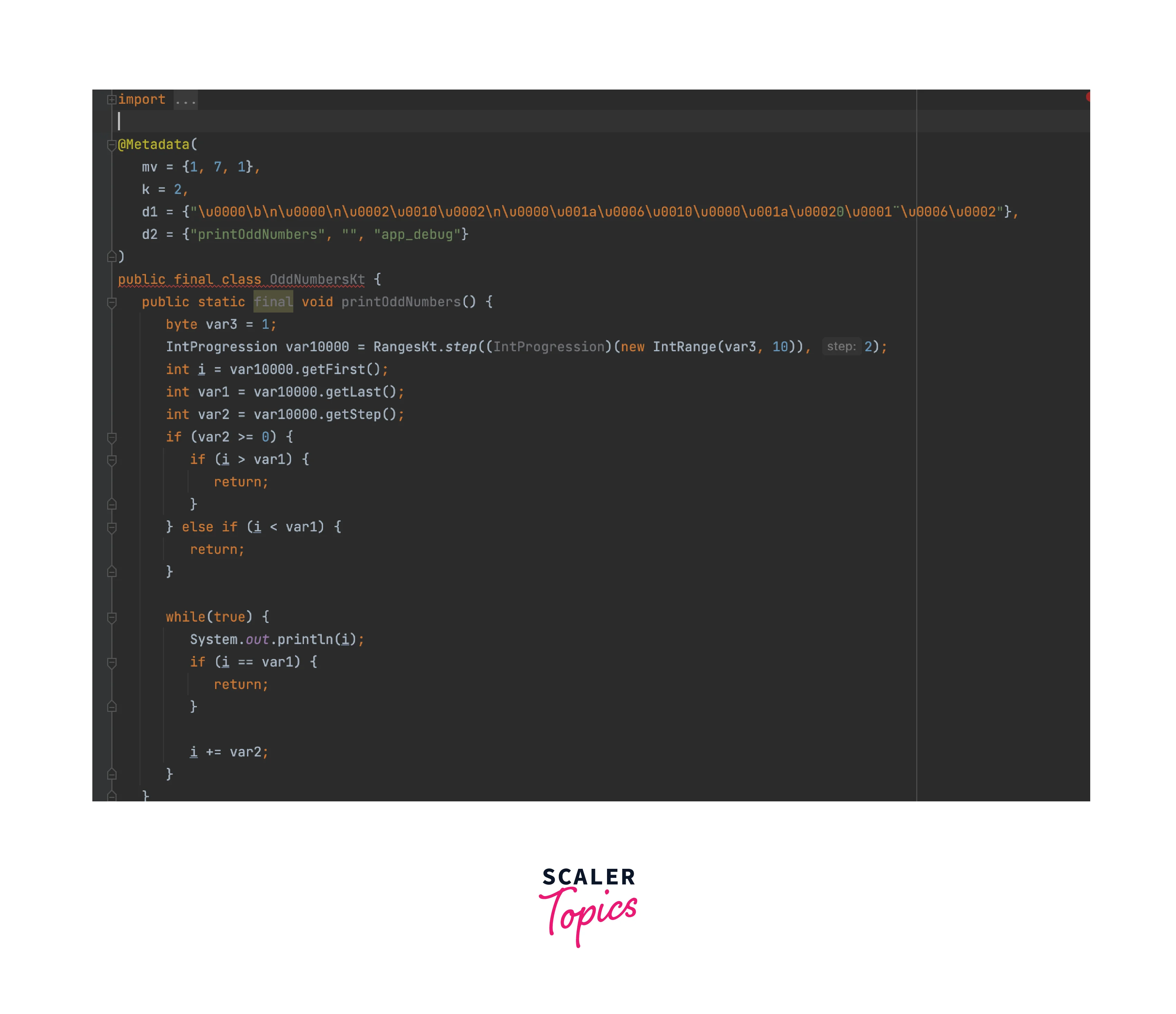
You would get the following code.
Code:
The code appears to be quite complex and in several cases, it could also contain dependencies on the Kotlin language. Unfortunately, due to its lack of readability and potential performance issues, this piece of code is unsuitable for use in a production environment.
Conversion with IntelliJ IDEA
IntelliJ IDEA offers a more convenient approach to perform the same two steps.
To compile the source code into bytecode, simply click on "Tools" -> "Kotlin" -> "Show Kotlin Bytecode" from the main context menu.
A new window will open, presenting the JVM bytecode in a readable format.
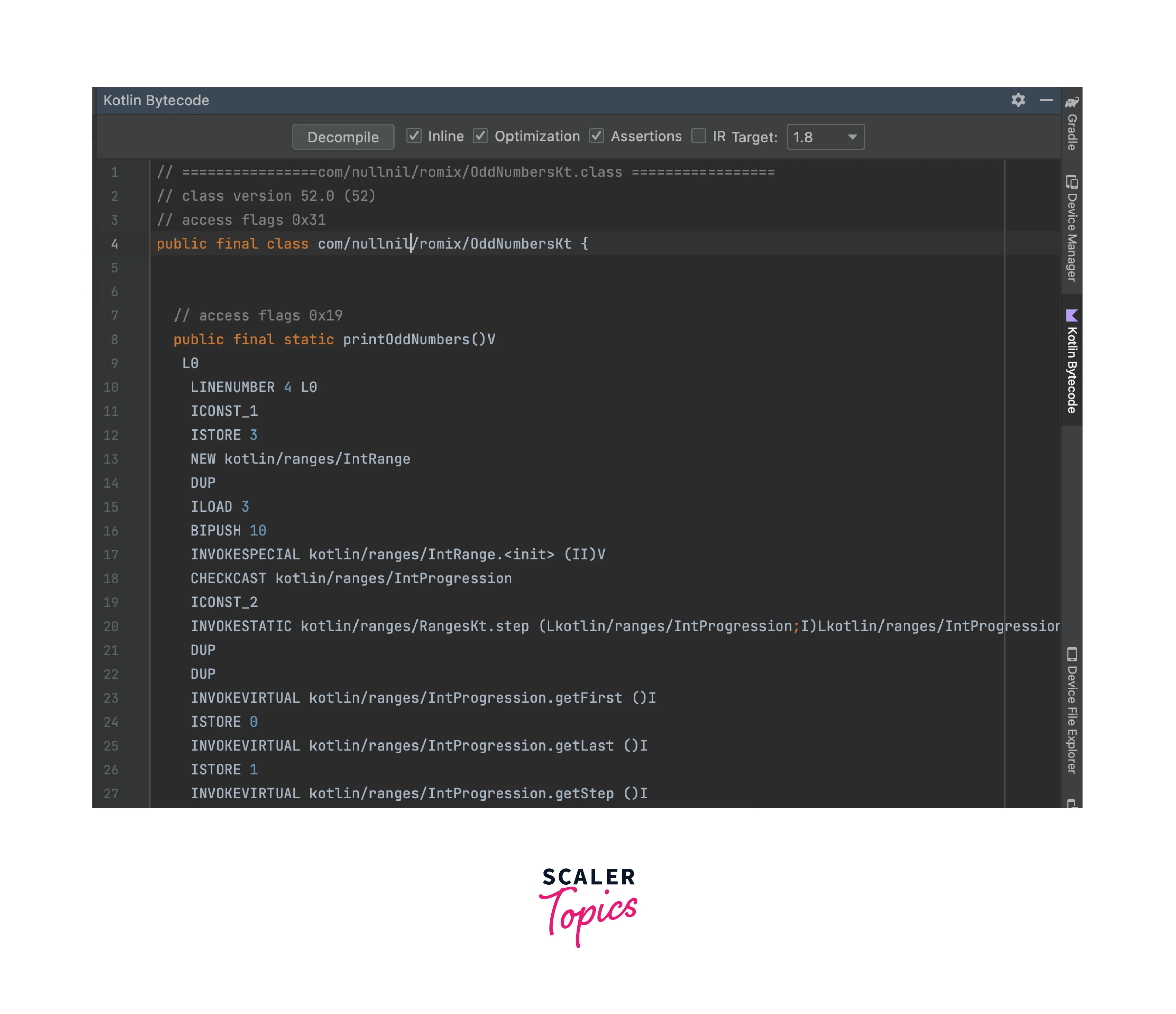
Then click on the "Decompile" button to generate a Java file. It is essential to note that IntelliJ IDEA employs Fernflower under-the-hood, ensuring that the resulting Java file will be identical to the one displayed earlier.
Conclusion
Convert Kotlin to Java can be a straightforward task, but it may also involve some challenges depending on the complexity of the Kotlin code and the features used. Here are some conclusions you can draw from the process:
- Kotlin and Java have some syntax differences, so you will need to adjust the code accordingly. Kotlin offers more concise syntax and several language features not available in Java, such as data classes, extension functions, and null safety. You'll need to rewrite these constructs using Java equivalents or alternative approaches.
- Kotlin's type system is more expressive and allows for more concise type declarations, inference, and smart casting. When you convert Kotlin to Java, you may need to provide explicit type declarations in certain cases where Kotlin can infer them automatically.
- Kotlin's null safety is a significant feature that helps prevent null pointer exceptions. In Java, there are no nullable types, so you'll need to ensure proper handling of null values throughout the converted code.
- Kotlin is designed to be fully interoperable with Java, so most of the standard libraries and frameworks used in Kotlin can be seamlessly used in Java after conversion. However, some Kotlin-specific libraries or language features like lambdas and higher-order functions may require additional adjustments or replacements when you convert Kotlin to Java.
- Kotlin has built-in coroutines for asynchronous programming, which can be more concise and readable than traditional Java approaches. Converting coroutines to equivalent Java code may involve using CompletableFuture or other concurrency libraries.