


PostgreSQL Create Sequence
Build an AI-First Career, Master the Complete Skillset
Choose from our industry-leading programs designed for career success
Modern Software and AI Engineering Program
Master full-stack development with AI integration


 +1000 more
Modern Data Science and ML with specialisation in AI
Advanced data science techniques with AI specialization
+1000 moreAdvanced AIML with Specialisation in Agentic AI
Deep dive into AIML with focus on Agentic systems
+1000 moreDevOps, Cloud & AI Platform Engineering
Build and manage AI-powered cloud infrastructure
+1000 moreAI Engineering Advanced Certification by IIT-Roorkee
Premier AI engineering certification from IIT-Roorkee

AI Forward Deployed Engineer Program
Full-stack engineering, production AI and client-facing consulting
+1000 moreOverview
In this article, we will explore how to create sequences in PostgreSQL. Sequences are a feature in PostgreSQL that allows for the automatic generation of unique numeric values. We will cover the syntax of the statement CREATE SEQUENCE in PostgreSQL and provide examples of creating ascending, descending, and table column-associated sequences.
Introduction to PostgreSQL SEQUENCE
PostgreSQL sequences are a powerful tool for generating unique numeric values automatically. They are commonly used to generate primary key values for tables. Sequences in PostgreSQL are independent of tables. This means they can be utilized across multiple tables within a database. Sequences in PostgreSQL are valuable for managing unique identifiers in your database.
CREATE SEQUENCE in PostgreSQL Syntax
The syntax for creating a sequence in PostgreSQL using the CREATE SEQUENCE statement is as follows:
Let's break down the syntax and understand the meaning of each term:
- IF NOT EXISTS (optional) allows you to create the sequence only if it doesn't already exist.
- my_sequence_name is the name you want to assign to the sequence. It is recommended to choose a descriptive name that reflects its purpose.
- AS data_type (optional) allows you to define the data type of the values generated by the sequence. If not specified, it defaults to bigint. Other data types used are smallint and int.
- INCREMENT [ BY ] incr_value (optional) specifies the increment value for each sequence value. The default is 1, meaning each value will be one greater than the previous one.
- MINVALUE min_value | NO MINVALUE (optional) sets the minimum value for the sequence. If not specified, there is no lower limit of the sequence.
- MAXVALUE max_value | NO MAXVALUE (optional) sets the maximum value for the sequence. If not specified, there is no upper limit of the sequence.
- START [ WITH ] strt_value (optional) sets the starting value of the sequence. The sequence starts at 1 by default.
- CACHE cache (optional) specifies the number of sequence values to cache for performance optimization by reducing disk I/O. The default is 1.
- [ NO ] CYCLE (optional) allows the sequence to wrap around and start from the beginning when the maximum value is reached. The default is NO CYCLE.
- OWNED BY { table_name.col_name | NONE } (optional) used to associate the sequence with a specific table column. If specified, the sequence will automatically generate values for that column.
- RESTART [ WITH ] rstrt_value (optional) restarts the sequence with the specified value.
- [ NO ] GENERATED { ALWAYS | BY DEFAULT } AS IDENTITY (optional) specifies whether the sequence is used as an identity column. This is commonly used with table definitions.
How Scaler Transformed Careers in Different Fields
Scaler learners achieved 2.5x salary growth with average post-Scaler CTC reaching ₹23L.
 Google
 Amazon
 Microsoft
 Flipkart
 Adobe1200+ more
Examples
The CREATE SEQUENCE in PostgreSQL statement can be used to create ascending or descending order sequence. Sequences are in ascending order by default. Let’s dive in to know more.
Creating an Ascending Sequence
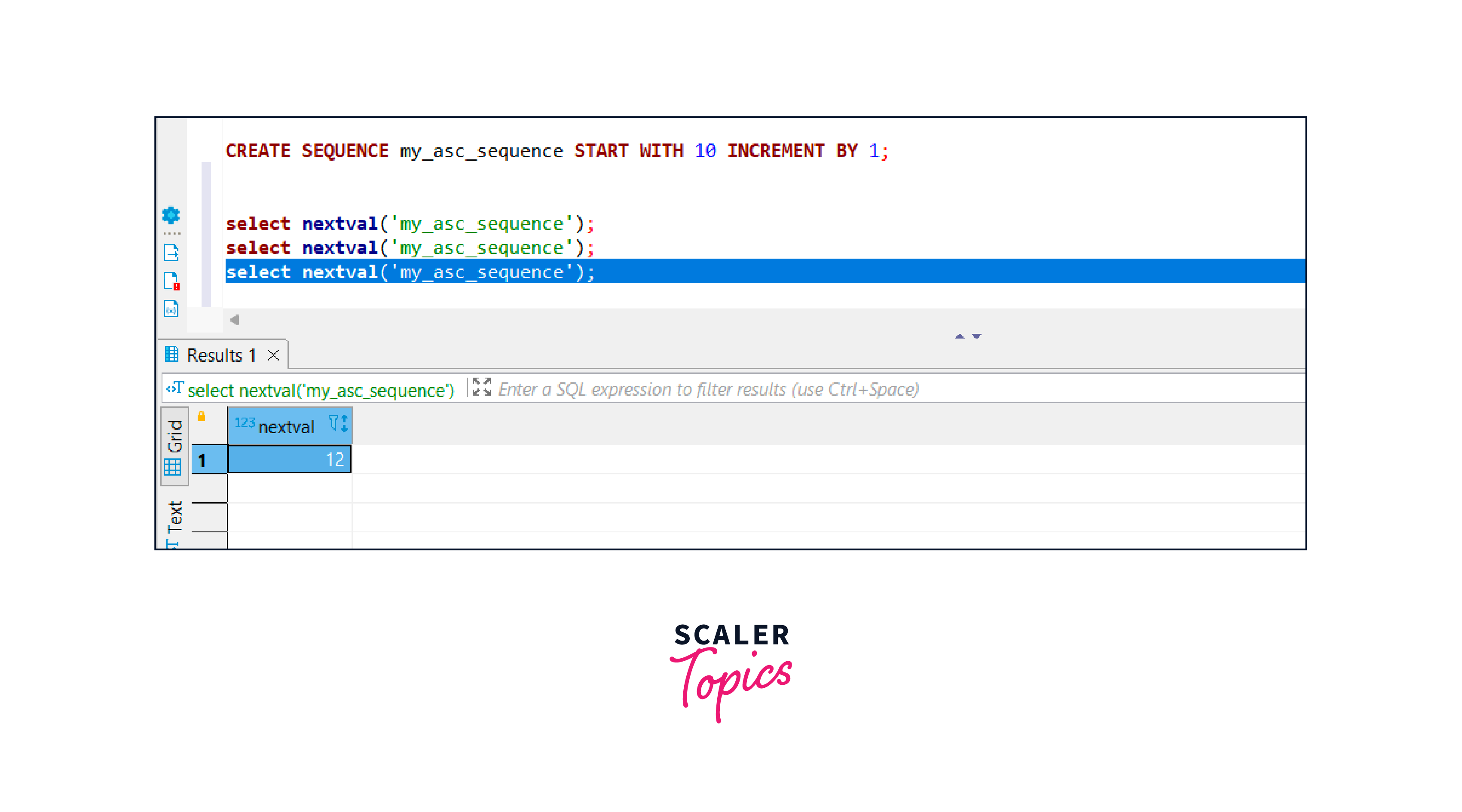
To create an ascending sequence named my_asc_sequence with a start value of 10, you can use the following statement :-
In this example, we are creating a sequence called my_asc_sequence that starts with the number 10 and increments by 1 each time it is called. When the sequence is called using the select nextval('my_asc_sequence'); statement, it retrieves the next value in the sequence. The first call returns 10, the second call returns 11, and the third call returns 12. So, the output is 12 as you can see in the figure below.
Output:
Turn Learning into Career Growth
Creating a descending sequence
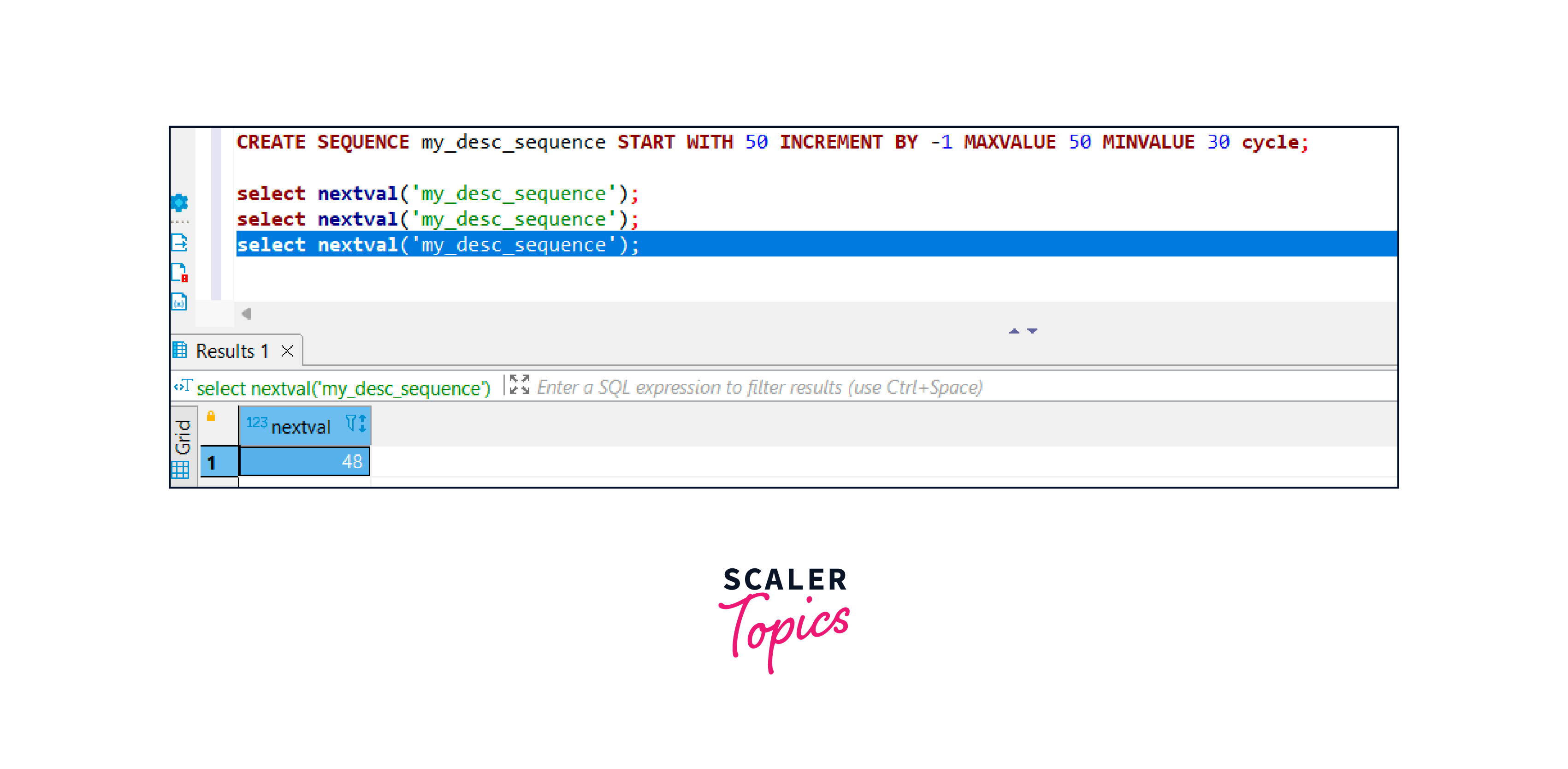
To create a descending sequence named my_desc_sequence with a start value of 50, you can use the following statement :-
In this example, we are creating a sequence called my_desc_sequence that starts with the number 50 and decrements by 1 each time it is called. The sequence stops at the MINVALUE 30 and does not go below it. With the cycle option enabled, the sequence starts again from 50 after reaching 30. When the sequence is called using the select nextval('my_desc_sequence'); statement, it retrieves the next value in the sequence. The first call returns 50, the second call returns 49, and the third call returns 48. So, the output is 48 as you can see in the figure below.
Output:
Creating a sequence associated with a table column
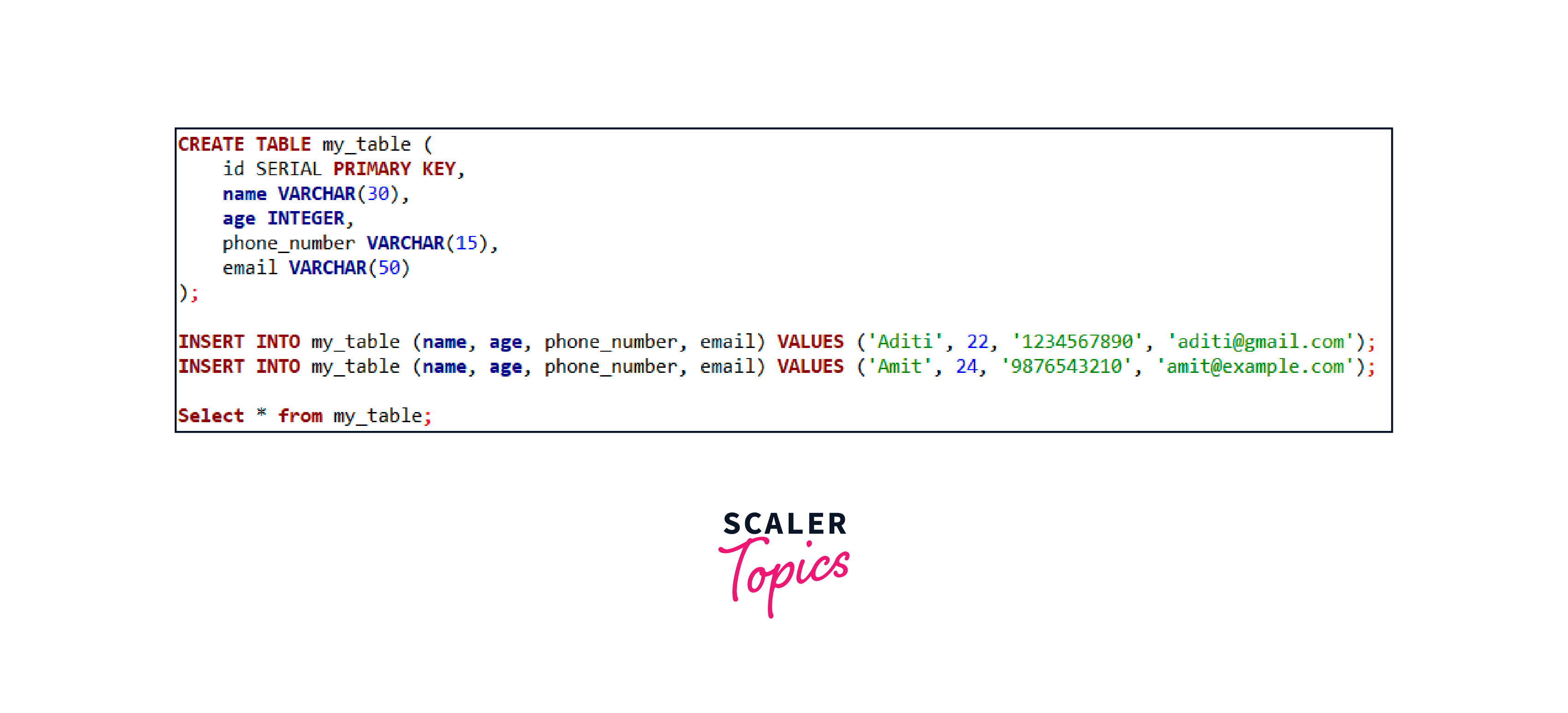
You can also create a sequence that is associated with a table column. This allows the sequence to automatically generate values for the column when new rows are inserted. To display how to do this, firstly we will create a table:
In this example, we create a table named my_table with five columns: id, name, age, phone_number, and email. The column id is defined as SERIAL. Now, after creating a table we can use sequence in two ways:-
Using Shorthand sequence
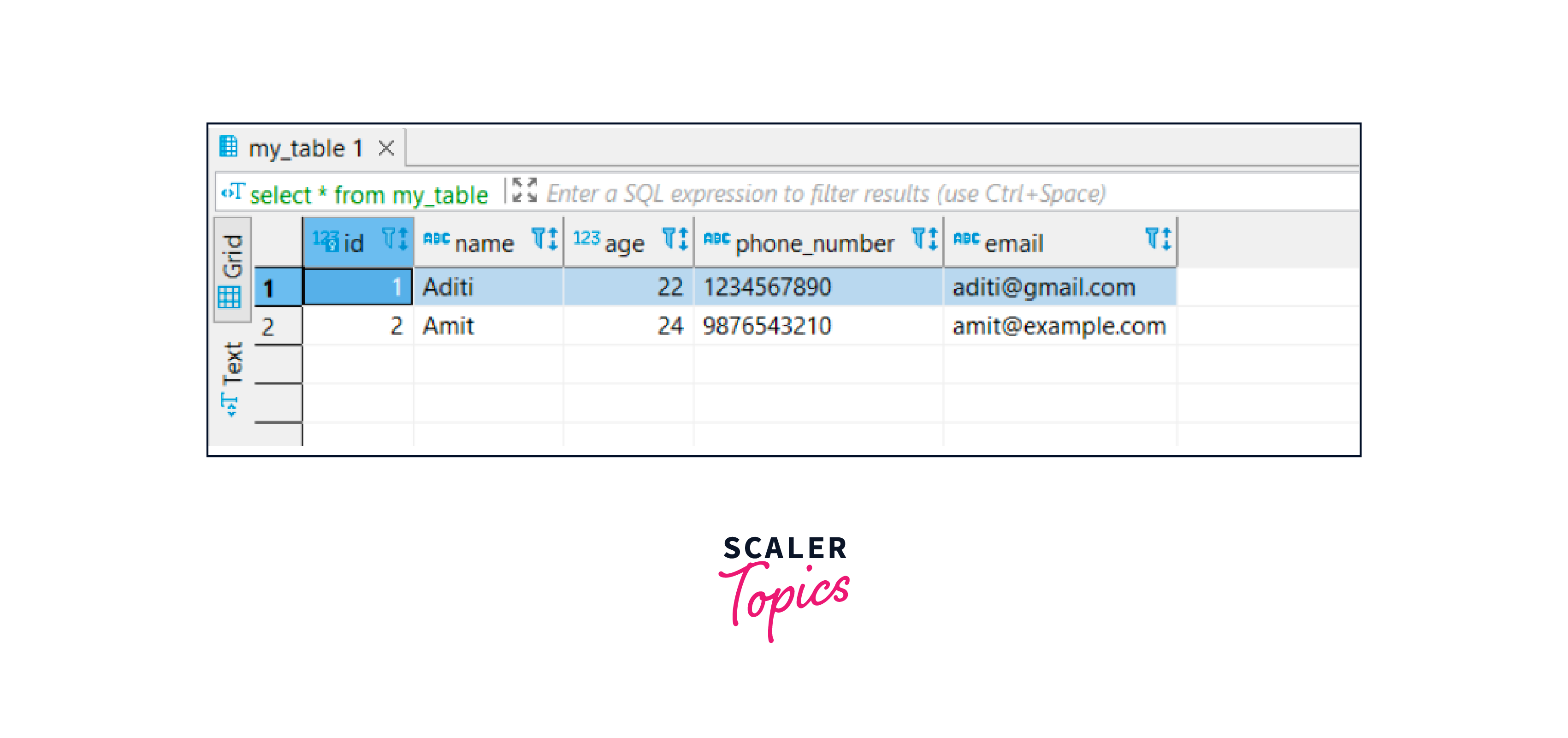
First method is, using SERIAL without creating any other custom sequence. SERIAL is a shorthand for creating an auto-incrementing integer column. It will automatically create a sequence named my_table_id_seq and associate it with the id column. When you insert data into the table, the id column will automatically be populated with unique values generated by the associated sequence. For example:-
In this case, the id column will be automatically assigned values 1 and 2, respectively, generated by the sequence. As you can see below :-
Output:
Using Custom Sequence
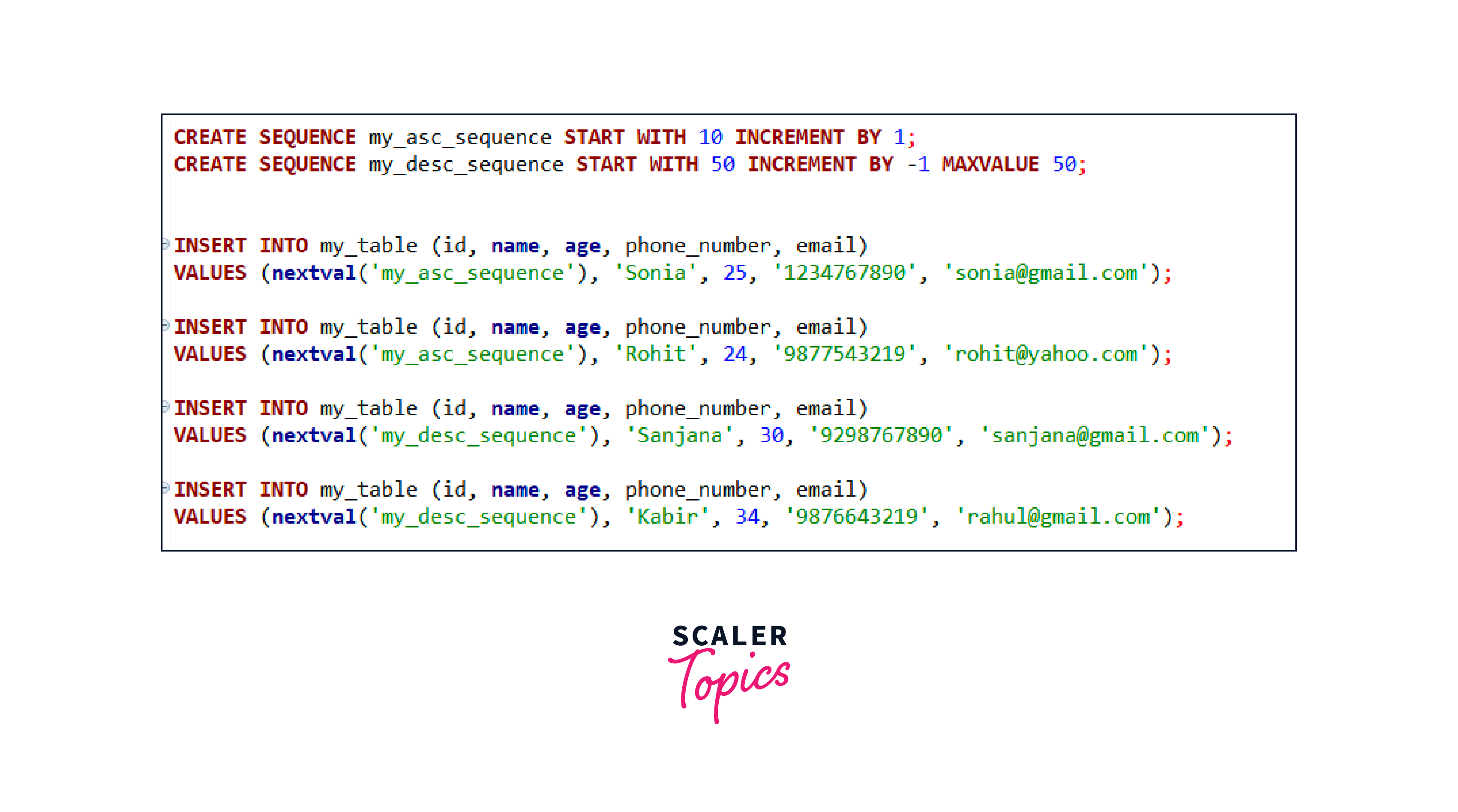
If you have created a sequence yourself and want to use it in PostgreSQL, you can reference the sequence in your SQL statements. For that, you are required to create a sequence in PostgreSQL. Here, we will use both my_asc_sequence and my_desc_sequence to insert the data into my_table using INSERT INTO command :-
In this scenario, we have two sequences: my_asc_sequence and my_desc_sequence. We use the nextval() function to get the next value from each sequence.
For my_asc_sequence, it generates the values 10 and 11 in ascending order. These values are then inserted into the id column of the my_table table. On the other hand, my_desc_sequence generates the values 50 and 49 in descending order. Similarly, these values are inserted into the id column of the my_table table. This can be observed in the figure below :-
Output after running the SELECT query on my_table:

Conclusion
- Sequences in PostgreSQL are a powerful tool for generating unique numeric values automatically.
- A sequence is in ascending order by default.
- Custom sequences can be created in either ascending or descending order.
- They can be associated with table columns to automatically assign unique values when inserting new rows.
- The nextval() function is used to retrieve the next value from a sequence.




