


CSS Overflow-y Property
 FREE
FREE

Build an AI-First Career, Master the Complete Skillset
Choose from our industry-leading programs designed for career success
Modern Software and AI Engineering Program
Master full-stack development with AI integration


 +1000 more
Modern Data Science and ML with specialisation in AI
Advanced data science techniques with AI specialization
+1000 moreAdvanced AIML with Specialisation in Agentic AI
Deep dive into AIML with focus on Agentic systems
+1000 moreDevOps, Cloud & AI Platform Engineering
Build and manage AI-powered cloud infrastructure
+1000 moreAI Engineering Advanced Certification by IIT-Roorkee
Premier AI engineering certification from IIT-Roorkee

AI Forward Deployed Engineer Program
Full-stack engineering, production AI and client-facing consulting
+1000 moreOverview
The overflow-y property determines whether to clip, add a scroll bar, or display overflow content when a block-level element overflows the content box vertically (i.e., top and bottom).
Syntax
CSS overflow y accepts keyword and global values like visible, hidden, clip, scroll, auto, inherit, etc. The default value of the CSS overflow-y property is visible.
We will discuss the various CSS overflow y supported property values in the following section of the article.
Overflow-y in CSS
| Value | Description | Syntax |
|---|---|---|
| visible | It is the default value. The visible keyword renders the content outside the padding box and prevents the clipping of the content. | overflow-y |
| hidden | The hidden keyword clips the content to fit it vertically in the padding box. There are no scrollbars provided. | overflow-y |
| clip | The clip value acts similarly to the hidden keyword. When CSS property overflow is hidden, the contents overflowing get hidden, but potentially they can be scrolled into view. In contrast, with the clip keyword, the overflow gets clipped off. | overflow-y |
| scroll | The scroll keyword clips the content and adds a scrollbar mechanism. | overflow-y |
| Auto | The auto keyword depends on the user agent. If content fits inside the padding box, it looks the same as visible; otherwise, it causes a scrolling mechanism. | overflow-y |
| inherit | It inherits the overflow behavior from its parent element. | overflow-y |
Note: If overflow-x is hidden, scroll, or auto, then overflow-y will implicitly compute to auto if it is not specified.
How Scaler Transformed Careers in Different Fields
Scaler learners achieved 2.5x salary growth with average post-Scaler CTC reaching ₹23L.
 Google
 Amazon
 Microsoft
 Flipkart
 Adobe1200+ more
Examples
Setting overflow-y Behavior
Let us explore the CSS overflow y supported property values through the following example.
HTML:
CSS:
Output:
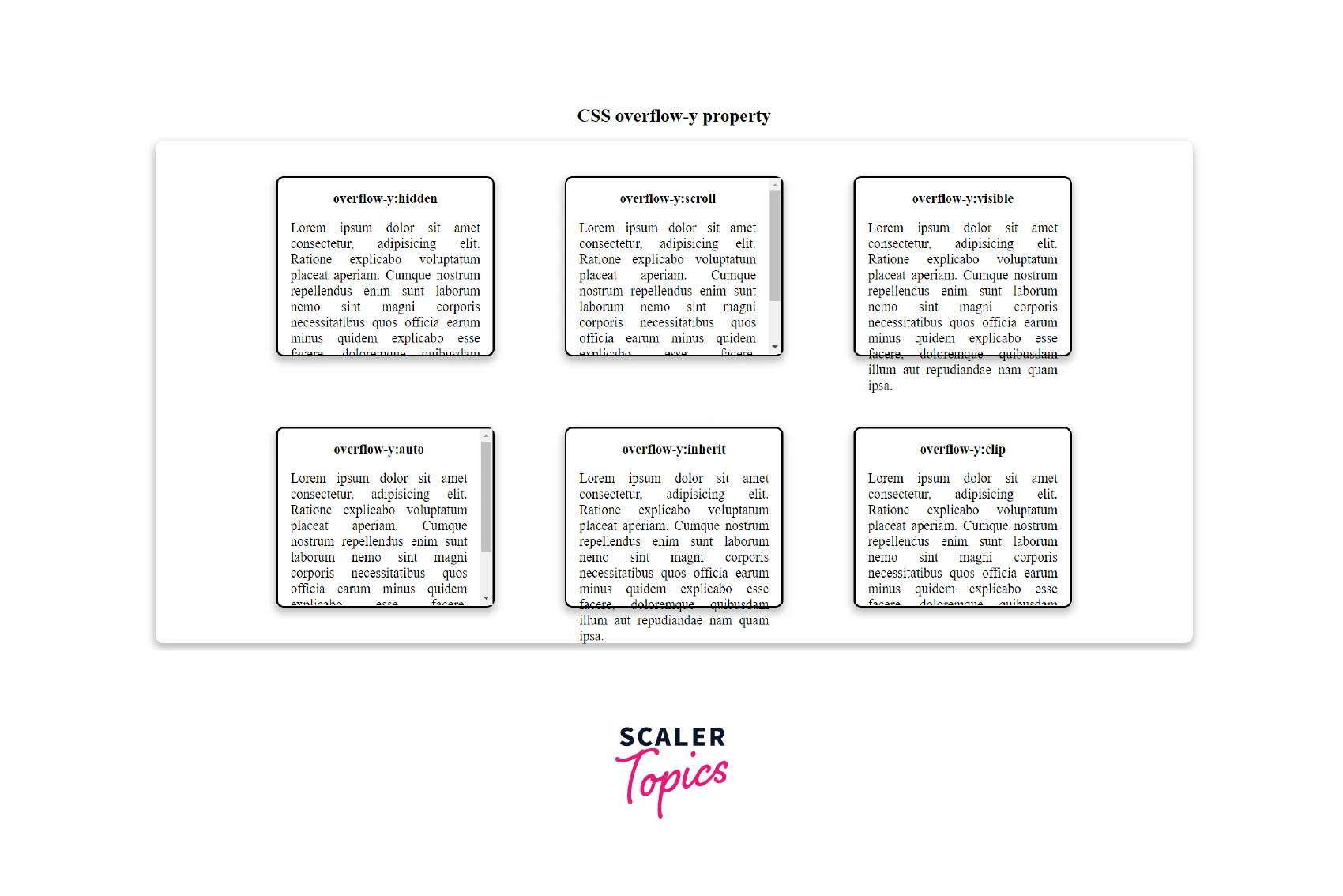
- The hidden keyword clips the overflowing content of the first block.
- The scroll keyword adds a scrollbar for the second box.
- The overflowing content overflows outside the third box.
- The auto keyword adds a scrollbar because the content overflows the fourth box.
- The inherit keyword inherits the default overflow-y behavior.
Turn Learning into Career Growth
Browser Support
The following browsers support the CSS overflow y property:
| Browser | Version |
|---|---|
| Google Chrome | 1.0 |
| Safari | 3 |
| Mozilla Firefox | 3.5 |
| Microsoft Edge | 12.0 |
| Opera | 9.5 |
| Chrome Android | 18 |
| Firefox for Android | 4 |
| Opera Android | 14 |
| Safari on iOS | 1 |
| Samsung Internet | 1.0 |
| WebView Android | 4.4 |
Conclusion
- The overflow-y CSS property handles the overflow behavior of the content.
- It can clip the overflowing content, add a scrollbar behavior or display the overflowing content outside the container.
- CSS overflow y accepts keyword and global values like visible, hidden, clip, scroll, auto, inherit, etc.
- The default value of the CSS overflow-y property is visible.
Related Properties
- overflow
- text-overflow
- overflow-x
- white-space




