


Difference between Ping and Traceroute
Build an AI-First Career, Master the Complete Skillset
Choose from our industry-leading programs designed for career success
Modern Software and AI Engineering Program
Master full-stack development with AI integration


 +1000 more
Modern Data Science and ML with specialisation in AI
Advanced data science techniques with AI specialization
+1000 moreAdvanced AIML with Specialisation in Agentic AI
Deep dive into AIML with focus on Agentic systems
+1000 moreDevOps, Cloud & AI Platform Engineering
Build and manage AI-powered cloud infrastructure
+1000 moreAI Engineering Advanced Certification by IIT-Roorkee
Premier AI engineering certification from IIT-Roorkee

AI Forward Deployed Engineer Program
Full-stack engineering, production AI and client-facing consulting
+1000 moreOverview
In computer networks, the data between sender and receiver is transferred in small units or blocks known as packets. Each packet is transmitted separately and may take a different path to reach its destination. Once all of these packets of the original message arrive at their destination, they are reassembled to form the original message. However, the web server may be down, network congestion may be present, or some other technical glitch may exist that prevents the message from reaching its destination. We use two common tools, Ping and Traceroute, to diagnose such congestions and network problems.
Ping
A ping (Packet Internet or Inter-Network Groper) is a simple Internet tool that allows a user to test and verify if a specific target IP address exists and can accept requests in computer network administration. Ping is also used for diagnostic purposes to verify that a host machine that the user is attempting to reach is active. Almost every embedded network administration software and any operating system (OS) with networking capabilities can use ping. We use the ping command for two purposes:
- To check the availability of the target host.
- To evaluate the round trip time(RTT).
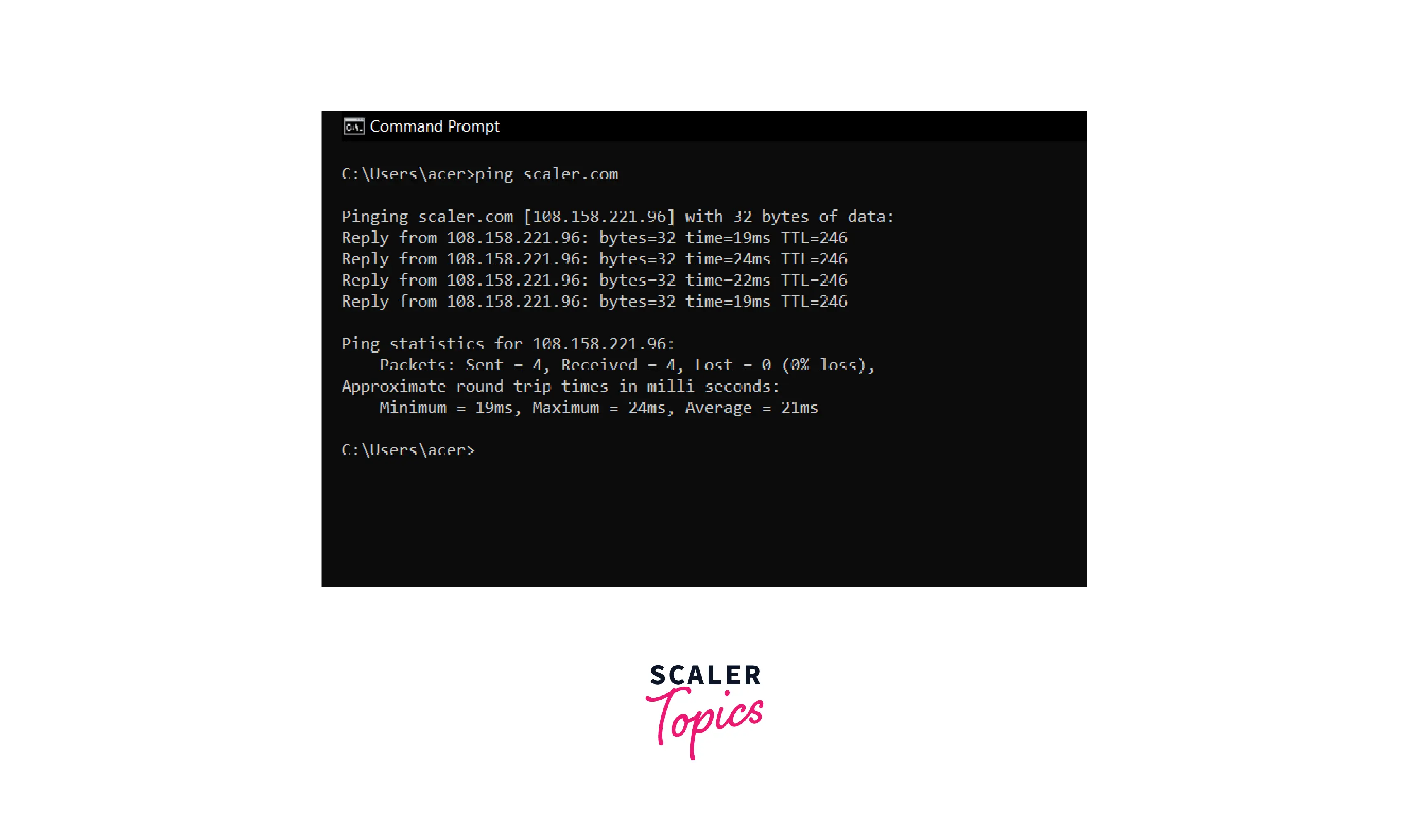
To test network connectivity, go to the command prompt and type ping <ip_address> followed by the enter key. The <ip_address> is the destination's IP address. This command will deliver four data packets to the target device. This is known as pinging. The destination machine will then transmit data packets to the sender machine. These responses are known as echo reply requests. They verify that the sending and receiving devices are connected to the network.
For example:- To test the connectivity of scaler.com, simply use the following command in the command prompt.
How does ping work?
Ping operates by delivering an ICMP (Internet Control Message Protocol) Echo Request to a predetermined network interface and then waiting for a response. When we use a ping command, a ping signal is sent to the destination address. When the destination host receives the echo request, it sends an echo reply packet in response.
Note:- The Round Trip Time (RTT) is a measure of how long it took to receive a response. The process is measured in milliseconds (ms) and begins when a browser sends a request to a server and finishes when the response from the server is received. RTT is a vital web application performance metric.
Traceroute
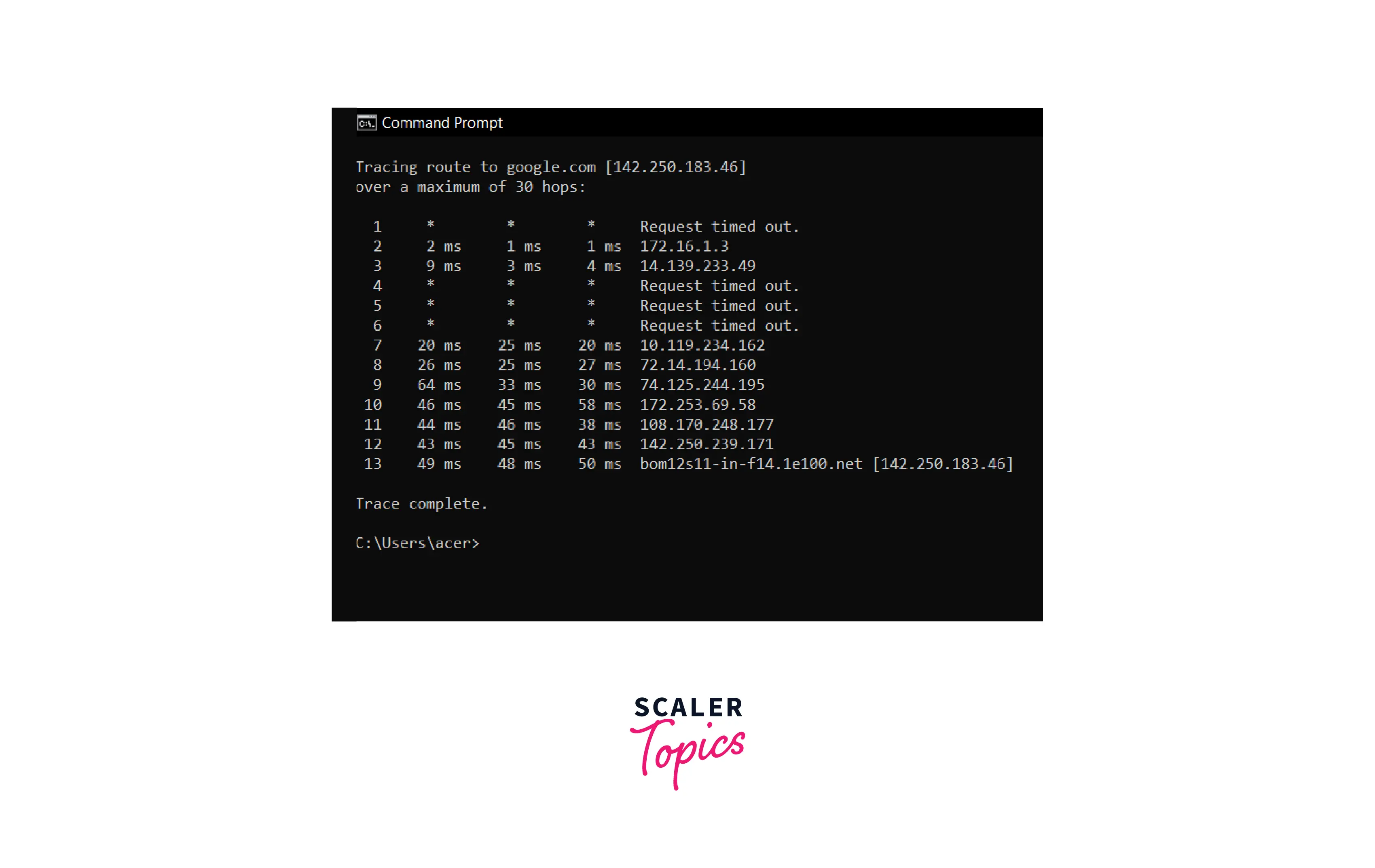
Traceroute is a utility that traces a packet from your computer to the host and displays the number of steps (hops) required to reach it and the time needed for each step.
The user can enter tracert <ip_address> at the command prompt. The <ip_address> is the IP address of the destination or target device. After that, a data packet is sent to the destination. Every time it passes a router, it sends the router's information to the sending device. This data comprises the IP address as well as the time it took to travel between each hop. In this way, the traceroute assists in determining where a problem occurs on the network. Overall, Traceroute assists in tracing the route between two points while documenting each hop.
For example:- To test the connectivity of google.com, simply use the following command in the command prompt.
How does Traceroute work?
Traceroute operates by transmitting data packets with a short survival period (Time to Live - TTL), which specifies how many steps (hops) the packet can survive before being returned. When a packet fails to reach its final destination and expires at an intermediate node, that node returns it and identifies itself. Traceroute can identify intermediary hosts by gradually increasing the TTL. If any hops return "Request timed out," this indicates network congestion and is a reason for sluggish loading of Web pages and failed connections.
How Scaler Transformed Careers in Different Fields
Scaler learners achieved 2.5x salary growth with average post-Scaler CTC reaching ₹23L.
 Google
 Amazon
 Microsoft
 Flipkart
 Adobe1200+ more
Ping vs Traceroute
| Ping | Traceroute |
|---|---|
| A ping is a command-line tool that is available on all platforms. | Whereas traceroute is a utility that differs depending on the platform. |
| It can be used by the ping <ip_address> syntax. | It can be used by the tracert <ip_address> syntax. |
| Ping is used to determine whether a network data packet can reach an address without errors. | The traceroute assists in mapping data on the internet from its origin to its destination. |
| Ping calculates the time taken by echo reply requests based on the response from the network address of the server. | Traceroute counts how many hops it takes packets to reach the host and how long each hop takes. It also calculates the exact path the packets traverse. |
| Ping employs ICMP (Internet Control Message Protocol) echo packets to determine packet loss and return time to its destination. To test connectivity, remote hosts use echo request type 8 and echo reply type 0. | Traceroute, on the other hand, employs both ICMP and UDP (User Datagram Protocol) data packets to determine packet loss and return time, depending on the platform. |
| Ping is unable to determine the route or path to the destination. | Traceroute uses TTL (Time-To-Live) to determine the best route to the destination. |
| The TTL (Time-To-Live)) value of a ping packet cannot be modified. | Traceroute broadcasts an incremental TTL until the source, or maximum TTL, is reached. |
| While gaming, ping is used to determine latency. | Traceroute is used for video conferencing to debug hop delay. |
Conclusion
- A ping (Packet Internet or Inter-Network Groper) is a simple Internet utility that allows a user to test and verify if a specific target IP address exists and can accept requests in computer network administration.
- Ping is also used for diagnostic purposes to verify that a host machine that the user is attempting to reach is active.
- Ping operates by delivering an ICMP Echo Request to a predetermined network interface and then waiting for a response.
- Traceroute is a utility that traces a packet from your computer to the host and displays the number of steps (hops) required to reach it and the time needed for each step.
- Traceroute operates by transmitting data packets with a short survival period (Time to Live - TTL), which specifies how many steps (hops) the packet can survive before being returned.
- A ping is a command-line tool available on all platforms, whereas a traceroute is a utility that differs depending on the platform.




