


<dt> Tag In HTML
 FREE
FREE

Build an AI-First Career, Master the Complete Skillset
Choose from our industry-leading programs designed for career success
Modern Software and AI Engineering Program
Master full-stack development with AI integration


 +1000 more
Modern Data Science and ML with specialisation in AI
Advanced data science techniques with AI specialization
+1000 moreAdvanced AIML with Specialisation in Agentic AI
Deep dive into AIML with focus on Agentic systems
+1000 moreDevOps, Cloud & AI Platform Engineering
Build and manage AI-powered cloud infrastructure
+1000 moreAI Engineering Advanced Certification by IIT-Roorkee
Premier AI engineering certification from IIT-Roorkee

AI Forward Deployed Engineer Program
Full-stack engineering, production AI and client-facing consulting
+1000 moreOverview
The dt tag in HTML is used to define a term in a description list. A description list is a list of terms with a description of each term. The description list is created using the dl tag. Inside the dl tag, we use the <dt> tag to define a description term, and after each <dt> tag, we should have at least one dd tag (description details) to describe the term defined in the dt tag in HTML.
To learn more about HTML tags, click here.
Syntax
To define a description term, we use the dt tag like this:
Here, we have the opening and closing </dt> tags, and the term is written between them.
Example:
Attributes of <dt> tag
The dt tag in HTML only includes the global attributes.
How Scaler Transformed Careers in Different Fields
Scaler learners achieved 2.5x salary growth with average post-Scaler CTC reaching ₹23L.
 Google
 Amazon
 Microsoft
 Flipkart
 Adobe1200+ more
How to Use <dt> Tag in HTML?
The dt tag in HTML is used within the dl tag, and after each <dt> tag, we should have at least one dd tag to describe the description term.
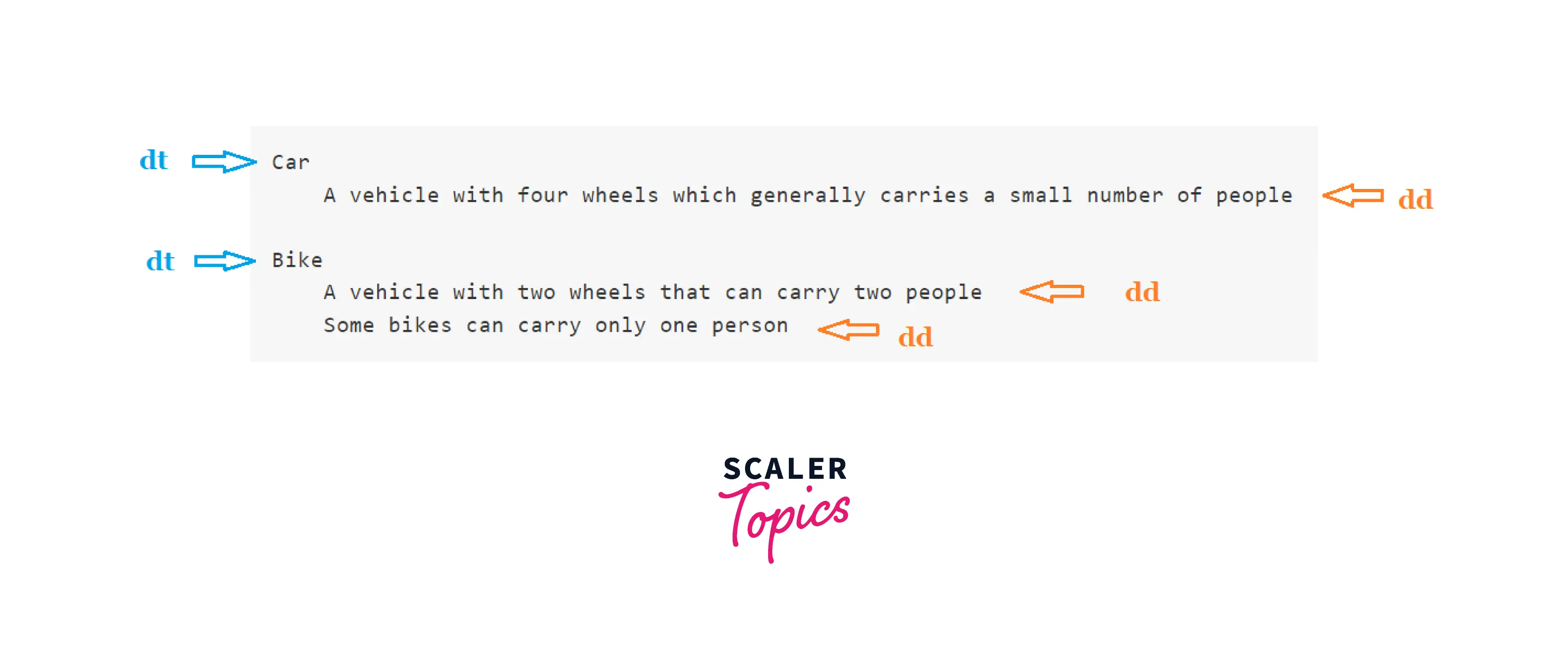
So, here in this image, we can see the hierarchy of <dt> and <dd> tags. More is explained with the example below:
Examples
A description list with terms and descriptions
The output of this code will be:

Note: Here, we can see that in the first description term, i.e., car, we have only one description detail(<dd> tag), and in the second <dt> element, i.e., Bike, we have two description details (<dd> element). So, in a description list in HTML, we can have the following:
- a single term having a single description
- a single term having multiple descriptions
- multiple terms having a single description
- multiple terms having multiple descriptions
Turn Learning into Career Growth
Accessibility Concerns
The <dt> tag should be defined properly for the users of the screen reader; if the tag is not used properly, it may create confusion for the user.
Browser support
The list of browsers that support the dt tag in HTML is listed below:
- Chrome
- Edge
- Firefox
- IE
- Safari
- Opera
- Webview android
Conclusion
- The <dt> tag is used to define a term in the description list.
- The <dt> tag is used within the <dl> tag.
- There should be at least one <dd> tag after <dt> tag.




