


Flutter Chatting App
Overview
The chatting app in Flutter is a versatile and user-friendly mobile application developed using the Flutter framework. It enables seamless real-time communication and messaging between users across different platforms. With its sleek and responsive UI, users can easily create profiles, search for contacts, and engage in individual or group conversations. The app supports various features, including text messages, multimedia sharing, emoji support, and push notifications. Powered by Flutter's rich widget library, this app ensures a smooth and delightful user experience while providing a secure and reliable platform for connecting and conversing with friends, family, and colleagues.
What are We Building?
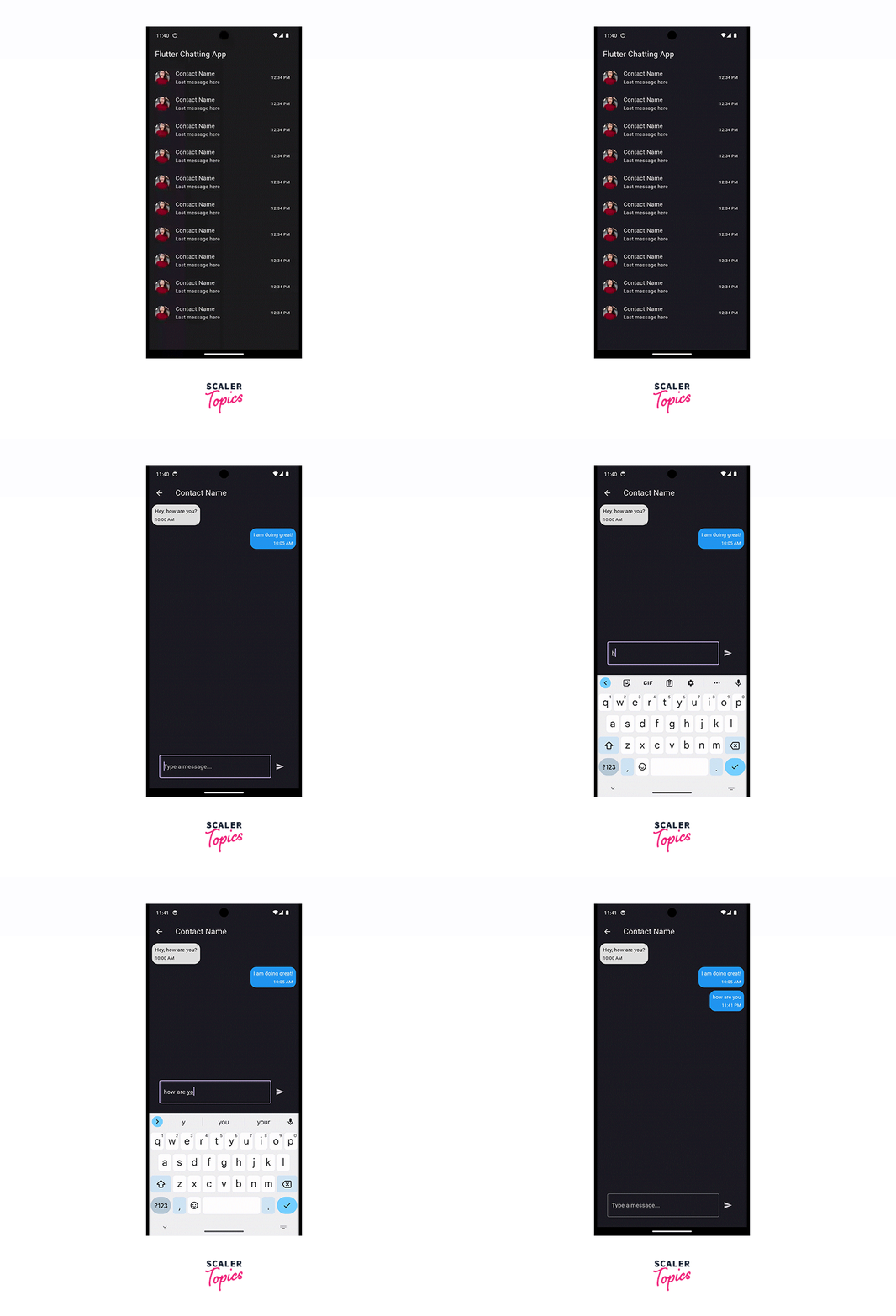
In this project, we will be building UI for a chatting app using the Flutter framework. The app will enable users to engage in real-time conversations, exchange messages, and connect with friends, family, and colleagues across different platforms. With its intuitive interface and powerful features, the app aims to provide a seamless and enjoyable chatting experience. Let's dive into the sub-headings to understand what we'll be building in more detail.
Pre-requisites
Building a chatting app in Flutter requires a solid understanding of various topics and technologies. Here are the major pre-requisites that will be used in this project:
-
Flutter Framework:
A good understanding of the Flutter framework is essential. Familiarity with Flutter widgets, state management, navigation, and handling user interactions will be crucial for developing the UI and implementing app functionality.
-
Dart Programming Language:
Since Flutter is based on the Dart programming language, a solid grasp of Dart is necessary. Understanding Dart syntax, data types, functions, classes, and asynchronous programming will enable efficient development and implementation of the app's logic.
-
User Authentication:
Implementing user registration and authentication features will require knowledge of authentication protocols, such as OAuth or Firebase Authentication. Understanding how to securely store and validate user credentials is crucial to ensure a secure user experience.
-
Real-time Communication:
Creating real-time messaging functionality involves working with technologies like WebSocket or Firebase Cloud Messaging. Understanding how to establish real-time connections and handle message synchronization across devices is essential for enabling seamless communication.
-
Networking and APIs:
Interacting with server-side APIs for features like user registration, contact management, and message sending requires knowledge of networking concepts and RESTful API integration. Understanding how to make HTTP requests, handle responses, and parse data formats (such as JSON) will be necessary.
-
Multimedia Handling:
Enabling multimedia sharing, such as images and videos, will involve knowledge of handling file uploads, downloads, and storage. Familiarity with libraries like Flutter's image_picker or Firebase Storage will be beneficial for implementing these features.
-
Push Notifications:
Implementing push notifications to keep users updated about new messages and chat activities will require understanding how to integrate push notification services like Firebase Cloud Messaging (FCM) or OneSignal into the app.
-
User Interface (UI) Design:
Developing an appealing and intuitive user interface will involve knowledge of UI design principles, responsive layouts, theming, and Flutter's widget system. Proficiency in designing UI elements and organizing them effectively is essential for creating a polished app.
These pre-requisites provide a foundation for successfully building a chatting app in Flutter. However, for this specific tutorial, you won't be needing all of it,as we are going to only make the UI part for the chatting App in Flutter.
Key Features of Flutter Chat App
A good and complete flutter chatting app should have the following features:
Flutter Chat App Features
-
Real-time Messaging:
-
Message Syncing:
Messages will be synchronized across devices in real-time, ensuring that users can seamlessly switch between devices while maintaining their chat history. This synchronization includes sent and received messages, ensuring a consistent and up-to-date conversation.
-
Offline Messaging:
Users will be able to send messages even when their internet connection is unstable. These messages will be securely stored on the device and automatically delivered once a stable connection is reestablished. This feature ensures that important messages are never lost due to network issues.
-
Message Status:
Users will have clear indicators for message delivery and read receipts. They can see when their messages have been successfully delivered and read by the recipient, enhancing communication transparency.
-
Typing Indicators:
To make conversations feel more interactive and responsive, the app will display when someone is typing in a conversation. Users will see real-time updates when their chat partners are composing messages.
-
-
Multimedia Sharing:
-
Media Previews:
Users can preview multimedia content, such as images and videos, directly within the chat interface. This feature eliminates the need to leave the conversation to view shared media, providing a seamless and user-friendly experience.
-
File Sharing:
Support for sharing various file types will be included. This means users can exchange documents, PDFs, spreadsheets, and other file formats in addition to multimedia content. This enhances the versatility of the app for both personal and professional use.
-
Media Gallery:
All shared media, including images, videos, and files, will be conveniently organized in a media gallery within each chat. This allows users to easily access and revisit shared content, making it a valuable reference tool.
-
-
User Authentication:
-
Secure Authentication:
Robust authentication mechanisms will be in place to protect user accounts from unauthorized access. This may include email verification, phone number verification, or social media logins, depending on user preferences.
-
Password Recovery:
Users will have the ability to reset their passwords if they forget them. This ensures they can regain access to their accounts without significant inconvenience, maintaining a positive user experience and account security.
-
-
Contact Management:
-
Import Contacts:
Users can import their existing contacts from their device's address book, simplifying the process of connecting with friends and acquaintances. This feature enhances user engagement by making it easier to start conversations.
-
Custom Groups:
Creating custom groups with personalized names and profile images will allow users to categorize their contacts efficiently. This is particularly useful for managing large contact lists and organizing conversations around specific interests or topics.
-
Favorites:
Users can mark certain contacts as favorites, creating a dedicated list of frequently contacted individuals. This feature streamlines communication and ensures that important contacts are easily accessible.
-
-
Push Notifications:
-
Customizable Alerts:
Users can customize notification preferences to tailor the app's behavior to their liking. This includes the ability to choose notification sounds, vibration patterns, and notification banners.
-
In-App Notifications:
Notifications will include the option to jump directly into the app and the specific chat where the new message was received. This allows for seamless transitions between app usage and notification response.
-
Notification History:
Users can access a history of notifications, ensuring that they don't miss important messages or updates. This feature is particularly valuable for users who may have temporarily silenced notifications or missed messages while the app was closed.
-
-
Emojis and Stickers:
-
Rich Emojis:
The app will provide a diverse set of expressive emojis covering a wide range of emotions and expressions. This enhances the communication experience by allowing users to convey their feelings more effectively.
-
Sticker Store:
Users can explore and download additional sticker packs from a built-in sticker store. Additionally, they can contribute their own custom stickers for consideration. This feature encourages user engagement and creativity.
-
Emoji Suggestions:
The app can suggest relevant emojis based on the content of the message, making emoji usage more efficient and convenient. Users will appreciate the ease of finding the perfect emoji for their message.
-
-
Search Functionality:
-
Advanced Filters:
Users can filter search results by date, sender, or keywords, allowing them to quickly find specific messages or information within their conversations. This feature enhances usability, especially for users with extensive chat histories.
-
Keyword Highlighting:
Search results will highlight the searched keywords within the chat messages, making it easier to identify relevant content. This visual cue speeds up the process of finding specific information within a conversation.
-
-
Offline Messaging:
-
Offline Queue:
Messages sent while offline will be queued and delivered automatically once the user's device regains a stable internet connection. This ensures that messages are reliably delivered, even in challenging network conditions.
-
Delivery Confirmation:
Users will receive confirmation when their messages are successfully delivered to the recipient. This provides peace of mind that their messages have reached their intended audience.
-
-
User Profiles and Avatars:
-
Profile Updates:
Users can update their profile information, including status messages, profile pictures, and other personal details. This feature allows users to express themselves and keep their profiles up to date.
-
Avatar Gallery:
Users can choose from a selection of avatars or upload their own custom profile picture. This personalization feature helps users identify each other easily and adds a personal touch to their profiles.
-
-
Customization Options:
-
Theme Selection:
Users can choose from various app themes, including light, dark, colorful, and more. This allows users to personalize the app's appearance to match their preferences and mood.
-
Chat Customization:
Users can customize chat backgrounds, font styles, and bubble colors, allowing them to tailor the chat interface to their individual tastes. This feature enhances the overall user experience by providing a visually pleasing and customizable environment.
-
Notification Preferences:
Customizable notification tones, vibration patterns, and LED light settings will be available to suit individual preferences. Users can fine-tune their notification experience to match their preferences and priorities .
-
The chat app in Flutter incorporates key features such as real-time messaging, multimedia sharing, user authentication, contact management, push notifications, emojis and stickers, search functionality, offline messaging, user profiles, and customization options. These features contribute to a rich and engaging chatting experience, enabling users to connect, communicate, and express themselves effectively within the app.However, It is to be noted we will only be making the UI for the Chatting App in Flutter in this tutorial.
How are We Going to Build the Flutter Chat App?
To build a Flutter Chat App UI, we will need to follow several steps:
-
Setting up Flutter:
If you haven't already, you'll need to set up Flutter on your development machine. You can do this by following the official Flutter installation guide available on the Flutter website or refer to this article by Scaler Topics.
-
Create a New Flutter Project:
Once Flutter is set up, create a new Flutter project using the Flutter CLI or your preferred integrated development environment (IDE). Use the Flutter CLI to create a new project:
-
Design the Chat App UI:
Before diving into coding, it's essential to design the user interface (UI) of your Chat App. Consider the layout, color scheme, typography, and overall aesthetics you want to achieve. Tools like Adobe XD or Sketch can help in creating a UI mockup.
-
Implementing the Chat UI:
Now it's time to start coding! Flutter uses the Dart programming language. Open the main.dart file and begin implementing the chat UI. There are several key components you'll need to build:
-
Chat List:
Display a list of chat conversations with various contacts. Each list item will show the contact's name, profile picture, last message, and timestamp.
-
Chat Bubble:
Create a custom widget to represent chat bubbles for both incoming and outgoing messages. A chat bubble usually includes the sender's profile picture, the message text, and a timestamp.
-
Input Field:
Add an input field where users can type and send messages. This field should also include a button or an icon that triggers the message sending action.
-
Navigation:
Implement navigation to move from the chat list to the individual chat screen when a user clicks on a particular contact.
-
-
Managing Chat State:
To create a functional chat app, you need to manage the chat state efficiently. You'll need to handle sending and receiving messages, displaying them in the chat list and individual chat screens, updating the timestamps, and managing user interactions.
-
Integrate with Backend:
A real chat app needs a backend server to handle messaging and communication between users. You can use Firebase or other backend services to manage user authentication, message storage, and real-time updates.
-
Handling User Interactions:
Implement various user interactions, such as tapping on a chat item to open the chat screen, handling message sending, and updating the UI when new messages arrive in real-time.
-
Testing and Debugging:
Test your app thoroughly on different devices and screen sizes. Flutter's built-in hot reload feature can be beneficial for quick iterations and debugging.
-
Polishing the UI:
Pay attention to details and polish the UI by making small adjustments to ensure a smooth and delightful user experience.
-
Publishing the App:
Once you are satisfied with the app, you can prepare it for release and publish it on the Google Play Store for Android or the Apple App Store for iOS.
Complete Code
You can find the entire code HERE!
-
main.dart
-
flutter_chat_app.dart
-
chat_list_screen.dart
-
chat_list_item.dart
-
individual_chat_screen.dart
-
chat_bubble.dart
-
message_input_field.dart
What’s Next!
- Real-time Messaging:
- Implement real-time messaging using Firebase Cloud Firestore or Firebase Realtime Database. This allows users to receive messages instantly without the need to refresh the app manually.
- User Authentication:
- Add user authentication using Firebase Authentication or other authentication providers. This will enable users to sign in and create accounts, making the chat app more personalized.
- Message Status Indicators:
- Display status indicators for messages, such as "delivered," "read," or "sending." Update the message status based on the recipient's actions.
- Media Sharing:
- Enable users to send and receive images, videos, and other media files. Implement a feature to preview media files directly in the chat screen.
- Message Time Formatting:
- Format the message timestamps in a user-friendly way, such as showing "just now," "1 minute ago," "1 hour ago," etc.
- Message Pagination:
- Implement pagination for chat history, allowing users to load older messages as they scroll up.
- Typing Indicator:
- Show a typing indicator when the other user is typing a message. This can provide a more interactive and engaging chat experience.
- Group Chats:
- Extend the app to support group chats where users can chat with multiple contacts simultaneously.
- Push Notifications:
- Implement push notifications using Firebase Cloud Messaging (FCM) to notify users of new messages even when the app is not open.
- Emojis and GIFs:
- Add support for sending and displaying emojis and GIFs in the chat messages.
- Message Search:
- Allow users to search for specific messages within a chat conversation.
- Block or Mute Users:
- Add the ability for users to block or mute certain contacts to manage their chat preferences.
- Message Encryption:
- Implement end-to-end encryption to ensure secure and private messaging.
- Message Deletion:
- Allow users to delete their messages from the chat history.
These are just a few ideas for additional features that can be implemented to enhance the Flutter Chat App UI. Depending on the scope and complexity of your project, you can pick and choose which features to prioritize and implement. Always keep the user experience in mind and aim to create a seamless, intuitive, and enjoyable chat app for your users.
Conclusion
- The Flutter Chatting App UI design demonstrates a user-friendly interface, ensuring seamless navigation and ease of use for users.
- The visually appealing layout and well-thought-out design elements make the Flutter Chatting App UI engaging and attractive to users.
- The use of smooth animations enhances the overall user experience, making interactions more intuitive and enjoyable.
- The Flutter Chatting App UI showcases a responsive design that adapts well to various screen sizes, ensuring a consistent experience across different devices.
- The app UI prioritizes functionality, providing users with intuitive features and controls to facilitate seamless communication.
- The modular design of the Flutter Chatting App UI allows for easy customization, enabling developers to tailor the app according to specific branding or user requirements.