


Generative AI Development: A Complete Guide to Building GenAI Apps
Generative AI development is the practice of building applications on top of generative models, foundation models like GPT, Claude, or Llama, wired up to your data, your tools, your prompts, and enough guardrails that they do something genuinely useful instead of just something impressive in a demo. Here's the one-line framing that trips people up early: you're almost never training the model yourself. You're building the system around it. This page maps the whole thing, the stack, the build order, the tools, the actual costs, the parts that break, and a first project to start this weekend.
A quick note before we get into it. There's a whole industry of agencies selling "generative AI development services" and pages quoting you a price to hire them. That's not this page. If you're trying to understand and build, not procure, you're in the right place.
If you want the longer, week-by-week version of everything below, a step-by-step generative AI roadmap is the companion piece to bookmark alongside this one.
Worth saying plainly why this page exists at all. Search volume for "generative ai development" is still small today, but the whole cluster around it, RAG, agents, vector databases, is climbing fast, and it's climbing because the underlying work is genuinely spreading past AI labs into ordinary product teams. This is the map for someone who hasn't picked a lane yet and, reasonably, wants the whole picture before choosing one.
What Does a GenAI App Actually Look Like? The Stack
This is the part half of you came here for, so let's not bury it. A modern GenAI app is built in layers, bottom to top, and each layer is there to solve a specific, real problem the one below it can't.
Foundation Models and Model APIs
The engine. You're choosing between closed APIs, OpenAI, Anthropic, Google, where someone else runs the model and you pay per token, or open models like Llama or Mistral that you host yourself. Closed gets you moving today. Open wins later on cost, privacy, and control, once you actually know what you need.
Prompt Engineering
How you instruct the model, and genuinely the cheapest lever in the entire stack. Before you reach for a vector database or a fine-tune, ask if a better-written prompt just solves it. It often does. Embarrassingly often, actually.
Retrieval-Augmented Generation (RAG) and Vector Databases
This is how you give the model your data, so it answers from facts instead of from memory it half-remembers and fully makes up when it's unsure. Your documents get chunked, turned into embeddings, and stored in something like Pinecone, Chroma, or Qdrant, then pulled back in at query time. We're not re-teaching RAG here, that's its own deep page, and how RAG connects models to your data and tools covers it properly.
Orchestration Frameworks
LangChain and LlamaIndex are the glue. They chain prompts, retrieval, tool calls, and memory into an actual workflow instead of a pile of disconnected API calls held together with hope. Watch the embedded walkthrough below for the actual building blocks, models, prompts, chains, memory, agents, since seeing it click together helps more than a paragraph ever will. Once orchestration clicks, building agentic AI and orchestration skills is the natural next stop.
*You can check this video to know more about Lnagchain components: LangChain Components Explained (2026)
Build an AI-First Career, Master the Complete Skillset
Choose from our industry-leading programs designed for career success
Modern Software and AI Engineering Program
Master full-stack development with AI integration


 +1000 more
Modern Data Science and ML with specialisation in AI
Advanced data science techniques with AI specialization
+1000 moreAdvanced AIML with Specialisation in Agentic AI
Deep dive into AIML with focus on Agentic systems
+1000 moreDevOps, Cloud & AI Platform Engineering
Build and manage AI-powered cloud infrastructure
+1000 moreAI Engineering Advanced Certification by IIT-Roorkee
Premier AI engineering certification from IIT-Roorkee

AI Forward Deployed Engineer Program
Full-stack engineering, production AI and client-facing consulting
+1000 moreFine-Tuning
The last resort, not the first move, whatever the marketing decks tell you. You reach for fine-tuning, usually LoRA or another parameter-efficient method, only once prompting and RAG genuinely can't get you there. Most teams that jump straight to fine-tuning end up re-learning this the expensive way.
Guardrails, Evaluation, and LLMOps
The unglamorous layer that decides whether your app survives contact with real users. Safety filters, evaluation harnesses, cost and latency monitoring. Nobody puts this on a slide. Everybody who's shipped something wishes they'd built it sooner.
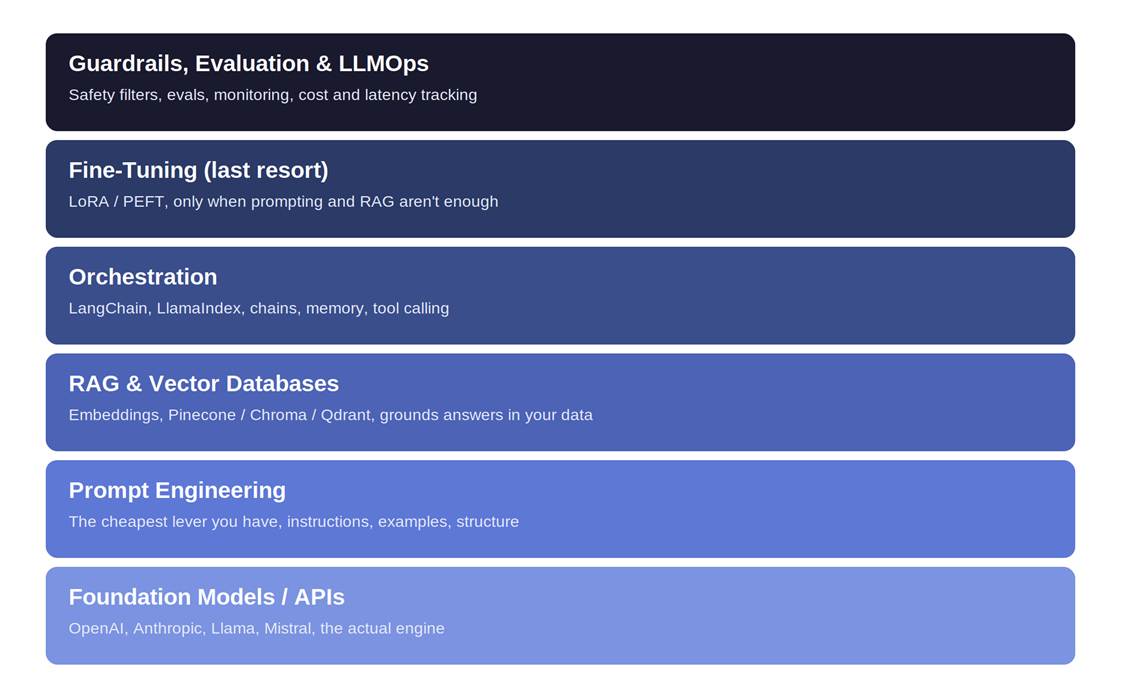
The generative AI app stack, from the foundation model up to guardrails and LLMOps.
Worth noticing how the weight shifts as you go up this stack. The bottom layers get most of the attention in tutorials and LinkedIn posts. The top layers, evaluation, guardrails, LLMOps, get almost none, and they're exactly where experienced teams spend the majority of their actual engineering time once something is live and real users are hitting it in ways your test prompts never did.
How Do You Build a GenAI App, Start to Finish?
Here's the practical spine of the whole page. Six stages, and they loop, they don't run once and stop.
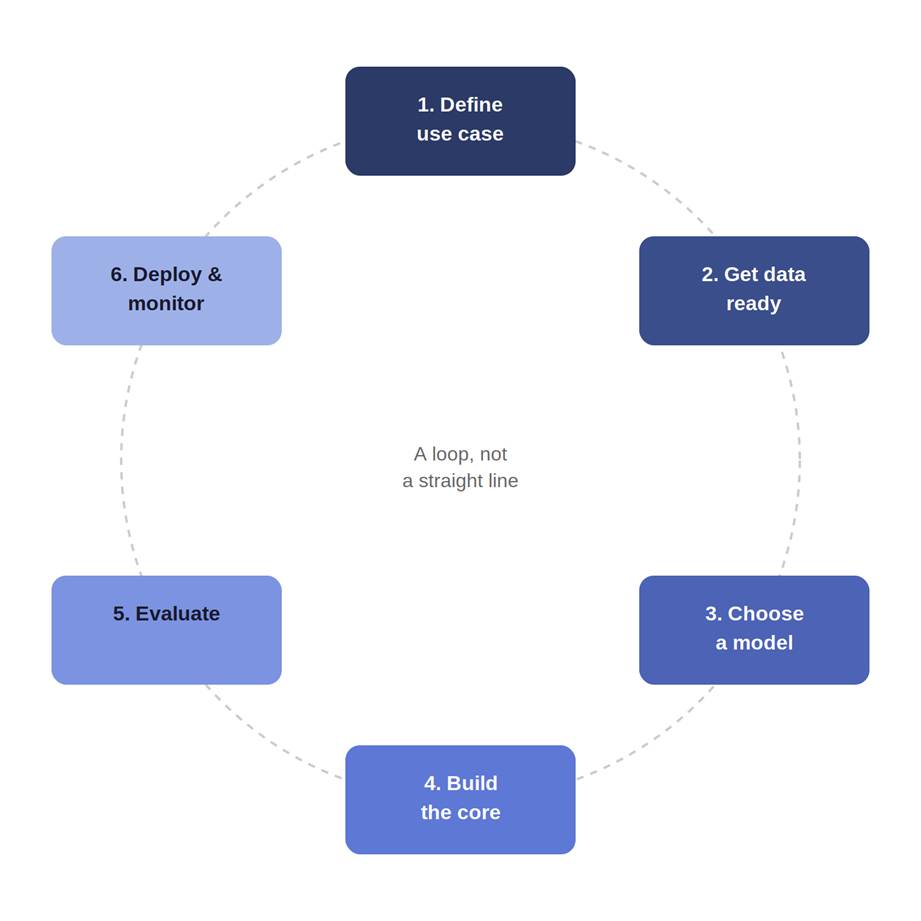
The generative AI development lifecycle. It's a loop, not a straight line.
1. Define the Use Case
Start from a real problem, never from a model you think is cool. What does "good" actually look like here? If you can't answer that in a sentence, you're not ready to open an IDE yet.
2. Get the Data Ready
The documents, the knowledge base, the examples the app needs. Quality here decides everything downstream, and it's the step everyone underestimates because it's the least fun one.
3. Choose Your Model
Closed API or open model, size versus cost versus latency. We'll get to the actual decision framework in the next section, so don't sweat it yet.
4. Build the Core
Prompts first. Add RAG if the app genuinely needs your own data. Add orchestration to tie the pieces together. Fine-tune only if you truly must, see above. In that order, not whichever order sounds most impressive on a resume.
5. Evaluate
How you actually measure a GenAI app: correctness, faithfulness to the source data, safety, latency, cost. This is not an afterthought bolted on before launch. It's a real discipline, and the teams that treat it as one are the ones whose apps don't quietly degrade six weeks after shipping.
6. Deploy and Monitor (LLMOps)
Ship it, then actually watch quality, cost, and drift, and iterate based on real usage instead of your own gut feeling. This whole lifecycle maps cleanly onto the tools and projects in a generative AI syllabus if you'd rather learn it as a structured curriculum than piece it together from blog posts, no judgment either way.
Should You Build or Buy, and Which Model Do You Pick?
This is the section most competitors skip entirely, and it's where the actual engineering judgment lives.
Build vs Buy
Be honest with yourself: most first projects should assemble from existing tools, not build from scratch. If you're not a coder, or you just want to validate an idea fast, low-code and no-code GenAI tools will get you further, faster, than you'd expect. Build from scratch once you've outgrown what the low-code platforms can actually do, not before.
How Scaler Transformed Careers in Different Fields
Scaler learners achieved 2.5x salary growth with average post-Scaler CTC reaching ₹23L.
 Google
 Amazon
 Microsoft
 Flipkart
 Adobe1200+ more
Open vs Closed Models
The decision people agonise over way more than they need to, early on.
| Factor | Closed APIs (OpenAI, Anthropic) | Open Models (Llama, Mistral) |
|---|---|---|
| Control | Limited, you use what they give you | Full, you own the weights and the serving stack |
| Cost | Cheap to start, can climb fast at scale | Higher upfront, wins on cost at real scale |
| Data privacy | Data leaves your infrastructure | Stays entirely under your control |
| Latency | Depends on their infrastructure, usually fine | You control it, can optimise further |
| Ease of start | Fastest, an API key and you're moving | Slower, you're now also running infrastructure |
| When to choose | Prototypes, most first products | Cost-at-scale, strict privacy, regulated data |
Key message, if you only remember one line from this table: closed APIs get you moving fastest, open models win on cost-at-scale, privacy, and control once you actually know your usage pattern.
RAG vs Fine-Tuning
The decision people get wrong most often. RAG supplies knowledge at query time. Fine-tuning changes the model's underlying behaviour or style. Most products should start with RAG, it's cheaper, and updating a document store is a lot easier than retraining a model every time something changes. Save fine-tuning for when RAG genuinely isn't enough, not as your opening move.
What Tools and Frameworks Will You Actually Use?
Concrete and scannable, grouped by the layer they live in.
| Layer | Example tools | What it's for |
|---|---|---|
| Models & APIs | OpenAI, Anthropic, Hugging Face, Ollama | The foundation model itself, hosted or via API |
| Orchestration | LangChain, LlamaIndex | Chaining prompts, retrieval, tools, and memory |
| Vector databases | Pinecone, Chroma, Qdrant | Storing and searching embeddings for RAG |
| Evaluation & LLMOps | Eval frameworks, tracing and monitoring tools | Measuring quality, cost, and catching regressions |
| Guardrails | Input/output filtering tools | Blocking unsafe output, injection, data leakage |
For the official reference on the most-used model API, OpenAI's developer platform documentation is the primary source. On the open-model side, Hugging Face's documentation covers hosting and fine-tuning in real depth. Name these correctly, because half of interview prep in this field is just knowing who does what.
None of these tools live in isolation, and that's the part a bullet list can't quite show you. A typical request in a working RAG app touches four or five of these layers in under two seconds: your orchestration framework receives the query, hits the vector database for context, assembles a prompt, calls the model API, and your evaluation or logging layer records what happened, all before the user notices any of it happened at all.
What Makes GenAI Development Hard? The Honest Part
This is the section the vendor pages won't write, because it doesn't sell anything. It just happens to be true.
Hallucination
The model states wrong things with total, unbothered confidence. RAG helps, grounding helps, and explicitly telling the model it's allowed to say "I don't know" helps more than you'd think. The underlying architecture behind why this happens traces back to the original transformer research, these models are fundamentally predicting the next plausible token, not consulting a fact-checker.
Latency
Big models are slow, and users notice within about two seconds. Streaming responses, using smaller models where you can get away with it, and caching repeated queries are your main levers here.
Cost
Tokens add up fast, faster than most people budget for on a first project. Model choice, context size, and caching are what actually control the bill, not vague promises to "optimise later." A context window that quietly grew from 2,000 tokens to 20,000 because someone kept stuffing more "just in case" context into every request is a genuinely common way a demo-cheap prototype turns into a surprisingly expensive habit.
Turn Learning into Career Growth
Safety and Guardrails
Prompt injection, unsafe output, data leakage, these aren't edge cases, they're Tuesday. Input and output filtering isn't optional once real users touch your app. The NIST AI Risk Management Framework is the closest thing to a government-standard reference if you want to build guardrails against something more rigorous than vibes.
Evaluation Is Genuinely Hard
There's no single accuracy number for a GenAI app, no matter how much you'd like one. You build task-specific evals, and this is where serious teams actually spend their effort, quietly, long after the demo everyone clapped for.
How Do You Get Started? A First Project Path
End on momentum, not more theory. Here's a sensible ladder, and yes, it's fine to feel a little impatient by this point.
• A prompt-only tool. No RAG, no orchestration. Just a well-instructed model doing one job well.
• Add RAG over a small document set. Your notes, a handful of PDFs, anything real you actually care about answering questions on.
• Add a simple agent or tool call. Let it do one more thing than just respond, like check a calendar or hit an API.
• Evaluate it, then deploy it. Even a rough eval and a live link beats a perfect prototype sitting on your laptop.
A few beginner-friendly project ideas if you want somewhere to point that ladder: a chatbot over your own notes, a document Q&A assistant for something you actually read often, or a content helper that drafts a first pass of something you write regularly. Build something small end-to-end before you go deep on any single layer. The depth comes later, and it comes faster once you've shipped one small, complete thing.
Once you've got a first project working, generative AI projects worth building for your portfolio has the next tier up, the kind that actually gets noticed in an interview.
FAQs
What is generative AI development in simple terms?
Building apps on top of generative models. You're constructing the system around the model, prompts, data, tools, guardrails, not training the model itself.
What skills do you need for generative AI development?
Python basics, prompt engineering, RAG, comfort with an orchestration framework, and evaluation, plus the judgement to pick the right approach for the problem in front of you rather than the most exciting one.
Do you need to train your own model to build GenAI apps?
No. Most development uses existing foundation models via APIs or open weights. Training a model from scratch is rare, expensive, and honestly not what 95 percent of GenAI jobs actually involve.
What is the difference between RAG and fine-tuning?
RAG supplies knowledge at query time by retrieving relevant documents. Fine-tuning changes the model's underlying behaviour or style. Start with RAG, it's cheaper and far easier to update as things change.
Open-source or closed models, which should a beginner use?
Closed APIs to start fast and learn the concepts without managing infrastructure. Open models once cost at scale, data privacy, or control genuinely start to matter for what you're building.
How much does it cost to build a GenAI app?
Mostly inference and token cost, plus whatever infrastructure you're running. Model choice, context size, and caching are the main levers. This is a learning answer, not a services quote, actual cost varies enormously by use case.
What are the biggest challenges in generative AI development?
Hallucination, latency, cost, safety and guardrails, and evaluation. In roughly that order of how often they surprise people who haven't shipped one of these before.
Ready to move from understanding the GenAI stack to actually building on it? Explore Scaler's guide to the best generative AI courses to learn LLMs, RAG and deployment and pick your structured next step.




