


Get URL in JavaScript
 FREE
FREE

In web development, understanding how to retrieve the current webpage's URL is crucial for various tasks.
JavaScript provides two methods Document - URL and window.location.href, to precisely fetch this URL information. By utilizing these built-in JavaScript functionalities, developers can access the complete web address, encompassing details like the HTTP protocol. This proficiency not only facilitates effective navigation but also plays a pivotal role in enhancing user interactivity and experience across dynamic web applications.
Syntax
The program to get URL in JavaScript is:
Return Value: This returns a string representing the URL of the document/webpage.
For example: Open the website https://www.google.com/ and enter the following code in the browser's console.
Output:
In the above example, we used document.URL to print the URL of the webpage.
Build an AI-First Career, Master the Complete Skillset
Choose from our industry-leading programs designed for career success
Modern Software and AI Engineering Program
Master full-stack development with AI integration


 +1000 more
Modern Data Science and ML with specialisation in AI
Advanced data science techniques with AI specialization
+1000 moreAdvanced AIML with Specialisation in Agentic AI
Deep dive into AIML with focus on Agentic systems
+1000 moreDevOps, Cloud & AI Platform Engineering
Build and manage AI-powered cloud infrastructure
+1000 moreAI Engineering Advanced Certification by IIT-Roorkee
Premier AI engineering certification from IIT-Roorkee

AI Forward Deployed Engineer Program
Full-stack engineering, production AI and client-facing consulting
+1000 moreURL Components
A URL consists of six different components. Each of these components is divided by special characters like ?, /,, #,* etc. These components are:
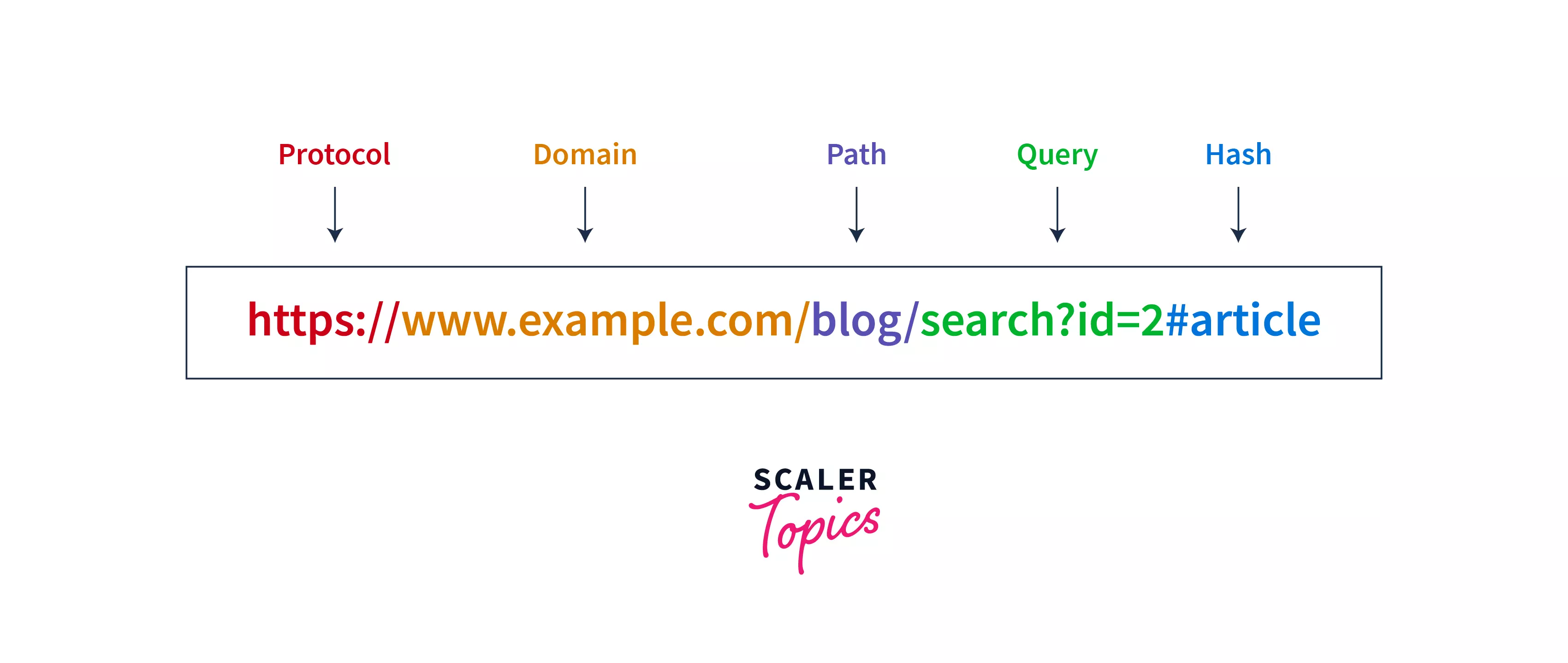
1. Protocol
The protocol is a component of a URL that defines the data transfer protocol we are going to use for data transmission for the current website or resource. The protocols for the URL could be - https, http, smtp, ftp, etc.
2. Domain
The domain is also known as the hostname or the domain name. It denotes the name of a website. An example of a domain in URL is www.google.com.
3. Port
The port is a component of a URL that is written after the domain name and the colon symbol (:). Generally, the port is not publicly visible. So, it is rarely visible on publicly available websites. However, the port is commonly used in the development phase of a website. A port in a URL https://www.example.in:8889 is 8889.
4. Path
The path of a URL is written after the domain name and port. The path specifies the location of one particular resource on a website. This resource could be an image, HTML page, etc. For example, in the URL https://www.scaler.com/topics, the path /topics points to a resource named topics in the website.
How Scaler Transformed Careers in Different Fields
Scaler learners achieved 2.5x salary growth with average post-Scaler CTC reaching ₹23L.
 Google
 Amazon
 Microsoft
 Flipkart
 Adobe1200+ more
5. Query
A query is a string in the URL that is used to enable internal search on a website. For example, in the URL https://www.example.com/blog/search?doc=javascript, search?doc=javascript represents the query.
6. Hash
The hash component usually appears at the end of a URL. It begins with the # (hash) symbol. It denotes a specific location inside a web page like the "id", "name", or any other attribute for an HTML element. For example, in https://www.scaler.com/topics/javascript/classes-in-javascript/#class-fields, #class-fields denotes the hash component of the URL.
Turn Learning into Career Growth
How to Get Current URL in JavaScript
Previously we used document.URL to get the current URL, but now we will use location object as it gives more functionalities. The location object in JavaScript belongs to the window and contains information about the current webpage. To get the current URL in JavaScript, we can use the location object and its href property.
Syntax:
For example: Open the website https://www.scaler.com/topics and enter the following code in the browser's console.
Output:
In the above example, we used location.href to print the current URL in JavaScript.
Get URL Origin
In order to get the base URL (i.e., the protocol, hostname, and the port number), we use the origin property of the location object.
Syntax:
For example: Open the website https://www.scaler.com/topics and enter the following code in the browser's console.
Output:
In this example, because we used the origin property, we got the base URL as the output. The path /topics was omitted from the output.
Conclusion
- URL stands for Uniform Resource Locator which is used to locate resources on the web.
- A URL has six components - Protocol, Domain, Port, Path, Query, and Hash.
- We can use document.URL and window.location.href to get URL in JavaScript.
- We can use window.location.origin to get the base URL of a website.




