


How To Set Upstream Branch on Git?
Overview
A git upstream branch is very closely related to a remote branch as we use the upstream branch that is used to track the remote repository by our local repository. Whenever we want to issue commands like git fetch or git pull without providing any argument, we are fetching or pulling the data from the upstream branch (that we set using the git set upstream command). Before setting up a git upstream branch, we must have a cloned GitHub repository. So, whenever there is a need of checking out a branch in Git from the remote repository, we use the git upstream branch hosted on the remote server (like GitHub).
Build an AI-First Career, Master the Complete Skillset
Choose from our industry-leading programs designed for career success
Modern Software and AI Engineering Program
Master full-stack development with AI integration


 +1000 more
Modern Data Science and ML with specialisation in AI
Advanced data science techniques with AI specialization
+1000 moreAdvanced AIML with Specialisation in Agentic AI
Deep dive into AIML with focus on Agentic systems
+1000 moreDevOps, Cloud & AI Platform Engineering
Build and manage AI-powered cloud infrastructure
+1000 moreAI Engineering Advanced Certification by IIT-Roorkee
Premier AI engineering certification from IIT-Roorkee

AI Forward Deployed Engineer Program
Full-stack engineering, production AI and client-facing consulting
+1000 morePre-Requisites
The prerequisites for learning the git set upstream command can be a basic understanding of Version Control Systems, Branching, and Git. Let us discuss them briefly before learning about the git set upstream command.
Branching
A branch is an independent line of development that is used to add certain features and fix bugs without hampering the main project. So, we can develop new features in parallel and when the development is completed, we can add the back to the main project. By default, all the GitHub repository has the master branch which can be used for production.
So, a new branch is a copy of the master branch which is created for bug fixes and for the addition of new features. After the bug is fixed or new features are added, we can merge the branch to the master branch. The git branch command enables us to perform parallel development. The command can create, rename, list, and delete branches.
What is Git Upstream Branch?
A git upstream branch is very closely related to a remote branch as we use the upstream branch that is used to track the remote repository by our local repository. So, whenever there is a need of checking out a branch in Git from the remote repository, we use the git upstream branch hosted on the remote server (like GitHub). In simpler terms, we can say that whenever we want to issue commands like git fetch or git pull without providing any argument, we are fetching or pulling the data from the upstream branch (that we set using the git set upstream command).
To set a git upstream branch, we can use the simple command:
So what are this local branch and remote branch? Well, a local branch is the type of branch that we create on our local system using Git Bash or Git GUI. The local branches are created by developers on their systems for feature development and bug fixing. Once the developer is done with the respective branch development then he/she asks the maintainer of the project to merge those changes and that is how the development process continues. Now a remote branch is quite similar to the local branch it is just that the remote branch is hosted on a remote server like GitHub.
Refer to the image provided below to understand the analogy between remote and local branches.
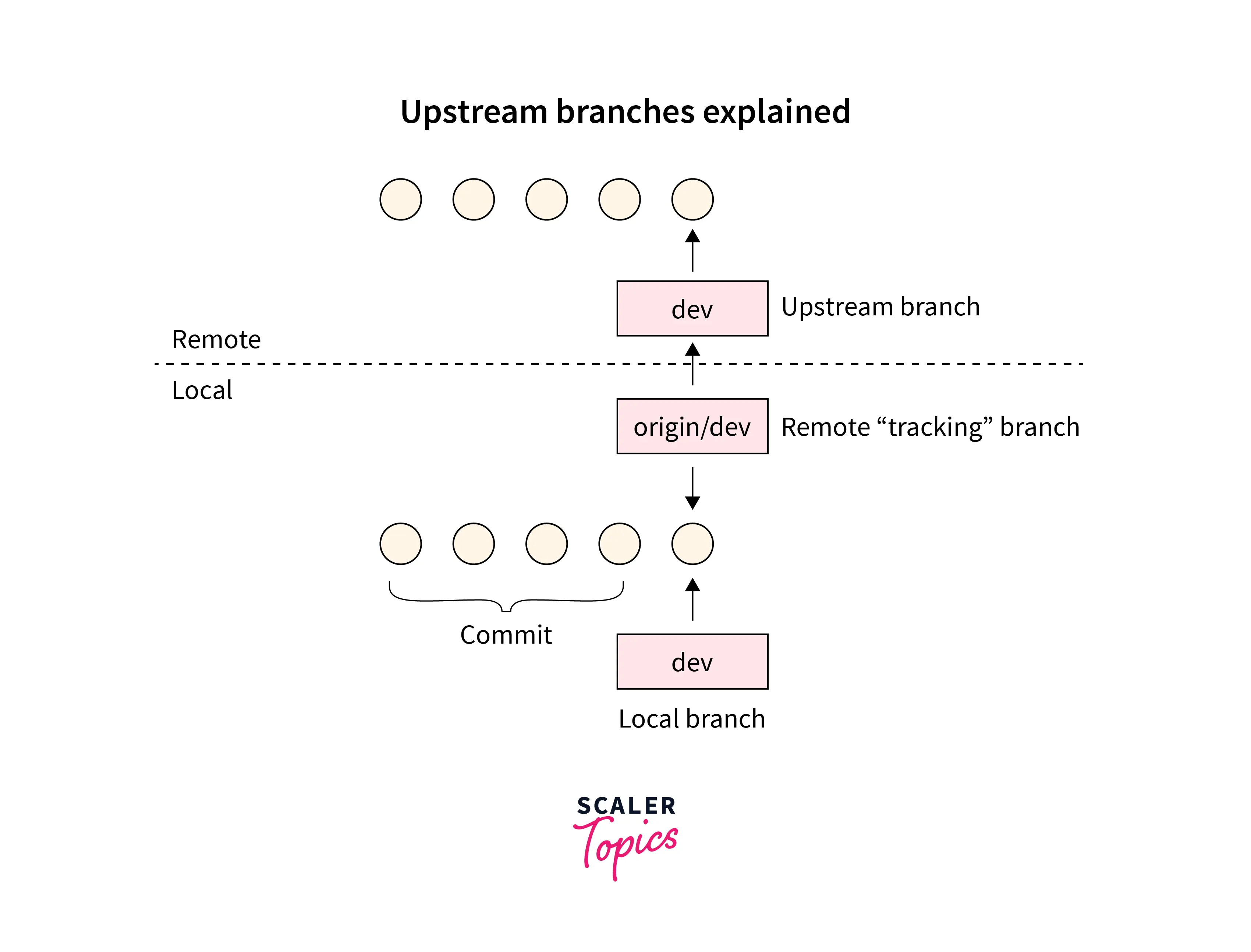
Before setting up a git upstream branch, we must have a cloned GitHub repository. Why do we clone a project from remote servers like GitHub? Suppose a developer or a team of developers have developed a project and hosted the project on the GitHub platform so that all the users can use it and see the source code. Now you are a user of the product and when you were viewing the project, you found an issue that you can fix. So, how will you fix the issue? Will you message the developers? Mail the team? or Will you change the code and ask the project maintainers to merge the changes after viewing it?
The last option is the best choice. So, to change the content of a project, we first fork the remote repository using the fork button present on GitHub or using the git fork command. Now after forking it, you will copy the entire project on your local system. This copying of the project is termed cloning in Git. So, you can either use the Clone or download button and download the zip project on your local system or you can use the git clone command for the same. Git clone and Git fork commands are used to clone and fork the remote repository to our local system.
To fetch the data from the remote repository using git clone, we can use the command:
To learn more about cloning, forking, etc., please refer to the article - Cloning and Forking remote repositories.
Why Set Up an Upstream Branch for a Local Branch?
To understand we should set up an upstream branch, let us take a dummy repository. We have a remote repository hosted on GitHub. Suppose we have our current HEAD (local HEAD branch) set on the test branch. We have also set a remote repository set as origin/test. Now since we have an upstream branch, we get several benefits:
- The git push and git pull operation becomes easier because we have the upstream branch already set so fetching or pulling the data from the upstream branch is done directly.
- We can use simple and short commands for pulling, and pushing. We do not need to type the entire command, branch name, flags, etc. We can simply use the command: git push instead of git push origin development.
- Since the upstream branch is already set, Git can tell us about the un-synced commits that have not been pushed and pulled till now.
To track the information, we can use the git status command. For example:
How Scaler Transformed Careers in Different Fields
Scaler learners achieved 2.5x salary growth with average post-Scaler CTC reaching ₹23L.
 Google
 Amazon
 Microsoft
 Flipkart
 Adobe1200+ more
How to Set Upstream Branches in Git?
Let us see how the git set upstream command is used in various scenarios.
Set Upstream Branch Using Git Push
We can set the git upstream branch using the -u flag that resembles upstream. For setting the upstream branch using the git push command, we first create a branch using the command: git checkout -b "branch-name". As we know that this command will not only create a branch but will also move us to the newly created branch. Now, we can set the upstream branch using the git push command along with the -u flag or option. The overall command for the same is:
We have another command that can be used as an alternative to the git push -u origin command. We can use the --set-upstream command for the same.
Turn Learning into Career Growth
Check Which Git Branches are Tracking Which Upstream Branches
To check which Git Branches are tracking which upstream branches, we have a very simple command. We can list down all our branches that have been tracking the upstream branch using the -v flag/option along with the git branch command. Let us see the overall command for the same.
Conclusion
- Git is a version control system that tracks the changes in the code, documents, and other important information regarding a certain code base, etc.
- A git upstream branch is very closely related to a remote branch as we use the upstream branch that is used to track the remote repository by our local repository.
- Whenever we want to issue commands like git fetch or git pull without providing any argument, we are fetching or pulling the data from the upstream branch (that we set using the git set upstream command).
- Before setting up a git upstream branch, we must have a cloned GitHub repository. So, whenever there is a need of checking out a branch in Git from the remote repository, we use the git upstream branch hosted on the remote server (like GitHub).
- The git push and git pull operation becomes easier because we have the upstream branch already set so fetching or pulling the data from the upstream branch is done directly.
- We can use simple and short commands for pulling, and pushing. We do not need to type the entire command, branch name, flags, etc. We can simply use the command: git push instead of git push origin development.
- Since the upstream branch is already set, Git can tell us about the un-synced commits that have not been pushed and pulled till now.
- We can list down all our branches that have been tracking the upstream branch using the -v flag/option along with the git branch command.
- To track branches for new local branches, we can use the --track flag along with the git checkout command.
- We can even set an alias name for the git push command and then we can use the alias to set the upstream branch. We can push the HEAD as well because the HEAD is equivalent to the remote branch
- We can set the upstream branch using the git push command along with the -u flag or option that resembles the upstream.




