


JavaScript querySelector()
 FREE
FREE

Overview
The querySelector() is a method used for searching and returning the very first element within the document that matches the given selector. The queryselector in javascript only returns the element that matches with one of the specified CSS selectors, or a group of selectors. However, if no matches are found, it returns null.
Note :
In the querySelector() method, the matching is done using depth-first pre-order traversal of all the nodes in the document.
Build an AI-First Career, Master the Complete Skillset
Choose from our industry-leading programs designed for career success
Modern Software and AI Engineering Program
Master full-stack development with AI integration


 +1000 more
Modern Data Science and ML with specialisation in AI
Advanced data science techniques with AI specialization
+1000 moreAdvanced AIML with Specialisation in Agentic AI
Deep dive into AIML with focus on Agentic systems
+1000 moreDevOps, Cloud & AI Platform Engineering
Build and manage AI-powered cloud infrastructure
+1000 moreAI Engineering Advanced Certification by IIT-Roorkee
Premier AI engineering certification from IIT-Roorkee

AI Forward Deployed Engineer Program
Full-stack engineering, production AI and client-facing consulting
+1000 moreSyntax of JavaScript querySelector() :
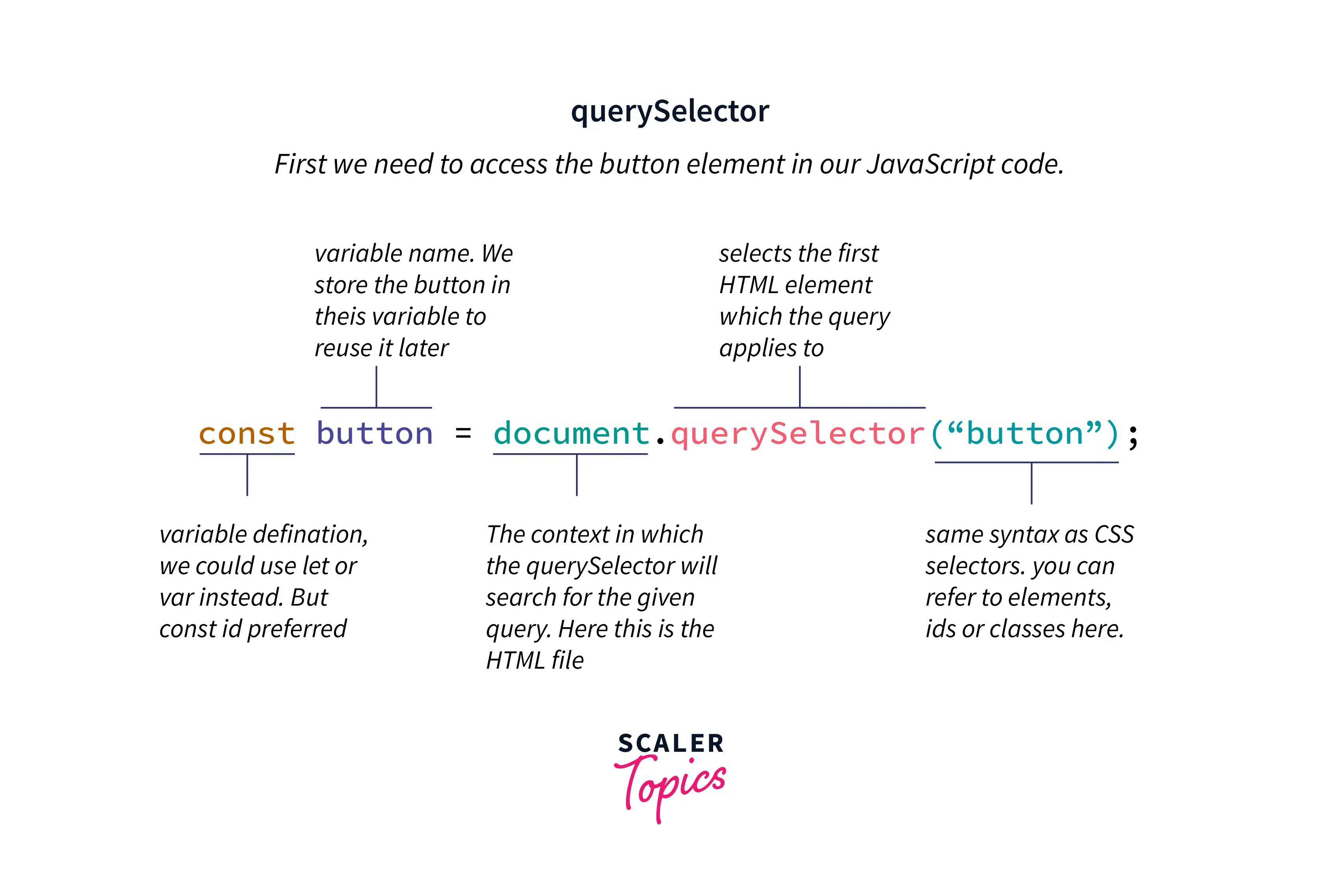
The selector in the syntax is a CSS selector(s) which matches the child elements of the parentNode.
A queryselector in javascript searches the element from the top of the page to the bottom of the page.
Parameters of JavaScript querySelector()
The querySelector() method takes a string parameter containing one or more selectors to match which follows the pattern of a CSS selector, where id is represented by a hash(#) and class is represented by a period(.). Using the comma (,) to separate your selectors will allow you to pass multiple selectors as arguments.
Return Value of JavaScript querySelector()
The queryselector in javascript returns the very first element object found that matches with one or a group of selectors, Otherwise null is returned in the case when there are no matches.
To return all elements that match a CSS selector (not only the first), use the querySelectorAll() instead.
Exceptions of JavaScript querySelector()
DOMException :
SyntaxError :
- If the syntax of the given selectors is not valid, SyntaxError is thrown.
Examples :
Consider the below example for a better understanding of how querySelector() works :
This will be how the HTML page will look :
-
<h2> element can be retrieved by passing "h2" as the method’s argument :
-
If you pass the class attribute, it will return the first element with the InterviewBit class :
-
If you pass the id attribute, it will return the first element with the id scaler
-
You can also pass other attributes like target or value :
-
You can also pass multiple elements like h1 and h2, only the first element found will be returned :
-
The universal selector retrieves all elements of any type denoted by (*), and selects only the first element in the document :
How Scaler Transformed Careers in Different Fields
Scaler learners achieved 2.5x salary growth with average post-Scaler CTC reaching ₹23L.
 Google
 Amazon
 Microsoft
 Flipkart
 Adobe1200+ more
How Does JavaScript querySelector() Work ?
We know that there are many different types of searches that are used to search elements. However, In the querySelector() method the matching is done using depth-first pre-order traversal of all the nodes in the document starting with the very first element in the document's markup and then iterating through sequential nodes in order of the number of child nodes.
- This querySelector method has several exceptions, each of which concerns a situation in which, if the querySelector is invalid syntax, the method will operate improperly and prompt with a syntax error.
- Another scenario states that the querySelector() method will return a null result if the element doesn't find any matches.
querySelectorAll() in Javascript
Since querySelector() in javascript returns only a single element, the additional querySelectorAll() method can be used in situations where you need to get all matching selector elements in the document.
Turn Learning into Career Growth
Syntax :
The querySelectorAll() method returns a static NodeList of elements that matches with one or a group of selectors. If no element matches, an empty NodeList is returned. To convert that NodeList to an array, you need to use the Array.from() method :
Note :
the NodeList is an array-like object, not an array object. However, in modern web browsers, you can use the forEach() method or the "for...of" loop. Use this JavaScript Formatter to format your code.
Basic Examples of querySelectorAll()
Consider the below example for a better understanding of how querySelectorAll() works :
This will be how the HTML page will look :
-
All <h2> elements can be retrieved by passing "h2" as the method’s argument :
Output :
-
If you pass the class attribute, it will return all the elements with the InterviewBit class :
Output :
-
If you pass the id attribute, it will return all the elements with the id scaler
Output :
-
You can also pass other attributes like target or value :
Output :
More Examples
Supported Browser
| Browser | Version |
|---|---|
| Chrome | 1 |
| Edge | 12 |
| Firefox | 3.5 |
| Internet Explorer | 9 |
| Opera | 10 |
| Safari | 3.1 |
| Chrome Android | 18 |
| Firefox for Android | 4 |
| Opera Android | 10.1 |
| Safari on iOS | 2 |
| Samsung InteNget | 1.0 |
| WebView Android | 4.4 |
Want to become a JavaScript expert? Our Free JavaScript course provides the training and recognition you need to succeed.
Conclusion
- The querySelector() returns the very first element that matches with one or more of the specified CSS selectors.
- The querySelectorAll() enables us to search and return all elements within the document.
- A CSS selector defines the element to which a CSS rule must apply.
- It provides quite a flexibility in terms of descendant and parent search for the very first element at a time or all elements at one go.
- JavaScript querySelector() and querySelectorAll() methods are user-friendly methods as it satisfies the requirement and from an accessibility point of view for retrieving elements well efficiently.




