


Jenkins Automated Deployment
Overview
Jenkins is a widely used open-source automation server that streamlines the Jenkins automated deployment process. It automates building, testing, and deploying software projects, ensuring efficient and reliable development workflows. Jenkins enables continuous integration and delivery by integrating with version control systems and other tools. It offers a vast library of plugins for extensibility and customization, supporting diverse technologies and platforms. With Jenkins, teams can automate repetitive tasks, trigger automatic testing, and orchestrate Jenkins automated deployment pipelines. This results in accelerated software delivery, enhanced collaboration, and improved software quality through consistent, automated Jenkins automated deployment processes.
In this article, we will learn about how we set up Jenkins for automatic deployments of our software technologies.
Setting Up Jenkins for Automated Deployment
Setting up Jenkins Automated Deployment involves a series of steps to streamline software delivery processes.
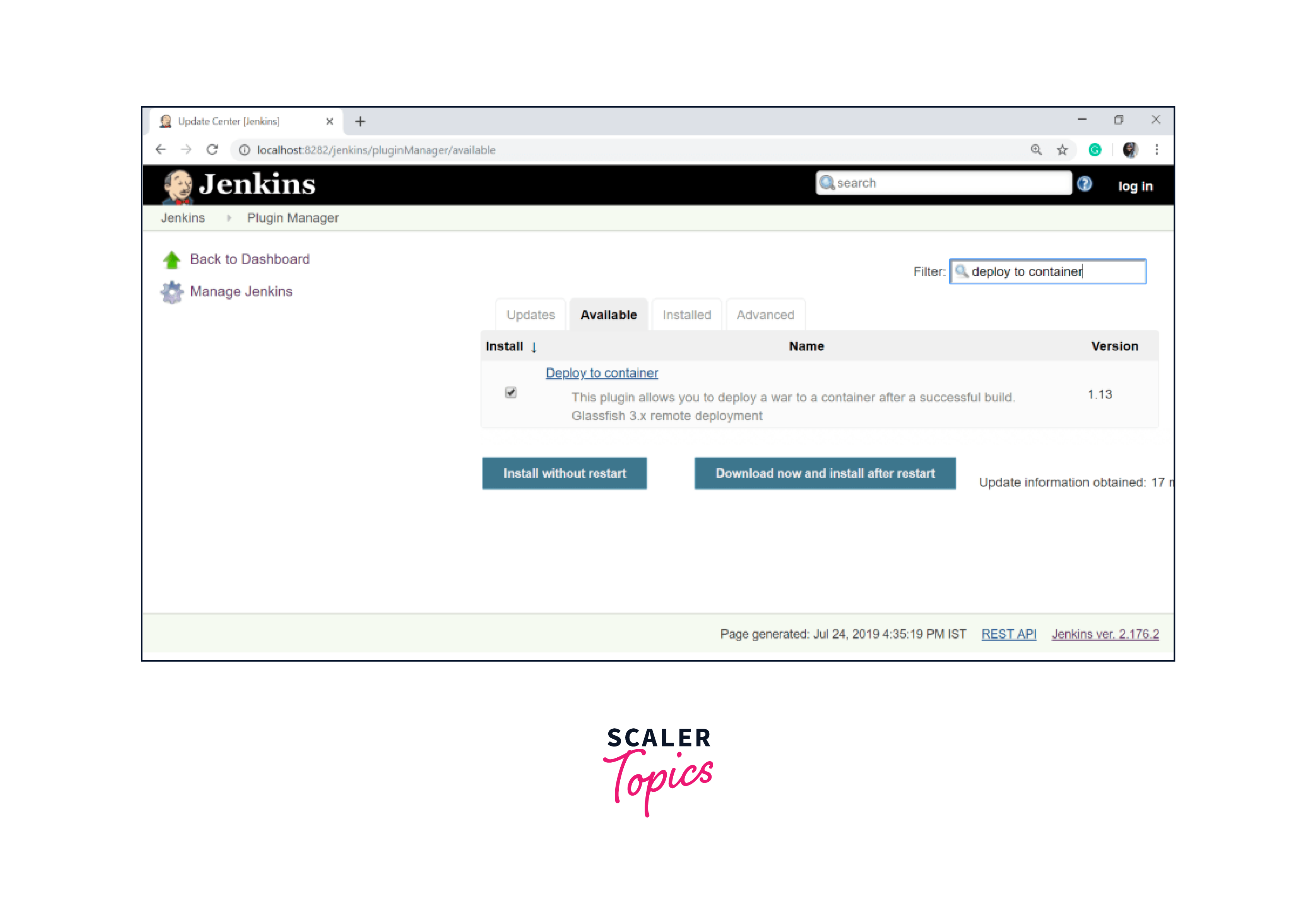
Step 1: Navigate to "Manage Jenkins" and select "Manage Plugins." Switch to the "Available" tab and use the filter to locate the "Deploy to container" plugin. Return to the main page afterward.
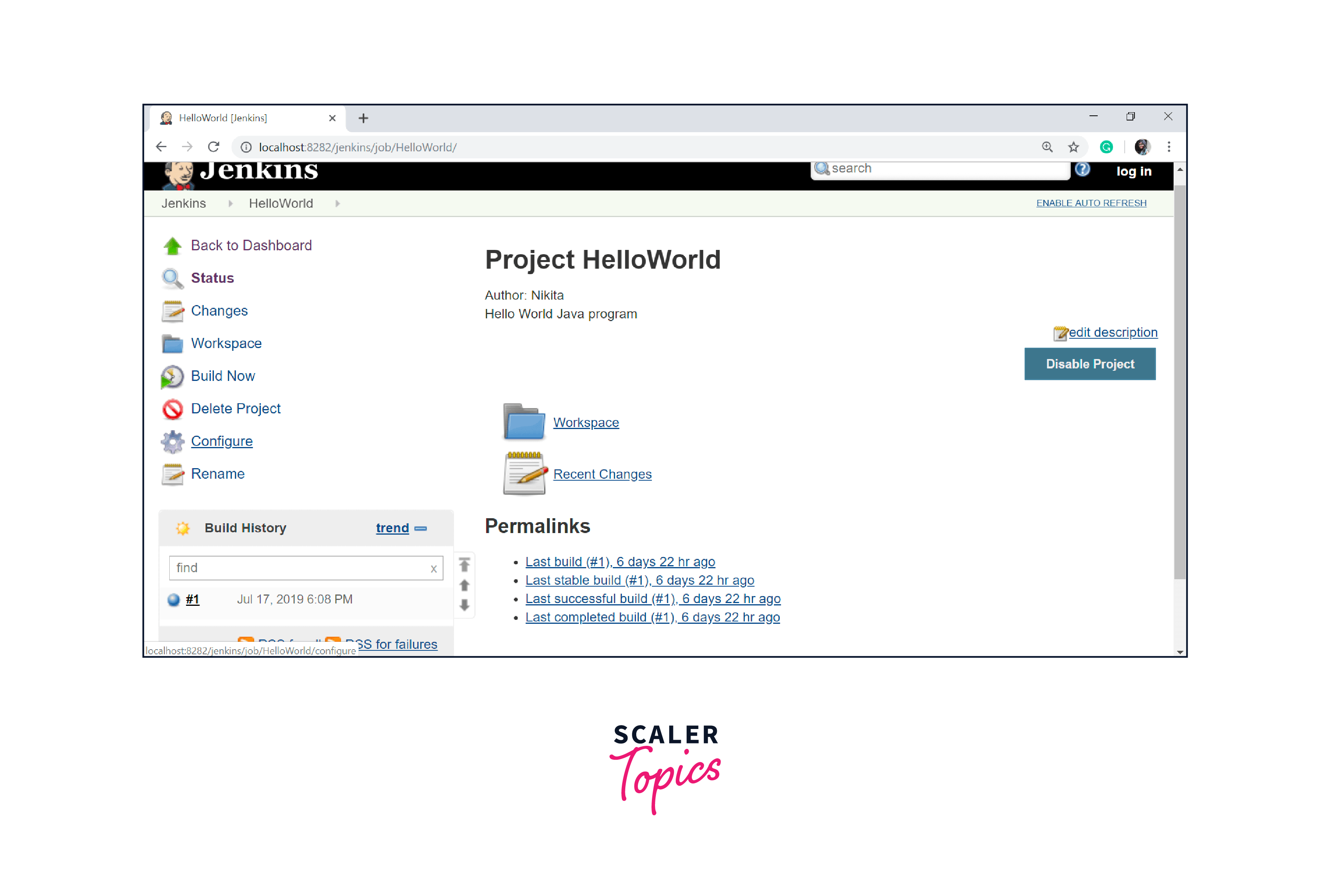
Step 2: Access your designated build project and choose "Configure" from the panel's left side.
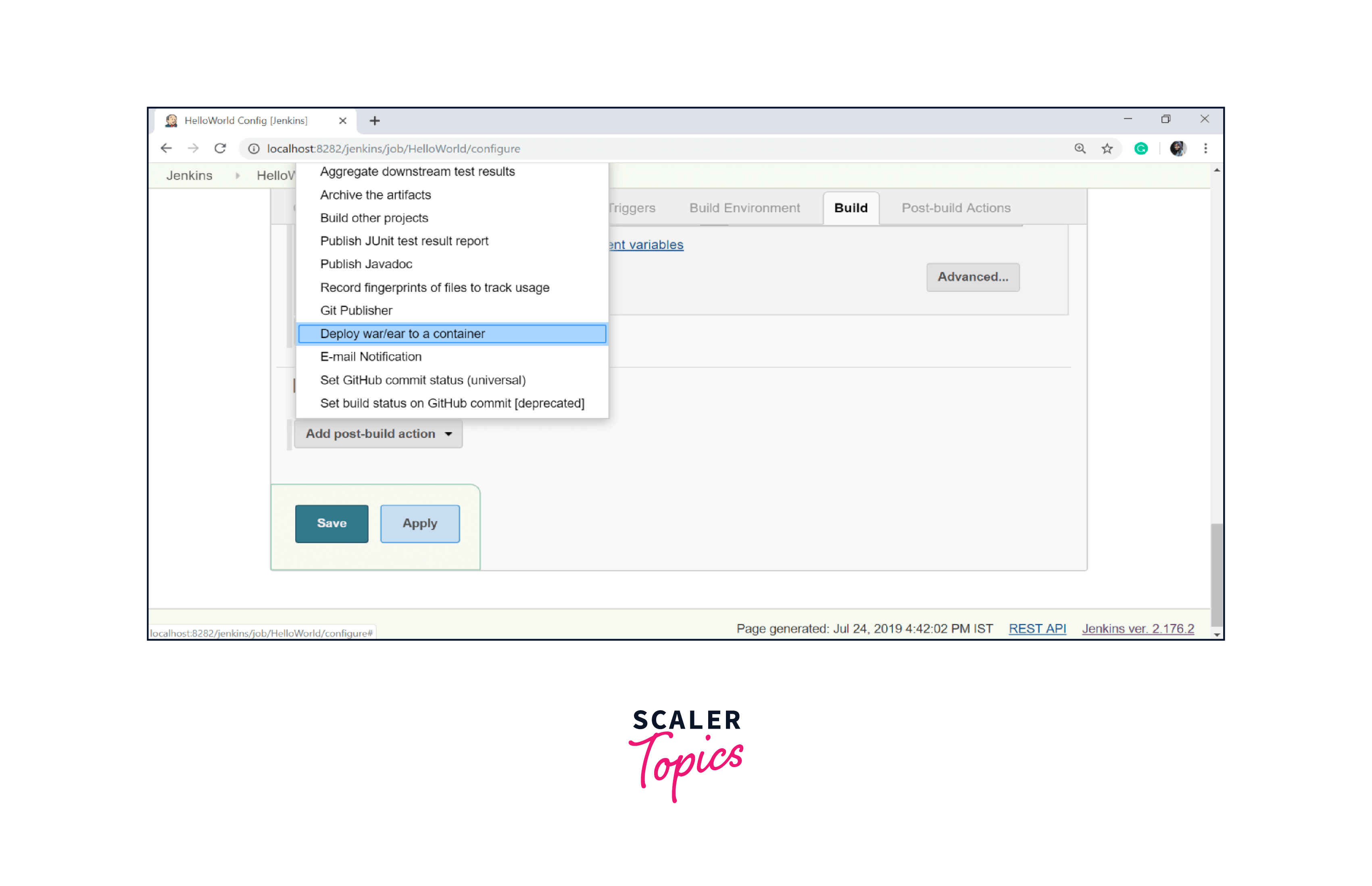
Step 3: Within the configuration page, scroll down and opt for "Add post-build action." Pick "Deploy war/ear to a container."
Step 4: In the "Deploy war/ear to a container" section, input the server details where the files should be deployed.
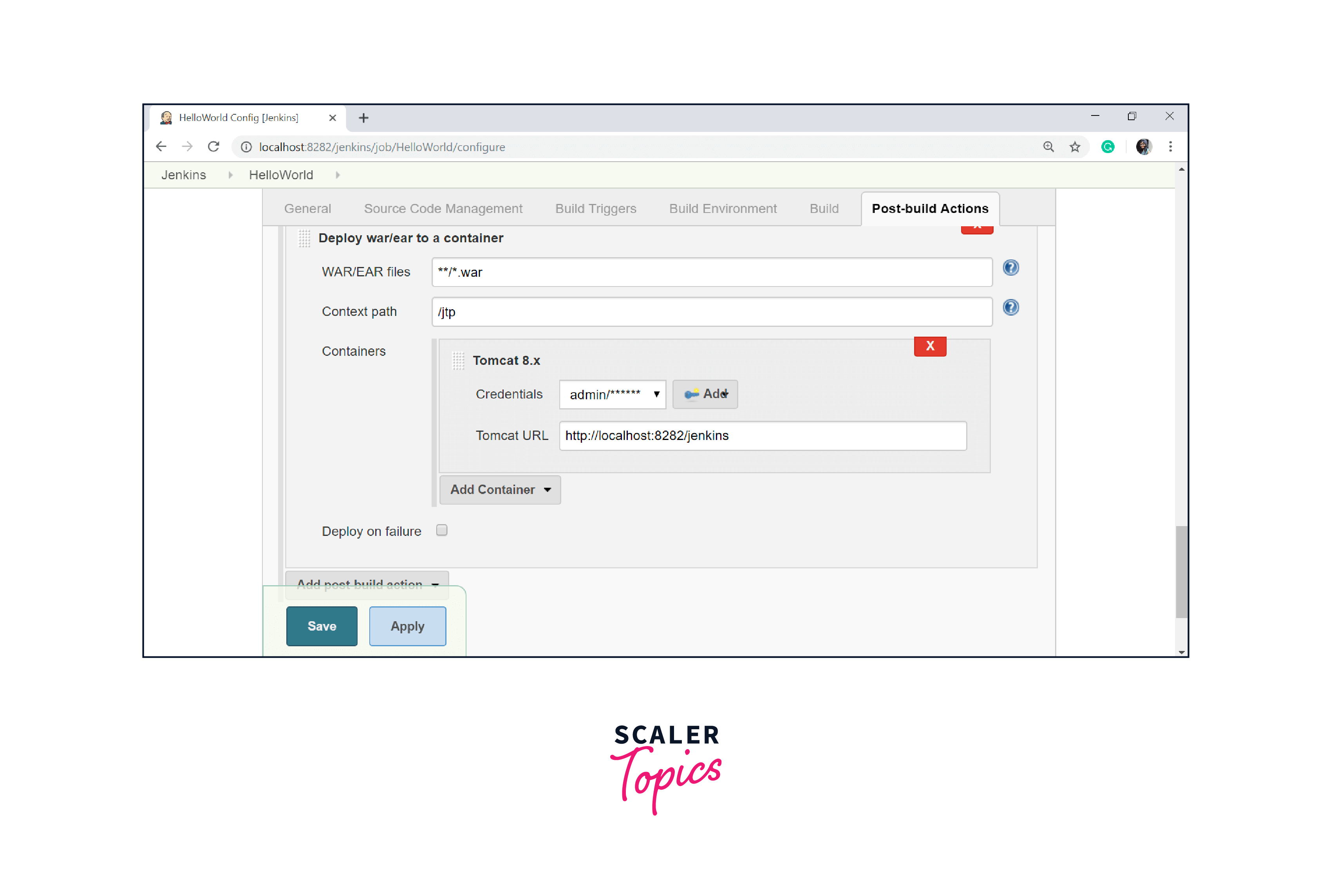
Step 5: Save your changes by clicking the "Save" button.
Version Control and Continuous Integration
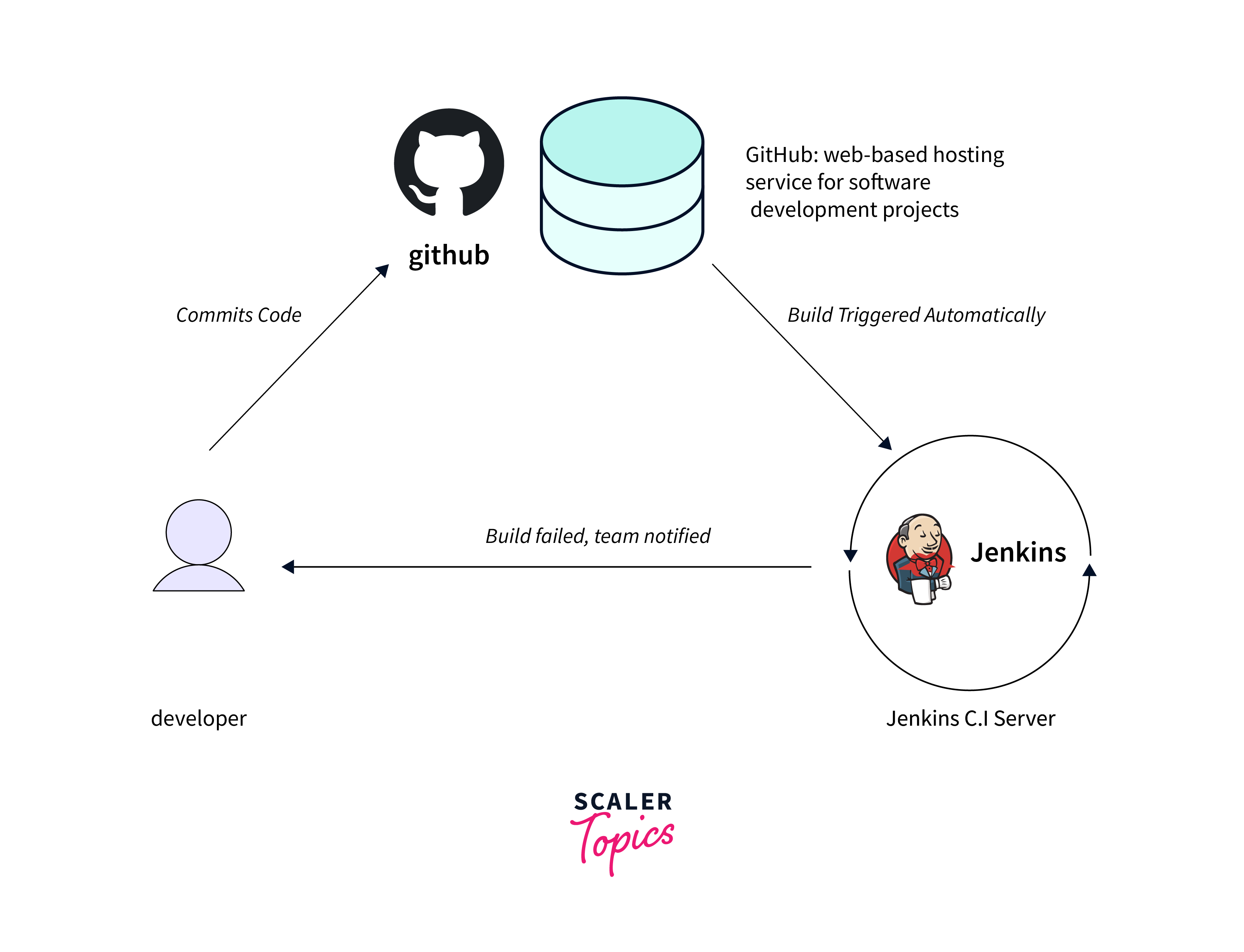
Version Control and Continuous Integration play pivotal roles in Jenkins-driven development pipelines:
Version Control:
Version control and continuous integration are integral components within the Jenkins ecosystem, playing vital roles in modern software development practices. Version control systems like Git enable teams to collaboratively manage code changes, track historical developments, and streamline collaboration. In Jenkins:
- Integration: Connect Jenkins with your version control repository. Trigger builds automatically upon code commits, ensuring updated code is continuously integrated.
- Branch Management: Jenkins supports branch-specific workflows. Different jobs can build and test various branches, promoting parallel development.
- Code Quality: Version control enables code review processes, enhancing quality before integration. Jenkins can enforce certain criteria before a build starts.
- History Tracking: Jenkins references version control to retrieve specific code versions, essential for reproducing past builds and troubleshooting.
Continuous Integration (CI):
Continuous Integration (CI) takes this a step further by automating the process of integrating code changes into a shared repository multiple times a day. Jenkins, as a powerful CI tool, automates the build, test, and deployment pipelines triggered by code commits. This dynamic approach fosters rapid feedback loops, allowing teams to catch bugs early in the development cycle and ensure consistent, reliable builds. In Jenkins:
- Automated Builds: Jenkins automates build processes upon code changes, creating consistent environments for testing and Jenkins automated deployment.
- Automated Testing: Integrate testing frameworks for unit, integration, and acceptance testing. Failures are detected rapidly, minimizing integration challenges.
- Quick Feedback: Jenkins provides prompt feedback on the integration status. Developers learn about issues sooner, addressing them promptly.
- Efficient Debugging: Early issue detection simplifies debugging. Developers can pinpoint the cause, fix it, and retest rapidly.
- Deployment Readiness: CI ensures codebase readiness for Jenkins automated deployment, eliminating last-minute integration headaches.
- Reduced Integration Risks: Frequent integration and testing catch integration problems early, reducing the risk of major defects at the end.
By harmonizing version control and continuous integration in Jenkins, development teams achieve higher productivity, quality, and agility in their software Jenkins automated deployment processes.
Defining Jenkins Automated Deployment Pipelines
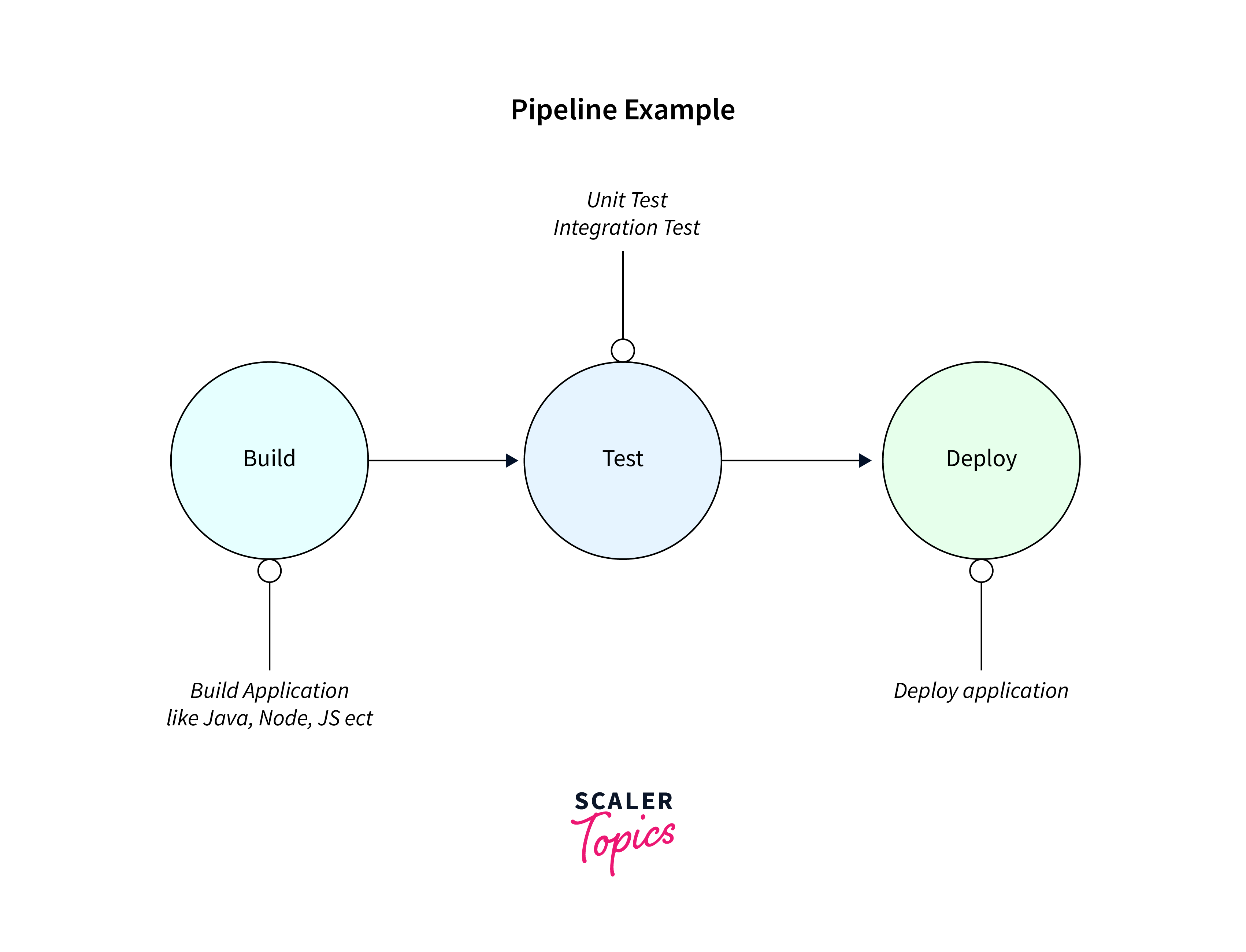
Jenkins Automated Deployment pipelines in Jenkins are orchestrated sequences of automated steps that manage the release process of software applications from development to production. These pipelines ensure consistent, repeatable, and reliable Jenkins automated deployment processes, minimizing manual interventions and human errors. A Jenkins automated deployment pipeline typically consists of multiple stages, each representing a distinct phase of the software delivery lifecycle. Jenkins allows developers and DevOps teams to define and customize these pipelines to match their specific requirements in Jenkins Automated Deployment.
Each stage in a Jenkins automated deployment pipeline represents a critical checkpoint where various actions can be performed, such as building, testing, deploying, and even manual approvals. Jenkins pipelines can be created using a domain-specific language (DSL) or through a visual pipeline editor, providing flexibility in designing complex workflows.
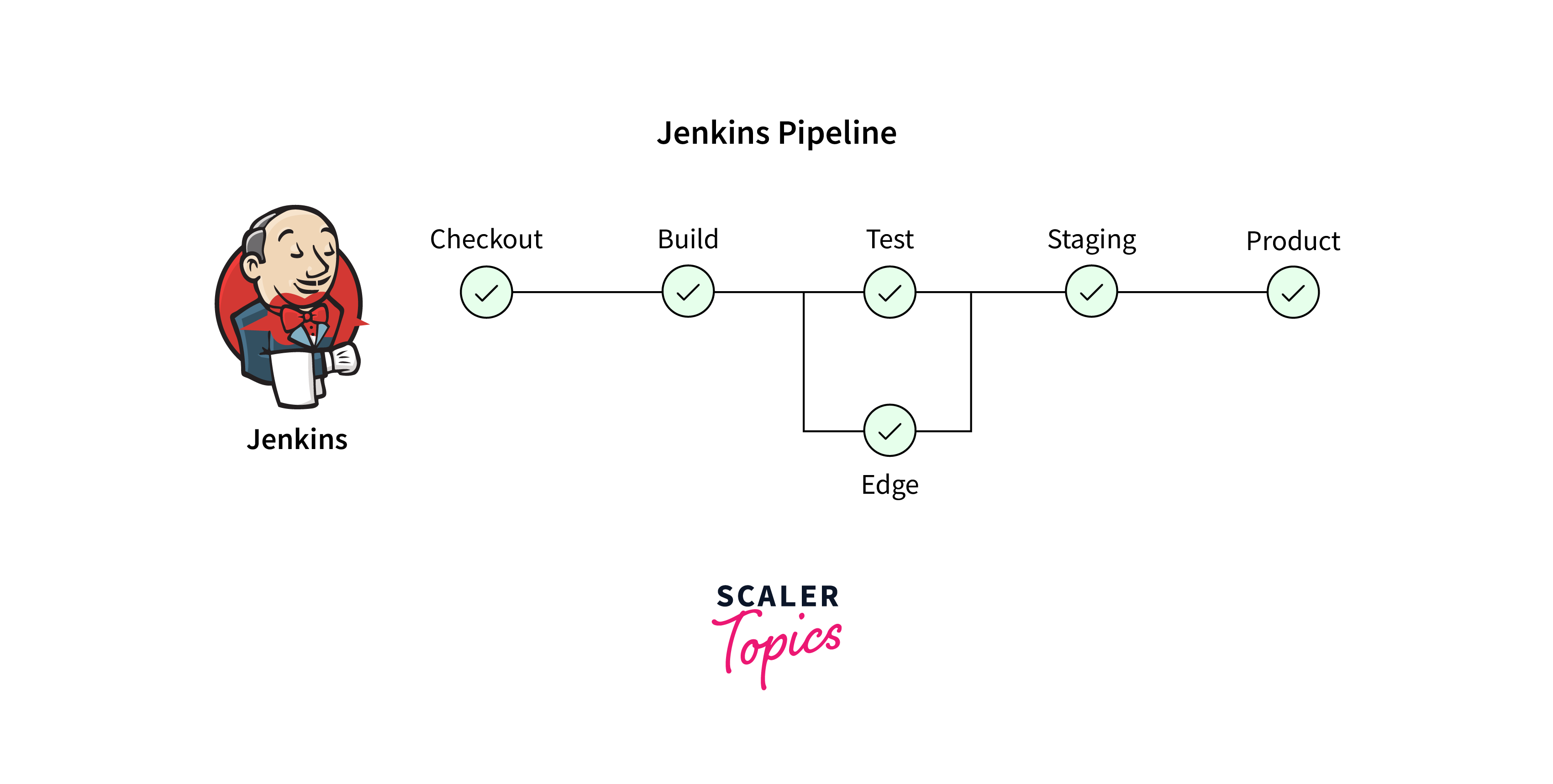
Key features and benefits of Jenkins automated deployment pipelines include:
- Automation: Pipelines automate the entire software delivery process, including building, testing, and deploying, reducing manual intervention and potential errors.
- Visibility: Jenkins automated deployment pipelines offer a clear visual representation of the software delivery stages, providing transparency into the progress of code changes through various environments.
- Consistency: Jenkins automated deployment pipelines enforce consistent deployment processes, ensuring that every code change undergoes the same set of validations before reaching production.
- Traceability: Each pipeline execution is recorded, allowing teams to trace back and understand the history of code changes, tests, and Jenkins automated deployment.
- Parallel Execution: Pipelines can execute stages in parallel, optimizing resource utilization and reducing overall pipeline execution time.
Here are the steps to define Jenkins automated deployment pipelines in Jenkins:
1. Install Jenkins and necessary plugins.
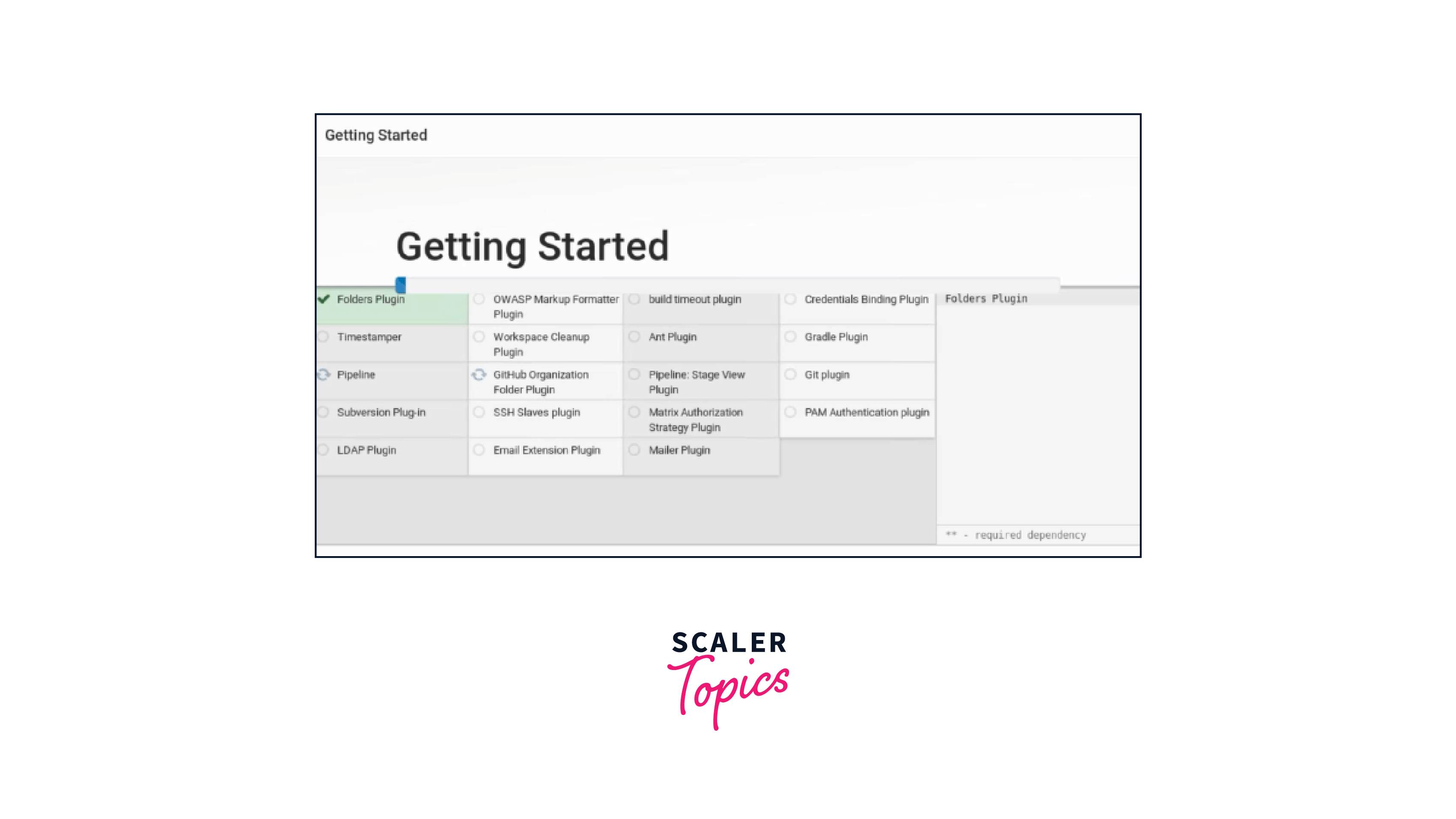
2. Set up source control integration.
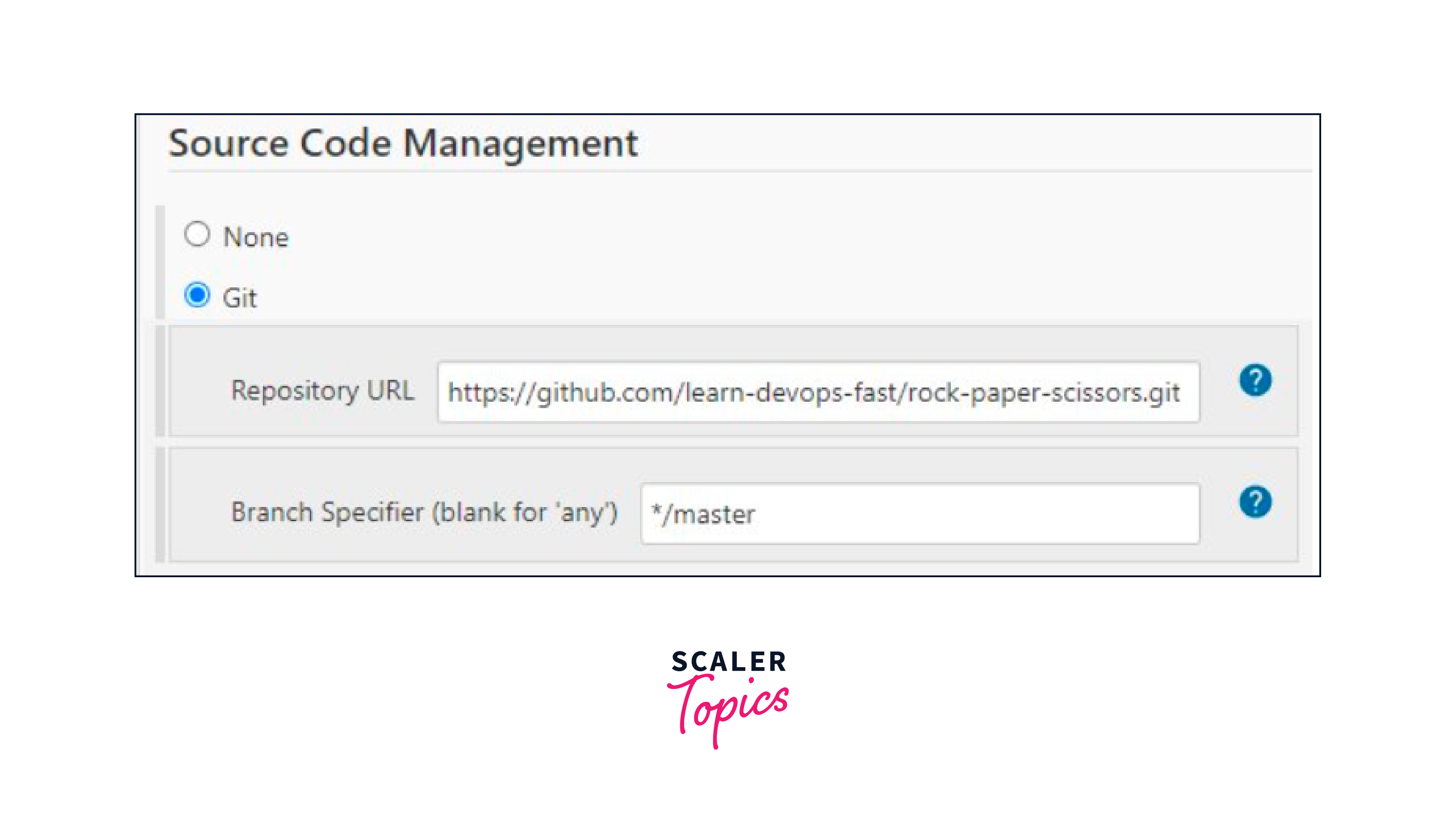
3. Create a Jenkins Pipeline project.
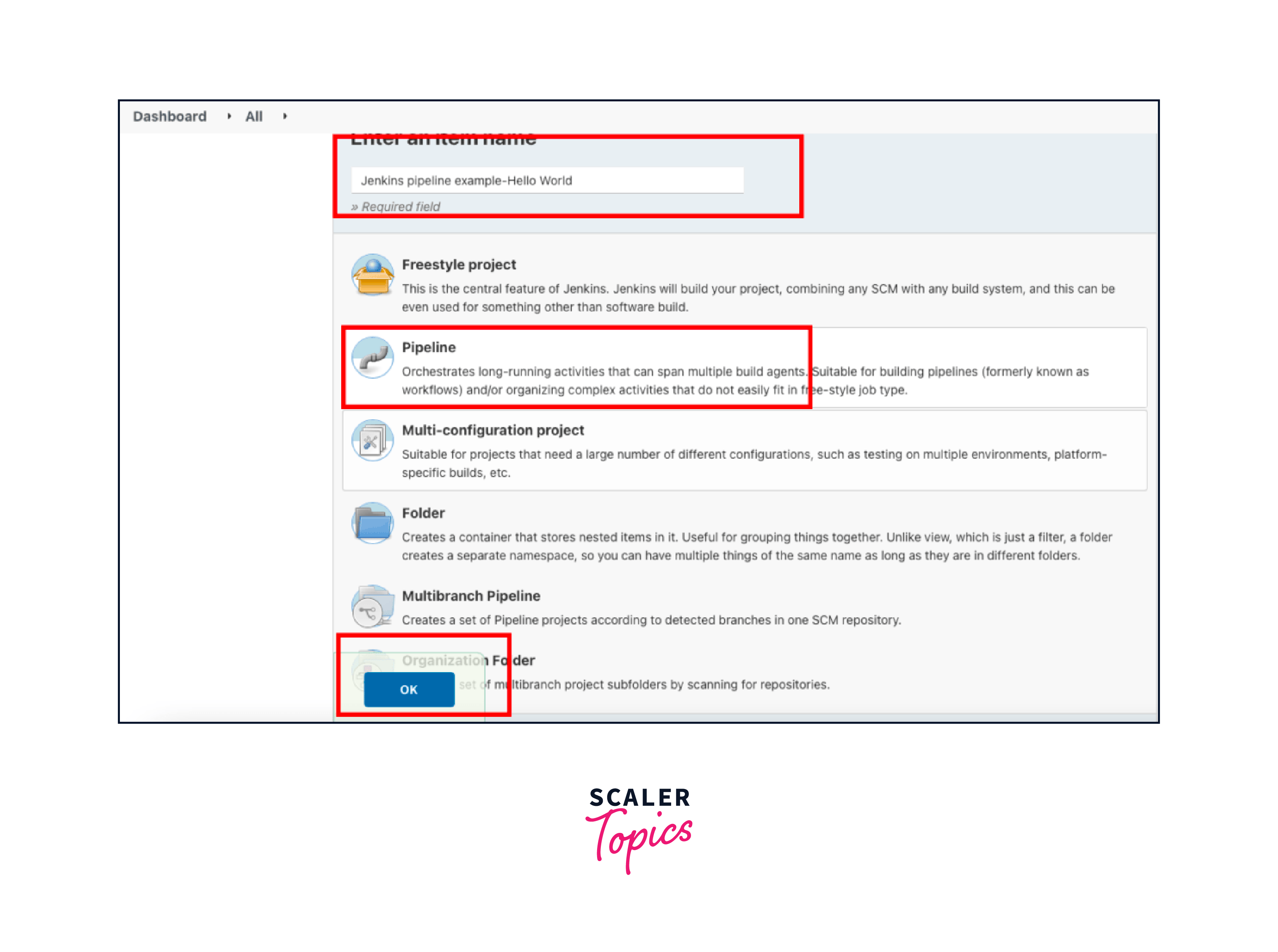
4. Define stages (build, test, deploy).
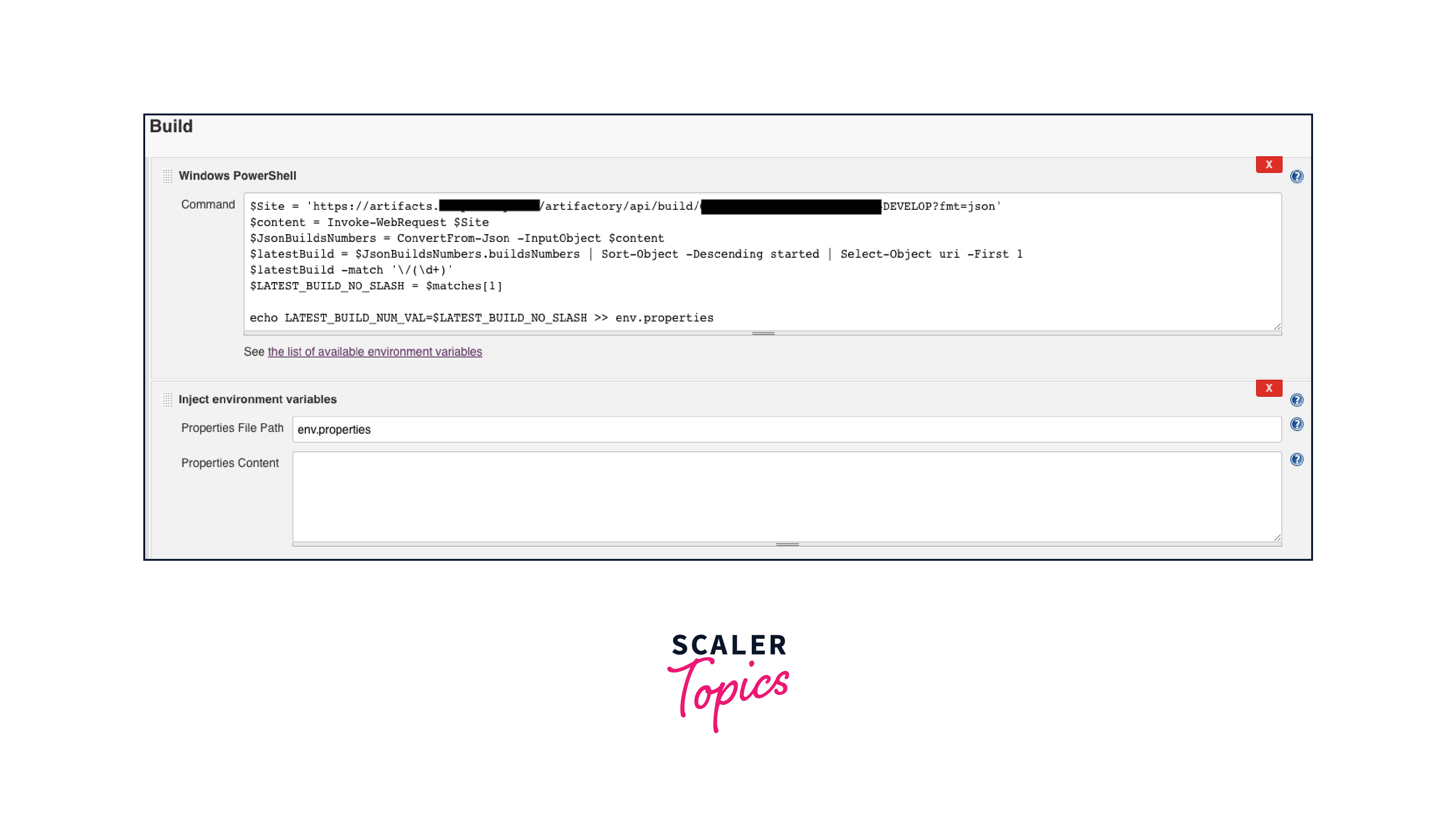
5. Configure triggers and environment variables.

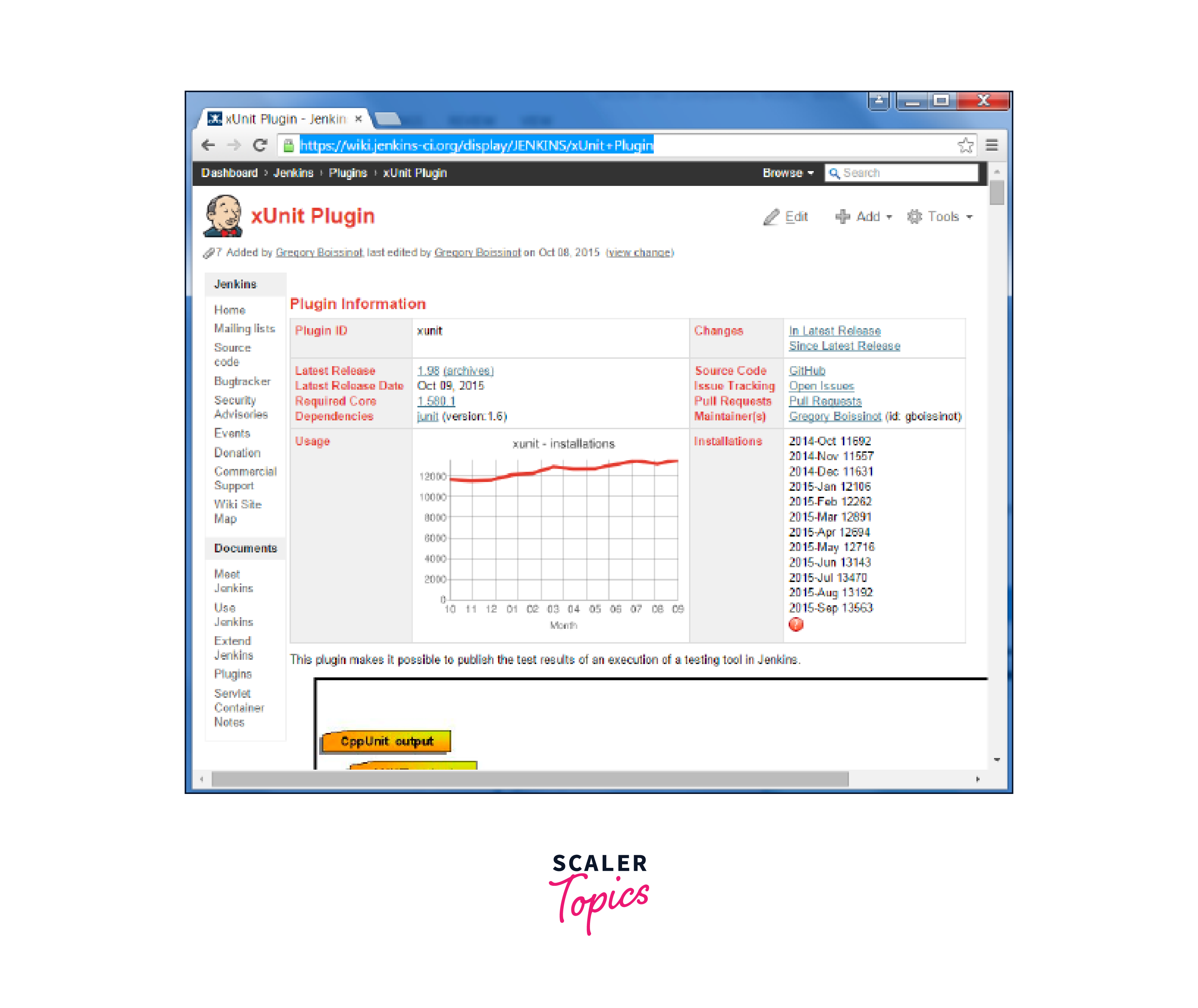
6. Add testing and quality checks.
7. Manage artifacts and deployments.
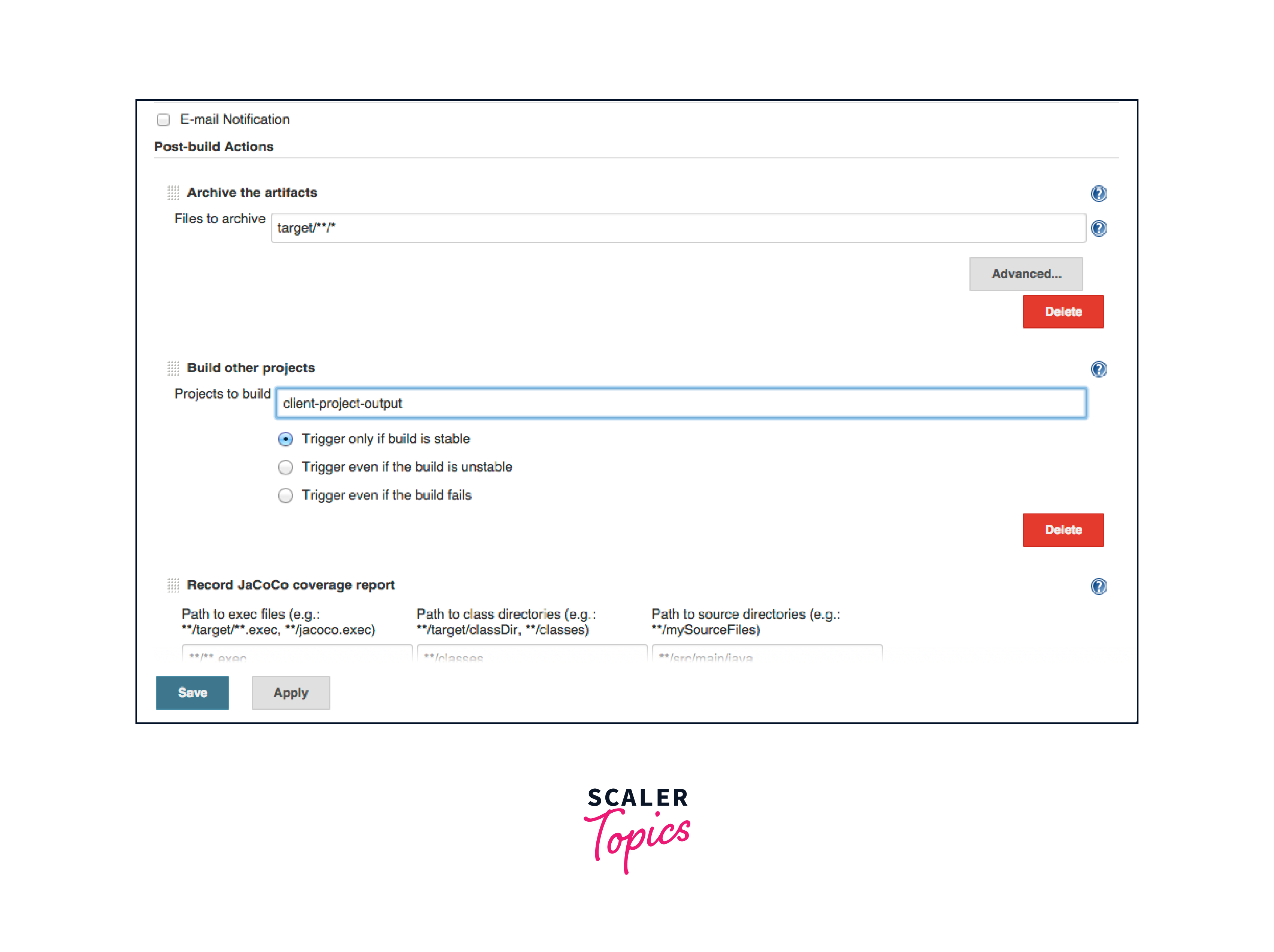
8. Implement notifications and error handling.
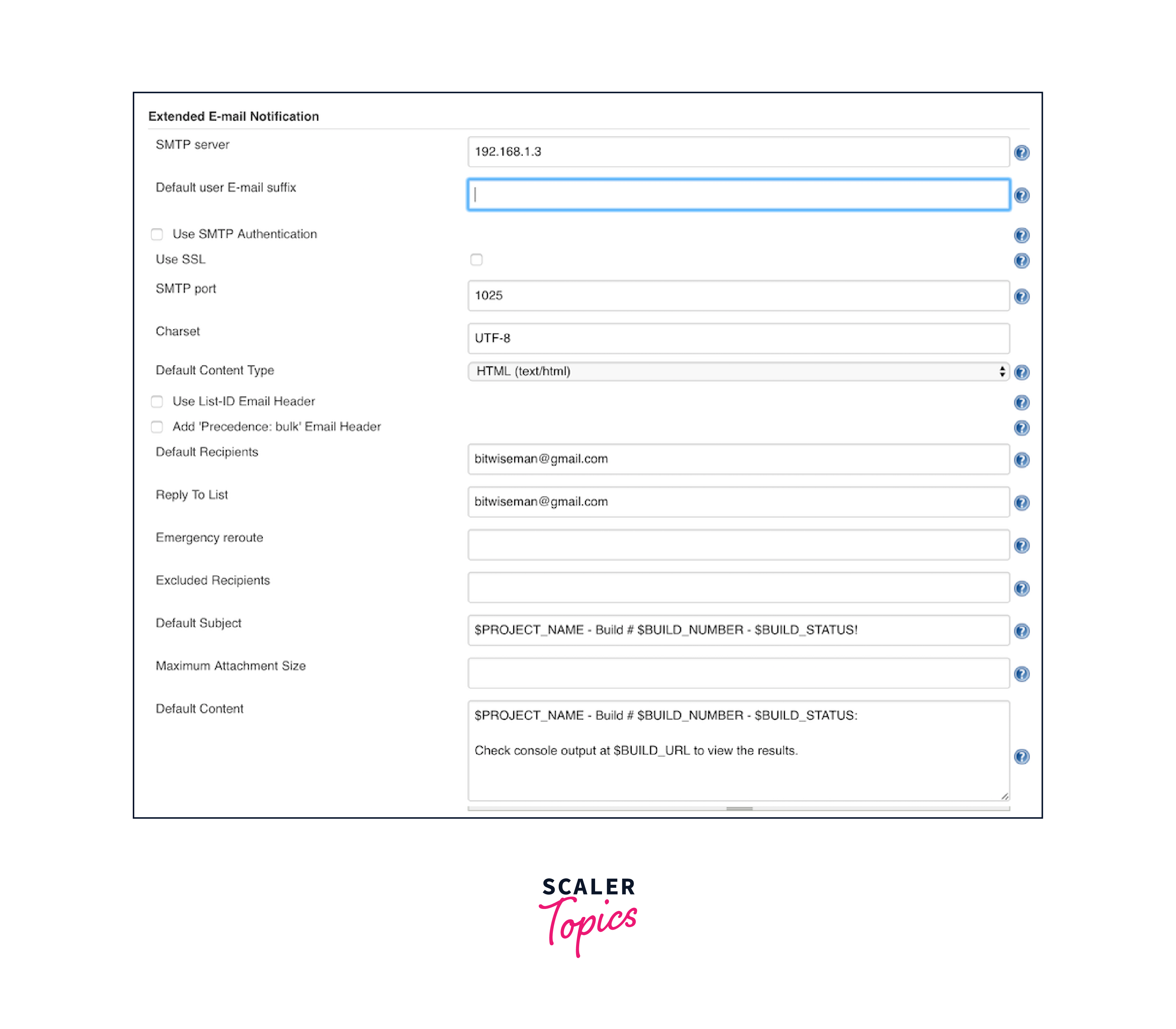
9. Ensure security, testing, and documentation.
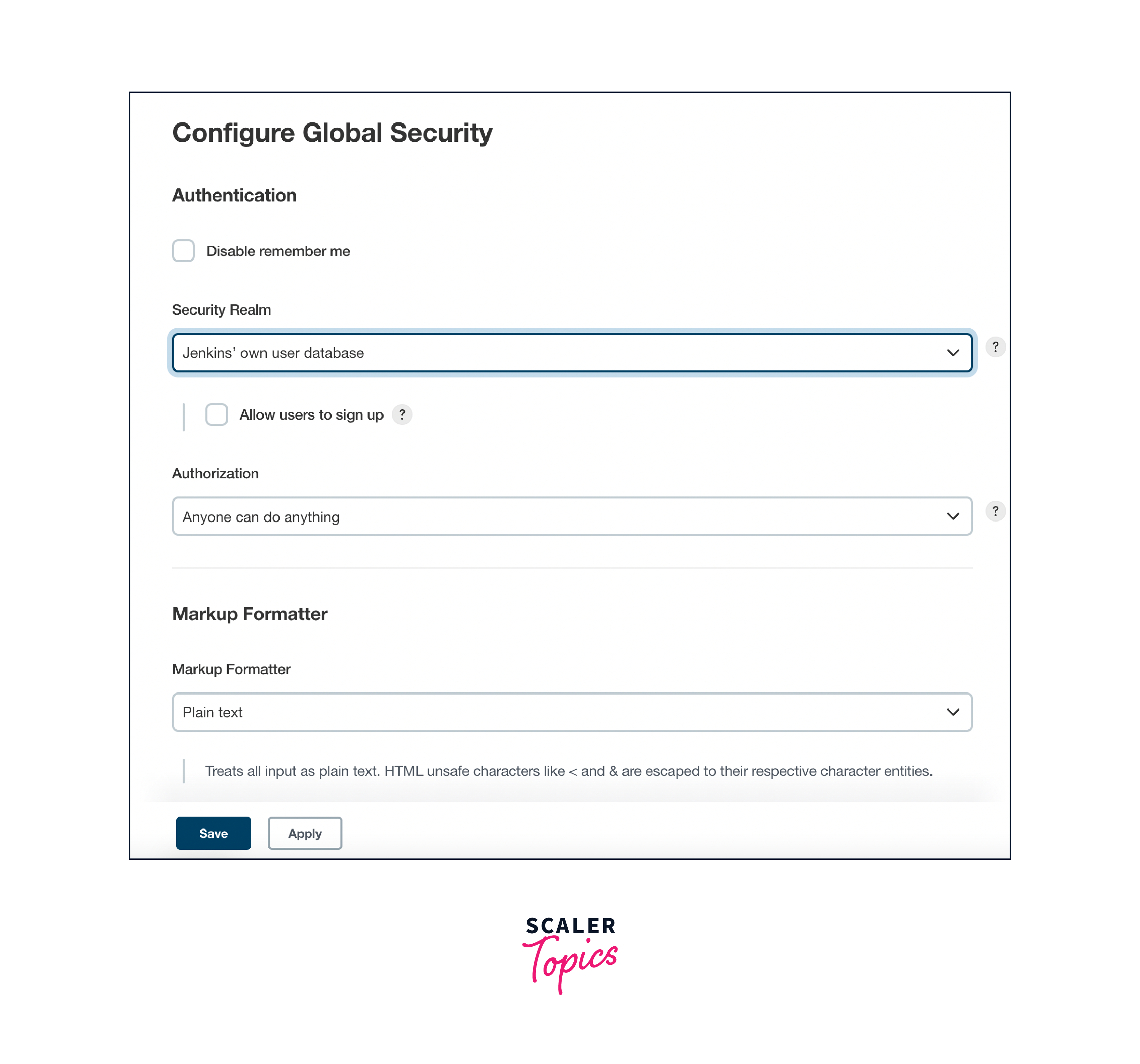
In essence, Jenkins automated deployment pipelines in Jenkins empower teams to achieve efficient, reliable, and agile Jenkins automated deployment by automating the entire process and ensuring the quality of the code at every step.
Automated Deployment Strategies
Jenkins automated deployment strategies encompass various approaches to streamline the software release process from development to production, ensuring reliability and efficiency while minimizing manual intervention. Here are common Jenkins automated deployment strategies:
- Continuous Deployment:
- Automatically deploys code changes to production after passing automated tests.
- Requires robust testing and monitoring for stability.
- Continuous Delivery:
- Automates the entire deployment pipeline, but production deployments are manual.
- Enhances control for critical applications.
- Blue-Green Deployment:
- Maintains two identical production environments, "blue" and "green."
- Automates deploying new versions to the inactive environment and enables quick rollbacks.
- Canary Deployment:
- Deploys code changes to a small user/server subset for real-world monitoring.
- Gradually expands the release if the canary phase succeeds.
- Feature Toggles (Feature Flags):
- Implements feature toggles to hide/show specific features based on configuration.
- Enables feature activation/deactivation without redeployment, reducing risk.
- Rolling Deployment:
- Automates gradual deployment of new versions in stages, updating subsets of servers.
- Minimizes impact on application availability and performance.
- Infrastructure as Code (IaC) Deployment:
- Automates infrastructure provisioning and management alongside application deployment.
- Ensures consistency across development, testing, and production environments using tools like Terraform or Ansible.
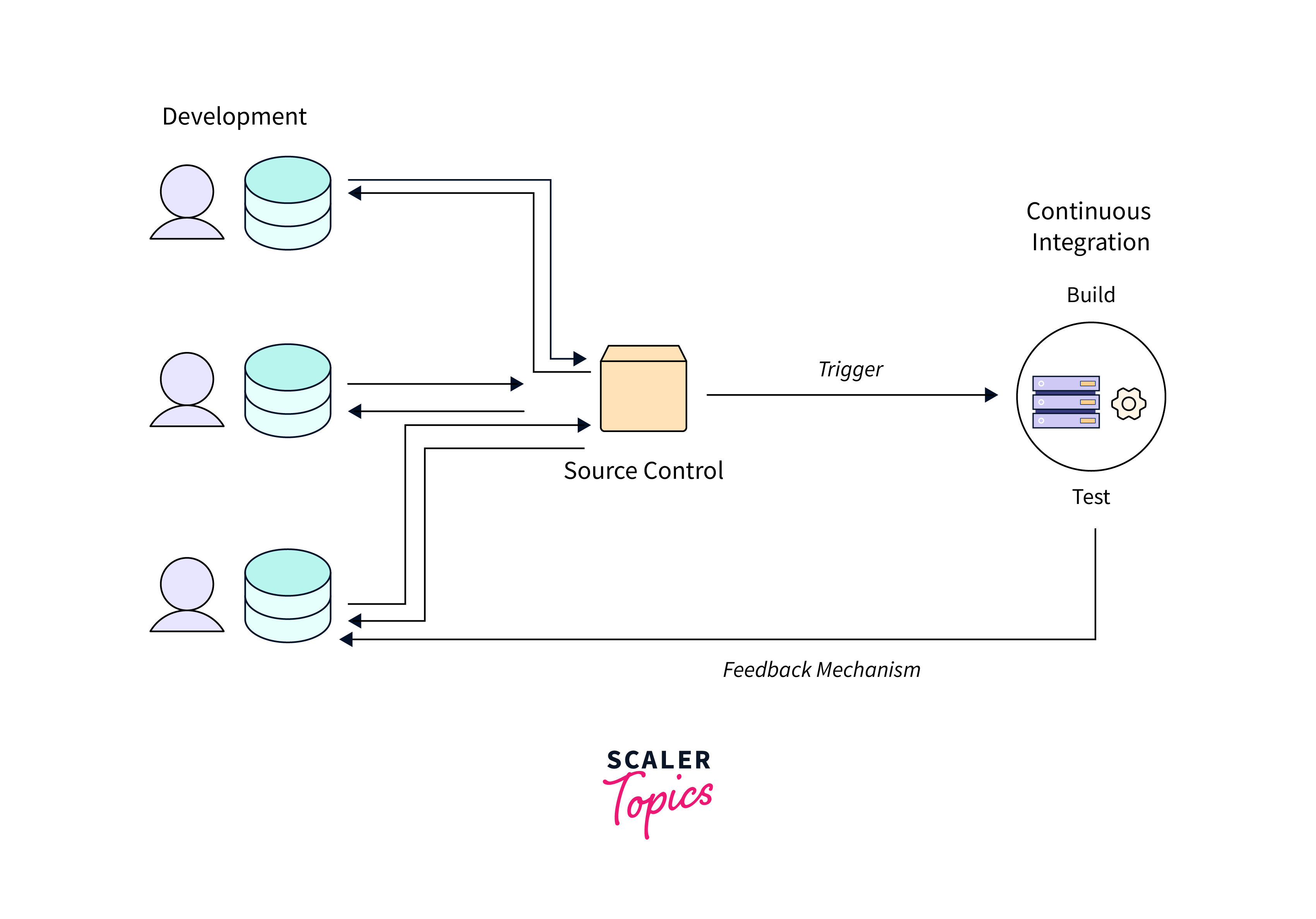
Jenkins offers customization of these strategies through pipelines, plugins, and integrations with various tools and services. The chosen strategy depends on factors like application criticality, release frequency, risk tolerance, and desired deployment speed.
Configuration Management and Environment Variables
Configuration Management in Jenkins:
Configuration management in Jenkins involves organizing and maintaining settings, plugins, and job configurations to ensure consistency across projects and environments. Jenkins provides various features to manage configurations effectively:
- Job Templates: Create job templates with predefined configurations, making it easier to set up new jobs consistently.
- Global Configuration: Set global settings for security, email notifications, and more to ensure a unified configuration across all jobs.
- Plugin Management: Manage plugins centrally to control versions and compatibility, ensuring a consistent set of tools for all projects.
- Pipeline Libraries: Use shared libraries to define reusable pipeline code, promoting consistency and reducing duplication.
- Configuration as Code (CasC): Utilize Jenkins Configuration as Code plugin to define Jenkins configurations using YAML or Groovy files, making it versionable and reproducible.
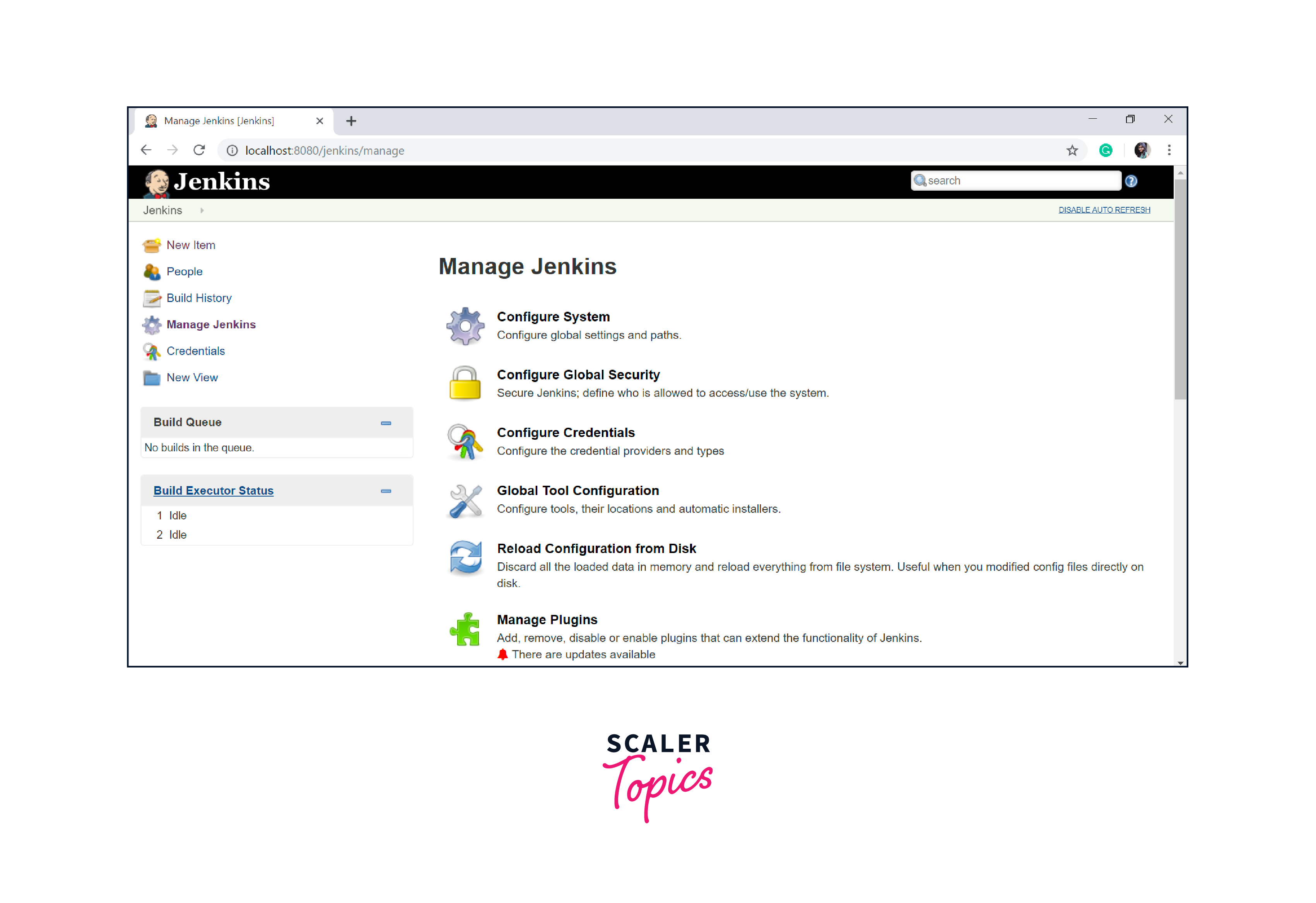
Here's a UI version of selecting configuration management in Jenkins:
Environment Variables in Jenkins:
Environment variables in Jenkins provide a way to store and manage dynamic values used by jobs, scripts, and pipelines. These variables help streamline automation and ensure consistent behavior across different stages of Jenkins automated deployment:
- Built-in Variables: Jenkins provides a set of predefined environment variables (e.g., JOB_NAME, BUILD_NUMBER, NODE_NAME) that offer information about the job and build environment.
- User-defined Variables: Create custom environment variables at different levels (job-specific, node-specific, global) to store data like credentials, paths, or configuration values.
- Secrets Management: Utilize Jenkins' built-in credentials management to securely store sensitive data like passwords and API keys as environment variables.
- Dynamic Variables: Jenkins pipelines can dynamically generate and set environment variables based on conditions or input parameters, enhancing flexibility.
- Integration with Tools: Use environment variables to pass data between different stages of a pipeline or to external tools integrated with Jenkins.
- Plugin Support: Numerous plugins enable fetching environment variables from external systems, enhancing automation and integration capabilities.
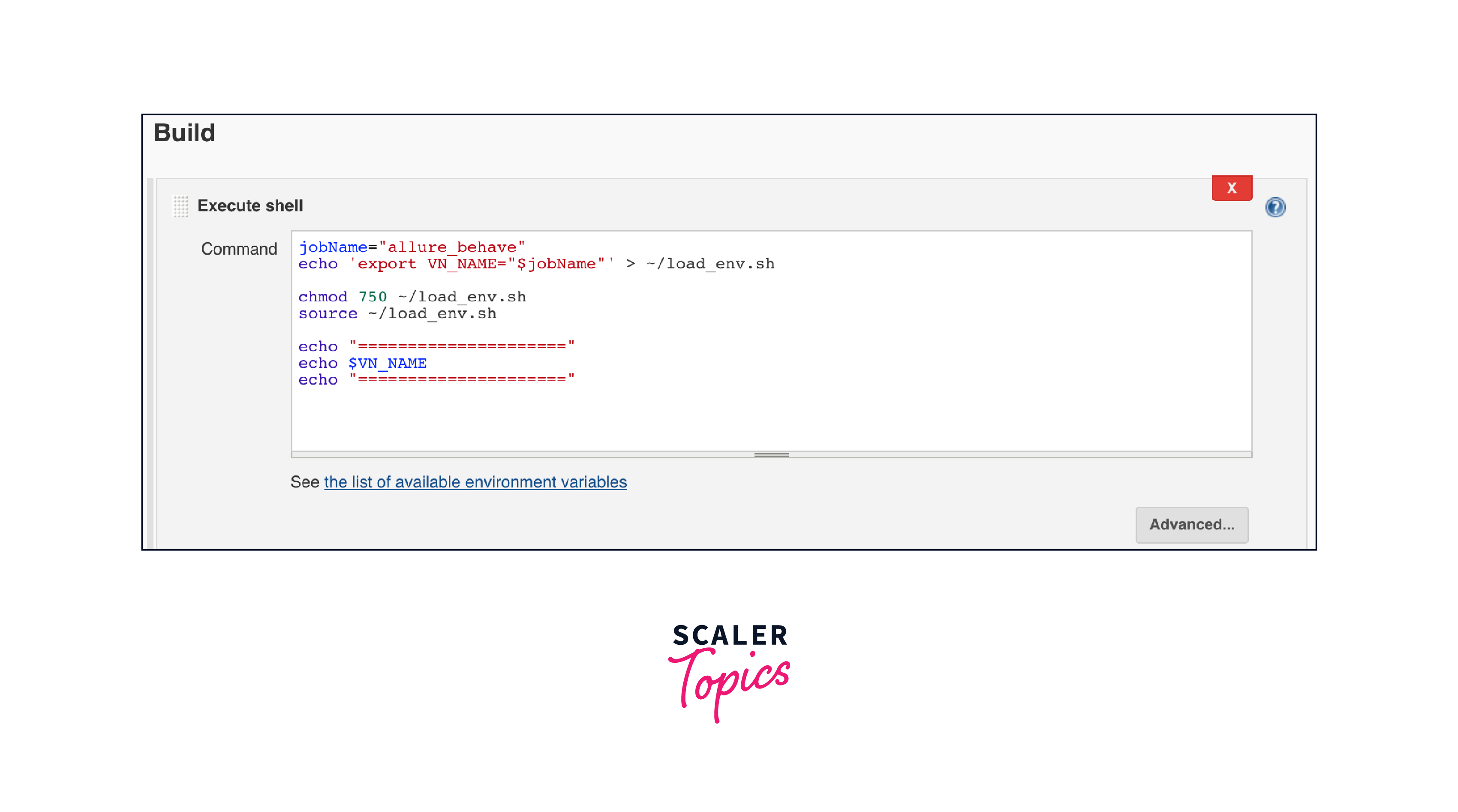
Here's an example in which we store environment variable "VM_HOME" in Jenkins Automated Deployment:
By effectively managing configurations and utilizing environment variables, Jenkins users can ensure consistency, security, and flexibility in their automation processes, promoting streamlined and reliable software Jenkins automated deployment.
Deployment to Different Environments
Deploying to different environments in Jenkins involves setting up automated processes to move your software application through various stages, such as development, testing, staging, and production. Here's how you can achieve this:
- Create Multiple Jobs or Stages: Set up separate Jenkins jobs or stages within a pipeline for each environment. For instance, you might have stages named "Development," "Testing," "Staging," and "Production."
- Configure Build and Tests: Each environment may require specific build and test configurations. Customize your Jenkins jobs or stages accordingly, adjusting build scripts, test suites, and other settings.
- Use Environment Variables: Utilize environment variables to parameterize your Jenkins automated deployment process. Define variables for server addresses, API keys, database connections, etc., and configure them differently for each environment.
- Conditional Deployments: Within your pipeline stages, use conditions or triggers to determine when to deploy to specific environments. For instance, only deploy to the "Testing" environment if tests in the previous stage pass.
- Artifact Management: Store built artifacts (e.g., compiled code, binaries) securely, ensuring consistent deployment across different environments.
By structuring your Jenkins pipeline to handle Jenkins automated deployments to different environments, you establish a controlled, efficient, and consistent approach to software delivery, ensuring your application's success across the development lifecycle.
Continuous Delivery and Continuous Deployment
Continuous Delivery and Continuous Deployment are both DevOps practices that involve automating and streamlining the software delivery process. While they share similarities, they differ in terms of the final step in the pipeline. Jenkins is a popular tool for implementing both practices. Here's how they work:
Continuous Delivery:
Continuous Delivery (CD) focuses on automating the entire software delivery pipeline up to the point of being ready for production deployment
. In a Jenkins context:
- Automated Builds: Jenkins automatically compiles, builds, and packages the code whenever changes are pushed to the repository.
- Automated Testing: Jenkins integrates with testing frameworks to perform automated tests, including unit, integration, and acceptance tests.
- Staging Environment: After passing tests, Jenkins deploys the application to a staging environment that closely resembles the production environment.
- Manual Approval: In the staging environment, a manual approval step is often included to ensure that the code is ready for production.
- Artifacts: Jenkins ensures that built artifacts, such as compiled code and binaries, are ready for deployment.
Continuous Deployment:
Continuous Deployment (CD) goes a step further by automating the Jenkins automated deployment of code changes directly to production after passing automated tests. In Jenkins:
- Automated Builds and Tests: Similar to continuous delivery, Jenkins automates building, testing, and packaging the code.
- No Manual Approval: Unlike continuous delivery, continuous deployment doesn't involve manual approval in a staging environment.
- Direct Production Deployment: After successful tests, Jenkins deploys the code directly to the production environment, ensuring rapid releases.
- Monitoring and Rollback: Monitoring tools are crucial to detect any issues in the production environment. Automated rollback strategies are employed if problems arise.
To simplify the process of understanding CI/CD, we'll use an infographic:
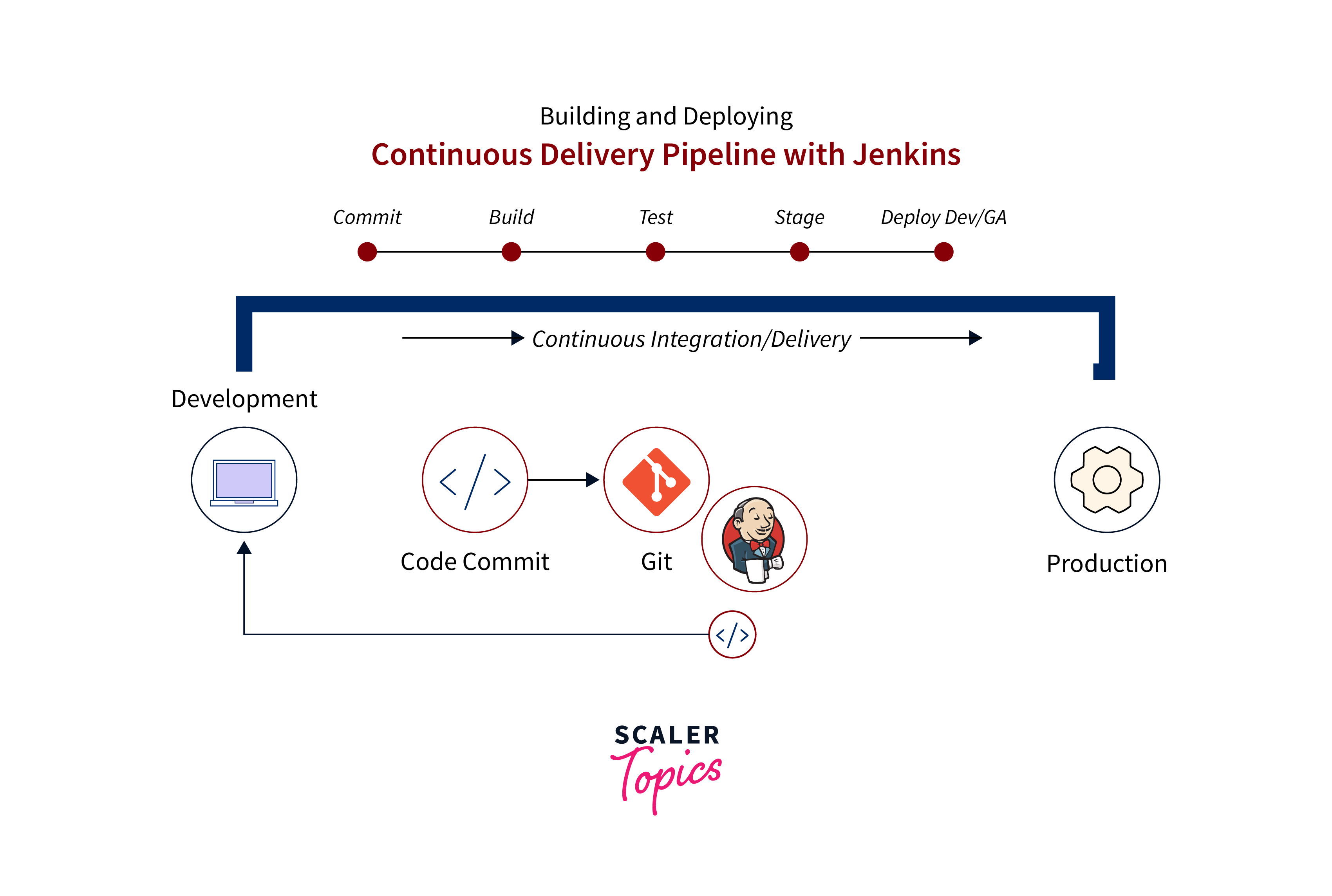
In summary, both continuous delivery and continuous deployment aim to automate and streamline the software delivery process, enhancing development speed, reducing errors, and improving overall software quality. The distinction lies in the final step: continuous delivery stops at the staging environment with a manual approval step, while continuous deployment automatically pushes changes to the production environment. Jenkins supports both practices and can be configured to align with an organization's specific release strategies.
Jenkins Automated Deployment Rollbacks and Recovery
Jenkins automated deployment rollbacks and recovery is crucial aspects of ensuring system stability and resilience in the event of issues arising from a new deployment. Rollbacks involve reverting to a previous version of the software, while recovery pertains to restoring the system to a functional state after a Jenkins automated deployment failure. Jenkins provides tools and strategies to manage rollbacks and recovery effectively for Jenkins Automated Deployment:
Rollback Strategies:
- Version Tagging: Before deploying a new version, tag the current production version in your version control system. If issues arise, you can quickly revert to the tagged version.
- Artifact Archival: Store built artifacts securely for each deployment version. If a rollback is required, Jenkins can retrieve and deploy a previous artifact.
- Blue-Green Deployment: This strategy involves maintaining two identical environments, "blue" and "green." If issues arise in the "green" environment after a deployment, you can switch back to the stable "blue" environment.
- Feature Flags: Implement feature toggles to enable or disable specific features without redeployment. If a new feature causes problems, you can turn it off without rolling back the entire deployment.
Recovery Strategies:
- Automated Rollback: Configure Jenkins to automatically trigger a rollback in case predefined criteria (e.g., failed tests, performance degradation) are met after a deployment.
- Backup and Restore: Regularly backup critical components of your system, including databases and configurations. If a Jenkins automated deployment fails, you can restore the system to a known working state.
- Incident Response Plan: Establish a well-defined incident response plan that outlines the steps to take in case of deployment failures. Jenkins can be integrated with communication tools to alert relevant teams.
- Monitoring and Alerts: Integrate monitoring tools into your Jenkins automated deployment pipeline. Set up alerts to notify administrators about anomalies so that they can take action promptly.
- Rolling Back Database Changes: In case database changes are part of the Jenkins automated deployment, have a mechanism to roll back database schema changes or data modifications if necessary.
- Post-Mortem Analysis: After a Jenkins automated deployment failure, conduct a post-mortem analysis to identify the root cause and implement preventive measures for the future.
Jenkins can automate many aspects of rollback and recovery processes, ensuring a rapid response to deployment failures and minimizing downtime. By implementing effective strategies and leveraging Jenkins' capabilities, teams can maintain a robust and resilient deployment pipeline.
Monitoring and Post-Deployment Tasks
Monitoring and post-deployment tasks are critical elements of maintaining the health and performance of applications after they've been deployed using Jenkins. These tasks ensure that deployed code functions as expected and promptly address any issues that arise. Here's how Jenkins can facilitate monitoring and post-deployment activities:
Monitoring:
- Integration with Monitoring Tools: Integrate Jenkins with monitoring and observability tools (e.g., Prometheus, Grafana, New Relic) to monitor application performance, resource utilization, and user experience.
- Automated Tests: Continuously run automated tests as part of your deployment pipeline to detect functional regressions and performance issues early.
- Health Checks: Include automated health checks in your pipeline to verify that the deployed application is responding correctly and meeting predefined criteria.
- Real-time Alerts: Configure monitoring tools to generate alerts when specific thresholds are breached or anomalies are detected, ensuring quick response to issues.
- Deployment Metrics: Collect and analyze metrics related to deployments, such as deployment success rates, time taken for deployments, and frequency of deployments.
Post-Deployment Tasks:
- Database Migrations: If your deployment involves changes to the database schema, automate database migrations to ensure data consistency and integrity.
- Configuration Updates: Use Jenkins to update environment-specific configurations, such as API endpoints, database connections, or feature flags, as part of the deployment process.
- Load Balancer Updates: If your application is load-balanced, automate the process of updating the load-balancer configuration to include the new deployment.
- Release Notes Generation: Automatically generate release notes detailing the changes introduced in the new deployment. This aids in communication among team members and stakeholders.
- Rollback Handling: Configure Jenkins to automatically trigger a rollback if critical issues are detected post-deployment.
- Communication: Integrate Jenkins with communication platforms (e.g., Slack, Microsoft Teams) to notify relevant teams and stakeholders about the success or failure of deployments.
- Logging and Auditing: Implement robust logging to capture deployment-related events and activities for auditing and troubleshooting purposes.
- Performance Optimization: Continuously analyze application performance post-deployment and optimize code or infrastructure as needed.
Jenkins, along with appropriate plugins and integrations, can orchestrate these monitoring and post-deployment tasks seamlessly, ensuring that deployed applications remain reliable, performant, and resilient.
Conclusion
Jenkins automated deployment is a powerful approach to streamline and enhance software delivery processes. By setting up Jenkins for automated deployments, teams can automate building, testing, and deploying software projects while ensuring consistency and reliability. Integration with version control systems, continuous integration, and the use of Jenkins automated deployment pipelines are fundamental to successful automation.
Understanding different deployment strategies, configuration management, and environment variables in Jenkins enables teams to tailor their Jenkins automated deployment processes to specific needs. Handling deployments to different environments and mastering the concepts of continuous delivery and continuous deployment are essential for achieving efficient software delivery.
Additionally, implementing effective rollback and recovery strategies, monitoring and post-deployment tasks, and leveraging Jenkins' capabilities in these areas are crucial for maintaining application health and reliability in production.
In summary, Jenkins automated deployment empowers development and DevOps teams to accelerate software delivery, enhance collaboration, and improve software quality through automated, efficient, and reliable Jenkins automated deployment processes.