


How to Create a Jenkins Shared Library
Overview
A Jenkins Shared Library is a reusable set of code, allowing teams to share common pipeline logic in Jenkins. It helps streamline and standardize Continuous Integration/Continuous Deployment (CI/CD) processes across projects. By abstracting complex tasks into functions, the Jenkins Shared Library enables faster and more efficient pipeline development. Teams can maintain and update shared code separately from individual pipelines, ensuring consistency and reducing duplication. It enhances collaboration, promotes best practices, and simplifies Jenkins pipeline creation, ultimately improving software delivery and development workflows.
What Is a Shared Library in Jenkins?
A Shared Library in Jenkins is a collection of reusable code, often written in Groovy, that allows teams to share common pipeline logic and functionality across multiple Jenkins pipelines. It provides a way to centralize and standardize CI/CD processes by abstracting complex tasks into reusable functions. Jenkins Shared Library enhances collaboration among development teams, promotes best practices, and simplifies pipeline development. They enable faster and more efficient pipeline creation and maintenance, ensuring consistency and reducing duplication of code. By separating shared code from individual pipelines, Jenkins Shared Libraries contribute to improved software delivery and development workflows.
Why Use a Jenkins Shared Library?
Using a Jenkins Shared Library offers several advantages that enhance the CI/CD process and make pipeline development more efficient:
- Reusability: Shared Libraries allow teams to write code once and reuse it across multiple pipelines. This reduces duplication of effort and promotes consistency in the CI/CD process.
- Centralization: By centralizing common pipeline logic, updates and improvements can be made in one place, benefiting all pipelines that use the library. This ensures that all projects stay up-to-date with the latest best practices and improvements.
- Abstraction: Complex tasks can be abstracted into simple functions in the Jenkins Shared Library, making pipeline scripts cleaner and more maintainable. Developers can focus on their specific pipeline requirements without getting bogged down in repetitive code.
- Standardization: Jenkins Shared Library allows organizations to define standardized practices, coding conventions, and security measures across all pipelines. This leads to a more unified and coherent CI/CD process.
- Collaboration: Jenkins Shared Libraries encourage collaboration among teams, as they can share and contribute to a common set of pipeline tools and utilities. This fosters knowledge-sharing and innovation within the organization.
- Versioning and Control: Jenkins Shared Library can be version-controlled, enabling teams to manage changes and rollbacks effectively. This ensures that each pipeline is using a known and tested version of the library.
- Ease of Maintenance: As the Jenkins Shared Library is maintained separately from individual pipelines, updates and bug fixes can be implemented without impacting the pipelines directly. This results in easier maintenance and faster response to issues.
Create a Shared Library in Jenkins
Creating a Shared Library in Jenkins involves the following steps:
- Configure Jenkins Master: Ensure that Jenkins is installed and set up correctly on your server.
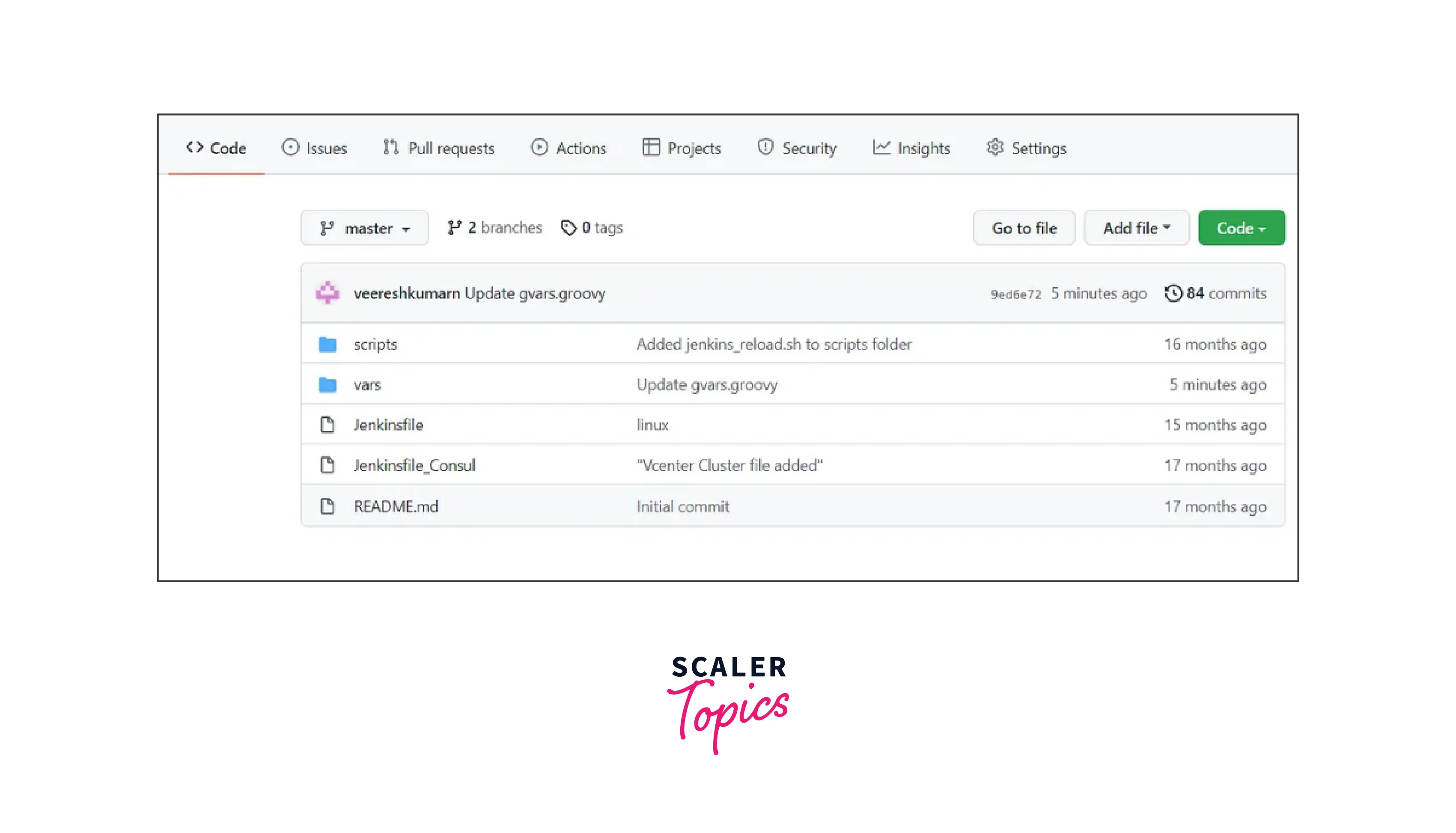
- Prepare the Library Repository: Create a Git repository to host your Shared Library code. This repository should have a specific directory structure recognized by Jenkins.
- Define the Directory Structure: In the repository, create a directory named vars, where your reusable functions will be defined. You can also have a src directory for any additional classes or code.
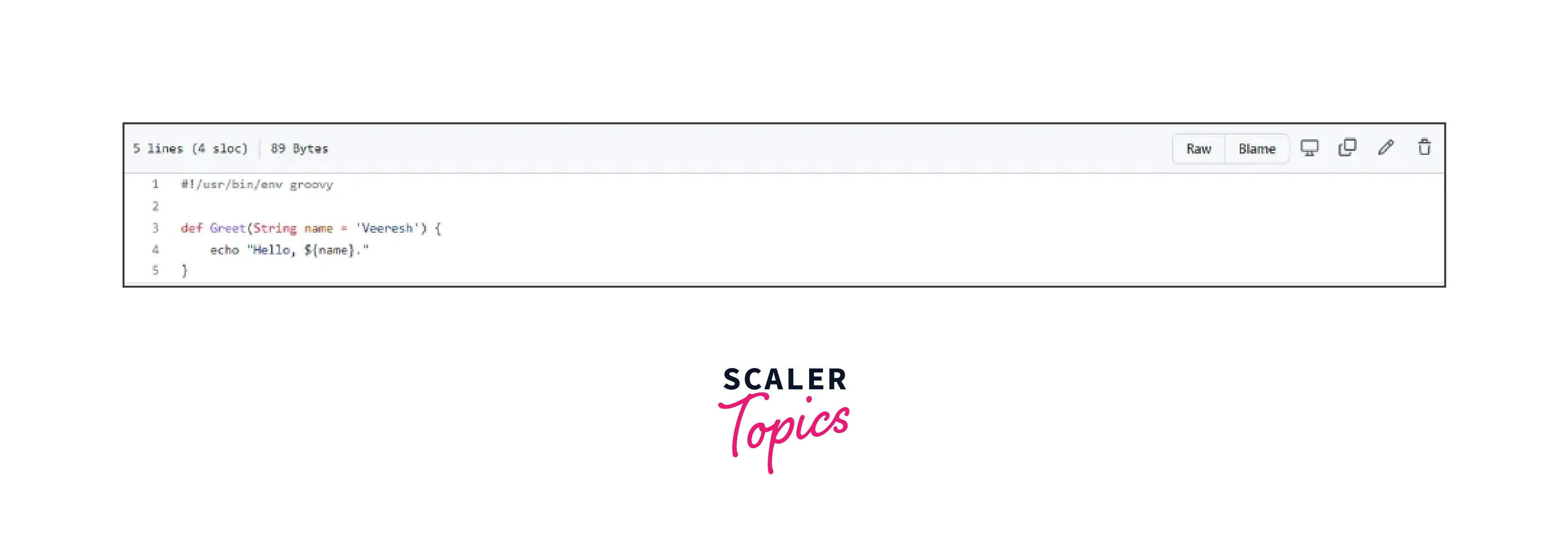
- Write Functions: Inside the vars directory, create Groovy files representing the functions you want to share across pipelines.
Here's an example of a simple Jenkins Shared Library function:
1. Commit and Push: Commit the changes to your Git repository and push them to the remote.
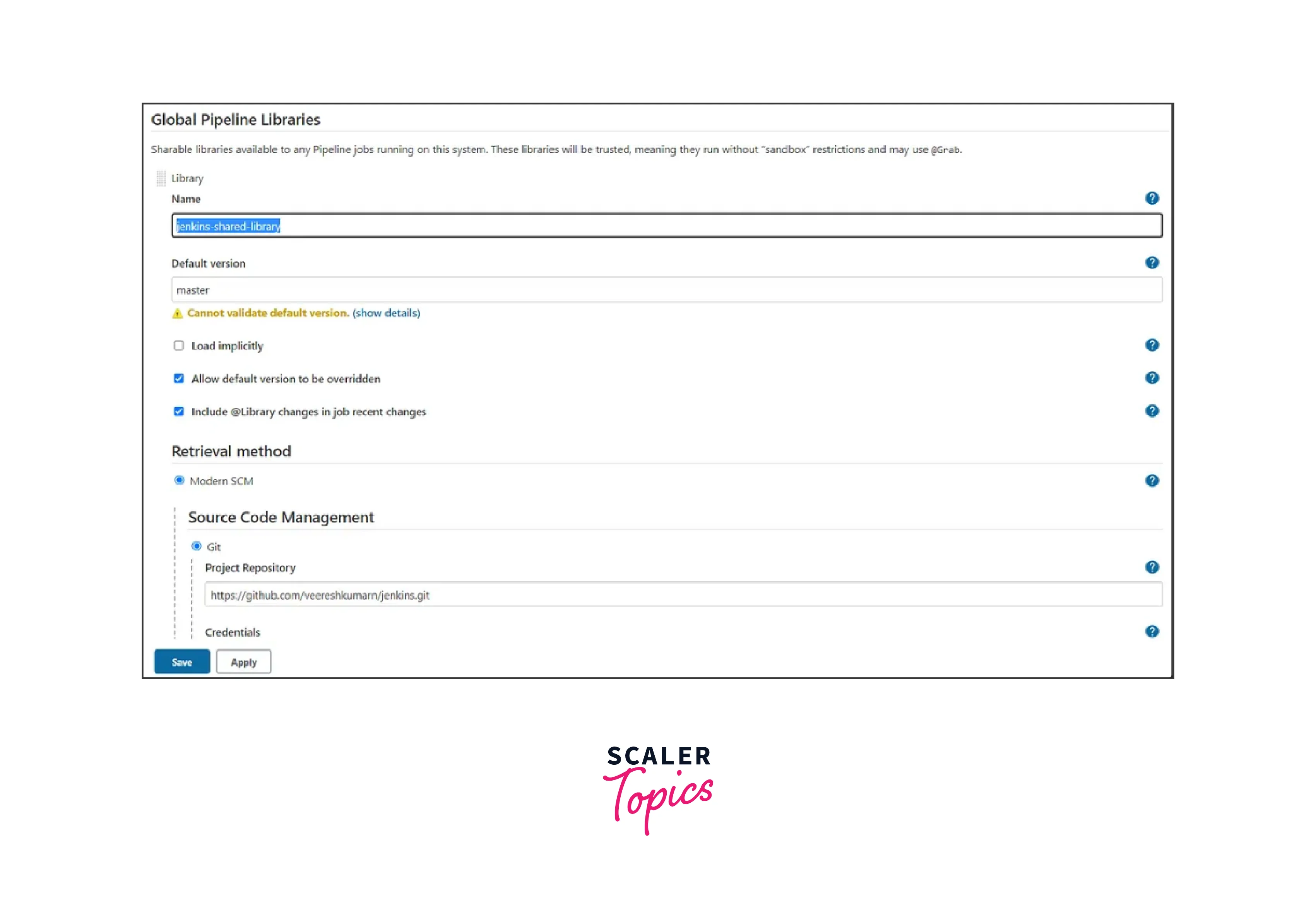
2. Configure Jenkins Global Libraries: In the Jenkins dashboard, go to "Manage Jenkins" > "Configure System" > "Global Pipeline Libraries."
3. Add the Library: Add a new Global Pipeline Library and provide the necessary details, such as the library name, Git repository URL, and the branch to use.
4. Load Library Dynamically (Optional): You can choose to load the library dynamically or explicitly. Dynamic loading allows pipelines to use the library without importing it explicitly.
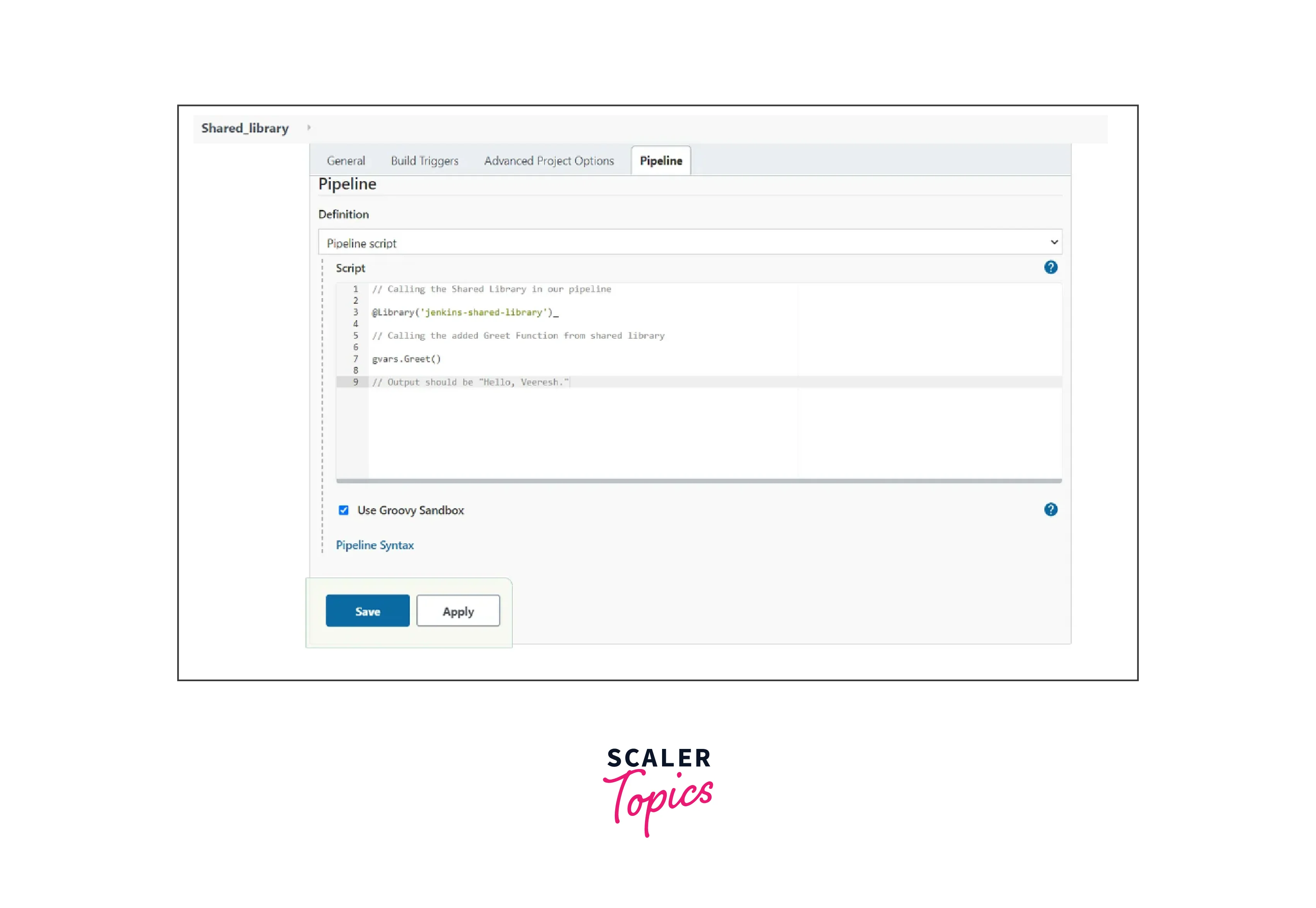
5. Use the Shared Library: In your Jenkinsfile, you can now use the shared functions by importing the library and calling the functions as follows:
6. Save and Run: Save the Jenkinsfile and run the pipeline. Jenkins will fetch the Jenkins Shared Library from the configured Git repository and execute the pipeline, utilizing the shared function.
What if You Don’t Have Jenkins Admin Access?
If you lack administrator access to Jenkins, accessing the "Manage Jenkins" area may not be possible. In such cases, you can work around this limitation by explicitly importing a library in your pipeline. Here's an example of a declarative pipeline using a Jenkins Shared Library stored in a private Git repository:
In this pipeline, the library is imported using the library command with a retriever, specifying the details of the Git repository. The retriever authenticates to the repository using the credentials identified by 'your-credentials-id'. Note that you should remove the credentials if the repository is public.
This approach allows you to utilize the Jenkins Shared Library even without admin access, enabling you to include reusable code and streamline your pipeline development.
Load a Shared Library in a Pipeline
To load a Jenkins Shared Library in a pipeline, you can use the @Library annotation. This annotation imports the specified Jenkins Shared Library, making its functions and variables available for use in the pipeline. Here's how to do it:
Assuming you have a Jenkins Shared Library named "my-shared-library," follow these steps: 1. Create a function:
2. Configure the Jenkins Shared Library in Jenkins:
- In the Jenkins dashboard, go to "Manage Jenkins" > "Configure System" > "Global Pipeline Libraries."
- Add a new library entry for "my-shared-library" with the necessary details, such as the Git repository URL, default version, etc.
- Load the Shared Library in your Jenkinsfile:
- In your Jenkinsfile, add the @Library annotation at the beginning of the file: @Library('my-shared-library') _
3. Using Jenkins Shared Library Functions: After loading the library, you can now use the functions and variables defined in the Shared Library within your pipeline. Here's a complete example of a Jenkins pipeline using the Jenkins Shared Library:
In this example, mySharedFunction is a function defined in the "my-shared-library" Shared Library, and it can be used directly within the pipeline.
By loading the Shared Library using @Library, you enable your pipeline to access and utilize the code from the library, promoting code reuse and maintaining a more organized and modular CI/CD process.
Conclusion
- Jenkins Shared Library is a powerful feature that allows teams to share reusable code and logic across multiple pipelines.
- Jenkins Shared Library centralizes and standardizes CI/CD processes, reducing duplication of effort and ensuring consistency.
- Shared Libraries abstract complex tasks into reusable functions, making pipeline scripts cleaner and easier to maintain.
- Collaboration is enhanced as teams can share and contribute to a common set of pipeline tools and utilities.
- It promotes best practices and coding conventions, leading to a more unified and coherent CI/CD process.
- Shared Libraries can be version-controlled, enabling effective change management and rollbacks.
- Even without Jenkins admin access, libraries can be imported explicitly in pipelines to leverage their benefits.