


Training Models with TPUs in Keras
Overview
Data availability has recently increased, so we need more computation power while training our neural network. To make an excellent deep-learning model, we need more data. To save time, we rely on computation powers such as GPUs or TPUs. So in this article, we will discuss TPUs and how you can use them.
Introduction to TPUs
Tensor Processing Unit (TPU) is an AI accelerator circuit developed by Google for neural network machine learning using Google's TensorFlow software. The advantage of TPUs lies in accelerating the performance of linear algebra computation, which is used heavily in machine learning applications. In addition, TPUs minimize the time-to-accuracy when you train large, complex neural network models. They are available through Google Colab, the TPU Research Cloud, and Cloud TPU. For more details, you can head to this link.
Transform Your Career
Choose from our industry-leading programs designed for career success
Modern Software and AI Engineering Program
Master full-stack development with AI integration


 +1000 more
Modern Data Science and ML with specialisation in AI
Advanced data science techniques with AI specialization
+1000 moreAdvanced AIML with Specialisation in Agentic AI
Deep dive into AIML with focus on Agentic systems
+1000 moreDevOps, Cloud & AI Platform Engineering
Build and manage AI-powered cloud infrastructure
+1000 moreAI Engineering Advanced Certification by IIT-Roorkee
Premier AI engineering certification from IIT-Roorkee

Cost Comparison between TPUs and an S Similar Capacity GPU Cluster
In this section, I will list the pricing of GPU and TPU on the Google Cloud Platform. For example, if I consider that you will use GPU, i.e. NVIDIA A100 80GB, then the pricing would be 12.88 per hour. You can visit this website to get the full pricing chart for GPU and TPU.
Introduction to the TPUStrategy
TPUStrategy helps us to train the models synchronously in TPU and TPU Pods. Using the TPU requires us to open a distribution strategy scope. TPUStrategy follows the exact mechanism as MirroredStrategy as it replicates the model once per TPU core, and the replicas are kept in sync.
Note: TPU pods collect TPUs connected to high-speed network interfaces.
Let's go through the code sample and understand how it works.
Output:
To utilize the full computation power, it is advised to use a larger batch_size while training in TPU or a multi-GPU setup. While training a model in TPU, you will observe that the first epoch will take time to start as your model is compiled into something that only TPU can execute. However, after one epoch, the training is very rapid.
Requirements for Training Keras Models on TPUs
For training Keras models on TPUs, we need to have TPU pods. We can also buy TPU from Google Cloud Platform and train our Keras models efficiently in the Vertex AI platform. If you want free TPUs, you can use Google Colaboratory for it. In Google Colab, you have to change the runtime from CPU to TPU. In Google Colab, you get access to 8-core TPU. After activating TPU, you need to connect it to the TPU cluster via tf.distribute.cluster_resolver.TPUClusterResolver.connect()






Train an Image Classification Model with TPUs
To demonstrate the usage of TPU with Keras, I will use the tf_flower dataset. We will use tf.data to build our data pipeline efficiently. We will also use best practices to build our model.
Imports
Output:
Scaler Placement Report and Statistics
Scaler learners achieved 2.5x salary growth with average post-Scaler CTC reaching ₹23L.
 Google
 Amazon
 Microsoft
 Flipkart
 Adobe1200+ more
Define Hyperparameters
Gather Dataset
Data Pipeline
Turn Learning into Career Growth
Visualize the Training Samples
Visualising the training data

Build the model
Model Summary
Output:
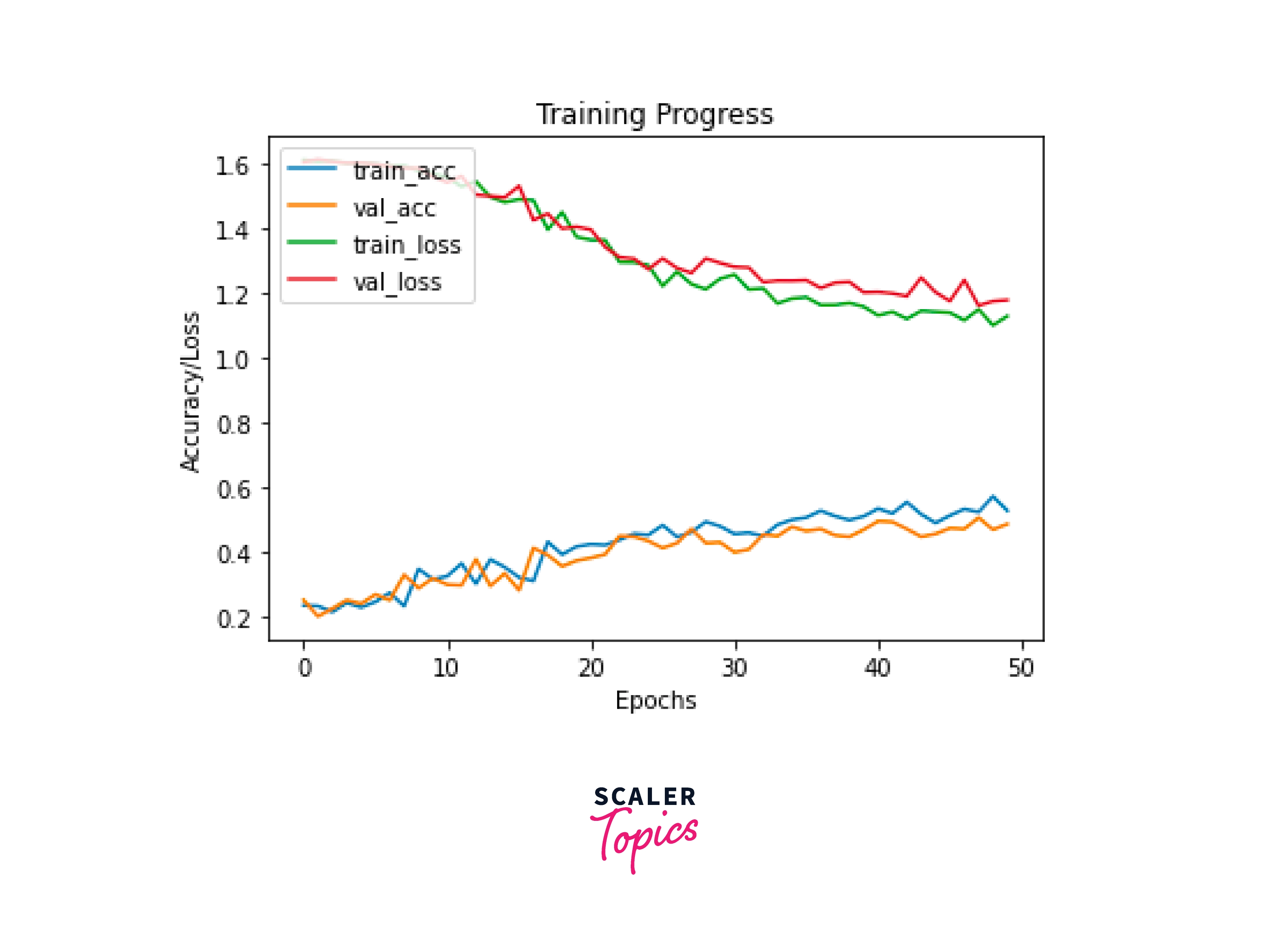
Last Epoch
Testing the Model

If you want to give it a try, then you can visit the Google Colaboratory.
Advantages of Training Models in Keras with TPU
I want to list down all the advantages of using TPU in Keras.
- TPUs are highly efficient in power consumption and generate less heat while training models in Keras.
- Training Keras models with TPUs require less code.
- TensorFlow models can be easily deployed in this ecosystem.
Conclusion
- In this article, we talked about what TPU is.
- We discussed the advantages of TPU and made a cost comparison between the usage of GPU and TPU
- Learned a little bit about TPUStrategy.
- Developed a full neural network model to train it in Keras using TPU.




