


Kotlin Scope Functions
Overview
Kotlin Scope functions are functions that execute a block of code by giving temporary scope to the object under consideration. There are five scope functions in Kotlin: let, run, with, apply, and also. Additionally, there are two other functions takeIf and takeUnless which can be chained along with these scope functions. All these share similarities as well as hold their unique use cases.
Kotlin Scope Functions
Kotlin Scope functions are the higher-order functions that make the code clean and concise. Their only purpose is to execute a block of code within the scope of an object.
When we are supposed to perform one or more operations on an object with a lambda expression within its scope, Scope functions are used. Here the name of the object is not required to access the object.
The five Kotlin Scope functions are let, run, with, apply, and also. All these functions are used to execute a block of code but each of them is unique in its way and has their respective use cases.
A good understanding of these functions can help us to smart ways of writing concise and accurate code.
Note:
Detailed explanation for context objects it and this is later explained in this article.
Have a look at the example below of the scope function let:
Without Scope Function
Code:
Output:
With Scope Functions
Code:
Output:
Explanation:
The above code demonstrates how the scope function makes code more readable and short. Here we are taking a class Book that stores the book's name, edition, number of pages, and authors. It also has two functions incrementPages and changeEdition.
Note:
- Kotlin Scope functions have no additional technical capabilities, they are only used to write readable and concise code.
- Choosing the right scope function can be tricky. It depends on the consistency and intent of the code moreover.
Function Selection
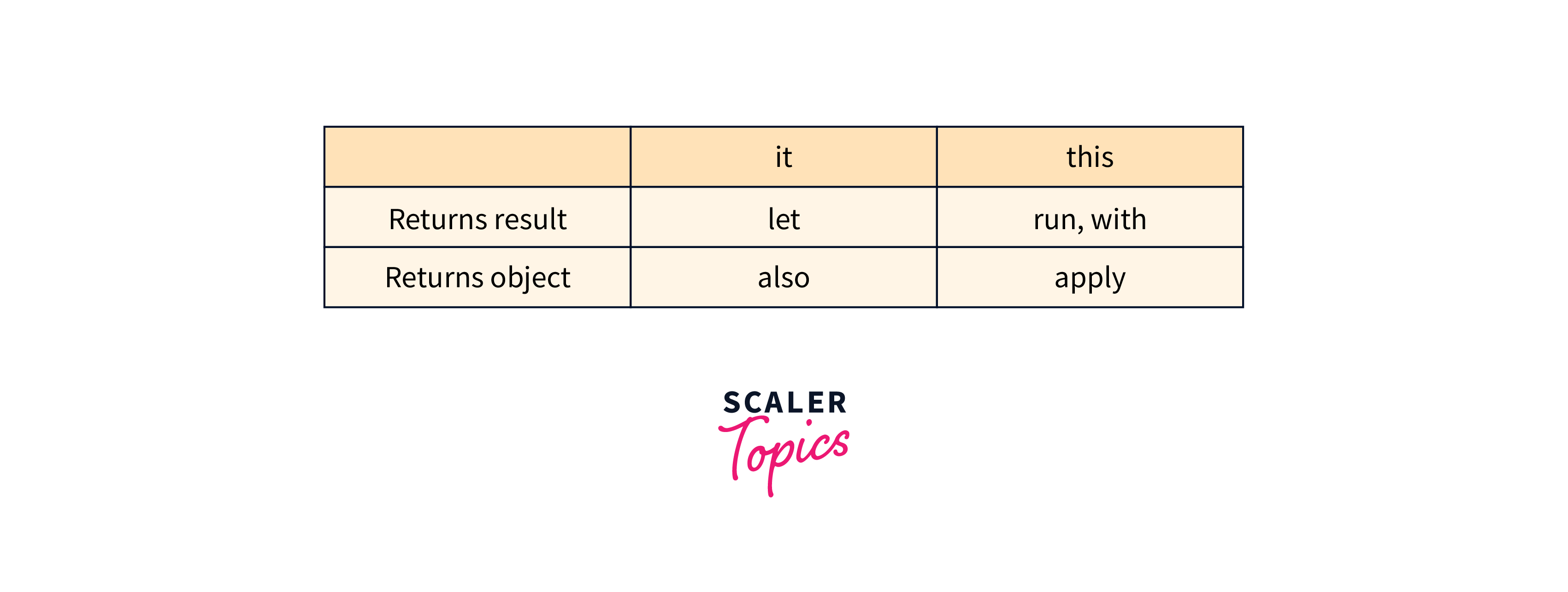
This table summarizes the key differences between the Kotlin scope functions.
| Function | Object reference | Return value | Is extension function? |
|---|---|---|---|
| let | it | Lambda result | Yes |
| run | this | Lambda result | Yes |
| run | - | Lambda result | No: called without the context object |
| with | this | Lambda result | No: takes the context object as an argument. |
| apply | this | Context object | Yes |
| also | it | Context object | Yes |
Short and quick guide on how to use these functions:
- let:
The let function is the versatile function. It can be used for executing lambda on a non-null object, introducing an expression as a variable in local scope, and object configuration. - apply:
The apply function is used to configure the object. When we are supposed to call multiple functions or set several properties on an object apply can be a good choice. - run:
The run is very much similar to the let function, but in the run function, the result of the lambda expression is not returned. - also:
The also function is useful for chaining multiple function calls on the same object. It is the same as the let function except that the return value is the object itself. - with:
The with function is a special case of the let function. It can only be used with non-null objects. It doesn't require the prefix for the object's name and thus, is very useful for accessing properties and methods of an object directly in lambda expression.
Note:
- There can be situations where more than one Kotlin scope function is suitable. Thus, choose the function based on project or team conventions.
- Scope functions may sound tempting once you understand them well, but avoid overusing, or nesting them as it can lead to confusing code.
- We can be extra careful when chaining them and give descriptive names to our lambda expressions.
Distinctions
As we saw in the above section the use case and properties of these functions are very much similar. Two main differences can be used to distinguish the scope functions.
- The way kotlin scope functions refers to the context object.
- The value they return
Context Object: This or It
The context object can be referenced by it or this instead of its actual name inside the lambda passed to the scope function. Each scope function uses either it or this to refer to the context object. this is a lambda receiver and it is a lambda argument.
A lambda expression having reference to an object as its first argument is called a lambda receiver. The receiver can be used to access the properties and methods of the object in the lambda expression.
A lambda argument is simply an argument to the function. Changes made to it will not reflect in the original object. These can be of any type such as primitive, objects, functions, etc.
this
The run, with, and apply kotlin scope functions reference the context object as a lambda receiver. The this keyword is used to refer to the object inside the lambda function. The this can be omitted in most of the cases to make the code shorter.
If there are external members then omitting this can be confusing, thus omitting is recommended only for lambda's that mainly operate on the object's members like assigning properties, calling functions, etc.
Code:
Output:
Explanation:
Here apply Koltin scope function is used to set the properties of the object after it is created. Also, we have omitted this and still founder, and objective refers to the correct values.
it
The let and also refer to the context object as an argument. If the argument name is not specified in the lambda function then the object is referred to as it. it is shorter and easier to understand as compared to this.
The scope of argument is only inside the specified function, the object is not available implicitly as in the case of this. When we want to perform some additional operation on the object after it is created we can access it using it. it is also better if there are multiple variables in the single code block.
Code:
Output:
Explanation:
The also Kotlin scope function is used to perform any operation on an object after it is created and before it is returned. In this case, we use the also scope function to print the person's name and age.
Return value
Another parameter for the distinction of the Koltin scope functions is their return values. The return value can either be the context object or the lambda result.
- apply and also return the context object.
- let, run, and with return the lambda result.
Context Object
The result is a context object itself in the apply and also kotlin scope functions. It is helpful when we wish to chain function calls on the same object, one after the other. Let us look at an example below.
Code:
Output:
Explanation:
The apply scope function is used to add elements to the list and return the same object. The also scope function is used to print a message before populating the list. The let scope function is used to execute a block of code and return the value of the expression. In this case, the let scope function is used to print the list after sorting it.
Context objects can also be used in return statements of functions as they return objects.
Code:
Output:
Explanation:
The getRandomNum() function first generates a random number between 0 and 999 using the Random.nextInt() function. The also scope function is then used to print the value of the random number to the console.
Lambda Result
let, run, and with Kotlin Scope functions can return Unit or any other value as the lambda result. These can be used to assign the result to a variable, chaining operations on the result, etc.
Code:
Output:
Explanation:
In this example, we first use the let scope function to print the person's name. Then, we use the uppercase() function to convert the name to uppercase letters. The let scope function returns the name, so we can chain the toUpperCase() function to it.
Kotlin Scope functions may not return any value and can be used to declare temporary scope for local variables.
Code:
Output:
Explanation:
In this example, we first use the let scope function to print the person's name. Then, we use the uppercase() function to convert the name to uppercase letters. The let scope function returns the name, so we can chain the toUpperCase() function to it.
Code:
Output:
Explanation:
In this example, We use the run Kotlin scope function to create a temporary scope for local variables (bookTitle and bookAuthor) within the context of the book object. The return value of the run block is stored in the bookInfo variable and then printed.
Functions
Let us understand each of these kotlin scope functions in detail to use the right function in our program.
let
- In the let scope function the context object is available as an argument it.
- let returns a lambda result.
The let scope function in Kotlin can be used to perform one or more functions as a result of multiple chained functions. Let us look at an example of the same:
Code:
The following code can be rewritten using the let scope function:
Code:
Output:
Explanation:
The next line of code uses the filter function to filter the numbers list to only include strings that start with the letters "s" or "n". The sort() function is then used to sort the filtered list in alphabetical order. Lastly, the let function simply prints the list instead of assigning the result to any variable and then printing the output.
As in the above code we only have a single function with it, we can replace this function with an argument to the method reference (::) to make them more concise and readable as follows:
Code:
Further let can be used to execute a code block containing non-null values. We can simply use the safe call operator ?. on it to avoid null objects.
Output:
Here we are simply printing all the strings present in the list except null once.
it can be confusing and we may wish to introduce some local variable with a limited scope inside the let block to make the code more meaningful. A new variable for the context object can simply be introduced by providing its name as the lambda argument instead of using the default it.
Output:
Explanation:
Here, as we are already using it for the outer list for filtration, we can avoid confusion inside the let block by using a different name.
with
- In the with scope variable, the context object is available as this.
- The return value is the lambda result same as let.
The with scope variable is not an extension function meaning that we cannot use contextObject.with{ // perform operation here} instead, we have to pass the context object as an argument to it. To access this context object inside lambda, we can use the this receiver.
with is used for only performing operations, returned result is not useful.
Let us say we have a class person having firstname and lastname and an introduction function that prints a message with full name. The function can be written without with as follows:
Now let us see how using with we can make code more readable and concise:
Ouptut:
Explanation:
Here, using with it is understood that we are referring to the context object person and we are not required to write person.firstName and so on. Also, as there is only one object we can omit writing this.firstName or this.introduce(). We have simply just called the properties and methods on the context object.
The with Kotlin scope function essentially focuses your code on the specified object, allowing you to work with its properties and methods as if they were local variables and functions. This can improve code readability by reducing repetitive references to the object name.
The with function can also be used to calculate a value using properties or functions of a helper object. Let us calculate the age of the person in terms of years, months, and days.
Output:
Explanation:
The properties and methods of the Calendar object are accessed directly within the with block. This allows you to work with the properties and methods more concisely without needing to use the Calendar.getInstance() repeatedly.
run
- In the run scope function, the context object is available as a receiver this.
- The return value for run is lambda result.
The run Kotlin scope function is very much similar to the with function but it is implemented as an extension function implying that the run function allows calling context objects with dot notion. This is helpful when lambda is supposed to initialize an object as well as return some value. Let us take an example of a Book class. Code:
Output:
Explanation:
The main() function creates a new Book object and then calls the run() function that a lambda expression as its argument. The lambda expression in this case is used to set the values of the name, author, publisher, and rating properties of the Book object.
The run() function also returns the Book object, so the printDetails() function can be called on it to print the details of the book.
The run Kotlin Scope function can also be invoked as a non-extension function. This variation of the run function has no context object but it still returns a lambda result. Non-extension run executes the code inside the block consisting of expression.
Let us take the same example we saw above to use without the extension function.
Output:
Explanation:
In this example, we use the non-extension variant of run that contains multiple statements that create and configure the Book object. The result of the run block is assigned to the book variable.
apply
- In the apply scope function the context object is available as this i.e. as receiver.
- It returns the value of the object itself.
As the return value for apply is the object itself, it is often used for configuration and initialization of the object's properties and performing operations on the members of the receiver object.
"Apply the following assignments to the object" concisely describes the essence of the apply scope function.
Let us take an example of the Car class. Code:
Output:
Explanation:
We use apply to create a new Car object and configure its properties. The apply block is executed on a new Car instance, and the configured object is returned as configuredCar.
also
- In the also scope function the context object is available as an argument i.e. it.
- The return value for also is the object itself.
When we need to utilize the context object as an argument, the also Kotlin scope function becomes a valuable tool. It finds common use when we want to execute additional operations while keeping the original object intact, or when we aim to avoid shadowing this reference from an outer block.
This function can be interpreted as 'and additionally perform the following actions on the object.
Output:
Explanation:
We use also to update the year of the car object and print a message. The also block is executed on the car object, and the modified object is returned as updatedCar.
TakeIf and TakeUnless
There are two more functions takeIf and takeUnless in addition to the Koltin scope functions. These two functions let us embed conditions on an object's state in call chains.
The takeIf function is called on an object with a condition, it returns the object if the condition is satisfied else it returns null. So, it acts as a filter for a single object.
The takeUnless is opposite to the takeIf function. Here, if the condition is satisfied it returns null else it returns the object.
In takeIf and takeUnless, the object is available as a lambda argument it. Let us take an example to check whether an item is available in the list or not.
Note: As takeIf and takeUnless functions return null it is important to have a safe call ?. before proceeding forward.
Output:
Explanation:
Here, takeIf returns the object if the item is available in the list else it returns null as in the case of the vegetable item was present so it returned the item. In the case of fruit, the item was present in the vegetable and thus, must not be fruit so it returns null. So, instead of displaying null to the user we are using a safe call operator to assign a default string.
The takeIf and takeUnless are used along with kotlin scope functions. These can be chained with a let code block to match a certain condition. Also, we can use the safe call to avoid any exceptions.
Output:
Explanation:
The code defines a data class Book representing books with attributes like title, author, and price. It then processes a list of books, applying a KaTeX parse error: Expected 'EOF', got '%' at position 3: 10%̲ discount and adding a "Discounted" prefix to the title for books priced at $25 or more, while printing the original and updated details for each book.
Conclusion
- Kotlin scope functions improve readability and makes the code clear and concise.
- The context object can be referenced by the keywords either this i.e. lambda receiver or it i.e. as an argument.
- The return value is another distinction parameter. The return value can either be a context object or a lambda result.
- let:
Executes a block of code with a given value as its argument and returns the result of the block. - run:
Executes a block of code with a given value as its argument and returns the value of the block. - with:
Executes a block of code with a given value as its argument and does not return anything. - apply:
Executes a block of code with a given value as its argument and modifies the value. - also:
Executes a block of code with a given value as its argument and returns the value. - takeIf and takeUnless are two more functions that make call chains easy to read. The takeIf function returns the object if it matches the condition, else it returns null.
- The takeUnless function returns the object only if it doesn't match the condition, else it returns null.