


Enabling Authentication on MongoDB
Overview
MongoDB is a Document Object-Oriented database that falls under the umbrella of NoSQL databases. It permits processing binary JSON (BSON)-formatted structured objects without the need for a predefined schema. Mongodb authentication and user management are two of the most crucial administrative duties involved in running MongoDB servers. The server must be set such that it can correctly identify your users and applications and block connections or processes that fail to authenticate.
Authentication Mechanisms in MongoDB
Several ways are available from MongoDB to authenticate a user's connection to the database. Pick the management and security balance that works best for you.
SCRAM
With SCRAM, the supplied MongoDB instance reads and validates the user's credentials against their Mongodb authentication database, username, and password using information that is already known to it. The Mongo database will not authenticate the user if any of their credentials do not match what the database expects, and they will not be granted access until they provide the proper username, password, and authentication database.
Challenge Response Authentication (MongoDB-CR)
This type of MongoDB authentication uses a username and password. A database or the entire cluster may be the scope of a user created. It is advised to only create a user specific to that database if a user needs access to data from that database exclusively. Access to the cluster level should be limited for admins.
X.509 Certificate Authentication
Using an X.509 certificate, users can log in to their MongoDB database. This requires that SSL be enabled on the MongoDB server. The community builds of MongoDB do not have SSL turned on by default. To use the Enterprise edition, you must either roll out your build or register. Each X.509 certificate with a distinct subject can have its user created in MongoDB. Mutual Mongodb authentication is a concept that is used in x.509 authentication.
Kerberos Authentication
The industry standard for client-server Mongodb authentication, Kerberos, is supported by MongoDB's Enterprise builds. For instance, if your company has an Active Directory installation, you can authenticate your users using the Kerberos authentication protocol.
LDAP Authentication
You can use LDAP for Mongodb authentication and permission in MongoDB if your company relies on it as a source of information for user access control. You may simply authenticate and authorize users using your current LDAP infrastructure thanks to MongoDB Enterprise Advanced's LDAP connection.
Adding Authentication to MongoDB
User accounts in MongoDB are made up of the account username and a certain authentication database. The MongoDB authentication database is just the database where the user is defined; it does not refer to scope or rights restrictions. Authentication databases are not unique, specific databases; rather, they are common databases used to handle other data.
The name of a user account must be distinct throughout the Mongodb authentication database. To generate a new, unique user account, the same username can be used with a separate authentication database.
This design makes it possible to reliably identify an account only when the username and Mongodb authentication database is included. One also needs to be able to submit the credentials linked to an account to authenticate to it. Typically, this is a password, but it could also be a certificate.
Authentication is required for enabling access control on a MongoDB deployment. Users who have access control enabled must identify themselves and are only permitted to take actions that fall under the permissions provided by the roles assigned to them.
Enabling MongoDB Authentication
By default, MongoDB authentication is turned off, allowing anyone with server access to access the whole MongoDB instance by using the Mongo command. Because of this, it's crucial to enable MongoDB authentication for databases.
After Mongodb authentication is set up, authorization can also be defined. A role might have its permissions expressly provided to it, inherited from another role, both, or neither. If the default database roles are insufficient for your needs, you can specify new roles or use the default roles.
The system can also be accessed directly or indirectly through Superuser roles, albeit it is advised to severely restrict the number of people who can have a Superuser role.
Before activating Mongodb authentication, you must first create a user to guarantee that your replica set is always accessible. You will have the freedom to create other users in the future with the rights they require because this user will have the ability to create new users on the database. A user with these capabilities is referred to as a user administrator in MongoDB.
To enable MongoDB authentication and authorization :
- Make a user account for the administrator.
- MongoDB should first be started without authentication.
- Use the Mongo shell to connect to the server directly from the server. The command below displays the default port; if you are using a different port, adjust it :
- Create a user with the userAdminAnyDatabase role in the admin database. Except for local and config, this role allows the creation and modification of roles and users on the current database.
The example below demonstrates how to establish an admin account and customize their password :
- (Ctrl+D) disconnect from the Mongo shell.
- Change disabled to enabled by finding the following line in the /etc/mongod.conf settings file : security: authorization: "disabled”
- Run the following command to restart MongoDB :
Any client trying to connect to the server after that must authenticate using the standard SCRAM Mongodb authentication method. For instructions on configuring advanced Mongodb authentication techniques like LDAP and Kerberos, consult the manual.
Authenticating Users in MongoDB
There are two ways to authenticate if you need to access a MongoDB database that has Mongodb authentication enabled :
- Using mongo shell for authentication
Run this command while connected to the Mongos or mongoDB instance:
The shell will prompt for a username and password; use the appropriate credentials for the database you accessed.
- Authenticate using the authentication database
Run the following command against your MongoDB authentication database if you are aware of the "authentication database" name for your user entity. You must be aware of the database's configured authentication technique, which in the case below is SCRAM-SHA-1.
If authentication is not successful, this operation returns 0. Otherwise, it returns 1.
Creating New Users
You must first switch to the database you want to use as the new user's Mongodb authentication database before you can create a new user.
First, by typing: you can obtain a list of the databases that are already set up on your machine.
Using the use command, navigate to the database that will be connected to the user :
Either the DB.createUser() method or the createUser database command can be used to create a new user. In either case, you must give a user object that has the username (the user field), password (the pwd field), and an array of roles that the user should be assigned to.
Using the db.createUser() method, you can enter the following to create a new user named Tom with the password hellothere and an empty roles array :
If the createUser database command had been used, the same process would have looked like this :
We'll solely demonstrate the database approaches going forward because the two options are so comparable. You may find all of the related commands in the MongoDB command reference manual, though, if you prefer the database command syntax. We clearly defined the password inline within the user object in the aforementioned commands. Alternatively, you can use the passwordPrompt() function inside the user document to have MongoDB interactively ask you for a password when the command is run, preventing the password from being logged and retrievable. Your command history will be clear because the password will not be visible :
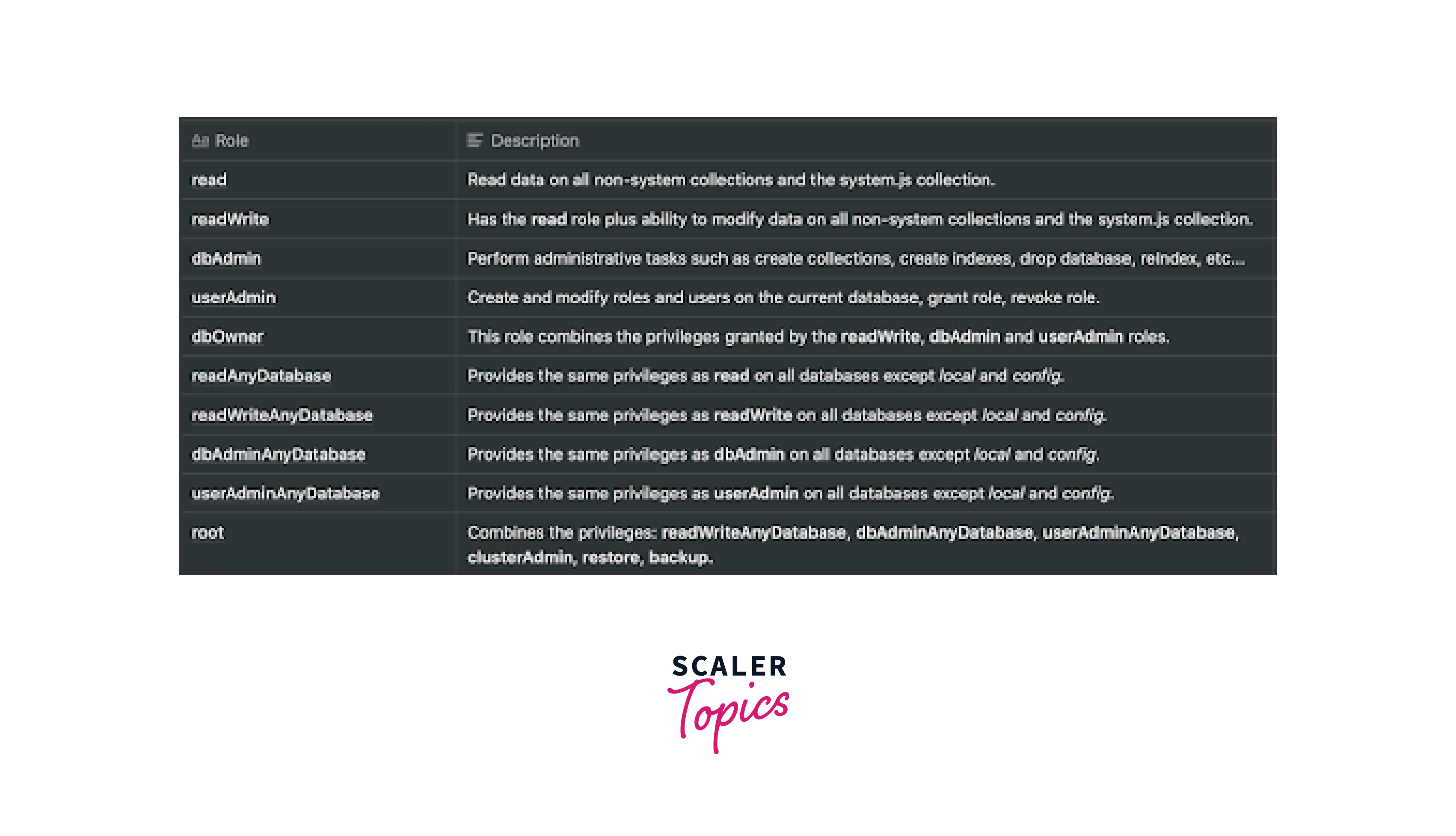
Remember that if you don't have TLS/SSL enabled, the server will still get the password in plain text. Roles that are already present in MongoDB can be used to establish constraints for the entire database. Listed roles are shown in the image below :
Steps to Follow if Authentication is Failing
- If Mongodb authentication is failing, you must verify if you have followed all the following steps carefully -
Verify that you have created a user administrator in the admin database.
Switch to the admin database and view the users:
The above command will show you all the users with the provided role.
- Check whether Mongodb authentication has been enabled in the mongod configuration file(/etc/mongod.conf)
- Then check whether the user you have created has the correct role as required for the operation.
- If the password has been lost, then it can be changed by the DB.changeUserPassword() function.
- The MongoDB authentication Restrictions can be checked and modified if required.The authenticationRestrictions document contains only clientSource and serverAddress, both of which are an array of IP addresses that restrict authentication.
FAQs
Q. How do you change the password for a MongoDB user?
A. The db.changeUserPassword() method can be used to modify a user's password. Again, before running the command, you must switch to the user's authentication database. The username of the account you want to alter and the new password for the account are the two arguments provided by the db.changeUserPassword() method.
Q. How do you delete MongoDB users?
A. Use the db.dropUser() method to delete user accounts in MongoDB. Before deleting a user, make sure to establish a connection to their MongoDB authentication database. The name of the user you want to delete must be provided for the db.dropUser() method to work:
When deletion is successful, MongoDB will return true. It will instead return false if the account wasn't found in the current database.
Conclusion
- MongoDB is a Document Object-Oriented database that falls under the umbrella of NoSQL databases.
- Several ways are available from MongoDB to authenticate a user's connection to the database, such as SCRAM, MongoDB-CR, etc.
- With SCRAM, the supplied MongoDB instance reads and validates the user's credentials against their Mongodb authentication database, username, and password using information that is already known to it.
- The industry standard for client-server Mongodb authentication, Kerberos, is supported by MongoDB's Enterprise builds.
- MongoDB-CR is a type of MongoDB authentication that uses a username and password.
- You can use LDAP for Mongodb authentication and permission in MongoDB if your company relies on it as a source of information for user access control.