


Java Stack peek() Method with Examples
 FREE
FREE

Overview
Understanding the stack data structure of Java is critical when dealing with it. The peek in stack is a useful tool to have in your programming toolbox. This approach lets you peep into the top member of the stack without deleting it. Whether you're managing complex data structures or implementing algorithms that rely on the last-in-first-out (LIFO) principle, a firm grasp of the peek() method's functionality is essential.
What is java.util.Stack.peek() Method in Java?
The java.util.Stack class is essential in handling data structures in Java programming. The peek in the stack is a vital tool for every developer in its arsenal of techniques.
Let us see the stack class of Java:
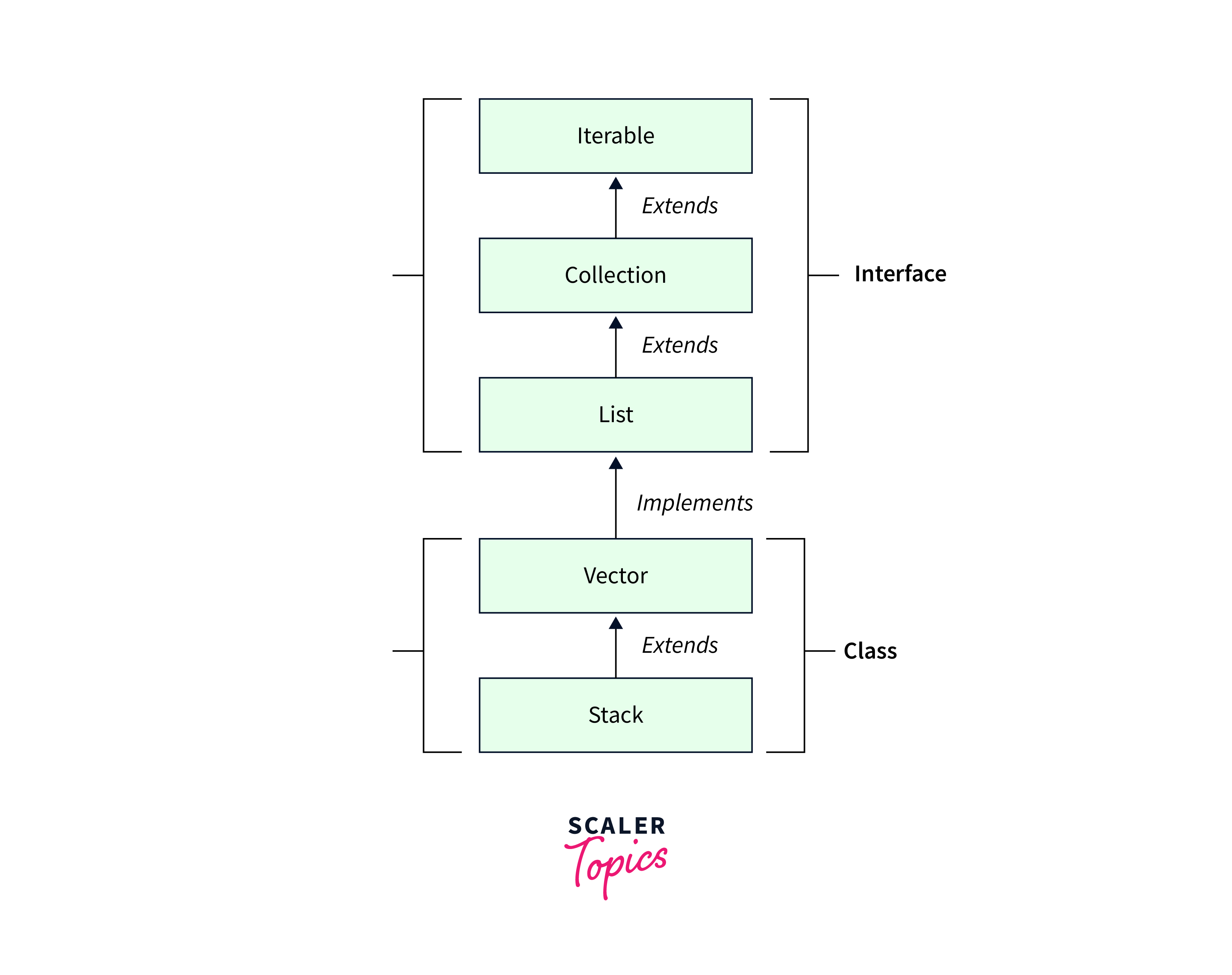
The peek in stack function allows you to peer into your stack without deleting any items. It's the same as looking through a window to observe what's happening inside a room without opening the door. This function retrieves the stack's topmost member without changing its structure. When you want to glance at what's at the top of the stack before deciding to pop it off, the peek() function comes in useful. It's a straightforward yet effective tool for managing your stack data structure.
Syntax
The java.util.Stack.peek() method in Java allows you to retrieve the top element of a stack without removing it. Its syntax is straightforward:
E denotes the type of element kept in the stack. When you call peek(), the element at the top of the stack is returned without changing the structure of the stack. This approach is useful when inspecting the top element without removing it from the stack.
Parameters
The peek in stack method is incredibly straightforward—it doesn't require any parameters. When you call stack.peek(), It just examines the stack's top member without deleting it. This allows you to study the element that will be popped off the stack next without changing the stack's state.
Return Values
One of the class's main functionalities is the peek() method, which allows developers to view the top element of the stack without deleting it.
When you call stack.peek(), it does not change the structure of the stack; it just returns the element at the top of the stack. Consider it like peering into a stack of plates: you can see the top plate without removing it from the stack.
The element at the stack's peak is returned by peek(). However, it is crucial to remember that if the stack is empty when you use peek(), a EmptyStackException will be thrown. Always verify if the stack is empty before calling peek()to avoid runtime issues.
Exceptions
In Java, the java.util.Stack.peek() function is useful for inspecting the element at the top of a stack without deleting it. However, understanding its exceptions is critical to avoid unexpected behaviour in your code.
- EmptyStackException: If you attempt to peek when the stack is empty, Java throws a EmptyStackException. Before calling peek(), make sure your stack has elements.
- NullPointerException: Use peek() with uninitialized or null stacks with caution. To prevent this issue, initialize the stack before calling peek().
To avoid these errors, surround your peek in stack methods with conditional checks to verify the stack is not empty and has been correctly initialized. As an example:
By understanding and handling these exceptions gracefully, you can harness the potential of java.util.Stack.peek() effectively in your Java applications.
Examples
Example 1: Basic Usage
Output:
In this example, we have created a stack, pushed elements onto it, and then used peek in the stack to check the top element.
Example 2: Handling Empty Stack
We ensure the stack isn't empty before calling peek() to prevent exceptions.
Example 3: Peek on an Object Stack
Output:
This example demonstrates using peek in a stack with a custom object type.
These code snippets showcase the versatility of java.util.Stack.peek() in various circumstances, from dealing with empty stacks to working with objects. It's a basic yet powerful Java stack manipulation technique.
FAQs
Q. Determine the purpose of java.util.Stack.peek() in Java?
A. The java.util.Stack.peek() function retrieves (but does not remove) the element at the top of the stack, enabling you to view it without altering it.
Q. What happens if you run java.util.Stack.peek() on an empty stack?
A. When peek() is used on an empty stack, an EmptyStackException is thrown. As a result, before calling peek(), ensure the stack is empty.
Q. What is the difference between java.util.Stack.peek() and java.util.Stack.pop()?
A. peek()obtains the top element while keeping the stack unaltered, but pop() removes and returns the top element while altering the stack.
Q. Is it possible to utilize java.util.Stack.peek() with data structures other than stacks?
A. While intended for stacks, peek() may be used with any data structure that implements the stack behaviour, like the Deque interface or LinkedList. However, it's advisable to use appropriate data structures for clarity.
Conclusion
- The java.util.Stack.peek() method provides a quick and easy way to peek at the top element of a stack without deleting it, making it ideal for situations when you need to investigate the element at the top of the stack.
- One of its distinguishing characteristics is that it is non-destructive; it does not change the content of the stack, guaranteeing that the stack stays intact for subsequent operations.
- When calling peek() on an empty stack, a EmptyStackException is thrown. Always verify if the stack is empty before using peek()to avoid runtime issues.
- It is widely used in decision-making procedures, such as assessing if a stack is empty before performing a pop operation or as part of an algorithm that inspects the top element without removing it.
- By avoiding unnecessary pops and preserving the stack's integrity, java.util.Stack.peek() enhances code efficiency and is especially useful in applications like expression evaluation and backtracking algorithms.