


Python Importlib Module
 FREE
FREE

Overview
The Python Importlib is used for dynamic imports in runtime. The import statement in Python source code is implemented by the Python Importlib package and is available for use with any Python interpreter. Since Python 3, this package has made programmatic module import possible. Additionally, this software enables users to design and employ objects (known as importers).
Build an AI-First Career, Master the Complete Skillset
Choose from our industry-leading programs designed for career success
Modern Software and AI Engineering Program
Master full-stack development with AI integration


 +1000 more
Modern Data Science and ML with specialisation in AI
Advanced data science techniques with AI specialization
+1000 moreAdvanced AIML with Specialisation in Agentic AI
Deep dive into AIML with focus on Agentic systems
+1000 moreDevOps, Cloud & AI Platform Engineering
Build and manage AI-powered cloud infrastructure
+1000 moreAI Engineering Advanced Certification by IIT-Roorkee
Premier AI engineering certification from IIT-Roorkee

AI Forward Deployed Engineer Program
Full-stack engineering, production AI and client-facing consulting
+1000 moreThe Python Importlib Module
The Python Importlib package has two main objectives. The first is to implement the import statement within Python's source code, while the second is to provide a portable implementation of import that can be used with any Python interpreter. Compared to implementations created in other languages, Importlib offers a more straightforward and understandable solution. Importlib includes functions that implement Python's import system for loading code from modules and packages. This package provides a useful method for dynamically importing modules, particularly in cases where the module name is not known when the code is written (such as with plugins or application extensions). Overall, the Python Importlib package is an essential tool for any Python developer who needs to manage dynamic imports, offering a reliable and easy-to-use solution for importing code from modules and packages.
Important Functions in Python Importlib
Below are some of the important functions in Python Importlib.
-
importlib.import_module(name, package=None): This function helps import a module in Python code. The name argument specifies the module that is to be imported. The package parameter must be set to the name of the package that will serve as the anchor for resolving the package name if it is supplied in relative terms (for example, import module("..mod", "pkg.subpkg") will import pkg.mod). The importlib.import() function is wrapped in the import_module() function to make things easier. All the semantics of the function are derived from the importlib.import(). The main difference between import_module() and importlib.import() is that the importlib.import() return to-level module or package (e.g., pkg) and import_module() returns the module or package that is specified.
-
importlib.find_loader(name, path=None): This function locates the module's loader so that it can be loaded into the RAM. The user can specify the path from which the module should be loaded. Since Python 3.4, importlib.util.find_spec() has taken its place.
-
importlib.invalidate_caches(): To apply modifications made to the module finder while the program runs, it invalidates the internally produced caches. Finders' internal caches are kept in sys.meta_path.
-
importlib.reload(module) : If the program has already imported a module, this function reloads it. This function recompiles and executes the module-level code. A ModuleNotFoundError has been triggered since Python 3.7 if the module that is being reloaded does not have a ModuleSpec.
-
importlib.abc: All of the essential abstract base classes that are used by import statements are included in this module. MetaPathFinder, PathEntryFinder, Finder (deprecated), and Loader are the classes in this module.
-
importlib.resources: The import system can access all the resources included in packages using this module. Any readable object that is part of a package is a resource. It has access to both binary and text resources. The resources could come in the form of zip files as well as static files (such as templates, sample data, and certifications).
-
importlib.machinery: Several objects that are used to load and import modules, such as Importer, SUFFIXES, PathFinder, etc., are present in this module.
-
importlib.util: The code of the module can be used by importers. It includes all the different objects required to build an importer, including LazyLoader, find_spec, module_from_spec, module_for_loader, and spec_from_loader.
Using Python Importlib to Import Custom Modules
In this section, we will be using Python Importlib to import custom modules. We are creating a custom module that we will be using in our programmes. Following is the code for the module.
Code for Module
After making the file save it as module.py, in the following example, instead of importing a custom module with the "import" command during initialization as we would normally do, we are utilizing the importlib module to import the custom module that we defined previously. And we used the variable_name.__ name__ command to print the name of the imported module.
Code to Import Module
Save the above file as main.py, and execute the following command. Make sure that the main.py file and the module.py file are in the same folder.
Command
soham@Ganeshs-MacBook-Air python % Python3 main.py
Output
Explanation
In the above example, we have first created a module that prints a statement. In the second code, we created a function that imports the custom module we created. We import this module using importlib.import_module() function. We are also storing the module in the variable named ‘module’. Later we print the name and call the main function of the module.
Taking Module Name as Input from the User
In this section, we will take an example where we will take a module name as input from the user. After getting the module name from the user, we also print the module's name, documentation, and directory that includes all the methods and functions. First, we will be creating a module, as shown below.
Code for Module
Now we will import this module and print the information like name, documentation, and directory of the module that we have created.
Code to Import Module
Command
soham@Ganeshs-MacBook-Air python % Python3 main.py
Output
Explanation
In the above example, we first created a module with some documentation and stored it in some directory. To know all the information about the module, we are first importing the module using importlib.import_module() function. Furthermore, we are printing the imported module's name documentation and directory list.
Python Program for reload() and invalidate_chaches
In this section, we will see an example that helps in clearing any previously saved cache, reloading the imported module, and then verifying whether any changes to the module have been made or not just by comparing the module before and after reloading it. If no modifications are made before and after reloading the module, it will return true, or else it will return false. So, for example, we consider the module from the previous section. We write the code to invalidate any previous cache stored and reload the imported module.
Code
Command
soham@Ganeshs-MacBook-Air python % Python3 main.py
Output
Explanation
In the above example, we are clearing any previously saved caches. Using the invalidate_caches() function, we are invalidating any previous module stored in the process. After that, we import the module and store it in some variable, and again we reload it and store it in another variable. We check if the two variables are the same. If both the variables are the same, then no changes were made to the module, and if both the variables are distinct, then some changes have been made to the module.
How Scaler Transformed Careers in Different Fields
Scaler learners achieved 2.5x salary growth with average post-Scaler CTC reaching ₹23L.
 Google
 Amazon
 Microsoft
 Flipkart
 Adobe1200+ more
Using importlib.resource to Fetch Data from a Text File
In this section, we will learn an example that will help us fetch the data from a text file. We will use the importlib.resources module in file handling to fetch and print the data from the file. To do this, we must make a folder named ‘data’. Inside the data folder, create two files: the init.py file and the random.txt file. The init.py file will be empty, whereas the random.txt file will contain some data.
The file structure will be as follows:
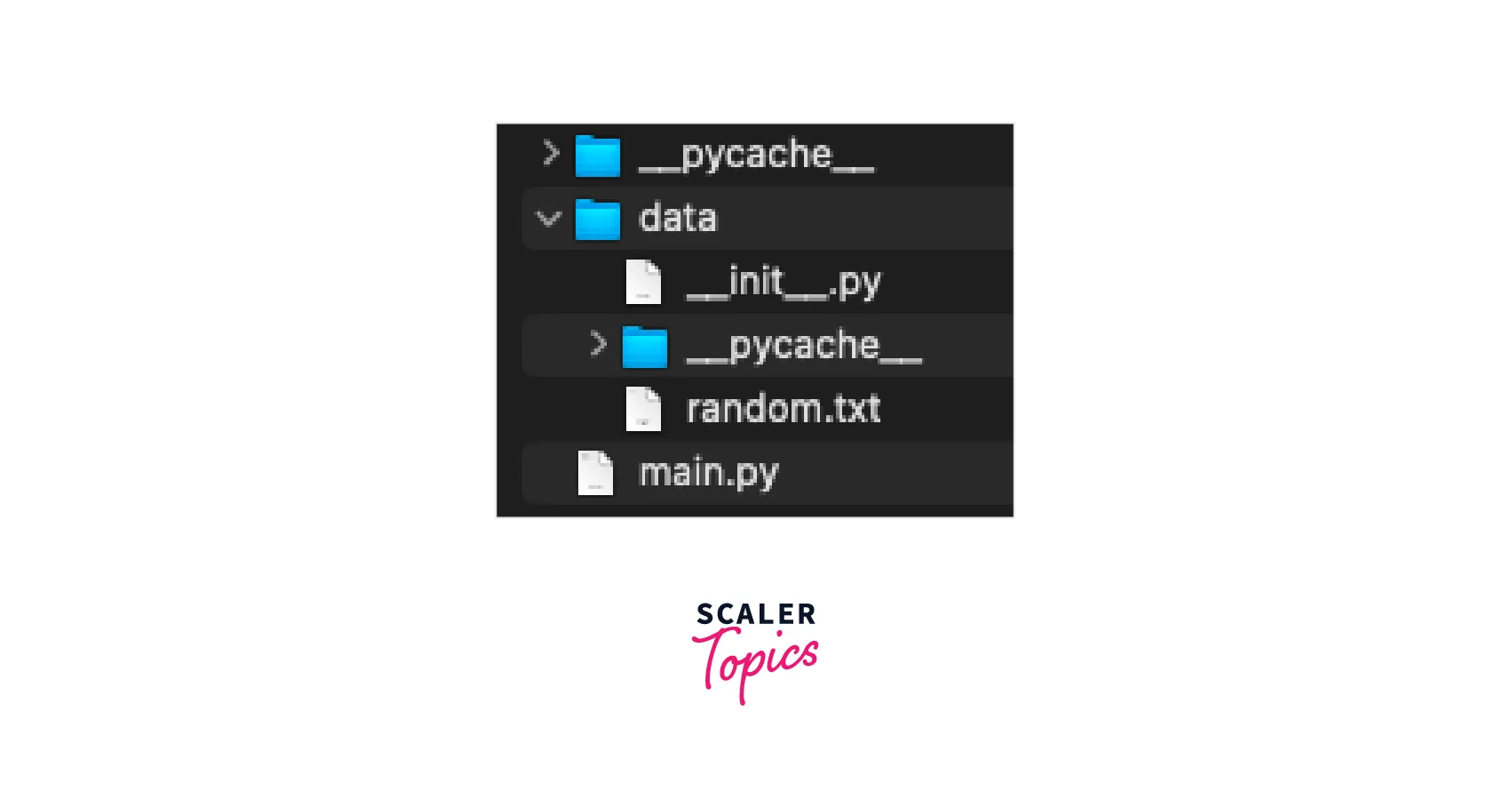
Now, we will be reading the data from the random.txt file using the following code:
The random.txt file has the following content. Hello Welcome to Scaler Hi Learn with Scaler
Code
Command
soham@Ganeshs-MacBook-Air python % Python3 main.py
Output
Explanation
In the above example, we have imported a resources module from importlib. Using the open_text() function provided by the resources module, we can read data from the ‘random.txt’ file. Furthermore, we are printing the data that we fetch from the .txt file.
Module Loader and Path Printing
In this section, we will be taking an example where we will use util.find_spec() and loader.load_module() methods of importlib modules to print the path and the loader of the module. The following is the code to print the loader and the path of the specific module.
Code
Command
soham@Ganeshs-MacBook-Air python % Python3 main.py
Output
Explanation
In the above example, we are using util.find_spec() and loader.load_module() importlib module methods to get the module's path and loader.
Turn Learning into Career Growth
Frequently Asked Questions
What is Python Importlib?
The import statement is implemented in Python source code and available for use with any Python interpreter through the Python Importlib package. It also offers a Python implementation that is simpler to understand than one that uses another language.
What is Python Importlib Util?
importlib.util indicates the Utility code for importers. Programmatically importing the module, testing the module's portability, and directly importing a source file are some functions of importlib util.
What does Python Importlib reload do?
You can force a module to reload using this technique, which will have the same result as importing the module for the first time.
Conclusion
- Python Importlib is used for dynamic imports in runtime.
- The importlib module helps us include the import statement implementation inside the Python source code.
- It offers portable implementation of import for all Python interpreters.
- importlib enables users to design and employ objects of their own.




