


Python Timeit Module
 FREE
FREE

Overview
The Python timeit module is a simple interface to measure the execution time for small blocks of code quickly.
When creating an application, you may wonder how this block of code will perform and want to test it under different scenarios. That's where the timeit module comes in handy.
timeit is straightforward to use and has a command-line interface and a callable one too.
Build an AI-First Career, Master the Complete Skillset
Choose from our industry-leading programs designed for career success
Modern Software and AI Engineering Program
Master full-stack development with AI integration


 +1000 more
Modern Data Science and ML with specialisation in AI
Advanced data science techniques with AI specialization
+1000 moreAdvanced AIML with Specialisation in Agentic AI
Deep dive into AIML with focus on Agentic systems
+1000 moreDevOps, Cloud & AI Platform Engineering
Build and manage AI-powered cloud infrastructure
+1000 moreAI Engineering Advanced Certification by IIT-Roorkee
Premier AI engineering certification from IIT-Roorkee

AI Forward Deployed Engineer Program
Full-stack engineering, production AI and client-facing consulting
+1000 morePython Timeit Module
Python provides a built-in library known as the timeit module that measures the execution time for small python code snippets. The timeit module executes your code a million times (default) to find the best and most precise value for the code execution time.
Developers have several ways to write the same code block, but they must find the perfect methods for their use cases. We can use the timeit module to determine each code block's execution time and quickly select the fastest.
The "timeit module" runs your code block millions of times by default to find the accurate execution time.
Syntax :
The above code snippet illustrates that we're importing the timeit module and using the timeit() function from the timeit module, which takes several parameters.
The timeit() function is among the essential functions, but the timeit module provides several other functions, such as repeat(), anddefault_timer(), and we will talk about each of them later.
Let's first talk about the parameter used by the timeit module.
Parameters of Timeit Module
timeit module provides several functions, and most of them use the following parameters :
- stmt :
This parameter holds the string of the code block whose execution time you want to measure, and the default value is "pass". - setup :
This parameter generally holds the import statement, which imports the essential modules for our stmt code block, and the default value is "pass". - timer :
This parameter holds a Timer object, and mostly, you don't have to worry as it will be set automatically and will have the default value. - number :
This parameter is used to specify the number of times you want to execute your code snippet, and the 1 million (1000000) is the default value. - repeat :
It tells how often the execution should be repeated.
Functions Used in Python Timeit Module
Python timeit module is a collection of several functions and let's learn each one with examples.
How Scaler Transformed Careers in Different Fields
Scaler learners achieved 2.5x salary growth with average post-Scaler CTC reaching ₹23L.
 Google
 Amazon
 Microsoft
 Flipkart
 Adobe1200+ more
timeit()
The timeit() is the core and most important function. It usually takes a small code snippet as a string and executes it million times (by default) to find the accurate execution time.
Syntax :
Example :
The above code illustrates that we're importing the timeit module, adding our code string inside the code variable. And last, using the timeit function with the stmt as code variable, setup as a "import math" and number as specify the number of times we want to execute our string of code.
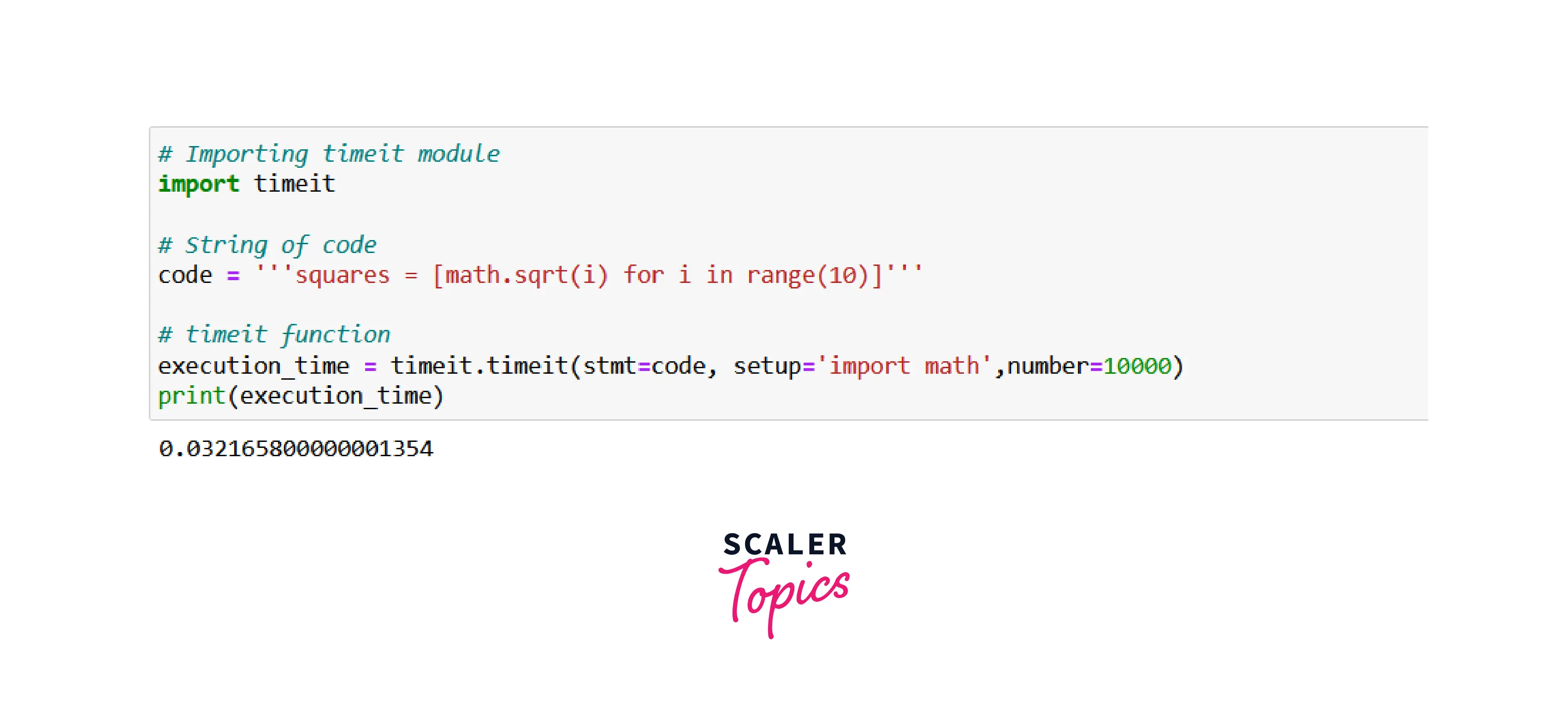
The last line of the above image shows our code string's execution time.
repeat()
The repeat() function works the same as the timeit() function, but it takes one additional repeat parameter to repeat the calculation of execution time for a string of code.
Syntax :
Example :
In the above code illustration, we're using the repeat() function to get the execution time of the given code but also specifying the repeat parameter value as 2 to repeat the whole process two times.

The repeat() function returns the execution time list containing two values because we have specified the repeat parameter value to 2.
Turn Learning into Career Growth
Why Use Python Timeit Module?
- Python timeit module ignores your system's background processes, which impacts the code execution.
- It executes your code 1 a million times (by default ) before giving you the execution time, making it statistically the most appropriate measurement for execution time.
- Python timeit supports the command-line interface and a collable one and supports straightforward use.
Examples to Understand Python Timeit Module
Let's see the most basic example of the timeit module :
Example - 1
Let's break down the above code snippet to understand it :
- First, we're importing the timeit module and adding the setup code as a string.
- We have created a code variable that contains the small code we use to get the execution time.
- And last, we have defined the timeit() function with stmt value as the code variable, setup value as the setup_code variable, and number as 10000.
The above code returns the below execution time as the output.

Example - 2
Python timeit module also can be used with the functions.
We're using the defined function inside the timeit() function. Also, I hope you noticed the unusual line of code inside the setup_code variable.
Whenever you use the timeit module, it runs on a different namespace, so you have to import it to the same namespace, and you can do it by using the below syntax :
Replace the func_name with your actual function name.
The above code returns the below execution time as the output.

Similar Useful Modules in Python
Measuring the execution time is very important because, in many algorithms, the time needs to be calculated and compared, and the fastest is usually chosen.
Many modules are available other than the timeit, such as datetime, time, etc to measure the execution time.
Conclusion
- Python timeit module is used to get the execution time of the specified code.
- It provides the timeit() function, which is the most important for calculation execution time.
- Python timeit module supports several functions such as timeit(), repeat() and many more.
- timeit is straightforward to use and has a command-line interface and a callable one.




