


React Native Flash Message
Overview
Developers use various approaches to inform users about events in mobile applications, whether they occur in the foreground or background. When it comes to notifying users about foreground events, developers commonly utilize a range of methods, such as flashbars, conventional alert boxes, toast messages, or in-app notification systems.
By using react-native-flash-message, developers can effortlessly incorporate eye-catching and user-friendly flashbars, top notifications, or alerts into their React Native projects. It offers a range of options for customization, allowing developers to tailor the appearance and behaviour of these elements to meet their requirements.
Build an AI-First Career, Master the Complete Skillset
Choose from our industry-leading programs designed for career success
Modern Software and AI Engineering Program
Master full-stack development with AI integration


 +1000 more
Modern Data Science and ML with specialisation in AI
Advanced data science techniques with AI specialization
+1000 moreAdvanced AIML with Specialisation in Agentic AI
Deep dive into AIML with focus on Agentic systems
+1000 moreDevOps, Cloud & AI Platform Engineering
Build and manage AI-powered cloud infrastructure
+1000 moreAI Engineering Advanced Certification by IIT-Roorkee
Premier AI engineering certification from IIT-Roorkee

AI Forward Deployed Engineer Program
Full-stack engineering, production AI and client-facing consulting
+1000 moreIntroduction
React Native Flash Message is a module or library specifically built for React Native applications. It provides a simple and efficient solution for creating customizable flashbars, top notifications, or alerts within the app. With React Native Flash Message, developers can easily display temporary messages or notifications to users, enhancing the user experience and providing important information or feedback. This module offers various customization options, allowing developers to modify the appearance, style, and behaviour of the flash messages to match their app's design and branding. React Native Flash Message simplifies the process of incorporating visually appealing and interactive notifications into React Native projects.
Installation
To install the most recent release of react-native-flash-message, you simply need to execute the following command as it is a JavaScript-based library:
For NPM users:
For YARN users:
Try It Out
To explore the features of this library, you have the option to experiment with the Flash Message Playground application.
Basic Usage
To ensure global functionality, the FlashMessage component is designed to be instantiated once within the main app screen. It should always be included as the last inserted component to achieve its intended purpose.
It is sufficient to invoke the showMessage or hideMessage functions from any part of your application.
If a global usage is unnecessary (for instance, if it will only be utilized on a single screen), you can instantiate the FlashMessage Component with a reference identifier (or employ an alternative reference capturing method).
Show some message
Once you have initialized the universal FlashMessage component, you can utilize the showMessage function on any screen or view to display messages within your application. This function serves as a global method that accepts a message object containing the specific details of your message.
To display a message with both a title and additional details spanning two lines, it is necessary to include specific attributes within the message object. For the title, the message attribute should be utilized, while the description attribute can be used for the details line.
How Scaler Transformed Careers in Different Fields
Scaler learners achieved 2.5x salary growth with average post-Scaler CTC reaching ₹23L.
 Google
 Amazon
 Microsoft
 Flipkart
 Adobe1200+ more
Props
| Property | Default | In Message Object | Description |
|---|---|---|---|
| hideOnPress | true | Yes | Controls if the flash message can be closed on press |
| onPress | none | Yes | onPress callback for flash message press |
| onLongPress | none | Yes | onLongPress callback for flash message press |
| animated | true | Yes | Controls if the flash message will be shown with animation or not |
| animationDuration | 225 | Yes | Animations duration/speed |
| autoHide | true | Yes | Controls if the flash message can hide itself after some duration time |
| duration | 1850 | Yes | How many milliseconds the flash message will be shown if the autoHide it's true |
| hideStatusBar | false | Yes | Controls if the flash message will auto-hide the native status bar |
| statusBarHeight | none | Yes | Use this prop to set a custom status bar height that will be added in flash message padding-top calc |
| floating | false | Yes | The floating prop unsticks the message from the edges and applies some border-radius to the component |
| position | top | Yes | The position prop set the position of a flash message |
| icon | none | Yes | The icon prop could be a render function that returns a new JSX Element or a definition of the icon |
| style | none | Yes | Apply a custom style object in the flash message container |
| textStyle | none | Yes | Apply a custom style object in flash message text label |
| titleStyle | none | Yes | Apply a custom style object in flash message title text label |
| titleProps | none | Yes | Set a custom props object in flash message title text label |
| textProps | none | Yes | Set a custom props object in the flash message for all text components |
| iconProps | none | Yes | Set a custom props object for the renderFlashMessageIcon method |
| renderBeforeContent | none | Yes | Render custom JSX before title in flash message |
| renderCustomContent | none | Yes | Render custom JSX below the title in flash message |
| renderAfterContent | none | Yes | Render custom JSX after the title (or description) of a flash message |
| renderFlashMessageIcon | renderFlashMessageIcon | Yes | Set a custom render function for inside message icons |
| transitionConfig | FlashMessageTransition | No | Set the transition config function used in shown/hide anim interpolations |
| canRegisterAsDefault | true | No | Use to handle if the instance can be registered as default/global instance |
| MessageComponent | DefaultFlash | No | Set the default flash message render component used to show all the messages |
Message Object
To display a message using the showMessage method, it is necessary to provide a message object as an argument. Within this method call, it is possible to include additional attributes to personalize the message. The majority of the FlashMessage Component's props can be dynamically passed when calling showMessage. These commonly used props or attributes are listed in the Props table under the designation "In Message Object."
If there is a requirement to further customize the background color or text color of the message, beyond the predefined types of success, warning, info, and danger, the backgroundColor and/or color attributes can be utilized within the message object.
To manage the press or touch event within your message, you have the option to utilize the onPress attribute, which enables you to trigger specific actions.
Turn Learning into Career Growth
Message with Custom Icon
To display a customized or unique icon within a showMessage call, it is possible to achieve this by passing a render function along with a new JSX element to be shown.
Disable All Messages
In case there is a need to disable or deactivate all flash messages, one can utilize the FlashMessageManager utility class for this purpose.
iPhone X (and Above)
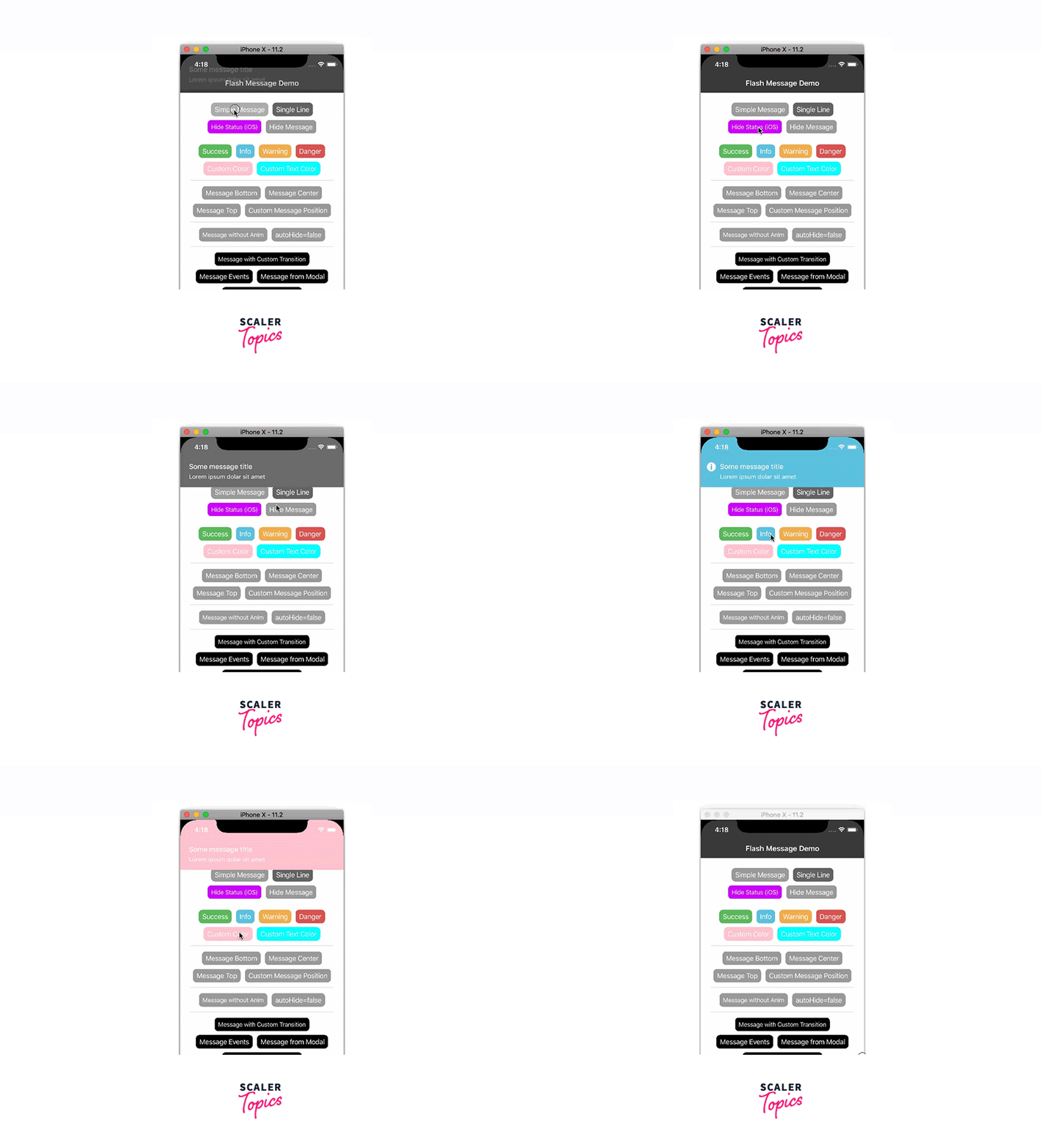
The primary component responsible for rendering messages in our application is referred to as DefaultFlash, which serves as the main MessageComponent. To address various aspects such as device orientations, statusbar heights, and the inclusion of iPhone X "notch" inset padding, DefaultFlash is encapsulated within another component called FlashMessageWrapper. This wrapper component ensures proper handling of these factors for an enhanced user experience. The below image demonstrates the various react native flash message components that we have discussed throughout the article.
Conclusion
- React Native Flash Message is a library which is offering a convenient solution for using visually appealing and customizable flashbars, top notifications, or alerts.
- To ensure global functionality, the FlashMessage component should be instantiated once within the main app screen and positioned as the last inserted component.
- showMessage and hideMessage functions allow developers to display or hide messages from any part of their application, providing flexibility in message handling.
- The library's props offer a wide range of customization options, such as controlling message behaviour, animations, duration, positioning, styling, and the inclusion of custom icons.
- Custom messages can be displayed using the showMessage function by providing a message object containing specific details such as the message title, description, type, and additional customization attributes like background color and text color.
- It is possible to disable all flash messages using the FlashMessageManager utility class, allowing developers to control the visibility of messages when needed.
- The FlashMessageWrapper component ensures proper rendering of messages, accounting for device orientations, status bar heights, and iPhone X "notch" inset padding, resulting in an optimized user experience.
FAQs
Q. Are there any predefined message types available in React Native Flash Message?
A. Yes, React Native Flash Message provides predefined message types such as "success", "info", "warning", "danger", and "default" that can be used to style flash messages accordingly.
Q. How can I handle multiple flash messages concurrently using React Native Flash Message?
A. React Native Flash Message provides a way to manage multiple flash messages concurrently by utilizing its message queue system. To handle multiple messages, you can enqueue new messages to the queue and set their priorities accordingly. By using the library's APIs, you can control the order in which messages are displayed, ensuring a seamless and organized user experience.
Q. How can I persist flash messages across different screens or app reloads in React Native?
A. By using techniques like AsyncStorage or a state management library such as Redux, you can store the flash message data and retrieve it when needed. This enables you to maintain message continuity and ensure important notifications are not lost during user interactions or app reboots.




