


HTML Table Rowspan & Colspan
 FREE
FREE

Overview
In HTML tables, Colspan and Rowspan attributes are important for shaping the structure of a table. Colspan lets a cell stretch across the columns, providing great support for grouping header columns, and rowspan stretches across the rows, helping to provide vertical organization. These attributes help designers to merge cells horizontally and vertically, giving more power to define the table's layout. In this article, we will see in detail both of these attributes.
Build an AI-First Career, Master the Complete Skillset
Choose from our industry-leading programs designed for career success
Modern Software and AI Engineering Program
Master full-stack development with AI integration


 +1000 more
Modern Data Science and ML with specialisation in AI
Advanced data science techniques with AI specialization
+1000 moreAdvanced AIML with Specialisation in Agentic AI
Deep dive into AIML with focus on Agentic systems
+1000 moreDevOps, Cloud & AI Platform Engineering
Build and manage AI-powered cloud infrastructure
+1000 moreAI Engineering Advanced Certification by IIT-Roorkee
Premier AI engineering certification from IIT-Roorkee

AI Forward Deployed Engineer Program
Full-stack engineering, production AI and client-facing consulting
+1000 moreRowspan and Colspan in HTML
In HTML table design, the Colspan and Rowspan attributes are mainly used for defining the structure and layout of the table. Colspan attribute defines how many columns a cell should span horizontally and is a handy tool for headers grouping columns. Conversely, Rowspan attribute determines the number of rows a cell should cover vertically helping in various tasks like merging cells for a clear and organized appearance.
These attributes are essential for customizing the look of overall HTML tables, enabling both horizontal and vertical cell merging. Understanding and using Colspan and Rowspan provides great control over table layout, resulting in a more efficient and organized presentation of information.
Syntax
The Colspan attribute is used for merging columns within an HTML table. The syntax is as follows:
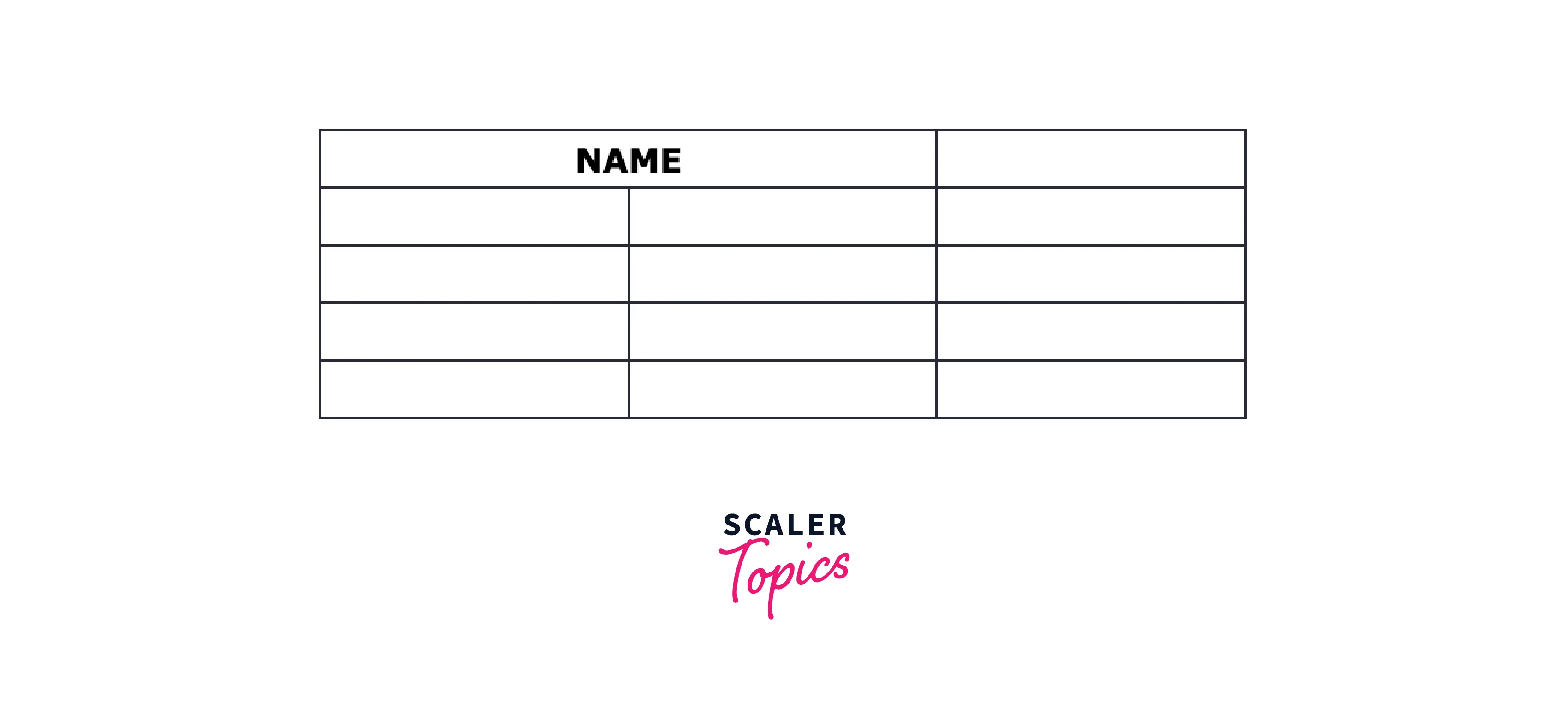
Similarly, the Rowspan attribute is used to merge rows. The syntax is:

These attributes provide an easy way to define and control the layout of cells within an HTML table, allowing for both horizontal and vertical expansion as needed.
Examples
How Scaler Transformed Careers in Different Fields
Scaler learners achieved 2.5x salary growth with average post-Scaler CTC reaching ₹23L.
 Google
 Amazon
 Microsoft
 Flipkart
 Adobe1200+ more
HTML Table Rowspan
Let us consider an example of a table having the sales performance of two products throughout different quarters.
Output:
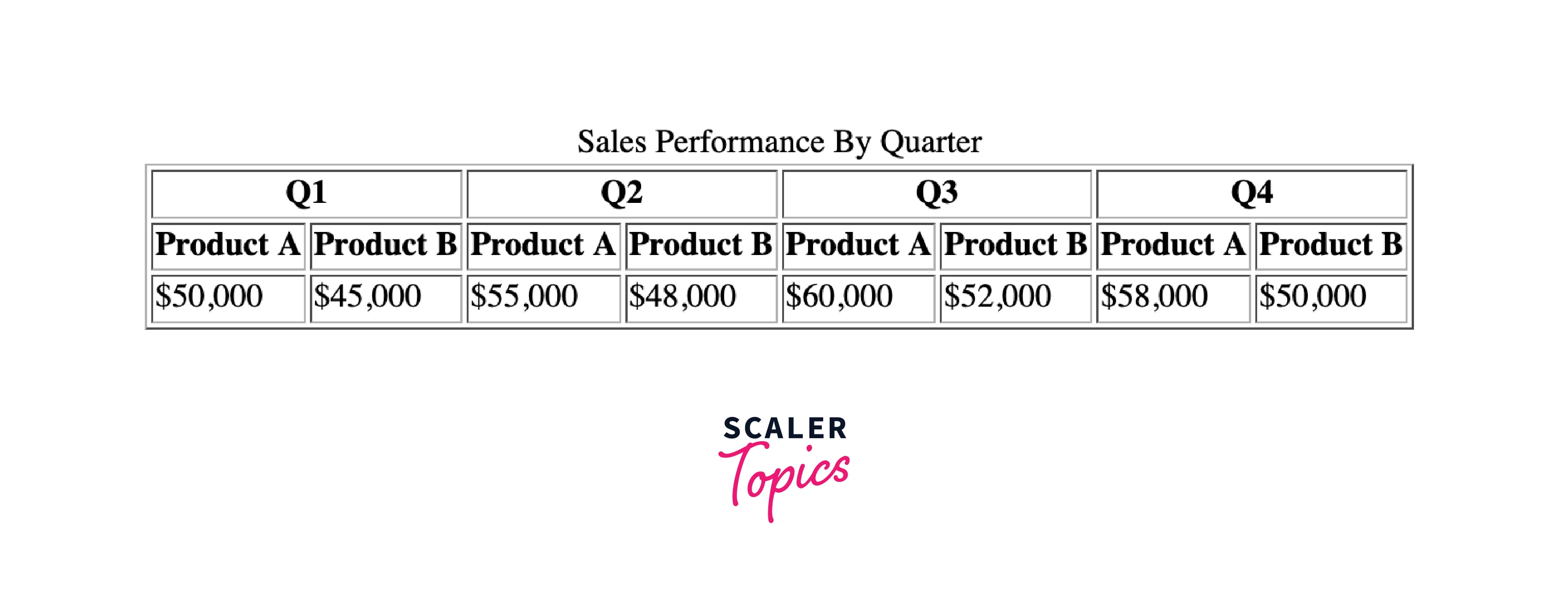
The table shows the sales performance of two products, Product A and Product B, across four quarters (Q1, Q2, Q3, and Q4). Each quarter is denoted by two columns, one for each product, indicated by the "colspan="2" attribute in the <th> (table header) cells. It helps in providing a clear and organized representation of the sales data over different quarters.
HTML Table Colspan
Let's now explore a scenario focusing on showcasing the performance of a single product across various regions.
Output:
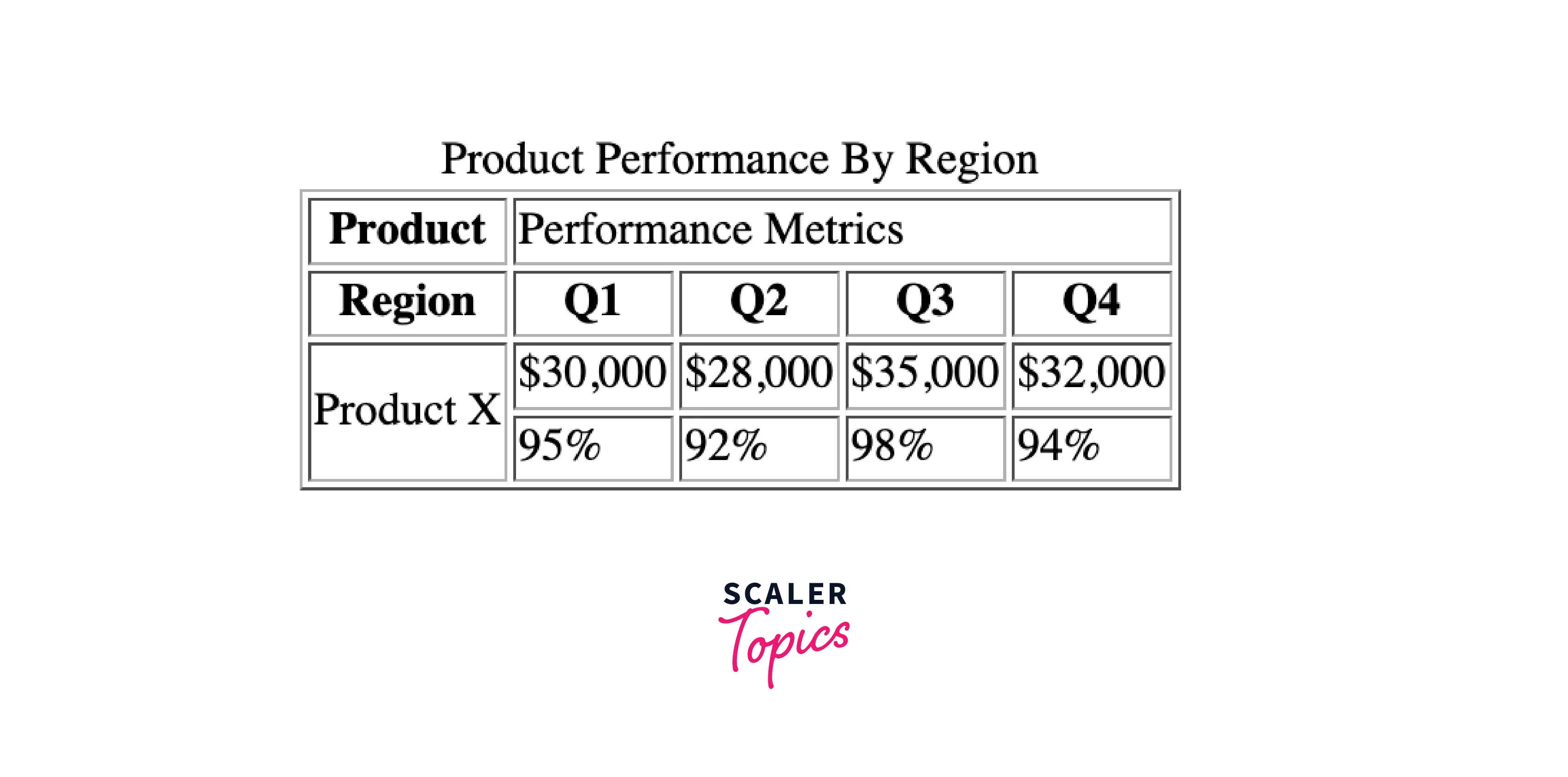
The above table depicts the performance of a single product, Product X, across diverse regions (indicated by the colspan="4" attribute in the second row). The second row outlines the performance metrics for each quarter (Q1, Q2, Q3, and Q4), and the first column identifies the regions where the product is available. The "rowspan="2"" attribute in the Product X cell ensures it spans two rows, accommodating both sales and performance percentages.
Turn Learning into Career Growth
Merging Rows and Columns Using Both rowspan and colspan Attributes
Let's now consider an example showing the utilization of both rowspan and colspan attributes to create a more intricate table structure.
Output:
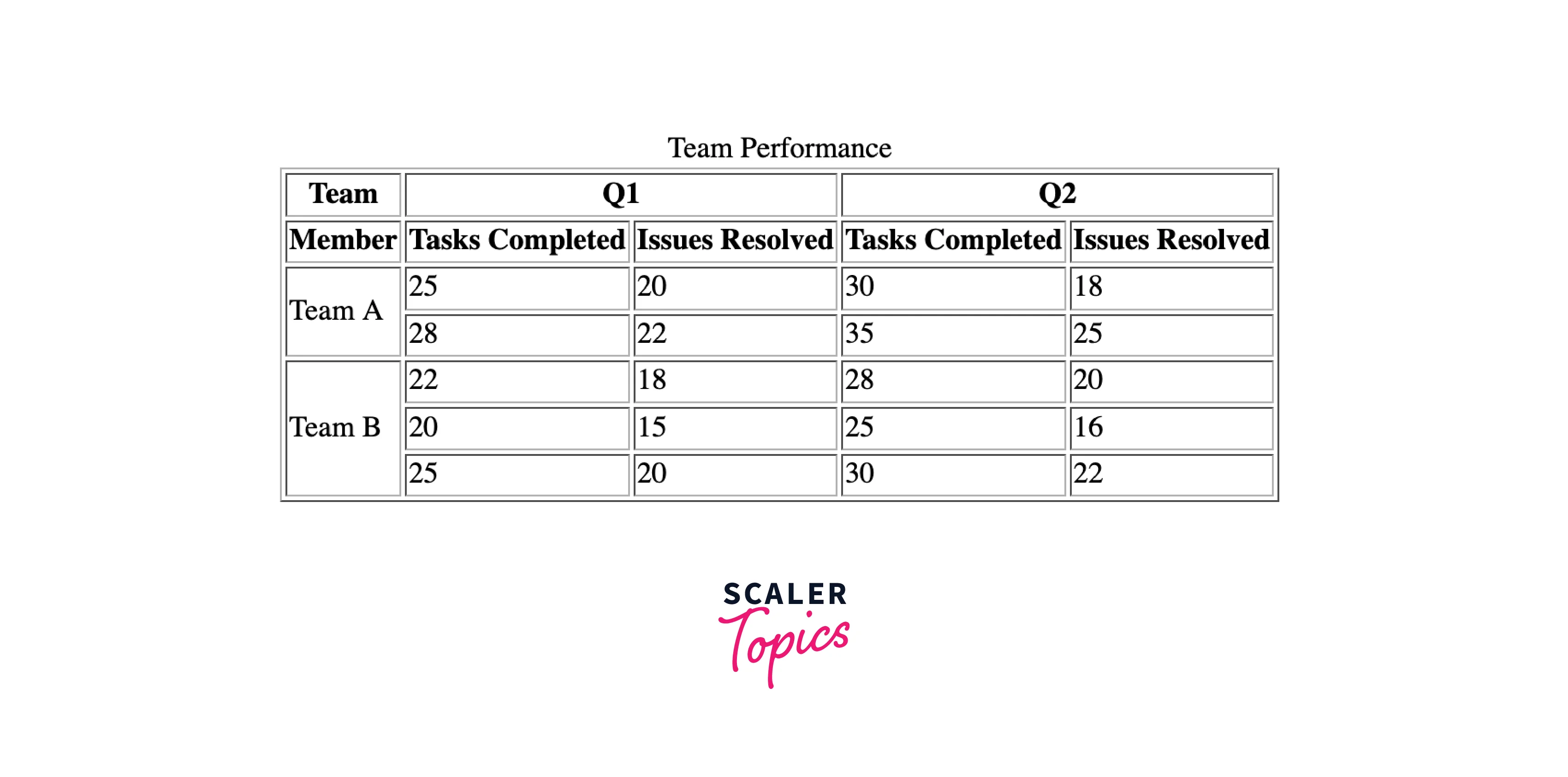
The table illustrates the performance of two teams, Team A and Team B, over two quarters (Q1 and Q2). The first row serves as headers for each quarter and the second row includes headers for each metric, such as Tasks Completed and Issues Resolved.
The rowspan attribute is employed to merge cells in the "Team" column, merging multiple members for each team and the colspan attribute is utilized to merge cells in the "Q1" and "Q2" columns, representing the performance metrics for each quarter.
Reasons Not to Use Colspan or Rowspan in HTML
In earlier web development practices, it was a common approach to use <table> elements for structuring the layout of a webpage. Attributes like colspan and rowspan were very frequently utilized to define the cells within the table.
However, this method of utilizing tables for page layout is now strongly discouraged in modern web development. Newer and more flexible layout techniques, such as CSS-based approaches like Flexbox and Grid, are preferred for creating responsive and maintainable designs.
Browser Support
Both the <table> elements, along with their attributes like colspan and rowspan, are universally supported across all web browsers. This means that web developers can easily render when using these elements to create tables in their HTML documents. Having consistent browser support ensures that the intended layout and structure of tables are maintained across different platforms and environments.
Conclusion
- Colspan and Rowspan attributes play a main role in enhancing the structure of HTML tables, allowing cells to span across multiple columns or rows.
- Both the <table> elements, along with their attributes like colspan and rowspan, are universally supported across all web browsers.
- Rowspan helps cells to stretch vertically and colspan lets cells spread horizontally.
- These attributes provide flexibility in designing tables, enabling customized presentations and organized displays of information in HTML table.




