


How to use RestClient in Ruby?
Overview
Ruby provides developers with a wide range of libraries and frameworks to simplify various tasks, including making HTTP requests. One such library is Ruby RestClient, which serves as a lightweight and user-friendly tool for interacting with RESTful APIs. It facilitates the process of making HTTP requests to RESTful APIs. By utilizing RestClient, developers can focus on consuming API functionality without the need to handle low-level network communication intricacies. This article will provide a comprehensive overview of using RestClient in Ruby, covering the installation process, creating various types of HTTP requests, and effectively handling errors and exceptions.
Furthermore, we will explore advanced features offered by RestClient, such as the ability to work with raw URLs, pass options for customization, handle resource nesting, and efficiently manage response data. By following practical examples and code snippets, we will see how to leverage RestClient to build a simple Ruby application that interacts with an API.
Introduction
Ruby RestClient is a lightweight library that simplifies interaction with RESTful APIs. It provides developers with a straightforward interface for making HTTP requests, handling responses, and managing authentication and headers. By abstracting away the complexities of the underlying HTTP protocol, RestClient enables Ruby developers to seamlessly integrate APIs into their web applications, resulting in reliable and scalable web experiences.
What is RestClient in Ruby?
RestClient is a lightweight Ruby library that simplifies interaction with RESTful APIs. With RestClient, Ruby developers can focus on the essential aspects of their application logic. The library streamlines the process by providing a simple and intuitive interface, enabling developers to send GET, POST, PUT, DELETE, and other HTTP requests with ease. Additionally, RestClient also supports handling response data, such as parsing JSON or XML, and managing authentication and headers.
What is the Purpose of Using RestClient in Ruby?
RestClient in Ruby provides an easy-to-use API that abstracts away low-level technicalities, enabling developers to interact with RESTful APIs without manual network protocol handling. It simplifies the process of accessing and manipulating data from remote servers, saving time and effort in development. Acting as a bridge between the application and the server, RestClient empowers developers to fully utilize RESTful API capabilities in their Ruby applications, resulting in strong, scalable, and feature-rich applications.
Installing RestClient
Before we dive into the usage of Ruby RestClient, we need to ensure that it is installed in our Ruby project. Fortunately, installing RestClient is very simple thanks to RubyGems, the package manager for Ruby libraries.
To install RestClient, open a terminal and type the following command:
gem install rest-client
This command will fetch and install the ruby RestClient gem from RubyGems.
How to Install RestClient in a Ruby Project?
After installing RestClient, we can include it as a dependency in our Ruby project's Gemfile, which serves as a configuration file for Bundler, Ruby's package manager
To add RestClient to our Gemfile, we open the file and append the following line:
Following the Gemfile update, we run the following command in our terminal:
Bundler will read the modified Gemfile, fetch and install the RestClient gem and its dependencies.
HTTP Requests Using RestClient in Ruby
With RestClient successfully installed in our Ruby project, we can now use its capabilities to execute HTTP requests seamlessly. This powerful library offers support for an extensive variety of HTTP methods, including GET, POST, PUT, DELETE, and more. In the upcoming section, we will focus into the process of making basic requests, specifically focusing on GET and POST operations.
Creating GET Requests
When we need to retrieve data from a server, GET requests come into play. Utilizing RestClient to generate a GET request is a simple process that involves a few easy steps. Let's examine an example to understand the procedure in detail:
Output
In the above example, we first require the 'rest-client' library, which provides us with a range of functionalities for making HTTP requests and handling responses. Next, we invoke the get method, passing the API endpoint's URL as an argument. This method then returns a response object that we store in the response variable.
Various properties of the response object can be accessed, such as the HTTP status code and the response body. In this example, we print the code and body to the console by utilizing response.code and response.body, respectively. These steps allow us to retrieve and display the necessary information from the server's response in a structured manner.
Creating POST Requests
When it comes to submitting data to a server, POST requests are the go-to choice. RestClient provides a convenient approach for creating POST requests, making the process seamless. Let's examine an example to understand how it works:
Output
In the given code sample, the post method is used with three arguments.
- The first argument specifies the URL of the API endpoint to which the POST request is sent.
- The second argument is the payload or data to be conveyed. In this example, a hash is used containing the userId, id, title, and body of a new post.
- The third argument, optional in this case, is a hash that allows us to define JSON as the content type. By including { content_type: :json }, we ensure that the server correctly interprets the data being sent.
The response object's different properties may be accessed and used in a way similar to that of the GET request example shown above. While response.body offers the response's actual content, response.code allows us to acquire the response's associated HTTP status code. These properties can then be printed to the console, allowing us to examine and process the server's response.
This approach employs POST requests to transmit data to a server, offering a simple and efficient method of submission.
Error Handling with RestClient
Handling errors and exceptions is an essential aspect of consuming APIs. RestClient provides mechanisms to handle errors and retrieve meaningful information about the failure.
Error Codes and Response Formats
When working with RestClient, handling error codes and response formats is made easier through the following steps:
- Error Codes: APIs use error codes to indicate the status of a request. Common error codes include:
- 400 Bad Request
- 401 Unauthorized
- 404 Not Found
- 500 Internal Server Error
- Accessing Error Information: The response object provided by RestClient allows us to access critical error information. We can use response.code to retrieve the error code associated with the response. This helps identify the type of error that occurred during the API interaction.
- Response Body: The response.body property provides access to the response body, which may contain additional details about the error. This can include an error message or specific information about the cause of the error.
By analyzing the values of response.code and response.body, we can gain insights into the nature and origin of the error. This enables us to take appropriate actions to address the issue. For example, a 400 Bad Request error indicates a problem with the request itself, and referring to the response code can help identify the specific issue. The response body often includes an error message or relevant information that assists in troubleshooting and resolving the error effectively.
Handling Errors and Exceptions Using RestClient in Ruby
While manually inspecting the response code and body provides valuable information, RestClient also offers exception handling mechanisms that simplify error management. By default, RestClient raises an exception when it encounters a non-2xx status code, indicating an error. This behavior allows us to catch the exception and handle errors gracefully within our code.
To demonstrate this error handling mechanism, consider the following example without exception handling:
Output
The above code gives a runtime error. Now, let's see an example of code with exception handling:
Output
In the provided code snippet, we encapsulate our code within a begin and rescue block to catch any RestClient exceptions that may occur. If an exception is raised, it will be caught by the RestClient::ExceptionWithResponse class. We can then access the response object contained within the exception to retrieve essential information such as the error code and body.
By utilizing exception handling, we gain more control over error scenarios and can implement appropriate error handling strategies. In the example, we print the HTTP status code and the error message retrieved from the response object, allowing us to provide meaningful feedback or take specific actions based on the encountered error.
Handling errors and exceptions using RestClient in Ruby empowers developers to seamlessly handle various error scenarios, diagnose, and address errors during API interactions. By using RestClient's support for error codes and response formats, developers can effectively gain insights into encountered errors through the response.code and response.body properties, enabling appropriate actions to be taken. The exception handling mechanism provided by RestClient further simplifies error management by handling non-2xx status codes and retrieving relevant error details, enhancing the overall reliability and robustness of API integrations in Ruby applications.
UsageRaw URL and Passing Advanced Options
RestClient offers advanced options that allow developers to customize their HTTP requests beyond the basic functionality shown in the previous examples. This section explores the usage of raw URLs and passing additional options to tailor requests according to specific requirements.
Raw URL
Instead of passing a full URL string to RestClient's request methods, we can pass a raw URL object. By allowing the creation of URLs with discrete query parameters, this method provides improved readability and flexibility.
This is demonstrated by the sample code below, which uses Ruby's URI module:
The above example used the Ruby URI module for URL construction. By separating the host, path, and query parameters, a well-structured and organized URL is created. To obtain the complete URL string, the to_s method is invoked on the URL object, and it is subsequently passed as an argument to the RestClient.get method.
This approach offers flexibility when building URLs dynamically or when dealing with complex query parameters. It enhances code readability and makes it easier to modify or update query parameters without modifying the core URL string.
Passing Advanced Options
Advanced arguments can be sent to RestClient, enabling even more flexibility of HTTP requests. Headers, cookies, login credentials, and other settings are among these.
The following example demonstrates how to pass additional options to a request:
In the above example, an additional hash is passed as the second argument to the RestClient.get method. This hash contains the 'Authorization' header with a bearer token value. This demonstrates how we can include authentication information with our request.
RestClient offers developers flexibility in making requests by providing options for custom headers, cookie management, request timeouts, and other advanced settings. This allows developers to modify their queries according to API criteria, add functionality, and tailor requests to their specific use cases. The ability to construct URLs with query parameters separately and pass advanced options for headers, cookies, and other parameters enhances readability and customization, enabling developers to build sophisticated and tailored HTTP requests that meet the requirements of their applications and APIs.
Resource Nesting
Resource nesting is a fundamental concept in RESTful APIs, where one resource is nested within another. RestClient in Ruby provides support for resource nesting by enabling us to chain request methods and access nested resources seamlessly.
To illustrate resource nesting with RestClient, let's examine the following example:
In the given example, resource nesting with RestClient is demonstrated through the following steps:
- Establish a RestClient resource object using the base URL, such as https://jsonplaceholder.typicode.com, with RestClient::Resource.new.
- Use square bracket notation ([]) on the resource object to indicate the desired nested resource, like 'posts'.
- Chain request methods to traverse the nested resource hierarchy and perform operations.
- Invoke the get method to send an HTTP GET request to the associated URL, including the nested resource path, and retrieve the targeted data. The response is stored in the response variable.
- Access the response body through response.body and print it to the console to examine the retrieved data.
Resource nesting simplifies the process of interacting with nested resources in RESTful APIs. It allows for easy traversal through the resource structure by chaining request methods, enabling developers to handle complex API scenarios where resources are organized hierarchically.
Exceptions
Ruby RestClient provides a complete collection of exception classes for dealing with a wide range of errors and failures that may occur during the request process.
Some commonly used exception classes in RestClient include:
- RestClient::RequestTimeout: Represents a timeout error when a request exceeds the specified duration. We can catch this exception to implement custom logic like retrying the request or displaying a user-friendly error message.
- RestClient::SSLCertificateNotVerified: Used for handling SSL certificate verification failures. Catching this exception allows us to apply custom verification logic or take alternative actions based on the specific error scenario.
- RestClient::ServerBrokeConnection: Indicates a situation where the server abruptly terminates the connection during a request. By catching this exception, we can implement techniques like retrying the request or informing the user of a failed connection.
RestClient's exception classes provide us with a powerful tool set to handle various errors and failures during HTTP requests. By catching specific exceptions, we can implement targeted error handling and recovery strategies, resulting in more reliable and resilient applications.
Result Handling
The outcome of a RestClient::Request is stored in a RestClient::Response object in RestClient. This response object provides different methods for developers to access and change response data. Some of the methods are:
- Response#code: Retrieves the HTTP response code.
- Response#body: Returns the response body as a string.
- Response#headers: Provides a hash of HTTP response headers.
- Response#raw_headers: Returns HTTP response headers as unprocessed arrays.
- Response#cookies: Retrieves a hash of HTTP cookies set by the server.
- Response#cookie_jar: Returns an HTTP::CookieJar of cookies.
- Response#request: Returns the RestClient::Request object used to make the request.
- Response#history: It provides a list of prior Response objects.
Here is an example:
Output
In the above example, we can access the response headers using response.headers and the cookies using response.cookies. This can be useful when we need to extract additional information from the response beyond the response body.
Building a Simple Ruby App Using RestClient
Here, we will see how to build a simple app using RestClient.
Step 1: Create a New Rails application
Open the terminal and run the following command to create a new Rails application:
rails new my_ruby_app
cd my_ruby_app
Step 2: Define the Routes
Open the config/routes.rb file in a text editor and replace its contents with the following:
Step 3: Generate the SearchesController
In the terminal, run the following command to generate the SearchesController:
rails generate controller Searches
This will create the searches_controller.rb file in the app/controllers directory.
Step 4: Implement the actions in SearchesController
Open the app/controllers/searches_controller.rb file and update it as follows:
Step 5: Create the views
Create two files, new.html.erb and results.html.erb, in the app/views/searches directory. Open each file in a text editor and add the following content:
new.html.erb
results.html.erb
Step 6: Start the Rails server
In the terminal, start the Rails server by running the following command:
rails server
Step 7: Test the application
We can go to http://localhost:3000/search in our web browser. The welcome screen with the search bar will appear. Enter a search word and press the "Search" button. We will be redirected to the search results page, which will display the parsed API results.

In the search page, we search the id 1.
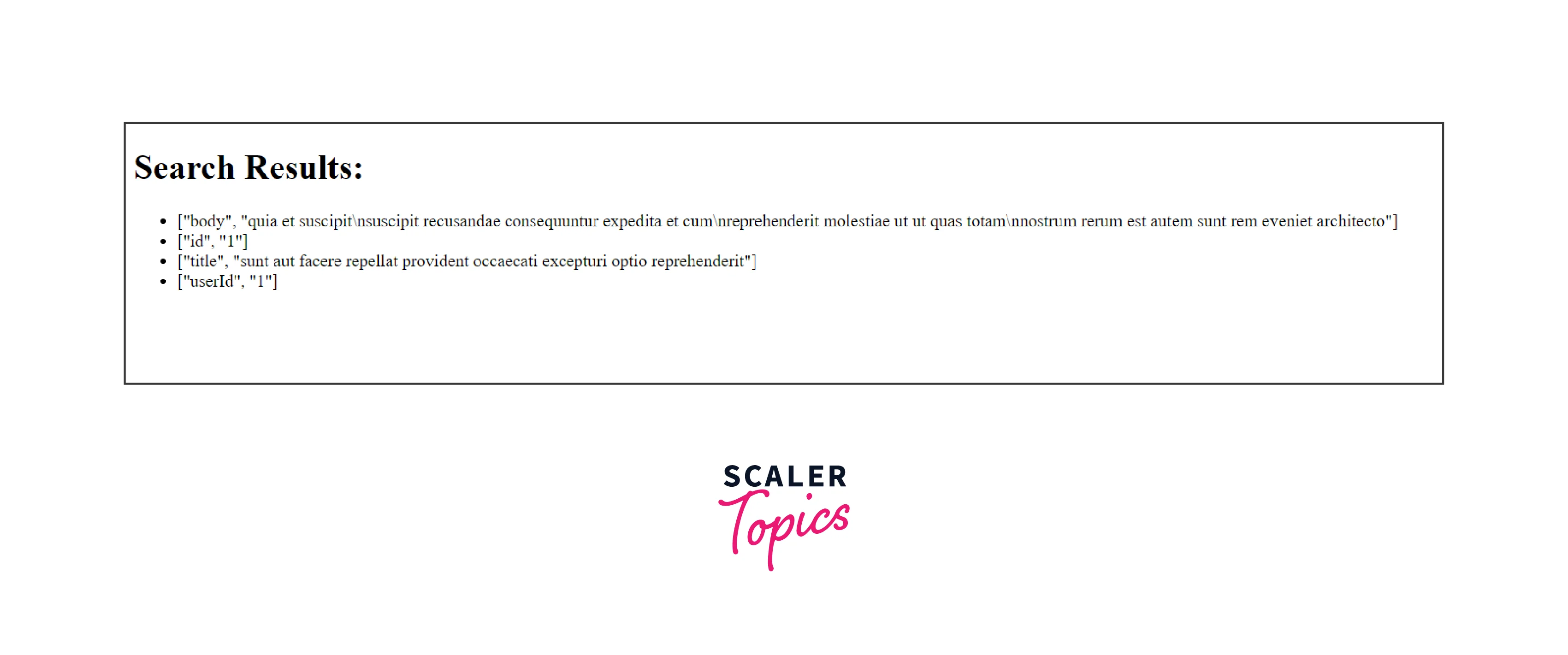
We can see the result of the post whose id is 1.
Conclusion
- RestClient is a lightweight and user-friendly library in Ruby that simplifies making HTTP requests to RESTful APIs.
- By using RestClient, developers can focus on consuming API functionality without worrying about low-level network communication.
- Incorporating RestClient into a Ruby project is a simple process facilitated by RubyGems. By adding it as a dependency in the project's Gemfile and utilizing Bundler, the installation of RestClient becomes effortless.
- RestClient supports various HTTP methods, including GET, POST, PUT, and DELETE, allowing developers to perform different types of requests.
- Creating GET requests with RestClient involves calling the get method and accessing the response properties like code and body.
- Creating POST requests with RestClient is achieved by calling the post method and passing the URL, payload, and options.
- Error handling with RestClient involves inspecting the response code and body to determine the cause of errors. RestClient also provides exception handling mechanisms to handle errors gracefully.
- RestClient supports the usage of raw URLs in request construction, making it more versatile and readable.
- Advanced options, such as headers, cookies, and authentication credentials, can be passed to RestClient for customization.
- Resource nesting is supported by chaining request methods, allowing developers to access nested resources in RESTful APIs.
- RestClient provides various exception classes to handle different types of errors or failures that may occur during HTTP requests.
- Result handling is facilitated by the Response class in RestClient, providing access to response headers, cookies, and other metadata.
- To demonstrate the practical use of RestClient, we built a simple Ruby application that fetched and displayed data from an API.