


What is Runlevels in Linux?
Runlevels in Linux are integer values that are bound to the state of the init program and the state of the system.
An init is the first program that is run in a Linux distribution once the kernel is loaded. The init is responsible for starting all the other programs and services on the system.
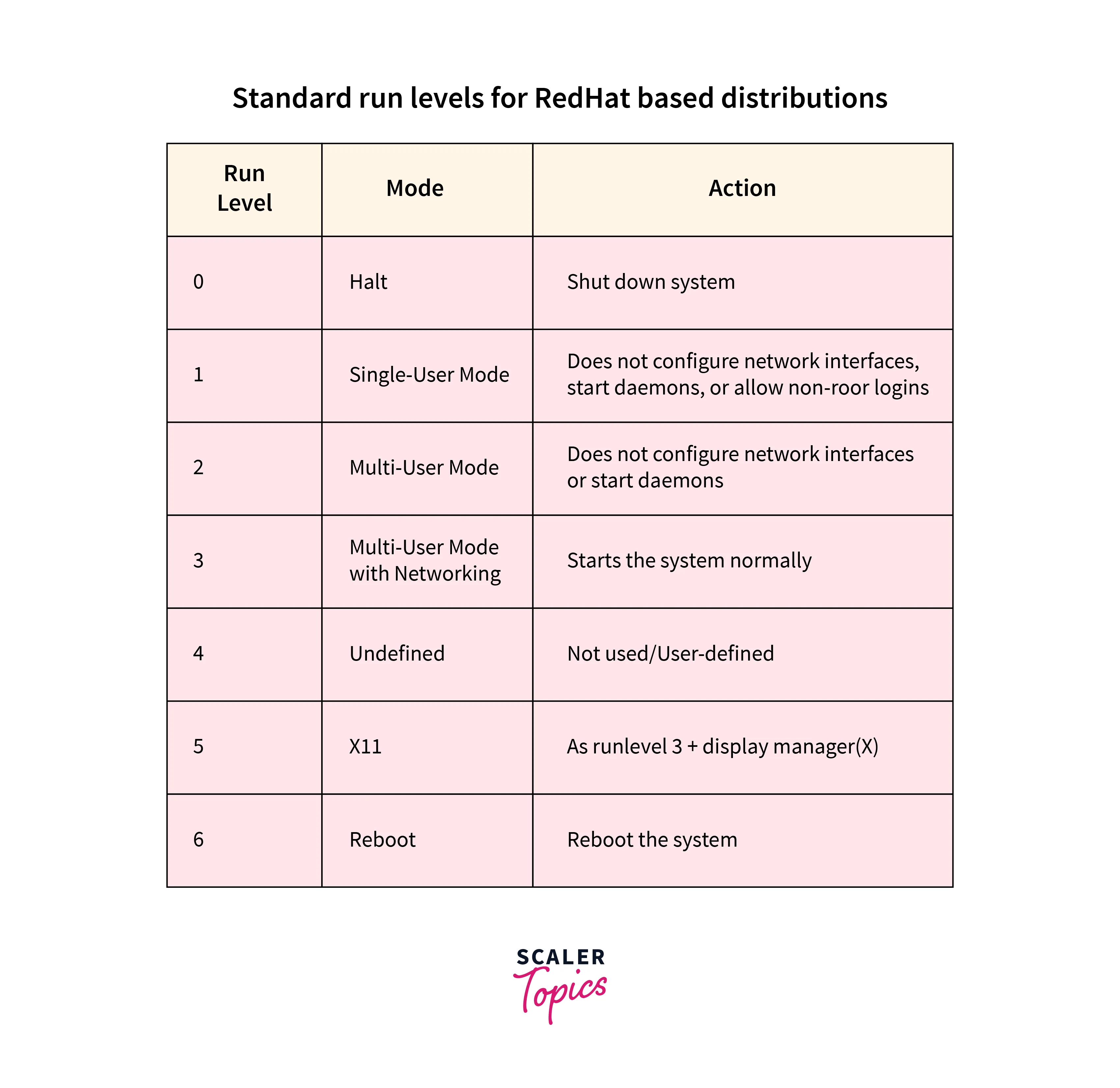
Each runlevel in Linux corresponds to a specific defined state of a Linux system. For example, runlevel 5 refers to a state of the system with multi-user enabled with networking as well as the ability to run a display server like X11.
How to Check Runlevel of Our Linux System?
There are two main ways to check the current runlevel of our Linux system.
1. Using the runlevel command:
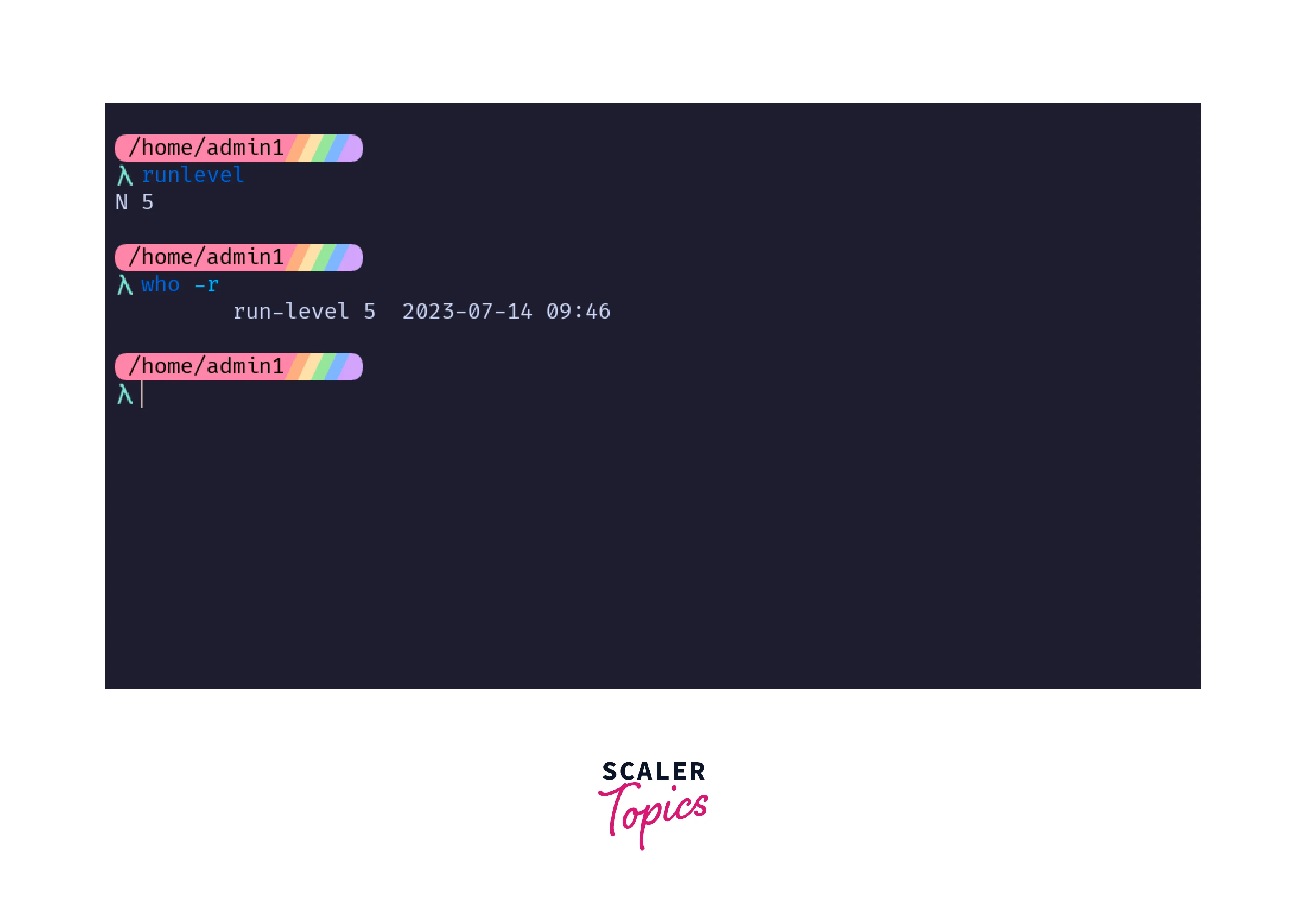
To check the current runlevel in Linux of the booted system, we can type the following command in the terminal:
This returns the integer value of the system's current runlevel.
You might need to install the systemd-sysv package on Ubuntu Linux as the runlevel command is found in this package.
2. Using the who command:
We can also check the current runlevel in Linux by running the command:
This returns the current runlevel of the system.
How to Change the Runlevel in Linux?
There are three ways to change the current runlevel of Linux:
1. Using the init command:
We can change to another runlevel by running the command:
This switches the system to runlevel 5.
2. Using the telinit command:
We can also change the runlevel by running the command:
This switches the system to runlevel 5.
3. Using the "systemctl isolate" command:
The systemd init system uses targets that correspond to traditional runlevels in Linux. To change the target of the system, we use the command:
This target corresponds to the traditional runlevel 3.
FAQ
1. Can I create my custom runlevel in Linux?
Answer: Yes, we can create our custom runlevels in Linux by defining the necessary services and processes that we require in this custom runlevel.
2. What is the difference between runlevel 3 and runlevel 5?
Answer: The main difference between runlevel 3 and 5 is the ability to run GUI, i.e., a display server like X11. We cannot run a GUI in runlevel 3 but we can run a desktop environment in runlevel 5.
3. What is the purpose of the single-user mode or maintenance mode (Runlevel 1)?
Answer: The runlevel 1, also known as single-user mode is used for system maintenance. At this runlevel, only the required services and processes are started and other non-essential processes are stopped.
4. Can I switch between runlevels without rebooting the system?
Answer: Yes, it's possible to switch between runlevels in Linux using the init command followed by the runlevel number we wish to switch into.
Conclusion
- Runlevels in Linux are integer values that are bound to the state of the init program and the state of the system.
- Each runlevel in Linux corresponds to a specific state of the system in Linux.
- We can check the runlevel of the current system using commands like: runlevel and who -r.
- We can change the runlevel of the system with the commands: telinit and init. We can also change the runlevel of a system by using the systemctl isolate command if the system is running the Systemd init system.