


ScrollView Component in React Native
Overview
Generally, we use different sizes of mobile devices. And If the amount of data is less, then it can fit on the screen, otherwise displaying a large amount of data on a single screen can be hard. For that, ScrollView Component in React Native allows users to scroll through the information in a small space, where the amount of data is larger than the screen size.
What is ScrollView Component in React Native
ScrollView Component in React Native is a built-in component that comes with the React Native library. This means that we don't need to install any additional packages or libraries to use it.
Additionally, ScrollView provides several customizable props to ScrollView React Native that make it easy to adjust the behaviour and appearance of the scrolling view.
ScrollView Component in React Native
-
Advantages
i) ScrollView is compatible with both iOS and Android platforms, making it a suitable option for cross-platform mobile app development.
ii) ScrollView also provides several customization options, as well as the ability to add custom animations.
iii) ScrollView React Native is very flexible and can be used to display any type of content, including text, images, and videos.
-
Disadvantages
i) The most common problem with ScrollView React Native Component is performance issues with large amounts of content. because ScrollView in React Native renders all of the content in the scrollable area, even if it is not currently visible on the screen of ScrollView React Native.
ii) Nesting multiple ScrollView React Native components can cause issues with scrolling behavior and performance. because each ScrollView component creates its scrollable area, which can lead to conflicts.
Props in React Native ScrollView
Android support Props
-
endFillColor: This prop is only effective when the content of the scroll view is smaller than the scroll view's frame.
-
fadingEdgeLength: It is a prop in the ScrollView React Native component in React Native that specifies the length of the fading edge effect at the top and bottom of the scroll view.
-
nestedScrollEnabled: It is used to enable or disable the ability for nested scrolling in a ScrollView. for example; nestedScrollEnabled={true}
-
overScrollMode: It controls the behavior of the scroll view when it is over-scrolled, i.e. when the user tries to scroll beyond the content limits.
overScrollMode='never' | 'auto' | 'always'
-
persistentScrollbar: It controls whether the scroll bar should remain visible all the time or only appear when scrolling.
-
scrollPerfTag: It allows you to assign a tag to the ScrollView React Native that will be used to track performance metrics related to scrolling.
ios Support Props
-
alwaysBounceHorizontal & alwaysBounceVertical: They control whether the ScrollView should always bounce when reaching the edge of the content in the horizontal and vertical directions, respectively.
-
automaticallyAdjustContentInsets: It controls whether the ScrollView React Native component should automatically adjust its content insets to account for the presence of navigation bars, tab bars, and other system-provided interface elements.
-
automaticallyAdjustKeyboardInsets: It controls whether the ScrollView should automatically adjust its content insets to account for the presence of the keyboard.
-
automaticallyAdjustsScrollIndicatorInsets: The automaticallyAdjustsScrollIndicatorInsets prop is a boolean value that determines whether the scroll indicators should be automatically adjusted based on the content inset of the scroll view.
-
bounces: The bounce prop is a boolean value in ScrollView React Native that determines whether the scroll view should bounce when it reaches the end of its content.
-
bouncesZoom: The bouncesZoom prop is a boolean value that determines whether the scroll view should bounce when the user tries to zoom in or out beyond the limits of the content.
-
canCancelContentTouches: The canCancelContentTouches prop is a boolean value that determines whether the scroll view can cancel touches
-
centerContent: The centerContent prop is a boolean value that determines whether the content inside the ScrollView in React Native should be centered vertically and horizontally.
-
contentInset: It prop is an object that specifies the amount of inset (padding) to be applied to the content of the ScrollView React Native component.
-
contentInsetAdjustmentBehavior: This prop is a string value that specifies how the scroll view should adjust its content inset to account for any content.
-
directionalLockEnabled: This prop determines whether the scroll view should lock to a single direction of scrolling at a time.
-
indicatorStyle: The indicatorStyle prop is a string value that specifies the style of the scroll indicators that are displayed when the user scrolls the content.
-
maintainVisibleContentPosition: The maintainVisibleContentPosition prop is a boolean value that determines whether the scroll view should attempt to maintain the visible content position when the content changes.
-
maximumZoomScale & minimumZoomScale: The maximumZoomScale prop specifies the maximum scale factor for the content within the scroll view,
-
onScrollToTop: onScrollToTop prop is a function called when the user taps the status bar to scroll to the top of the ScrollView React Native component.
-
pinchGestureEnabled: This prop allows you to enable or disable pinch-to-zoom gestures for the content within the ScrollView in React Native.
-
scrollEventThrottle: the scrollEventThrottle prop in ScrollView React Native that allows you to control the rate at which the onScroll event is fired while scrolling.
-
scrollIndicatorInsets: allows you to control the insets for the scroll indicators in ScrollView React Native.
-
scrollToOverflowEnabled: controls whether the scroll view should allow scrolling to go beyond the bounds of its content.
-
scrollsToTop: controls whether the scroll view should automatically scroll to the top of the content when the status bar is tapped.
-
snapToAlignment: prop that controls the alignment of the content when it is snapped into place during scrolling.
-
zoomScale: The current zoom level can be controlled using the zoomScale prop.
Props Support on Both Android and ios
-
StickyHeaderComponent: A StickyHeaderComponent is a component that can be used in a ScrollView React Native component to create a header that sticks to the top of the screen as the user scrolls through the content.
-
contentContainerStyle: This prop allows you to style the content container of the scroll view.
-
contentOffset: contentOffset is a prop in the ScrollView component in React Native that allows you to set the initial scroll position of the ScrollView React Native.
-
decelerationRate: When the user scrolls the scroll view and then lifts their finger, the scroll view continues to scroll for a short period.
-
disableIntervalMomentum: If the prop value is true, which means that the ScrollView will stop scrolling immediately when the user lifts their finger, without any additional momentum
-
disableScrollViewPanResponder: The disableScrollViewPanResponder prop takes a boolean value as its argument. When it is set to true, the pan responder behavior of the ScrollView will be disabled.
-
horizontal: This prop in the ScrollView React Native component specifies whether the scroll view should be horizontally scrollable or not.
-
invertStickyHeaders: By using this prop it will stick to the top of the ScrollView in React Native as the user scrolls down.
-
keyboardDismissMode: The ScrollView Component in React, specifies how the keyboard should be dismissed when the user begins scrolling the scroll view in ScrollView React Native.
-
keyboardShouldPersistTaps: In the ScrollView React Native component, this prop specifies whether the keyboard should stay visible when the user taps on the scroll view.
-
onContentSizeChange: It is triggered whenever the content size of the ScrollView changes, either due to new content being added or removed or due to changes in the size of the ScrollView React Native itself.
-
onMomentumScrollBegin & onMomentumScrollEnd: These two props take a function as their argument, which will be called when the momentum scroll begins.
-
onScroll: It also works the same onMomentumScrollBegin and onMomentumScrollEnd. onScroll event contains the current position and velocity of the scroll.
-
onScrollBeginDrag & onScrollEndDrag: The onScrollBeginDrag prop takes a function as its argument, which will be called when the user begins dragging the ScrollView. The onScrollEndDrag prop is similar to onScrollBeginDrag, but it is triggered when the user finishes dragging the ScrollView React Native Component.
-
pagingEnabled: It enables paging behavior in the ScrollView, allowing it to snap to a specific point in the content on each scroll gesture.
-
refreshControl: This prop is a component that can be added to the ScrollView component in React Native to enable pull-to-refresh functionality.
-
removeClippedSubviews: this prop will cause the ScrollView to remove and unmount all subviews that are not currently visible on the screen.
-
scrollEnabled: When set to false, this prop disables scrolling on the ScrollView. Default always True.
-
showsHorizontalScrollIndicator & showsVerticalScrollIndicator: These props display a horizontal and vertical scroll indicator at the bottom and right side of the ScrollView to indicate that there is more content horizontally.
-
snapToEnd: this prop will cause the ScrollView to snap to the end of its content when it is scrolled to the bottom.
-
snapToInterval: It specifies the interval at which the ScrollView should snap to a specific point.
-
snapToOffsets: if you set snapToOffsets to [0, 200, 400], the ScrollView will snap to the closest offset of 0, 200, or 400 when it is scrolled.
-
snapToStart: this prop will cause the ScrollView to snap to the start of its content when it is scrolled to the top.
-
stickyHeaderHiddenOnScroll: this prop will cause sticky headers to be hidden while the ScrollView is being scrolled.
-
stickyHeaderIndices: It specifies the indices of items in ScrollView React Native content that should be sticky headers.
React Native ScrollView Methods
ScrollView React Native component provides several methods that allow you to control the scroll view behavior and interact with the content inside the ScrollView in React Native.
flashScrollIndicators(): This method briefly shows the scroll indicators for the ScrollView. For example, flashScrollIndicators() will show the scroll indicators for a brief period.
scrollTo(): It takes two arguments: x and y which represent the horizontal and vertical offset respectively.
scrollToEnd(): This method scrolls the ScrollView React Native to the bottom of its content. For example, scrollToEnd() will scroll the ScrollView to the end of the content.
scrollWithoutAnimationTo: This method is similar to scrollTo but it does not animate the scrolling. It takes the same arguments as scrollTo.
Uses of ScrollView Component in React Native
Some of the common use cases of the ScrollView component in React Native include:
- Displaying a long list of items: The ScrollView React Native component is commonly used to display a list of items that can be scrolled vertically or horizontally.
- Displaying images or media: If you have a large number of images or other media that you want to display in a scrollable container.
- Creating a scrollable form: If you have a form that contains several input fields that do not fit on a single screen.
- Building a chat interface: The ScrollView component is often used to build chat interfaces.
- Implementing infinite scrolling: If you want to load more content as the user scrolls down a list, you can use the ScrollView React Native component to detect when the user has reached the end of the list.
ScrollView Component React Native Implementation
Steps to Set Up:
- make sure JDK Java SE Development Kit is installed in the system.
- Nodejs and NPM (in this article we are using Yarn) should be installed on your system
- Install Android Studio (if not we can install an independent android SDK with an android emulator installed) link to install android SDK
Note: why to install an independent android emulator because every system can’t handle android studio. Otherwise, you can follow ScrollView React Native documentation for more
In React Native, There are two ways to set up a project using Expo for ScrollView React Native and the other one is React Native CLI. But in this article, we are going with React Native Cli, not the Expo. Because in the majority of cases and high-end apps cli is used.
-
step-1 : install the React Native a project by running the following command
-
step-2 : start metro which performs hot reloading means to keep the app running and refresh only where file changes happen.
-
step-3 : Now, use one of the following commands in the terminal to run your iOS or Android application
Project Structure:
to build a sensible application we need some data which can be shown in the user interface. In the following viewdata.js file we created an object of arrays with different data sets in ScrollView React Native component.
Example:
Explanation: In React Native, we can use JSON objects to manage application state in a variety of ways. JSON data can be useful in state management.
we finally got all our data, then what about creating a specific view for those data? For that, we created individual post-view and card-view named as Box.js and Card.js
Example:
Explanation: ScrollView in React Native Component, we are using the map method to populate the data for each view in Box.js. we are creating BoxView component for the vertical ScrollView React Native component.
Example:
Explanation: All the task for the vertical scroll view is completed.
Let's create a new horizontal scroll view. For that, we are planning to make a card component named Card.js
Example:
Explanation: Previously, we made a BoxView, where we used the map function. CardView is only the same as BoxView. here horizontal ScrollView in React Native is created with additional props in ScrollView React Native.
Example:
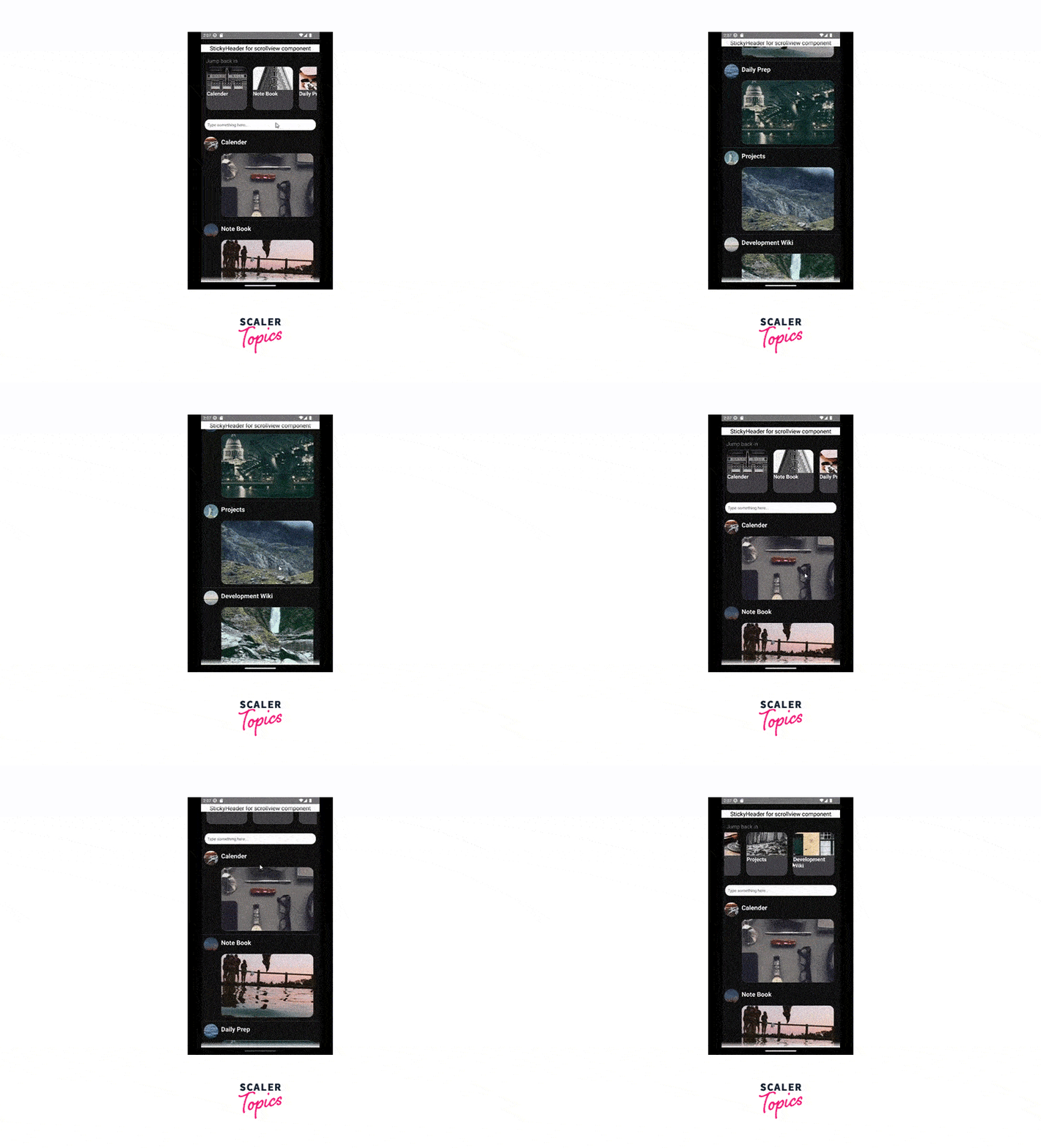
Explanation: So far we created all the components for the scroll view. In the end, we are creating a header for the ScrollView React Native component named StickyHeader, which sticks to the top view of the application on scroll.
Example:
Explanation: Here we are importing all the view components in App.js. In this file, all the props are passes which represent all functionality of a ScrollView in React Native component
Example:
Output
Conclusion
ScrollView React Native component in React Native is a great choice for creating scrollable views that contain long-form content such as articles. It allows users to scroll through content that extends beyond the screen size, providing a seamless reading experience.