


System.setProperty in Selenium
Overview
System.setProperty() in Selenium is used to configure system properties that affect the behavior of the WebDriver. It allows testers to set properties like the browser driver executable path before initializing the WebDriver, ensuring proper communication between the test script and the browser. This method provides flexibility and customization in the test environment setup.
Introduction to System Class in Java
The System class in Java is a predefined class that provides access to system resources and functionalities. It contains various static methods and fields that allow interaction with the underlying operating system. The System class is commonly used for tasks like reading and writing to the console, getting system properties, managing standard input and output streams, and handling runtime environment-related operations. It serves as a gateway to important system-level operations and provides a convenient way to access and utilize system resources in Java programs.
Transform Your Career
Choose from our industry-leading programs designed for career success
Modern Software and AI Engineering Program
Master full-stack development with AI integration


 +1000 more
Modern Data Science and ML with specialisation in AI
Advanced data science techniques with AI specialization
+1000 moreAdvanced AIML with Specialisation in Agentic AI
Deep dive into AIML with focus on Agentic systems
+1000 moreDevOps, Cloud & AI Platform Engineering
Build and manage AI-powered cloud infrastructure
+1000 moreAI Engineering Advanced Certification by IIT-Roorkee
Premier AI engineering certification from IIT-Roorkee

What is setProperty in Selenium?
In Selenium, the setProperty method is not specific to Selenium itself but is a method provided by the System class in Java.
The System.setProperty method is used to set system properties that configure the behavior of the WebDriver in Selenium. It is commonly used to specify the path of the browser driver executable, which is required for establishing a connection between the WebDriver and the chosen web browser.
By using System.setProperty, testers can set the appropriate system property key-value pair, such as webdriver.chrome.driver for Chrome or webdriver.gecko.driver for Firefox, to specify the location of the corresponding browser driver executable on the system.
Syntax
The syntax for setProperty:
An example of how System.setProperty can be used in Selenium to set the path for the Chrome driver:
In this example, the System.setProperty method is used to set the property webdriver.chrome.driver to the path of the Chrome driver executable. This ensures the WebDriver uses the specified Chrome driver when launching the Chrome browser.
Parameters
- key: The system property key to be set, such as webdriver.chrome.driver or webdriver.gecko.driver.
- value: The value of the system property, representing the path or location of the browser driver executable file.
Returns
The setProperty method does not have a return value. It simply sets the specified system property.






Throws
The System.setProperty method in Java, including when used in Selenium, can throw the following exceptions:
- SecurityException: If a security manager is present and its checkPermission method does not allow setting the specified property. This can happen if there are security restrictions in place that prevent modifying system properties.
- NullPointerException: If the key or value parameter is null. The key and value should be non-null values when calling System.setProperty.
- IllegalArgumentException: If the key parameter is empty, it is an empty string. The key should be a non-empty string representing the system property to be set.
It's important to handle these exceptions appropriately in your code when using System.setProperty to set system properties in Selenium or any other Java application.
Demo: Illustrating setProperty in Selenium
Let's look into a code example demonstrating the use of setProperty in Selenium:
Scaler Placement Report and Statistics
Scaler learners achieved 2.5x salary growth with average post-Scaler CTC reaching ₹23L.
 Google
 Amazon
 Microsoft
 Flipkart
 Adobe1200+ more
Code Explanation
- System.setProperty("webdriver.chrome.driver", "path/to/chromedriver"); is used to set the system property for the ChromeDriver executable. This tells Selenium where to find the ChromeDriver binary on the system. Make sure to provide the correct path to the chromedriver executable file.
- WebDriver driver = new ChromeDriver(); creates a new instance of the ChromeDriver. This initializes a new Chrome browser session.
- driver.get("https://www.google.com"); navigates the browser to the specified URL. In this case, it opens the "https://www.google.com" website.
- Further actions can be performed on the website using the driver object. This can include interacting with elements, clicking buttons, filling out forms, etc. Refer to the Selenium documentation or tutorials for more details on performing various actions.
- driver. quit(); closes the browser and ends the WebDriver session. It's important to close the browser after automation tasks are done to release system resources.
Use of the setProperty Method with Various Examples
Let's look into some additional examples illustrating the usage of System.setProperty in Selenium:
Example 1: Launching Scaler Topics Website Using setProperty Method in Selenium
Turn Learning into Career Growth
Code Explanation
In the code above, the System.setProperty method is used to set the system property for the ChromeDriver executable. After setting the property, a new instance of the ChromeDriver is created, and the WebDriver opens a new Chrome browser session. The browser then navigates to the Scaler Topics website (https://www.scaler.com/topics). You can perform any required actions on the website using the driver object.
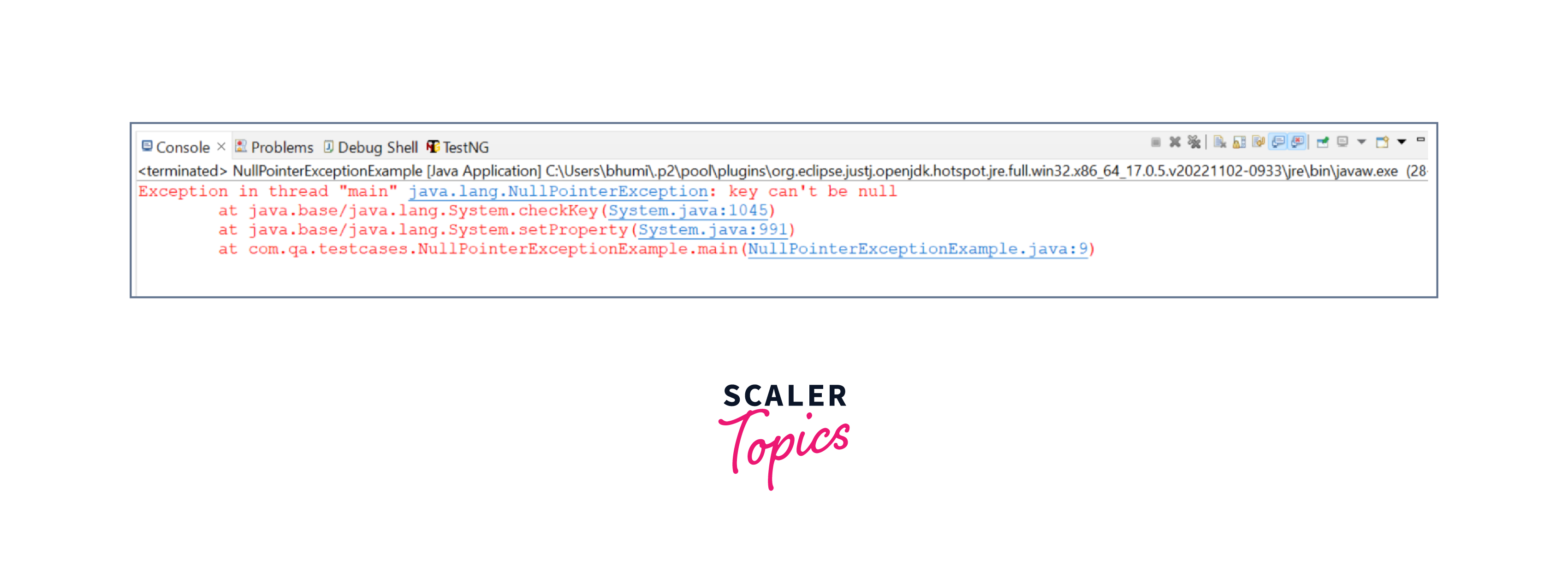
Example 2: Passing Key as Null
Code Explanation
In this example, an attempt is made to set the system property with a null key. This will throw a NullPointerException because the key cannot be null. Providing a valid non-null key is essential when using System.setProperty.
Example 3: Passing Key as Empty
Code Explanation
In this example, an empty string is passed as the key to System.setProperty. However, an empty key will not set the property, and the WebDriver will be unable to locate the ChromeDriver. It's important to provide a valid non-empty key when setting the system property for Selenium WebDriver.
Conclusion
- The System.setProperty method is used to set system properties in Java. It is commonly used in Selenium to configure the behavior of the WebDriver.
- The System.setProperty method takes two parameters: the key and the value of the system property.
- The key represents the specific property to be set, such as webdriver.chrome.driver or webdriver.gecko.driver.
- The value is the path or location of the browser driver executable file.
- The System.setProperty method does not have a return value; it simply sets the specified system property.
- It can result in the following:
- The SecurityException may occur if security restrictions prevent system property modification.
- The NullPointerException is thrown if the key or value parameter is null.
- The illegalArgumentException is raised if the key parameter is an empty string.