


Logging with Spring Boot
Overview
No software is bug-free and will never be.
An application can malfunction because of bugs, and we need to have some mechanism to trace what is happening. This is the role of application logging.
Logging in any application generally means some way to indicate the state of the system at runtime. We should produce logging that is informative and effective and easy to reveal the state of the system so that it can be used to diagnose and fix bugs in the application.
Build an AI-First Career, Master the Complete Skillset
Choose from our industry-leading programs designed for career success
Modern Software and AI Engineering Program
Master full-stack development with AI integration


 +1000 more
Modern Data Science and ML with specialisation in AI
Advanced data science techniques with AI specialization
+1000 moreAdvanced AIML with Specialisation in Agentic AI
Deep dive into AIML with focus on Agentic systems
+1000 moreDevOps, Cloud & AI Platform Engineering
Build and manage AI-powered cloud infrastructure
+1000 moreAI Engineering Advanced Certification by IIT-Roorkee
Premier AI engineering certification from IIT-Roorkee

AI Forward Deployed Engineer Program
Full-stack engineering, production AI and client-facing consulting
+1000 moreWhat is Logging?
Logging is a controlled way of representing the state of an application in a readable format.
Controlled
We have to write some logging code within our applications. Our method invocation has to go through logging code which gets mixed up with our application logic. Therefore, keep in mind that a good logging function is to support and improve the quality of the application being written with the least possible impact on the system's overall performance. Excessive logging will degrade overall application performance.
State of the Application
If we don't exercise adequate caution when determining what to log, the loggiprogram's logging information is quite meaningless. When logging activities, we should try to give a clear picture of the application's state of control and what it is doing, as well as, wherever possible, the system's internal state.
Readable
Logged information must be presented in a readable format for the user to understand and act.
Popular Java-Based Logging APIs
A list of logging frameworks we can use with java is
- JDK Logging API -
JDK has its logging API in its java.util.logging package. This API originated from the JSR 47. - Log4j -
Apache log4j is an open-source logging API. It allows great control over the granularity of logging statements. The main benefit of this API is that it is highly configurable through external configuration files at runtime. - Logback -
Logback is intended as a successor to the popular log4j project with improvements over the original project.
In this article, we will cover logback, but the concepts are the same and can be applied to other logging frameworks without much deviation.
How Scaler Transformed Careers in Different Fields
Scaler learners achieved 2.5x salary growth with average post-Scaler CTC reaching ₹23L.
 Google
 Amazon
 Microsoft
 Flipkart
 Adobe1200+ more
Logback Architecture
Logback has structured into three modules logback-core, logback-classic and logback-access
- Logback-core:
This base module contains common functionality to be used in the other two modules. Both classic and access use this module. - Logback-classic:
It implements the SLF4J API so that actual implementation can be switched to a different provider, like log4j, without changing any code.- Realization of bridge pattern from GOF repository.
- Logback-access:
It integrates with Servlet containers to provide HTTP-access log functionality.
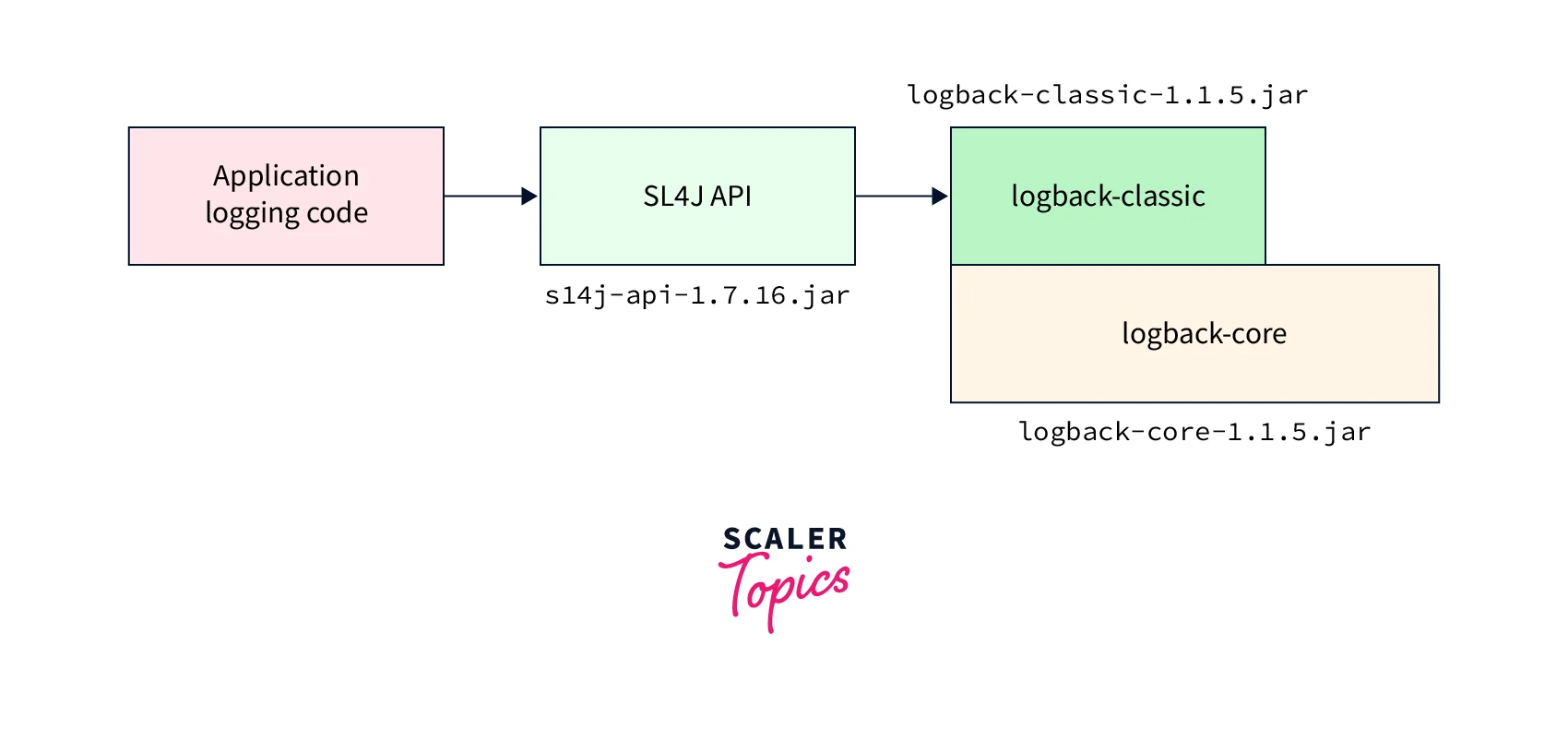
Under the hood, logback provides three main classes: Logger, Appender, and Layout. These three components work together to enable developers to log messages according to message type and level.
- Logger:
The Logger object is responsible for capturing logging information. - Appender:
The Appender object is responsible for publishing logging information to various preferred destinations. For example, a ConsoleAppender object can print logging information to a console. - Layout:
The Layout object is used to format logging information in different styles and patterns.
Loggers
Log Levels
Level defines the severity of any logging information. Each piece of logging information is accompanied by its appropriate level, which tells the Logger object about the severity of the information. There are five levels of logging defined by logback.
Logback levels follow below in ascending order.
The level on the left side activates the level to its right. For example, if the lowest active level is DEBUG, then INFO, WARN, and ERRORwill all be printed, but TRACE will be ignored.
Level Hiarerchey
Loggers are named entities. Their names are case-sensitive and follow the hierarchical naming rule separated by a dot.
For example, the logger named com.scaler is a parent of the logger named com.scaler.springboot.
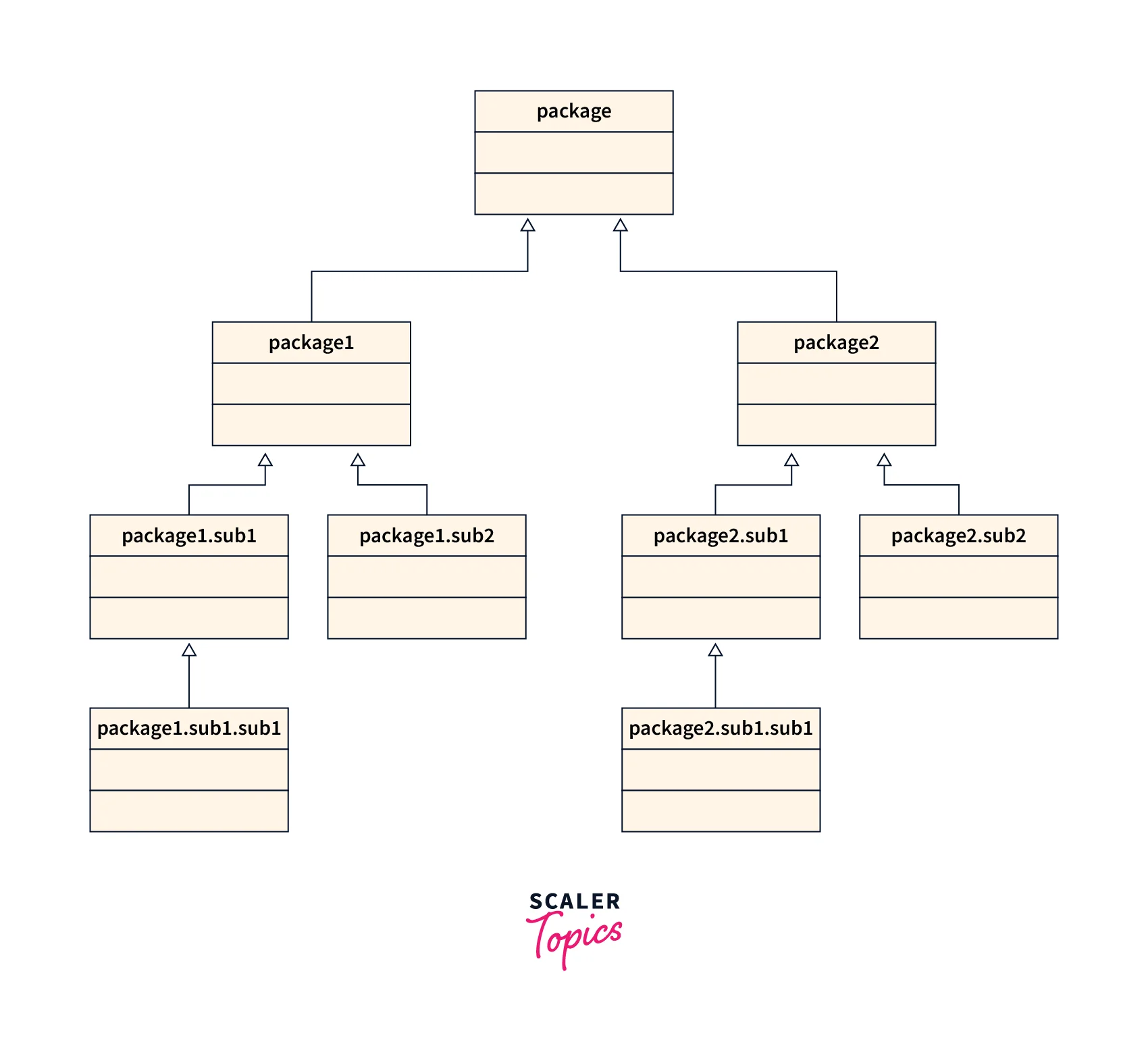
Other than our logger, logback has a root logger available by default. The root logger resides at the top of the logger hierarchy. Like every logger, it can be retrieved by its name.
Root logger is same as what the Object class is to java
Effective log level
Combining three information log levels, hierarchical nature, and root logger, the effective log level are given below for different scenarios.
- Case 1 -
The Root logger is assigned a level DEBUG, inherited by the other loggers' a, a.b, and a.b.c.
| Logger Name | Assigned Level | Effective Level | Explanation |
|---|---|---|---|
| Root | DEBUG | DEBUG | Use Assigned level |
| a | NONE | DEBUG | No level assigned. Use Root level |
| a.b | NONE | DEBUG | No level assigned. Use Root level |
| a.b.c | NONE | DEBUG | No level assigned. Use Root level |
- Case 2 -
Every logger level has a level assigned.
| Logger Name | Assigned Level | Effective Level | Explanation |
|---|---|---|---|
| Root | ERROR | ERROR | Use assigned level |
| a | INFO | INFO | Use assigned level |
| a.b | DEBUG | DEBUG | Use assigned level |
| a.b.c | WARN | WARN | Use assigned level |
- Case 3 -
No level assigned to one of the sub-loggers at the second level
| Logger Name | Assigned Level | Effective Level | Explanation |
|---|---|---|---|
| Root | DEBUG | DEBUG | Use assigned level |
| a | INFO | INFO | Use assigned level |
| a.b | NONE | INFO | Inherits "a". Use level from "a" |
| a.b.c | ERROR | ERROR | Use assigned level |
Appenders
Appenders are the destination where logs will be printed. Logback comes with frequently used appenders, including console, files, remote socket servers, MySQL, PostgreSQL, Oracle, and other databases, JMS, and remote UNIX Syslog daemons.
More than one appender can be attached to a logger.
Appender follows additivity. It always uses an appender from its parent unless denied explicitly in the configuration.
It can be understood from the below table.
| Logger Name | Appenders | Additivity | Destination | Explanation |
|---|---|---|---|---|
| Root | A1 | NA | A1 | Use A1 Destination |
| a | A2,A3 | True | A1,A2,A3 | A1 inherited from root logger as additivity is set to true. |
| a.b | NONE | true | A1,A2,A3 | No appender specified but additivity is true. Inherit appender from immediate parent |
| a.b.c | B1 | false | B1 | Additivity is false. Use only specified appender. |
Turn Learning into Career Growth
Layout
The layout is the format in which we want to print the logs. Sample pattern layout
Configure Logback
Maven Dependency
We need the below maven dependencies.
Configuration
We need a logback.xml file on the classpath. Let's see a sample configuration and decipher it.
Explanation
- We have two appenders defined CONSOLE and FILE_ROLLING and the loggers Root, com.scaler, and com.scaler.special.
- Root logger level is info and configured with both the appenders. Therefore logs will be printed on the console, as well as files for the root logger
- Logger com.scaler is configured with additivity true. Therefore it will inherit the root logger level and appenders.
- Logger com.scaler.special is configured with debug level and additivity false. Therefore it will use provided level and appender for itself. Nothing will be inherited from its parent.
Conclusion
- Logging is critical to any application to identify issues in the application.
- Different logging frameworks are available to use with java.
- Logback architecture uses Loggers appenders and patterns to log the information.
- Logback architecture is flexible to configure each logger individually.
- Logging framework inherits everything from its immediate parent.
- If no parent exists, then it uses root logger configuration.




