


MySQL TRIM() Function
Overview
The MySQL TRIM() function is a built-in function that removes the leading and/or trailing spaces or specific characters from a string. The function is used to modify the input string and return the modified string. It is an essential tool for manipulating strings in MySQL, particularly when dealing with user input. This article will explore the syntax, parameters, return value, exceptions, and working of the MySQL TRIM() function.
Syntax of MySQL TRIM() Function
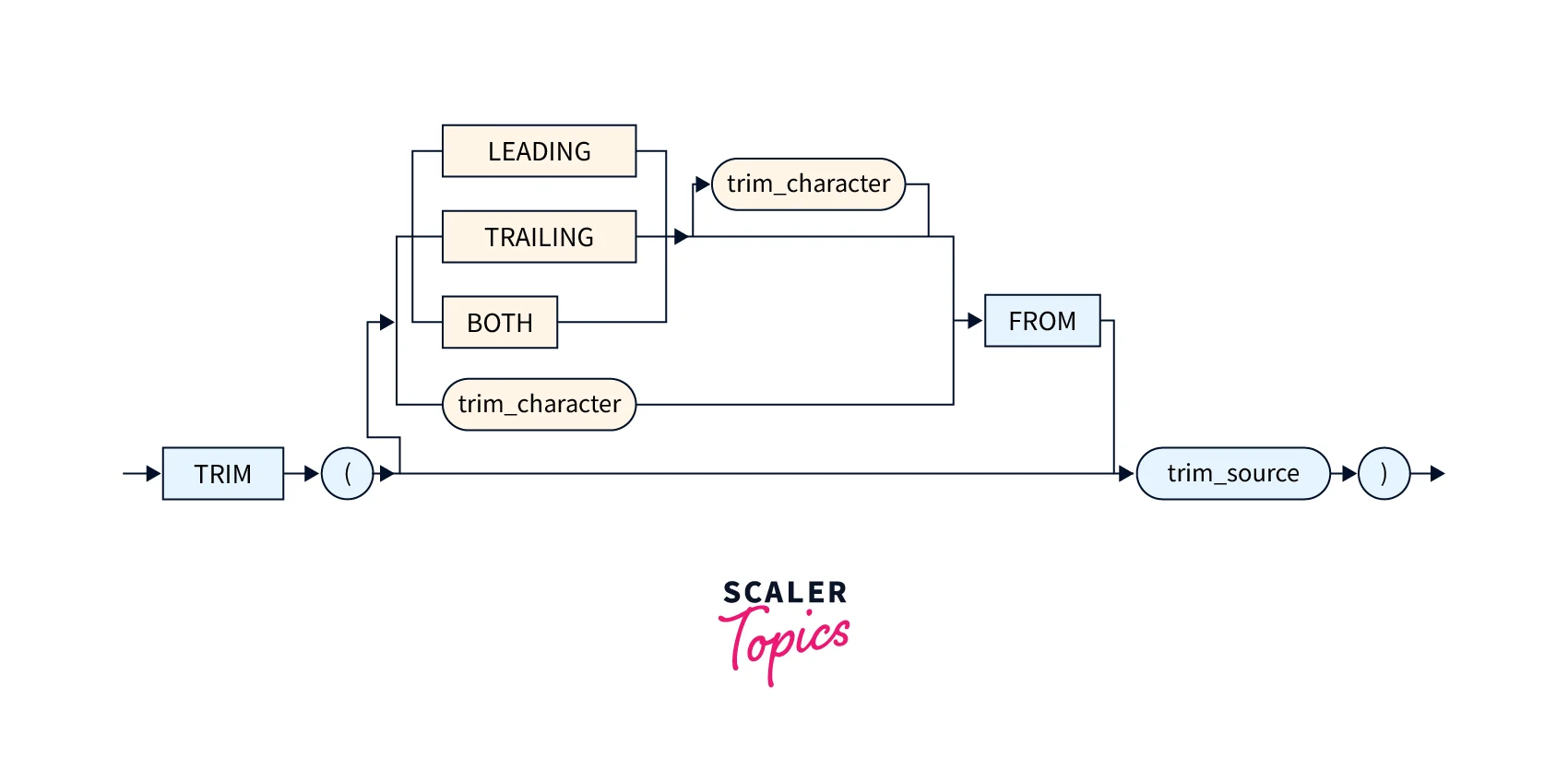
The syntax of the function TRIM in MySQL is as follows:
Syntax:
Parameters of MySQL TRIM() Function
The TRIM in MySQL function accepts two parameters:
- String: The input string that needs to be trimmed.
- Characters: An optional parameter that specifies the characters to remove from the input string.
In addition to the above parameters, the TRIM in MySQL function also accepts the following optional keywords to specify the direction of trimming:
- BOTH: Removes leading and trailing occurrences of the specified characters. This is the default behaviour if no direction is specified.
- LEADING: Removes leading occurrences of the specified characters.
- TRAILING: Removes trailing occurrences of the specified characters.
Return Value of MySQL TRIM() Function
The function TRIM in MySQL returns the modified string with the leading and/or trailing specified characters removed. If no characters are specified, it will remove all leading and/or trailing spaces from the input string.
Exceptions of MySQL TRIM() Function
The function TRIM in MySQL removes unwanted characters or spaces from a string. However, there are some exceptions that you should be aware of:
-
Empty String: If you pass an empty string to the TRIM() function, it will return an empty string. For example, if you run the query SELECT TRIM(''), it will return an empty string.
-
Invalid Arguments: If you pass invalid arguments to the TRIM() function, it will return NULL. For example, if you pass a number to the TRIM() function like SELECT TRIM(123) or if you don't pass any argument like SELECT TRIM(), it will return NULL.
Thus, while using the TRIM() function, you should consider these exceptions to avoid unexpected results.
How does the MySQL TRIM() Function Work?
The function TRIM in MySQL removes the specified characters from the input string. If no characters are specified, it will remove all leading and/or trailing spaces from the string.
Examples
Consider the following set of examples to understand the working of the function TRIM in MySQL.
Example 1: Removing Leading and Trailing spaces
Code:
Output:
Explanation:
The TRIM() function removes the leading and trailing spaces from the input string in this example.
Example 2: Removing Specific Characters
Code:
Output:
Explanation:
In this example, the TRIM() function removes all leading and trailing commas from the input string.
Example 3: Removing Leading or Trailing Characters
Case 1: Leading characters
Code:
Output:
Explanation: In this example, the TRIM() function removes all leading zeros from the input string. It is important to note here that the zeros at the end of the string are not removed.
Case 2: Trailing characters
Code:
Output:
Explanation:
In this example, the TRIM() function removes all trailing zeros from the input string. It is important to note here that the zeros at the start of the string are not removed.
Example 4: Removing Both Leading and Trailing Tabs
Code:
Output:
Explanation:
In this example, the TRIM() function removes the leading and trailing tabs from the input string.
Example 5: Removing Specific Characters From a Column
Consider a table named employees with a column full_name containing names with a prefix of Dr. that must be removed.
The following is the data that is present in the full_name column of the employees table before the operation is performed.
Employees table (full_name column data only):
| full_name |
|---|
| Dr. John Doe |
| Dr. Jane Smith |
| Dr. Alice Johnson |
The following query is used to perform the above-said task.
Code:
Output:
| name_without_prefix |
|---|
| John Doe |
| Jane Smith |
| Alice Johnson |
Explanation:
In this example, the TRIM() function removes the Dr. prefix from the full_name column and returns the modified string as a new column named name_without_prefix.
Example 6: Removing Specific Characters From a Variable
Consider a scenario where a variable @url contains a URL string with unwanted query parameters:
Code:
Output:
| cleaned_url |
|---|
| https://scaler_topics.com/page?param1=value1 |
Explanation:
In this example, the TRIM() function removes the unwanted query parameter ¶m2=value2 from the URL string in the @url variable and returns the cleaned URL as a new variable named cleaned_url.
Example 7: Removing Specific Characters From a JSON String
Consider a real-world scenario where you have a table named employees with a column named employee_data that contains JSON data with unwanted whitespace. The following represents some sample data present in this table:
Query for table creation and data insertion:
Query for viewing the data inside the table:
Output:
| id | employee_data |
|---|---|
| 1 | {"age": 30, "name": "Ravi Sharma"} |
| 2 | {"age": 25, "name": "Sneha Singh"} |
| 3 | {"age": 35, "name": "Alok Kumar"} |
To clean up the JSON data and remove any unwanted whitespace, you can use the TRIM() function in your MySQL query as follows:
Code:
- This query uses the TRIM() function with the BOTH keyword to remove any tabs or newlines from the employee_data column in the employees table.
- The cleaned JSON string is returned as a new column named cleaned_data.
- The output of this query would look something like this:
Output:
| cleaned_data |
|---|
| {"name":"Ravi Sharma","age":30} |
| {"name":"Sneha Singh","age":25} |
| {"name":"Alok Kumar","age":35} |
This output shows the cleaned JSON data for each row in the employees table, with no unwanted whitespace.
Example 8: Removing Trailing Zeroes From a Decimal Number
Consider a scenario where a table named product_info contains information about various products. One of the columns in the table, named product_price, contains decimal numbers with trailing zeroes. The following table represents the sample data present in this table:
Product Info Table:
| product_id | product_name | product_price |
|---|---|---|
| 1 | Product 1 | 10.250 |
| 2 | Product 2 | 5.500 |
| 3 | Product 3 | 15.000 |
To remove the trailing zeroes from the product_price column, we can use the TRIM() function with the TRAILING parameter. The following query is used to modify the table as required:
Code:
Output:
| cleaned_price |
|---|
| 10.25 |
| 5.5 |
| 15 |
Explanation:
- In this example, the TRIM() function removes any trailing zeroes from the product_price column and returns the cleaned decimal number as a new column named cleaned_price.
- This can be useful when we want to format the decimal numbers without the trailing zeroes, for example, while displaying the prices on a web page.
Example 9: Removing Spaces From the Beginning of a String in a Table
Consider a table named employees with a column full_name that contains names with leading spaces that need to be removed.
The following query is used to create the employees table.
Query:
The following query can be used to insert data into the employees table.
Query:
The following query can be used to view the contents of the employees table.
Query:
Output:
| id | full_name |
|---|---|
| 1 | Ravi Kumar |
| 2 | Priya Sharma |
| 3 | Rohit Verma |
Code:
Output:
| name_without_leading_space |
|---|
| Ravi Kumar |
| Priya Sharma |
| Rohit Verma |
Explanation:
In this example, the TRIM() function removes the leading spaces from the full_name column and returns the modified string as a new column named name_without_leading_space.
Conclusion
- The function TRIM in MySQL is a powerful tool for manipulating strings in MySQL.
- It removes a string's leading and/or trailing spaces or specific characters.
- The function is versatile and can be used in various scenarios, particularly when dealing with user input and string data from external sources.
- The TRIM() function is easy to use and provides great flexibility for string manipulation in MySQL.