


Azure Virtual Net Peering
Overview
In today's dynamic cloud environment, seamless communication between resources is very important. Azure Virtual Network (VNet) Peering emerges as a powerful solution, allowing businesses to interconnect Azure Virtual Networks effortlessly. This feature empowers enterprises to create a unified network experience, enhancing collaboration and resource utilization.
What is VNet Peering in Azure?
Azure Virtual Network Peering is a fundamental networking concept within the Azure ecosystem. It enables the connection of two or more Azure Virtual Networks, regardless of their geographical location or subscription. This connection, or "peering," effectively merges the VNets into a single network, enabling secure and efficient communication between resources.
Key Benefits and Considerations
The following are the key benefits of Azure VNet Peering:
-
Enhanced Network Isolation:
Azure VNet Peering establishes a secure communication channel between Virtual Networks while maintaining network traffic isolation from other VNets. This ensures that sensitive information remains protected.
-
Transitive Routing Capability:
With VNet Peering, VNets can communicate directly with one another, even if they are in separate regions or subscriptions. This allows for the creation of complex network architectures, allowing the flow of data through multiple interconnected VNets.
-
Cost-effective Solution:
Unlike traditional VPN or ExpressRoute connections, VNet Peering does not require a virtual network gateway. This leads to reduced infrastructure costs and simplified network configurations.
-
Global Reach:
Azure VNet Peering supports connections across different Azure regions and tenants. This flexibility makes it a versatile solution for businesses with a global presence.
-
Optimized Performance: By bypassing the public internet, VNet Peering ensures low-latency communication between VNets. This leads to faster and more reliable data transfers.
The following are some challenges associated with Azure VNet Peering:
-
IP Addressing:
Careful planning of IP address ranges is crucial before initiating a VNet Peering. Overlapping IP ranges can lead to communication conflicts, so it's important to verify and adjust address spaces accordingly.
-
Transitive Peering:
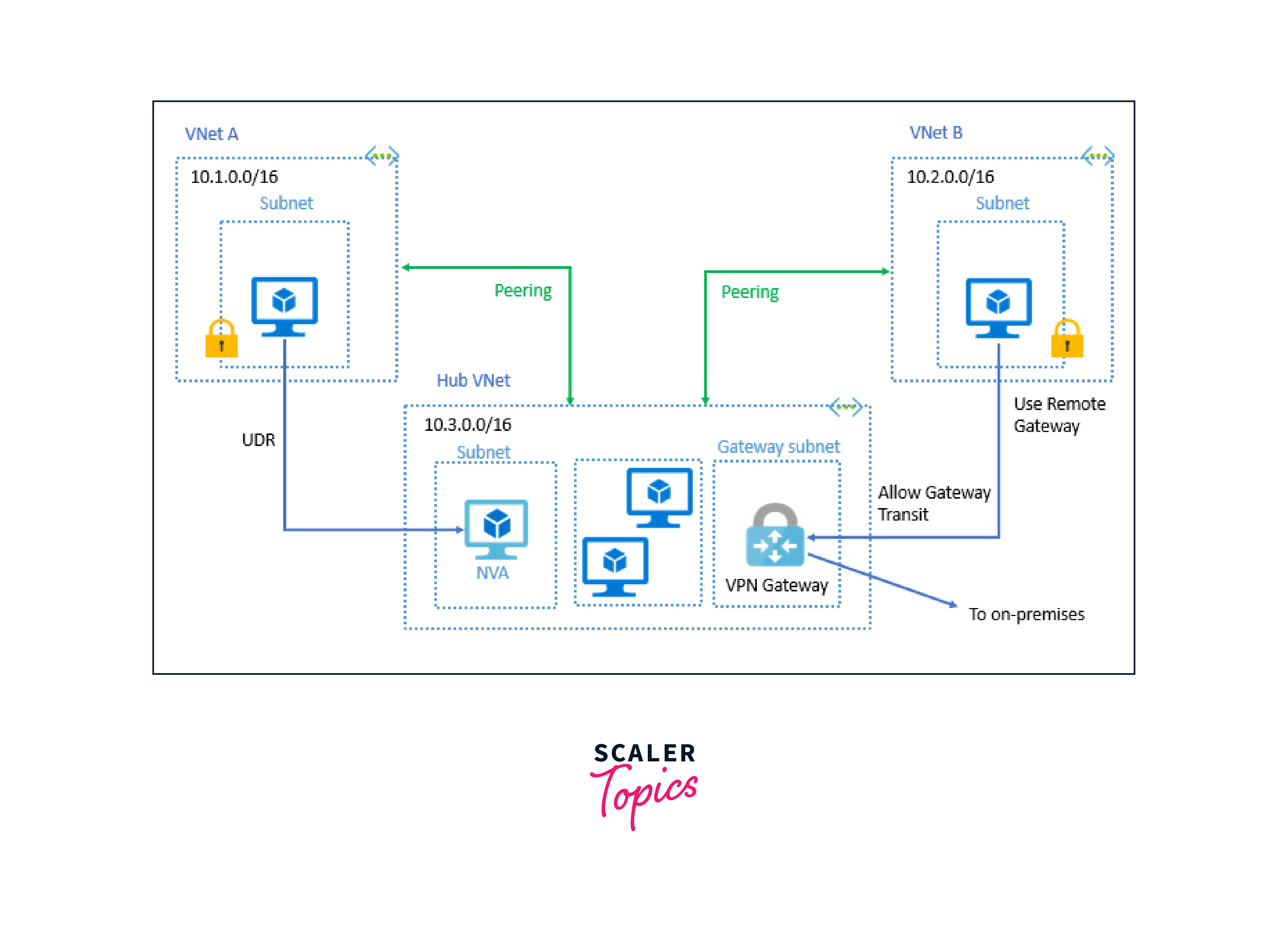
It's important to note that transitive peering is supported only within the same Azure Active Directory (Azure AD) tenant. This means that in a hub-and-spoke architecture, communication can flow from one spoke VNet through the hub VNet to reach another spoke VNet.
Types of VNet Peering
Azure Virtual Network (VNet) Peering offers several types of connections to suit various networking requirements. Understanding these types allows businesses to modify their network architectures to their specific needs. Here are the primary types of VNet Peering:
- VNet Peering within a Single Region This type of peering connects Virtual Networks within the same Azure region. It is the most common scenario for businesses that require communication between resources deployed in different VNets within a specific geographic area. This type of peering offers low-latency communication and is the foundation for building complex network architectures.
- Global VNet Peering Global VNet Peering extends the capability of VNet Peering across different Azure regions worldwide. This means that Virtual Networks located in different geographic areas can be seamlessly connected. It's an invaluable feature for organizations with a global footprint, allowing for unified communication and resource access across regions.
- Peering Across Different Subscriptions This type of peering enables the connection of VNets that belong to different Azure subscriptions. This is particularly useful in scenarios where resources are distributed across separate Azure accounts yet still need to communicate securely and efficiently. It streamlines network communication without compromising security or performance.
- VNet Peering Across Different Azure AD Tenants Azure Active Directory (Azure AD) is a crucial component of identity and access management in Azure. VNet Peering can be established across VNets that belong to different Azure AD tenants. This allows organizations with multiple Azure AD environments to maintain secure and isolated network communication.
- Remote Gateway Peering Remote Gateway Peering enables communication between VNets that are connected to on-premises networks through Site-to-Site VPN or ExpressRoute. This type of peering extends the connectivity of on-premises resources to resources in peered VNets, providing a comprehensive and integrated network solution.
- Transitive Peering within the Same Azure AD Tenant Transitive peering is a scenario where multiple VNets are interconnected in a hub-and-spoke configuration within the same Azure AD tenant. In this setup, traffic can flow from one spoke VNet, through the hub VNet, to reach another spoke VNet.
What are the Pre-Deployment Checks?
Before setting up Azure Virtual Network peering, it's crucial to conduct a series of pre-deployment checks. These preliminary steps are vital in ensuring a secure network integration. Here are the key pre-checks to consider:
-
Network Architecture Design
Before initiating the peering process, it's important to have a well-defined network architecture in place. This includes a clear understanding of the purpose of each Virtual Network, the resources they will host, and the desired communication flows between them.
-
IP Addressing and Range Planning
Careful planning of IP address ranges is crucial to prevent conflicts during peering. Ensure that the IP address ranges of the Virtual Networks do not overlap. If there is an overlap, Azure will not allow the peering to be established.
-
Azure AD Tenancy Considerations
Verify that the Virtual Networks to be peered are within the same Azure Active Directory (Azure AD) tenant or in trusted Azure AD tenants. This ensures smooth authentication and access control within the peered networks.
-
Subscription and Region Compatibility
Confirm that the Virtual Networks are within the same Azure subscription and compatible Azure regions. While Azure supports global VNet peering, it's essential to verify compatibility for specific features and services.
Steps to Configure
Configuring Azure Virtual Network peering involves a series of structured steps to ensure seamless communication between networks. Follow these steps to set up Azure Virtual Network peering:
- Navigate to the Azure Portal:
Log in to the Azure Portal (https://portal.azure.com) using your credentials.

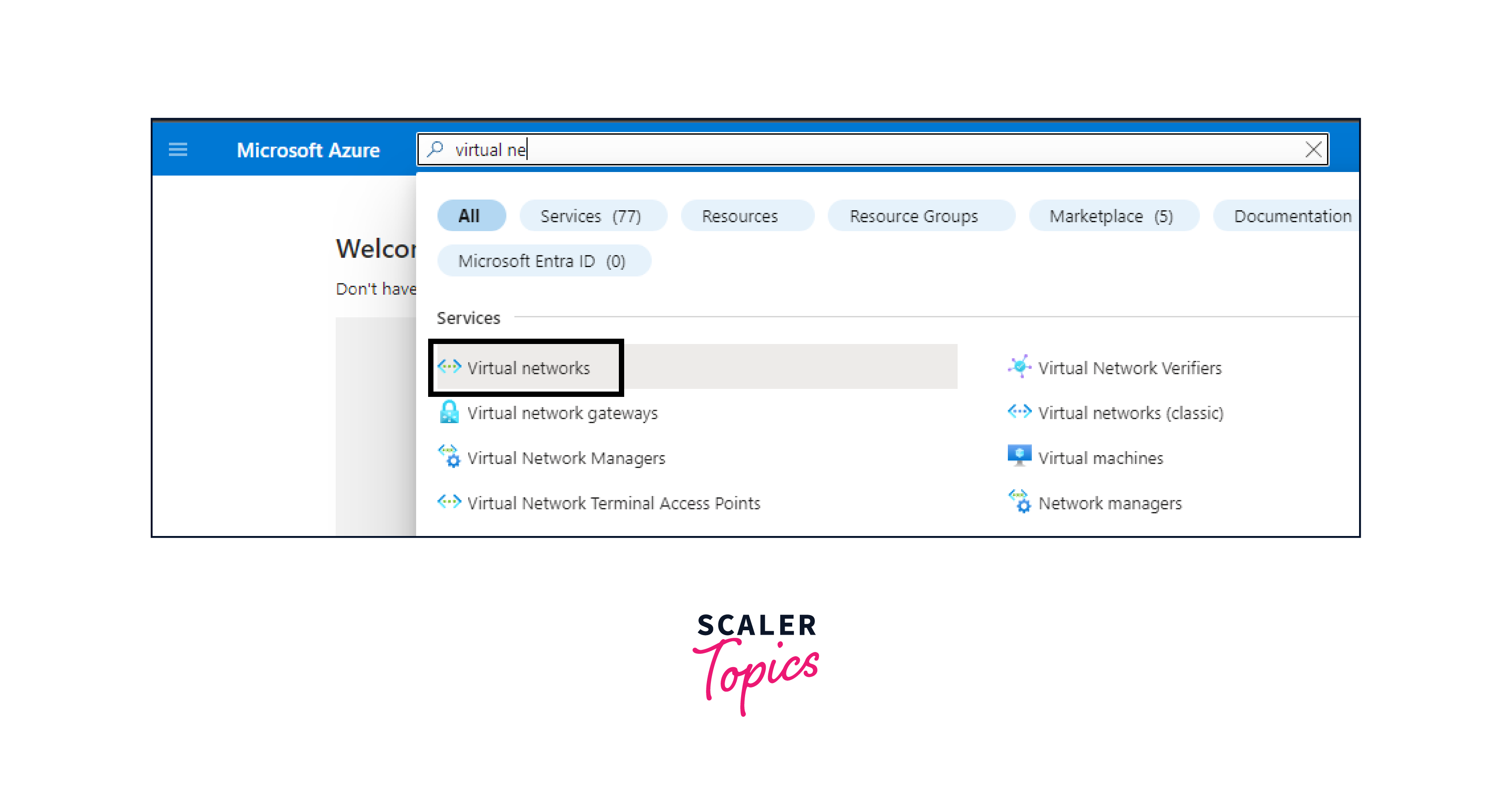
- Access Virtual Networks:
In the Azure Portal, locate and select "Virtual networks" from the left-hand menu.
- Select the Source VNet: Choose the Virtual Network from which you want to initiate the peering. Click on the desired VNet.
- Initiate Peering:
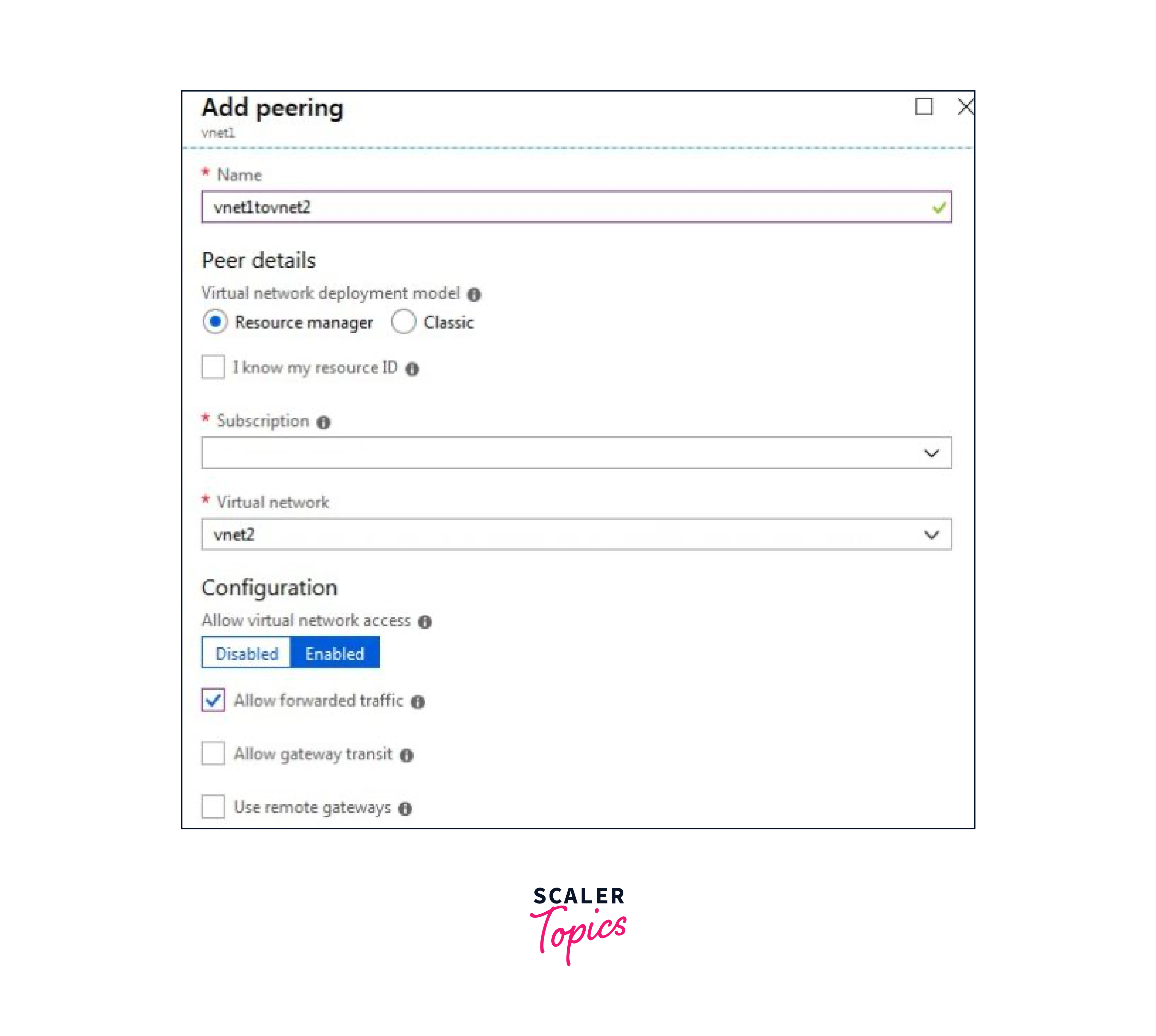
Within the selected VNet, navigate to "Peerings" in the left-hand menu, and click on the "+ Add" button to create a new peering.
- Configure Peering Details:
Provide a descriptive name for the peering, and select the target Virtual Network from the list of available VNets. Repeat the same steps on the target VNet to create a peering back to the source VNet.

- Adjust Peering Settings (Optional): You may adjust settings such as traffic forwarding, remote gateways, or use remote gateway transit, depending on your specific requirements. These settings allow for more advanced configurations and capabilities.
- Initiate Connection: Once the peering is created and approved, the Virtual Networks are connected. Resources in the peered VNets can now communicate with each other as if they were on the same network.
- Verification and Testing: It's essential to perform thorough testing to ensure communication between resources in the peered VNets is functioning as expected. Verify that applications, services, and data flow seamlessly across the peered networks.
Pricing
When implementing Azure Virtual Network Peering, it's important to understand the associated costs. Here are the key pricing considerations for Azure Virtual Network Peering:
- Data Transfer Costs: Data transfer between peered Virtual Networks is generally free of charge, as long as the VNets are within the same Azure region. However, if data is transferred across regions or over the internet, standard data transfer charges apply.
- Gateway Transit: If you choose to enable gateway transit in a peering configuration, be aware that there may be additional costs associated with using virtual network gateways. This includes charges for the gateway itself as well as any data processed through it.
- Bandwidth and Throughput: Consider the bandwidth requirements for your peered Virtual Networks. Azure provides various options for network bandwidth, each with its own associated cost. It's important to select the appropriate bandwidth level based on your application's needs.
FAQs
Q. Can I peer Virtual Networks in different Azure regions?
A. Yes, Azure supports peering Virtual Networks across different regions, allowing for global network integration.
Q. Is VNet peering secure?
A. Yes, VNet peering is secure as it operates within the Azure backbone network, ensuring traffic stays within Microsoft's network infrastructure.
Q. Can I establish transitive peering between multiple VNets?
A. Yes, transitive peering is supported within the same Azure AD tenant, enabling complex hub-and-spoke network architectures.
Conclusion
- Azure Virtual Network Peering is a fundamental networking concept within the Azure ecosystem. It enables the connection of two or more Azure Virtual Networks, regardless of their geographical location or subscription.
- This connection, or "peering," effectively merges the VNets into a single network, enabling secure and efficient communication between resources.
- With VNet Peering, VNets can communicate directly with one another, even if they are in separate regions or subscriptions.
- This allows for the creation of complex network architectures, allowing the flow of data through multiple interconnected VNets.
- It's important to note that transitive peering is supported only within the same Azure Active Directory (Azure AD) tenant.
- This means that in a hub-and-spoke architecture, communication can flow from one spoke VNet through the hub VNet to reach another spoke VNet.