


What is proc in Linux?
In the Linux operating system, /proc is a virtual filesystem that provides an interface to kernel data structures and information about running processes. The /proc directory contains a set of special files and directories that allow users and system administrators to interact with the kernel, access real-time system information, and perform various debugging and monitoring tasks. It acts as a window into the kernel's current state and dynamic data, making it a valuable resource for understanding and managing processes.
Directories in /proc in Linux
The /proc directory is organized in a hierarchical structure, with each directory representing a specific aspect of the system or a running process. Some of the essential directories found in /proc include:
- /proc/cpuinfo: This directory provides detailed information about the processor(s) installed on the system, such as model name, cache size, and CPU flags.
- /proc/meminfo: Here, you can find information about memory usage, including total memory available, free memory, and usage by various components like buffers and cache.
- /proc/sys: This directory contains kernel tunables and system parameters that can be modified to control various aspects of the kernel's behavior and performance.
- /proc/net: It holds information related to networking, such as TCP and UDP connections, network interfaces, and statistics.
- /proc/sysvipc: This directory shows information about System V IPC (Inter-Process Communication) objects, including shared memory segments, semaphores, and message queues.
- /proc/PID: Each running process on the system is represented by a directory named with its process ID (PID) under the /proc directory. These PID directories contain information specific to each process.
- /proc/PID/cmdline: This file contains the command line arguments used to start the process. It is a null-separated list of arguments passed to the executable. The arguments are typically separated by null characters rather than spaces.
- /proc/PID/cpu: This file provides information about the current and last CPU on which the process was executed. It shows the CPU numbers as two decimal values separated by a space.
- /proc/PID/cwd: This is a symbolic link to the current working directory of the process. It points to the actual directory on the system where the process is running.
- /proc/PID/environ: This file contains the environment variables and their values associated with the process. Each variable is separated by a null character.
- /proc/PID/exe: This is a symbolic link to the executable file of the process. It points to the actual binary file that is being executed.
- /proc/PID/fd: This directory contains information about all file descriptors opened by the process. Each file descriptor is represented as a symbolic link pointing to the actual file or resource it corresponds to.
- /proc/PID/maps: This file provides a memory map of the process, showing the regions of memory allocated for executable code, data, stack, shared libraries, etc.
- /proc/PID/mem: This file allows access to the physical memory of the process. Reading from this file allows you to read the process's memory, and writing to it can be used to modify the memory (use with caution, as it can cause instability or crashes).
- /proc/PID/root: This is a symbolic link to the root directory of the process. It points to the root directory that the process sees as its own root.
- /proc/PID/stat: This file contains various pieces of information about the process, including its status, memory usage, scheduling information, and more. The contents are formatted as a single line with multiple fields.
- /proc/PID/statm: This file provides information about the process's memory usage in pages (not bytes). It includes the total program size, resident set size, shared pages, and more.
- /proc/PID/status: This file provides human-readable status information about the process, including its current state, memory usage, and other details.
These files and directories in the /proc filesystem allow users and system administrators to obtain detailed information about running processes and their resources, making it a valuable tool for process monitoring and troubleshooting in Linux systems.
Files in /proc in Linux
Apart from directories, the /proc filesystem also contains various files that offer real-time information about the system and processes. Some of the essential files include:
- /proc/version: Displays the Linux kernel version and information about the compiler used to build the kernel.
- /proc/uptime: Provides the system uptime in seconds and the time spent in idle state.
- /proc/loadavg: Shows the average system load over the last 1, 5, and 15 minutes, indicating how busy the system has been.
- /proc/mounts: Lists all the mounted filesystems on the system.
- /proc/self: This is a symbolic link that points to the directory corresponding to the current process (similar to /proc/PID).
- /proc/crypto: This file provides a list of available cryptographic modules in the Linux kernel. It shows information about the cryptographic algorithms and ciphers supported by the kernel.
- /proc/diskstats: This file contains information about the I/O statistics of the disk devices in the system. It includes details about reads, writes, and other I/O operations for each disk device.
- /proc/filesystems: This file lists the file systems supported by the Linux kernel at the time of listing. It shows the filesystem types that the kernel recognizes and can mount.
- /proc/kmsg: This file holds the kernel's log messages. It provides access to the kernel message buffer, which includes log messages and debugging information generated by the kernel.
- /proc/scsi: This directory contains information about any devices connected via a SCSI (Small Computer System Interface) or RAID (Redundant Array of Independent Disks) controller. It shows details about SCSI devices and their status.
- /proc/tty: This directory provides information about the current terminals in the system. It includes details about the virtual terminals, serial ports, and other TTY (teletype) devices.
These files and directories in the /proc filesystem provide valuable insights into various aspects of the Linux kernel, system hardware, and other system-related information. They are useful for system monitoring, debugging, and understanding the current state of the system.
How to List Files and Directories?
Listing files and directories in the /proc filesystem is similar to listing files in any other directory on Linux. The ls command can be used to view the contents of the /proc directory:
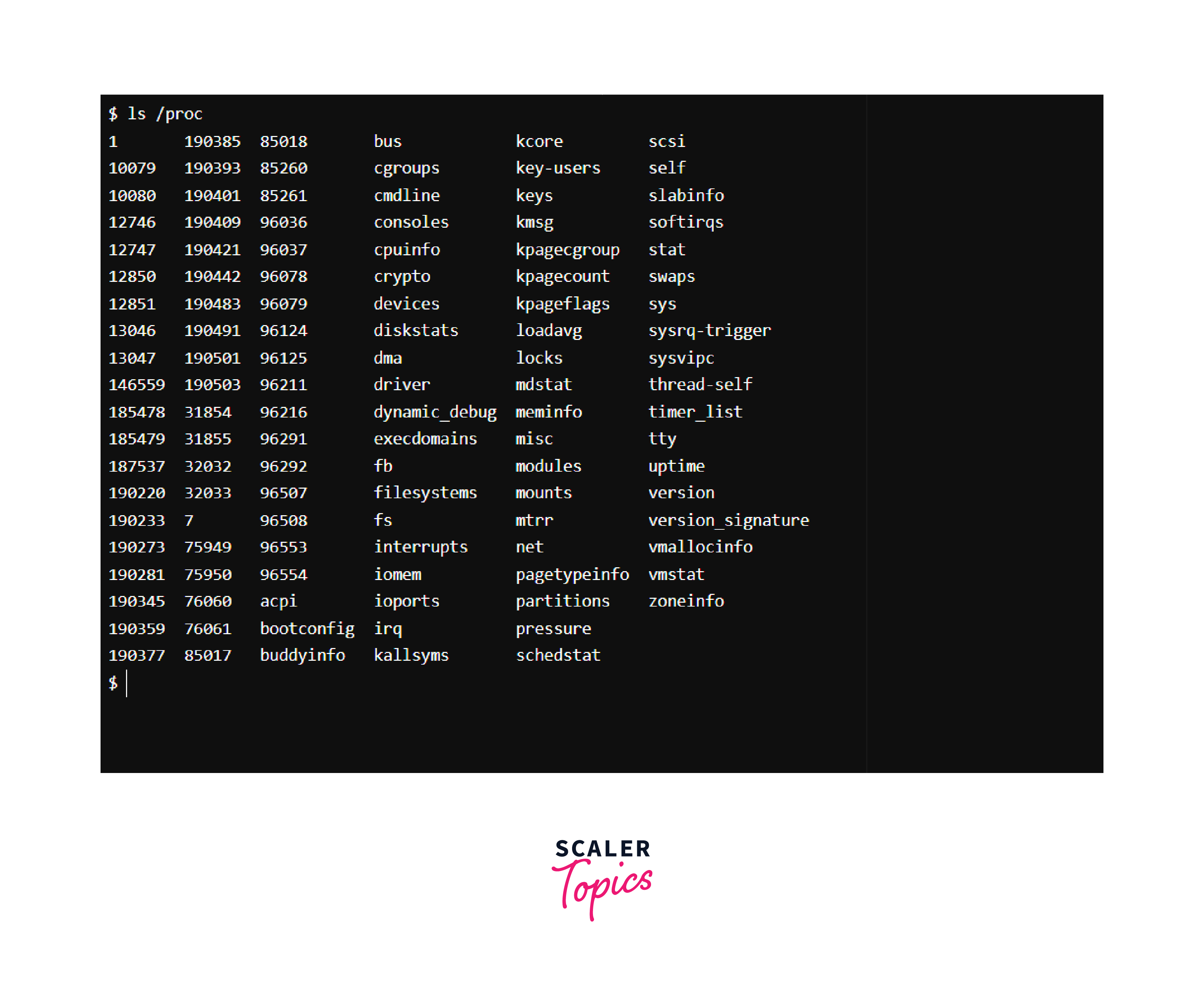
However, it's important to note that the /proc filesystem is dynamic and reflects the current state of the system. As processes start and terminate, the contents of /proc change accordingly. Some directories may not be accessible or might disappear if the corresponding process has ended.
How to View Information for a Specific Assigned PID
The /proc directory provides a wealth of information for each running process through its PID-specific directories. To view information for a specific process, you can navigate to the respective PID directory and examine the files inside it.
For example, to view information for a process with PID 12345:

This will list the files associated with the process, which typically include:
1. /proc/PID/cmdline: Displays the command-line used to launch the process.
2. /proc/PID/status: Provides various status information, such as the process's memory usage, current state, and more.
3. /proc/PID/io: Contains I/O statistics for the process, such as the number of bytes read/written.
4. /proc/PID/environ: Shows the environment variables that were set when the process started.
5. /proc/PID/fd: This directory contains symbolic links to all file descriptors opened by the process.
6. /proc/PID/maps: Displays the memory maps used by the process, showing the mapped memory regions.
It's important to exercise caution when interpreting and modifying files under /proc because incorrect changes can destabilize the system or cause unexpected behavior.
Conclusion
- The /proc directory in Linux is a virtual filesystem that provides access to kernel data structures and real-time system information.
- It contains directories for various system components, such as CPU information, memory usage, and networking statistics.
- Each running process is represented by a directory with its PID under /proc, containing specific information about that process.
- The /proc filesystem is dynamic and changes based on the current state of the system.
- Listing files and directories in /proc can be done using the ls command.
- To view information for a specific process, navigate to the corresponding PID directory and explore the files inside it.
- Exercise caution when interacting with files under /proc as incorrect modifications can lead to system instability.