


TCP/IP Protocol Suite
Every time you load a webpage, send a message, stream a video, or transfer a file across the internet, a silent architecture handles the entire process. That architecture is the TCP/IP protocol suite — the set of communication rules that makes modern networking possible.
This guide breaks it down layer by layer, protocol by protocol, with the clarity that networking textbooks often skip.
What Is the TCP/IP Protocol Suite?
The TCP/IP protocol suite (Transmission Control Protocol/Internet Protocol) is a comprehensive set of communication protocols that governs how data is packetized, addressed, transmitted, routed, and reassembled across networks. It provides the foundational rules that allow billions of devices — smartphones, laptops, servers, IoT hardware — to communicate over both the public internet and private networks.
Without TCP/IP, there is no internet. Every email you send, every website you visit, every video call you join depends on this protocol stack working reliably in the background.
At its core, the suite does four things:
-
Breaks data into packets — Large chunks of data are split into manageable units called data packets, each tagged with source and destination information.
-
Addresses each packet — Using IP addresses, every packet is labeled so networks know where it came from and where it's going.
-
Routes packets across networks — Routers and gateways forward packets across multiple network boundaries until they reach the destination.
-
Reassembles data at the destination — The receiving device collects all packets and reconstructs the original data in the correct order.
TCP/IP is not a single protocol. It is a suite — a collection of layered protocols, each handling a specific part of the communication process. The two most important protocols in the suite give it its name:
-
TCP (Transmission Control Protocol): Manages reliable, ordered data delivery.
-
IP (Internet Protocol): Handles logical addressing and routing.
Together, they form the backbone of data communications worldwide.
A Brief History: How TCP/IP Became the Standard
The TCP/IP protocol suite did not emerge overnight. It was born out of a U.S. Department of Defense research initiative in the 1970s, led by DARPA (Defense Advanced Research Projects Agency). Two networking pioneers — Vinton Cerf and Robert Kahn — designed the original TCP protocol to solve a fundamental problem: how to connect different networks that used different hardware and software.
The first formal specification appeared in December 1974 as RFC 675, titled the Internet Transmission Control Program. Over the next several years, the protocol evolved, splitting into separate TCP and IP protocols to improve flexibility.
The pivotal moment came on January 1, 1983 — often called the birthday of the modern internet — when ARPANET (the predecessor to the internet) officially switched from the older Network Control Protocol (NCP) to TCP/IP. From that point forward, TCP/IP became the universal standard for network communication.
Today, virtually every device connected to a network relies on the TCP/IP protocol suite.
Key Highlights
-
TCP/IP is a suite of communication protocols — not a single protocol.
-
It defines how data is packetized, addressed, transmitted, routed, and reassembled.
-
It is the practical, implementation-based model used in real-world networks, unlike the OSI model, which is primarily theoretical.
-
It was developed by DARPA in the 1970s, designed by Vinton Cerf and Robert Kahn, and adopted by ARPANET on January 1, 1983.
-
It supports communication across heterogeneous networks — different hardware, different operating systems, different vendors — all speaking the same protocol language.
What Is the TCP/IP Model?
The TCP/IP model is the architectural framework that describes how data travels from one device to another across a network. It defines a layered approach where each layer handles a specific aspect of data transfer, and each layer communicates only with the layers directly above and below it.
Also known as the internet protocol suite, the TCP/IP model standardizes communication so that devices from any manufacturer, running any operating system, on any type of network can exchange data without compatibility issues.
| Layer | Primary Responsibility |
|---|---|
| Application Layer | Interfaces with user applications; handles data formatting and communication methods |
| Transport Layer (Host-to-Host) | Ensures end-to-end communication, reliability, and flow control |
| Internet Layer (Network Layer) | Handles logical addressing, routing, and packet forwarding across networks |
| Network Access Layer (Link Layer) | Manages physical transmission over the network medium |
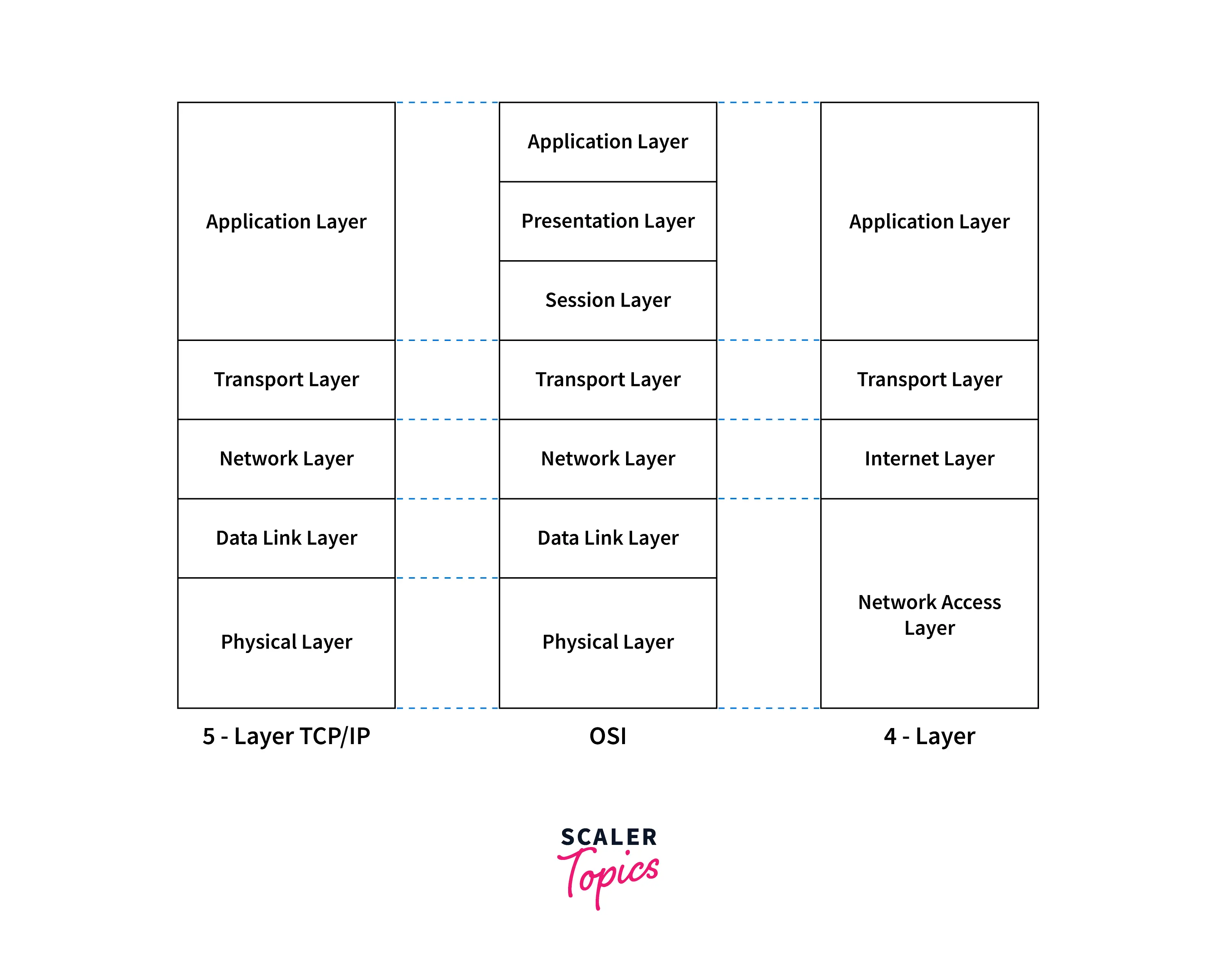
Some references describe a five-layer TCP/IP model, where the Network Access Layer is split into a data link layer and a physical layer. The four-layer version remains the canonical model, but the five-layer representation maps more directly to actual hardware and software implementations.
Why four layers instead of seven? Unlike the seven-layer OSI model, which separates every possible networking function into its own layer, the TCP/IP model groups related functions together. This makes it more practical and closer to how real networking software and hardware actually operate.
The Role of TCP and IP in the Model
TCP (Transmission Control Protocol) operates at the transport layer. It is a connection-oriented protocol, meaning it establishes a formal connection between sender and receiver before any data is transmitted. TCP handles:
-
Segmentation — Breaking large data streams into smaller, numbered segments.
-
Flow control — Adjusting the transmission speed so the receiver isn't overwhelmed.
-
Error checking — Detecting corrupted or lost packets through checksums and acknowledgments.
-
Retransmission — Resending any packets that fail to arrive.
-
Ordered delivery — Reassembling segments in the correct sequence at the destination.
TCP is the reason a large file arrives intact, without missing pieces, even when packets take different routes across the internet.
IP (Internet Protocol) operates at the internet layer. It is the primary protocol responsible for:
-
Logical addressing — Assigning and reading IP addresses that identify source and destination hosts.
-
Routing — Determining the best path for packets across interconnected networks.
-
Packet forwarding — Moving packets from one router to the next until they reach the target network.
IP does not guarantee delivery. It is a best-effort protocol. That is why TCP sits above it — to add the reliability that IP alone does not provide.
Together, TCP and IP create a system where data is broken into packets (TCP), given addresses (IP), routed across networks (IP), and reassembled with full integrity at the destination (TCP).
How Does the TCP/IP Protocol Work?
Understanding the TCP/IP protocol suite means understanding what happens to data as it moves from a sender to a receiver. The process follows a strict layered sequence — and at every stage, specific protocols handle specific tasks.

Build an AI-First Career, Master the Complete Skillset
Choose from our industry-leading programs designed for career success
Modern Software and AI Engineering Program
Master full-stack development with AI integration


 +1000 more
Modern Data Science and ML with specialisation in AI
Advanced data science techniques with AI specialization
+1000 moreAdvanced AIML with Specialisation in Agentic AI
Deep dive into AIML with focus on Agentic systems
+1000 moreDevOps, Cloud & AI Platform Engineering
Build and manage AI-powered cloud infrastructure
+1000 moreAI Engineering Advanced Certification by IIT-Roorkee
Premier AI engineering certification from IIT-Roorkee

AI Forward Deployed Engineer Program
Full-stack engineering, production AI and client-facing consulting
+1000 moreStep-by-Step: How Data Travels Through the TCP/IP Layers
Step 1 — Data Creation at the Application Layer
A user creates data — typing a message, requesting a webpage, uploading a file. The application (a browser, email client, or file transfer tool) prepares this data using an application layer protocol such as:
-
HTTP/HTTPS (Hypertext Transfer Protocol) — for web pages
-
SMTP (Simple Mail Transfer Protocol) — for sending email
-
FTP (File Transfer Protocol) — for transferring files
-
DNS (Domain Name System) — for resolving domain names to IP addresses
The application adds its own header information and passes the data down to the transport layer.
Step 2 — Segmentation at the Transport Layer
The transport layer protocols — TCP or UDP — take the application data and segment it into smaller units:
-
TCP adds sequence numbers, port numbers, and checksums. It establishes a connection with the receiver using a three-way handshake (SYN → SYN-ACK → ACK). This ensures both sides are ready before any data flows.
-
UDP skips the handshake entirely. It adds port numbers and a minimal checksum, then sends the data immediately. No guarantees of delivery, order, or error recovery.
The choice between TCP and UDP depends on the application. A file download needs TCP's reliability. A live video call needs UDP's speed.
Step 3 — Addressing and Routing at the Internet Layer
The internet layer takes each transport segment and encapsulates it into an IP datagram. The IP header contains:
-
Source IP address — Where the data is coming from.
-
Destination IP address — Where the data is going.
-
TTL (Time to Live) — A counter that decreases at each router hop, preventing packets from circulating forever.
-
Protocol field — Identifying whether the payload is TCP or UDP.
An IP router examines the destination network address in each datagram and forwards it toward the destination network. In large networks, routing protocols like OSPF, BGP, and EIGRP help routers exchange path information and determine optimal routes.
Step 4 — Physical Transmission at the Network Access Layer
The network access layer (also called the network interface layer or link layer) converts the IP datagram into a frame suitable for the physical network. This layer:
-
Maps IP addresses to hardware (MAC) addresses using ARP (Address Resolution Protocol).
-
Encapsulates data into frames with source and destination MAC addresses.
-
Transmits the frame over the network medium — Ethernet cables, fiber optics, Wi-Fi radio signals, or serial links using the Point-to-Point Protocol (PPP).
-
Handles error detection at the frame level.
Step 5 — Reception and Reassembly
At the receiving device, the entire process runs in reverse:
-
The network access layer receives the frame, checks for errors, and extracts the IP datagram.
-
The internet layer reads the destination IP address, confirms it matches the device, and removes the IP header.
-
The transport layer reassembles the segments in order (TCP) or delivers them as they arrive (UDP), checking for errors and requesting retransmission if needed.
-
The application layer presents the reconstructed data to the user — a rendered webpage, a delivered email, a completed file.
This entire process happens in milliseconds, billions of times per second, across the global internet.
Client-Server Communication
Most TCP/IP communication follows the client-server model:
-
The client initiates a request (for example, your browser requesting a webpage).
-
The server processes the request and sends back the response (the web server delivers the HTML, CSS, and images).
Here is what happens when you type www.example.com into your browser:
-
Your device queries a DNS server to resolve the domain name into an IP address.
-
Your browser initiates a TCP connection with the web server at that IP address.
-
The browser sends an HTTP request through the TCP connection.
-
The server processes the request and sends back the webpage data.
-
TCP ensures all packets arrive correctly and in order.
-
Your browser renders the page.
Point-to-Point Communication
TCP/IP also supports point-to-point communication, where data travels directly between two hosts over a dedicated link. The Point-to-Point Protocol (PPP) is commonly used for serial connections, dial-up links, and direct router-to-router connections. PPP includes a Network Control Protocol (NCP) for configuring the network layer parameters of the connection.
Why TCP/IP Works So Well
TCP/IP's success comes down to three principles:
-
Standardization — Every device follows the same protocol rules, regardless of vendor or platform.
-
Layered abstraction — Each layer handles its own responsibility without needing to understand the others. The application layer doesn't need to know whether the physical connection is Ethernet or Wi-Fi.
-
Scalability — The same protocol suite handles communication on a home network with three devices and the global internet with billions.
The 4 Layers of the TCP/IP Protocol Suite — Detailed Breakdown
The TCP/IP model contains four major layers. Each layer handles a specific part of communication and works with the layers above and below it.
The four layers are:
-
Application Layer
-
Host-to-Host Layer / Transport Layer
-
Internet Layer / Network Layer
-
Network Access Layer / Link Layer
Layer 1: Application Layer
The Application Layer is the topmost layer of the TCP/IP model and the one closest to the end user. It combines the functions of three OSI model layers — Application, Presentation, and Session — into a single, unified layer.
This layer is where user-facing software generates, formats, and interprets data. It defines the communication methods and protocols that applications use to interact with the network.
What the Application Layer actually does:
-
Allows software to request and deliver network services.
-
Handles data formatting, encoding, and encryption (e.g., HTTPS/TLS encryption).
-
Manages session establishment and termination between communicating applications.
| Protocol | Full Name | Purpose |
|---|---|---|
| HTTP/HTTPS | Hypertext Transfer Protocol / Secure | Used for accessing and transferring web pages; HTTPS adds TLS encryption for security |
| FTP | File Transfer Protocol | Transfers files between computers over a network |
| SMTP | Simple Mail Transfer Protocol | Sends email messages between mail servers |
| POP3/IMAP | Post Office Protocol / Internet Message Access Protocol | Used for receiving and managing emails on client devices |
| DNS | Domain Name System | Translates human-readable domain names into IP addresses |
| DHCP | Dynamic Host Configuration Protocol | Automatically assigns IP addresses and network configuration to devices |
| SNMP | Simple Network Management Protocol | Used for monitoring and managing network infrastructure and devices |
| TELNET | Telecommunication Network | Provides remote access and command-line control of systems (insecure) |
| SSH | Secure Shell | Secure, encrypted remote access to systems; modern replacement for TELNET |
Every time you browse a website (HTTP), send an email (SMTP), or connect to a remote server (SSH), you are interacting with the application layer.
Layer 2: Transport Layer (Host-to-Host Layer)
The Transport Layer sits between the application layer and the internet layer. It is responsible for end-to-end communication between the source and destination applications. This layer determines how much data to send, when to send it, and how to ensure it arrives correctly.
Core functions of the transport layer:
-
Segmentation and reassembly — Breaking application data into segments at the sender and reassembling them at the receiver.
-
Port addressing — Using port numbers to direct data to the correct application (e.g., port 80 for HTTP, port 443 for HTTPS, port 25 for SMTP).
-
Connection management — Establishing, maintaining, and terminating connections between hosts.
-
Flow control — Preventing the sender from overwhelming the receiver with too much data too quickly.
-
Error checking — Detecting corrupted, lost, or duplicated segments using checksums and acknowledgment mechanisms.
The Two Transport Layer Protocols:
TCP (Transmission Control Protocol) is a connection-oriented protocol that provides reliable, ordered, and error-checked delivery of data. Before any data is sent, TCP performs a three-way handshake to establish a connection:
-
SYN — The sender requests a connection.
-
SYN-ACK — The receiver acknowledges and accepts the connection.
-
ACK — The sender confirms, and data transfer begins.
TCP uses sequence numbers, acknowledgments, and retransmission timers to ensure reliable delivery. If a packet is lost or corrupted, TCP detects the failure and resends the affected data. This makes TCP ideal for applications where data integrity matters more than speed — file downloads, email, web pages, database transactions.
UDP (User Datagram Protocol) is a connectionless protocol that sends data without establishing a connection first. There is no handshake, no acknowledgment, and no retransmission. UDP simply packages data into datagrams and sends them on their way.
This makes UDP significantly faster than TCP, but also less reliable. UDP does not guarantee delivery, order, or duplicate protection. However, for applications that can tolerate some data loss in exchange for lower latency — live video streaming, online gaming, voice over IP (VoIP), DNS queries, and live broadcasts — UDP is the better choice.
| Feature | TCP | UDP |
|---|---|---|
| Connection type | Connection-oriented (requires handshake) | Connectionless (no handshake) |
| Reliability | High — guarantees delivery and order | Lower — no delivery or order guarantees |
| Flow control | Yes — adjusts transmission rate | No — sends at full speed |
| Error checking | Strong — checksums, acknowledgements (ACKs), retransmissions | Limited — basic checksum only |
| Delivery order | Guaranteed using sequence numbers | Not guaranteed |
| Overhead | Higher (connection setup, headers, ACKs) | Lower (minimal header, no setup) |
| Speed | Slower due to reliability mechanisms | Faster due to minimal processing |
| Use cases | Web browsing, email, file transfer, databases | Streaming, gaming, VoIP, DNS, live feeds |
| Header size | 20–60 bytes | 8 bytes |
| Communication model | One-to-one | One-to-one, one-to-many, multicast |
When to use TCP: When every byte matters — file transfers, web pages, financial transactions, configuration updates.
When to use UDP: When speed matters more than perfection — live video, online gaming, real-time sensor data, DNS lookups.
Layer 3: Internet Layer (Network Layer)
The Internet Layer — also called the Network Layer — is where the actual routing happens. This layer is responsible for moving data packets from the source host to the destination host across multiple interconnected networks, not just within a single network segment.
Core functions of the internet layer:
-
Logical addressing — Assigning unique IP addresses to every host on the network.
-
Routing — Determining the best path for each packet through the network.
-
Packet forwarding — Moving packets from one router to the next along the chosen path.
-
Fragmentation and reassembly — Splitting packets that exceed the maximum frame size of a network, and reassembling them at the destination.
-
Communication across network boundaries — Enabling data to travel between different networks (e.g., from your home network to a server on a different continent).
Key Internet Layer Protocols:
IP (Internet Protocol) is the primary protocol at this layer. IP encapsulates transport-layer segments into datagrams, adds source and destination IP addresses, and hands them off to the network access layer for physical delivery. IP operates on a best-effort basis — it does not guarantee delivery, order, or error recovery. Those responsibilities belong to TCP at the transport layer.
There are two versions of IP in use today:
| Version | Description |
|---|---|
| IPv4 (Internet Protocol Version 4) | Uses 32-bit addresses (e.g., 192.168.1.1); supports approximately 4.3 billion unique addresses; still dominant in many networks |
| IPv6 (Internet Protocol Version 6) | Uses 128-bit addresses (e.g., 2001:0db8:85a3::8a2e:0370:7334); supports approximately 3.4 × 10³⁸ addresses; designed to solve IPv4 address exhaustion |
The transition from IPv4 to IPv6 has been gradual, and most modern operating systems and network devices support both protocols simultaneously (dual-stack operation).
ARP (Address Resolution Protocol) operates at the boundary between the internet layer and the network access layer. When a device needs to send a packet to another device on the local network, it uses ARP to discover the destination's MAC (hardware) address based on its known IP address. Without ARP, devices cannot communicate on a local Ethernet segment because data link layer communication requires physical addresses.
ICMP (Internet Control Message Protocol) is used for error reporting and network diagnostics. It does not carry application data — instead, it carries control messages between network devices. Common uses include:
-
Ping — Testing whether a remote host is reachable.
-
Traceroute — Mapping the route packets take to reach a destination.
-
Destination unreachable — Reporting when a packet cannot be delivered.
-
Time exceeded — Reporting when a packet's TTL reaches zero.
An IP router at this layer examines the destination network address in each packet's header, consults its routing table, and forwards the packet toward the next hop. In large-scale networks, routing protocols such as OSPF (Open Shortest Path First), BGP (Border Gateway Protocol), and RIP (Routing Information Protocol) enable routers to share route information dynamically and select optimal paths.
Layer 4: Network Access Layer (Link Layer / Network Interface Layer)
The Network Access Layer is the lowest layer in the TCP/IP model. It combines the functions of the data link layer and the physical layer from the OSI model into a single layer responsible for transmitting data over the actual network medium.
This is where software meets hardware. The network access layer handles the physical and logical connection between a device and the network it's attached to.
Core functions of the network access layer:
-
Framing — Encapsulating IP datagrams into frames with headers and trailers for the specific network technology.
-
Physical addressing — Using MAC addresses to identify source and destination devices on the local network.
-
Error detection — Using frame check sequences (FCS) to detect transmission errors at the data link level.
-
Media access control — Managing how devices share the network medium (e.g., CSMA/CD for Ethernet, CSMA/CA for Wi-Fi).
-
Physical transmission — Converting data frames into electrical signals, radio waves, or light pulses for transmission over cables, fiber, or wireless channels.
Key Network Access Layer Technologies and Protocols:
| Technology | Description |
|---|---|
| Ethernet | The dominant wired networking technology for LANs; uses MAC addressing and CSMA/CD |
| Wi-Fi (IEEE 802.11) | Wireless networking standard for local area connectivity |
| PPP (Point-to-Point Protocol) | Used for direct serial connections between two nodes; includes Network Control Protocol (NCP) for configuration |
| Frame Relay | Used in wide-area networks for packet-switched communication |
| Token Ring | Legacy LAN technology (largely obsolete) |
The network access layer interacts directly with network hardware — network interface cards (NICs), switches, hubs, cables, wireless adapters, and transceivers. When a device connects to a network (plugging in an Ethernet cable or joining a Wi-Fi network), it is the network access layer that establishes the physical connection and begins exchanging frames.
Data link layer protocols at this level are responsible for communication between devices on the same layer of the network — typically devices on the same local segment. These protocols ensure that frames are properly addressed, transmitted without collisions (or with collision recovery), and checked for errors before being passed up to the internet layer.
TCP/IP Model vs. OSI Model — Clear Comparison
The TCP/IP model and the OSI (Open Systems Interconnection) model are the two most referenced networking frameworks. While they serve similar purposes — describing how data moves through a network — they differ significantly in approach, structure, and practical application.
Fundamental Differences
| Aspect | TCP/IP Model | OSI Model |
|---|---|---|
| Nature | Practical, implementation-based | Theoretical reference framework |
| Layers | 4 (or 5 in expanded form) | 7 |
| Origin | Developed from DARPA/ARPANET research | Developed by ISO as a conceptual standard |
| Usage | The actual model used in real-world networks | Primarily used for teaching and conceptual understanding |
| Protocol specificity | Built around specific TCP/IP protocols | Generic — not tied to any specific protocol family |
| Layer separation | Groups related functions into broader layers | Strictly separates each networking function |
Layer Mapping: TCP/IP ↔ OSI
| TCP/IP Layer | OSI Model Layers |
|---|---|
| Application Layer | Application + Presentation + Session |
| Transport Layer | Transport |
| Internet Layer | Network |
| Network Access Layer | Data Link + Physical |
Which Model Should You Learn First?
If you are studying networking, learn the OSI model first — it provides a clearer conceptual framework for understanding what each layer does. Then learn the TCP/IP model — because that is the model actually implemented in every network you will ever work on.
The OSI model is the map. The TCP/IP model is the territory.
Common TCP/IP Protocols — Complete Reference
The TCP/IP protocol suite includes far more than just TCP and IP. Here is a complete reference organized by layer:
How Scaler Transformed Careers in Different Fields
Scaler learners achieved 2.5x salary growth with average post-Scaler CTC reaching ₹23L.
 Google
 Amazon
 Microsoft
 Flipkart
 Adobe1200+ more
Application Layer Protocols
-
HTTP/HTTPS — Web page delivery and secure web communication
-
FTP — File transfer between hosts
-
SMTP — Email sending
-
POP3/IMAP — Email retrieval
-
DNS — Domain name resolution
-
DHCP — Automatic IP address assignment
-
SNMP — Network device monitoring and management
-
TELNET — Unencrypted remote terminal access
-
SSH — Encrypted remote terminal access
Transport Layer Protocols
-
TCP (Transmission Control Protocol) — Reliable, connection-oriented data delivery
-
UDP (User Datagram Protocol) — Fast, connectionless datagram delivery
Internet Layer Protocols
-
IP (Internet Protocol) — Logical addressing and routing (IPv4 and IPv6)
-
ARP (Address Resolution Protocol) — IP-to-MAC address resolution on local networks
-
ICMP (Internet Control Message Protocol) — Error reporting and diagnostics
-
IGMP (Internet Group Management Protocol) — Multicast group management
Network Access Layer Protocols
-
Ethernet — Wired LAN communication
-
Wi-Fi (802.11) — Wireless LAN communication
-
PPP (Point-to-Point Protocol) — Serial and direct-link communication
-
SLIP (Serial Line Internet Protocol) — Legacy serial communication (largely replaced by PPP)
These protocols work together as an integrated system. No single protocol handles everything — the power of the TCP/IP suite lies in how these protocols coordinate across layers to provide complete, reliable data transmission.
Real-World Uses of the TCP/IP Protocol Suite
The TCP/IP protocol suite is not an abstract concept — it is the working infrastructure behind nearly every digital interaction. Here are the most significant real-world applications:
1. Web Browsing
Every time you open a browser and visit a website, your device uses DNS to resolve the domain name, TCP to establish a reliable connection, and HTTP/HTTPS to request and receive web content. The entire process runs on the TCP/IP stack.
2. Email Communication
Email relies on SMTP for sending messages between mail servers, and POP3 or IMAP for retrieving messages on the recipient's device. All of these protocols operate over TCP connections, ensuring messages arrive completely and in order.
3. File Transfer
FTP and its secure variants (SFTP, FTPS) use TCP/IP to move files between computers with data integrity guaranteed by TCP's reliability mechanisms.
Turn Learning into Career Growth
4. Instant Messaging and Real-Time Communication
Apps like WhatsApp, Telegram, Slack, and Microsoft Teams use TCP/IP for message delivery and synchronization. Voice and video calls often use UDP protocols within the TCP/IP suite to minimize latency during real-time communication.
5. Online Gaming
Multiplayer online games depend on TCP/IP for both game-state synchronization and real-time player communication. UDP is commonly used for time-sensitive data like player position and actions, while TCP handles reliable transactions like scoring and inventory updates.
6. Video and Audio Streaming
Services like Netflix, YouTube, and Spotify use TCP/IP protocols to manage data transmission rates, handle network congestion, and deliver smooth playback. Adaptive streaming protocols adjust quality in real time based on available bandwidth — all running over the TCP/IP stack.
7. Internet Banking and Secure Services
Online banking, e-commerce, and any service that handles sensitive data depend on TCP/IP for the underlying communication, with TLS/SSL encryption layered on top to protect data in transit. HTTPS (HTTP over TLS) ensures that financial transactions remain confidential.
8. Remote Access and System Administration
Protocols like SSH and TELNET allow network administrators and system administrators to remotely manage servers, routers, and network devices. SSH provides encrypted remote access, while TELNET (now largely deprecated for security reasons) transmits data in plaintext.
9. Network Services and Infrastructure
TCP/IP supports the core services that keep networks running:
-
DHCP — Automatically configuring devices with IP addresses and network settings.
-
DNS — Resolving domain names to IP addresses across the internet.
-
NAT (Network Address Translation) — Allowing multiple devices on a private network to share a single public IP address.
-
VPN Services — Creating encrypted tunnels over the public internet for secure remote access.
-
Routing and Switching — Directing traffic between networks and within local segments.
10. IoT (Internet of Things)
Smart home devices, industrial sensors, connected vehicles, and wearable technology all communicate using TCP/IP protocols. Lightweight variants like CoAP (Constrained Application Protocol) and MQTT are optimized for devices with limited processing power and bandwidth, but they still operate within the TCP/IP framework.
Advantages of the TCP/IP Model
| Advantage | Explanation |
|---|---|
| Open and standardized | TCP/IP is an open protocol suite — no single vendor controls it. This makes it universally adoptable. |
| Scalable | Works equally well on a two-device home network and the global internet with billions of connected devices. |
| Interoperable | Devices from different manufacturers, running different operating systems, can communicate seamlessly. |
| Reliable | TCP provides guaranteed delivery, ordered reassembly, and error recovery. |
| Flexible | Supports both reliable (TCP) and fast (UDP) communication, allowing applications to choose the right approach. |
| IP-based addressing | Logical addressing via IP enables hierarchical routing and efficient packet delivery across global networks. |
| Industry standard | The de facto standard for all internet and most private network communication. |
| Supported by essential services | Integrates naturally with DNS, DHCP, NAT, VPNs, and other critical network services. |
Disadvantages of the TCP/IP Model
| Disadvantage | Explanation |
|---|---|
| Less granular than OSI | The four-layer model groups functions that the OSI model separates, which can make conceptual understanding less precise. |
| Protocol-specific | The model is designed around the TCP/IP family, making it less useful as a universal framework for non-TCP/IP protocol stacks. |
| Blurred boundaries | Does not clearly distinguish between services, interfaces, and protocols in the way the OSI model does. |
| Not ideal for teaching | The broader layer groupings make it harder to explain individual networking concepts in isolation. |
| Rigidity in protocol replacement | Replacing or modifying individual protocols within the suite is difficult due to deep integration and widespread dependency. |
Key Takeaways
-
TCP/IP stands for Transmission Control Protocol/Internet Protocol — the foundational protocol suite of the internet.
-
The TCP/IP model has four layers: Application, Transport, Internet, and Network Access.
-
TCP provides reliable, connection-oriented delivery; UDP provides fast, connectionless delivery.
-
IP handles addressing and routing; ARP maps IP to MAC addresses; ICMP handles error reporting and diagnostics.
-
The TCP/IP model is practical and implementation-based, unlike the seven-layer OSI model, which is primarily theoretical.
-
TCP/IP powers virtually every form of digital communication — web browsing, email, messaging, streaming, gaming, banking, remote access, and IoT.
-
Developed by DARPA in the 1970s, designed by Vinton Cerf and Robert Kahn, and adopted as the ARPANET standard on January 1, 1983.
Conclusion
The TCP/IP protocol suite is not just another networking concept to memorize — it is the architecture that makes the internet possible. Understanding how data is broken into data packets, how each layer of the model handles a specific responsibility, and how protocols like TCP, UDP, IP, ARP, ICMP, DNS, and DHCP work together gives you a foundation that applies to every area of networking, cybersecurity, cloud computing, and software development.
Whether you are configuring a home router, troubleshooting network latency, building a distributed application, or studying for a networking certification, the TCP/IP model is the framework you return to. It is practical, proven, and universal.
Master the TCP/IP protocol suite, and you master the language of networks.
Ready to go deeper? Explore our Free Computer Networks Course and build the networking expertise that drives careers in infrastructure, security, and cloud engineering.
FAQs
Frequently Asked Questions About the TCP/IP Protocol Suite
Q1: What is the TCP/IP protocol suite in simple terms?
The TCP/IP protocol suite is a set of communication rules that defines how data is broken into packets, addressed, transmitted, routed, and reassembled across networks. It is the foundational protocol stack that makes internet communication possible.
Q2: What are the four layers of the TCP/IP model?
The four layers are: (1) Application Layer — handles user-facing protocols like HTTP, FTP, and SMTP; (2) Transport Layer — manages end-to-end communication using TCP or UDP; (3) Internet Layer — handles addressing and routing using IP, ARP, and ICMP; (4) Network Access Layer — manages physical transmission over the network medium using Ethernet, Wi-Fi, or PPP.
Q3: What is the difference between TCP and UDP?
TCP is a connection-oriented protocol that guarantees reliable, ordered delivery of data through handshakes, acknowledgments, and retransmission. UDP is a connectionless protocol that sends data without establishing a connection, making it faster but without delivery guarantees. TCP is used for file transfers, web browsing, and email. UDP is used for live streaming, online gaming, and VoIP.
Q4: How does the TCP/IP model differ from the OSI model?
The TCP/IP model has 4 layers and is practical and implementation-based, used in real-world networks. The OSI model has 7 layers and is a theoretical reference framework used primarily for teaching and conceptual understanding. In the TCP/IP model, the Application, Presentation, and Session layers of the OSI model are combined into a single Application Layer, and the Data Link and Physical layers are combined into the Network Access Layer.
Q5: What is the role of IP in the TCP/IP protocol suite?
IP (Internet Protocol) operates at the internet layer and is responsible for logical addressing (assigning IP addresses to devices) and routing (determining the best path for packets to travel across networks). IP is a best-effort protocol — it does not guarantee delivery, which is why TCP provides reliability at the layer above.
Q6: What is ARP and why is it important?
ARP (Address Resolution Protocol) maps a device's IP address to its physical MAC address on a local network. When a device needs to send a frame to another device on the same network segment, it uses ARP to discover the destination's hardware address so the frame can be properly delivered at the data link layer.
Q7: When was TCP/IP adopted as the internet standard?
TCP/IP became the official standard for ARPANET — the precursor to the modern internet — on January 1, 1983. This date is often referred to as the birth of the modern internet. The protocol was developed by Vinton Cerf and Robert Kahn, funded by DARPA, with the first specification published as RFC 675 in December 1974.
Q8: Why is the TCP/IP model considered more practical than the OSI model?
The TCP/IP model is based on actual working protocols and implementations that run the global internet. The OSI model, while useful for conceptual understanding, was developed as a theoretical reference and is not the model that real network hardware and software are built on. TCP/IP's broader layer groupings also more closely match how networking software is actually structured.
Q9: What protocols operate at the application layer of TCP/IP?
Key application layer protocols include HTTP/HTTPS (web browsing), FTP (file transfer), SMTP (email sending), POP3/IMAP (email retrieval), DNS (domain name resolution), DHCP (automatic IP configuration), SNMP (network management), TELNET (remote access), and SSH (secure remote access).
Q10: Can TCP/IP work on wireless networks?
Yes. TCP/IP is independent of the physical network medium. It works over Ethernet (wired), Wi-Fi (wireless), cellular networks, fiber optic links, satellite connections, serial links (via PPP), and any other transmission technology. The network access layer adapts to the specific physical medium in use.
Q11: What is the difference between IPv4 and IPv6?
IPv4 uses 32-bit addresses, supporting approximately 4.3 billion unique addresses. IPv6 uses 128-bit addresses, supporting an effectively unlimited number of devices (3.4 × 10³⁸ addresses). IPv6 was developed to solve IPv4 address exhaustion caused by the explosive growth of internet-connected devices. Most modern networks support both protocols in dual-stack mode.
Q12: Is TCP/IP used in IoT devices?
Yes. IoT devices communicate using TCP/IP protocols, though many use lightweight variants optimized for constrained environments. Protocols like MQTT and CoAP run over TCP/IP and are designed for devices with limited processing power, memory, and bandwidth.
Q13: What is ICMP used for?
ICMP (Internet Control Message Protocol) is used for error reporting and network diagnostics. It supports tools like ping (to test host reachability) and traceroute (to map packet routes), and it generates error messages like "destination unreachable" and "time exceeded" when network problems occur.
Q14: How does DHCP work within the TCP/IP suite?
DHCP (Dynamic Host Configuration Protocol) automatically assigns IP addresses, subnet masks, default gateways, and DNS server addresses to devices when they join a network. Instead of manually configuring each device, DHCP enables network administrators to manage addressing centrally and dynamically.
Q15: Why is TCP called a connection-oriented protocol?
TCP is called connection-oriented because it establishes a formal connection between sender and receiver before any data is transferred. This connection is set up using a three-way handshake (SYN, SYN-ACK, ACK). Throughout the data transfer, TCP maintains the connection with sequence numbers, acknowledgments, and flow control, and the connection is explicitly terminated when the transfer is complete.




