


What is the Correct HTML Tag for the Largest Heading?
 FREE
FREE

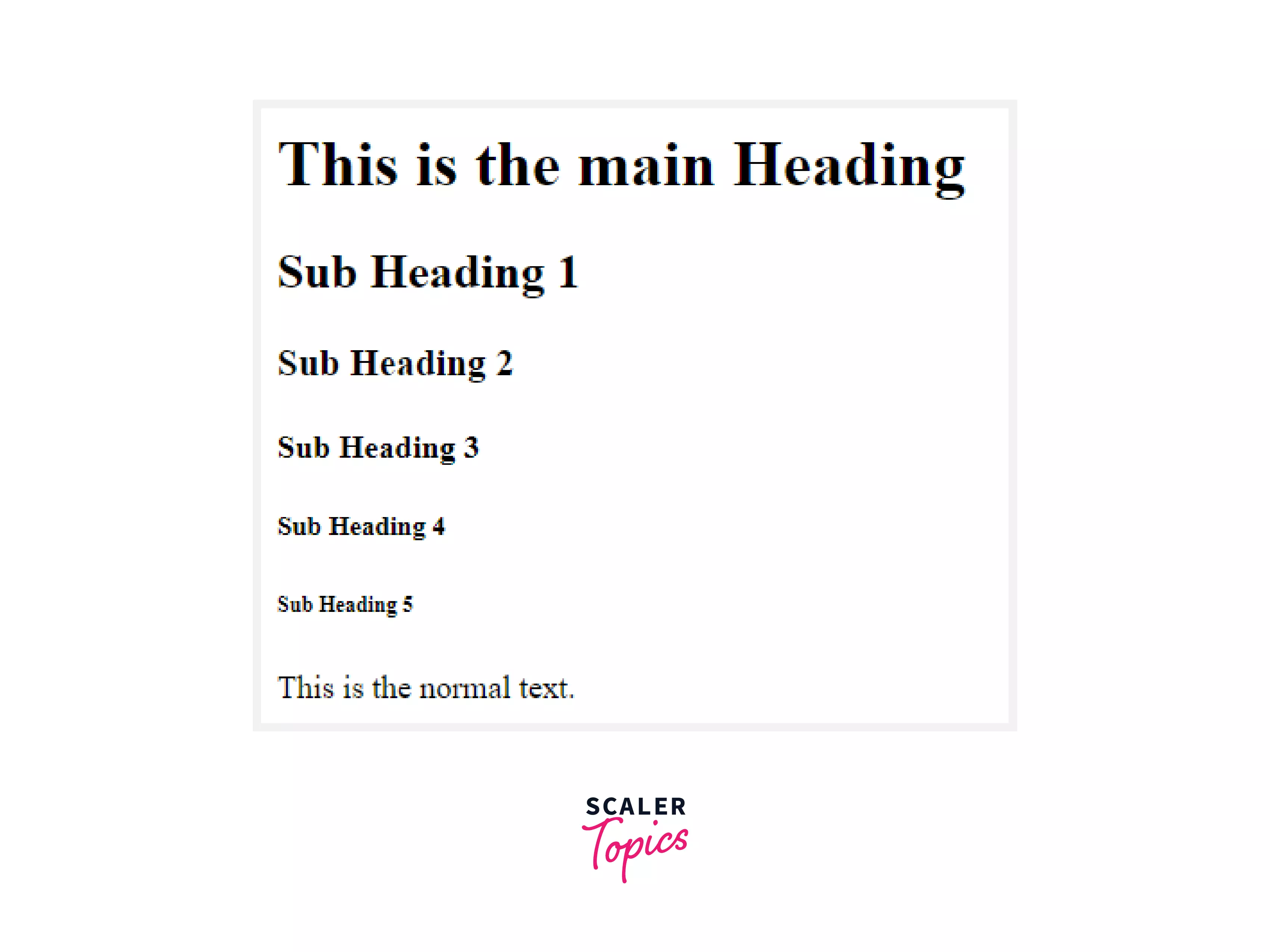
Correct HTML tag for the largest heading is <h1>. In an HTML page, the <h1> to <h6> tags are used to define headers. HTML header tags distinguish a page's headers (h1) and sub-headings (h2-h6) from the rest of the content. The largest heading is defined by <h1>, while the smallest heading is defined by <h6>.
Build an AI-First Career, Master the Complete Skillset
Choose from our industry-leading programs designed for career success
Modern Software and AI Engineering Program
Master full-stack development with AI integration


 +1000 more
Modern Data Science and ML with specialisation in AI
Advanced data science techniques with AI specialization
+1000 moreAdvanced AIML with Specialisation in Agentic AI
Deep dive into AIML with focus on Agentic systems
+1000 moreDevOps, Cloud & AI Platform Engineering
Build and manage AI-powered cloud infrastructure
+1000 moreAI Engineering Advanced Certification by IIT-Roorkee
Premier AI engineering certification from IIT-Roorkee

AI Forward Deployed Engineer Program
Full-stack engineering, production AI and client-facing consulting
+1000 moreA Section Heading
Headings allow you to divide your website content into manageable portions. They function similarly to headings and subheadings in a book or report. Learn more
A Paragraph
The p element allows you to create text paragraphs. Most browsers show paragraphs with a vertical gap between them, which helps to break up the text. Learn more
Note: Do not use a <h1> tag to change the formatting. <h1> tags are used to define different heading levels, such as those found in a table of contents.
Example:
Output of the above code:
How Scaler Transformed Careers in Different Fields
Scaler learners achieved 2.5x salary growth with average post-Scaler CTC reaching ₹23L.
 Google
 Amazon
 Microsoft
 Flipkart
 Adobe1200+ more
Global Attributes
Global attributes are properties shared by all HTML elements; they can be applied to all elements. They are said to be global because they are supported by standard and non-standard HTML elements. However, they may not affect some.
All HTML elements, even those not specified in the standard, can have global properties. This means that any non-standard elements must nevertheless allow certain characteristics, even if using such elements renders the content non-HTML5 compliant. HTML5-compliant browsers, for example, hide content tagged as <foo hidden>...</foo>, despite the fact that <foo> is not a legitimate HTML element.
List of Global Attributes
| Attribute | Value | Description |
|---|---|---|
| accesskey | shortcut key | It gives a tip for creating a keyboard shortcut for the currently selected element. This property is a list of characters separated by spaces. The browser should use the first one on the computer keyboard layout. |
| autocapitalize | off / none, on / sentences, words, characters | Controls whether and how text input is capitalized automatically when it is entered/edited by the user. |
| autofocus | false | Indicates that an element will be focused on page load or when the <dialogue> in which it is included is displayed. |
| class | classname | It is a list of the element's classes, separated by spaces. Classes enable CSS and JavaScript to identify and access certain components using class selectors or functions. |
| contenteditable | true / false | An enumerated attribute that indicates whether or not the element should be adjustable by the user. If this is the case, the browser adjusts its widget to allow modification. |
| contextmenu | menu-id | A context menu for an element is specified. A context menu opens when the user clicks the right mouse button on an element. |
| data- | data | Forms a class of attributes known as custom data attributes, which allow private information to be exchanged between HTML and its DOM representation, which scripts can exploit. All such custom data is accessible through the HTMLElement interface of the element on which the attribute is set. |
| dir | ltr / rtl / auto | Specifies the base direction of directionality of the element's text. |
| draggable | true / false / auto | An enumerated attribute indicates whether the element may be dragged with the Drag and Drop API. |
| dropzone | copy / move / link | When dragged data is dumped, this property specifies whether it is copied, relocated, or linked. |
| enterkeyhint | This value indicates the action label (or icon) on virtual keyboards to display for the enter key. | |
| exportparts | It is used to export shadow components from a nested shadow tree into a contained light tree transitively. | |
| hidden | hidden | A Boolean attribute specifies whether or not the element is still relevant. For example, It can be used to conceal elements of the website that cannot be accessed until the login process is completed. The browser will not render such items. |
| Id | name | Defines a unique identifier (ID) that must be unique throughout the document. It serves to identify the element when linking (through a fragment identifier), scripting, or styling (with CSS). |
| lang | language-code | Specifies the primary language for the text content of the element. |
| Spellcheck | true / false | Specifies whether or not the element should be checked for spelling mistakes. |
| tabindex | number | Specifies an element's tabbing order. |
| title | text | It contains text that represents advisory information about the element to which it belongs. Such information is typically, but not always, displayed to the user in the form of a tooltip. |
| slot | An element having a slot attribute is assigned to the slot established by the <slot> element whose name attribute matches the value of that slot attribute. | |
| Style | style | Style is used to add inline CSS to the currently selected element. It is recommended that styles be defined in a separate files or files. This attribute and the <style> element are primarily intended for rapid stylings, such as for testing reasons. |
| translate | yes / no | It specifies whether or not the element's content should be translated when the page is localized. |
| xml:lang | language-code | In XHTML documents, it specifies the primary language for the element's text content. |
Turn Learning into Career Growth
Specific Attributes
| Attribute | Value | Description |
|---|---|---|
| align | left / right / center / justify | Specifies the alignment of the enclosing content. |
Browser Support
The following browsers support the <h1> to <h6> tag:
- Chrome
- Android
- Firefox (Gecko)
- Firefox Mobile (Gecko)
- Internet Explorer (IE)
- Edge Mobile
- Opera
- Opera Mobile
- Safari (WebKit)
- Safari Mobile
Conclusion
- Correct HTML tag for the largest heading is <h1>. The <body> tag contains the HTML <h1> element.
- Headings can be anywhere from <h1> to <h6>. The most crucial heading is <h1>, whereas the least important is <h6>.
- The <h1> heading is the first heading in the document, and it is usually in a large bolded font.




