


How does a C Program Execute?
 FREE
FREE

What Is Execution of a C Program?
Execution of a C program is a multi-stage process in which the source code written by a programmer is converted into machine-readable instructions and then executed by the computer. This process involves several phases, such as preprocessing, compilation, assembly, linking, and loading, before the program produces the final output. Understanding these internals is a core component of a comprehensive Software Development Course.
Phases of Execution of a C Program
The execution of a C program occurs through a series of well-defined stages that convert human-readable source code into executable machine code. This process is commonly explained using six phases of C program execution, which are frequently asked in exams and interviews.
Six Phases of Execution of a C Program
-
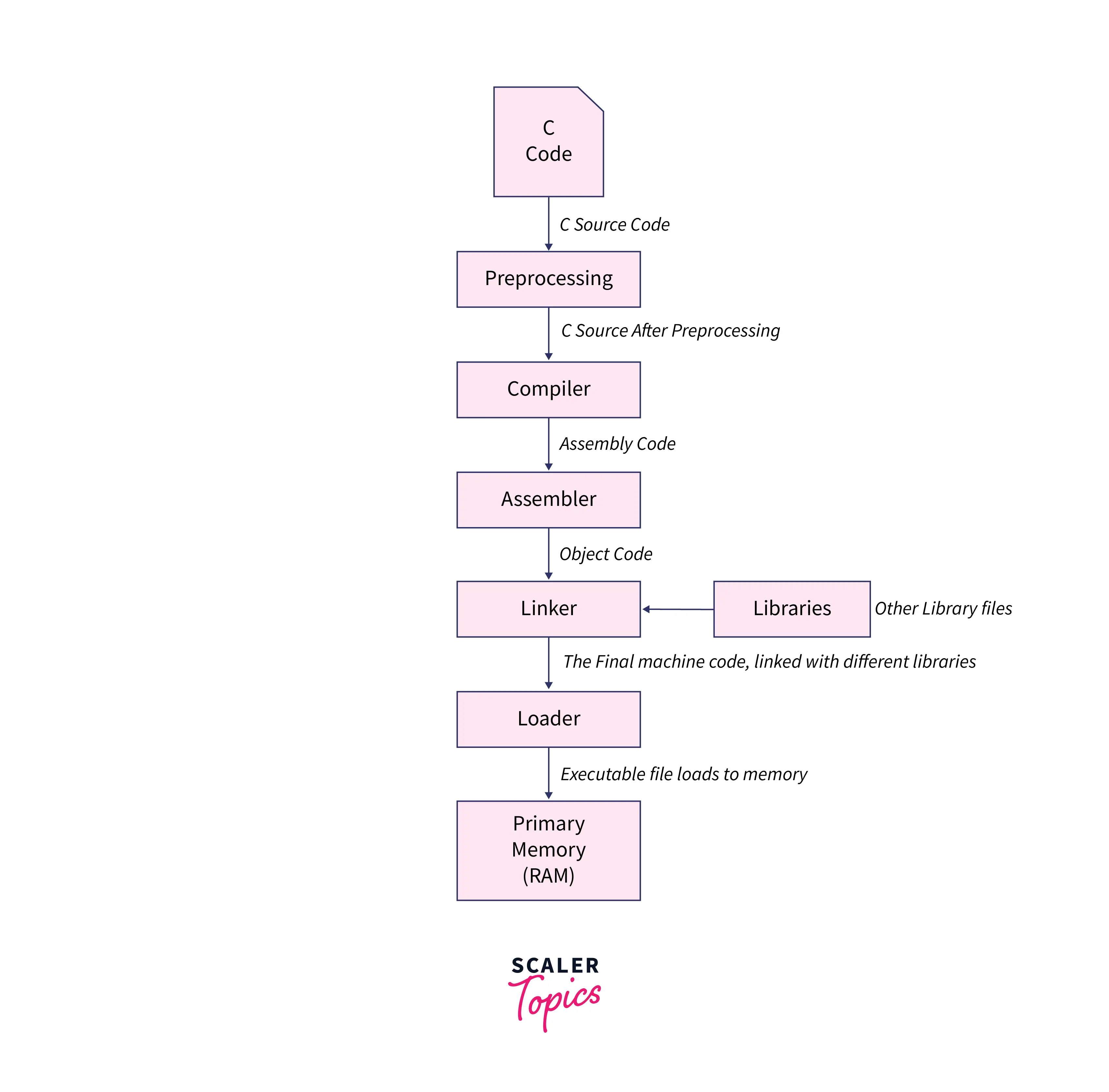
Writing the Program: The programmer writes the source code using a text editor, and the file is saved with a .c extension.
-
Preprocessing: The preprocessor processes directives such as #include, #define, and macros, and generates an expanded source file.
-
Compilation: The compiler checks the program for syntax errors and converts the preprocessed code into assembly-level instructions.
-
Assembly: The assembler converts assembly code into object code and generates an object file.
-
Linking: The linker combines object files with required libraries to create an executable program.
-
Loading and Execution: The loader loads the executable file into memory, and the CPU executes the program starting from the main() function.
Phase 1: Writing the C Program
The first phase in the execution of a C program is writing the source code. In this stage, the programmer creates the program using a text editor or an integrated development environment (IDE) by following C programming syntax and structure.
The programmer writes instructions using the C programming language to define logic, functions, variables, and program flow. The code is written in a human-readable format and serves as the foundation for all later execution stages.
.c File Explanation
After writing the program, it is saved with a .c file extension, which identifies it as a C source file. This file contains the complete source code that will be processed by the compiler in the later stages of execution.
For example:
program.c
The .c file acts as the input for the preprocessing and compilation phases, where it is gradually converted into machine-executable code.
Phase 2: Preprocessing
The preprocessing phase is the second step in the execution of a C program. In this stage, the preprocessor processes special instructions called preprocessor directives before the actual compilation begins. These directives modify the source code and prepare it for further translation.
The preprocessor performs tasks such as:
-
Processing #include Directives: The #include statement inserts the contents of header files into the program. These header files provide predefined functions and declarations required for program execution.
-
Processing #define Directives: The #define directive is used to create macros or symbolic constants. The preprocessor replaces these constants with their defined values throughout the program.
-
Removing Comments: All comments written in the source code are removed during preprocessing, as they are not required for program execution.
Output of Preprocessing - .i File
After processing all directives and modifications, the preprocessor generates an expanded source code file known as the .i file. This file contains the updated code after header file inclusion, macro expansion, and comment removal.
The .i file serves as the input for the compilation phase, where the program is translated into assembly-level instructions.
Phase 3: Compilation
The compilation phase is the third step in the execution of a C program. During this stage, the compiler translates the preprocessed source code into assembly-level instructions and checks the program for syntax and logical errors.
The compiler analyzes the expanded source code generated during preprocessing and performs several checks, including:
-
Syntax Checking: The compiler verifies whether the program follows correct C language rules and syntax. If any syntax errors are detected, the compiler generates error messages, and the program must be corrected before proceeding.
-
Code Translation: After successful error checking, the compiler converts the high-level C code into assembly language instructions that are closer to machine-level operations.
Output of Compilation = .s File
Once the compilation process is completed, the compiler generates an assembly code file known as the .s file. This file contains assembly-level instructions that will be converted into object code in the next stage.
The .s file acts as the input for the assembly phase, where assembly instructions are translated into machine-readable object code.
Phase 4: Assembly
The assembly phase is the fourth step in the execution of a C program. In this stage, the assembler converts the assembly-level instructions generated during compilation into machine-readable object code.
The assembler translates assembly language instructions into binary machine code that can be understood by the computer’s processor. This conversion ensures that the program instructions are prepared in a format suitable for execution.
Output of Assembly - .o File
After translation, the assembler generates an object file with the .o file extension. This file contains machine-level instructions but is not yet executable because it may require additional library functions and external references.
The .o file serves as the input for the linking phase, where it is combined with necessary libraries to create a final executable program.
Phase 5: Linking
The linking phase is the fifth step in the execution of a C program. In this stage, the linker combines the object code generated during the assembly phase with required library files to produce a complete executable program.
Why Linking Is Needed?
During compilation and assembly, the object file may contain references to functions or variables that are defined in external libraries. These references must be resolved before the program can run. The linker connects these references with their actual definitions, ensuring that all required program components are available.
Libraries Explained
Libraries contain precompiled code for commonly used functions such as input-output operations, mathematical calculations, and string handling. For example, functions like printf() and scanf() are defined in standard libraries. The linker attaches these libraries to the object file so that the program can use them during execution.
Output of Linking - Executable File
After linking is completed, the linker generates an executable file (such as .exe in Windows or a.out in Linux). This file contains the complete machine code that can be loaded into memory and executed by the system.
Phase 6: Loading and Execution
The loading and execution phase is the final step in the execution of a C program. In this stage, the executable file is loaded into memory, and the program begins running.
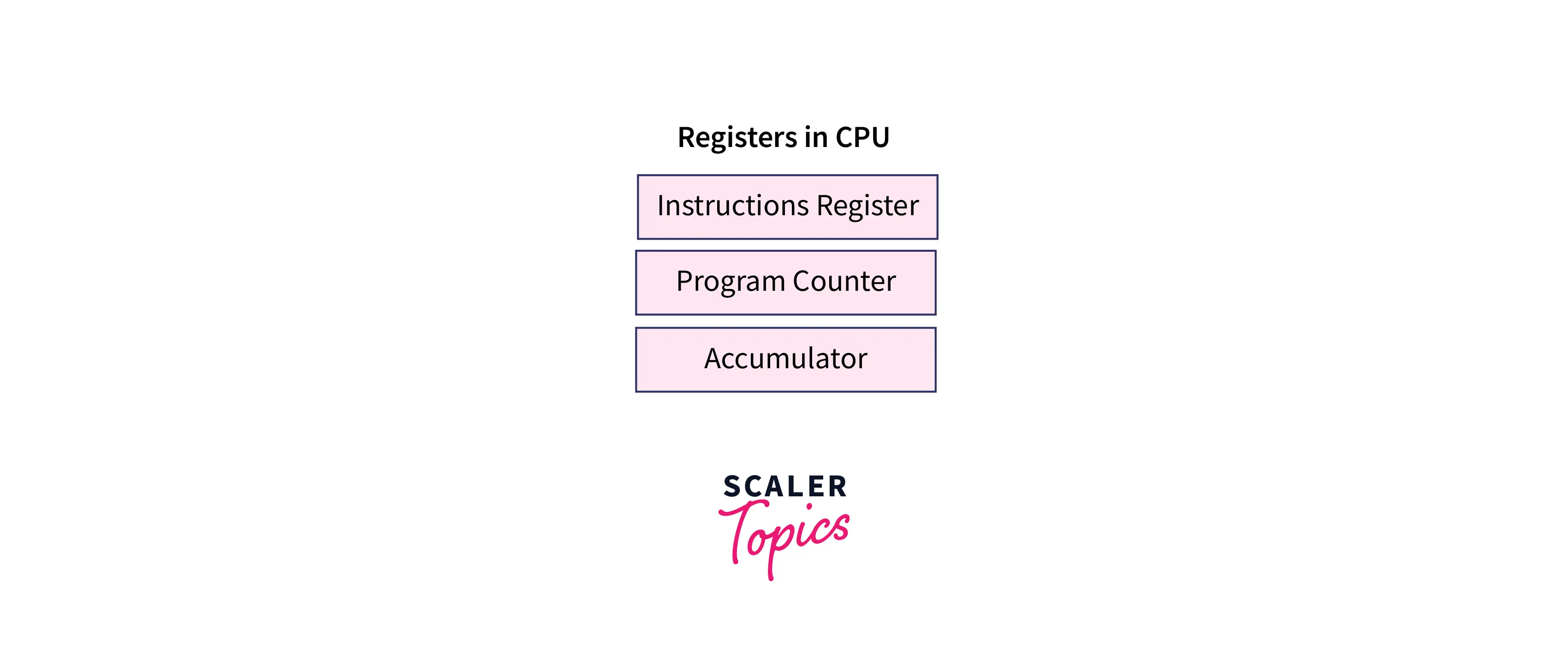
Loader Role
The loader is responsible for placing the executable program into the system’s main memory (RAM). It allocates memory space, prepares program instructions for execution, and initializes required resources before the program starts.
main() Execution
Once the program is loaded into memory, execution begins from the main() function. The main() function acts as the entry point of every C program, and all program instructions are executed sequentially from this function.
CPU Execution
After loading, the CPU processes the machine instructions one by one. It performs calculations, manages program flow, and generates the final output based on the program logic. Once all instructions are executed, the program terminates successfully.
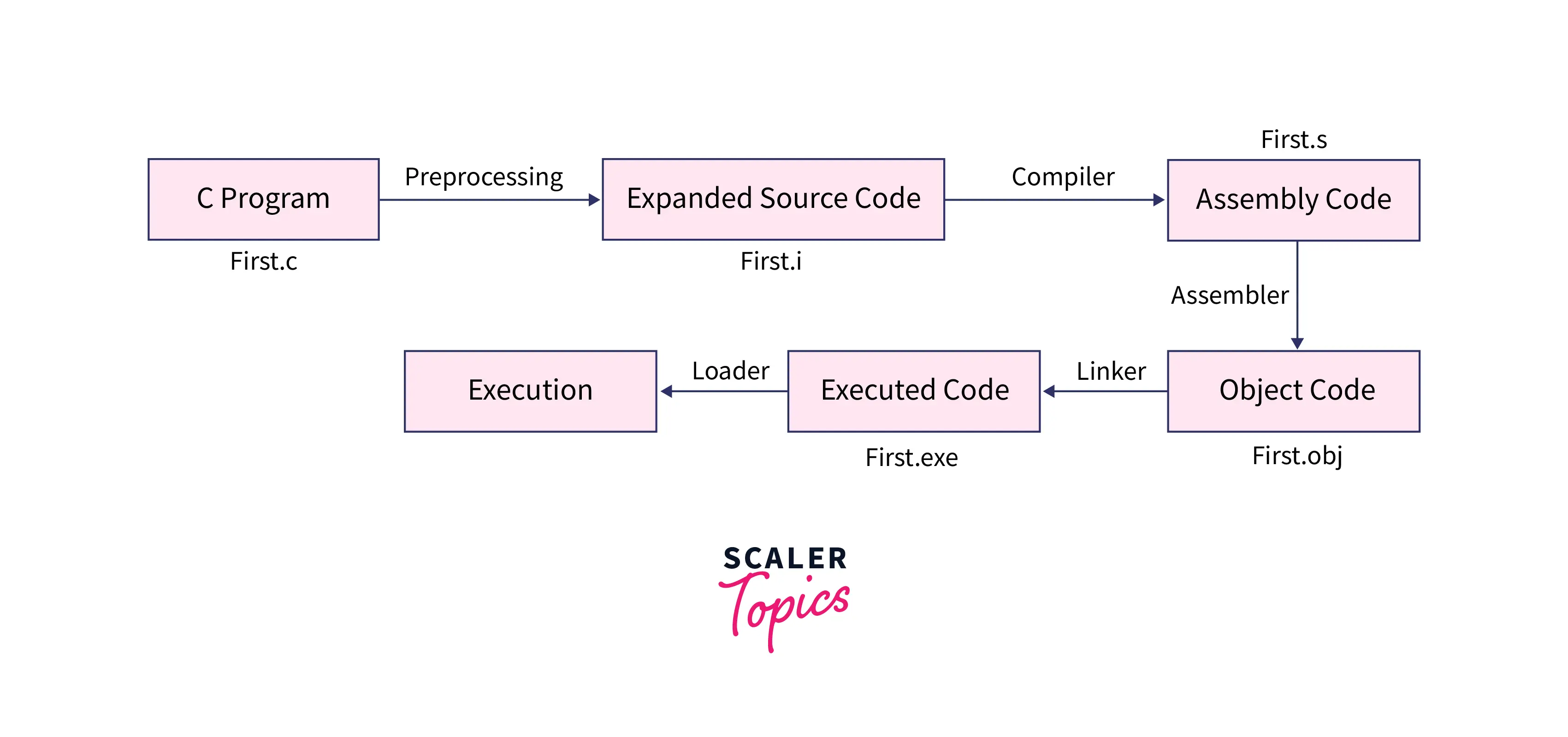
Execution of C Program - Flow Diagram
The flow diagram below represents how a C program moves from source code to final output by passing through preprocessing, compilation, assembly, linking, and execution stages.
Compilation vs Execution in C
Compilation and execution are two important stages in running a C program, but they serve different purposes. Compilation focuses on converting source code into machine code, while execution involves running the compiled program to produce output.
Compilation vs Execution Comparison
| Aspect | Compilation | Execution |
|---|---|---|
| Purpose | Converts source code into machine-readable code | Runs the compiled program to produce output |
| Stage in Program Flow | Occurs before program runs | Occurs after compilation and linking |
| Error Detection | Detects syntax and compile-time errors | Detects runtime errors |
| Output | Generates object file or executable file | Produces program output |
| Involves | Preprocessor, compiler, assembler, linker | Loader and CPU execution |
Compilation ensures that the program is correctly translated into executable format, while execution allows the computer to perform operations defined in the program and generate results.
Why Understanding Execution of C Program Is Important
Execution of a C program is a foundational topic in programming and is frequently tested in academic exams and technical interviews. Understanding this concept can help you answer theoretical questions correctly and solve practical debugging problems more confidently.
Questions Commonly Asked in Exams and Interviews
Students are often asked questions such as:
-
What are the six phases of execution of a C program?
-
Explain preprocessing, compilation, linking, and execution with examples.
-
What is the difference between compilation and execution?
-
What is the role of the linker and loader?
-
Explain the output files generated in each phase (.i, .s, .o, executable).
These questions test whether students understand how source code is converted into machine-executable instructions.
Why Students Often Find This Topic Difficult
Students usually struggle with:
-
Remembering the correct order of execution phases
-
Understanding the role of different system components like compiler, assembler, and linker
-
Confusing file extensions generated at each stage
-
Connecting theoretical concepts with practical program execution
These difficulties often occur because the process involves multiple system-level transformations that are not directly visible during coding.
Preparation Tips to Master This Topic
Students can understand the execution of a C program more effectively by:
-
Learning the six phases as a step-by-step flow instead of memorizing definitions
-
Practicing diagram-based explanations of execution stages
-
Understanding the purpose of each phase rather than only learning outputs
-
Relating compilation errors and runtime errors to their respective execution stages
Why This Knowledge Helps in Programming
Understanding execution flow helps programmers identify whether errors occur during compilation, linking, or runtime. This improves debugging skills and builds strong fundamentals for learning advanced topics such as compilers, operating systems, and system-level programming.
FAQs
What are the steps to execute a C program?
The steps to execute a C program include writing the source code, preprocessing the code, compiling it into assembly instructions, assembling it into object code, linking required libraries to create an executable file, and finally loading and executing the program to produce output.
What are the six phases of C program execution?
The six phases of C program execution are writing the program, preprocessing, compilation, assembly, linking, and loading with execution. Each phase converts the program step-by-step from human-readable source code into machine-executable instructions that the computer can run.
What happens during compilation?
During compilation, the compiler checks the preprocessed source code for syntax errors and converts it into assembly-level instructions. If errors are found, the compiler displays error messages. After successful checking, the compiler generates an assembly file that is used in the next phase.
What is the role of linker in C?
The linker combines object files generated during assembly with required library files. It resolves references to external functions and variables, ensuring that all program components are connected correctly. After linking, a complete executable file is created that can be loaded and executed by the system.
What is the difference between compilation and execution?
Compilation is the process of converting source code into machine-readable executable code, while execution involves running the compiled program to generate output. Compilation identifies syntax errors, whereas execution runs instructions using the CPU and may detect runtime errors.