


SQL PARTITION BY Clause
 FREE
FREE

The PARTITION BY in SQL is a subclause to OVER(). It divides the resultant rows into different partitions based on the specified columns' values. Then the window function is applied to each partition made and gives the results in the form of a separate column.
To further enhance your learning, you can explore some of the biggest free online collections of SQL Server articles, tutorials, and technical series available. These resources are often curated and shared by the active and supportive SQL Server community, which plays a key role in sharing knowledge and best practices.
- The partitions made by the clause are referred to as 'Window'.
- Window functions that can be used with this clause are RANK(), LAG(), LEAD(), COUNT(), MAX() etc.
Introduction to SQL Partition
The SQL PARTITION BY clause is a fundamental feature that empowers data analysts to segment a result set into distinct partitions based on the values of one or more columns. By using the PARTITION BY clause, you can perform calculations and apply aggregate functions—such as SUM(), COUNT(), and AVG()—within each partition independently, rather than across the entire data set. This approach is especially valuable for advanced data analysis, as it allows you to generate insights specific to each group or segment of your data.
For example, when you use the SQL PARTITION BY clause with window functions like ROW_NUMBER() or RANK(), you can assign rankings or row numbers within each partition, making it easy to analyze trends or performance within specific categories. Whether you’re working with sales data, employee records, or any other structured data, the ability to partition by one or more columns gives you the flexibility to perform calculations that are tailored to each group.
Mastering the SQL PARTITION BY clause is essential for anyone looking to enhance their SQL skills and perform sophisticated data analysis. It enables you to break down complex data sets, perform calculations within each partition, and gain deeper insights—all within a single SQL query.
How to Implement PARTITION BY Clause in SQL?
PARTITION BY clause is used with the OVER() clause to form clusters based on a specified column.
Syntax of PARTITION BY in SQL:
Standard SQL allows only column names to be put as expression1, expression2. OrderClause and frameClause are optional, and can only be added when required.
Example:
Here, we've created a table StudentMarks with columns Id, Name, Subject, Marks.
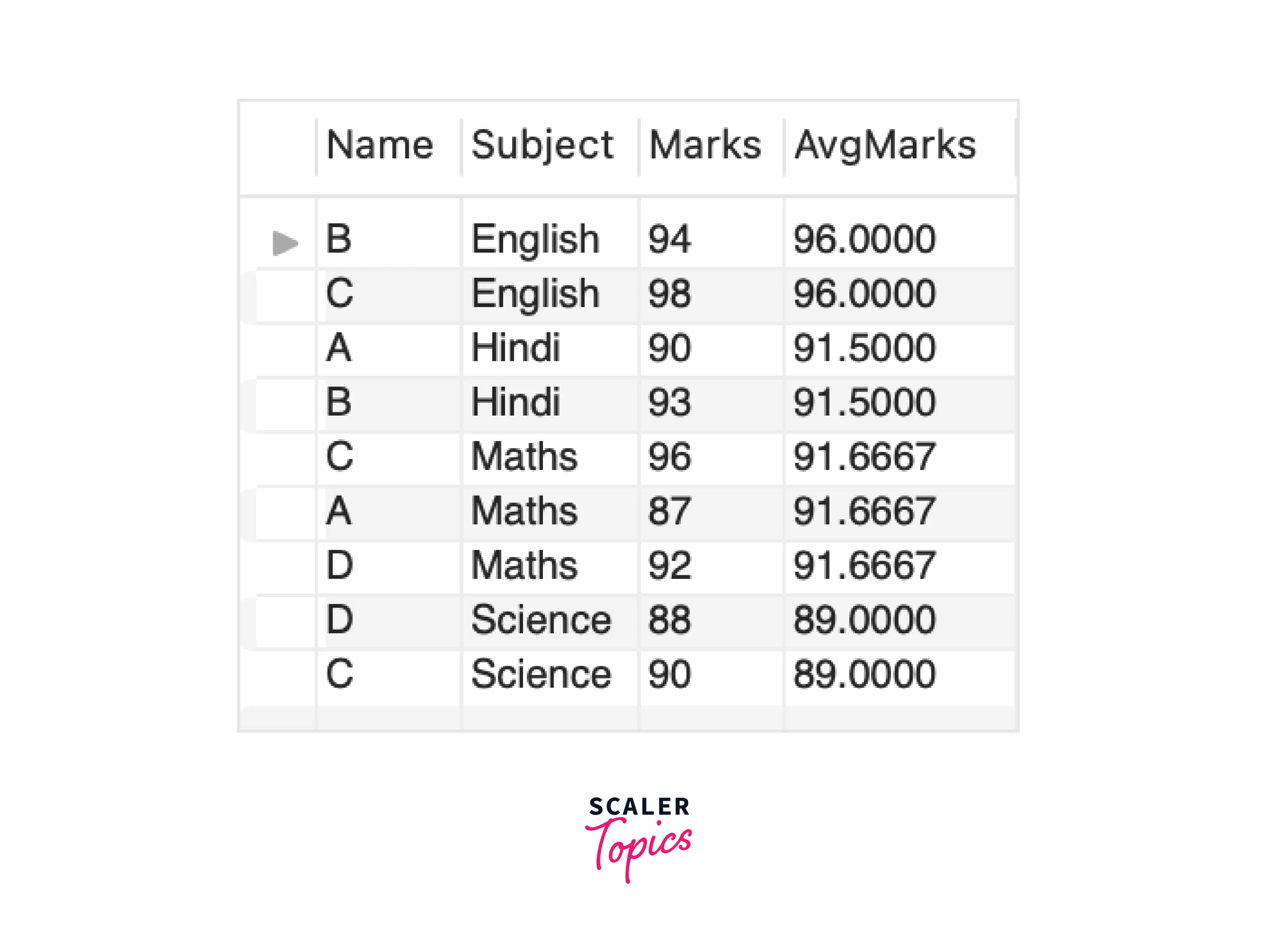
Output:
As a result, PARTITION BY has calculated the average marks for the students where each window is made on the Subject.
Unlike GROUP BY, it returns each row of the table with calculated result.
Demo Database
To illustrate the usage of the PARTITION BY in SQL, let's create a sample database named "Sales" with a table called "Orders". This table contains columns such as order_id, customer_id, order_date, and order_amount.The following SQL code demonstrates how to set up the necessary tables and insert sample data for the examples.
Now that we have our sample database set up, let's explore how the PARTITION BY clause can be utilized in SQL queries.
OVER Clause with PARTITION BY in SQL
The OVER clause combined with the PARTITION BY clause allows you to define the window over which a function is applied.
Example:
Output:
[IMAGE 1 START SAMPLE]
 [IMAGE 1 FINISH SAMPLE]
In this query, we're calculating the total order amount per customer by partitioning the data based on the customer_id column. The SUM() function is then applied to the order_amount column within each partition, resulting in the total order amount for each customer.
Row Number with PARTITION BY in SQL
The ROW_NUMBER() function combined with PARTITION BY assigns a unique sequential integer to each row within a partition. This can be useful for ranking purposes.
Example:
Output:
[IMAGE 2 START SAMPLE]
 [IMAGE 2 FINISH SAMPLE]
In this query, we're assigning a row number to each order within each customer's partition based on the order_date. This allows us to identify the chronological order of orders for each customer.
COUNT() with PARTITION BY in SQL
The COUNT() function with PARTITION BY allows you to count rows within each partition separately.
Example:
Output:
[IMAGE 3 START SAMPLE]
 [IMAGE 3 FINISH SAMPLE]
In this query, we're counting the number of orders per customer by partitioning the data based on the customer_id column. The COUNT() function then counts the number of rows within each partition, giving us the total number of orders for each customer.
Working with Multiple Columns
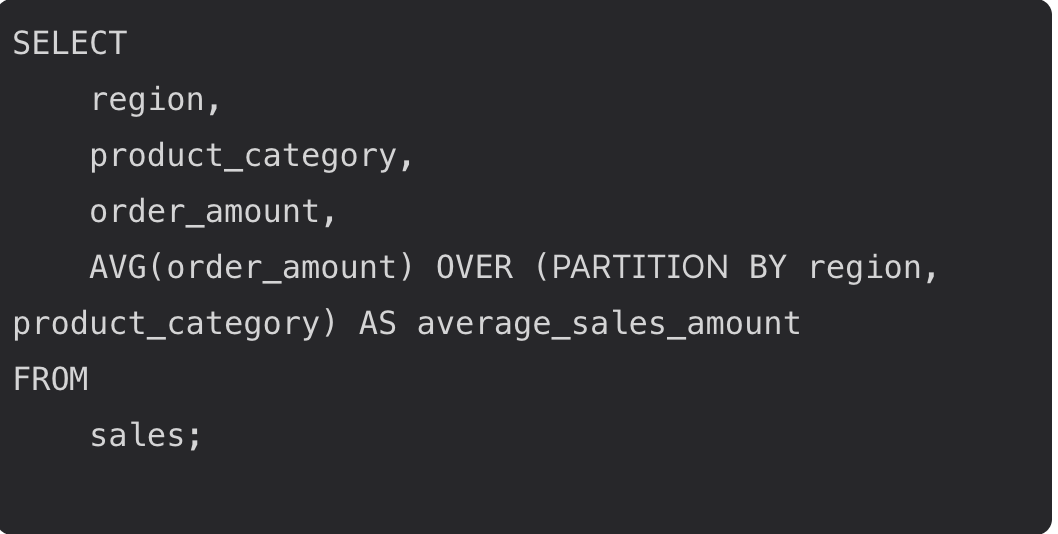
The true power of the SQL PARTITION BY clause becomes evident when you partition your data using multiple columns. By specifying more than one column in the PARTITION BY clause, you can create highly granular partitions that reflect the unique combinations of values across those columns. For instance, in a sales table, you might want to analyze the average sales amount for each combination of region and product category. By partitioning on both columns, your query calculates the average sales within each region-category pair, providing more detailed insights than partitioning by a single column alone.
To use multiple columns in the PARTITION BY clause, simply list them in a comma-separated format. This instructs SQL to treat each unique combination of the specified columns as a separate partition. Not only does this approach allow for more precise data analysis, but it can also improve query performance by reducing the number of rows processed within each partition, especially in large tables.
For example, the following query demonstrates how to calculate the average sales amount for each region and product category in a sales table:
By leveraging multiple columns in the PARTITION BY clause, you can unlock deeper insights and optimize your queries for complex data sets.
Best Practices
To maximize the effectiveness of the SQL PARTITION BY clause, it’s important to follow a set of best practices. First, always ensure you select the most relevant columns for partitioning, as the choice of columns directly impacts how your data is grouped and how calculations are performed. Using the OVER clause in conjunction with the PARTITION BY clause allows SQL Server and other databases to optimize query performance, making your data analysis more efficient.
-
Pay attention to the order of columns in the PARTITION BY clause, as it can influence the way partitions are created and, consequently, the results of your calculations. It’s also a good idea to test your queries with sample data and validate the output to ensure accuracy, especially when working with complex partitions or large data sets.
-
Additionally, consider combining the PARTITION BY clause with other important clauses like WHERE and HAVING to filter and aggregate your data more effectively. This approach enables you to perform calculations on only the required columns and rows, further enhancing performance and the relevance of your results.
By adhering to these best practices, you can harness the full potential of the SQL PARTITION BY clause, streamline your data analysis workflows, and deliver more meaningful insights from your data.
Conclusion
- The PARTITION BY in SQL allows for the partitioning of result sets based on specified columns.
- It facilitates the application of aggregate or window functions within each partition independently.
- The OVER clause, combined with PARTITION BY, is used to define the window over which functions are applied.
- Functions like SUM(), COUNT(), and ROW_NUMBER() can be effectively utilized with PARTITION BY to perform various analyses on partitioned data.