


RAG Architecture Diagram Explained (with Labelled Components & Variants)
A RAG architecture diagram is a visual map of how a retrieval-augmented generation system moves data from raw documents, through a vector database, to an LLM that writes a grounded answer. It shows the components as boxes and the data flow as arrows, split into two distinct phases: indexing (done once) and retrieval (done at query time).
If you've ever wondered how an AI system actually looks up information before answering instead of just guessing from memory the diagram below shows exactly how the pieces connect. This page explains every box, every arrow, and then draws the common variants (simple, chatbot, agentic, multimodal) in the same visual language so you can see what changes between them.
The Full RAG Architecture Diagram
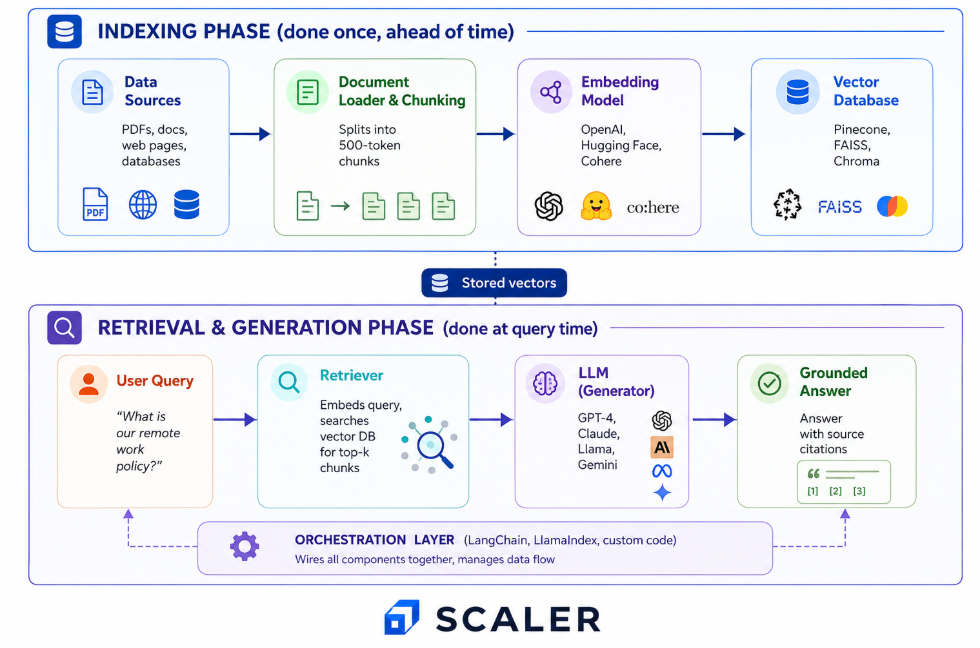
RAG architecture diagram showing indexing and retrieval phases with document loader, embedding model, vector database, retriever and LLM
The Components in a RAG Diagram (Every Box Explained)
Each box in the diagram represents a distinct component. Here's what each one does and where real tools fit in.
| Component | What it does | Example tools |
|---|---|---|
| Data Sources / Knowledge Base | The raw material PDFs, Word docs, web pages, wikis, databases that feed the system | Google Drive, Confluence, SharePoint, S3 buckets |
| Document Loader & Chunking | Reads raw files and splits them into bite-sized chunks (typically 200–500 tokens) with some overlap so sentences aren't cut in half | LangChain loaders, LlamaIndex readers, Unstructured |
| Embedding Model | Turns each chunk into a vector a list of numbers that captures what the text means, so similar meanings produce similar vectors | OpenAI Embeddings, Cohere, Hugging Face models |
| Vector Database | Stores the vectors and finds the most similar chunks to a query in milliseconds using cosine similarity | Pinecone, FAISS (Meta AI), Chroma, Weaviate |
| Retriever | Takes the user's query, embeds it with the same model, and pulls the top-k closest chunks from the vector database | Built into LangChain/LlamaIndex, or custom |
| LLM (Generator) | Receives the query plus the retrieved chunks and writes a grounded answer how large language models are structured internally determines how it processes that context | GPT-4, Claude, Llama, Gemini |
| Orchestration Layer | The glue that wires all the boxes together manages the data flow, handles errors, and coordinates the pipeline | LangChain, LlamaIndex, Haystack, custom Python |
The orchestration layer isn't always drawn in simple diagrams, but it's always there in practice. It's the code that says "take the query, embed it, search the vector DB, pass the results to the LLM, and return the answer."
Build an AI-First Career, Master the Complete Skillset
Choose from our industry-leading programs designed for career success
Modern Software and AI Engineering Program
Master full-stack development with AI integration


 +1000 more
Modern Data Science and ML with specialisation in AI
Advanced data science techniques with AI specialization
+1000 moreAdvanced AIML with Specialisation in Agentic AI
Deep dive into AIML with focus on Agentic systems
+1000 moreDevOps, Cloud & AI Platform Engineering
Build and manage AI-powered cloud infrastructure
+1000 moreAI Engineering Advanced Certification by IIT-Roorkee
Premier AI engineering certification from IIT-Roorkee

AI Forward Deployed Engineer Program
Full-stack engineering, production AI and client-facing consulting
+1000 moreHow to Read the Data Flow (Arrows and Phases)
The diagram has two distinct phases, colour-coded in the arrows. Understanding this split is the key to reading any RAG architecture.
The Indexing Phase (done once, ahead of time)
This is the setup. Before any question arrives, you prepare your knowledge base:
Documents → Load & Chunk → Embed → Store in Vector DB
- Documents come in from your data sources (PDFs, web pages, databases)
- Document loader reads them and chunking splits them into small, overlapping pieces
- Embedding model converts each chunk into a vector (a list of numbers capturing meaning)
- Vector database stores those vectors for fast similarity search later
This phase runs once and again whenever your documents change. It doesn't run on every question.
▶ Watch the indexing flow in action: Complete RAG Tutorial | Indexes, Embeddings, Vectors & Retrieval Step by Step
For the full build walkthrough with code, see the full RAG pipeline, stage by stage.
The Retrieval & Generation Phase (done at query time)
This is what happens every time someone asks a question:
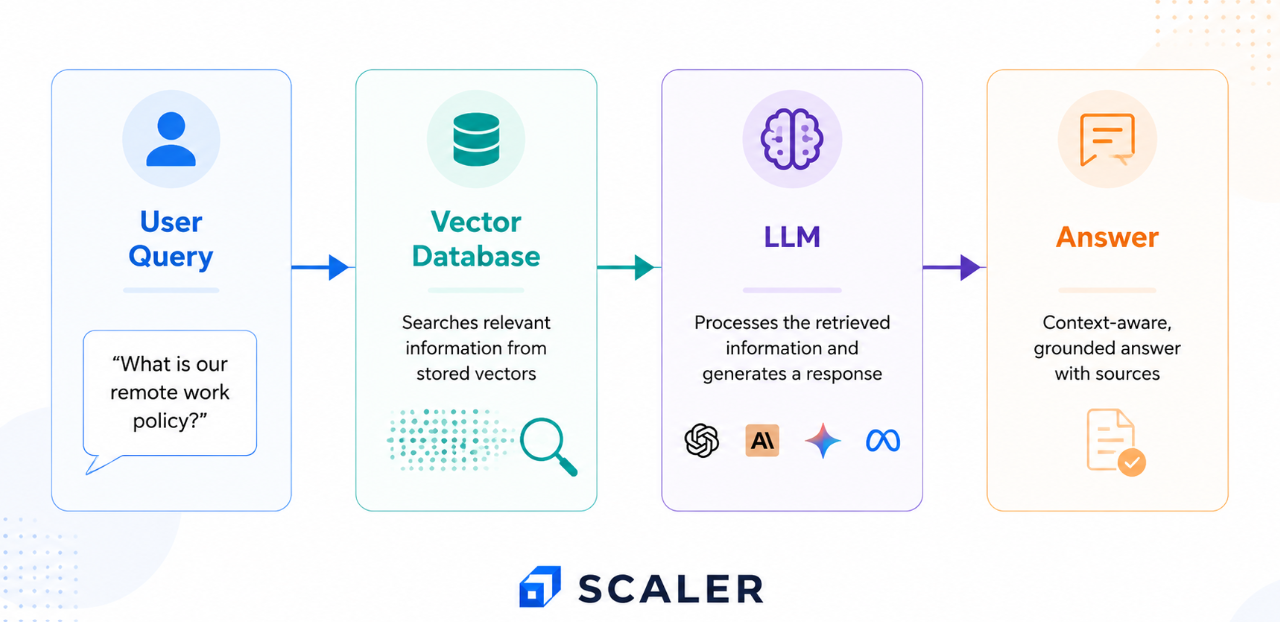
- User query comes in ("What's our remote work policy?")
- Retriever embeds the query using the same embedding model
- Vector database finds the top-k most similar chunks (typically k=3 to 5)
- LLM receives the query plus those chunks and writes an answer grounded in the retrieved text
- Grounded answer is returned, often with source citations
The arrows in this phase move right to left in some diagrams, or top to bottom in others what matters is that you can trace the data from "question in" to "answer out" without losing track of which box does what.
RAG Diagram Variants (Same Shape, Different Needs)
The basic diagram is the foundation. Real-world systems add layers depending on the use case. Here are the most common variants all drawn in the same visual language so you can see exactly what changes.
RAG with a Vector Database (The Standard)
The full standard diagram the hero image at the top of this page. It adds the embedding model, the document loader, and the orchestration layer. This is what most production RAG systems look like.
The vector database sits between the embedding model and the retriever. It's the component that makes similarity search fast you can't do this efficiently in a normal database, which is built for exact matches, not "find me the most similar text."
RAG Chatbot Architecture
Add a chat interface and conversation memory in front of the retriever:
RAG chatbot architecture diagram with chat interface and conversation memory
The difference: the system remembers previous messages in the conversation. When you ask "what about part-time employees?" after asking about remote work policy, it knows you're still talking about the same topic. The conversation memory is passed to the LLM along with the retrieved chunks.
This is the architecture behind most customer support bots and internal knowledge assistants.
Agentic RAG Diagram
An agent/orchestrator sits in front of the retriever and makes decisions:
Agentic RAG architecture diagram with an orchestrator deciding when to retrieve and call tools
The key difference: the agent decides whether to retrieve, what to retrieve, and when to stop. It can loop retrieve, check the answer, retrieve again from a different source if needed. It can also call tools (a calculator, a code interpreter, an API) alongside retrieval.
This is the pattern behind systems like Perplexity and advanced customer support bots. For a deeper look at how agentic AI systems are architected, see that companion guide.
How Scaler Transformed Careers in Different Fields
Scaler learners achieved 2.5x salary growth with average post-Scaler CTC reaching ₹23L.
 Google
 Amazon
 Microsoft
 Flipkart
 Adobe1200+ more
Multimodal RAG Diagram
The knowledge base and embeddings handle images and audio, not just text:
Free Agentic AI Course
with Certification
Learn LLMs, prompt engineering, RAG & agentic AI — hands-on. Earn an industry-recognised certificate at zero cost.

How to Draw Your Own RAG Architecture Diagram
If you're making slides, writing documentation, or explaining RAG to your team, here's a simple checklist:
- Separate indexing from retrieval visually. Use two colours, two sections, or a clear dividing line. This is the single most important design choice it's what makes the diagram readable.
- Label every box with both a role and an example tool. "Vector Database (Pinecone)" is clearer than just "Vector DB."
- Use arrow direction to show data flow. Left to right or top to bottom pick one and stay consistent.
- Colour-code the two phases. Indexing arrows in one colour, retrieval arrows in another. This is the design choice that makes our diagram clearer than every competitor's.
- Keep the basic version to 5–6 boxes. Data sources, chunking, embedding, vector DB, retriever, LLM. Add the orchestration layer only if the audience needs it.
Tools like draw.io, Excalidraw, or Mermaid work well for creating these diagrams. Start with the simple 4-box version and add layers only as the audience requires.
For more on how retrieval connects to AI agents in practice, see that companion piece diagrams get more complex once agents and tools enter the picture.
Where RAG Architectures Are Used (Real Examples)
The diagram variants map directly to real-world systems:
- Customer support bots → Chatbot variant. Answers from help docs with conversation memory.
- Internal knowledge assistants → Standard variant. Searches company wikis and HR policies.
- Legal/medical/financial research → Standard or agentic variant. Searches large document collections, sometimes with tool calls for calculations.
- Coding assistants → Standard variant. Grounds answers in your codebase.
- Website chatbots → Chatbot variant. Answers from the site's own pages.
- "Chat with your PDF" tools → Multimodal variant. Handles text, charts, and diagrams in a single document.
Each use case takes the same basic shape and adds the layers it needs.
FAQs
Turn Learning into Career Growth
What is a RAG architecture diagram?
A RAG architecture diagram is a visual map of how a retrieval-augmented generation system is wired. It shows the components (data sources, embedding model, vector database, retriever, LLM) as boxes and the data flow as arrows, split into two phases: indexing (done once) and retrieval (done at query time). It's the picture that makes the concept click.
What are the main components in a RAG architecture?
The seven main components are: (1) data sources / knowledge base, (2) document loader and chunking, (3) embedding model, (4) vector database, (5) retriever, (6) LLM (generator), and (7) an orchestration layer (like LangChain or LlamaIndex) that wires them together. The first four belong to the indexing phase; the last three run at query time.
What is the difference between the indexing and retrieval phases?
The indexing phase runs once (and again when documents change): it loads documents, splits them into chunks, embeds them into vectors, and stores them in a vector database. The retrieval phase runs at query time: it embeds the user's question, searches the vector database for the most similar chunks, and passes them to the LLM to generate an answer.
Where does the vector database sit in a RAG diagram?
The vector database sits between the embedding model and the retriever. During indexing, it receives vectors from the embedding model and stores them. During retrieval, the retriequer queries it with the embedded user question, and it returns the top-k most similar chunks. It's the component that makes similarity search fast.
What does an agentic RAG diagram add over a basic one?
An agentic RAG diagram adds an agent or orchestrator in front of the retriever. Instead of always retrieving, the agent decides whether to retrieve, what to retrieve, and when to stop. It can loop retrieve, check the answer, retrieve again from a different source. It can also call tools (calculators, APIs, code interpreters) alongside retrieval.
What is a simple RAG architecture diagram?
A simple RAG architecture diagram is the stripped-back beginner version with just four boxes: user query → vector database → LLM → answer. It hides the embedding model, document loader, and orchestration layer to show the core idea: look up relevant information, then generate an answer from it.
How is a RAG chatbot architecture different?
A RAG chatbot architecture adds a chat interface and conversation memory in front of the retriever. The system remembers previous messages in the conversation, so follow-up questions like "what about part-time employees?" work naturally. The conversation history is passed to the LLM along with the retrieved chunks.
Ready to move from understanding the diagram to actually building RAG systems? Explore Scaler's guide to the best generative AI courses to learn LLMs, RAG and deployment.




