


Social Distancing Checker Using OpenCV
Overview
The Social Distancing using OpenCV is a computer vision-based solution that can detect whether people are maintaining social distancing guidelines in a particular area. It involves analyzing video footage or images captured by a camera and applying computer vision algorithms to identify people and measure the distance between them.
What are we Building?
We are building a Social Distancing using OpenCV. Here are the key points of what we are building:
- A computer vision-based solution to detect whether people maintain social distancing guidelines in a particular area.
- The solution uses the OpenCV library, an open-source computer vision and machine learning software library.
- The Social Distancing Checker involves analyzing video footage or images captured by a camera and applying computer vision algorithms to identify people and measure the distance between them.
- With the help of Social Distancing using OpenCV, organizations can monitor people's compliance with social distancing guidelines in public areas such as parks, shopping malls, and workplaces.
- This can help prevent the spreading of contagious diseases such as COVID-19 and other infections.
Dataset:
You will need a dataset of images or videos of people in a particular area to test the Social Distancing using OpenCV you will be building. Ensure all the above requirements are fulfilled before starting to build the Social Distancing Checker.
In this project, we use the COCO (Common Objects in Context) dataset to train the YOLO (You Only Look Once) object detection model, which detects pedestrians in the input video stream.
The COCO dataset is a large-scale object detection, segmentation, and captioning dataset that contains over 330,000 images, each annotated with object labels, object bounding boxes, and object segmentation masks. The dataset includes 80 object categories, including people, animals, vehicles, and household objects.
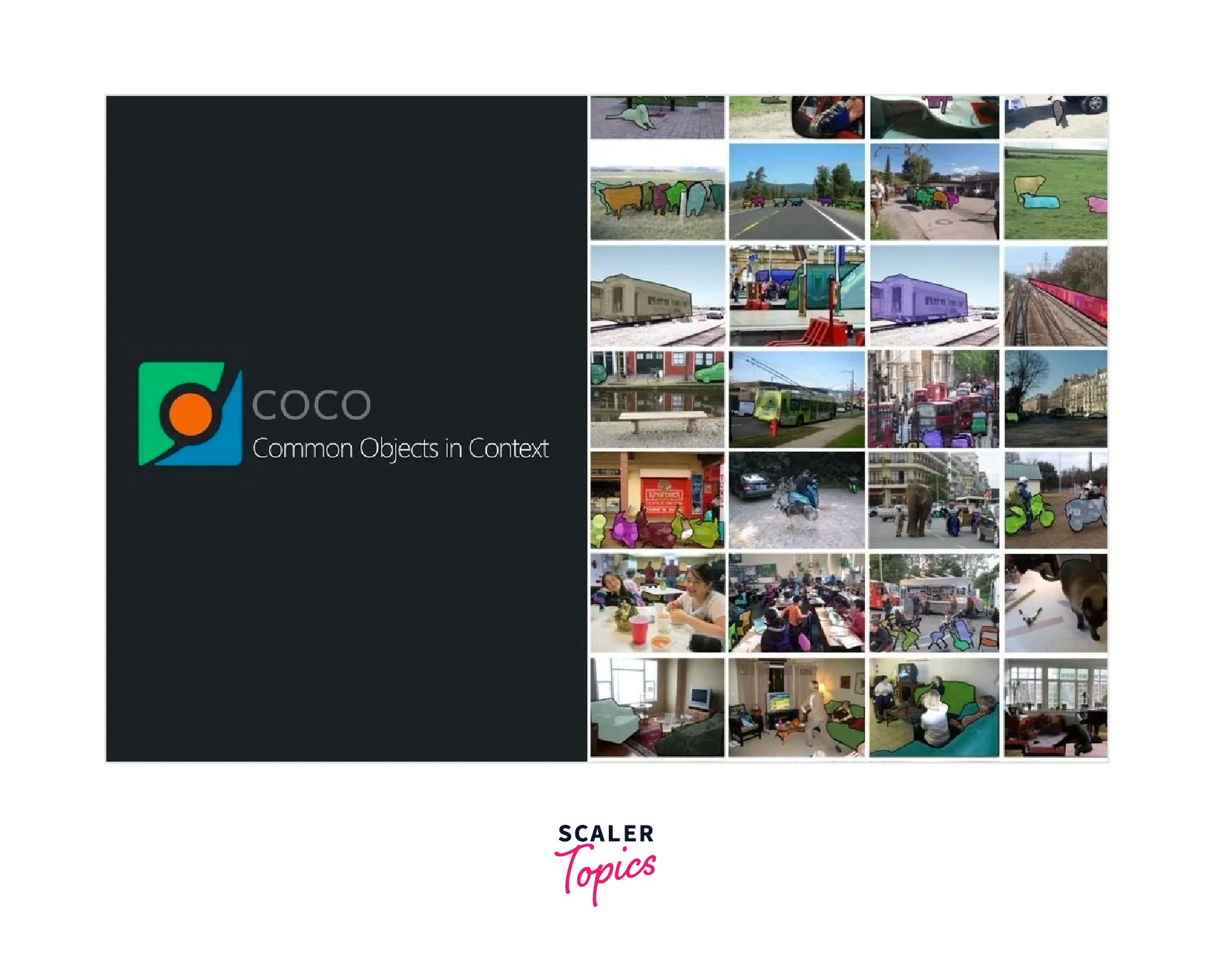
For the social distancing using the OpenCV project, we are only interested in the "person" object category, which includes images of people in various poses and locations.
The YOLO model is a real-time object detection system that processes images and videos in real-time by predicting object bounding boxes and class labels in a single forward pass of the network. YOLO is a popular object detection model because of its speed and accuracy, and it has been used in many computer vision applications, including autonomous vehicles, robotics, and surveillance systems.
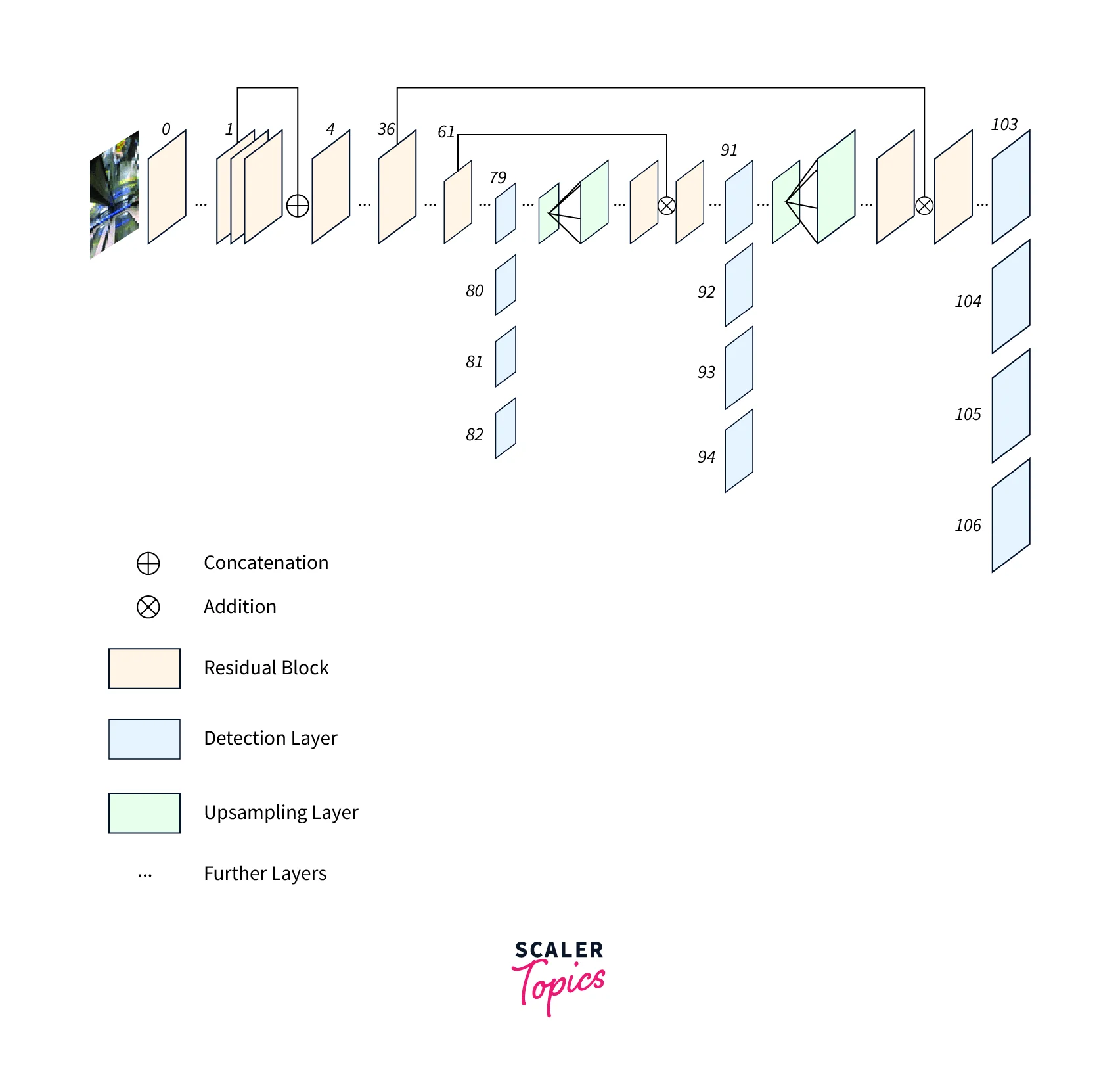
For this project, we are using the YOLOv3 architecture, a deep neural network with 106 layers trained on the COCO dataset to detect 80 different object categories. We have fine-tuned the YOLOv3 model on the COCO dataset to detect only the "person" object category and optimize its pedestrian detection performance. The fine-tuned model has been saved in the files yolov3.cfg and yolov3.weights.
Pre-requisites
To understand and follow this article on building a social distancing checker using OpenCV and Python, it is recommended to have the following prerequisites:
- Basic knowledge of Python programming language.
- Familiarity with object detection and image processing concepts.
- Understanding deep learning and machine learning concepts, particularly convolutional neural networks (CNNs).
- Experience working with the OpenCV library and its functions.
- Basic knowledge of computer vision techniques and their applications.
- While not required, experience with the YOLOv3 object detection model and the COCO dataset can help understand the project.
Before building Social Distancing using OpenCV, it is recommended to read a few of the articles mentioned below:
To build the social distancing using OpenCV, You will need to have the following tools and libraries:
- A computer with a webcam or any other camera that can capture video footage or images.
- Python 3.x installed on your computer.
- The OpenCV library is installed on your computer. You can install it using pip.
How are we Going to Build this?
We will be using Python and OpenCV to build the Social Distancing Checker. Here are the high-level steps involved:
- Capture video footage or images using the camera.
- Use the OpenCV library to detect and identify people in the captured video or images.
- Calculate the distance between people using the detected coordinates.
- Determine whether people maintain social distancing guidelines by comparing distance with a predefined threshold.
- Highlight people not maintaining social distancing guidelines in the video or image.
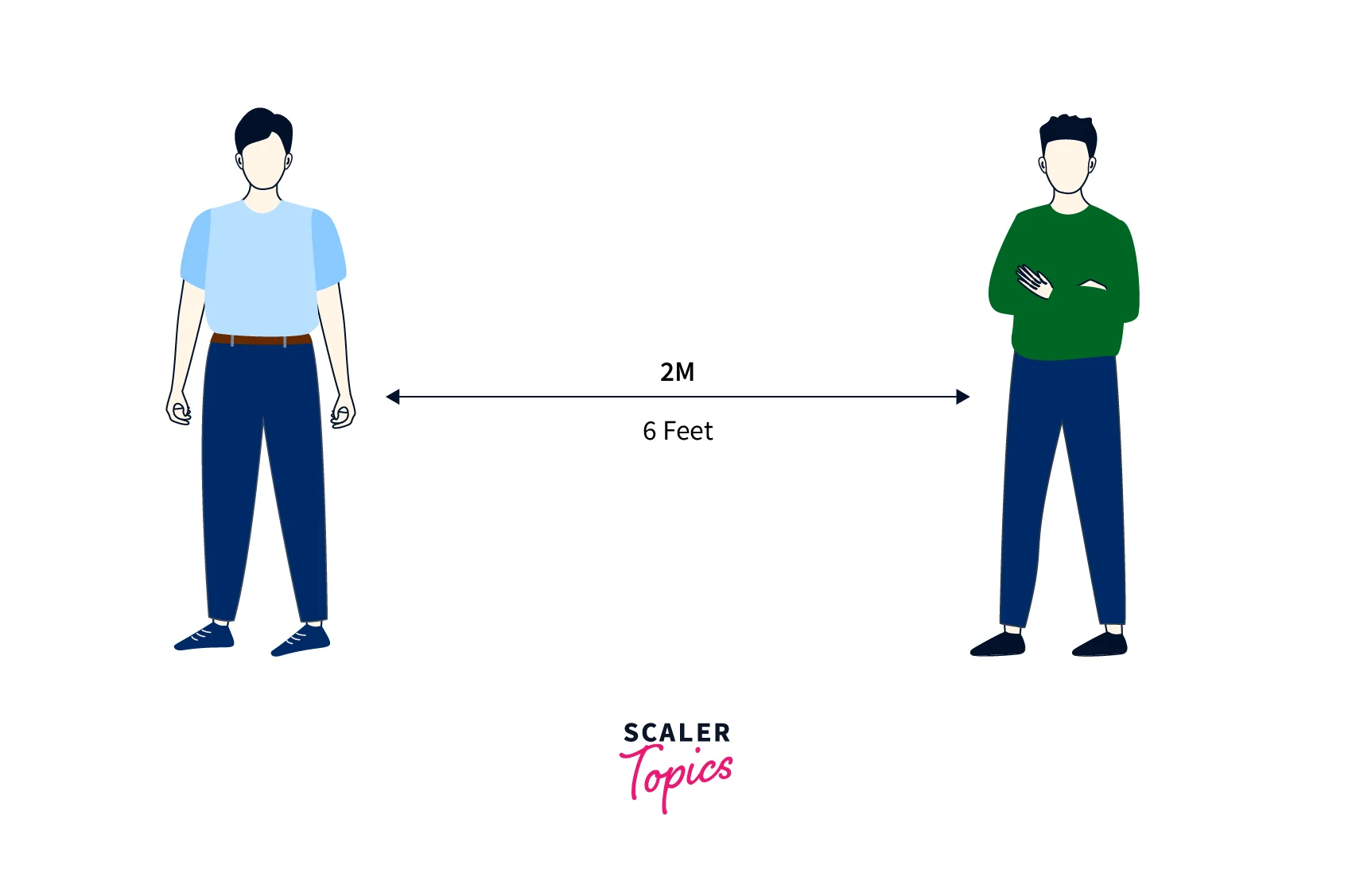
Final Output
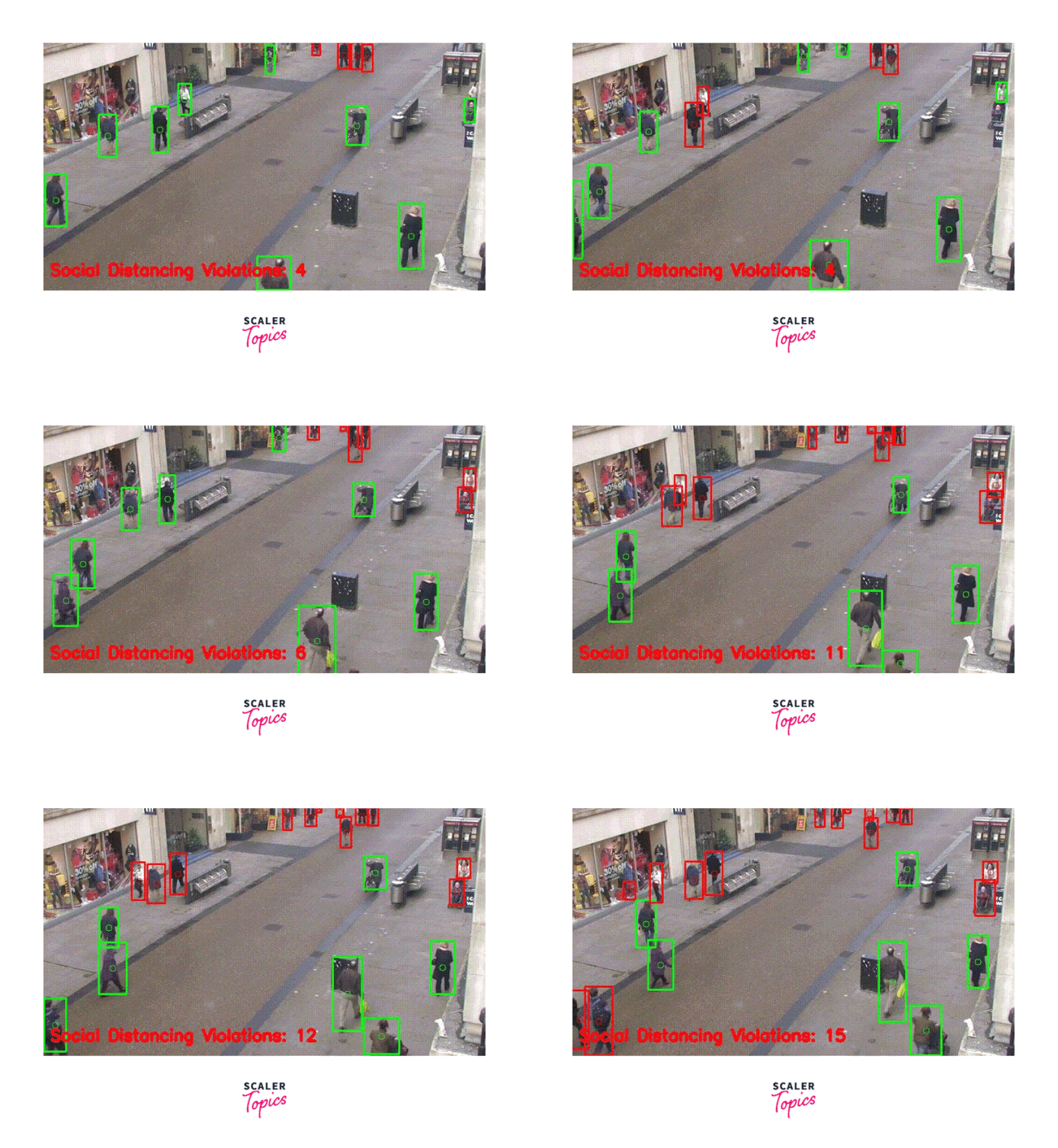
The final output of the Social Distancing using OpenCV project will be a video or image with people who need to maintain social distancing guidelines highlighted with a bounding box or any other visual indicator.
-
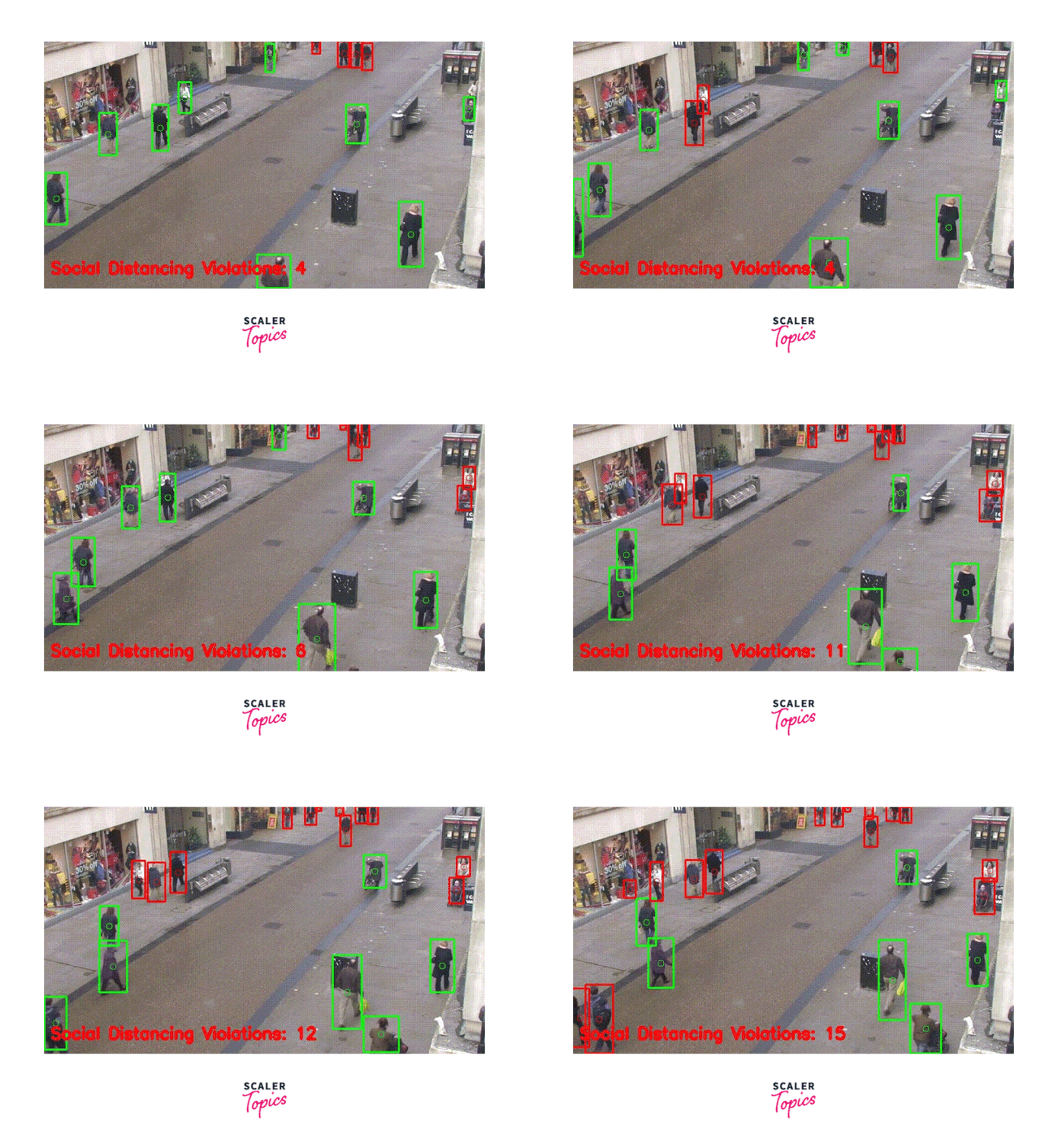
The output will also display the number of people who must maintain social distancing guidelines. The output can be further customized to suit the user's specific needs.
-
The distances between people are calculated based on their bounding boxes' coordinates, and if the distance is less than a predefined threshold, the bounding boxes around those people turn red to indicate a violation of social distancing.
Requirements
The task of building the Social Distancing using OpenCV requires a computer with sufficient hardware and software resources, as well as access to various datasets and pre-trained models. The requirements for building Social Distancing using OpenCV are:
Hardware Requirements:
A computer with a webcam or any other camera that can capture video footage or images.
Software Requirements:
- Python 3. x:
Python is a popular programming language that is widely used in machine learning and computer vision applications. You will need to install Python 3 on your system if you still need to do so. - OpenCV library:
OpenCV is an open-source computer vision library that provides a wide range of tools and functions for image and video processing. You will need to install OpenCV on your system to use its functions and methods in the project. - NumPy library:
NumPy is a Python library that provides support for arrays and matrices, as well as various mathematical operations on them. It is commonly used in computer vision and image processing applications for tasks such as image manipulation, filtering, and transformation. - imutils library:
imutils is a Python package that provides a collection of image-processing functions and utilities to make image-processing tasks easier. It contains functions for resizing, rotating, and cropping images, as well as functions for working with OpenCV video streams. - argparse library:
argparse is a Python library that provides a simple way to handle command-line arguments in Python programs. It allows you to define the arguments that your program expects and provides a way to parse them from the command line.
You can install the required libraries using pip. For example, to install OpenCV, run the following command in the terminal:
Similarly, you can install other libraries as well.
Social Distancing Using OpenCV and Python
The Social Distancing Checker using OpenCV involves several steps in its implementation, which include:
-
Defining the helper functions:
This involves creating several functions to calculate distances between people, draw bounding boxes around them, and display warning messages if social distancing guidelines are not being followed. -
Loading the YOLO object detection model:
The YOLO (You Only Look Once) object detection model detects people in the video stream. The model and its configuration file and class labels are loaded into the program. -
Capturing and processing the video stream:
The video stream is captured using OpenCV and processed frame by frame. The YOLO model detects people in each frame, and their positions and bounding boxes are extracted. -
Calculating distances and checking for social distancing:
Using the helper functions, distances between people are calculated based on their bounding boxes. If the distance between two people is less than the recommended social distancing threshold, a warning message is displayed. -
Displaying the output:
The processed video stream with bounding boxes and warning messages is displayed on the screen.
Overall, the Social Distancing Checker using OpenCV involves computer vision techniques such as object detection, bounding box extraction, and distance calculation to monitor social distancing in a video stream.
Step - 1: Install Required Libraries
First, you need to install the required libraries, including OpenCV, NumPy, imutils, and argparse. You can install these libraries using pip. Open the terminal or command prompt and run the following commands:
Step - 2: Import Required Libraries
After installing the required libraries, you need to import them into your Python script. Open your Python script and add the following lines at the top:
Step - 3: Define Arguments
Next, you need to define the arguments used to run the script. In this case, we will use two arguments: --input and --output. The --input argument will take the input video file or camera device index, and the --output argument will take the output video file name. Add the following lines of code to define the arguments:
Step - 4: Load Model and Define Constants
Now, you need to load the pre-trained model and define some constants. We will be using the YOLOv3 pre-trained model to detect people in the input video. Add the following lines of code to load the model and define the constants:
The "yolov3.cfg" file is a configuration file that defines the structure and settings of the YOLOv3 model. It specifies the number of layers, filter sizes, and other hyperparameters that are required for the model to function correctly. This file is typically provided along with the pre-trained model weights file.
The "yolov3.weights" file, on the other hand, contains the pre-trained weights for the YOLOv3 model. These weights are learned during the training process, and they represent the knowledge gained by the model from the training data. By using these pre-trained weights, the YOLOv3 model can accurately detect objects in real-time video streams or images.
Step - 5: Defining the Helper Functions
Next, you need to define some helper functions that will be used to calculate the distance between people and draw bounding boxes around them. Add the following lines of code to define the helper functions:
First, we are going to define the detect_people() function to find the number of people detected and their centroids. The function takes the input image or video frame, pre-trained YOLO model, confidence threshold, and non-maxima suppression threshold as input, and returns the detected people's bounding boxes, confidence scores, and class labels.
Next, we are going to define the is_close() to determine whether the people detected in the frame are close to each other or not. Here is the implementation of the function:
Next, we are going to write a function draw_boxes() to draw bounding boxes on the people inside the video frame. In the Social Distancing using OpenCV project, the draw_boxes() function is used to draw bounding boxes around the people detected in the video stream, along with their corresponding confidence scores and class labels. These bounding boxes are then used to calculate the distances between people and check for social distancing.
These helper functions will be used in the main code to detect people in the video, check if they are too close to each other, and draw bounding boxes around them.
Step - 6: Initialise the Object Detector and the Class Variables
The next step is to initialize the YOLO object detector and load the COCO class labels for social distancing using the OpenCV project. Here's the code:
We first load the COCO class labels from the coco.names file. These labels classify the objects detected by the YOLO object detector. Next, we initialize the YOLO object detector by loading the configuration file yolov3.cfg and the pre-trained weights file yolov3.weights. We then extract the output layer names from the YOLO model and keep only the unconnected output layer names.
Step - 7: Initialise the VideoWriter Object
Now, will read the input video file and initialize a VideoWriter object to write the output video. Here's the code:
We first create a VideoCapture object 'vs' and open the input video file "input.mp4". We then initialize the VideoWriter object writer with the MJPG codec and set the dimensions of the output video to be the same as the input video.
Step - 8: Apply the Object Detector and Social Distancing Checker
In the next step, we will loop over each frame of the video and apply the object detector and social distancing checker to the frame. We will also draw the output frame and write it to the output video file. Here's the code:
In the loop, we first read the next frame from the input video using the VideoCapture.read() method. If the frame was not grabbed, we reached the end of the video and broke from the loop. If the frame's dimensions are not initialized, we set them to the frame's dimensions.
We then pass the frame to the detect_people() function to detect people in the frame and check if they are too close to each other. We get the results and centroids from the function and compute the pairwise distances between all detected people. We loop over the upper triangular of the distance matrix and check if the distance between any two people is less than the minimum safe distance. If so, we add the indices of the two people to the violate set.
We then draw bounding boxes around the detected people and indicate if they are too close to each other using the draw_boxes() function. We check if each person's index is in the violate set. If so, we draw the bounding box in red.
We then write the number of people violating social distancing using the cv2.putText() function. If the VideoWriter object is not initialized, we initialize it with the dimensions of the output video file. We write the output frame to the output video file using the VideoWriter.write() method.
Step - 9: Display the Output Frame
Finally, we display the output frame using the cv2.imshow() function and wait for a key press. We break from the loop if the 'q' key is pressed. After the loop, we release the video capture and writer objects and close all windows using the VideoCapture.release(), VideoWriter.release(), and cv2.destroyAllWindows() functions.
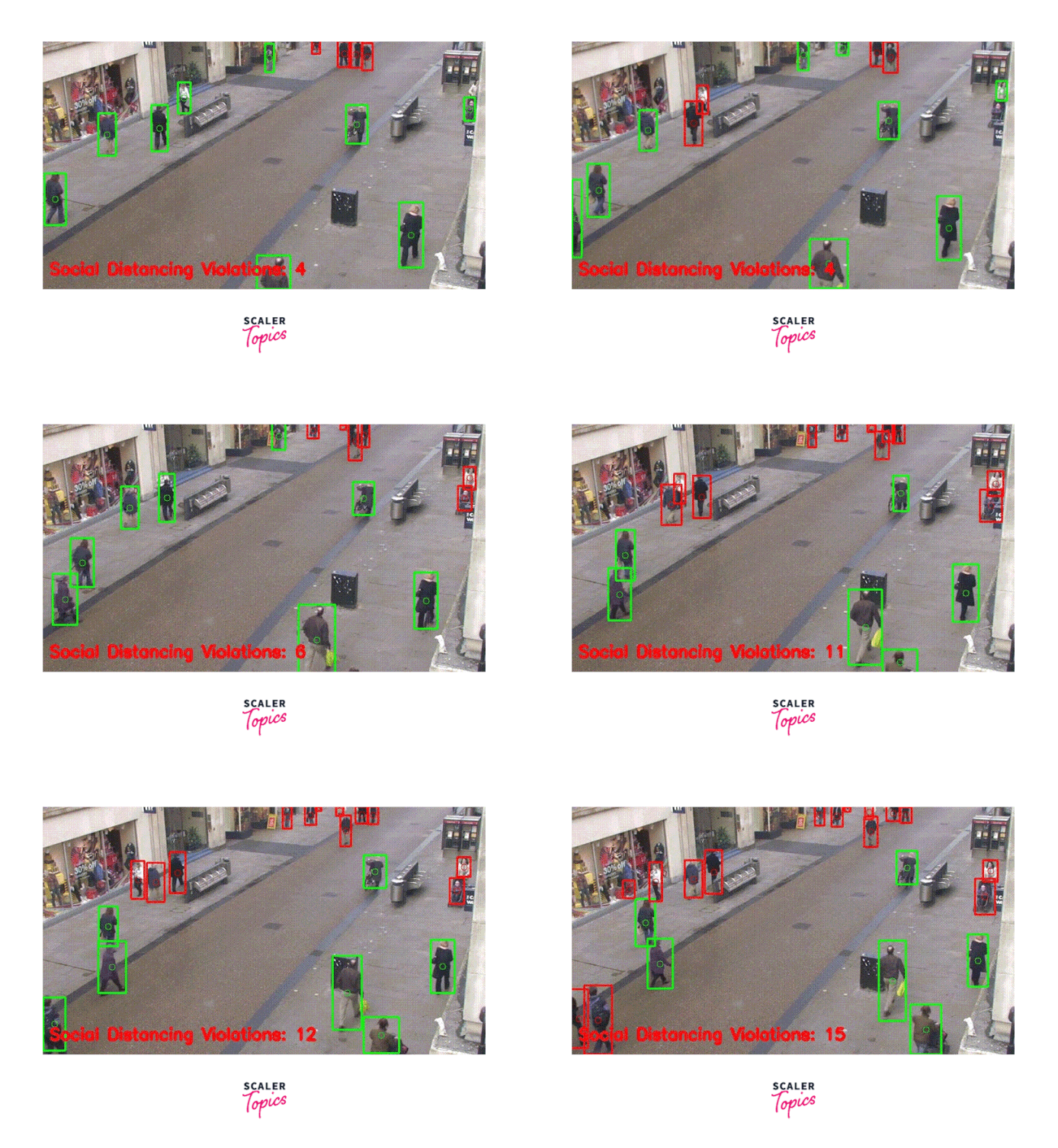
The final output of the social distancing using OpenCV will be a video file with bounding boxes around people in each frame. The bounding boxes will be green if the people are at a safe distance from each other and red if they are too close. The number of people violating social distancing will be displayed at the bottom of each frame. The output video file will be saved in the same directory as the input video file with the name output.avi. The user can view the output video file to check if people follow social distancing guidelines in the input video.
Testing
Now, let us test the above code and visualize the output of Social distancing using the OpenCV project.
You can see that the input video stream is being processed in real-time, and bounding boxes are being drawn around each detected person. The green bounding boxes indicate that the person is maintaining a safe distance from others, while the red bounding boxes indicate that the person is too close to others.
Conclusion
- In this project, we have demonstrated how to build a social distancing checker using OpenCV and Python.
- We have used the YOLOv3 object detection model trained on the COCO dataset to detect people in an input video stream. We have also used computer vision techniques to calculate the distance between people and draw bounding boxes and lines indicating whether they are maintaining a safe distance.
- The social distancing using OpenCV can be a useful tool in helping to prevent the spread of infectious diseases like COVID-19, as it can provide real-time feedback to individuals and organizations about whether they are maintaining a safe distance from others.
- With further development, this tool could be integrated into various settings, including public transportation, workplaces, and public events, to help ensure the safety of all participants.