


C++ Timer
 FREE
FREE

The C++ timer is used to create a program that takes time as input from the user and creates a timer for the program. The C++ timer program creates a notifier when the time reaches zero. The C++ timer is in the header file, namely <ctime>. The function that we will use in the timer program is contained in the header file and used to manipulate information on the data and time.
Creating Timer in C++
In most applications, the timer is enough to assist in addressing a solo thread. The essential benefit of the time_t() feature is implementing the C++ timer on the code. Our machine occupancy is multiplied by the share of ten points, and later, it turns into its ordinary state. This happens because of the algorithm if the timer() feature may be very strong. You can set a timer() feature or end the feature according to your choice and need. Each timer() function has a unique identification while we set it additionally required a name returned feature. We also can make use of the library. We can create the C++ timer program by two different methods. Refer to the below section for this.
Build an AI-First Career, Master the Complete Skillset
Choose from our industry-leading programs designed for career success
Modern Software and AI Engineering Program
Master full-stack development with AI integration


 +1000 more
Modern Data Science and ML with specialisation in AI
Advanced data science techniques with AI specialization
+1000 moreAdvanced AIML with Specialisation in Agentic AI
Deep dive into AIML with focus on Agentic systems
+1000 moreDevOps, Cloud & AI Platform Engineering
Build and manage AI-powered cloud infrastructure
+1000 moreAI Engineering Advanced Certification by IIT-Roorkee
Premier AI engineering certification from IIT-Roorkee

AI Forward Deployed Engineer Program
Full-stack engineering, production AI and client-facing consulting
+1000 moreC++ Timer Using System Calls
The first method of creating the C++ timer is to create a C++ timer using the system calls. Let us discuss this concept below using code examples and explanations.
Introduction
This approach will create a C++ timer without any graphics and animation. The timer will be using the system call. Here, the timer refers to a stopwatch that tickles until the time becomes zero. This timer can be created on Linux. For creating the C++ timer in Linux, we need to know and understand the following two commands that are:
-
sleep(): This function takes the time (in seconds) as the argument to the function and sleeps the program for that given period.
-
system(): This function executes a system command. This execution takes place when the commands are passed as the arguments in this function.
Implementation of Code
Now, let us see the above concept by implementing this in code.
Code
Output
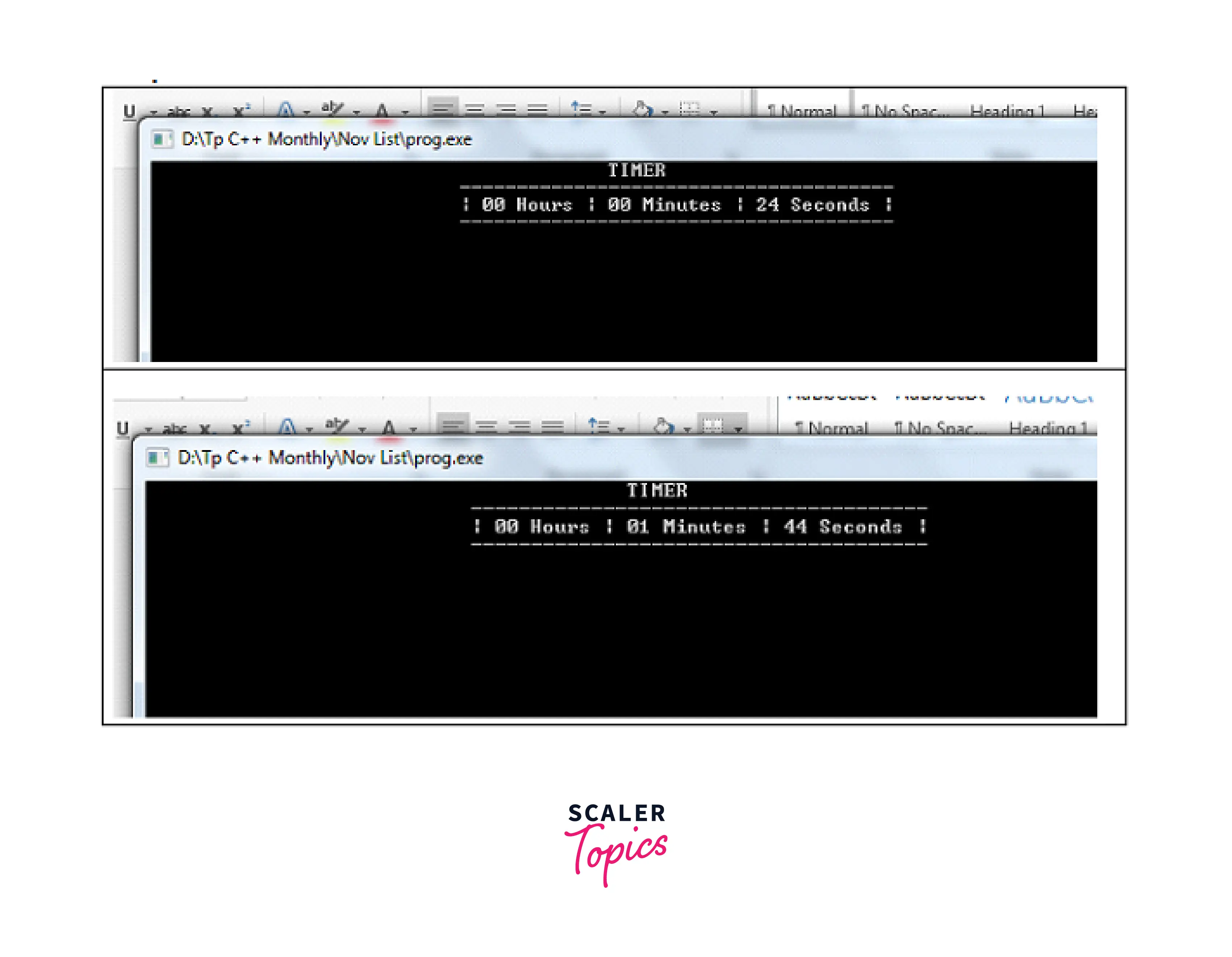
Explanation We define header files for the basic and general libraries at the beginning of the code. As mentioned, input-output stream library files and additional header files are included. Following namespace conventions, we initialized the integer data types for seconds, minutes, and hours by setting all values to zero. When we established the class structure, we wrote a function for showing the clock.
The logic for our date and time is then developed in a while loop in a timer() function. Because we enter one in the sleep() function parameters, the loop will display a function call per second. The "if" statement will have an increment after each minute, followed by an hour and then another second.
The above code can also be run on the Windows operating system. We need to make some modifications, which will work on the window operating system. The modifications are as follows:
- In the function system call(), change the clear to cls.
- In thesleep() function, change the lowercase s to uppercase S.
- Include the header file, namely "windows.h".
Creating Timer using Custom Class
Now we will create a C++ timer using a custom class. Let us see this with code implementation and explanation in the below sections.
How Scaler Transformed Careers in Different Fields
Scaler learners achieved 2.5x salary growth with average post-Scaler CTC reaching ₹23L.
 Google
 Amazon
 Microsoft
 Flipkart
 Adobe1200+ more
Introduction
The C++ timer program creates a notifier when the time reaches zero. We can also create this by creating a class at the beginning of the program, and then we will add the different properties in the class that we want to show in our C++ timer program.
Implementation of Code
For creating the C++ timer using the custom class, first, we will create a class, namely later. Then we will customize the properties of the class. These properties are as follows:
- int: This will be in milliseconds and will wait until the code runs.
- bool: This is a boolean value (either true or false). If the bool value is true, it returns instantly, and the code will run after the specified time on another thread.
- The variable arguments: These are the value fed to the standard bind (std::bind).
- We can also change the unit of time from milliseconds to microseconds, etc.
Code
Output Then we will get the output as:
Turn Learning into Career Growth
Examples for Better Understanding
Now, let us see some more examples where we will use the C++ timer program and understand this in a better way.
Example 1. Delay in the Output.
In this example, we will create a timer that will help us cause output delays. We will enter the time (in seconds) for which we want to create the delay in the output.
Output:
Explanation: In the above example, we first included the header file for using our program's standard input and output functions. Then in the main function, we declared an integer variable, time_delay. After that, we take the integer from the user that is the time in seconds that we want to make a delay for and put this into the variable time_delay. After that, we created a pointer for the variable and assigned it the macro CLOCK_PRT_SEC. Then we used a loop to check the state of the program from the early cycle of the program to the completion of the program.
Example 2. Get the Time and Date.
In this example, we will use the C++ timer program to get the date and the time.
Output:
Explanation: We include our required libraries in his code before calling the program's main function from the namespace standard. Here, the time is obtained as an object and provided to the ctime function. After that, we assign a character pointer to this function. The local time and date we obtain from our system are then shown. On the other hand, we use the function gmtime to obtain our date and time in UTC, which we then assign to our variable that displays the UTC and date. GMT stands for Greenwich Mean Time, and UTC (Coordinated Universal Time) is defined as the worldwide coordinated time.
Related Articles:
- To learn how to convert the given string into Datetime in Python, click here- Convert String to Datetime in Python.
- Check out this article to learn more about C++ Header Files.
Conclusion
- The C++ timer is used to create a program that takes time as input from the user and creates a timer for the program.
- We can create the C++ timer by two methods. The first is using the system call, and the second is creating a custom class.
- In the system call approach, the timer refers to a stopwatch that tickles until the time becomes zero. We can create this time of time in Linux.
- The two commands used in Linux to create the C++ timer are the sleep() and the system() commands. The sleep() function is used to take the time (in seconds) as the argument to the function and sleeps the program for that given period, and the system() function is used for executing a system command. This execution takes place when the commands are passed as the arguments in this function.
- The second approach for creating a C++ timer is by creating a class at the beginning of the program, and then we will add the different properties in the class that we want to show in our C++ timer program.
- We can use the C++ timer for different purposes, to make a delay for getting the program output and for getting the time and date according to the user's local time.




