


What Software is Used for Cyber Security?
Overview
CyberSecurity Software is necessary for a business's or an individual's cyber security and privacy. Cybersecurity is a way of protecting a network, system, or application from cyber-attacks. It serves as protection against identity theft, cyberattacks, and illegal data access.
Cybersecurity is divided into several components, such as operational security, network security, disaster recovery, application security, etc. It must be kept up to date to protect against numerous cyber threats, including social engineering, malware, phishing, and ransomware.
What is Cyber Security Software?
Software designed to prevent sophisticated cyberattacks is known as cyber security software. Modern cyber security software frequently includes many layers of security capabilities, such as machine learning and cybersecurity AI solutions, to create higher protection as new cyber threats emerge continually. Cyber security software also offers resilience to safeguard email, backup important data, and guarantee company continuity if a cyberattack is successful.
Organizations must use cyber security technologies and software to defend themselves from the growing number of potentially catastrophic criminal assaults that risk data breaches, company continuity, and possible ransomware payments. The largest effect on a company's bottom line is frequently reputational harm and the subsequent ripple effects, even while corporate productivity, downtime, and direct monetary losses are severe issues from a successful cyberattack.
Types of Cyber Security Tools
Cybersecurity software may be divided into the following categories:
- Network Security Monitoring tools
- Encryption Tools
- Web Vulnerability Scanning tools
- Network Protection Wireless Tools
- Network Sniffer
- Firewall
- Antivirus software
- PKI services
- Managed Detection Services
- Penetration Testing
List of Top Cyber Security Tools
Many cybersecurity technologies can do a privacy audit on all software, and discover and eliminate the most recent dangers. You can handle file access control and do a forensic investigation using these cybersecurity tools.
Here is a list of the best cybersecurity programs and tools, along with descriptions of their most popular features. This list of cyber security tools includes both for-profit (paid) and open-source (free) applications.
1. SolarWinds Security Event Manager
- Ideal for: Medium-sized to big organizations.
- Category: SIEM cloud-based tool.
- Price: A 14-day trial period with full functionality is offered. The product has a $4500 starting price.
An intrusion detection solution for networks and hosts is SolarWinds Security Event Manager. It monitors, responds to, and reports security risks in real-time. It provides robust log search functionality. It is a scalable cloud-based system.
Features:
- Threat intelligence will be updated often.
- It offers capabilities for event management and security information.
- It includes log event archiving and log correlation functions.
- A complete set of integrated reporting tools are offered by it.
Conclusion:
Solarwinds Security Event Manager was created as an all-in-one SIEM tool solution for Managed Service Providers as a cloud-based solution.
2. SecPod SanerNow
- Ideal for: Medium-sized to big organizations.
- Category: Cloud and On-premises vulnerability and patch management tool.
The SanerNow cyber-hygiene platform offers a cutting-edge solution for managing vulnerabilities to achieve continuous security risk and compliance posture for cyberattack avoidance. It is a powerful vulnerability management technology that combines vulnerability assessment and immediate repair into a single, integrated console.
It checks for vulnerabilities, misconfigurations, and more, and offers remediation controls and techniques automatically and immediately fixes them.
Every stage of vulnerability management, from scanning to remediation, can be automated thanks to its natively-built system. SanerNow enables you to improve the security posture of your business and guard against cyberattacks.
Features:
- All duties are carried out by a multi-functional, clever, and lightweight agent.
- SanerNow effectively selects vulnerabilities for quick correction by assessing risk potential, high-fidelity assaults, and other factors.
- Its integrated patching allows for speedy remediation of IT asset problems.
- Mitigate security risks with its additional remedial processes, which go beyond patching.
- Your business may effectively eliminate vulnerabilities and more via a single cloud-based console.
- You can handle vulnerabilities in real time using SanerNow, from scanning to remediation.
Conclusion:
With SanerNow, you get a comprehensive cybersecurity solution that can take your vulnerability management approach to the next level by addressing additional security threats from the same dashboard. Additionally, it may replace some of the systems you now use for patch management and vulnerability management, allowing you to manage attack surfaces more successfully.
3. Intruder
- Ideal for: Medium-sized to big organizations.
- Price: A 14-day free trial is offered. It offers three different price options: Essential, Pro, and Verified. For more information about their rates, get in touch with them.
- Category: Cloud-based Vulnerability Scanner
The most well-known cloud-based network vulnerability scanner, Intruder, enables you to identify cybersecurity flaws in your most vulnerable systems and prevent costly data breaches. It is the best answer to your cybersecurity problems. It significantly contributes to time savings.
Features:
- More than 9,000 security holes.
- Unlimited on-demand scanning.
- Numberless user accounts.
- Investigates bugs in online applications like SQL injection and cross-site scripting.
- Alerts on potential threats.
- Available Smart Recon Network PCI ASV scans.
Conclusion:
For all of your cybersecurity needs, Intruder is a one-stop shop.
4. Acunetix
- Ideal for: Small enterprises, enterprise clients, online professionals, and pen testers.
- Price: Acunetix has three pricing tiers for its solutions: Standard, Premium, and Acunetix 360. To learn more about price, get a quotation. On request, a demo is further offered.
- Category: Web Application Security Scanner, both on-premise and cloud-based.
Acunetix is the answer for securing your websites, online apps, and APIs. All websites, web apps, and sophisticated web applications may be scanned by this application security testing tool, which can identify over 7K vulnerabilities.
It includes vulnerability management capabilities built in. Acunetix offers both on-premises and on-demand deployment options.
Features:
- Utilizing sophisticated macro recording technology, Acunetix can scan intricate forms with several levels and password-protected portions of the website.
- It assesses the issue's seriousness and quickly offers insights that may be put to use.
- It offers tools for prioritizing and scheduling full and incremental scans.
Conclusion:
Acunetix is a clear and simple-to-use solution. It scans quite quickly. Acunetix may be simply incorporated with your existing systems.
5. ManageEngine Vulnerability Manager Plus
Category:
On-premises end-to-end threat and vulnerability management software.
Enterprises may utilize ManageEngine Vulnerability Manager Plus, a threat and vulnerability management tool with integrated patch management that focuses on priority.
It is a tactical approach for providing thorough visibility, evaluation, repair, and reporting of vulnerabilities, incorrect settings, and other security gaps throughout the company network via a single console.
Features:
- Utilizing a risk-based vulnerability assessment, determine the most exploitable and significant vulnerabilities.
- Automate and customize Linux, macOS, and Windows fixes.
- Find zero-day vulnerabilities and repair them before remedies are released.
- With the help of security configuration management, continuously identify and fix misconfigurations.
- Obtain security advice to configure web servers in a way that prevents a variety of attack variations.
- Check your network for active ports, peer-to-peer and unsecured remote desktop sharing applications, and out-of-date software.
Conclusion:
ManageEngine Vulnerability Manager Plus is a multi-OS solution that not only enables vulnerability detection but also comes with built-in vulnerability repair.
Vulnerability Manager Plus provides a comprehensive range of security tools, including security configuration management, automatic patching, web server hardening, and high-risk software audits, to help you keep your endpoints secure.
6. Invicti (formerly Netsparker)
- Ideal for: Medium-sized to big organizations.
- Price: For further price information, get a quotation. There are three pricing tiers available for the solution: Standard, Team, and Enterprise.
- Category: Cloud-based and on-premise web application security for the enterprise.
Invicti is an enterprise application security testing solution. Throughout the SDLC, it provides the capabilities and functions needed to automate security testing. Automated, visible, accurate, scalable, and secure features are all possessed by Invicti.
Features:
- Invicti helps programmers create safer code for the present environment.
- It carries out thorough screening and has speedy vulnerability detection.
- It includes capabilities for integrated behavior-based and signature testing.
- It uses a special dynamic and interactive scanning methodology that can discover more actual vulnerabilities.
Conclusion:
The Invicti web application security solution gives you a full view of the security of your applications. It offers training and support with onboarding. You will have more visibility and deeper scans thanks to its original DAST + IAST technique.
7. Perimeter 81
- Ideal for: Medium-sized to large businesses.
- Price: The cheapest Perimeter 81 plan is $8 per user per month. Additionally, there are the premium and premium plus plans, which have monthly user fees of $12 and $16, respectively. You may also choose the customized company plan.
- Category: Cloud-based network security administration.
Perimeter 81 is the program that immediately drew us over with all of its powerful network security capabilities. The program provides its customers with a wealth of cybersecurity solutions to fortify your company's defenses against a variety of potential attacks.
The program streamlines the process of controlling and safeguarding the integrity of your network with its amazing capabilities, which include device posture check, web blocking, access to Zero Trust Networks, and multi-factor authentication.
Features:
- The firewall as a service secures network traffic in all settings.
- Using encryption, 2FA, and single sign-on, achieve multi-layered security.
- A single management strategy for centralized network administration and monitoring.
- With Automatic Wi-Fi Protection, prevent connections from unrecognized Wi-Fi networks.
Conclusion:
Perimeter 81 is a cloud-based cybersecurity application that offers several security capabilities that remarkably ease the process of administering and safeguarding the network. The program is also exceptionally easy to implement and operate, which is exactly why we have it listed so highly on our list.
8. System Mechanic Ultimate Defense
- Ideal for: Threat detection powered by AI and algorithms.
- Price: An yearly plan for $63.94.
- Category: On-Premise and Cloud-based Threat Detection.
System Mechanic Ultimate Defense is a strong antivirus program as well as an efficient PC optimizer. With real-time antivirus defense, it can safeguard your computer against viruses, spyware, and other similar dangers. To effectively identify new and unidentified dangers before they have a chance to damage your system, it makes use of AI and intuitive threat detection methods.
Features:
- Secures credit card information and internet passwords from online snoopers.
- Sophisticated AI is used to find and get rid of the most recent malware threats.
- Find and get rid of bloatware that slows down your system.
- Utilize proprietary technology to examine files that appear suspicious.
Conclusion:
System Mechanic Ultimate Defense is a necessary component of any discussion on cybersecurity software. Thanks to the sophisticated AI and algorithms this software employs, it can identify known and previously undiscovered dangers.
9. Vipre
- Ideal for: Complete defense against changing threats.
- Price: There are three price tiers for Vipre company protection: Core Defense ($96 per user per year), Edge Defense ($96 per user per year), and Complete Defense ($144 per user per year). The first year's cost of home protection starts at $14.99.
- Category: Home antivirus software and cloud-based email and endpoint security solutions.
Vipre provides cybersecurity solutions for both business and personal usage. It guards against data breaches, ransomware, and computer infections.
It can offer complete email and end-point security and privacy, real-time threat information, and corporate protection. This offers your company and partners layered protection. Both Windows and Mac systems are supported.
Features:
- Vipre offers straightforward solutions to safeguard your company's data and defend it from internet dangers.
- It offers customizable pricing and all-inclusive packages.
- It uses AI technology to deliver unmatched protection.
- Vipre provides a fully integrated, deployable, and manageable solution.
- Additionally, it can encrypt emails.
Conclusion:
Vipre is simple to install and operate. It offers solutions for endpoint security, email security, and home protection. It may offer complete cybersecurity defense with DLP and company VPN. It may also offer instruction on security awareness.
10. LifeLock
- Ideal for: Medium-sized to big organizations.
- Price: There are four pricing tiers for the LifeLock solution: Standard ($7.99 for the first year), Select ($7.99 for the first year), Advantage ($14.99 for the first year), and Ultimate Plus ($20.99 for the first year). These rates are all for yearly billing. Plans for monthly billing are also offered. The product is free to test for 30 days.
- Category: Identity Theft Protection.
LifeLock is a tool for keeping an eye out for dangers and identity theft. You can safeguard your identity, devices, and online privacy all at once with Norton 360 and LifeLock. It is the platform that can stop cyber threats, identify and notify users, and restore and compensate.
With identity restoration agents, the issue of ID theft will be resolved. It will refund monies taken as a result of identity theft up to the extent of your plan.
Features:
- LifeLock can offer tools for monitoring the dark web, id verification, and false identities.
- LifeLock offers features including virus protection, parental control, ad-tracker blocker, cloud backup for Windows PCs, and more for device security.
- You may be made aware of crimes done in your name.
- A privacy monitor is present.
Conclusion:
The solution comes with Norton antivirus software. A safe VPN will restrict access to your information on public Wi-Fi. It will keep an eye out for identity risks. It sends notifications by phone, text, email, or mobile app. Live member help is available continuously.
11. Malwarebytes
- Ideal for: Personal usage and small to big companies.
- Price: There are three pricing tiers available: Teams ($119.97 annually, three endpoints), Endpoint Protection ($699.90 annually, ten endpoints), and Endpoint Detection and Response ($299.90 annually, twenty endpoints) (Get a quote).To your needs, you can expand the number of devices. Home solutions cost $39.99 a year, to begin with. On request, a risk-free trial is provided.
- Category: Home and business cybersecurity.
Malwarebytes provides cybersecurity products for both enterprises and homes. Malware, ransomware, dangerous websites, etc. are all things it can defend against. Additionally, it can defend against sophisticated internet attacks that antivirus software is unable to identify. Devices running Windows, Mac, Android, iOS, and Chromebooks are supported.
Features:
- Malwarebytes uses behavior matching, anomaly detection, and application hardening to defend against malware.
- It can clean contaminated devices.
- No matter what kind of device you are using—Windows, Mac, or Android—Malwarebytes will stop the attack vectors at every turn.
- It may offer Windows endpoint detection and response together with multi-layered security.
- It can detect and prevent attacks in real-time.
Conclusion:
Malwarebytes offers businesses and homes a cybersecurity solution. It can guard against dangerous websites and stop threats in real time.
Businesses may choose a solution based on their needs, such as remote endpoint management, endpoint protection-detection & response services, protection for a particular number of devices, etc.
12. CIS
- Ideal for: Medium-sized to big organizations.
- Price: All users have free access to CIS CSAT, CIS RAM, CIS-CAT Lite, CIS Controls, and CIS Benchmarks. A paid subscription is required to access CIS SecureSuite. Pay-per-use access to CIS Hardened Images and CIS Services is offered.
- Category: Cybersecurity tools
The Center for Internet Security is abbreviated as CIS. It offers a range of memberships, services, and cybersecurity technologies. It offers CIS SecureSuite for business use. CIS Benchmarks and CIS Controls are both parts of the CIS Security package.
Features:
- It provides a range of products, including CIS Controls, CIS-CAT Lite, CIS RAM, CIS CSAT, etc., to help secure your business.
- Automated evaluation is done via CIS-CAT Lite.
- It offers Incident Response Services and a Security Operations Center that is open .
- It offers products including CIS Workbench, CIS RAM, and CIS CSAT.
- It also offers CIS-CAT Lite, CIS-CAT Pro, and CIS-CAT Pro.
Conclusion:
CIS offers strategies for protecting your company from particular platforms, specific dangers, and specific threats. It offers membership to companies that sell products as well as IT consultants, hosting, cloud, and managed service providers.
13. Snort
- Ideal for: Small and Medium-sized enterprises.
- Price: Free
- Category: Network intrusion prevention system.
Snort is a free and open-source platform. It is a network intrusion prevention application. It supports the FreeBSD, Fedora, Centos, and Windows operating systems. It can broadcast info to your screen and observe network traffic.
Features:
- Real-time packet analysis.
- Packet recording
Conclusion:
Since Snort is installed behind the firewall, it will serve as the second line of protection. It may also compare traffic to a set of rules.
14. Wireshark
- Ideal for: Businesses, not-for-profit organizations, governments, and educational institutions.
- Price: Free
- Category: Network protocol analyzer.
Wireshark network protocol analyzer is compatible with Windows, Mac, Linux, FreeBSD, Solaris, NetBSD, and other operating systems. It has a typical three-pane packet browser. It is capable of offline analysis as well as live capture.
Features:
- Hundreds of platforms are thoroughly inspected by Wireshark.
- It has strong display filters.
- It can decompress gzip-captured files.
- It supports several decryption protocols.
Conclusion:
Wireshark will show you precise information on what is occurring on your network. It offers decryption support for several protocols. Wireshark allows you to save the output as XML, PostScript, CSV, or Plain Text.
15. Webroot
- Ideal for: Small to Medium-sized organizations as well as individuals.
- Price: Webroot Antivirus (for PC and Mac) costs $29.99 a year per device. For $44.99 for 3 devices per year, Internet Security Plus is a PC, Mac, smartphone, and tablet security program. With 25 GB of storage, Internet Security Complete is available. You must pay $59.99 a year for five devices.
- Category: Endpoint, network, PC, and mobile device cybersecurity.
Webroot is a platform that operates on the cloud. It can defend mobile devices, Macs, and PCs. It offers a solution for partners, enterprises, home offices, and personal usage. The platforms it supports include Windows, Mac, Android, and iOS.
Features:
- Real-time threat detection and mitigation.
- Multi-vector protection will safeguard endpoints and networks.
- It offers services for cloud-based threat intelligence.
- It provides insight into potential threats.
Conclusion:
Webroot offers threat intelligence, endpoint security, and DNS protection for enterprises. Additionally, it offers businesses security awareness training. Customer feedback indicates that while it occasionally slows down other online apps, the network is well protected.
16. Norton Security
- Price: A 30-day free trial of Norton's antivirus is available. The price for antivirus software starts at $5.99 per month. For the first three months, Norton 360 with LifeLock costs $9.99.
Norton 360 with LifeLock is an all-in-one solution from Norton. The business provides cybersecurity software options including antivirus, virus removal, malware protection, cloud backup, password managers, and secure VPN.
Features:
- Ransomware, viruses, spyware, malware, and other internet dangers may all be protected from Norton Antivirus.
- For identifying and thwarting attacks, it offers five layers of security.
- It provides file and document storage and protection via cloud backup services.
- It offers five levels of threat detection and blocking protection.
- It offers a protected Norton VPN.
Conclusion:
For desktops, cellphones, and tablets, there is a Norton security solution. It offers a range of products, including VPN, antivirus software, and password managers.
17. Nmap
- Ideal for: Scanning both single hosts and big networks.
- Price: Free and open source.
NMap is a port scanning tool. It is utilized for security audits and network discovery. It may be used to plan service upgrades and manage Network Inventory. You may use it to track host or service uptime as well.
Features:
- It offers both a GUI and a command-line interface.
- It is cross-platform compatible.
- It can search very large networks.
- It supports several sophisticated approaches.
Conclusion:
Nmap is a strong, adaptable, simple, and cost-free utility that supports a variety of port scanning techniques. Nmap suite is a collection of utilities that includes items like Zenmap, Ncat, Ndiff, and Nping.
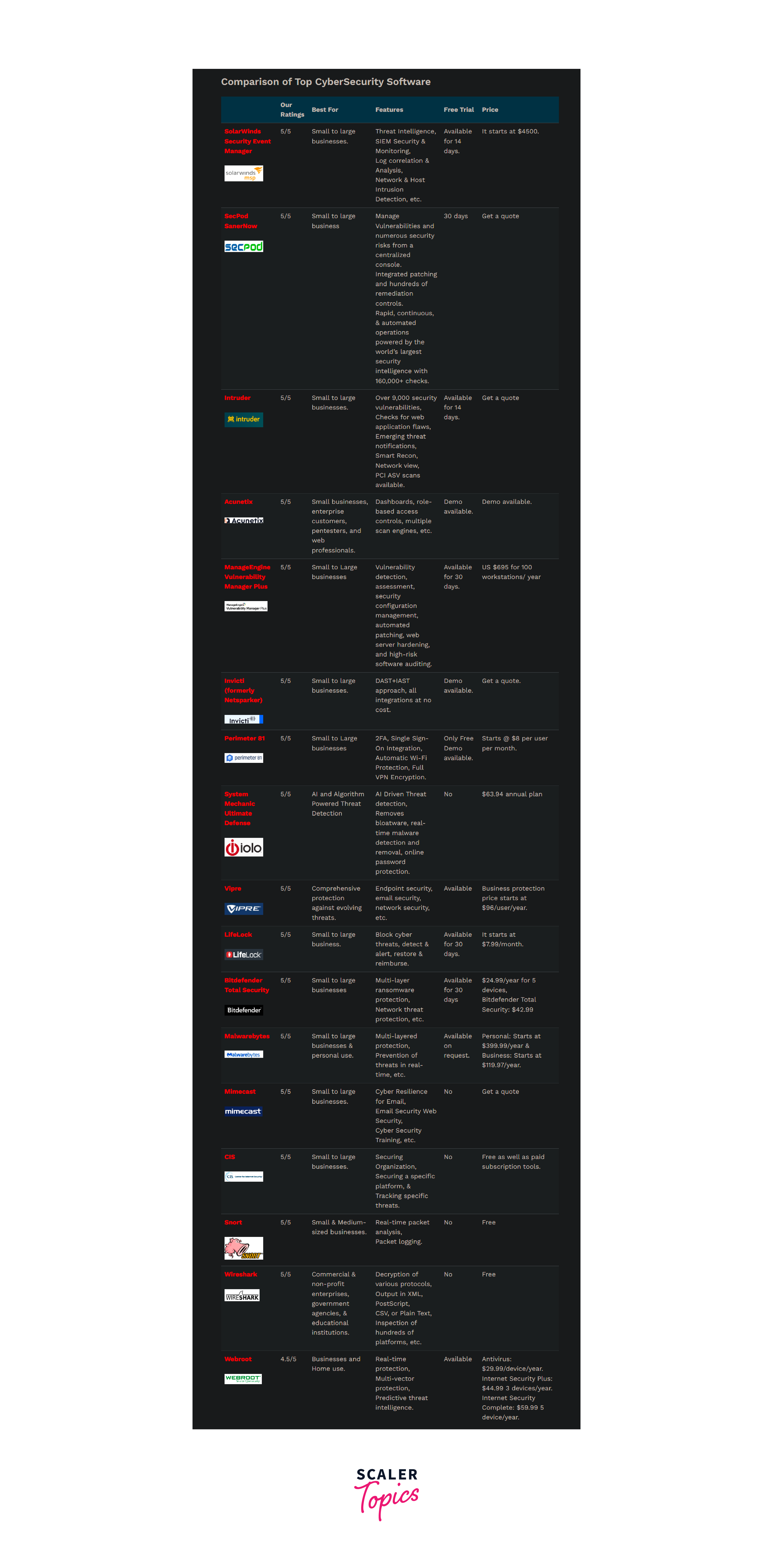
Quick Comparison Chart of Top Cyber Security Tools
Learn More
Conclusion
- We looked at the best cybersecurity software products and realized how crucial cybersecurity is.
- Gnu Privacy Guard, Wireshark, and Snort are all free cybersecurity software.
- CIS provides several goods and services without charge.
- Mimecast offers email security with effective spam prevention and detection features.
- Snort is a platform for real-time packet analysis that is entirely free.
FAQs
Q. Which aspects of cyber security software products are the most important?
A. The top aspects of software tools for cyber security include:
- Advanced security services that safeguard email and users from targeted assaults by thwarting spam, viruses, malware, and data breaches. These services use multi-layered detection engines and the most recent threat intelligence.
- In the event of attacks or disruptions, business continuity will allow users to continue using email. A 100 percent uptime for services. Users will always have access to the email data they require.
- Archiving for a variety of purposes. Storing and duplicating data from email, files, and instant messaging discussions in the cloud improves data availability and integrity before, during, and after attacks.
- Management tools that make compliance, e-discovery, and backup and recovery easier.
- End-user education and resources are provided to increase cyber security awareness among users and to empower staff to act as a strong first line of defense against online threats.
Q. Why are software tools for cyber security crucial for businesses?
A. Organizations must adopt cybersecurity software solutions to safeguard against criminal intrusions that can result in data breaches, company disruptions, and, in an increasing number of cases, ransomware payments.
Q. How does Cybersecurity Software function?
A. A cybersecurity system is protected by several layers that cover devices, computers, applications, and networks. It aids in keeping your password secure and guarding against outsiders' access to your network and other data, both digital and physical.
Q. Is it worthwhile to spend money on cybersecurity software?
A. The threat from cyberspace is seriously rising. In the recent past, several firms have lost their sensitive information and important data, which has resulted in major financial calamities. In this sense, cyber security software is a blessing that will constantly monitor your digital assets and safeguard them from any undesirable security intrusion. Therefore, it is worthwhile to spend money on the best cybersecurity software.
Q. What advantages come with cybersecurity software?
A. These are the advantages of cyber security:
- It defends the company from phishing, malware, ransomware, and social engineering.
- End users are secured by this network security technology.
- It offers effective network and data protection.
- After a breach, extend the time for recovery.
- Unauthorized users are prevented via cybersecurity.
Q. What features can you find in cyber security software?
A. Cyber security software, which is packed with several features and capabilities, assists enterprises and companies in protecting their sensitive data from hostile hackers. So let's examine numerous features that cooperate to eliminate any potential risk influencing private company data and information.
- Automated Updates
- Routine Scanning
- Quarantine Threads
- Complete Protection
- Two-Factor Authentification
- One Time Sign-On
Q. How Should I Select Cybersecurity Software?
A. Choosing the finest cyber security software from the vast array of possibilities on the market is like looking for a needle in a haystack of options. Let's investigate the greatest ways to choose the top antivirus from the competition.
- Understanding the needs of the company.
- Analysing the whole user population.
- Considering the company's budget.
- Multilayered security protocols.
- A user-friendly interface.
- User access controls.
- Compatibility with system requirements.
- Protection against emerging threats.
- Reviews from the software's previous customers.
- Accessibility to Mobile devices.