




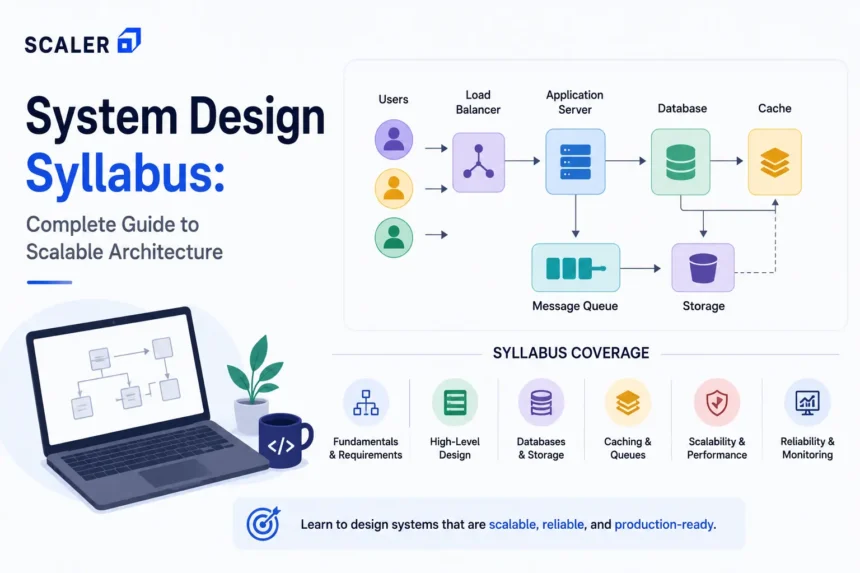
We have seen that most developers start learning system design when interview preparation becomes unavoidable. But the confusion starts surfacing only after opening a few tutorials or watching random architecture videos, and they start wondering where to start from or what to even cover.
The reason system design feels overwhelming is that it is not a single topic. A complete system design syllabus includes architecture fundamentals, databases, caching, APIs, distributed systems, reliability, scalability, messaging systems, and production architecture challenges. More importantly, these concepts move along a flow; hence, you can only understand them when done right in order. Some people jump straight to system design interview questions and end up getting confused even more.
Whether you are exploring system design for beginners, preparing for SDE-2 interviews, or trying to understand large-scale applications, this guide will walk you through a complete system design roadmap step by step. You will learn what topics a system design course should include, how high level system design differs from low level system design, which case studies to practice, and when structured learning becomes useful for interview preparation and backend engineering roles.
If you want to build conceptual clarity before diving into advanced architecture topics, you can check out this system design tutorial, which can help you understand the foundations.
Transform Your Career
Choose from our industry-leading programs designed for career success
Modern Software and AI Engineering Program
Master full-stack development with AI integration


 +1000 more
Modern Data Science and ML with specialisation in AI
Advanced data science techniques with AI specialization
+1000 more
Advanced AIML with Specialisation in Agentic AI
Deep dive into AIML with focus on Agentic systems
+1000 more
DevOps, Cloud & AI Platform Engineering
Build and manage AI-powered cloud infrastructure
+1000 more
AI Engineering Advanced Certification by IIT-Roorkee
Premier AI engineering certification from IIT-Roorkee

Quick System Design Syllabus Snapshot
Before you look into the detailed individual modules, you can check out this overview here.
Here is what a strong system design roadmap typically includes:
| Module | Topics Covered |
| Prerequisites | DSA, OOP, DBMS, Operating Systems, Computer Networks, APIs, backend fundamentals |
| Module 1: System Design Fundamentals | Requirements gathering, scale estimation, constraints, assumptions, trade-offs |
| Module 2: High Level System Design (HLD) | Architecture diagrams, services, APIs, databases, load balancers, and caching |
| Module 3: Scalability Patterns | Horizontal scaling, partitioning, sharding, replication, CDN, queues |
| Module 4: Data Architecture | SQL vs NoSQL, indexing, transactions, consistency, availability, CAP theorem |
| Module 5: Reliability & Performance | Fault tolerance, retries, rate limiting, monitoring, disaster recovery |
| Module 6: Low Level System Design (LLD) | OOP design, class diagrams, SOLID principles, design patterns, interfaces |
| Module 7: Distributed Systems | Messaging systems, Kafka, event-driven architecture, microservices, eventual consistency |
| Module 8: System Design Case Studies | URL shortener, chat applications, social feeds, ride-hailing systems, streaming systems, and payment architecture |
| Module 9: Interview Preparation | Structured answers, architecture diagrams, bottlenecks, APIs, trade-off explanations, mock design rounds |
Complete System Design Syllabus Breakdown
You can look into the table below, which breaks down the complete system design syllabus module by module, including what each stage teaches, why it matters, and what practical capability you should ideally develop after completing it.
| Module | Learner Question | Topics to Cover | Practical Outcome |
| Prerequisites | Am I ready for system design? | DSA, OOP, DBMS, OS, networking, APIs, backend basics | Understand architecture discussions without getting lost |
| Design Fundamentals | How do I approach open-ended problems? | Requirements, constraints, scale estimation, assumptions, trade-offs | Convert vague problems into structured designs |
| HLD Basics | How do large systems fit together? | Services, APIs, databases, caching, load balancers, CDN, storage | Draw basic high level system design diagrams |
| Scalability | How do systems handle growth? | Horizontal scaling, stateless services, sharding, replication, queues | Scale systems from small workloads to millions of users |
| Data Architecture | How should data be stored and accessed? | SQL vs NoSQL, indexing, transactions, CAP theorem, consistency | Choose suitable database strategies |
| Caching & Performance | How do systems become fast? | Redis, CDN, cache invalidation, hot keys, read/write optimization | Design cache layers with trade-off awareness |
| Reliability Engineering | How do systems survive failures? | Retries, failover, backups, timeouts, circuit breakers | Explain fault-tolerant architecture decisions |
| LLD Foundations | How do I design maintainable components? | SOLID, design patterns, interfaces, UML, object relationships | Design cleaner service and module structures |
| Distributed Systems | What changes at a large scale? | Kafka, queues, event-driven systems, microservices | Design asynchronous and distributed workflows |
| Case Studies | How do I solve real system design scenarios? | URL shortener, chat app, YouTube, Uber, payments, feeds | Build interview-oriented architecture thinking |
| Interview Preparation | How do I answer system design interviews? | APIs, bottlenecks, diagrams, scaling, trade-offs | Approach HLD and LLD interview rounds confidently |
What Is Included in a System Design Syllabus?
A complete system design syllabus should include all the core topics alongside ways to practice them. The learning usually progresses from backend fundamentals and system design basics toward scalable architecture, distributed systems, reliability, and production-level case studies.
Most system design courses typically include:
- system design fundamentals
- high level design (HLD)
- low level design (LLD)
- databases and data modeling
- caching and performance optimization
- queues and event-driven systems
- scalability patterns
- distributed systems
- reliability engineering
- and architecture case studies
The syllabus should also clearly separate concepts like:
- HLD, which focuses on services, APIs, databases, traffic flow, and infrastructure,
- and LLD, which focuses on classes, interfaces, object relationships, and maintainable code design.
As you move along the syllabus, you should be able to understand individual architecture components toward solving complete system design case studies involving scalability, challenges, distributed systems, and production architectures.
If you are looking for a guided program, then do check out the Scaler’s System Design Course.
Who Should Learn System Design?
You will need system design if you are preparing for backend development, full-stack development, SDE-2 interviews, or engineering roles where scalability, APIs, databases, caching, and architecture decisions are involved.
If you are a fresher or SDE-1 developer, focus first on backend fundamentals, APIs, databases, and application flow before moving into distributed systems. You can also go for a Software Development Course to make system design much easier to understand later on.
Backend developers and full-stack developers usually encounter system design concepts much more frequently because application performance, scalability, APIs, databases, and service interactions become harder to manage as systems grow. Following a Backend Roadmap or improving your end-to-end engineering understanding through a Full Stack Course can help you connect these concepts much more naturally.
For senior engineering roles and system design interviews, companies usually expect you to understand high level system design, low level system design, distributed systems, reliability, and architectural trade-offs instead of only solving coding problems.
Prerequisites Before Starting System Design
Before you start learning scalable system design or distributed systems, you should be familiar with a few backend and computer science fundamentals first.
Without having an understanding of these concepts, learning system design could get confusing, so do make sure to understand these:
- DSA and problem-solving basics
- OOP concepts and object relationships
- DBMS and SQL fundamentals
- Operating Systems concepts like processes and threads
- Computer Networks basics like HTTP, TCP/IP, and requests
- APIs and backend application flow
- Basic cloud and deployment awareness
If you have yet to learn some of the above mentioned topics here, then don’t worry! It’s fairly normal not to know 2-3 topics here and there. You can check out these free sources to start learning – DBMS tutorial, SQL tutorial, Operating System concepts, and Computer Networks basics.

Free Courses by top Scaler instructors
System Design Syllabus: Mod 1 – Mod 10
From here, we will be giving a detailed module-wise system design syllabus, so you’ll be able to understand what to cover and what each module aims to teach.
Module 1 – System Design Fundamentals
As the name suggests, you will be looking into the fundamentals here, which is important for the advanced concepts you will learn later on.
The module starts with requirement analysis. You will learn how to separate:
- functional requirements like authentication, notifications, or URL generation
- from non-functional requirements like latency, scalability, reliability, and availability
You need to understand the difference here because non-functional requirements usually decide the architecture later. For example, a notification system handling a few thousand alerts daily will look very different from a system processing millions of real-time notifications every minute.
Another major part of this module is scale estimation. You will learn how to estimate:
- requests per second
- storage growth
- traffic spikes
- read-heavy vs write-heavy workloads
- and bandwidth usage
This will help you understand why systems that work perfectly at a small scale often require replication, partitioning, asynchronous workflows, or load balancing as traffic increases.
The module also introduces bottleneck identification and architectural trade-offs, including consistency, latency, infrastructure costs, availability, and operational complexity.
At this stage, you’ll also start understanding how changes in one part of the system affect another. For example, improving data consistency can slow the system down, while replication makes systems more reliable but also harder to manage.
As you work through this module, practicing smaller systems like a URL shortener or notification service can make these concepts easier to understand before moving toward larger architecture problems later in the roadmap.
Module 2 – High-Level Design (HLD) and Architecture Diagrams
Once you are done learning the system design fundamentals, the next stage of the syllabus focuses on high level system design (HLD).
In this module, you’ll learn how to design:
- service communication
- API flow
- database interactions
- caching layers
- load balancing
- file storage systems
- CDN usage
- asynchronous workflows using queues
- and third-party integrations
HLD covers overall application architecture, service flow, databases, and infrastructure components. For example, in a video streaming platform, HLD would involve deciding which services handle uploads, streaming, recommendations, storage, and traffic distribution across the application.
A large part of HLD involves reading and creating architecture diagrams. A high level system design diagram should clearly show:
- major services
- request flow
- databases
- external integrations
- scaling component
- and communication between systems
At the same time, we have seen beginners making the mistake of overcomplicating the diagrams by adding too many implementation details, low-level classes, or unnecessary infrastructure components early on.
In most system design interview questions, interviewers usually check if you have enough knowledge on your project, the topics, and if you have complete confidence in what you’ve made, and that is key to learning here.
Also, HLD and LLD are asked a lot in such interviews, so here is a broader difference between the two.
HLD vs LLD in System Design
| High Level Design (HLD) | Low Level Design (LLD) |
| Focuses on system architecture | Focuses on code-level structure |
| Covers services, APIs, databases, and scaling | Covers classes, objects, interfaces, patterns |
| Explains system communication and flow | Explains internal component design |
| Used heavily in scalable architecture discussions | Used heavily in maintainable software design |
| Example: Designing YouTube architecture | Example: Designing video processing classes |
Keep these differences in mind because throughout the system design roadmap, HLD and LLD deal with different stages of designing an application.
By the end of this module, you’ll be able to read and create basic system design architecture diagrams for applications like URL shorteners, chat systems, notification services, or content platforms.
Module 3 – Databases, Storage, and Data Modeling
Almost every large application depends heavily on how data is stored and retrieved. This module covers database design, storage systems, indexing, partitioning, and the trade-offs involved in handling growing workloads.
You should start the module with relational vs NoSQL databases. You will learn where SQL databases work better, in payment systems, banking applications, order management systems, inventory tracking, and transactional workflows.
These applications usually require accurate transactions and structured relationships between data, which is why SQL databases are often preferred here.
At the same time, this module also covers where NoSQL databases work better, especially in applications handling:
- unstructured data
- massive read/write traffic
- flexible schemas
- real-time feeds
- search systems
- or rapidly growing datasets
For example, a social media feed system usually needs to manage massive amounts of user activity and content updates at the same time, while a payment system focuses much more on keeping transactions accurate and consistent.
This module also introduces schema design and indexing. You will learn how poorly structured schemas or missing indexes can slow down queries significantly as traffic and storage increase.
As the syllabus progresses, you will also start learning:
- replication
- partitioning
- sharding
- consistency models
- availability
- and the CAP theorem
As traffic and data keep increasing, databases also need better ways to handle load across the application. Concepts like replication, partitioning, and sharding help systems manage larger workloads without relying on a single database server.
At this stage, database choices also start depending heavily on the type of application being designed. For example:
- search systems may prioritize fast retrieval and indexing
- Payment systems prioritize strong consistency.
- Recommendation systems prioritize scalability, and social platforms often optimize for high read/write throughput.
By the end of this module, you should be able to connect database selection with application requirements.
Scaler Placement Report and Statistics
Scaler learners achieved 2.5x salary growth with average post-Scaler CTC reaching ₹23L.
 Google
 Amazon
 Microsoft
 Flipkart
 Adobe
1200+ more
Adobe
1200+ more
Module 4 - Caching, CDNs, and Performance Optimization
Applications handling large amounts of traffic cannot keep fetching the same data from the database repeatedly. This module covers caching, CDNs, and performance optimization techniques used to reduce load and improve response time across the application.
The module starts with Redis and application-level caching, where frequently accessed data gets stored temporarily so systems can respond faster without repeatedly querying the database. You’ll also cover database caching, cache invalidation, CDN delivery, and caching patterns used in applications with heavy user traffic.
These concepts appear heavily in systems like news feeds, streaming platforms, e-commerce catalogs, and search-based applications, where users expect fast loading times even during peak traffic.
The module also covers database caching, cache invalidation, read-heavy systems, hot keys, and different caching strategies like:
- write-through caching,
- write-back caching,
- and cache-aside patterns.
There are also times when system design starts having compromises. Faster systems also create situations where users may not always see the latest updated data immediately.
For example:
- Aggressive caching improves response time but increases stale data risk
- Large cache layers reduce database load but increase memory cost
- CDN delivery improves global performance but makes invalidation harder
See, here are some compromises that take place during system design -
| Optimization Goal | Impact on the System |
| Faster response time | Risk of stale or outdated data |
| Reduced database load | Increased memory and infrastructure cost |
| Global CDN delivery | Harder cache invalidation and synchronization |
| Heavy read optimization | More cache consistency complexity |
Content Delivery Networks (CDNs) will also be included in the module, which helps in distributing static assets like videos, images, scripts, and frontend files closer to users geographically. This becomes extremely important in systems like video streaming platforms, OTT applications, e-commerce product pages, and social media feeds.
For example, without CDNs, a video platform serving global users would experience massive latency and bandwidth bottlenecks if all requests hit one central server location.
By the end of this module, you’ll understand how caching improves application performance, how it affects data consistency, and why performance optimization often comes with added infrastructure and maintenance complexity.
Module 5 - Load Balancing, Scaling, and Traffic Management
This module focuses on how systems continue handling traffic as users, requests, and services start increasing. Most applications work well initially with a single server and database, but once traffic grows, performance bottlenecks, downtime risks, and request failures start becoming much harder to manage.
That is why this stage of the system design syllabus introduces scaling strategies, load balancing, traffic distribution, and infrastructure management concepts used in scalable system design.
One of the first topics covered here is vertical vs horizontal scaling.
| Vertical Scaling | Horizontal Scaling |
| Increasing the CPU, RAM, or storage of a single server | Adding multiple servers and distributing traffic across them |
| Hardware becomes expensive and eventually reaches a limit | Requires traffic distribution and coordination across servers |
You’ll learn about Stateless services here as well. Once applications scale horizontally, requests should not depend heavily on one server’s memory or local session state. Otherwise, distributing traffic across multiple servers becomes difficult.
The module also introduces load-balancing algorithms and traffic distribution strategies. You learn how systems route requests across multiple servers using approaches like:
- round robin
- least connections
- weighted balancing
- and geographic routing
This becomes especially important during traffic spikes. For eg, flash sales, viral social media traffic, breaking news events, or large product launches.
Without proper traffic management, systems may overload even if the core application logic works correctly.
Another major topic covered here is autoscaling and traffic control. You’ll learn how modern cloud systems automatically increase or reduce infrastructure based on traffic patterns instead of relying on fixed server capacity.
The module also introduces:
- API gateways
- rate limiting
- throttling
- backpressure
- and request prioritization
These concepts become critical in distributed systems because not every service should process unlimited requests simultaneously. For example, rate limiting protects APIs from abuse, backpressure prevents downstream system overload, and API gateways centralize routing, authentication, and monitoring.
One of the most important learning outcomes in this module is understanding how architectures evolve gradually:
- single server systems
- multi-server systems
- load-balanced services
- distributed applications
- and eventually cloud-native scalable architectures
As you move deeper into infrastructure scaling and production architecture, a DevOps Course or Cloud Course can help you understand how these scaling and traffic management concepts work in deployed systems.
Module 6 - Message Queues and Event-Driven Systems
Not every task inside an application needs to happen instantly. When you place an order online, the payment confirmation may appear immediately, but emails, notifications, analytics updates, invoice generation, and inventory syncing often continue running in the background.
This module covers the systems that handle these background workflows. You will learn how queues, Kafka, Pub/Sub systems, and asynchronous processing help applications manage large volumes of tasks without slowing down the main request flow.
The module also introduces retries, dead-letter queues, event ordering, idempotency, and eventual consistency, concepts that become important once multiple services start communicating independently across the application.
You’ll now be able to use your learnings from distributed systems concepts. Once services communicate asynchronously, systems become more scalable and fault-tolerant, but they also introduce new challenges like -
- duplicate events,
- delayed processing,
- message ordering issues,
- retry failures,
- and temporary data inconsistency.
For example, a payment service may complete a transaction while the notification service sends the confirmation message a few seconds later. That delay is often acceptable in distributed systems because scalability and reliability become more important than strict real-time synchronization everywhere.
Another important concept introduced here is idempotency. In scalable architectures, retries are common, especially during failures. Systems must handle repeated events safely without creating duplicate payments, duplicate orders, or duplicate notifications.
By the end of this module, you should understand when asynchronous systems scale better than synchronous workflows and why queues become critical in high-traffic applications handling millions of background events daily.
Module 7 - Reliability, Fault Tolerance, and Observability
This module focuses on something many beginners initially overlook in system design: large systems do not fail occasionally; the failures are expected constantly. Servers crash, APIs timeout, databases slow down, queues get delayed, and network requests fail regularly at scale.
That is why scalable system design is not only about handling more traffic. It is also about keeping systems stable when failures happen.
In this stage of the system design syllabus, you learn how systems recover from failures using:
- timeouts
- retries
- circuit breakers
- failover systems
- replication
- and disaster recovery strategies
For example, if a payment service is temporarily unavailable, blindly retrying requests may further overload the system. Here, you’ll be using retry limits, backoff strategies, and circuit breakers to solve the issues.
You’ll also learn observability and production monitoring here. Once systems grow across multiple services and infrastructure layers, debugging becomes much harder without proper visibility into the system.
That is why Large applications often depend on:
- centralized logging
- monitoring dashboards
- distributed tracing
- alerting systems
- SLOs (Service Level Objectives)
- and incident tracking
These tools help engineering teams identify:
- latency spikes
- failing services
- traffic bottlenecks
- unhealthy deployments
- and cascading failures before they affect users heavily
This module will help you have another viewpoint while making decisions. Earlier stages of the system design roadmap focused heavily on scalability and performance. Here, the focus will shift toward resilience and recovery. You’ll find answers to some important questions like:
- What happens if a service crashes?
- What happens if a database becomes unavailable?
- How does traffic reroute during failures?
- How quickly can the system recover?
Module 8 - Low-Level Design (LLD), OOP, and Design Patterns
This module shifts the focus from large-scale architecture to internal component design. While high level system design explains how services, databases, APIs, and infrastructure work together, low level system design (LLD) focuses on how individual modules, classes, interfaces, and objects are structured inside the application itself.
That is why LLD interviews usually evaluate code structure, maintainability, extensibility, and object-oriented thinking instead of scalability alone.
In this stage of the system design syllabus, you’ll learn:
- OOP principles
- SOLID principles
- interfaces
- object relationships
- UML and class diagrams
- design patterns
- and maintainable code structure
Here, you’ll learn how to design systems that remain scalable and easier to extend as features grow over time.
When you work on problems like parking lot systems, Splitwise, elevator systems, or cab booking applications, a lot of the design effort goes into deciding how different classes, objects, and components should connect inside the application. That is where concepts like inheritance, abstraction, object interaction, and separation of responsibilities start becoming easier to understand practically.
When you start solving problems like these, design patterns also become much easier to understand because you finally see where they fit inside actual application structures. You’ll start understanding why patterns like:
- Singleton
- Factory
- Observer
- Strategy
- and Builder
appear repeatedly in maintainable software systems.
Extensibility is another major part of low-level system design. Applications keep changing as new features, workflows, and requirements get added over time, so the code structure should make those updates easier without forcing major rewrites across the application.
If you want to strengthen these software engineering fundamentals further, a Software Development Course can help improve your object-oriented programming and design thinking. Once you are familiar with both HLD and LLD concepts together, a structured System Design Course can help you connect them within larger, scalable architecture discussions and interview scenarios.
Scaler Alumni and Their Success Stories
Module 9 - Distributed Systems and Microservices
This module includes the architectural challenges at a large scale. At a smaller scale, monolithic architectures are often easier to build, test, and manage. But as traffic, teams, and services grow, large applications usually start breaking into distributed systems and microservices.
That is why this stage of the system design syllabus focuses heavily on service communication, consistency, deployment complexity, and failure handling across multiple systems.
One of the first concepts covered here is monolith vs microservices architecture.
| Monolith Architecture | Microservices Architecture |
| Single deployable application | Multiple independent services |
| Easier initial development | Better scalability and service isolation |
| Simpler debugging and deployment | Higher operational complexity |
| Shared codebase and database | Distributed communication between services |
| Faster for smaller teams | Better suited for larger systems and teams |
You’ll also learn service discovery and API gateways. Once systems are split into multiple services, managing authentication, routing, monitoring, and request handling centrally becomes much more important.
As the learning progresses, you also start dealing with distributed systems challenges that do not exist in smaller applications:
- network partitions
- service failures
- distributed transactions
- eventual consistency
- deployment coordination
- and observability across services
For example, in an e-commerce system, placing an order may involve:
- payment services
- inventory systems
- notification services
- shipping workflows
- and analytics pipelines working together
If one service fails midway, maintaining consistency across all systems becomes much harder than in a monolithic architecture.
That is why this module also introduces concepts like:
- distributed transactions
- saga patterns
- asynchronous coordination
- retries
- and compensation workflows
You’ll also start understanding one of the biggest challenges in scalable system design: microservices improve scalability and team independence, but they also increase deployment complexity, debugging difficulty, observability requirements, and operational overhead significantly.
Module 10 - System Design Case Studies to Practice
This module will be completely dedicated to practice. By this stage, you’ll start combining scalability, databases, caching, queues, reliability, distributed systems, and trade-offs within complete end-to-end system design case studies.
Here are some case studies you can work on -
Beginner-Level Case Studies
| Case Study | Concepts Usually Tested |
| URL Shortener | APIs, hashing, database design, scalability basics, rate limiting |
| Notification System | Queues, retries, asynchronous processing, delivery workflows |
| File Storage System | Object storage, metadata handling, CDN basics, replication |
| Rate Limiter | Caching, counters, distributed coordination, traffic control |
These problems will help you connect high level system design concepts without introducing excessive distributed systems complexity early on.
Intermediate-Level Case Studies
| Case Study | Concepts Usually Tested |
| Chat Application | WebSockets, message queues, ordering, and presence systems |
| Social Media Feed | Fan-out strategies, caching, ranking, and database scaling |
| Cab Booking System | Real-time location tracking, geospatial queries, event processing |
| Search System | Indexing, distributed search, ranking, storage optimization |
At this stage, applications need to manage much higher traffic without affecting speed and response time. You’ll start dealing with real-time systems, asynchronous workflows, scalability bottlenecks, and distributed communication more frequently.
Advanced-Level Case Studies
| Case Study | Concepts Usually Tested |
| Video Streaming Platform | CDN, distributed storage, transcoding, bandwidth optimization |
| Payment System | Strong consistency, idempotency, retries, fault tolerance |
| E-commerce Platform | Inventory consistency, distributed transactions, and caching |
| Large Analytics Pipeline | Event-driven systems, Kafka, batch vs stream processing |
These systems usually combine multiple advanced topics from the syllabus together:
- distributed systems
- microservices
- reliability engineering
- observability
- consistency trade-offs
- and large-scale traffic handling
Another important thing you’ll start noticing in this module is that the same architecture concepts appear repeatedly across different systems.
For example:
- queues appear in notifications, payments, and analytics
- caching appears in feeds, streaming, and search systems
- Consistency trade-offs appear in distributed transactions and order processing
- scalability patterns appear across almost every large-scale system
And this is exactly why you should give your all working through the case studies, not only will you understand how all the concepts would come together and connect, but also you’ll build a credible portfolio by the time you end your journey!
System Design Syllabus by Career Goal
You can refer to this table if you want to learn system design in accordance with a particular role -
| Career Goal | What to Focus on First | What to Practice | Recommended Learning Path |
| Fresher / SDE-1 | APIs, DBMS, backend basics, HLD fundamentals | URL shortener, notification system | Software Development Course + System Design Tutorial |
| Backend Developer | Databases, caching, queues, scalability | Feed systems, chat apps, traffic-heavy systems | Backend Roadmap |
| Full-Stack Developer | APIs, service communication, scalability | Authentication, media systems, APIs | Full Stack Course |
| SDE-2 Aspirant | HLD, distributed systems, trade-offs | Ride-hailing, payments, streaming systems | System Design Course |
| Senior Engineer | Reliability, observability, microservices | Fault-tolerant distributed systems | DevOps Course + Cloud Course |
| DevOps / Cloud Learner | Infrastructure, failover, scalability | Deployment-heavy architectures | Cloud Course |
| Interview Candidate | Case studies, architecture explanation, trade-offs | Mock HLD and LLD rounds | System Design Course |
How Long Does It Take to Complete a System Design Syllabus?
Here is an estimated timeline, but it may differ, keeping your speed and consistency in mind.
| Timeline | What You Can Usually Cover |
| 4 Weeks | Fundamentals, HLD basics, databases, simple case studies |
| 8 Weeks | Scalability, caching, queues, intermediate architectures |
| 12 Weeks | Distributed systems, reliability, and advanced case studies |
| 3–6 Months | Interview-level system design with repeated practice and feedback |
One important thing to remember is that system design interview preparation depends heavily on repetition. Reading architecture concepts once doesn’t work, even for the best of the best. Most learners improve only after solving multiple case studies, explaining trade-offs, and receiving feedback on their architecture decisions.
Free System Design Syllabus vs Structured System Design Course
With free system design resources, you can expect:
- understanding fundamentals
- learning architecture basics
- and exploring concepts casually
But once you move toward system design interview questions, distributed systems, and production-level architecture discussions, then a structured and guided learning path can offer you the needed assistance.
If your goal is only to understand the basics of scalable system design, free resources can be more than enough initially.
But if you are preparing for backend roles, SDE-2 interviews, or production-scale architecture discussions, a structured System Design Course can help you practice system design thinking much more consistently.
Explore These Course Syllabus
FAQs
1. What is included in a system design syllabus?
A complete system design syllabus usually covers system design fundamentals, HLD, LLD, databases, caching, scalability, distributed systems, reliability engineering, microservices, message queues, and system design case studies. Most structured system design courses also include interview preparation and architecture discussions around real-world systems.
2. What are the prerequisites for learning system design?
Before starting system design, you should understand backend fundamentals like DBMS, SQL, APIs, operating systems, computer networks, and basic backend development. Familiarity with OOP and data structures also helps while learning low level system design and distributed systems.
3. What is the difference between HLD and LLD?
High level system design (HLD) focuses on architecture, scalability, services, APIs, databases, caching, and infrastructure flow. Low level system design (LLD) focuses on classes, objects, interfaces, design patterns, and maintainable code structure inside the application.
4. How long does it take to learn system design?
The learning timeline depends on your experience level and goals. Beginners may take 2–3 months to understand system design fundamentals and basic case studies, while interview-level preparation often requires 3-6 months of repeated architecture practice, mock discussions, and trade-off analysis.
5. What are the best system design case studies to practice?
Some of the most commonly practiced system design case studies include:
- URL shortener
- notification system
- chat application
- social media feed
- ride-hailing app
- video streaming platform
- payment system
- search system
6. Is a free system design course enough?
Free system design resources are usually enough for understanding fundamentals and architecture basics. However, for system design interview preparation, many learners eventually benefit from structured practice, guided case studies, mock interviews, and feedback on architecture decisions through a more structured System Design Course.
