


Disk Scheduling Algorithms in OS: FCFS, SSTF, SCAN, C-SCAN & More
Disk Scheduling Algorithms Overview
Imagine you're standing in front of a lift (elevator) on the ground floor of a 40-storey building. People keep pressing buttons on random floors 12, 3, 29, 7, 35, 15. If the lift served those floors in exactly the order the buttons were pressed, it would zigzag up and down the building all day, wasting time and electricity. Instead, a smart lift sweeps upward, dropping people off as it passes their floors, then comes back down.
Your computer's hard disk faces the exact same problem and the operating system solves it using disk scheduling algorithms. In this article, we'll break down every major disk scheduling algorithm, work through the classic example step by step, and look at what actually happens inside a modern Linux machine today.
A disk scheduling algorithm (also called an I/O scheduling algorithm) is the method an operating system uses to decide the order in which read and write requests sent to a disk are executed. It is the traffic police of your storage device: it manages the queue of incoming I/O requests so that data is accessed as quickly and fairly as possible. (Wikipedia)
Here's why it exists. When a process wants to read or write data, it makes a system call, which generates an I/O request to the disk. On a busy system, dozens or hundreds of these requests pile up at once. The disk can physically serve only one request at a time, so the rest wait in a queue. Meanwhile:
- The hard disk is one of the slowest components of a computer.
- Requests may be scattered far across the disk surface, so jumping between them means a lot of physical disk arm movement (seek), which is pure wasted time.
The disk scheduling algorithm decides which waiting request to serve next, with two broad goals: minimize seek time (head movement) and be fair to every request.
Think of it like a food-delivery assignment system. Orders come in from all over the city. A naive system assigns riders in the order orders arrived; a smart one groups orders by area and route so riders cover minimum distance. Disk scheduling does the same job — but for the disk head instead of delivery bikes.
Build an AI-First Career, Master the Complete Skillset
Choose from our industry-leading programs designed for career success
Modern Software and AI Engineering Program
Master full-stack development with AI integration


 +1000 more
Modern Data Science and ML with specialisation in AI
Advanced data science techniques with AI specialization
+1000 moreAdvanced AIML with Specialisation in Agentic AI
Deep dive into AIML with focus on Agentic systems
+1000 moreDevOps, Cloud & AI Platform Engineering
Build and manage AI-powered cloud infrastructure
+1000 moreAI Engineering Advanced Certification by IIT-Roorkee
Premier AI engineering certification from IIT-Roorkee

AI Forward Deployed Engineer Program
Full-stack engineering, production AI and client-facing consulting
+1000 moreWhy Disk Scheduling Matters
Disk scheduling is important for three concrete reasons:
- Only one request is served at a time. Multiple I/O requests arrive from different processes, and the rest must wait. A bad ordering makes everyone wait longer.
- Requests are far apart. If one request sits near the current head position and another sits at the far edge of the disk, servicing them in the wrong order forces long, wasteful sweeps of the disk arm.
- The disk is a mechanical bottleneck. On a traditional spinning Hard Disk Drive (HDD), moving the read/write head (seek) and waiting for the platter to rotate (rotational latency) take milliseconds — an eternity for a CPU that works in nanoseconds.
To make this concrete, on a 7200 RPM drive the platter completes one rotation in about 8.33 ms, so the average rotational latency the time to wait for the right sector to spin under the head is roughly 4.17 ms. Add an average seek time of several milliseconds, and you can see why the order in which the head moves between tracks dramatically changes total access time. (For a fuller picture of HDD mechanics, see Wikipedia's hard disk drive article.)
By reordering requests intelligently, a good scheduling algorithm reduces this movement and keeps every process's data flowing with less waiting.
Key Terms Associated with Disk Scheduling
Before we compare algorithms, let's pin down the vocabulary. (OSTEP: Hard Disk Drives)
- Seek Time — The time taken by the disk arm to move its read/write head to the track containing the required data. Since seek time grows with head movement, total head movement is the standard metric used to compare algorithms.
- Rotational Latency — The time the platter takes to rotate until the desired sector sits under the read/write head.
- Transfer Time — The time taken to actually read/write the data once the head is in position.
- Disk Access Time — The sum of all of the above:
Disk Access Time = Seek Time + Rotational Latency + Transfer Time - Disk Response Time — The average time a request waits in the queue before its I/O begins. (Average of the waiting times of all requests.)
- Throughput — The number of requests the disk completes per unit of time.
- Starvation — A situation where a low-priority request keeps getting pushed back indefinitely because new requests that are "closer" or "more important" keep arriving and jumping the queue.
Types of Disk Scheduling Algorithms
There are several disk scheduling algorithms, each with its own strengths and weaknesses. We'll explore all six major ones:
- FCFS (First Come First Serve)
- SSTF (Shortest Seek Time First)
- SCAN (Elevator algorithm)
- C-SCAN (Circular SCAN)
- LOOK
- C-LOOK (Circular LOOK)
We'll use the same example for every algorithm so you can compare them directly:
Setup: A disk with 200 tracks (0 to 199). The request queue is: 82, 170, 43, 140, 24, 16, 190 and the read/write head is currently at track 50.

1. FCFS disk scheduling algorithm-
It stands for ‘first-come-first-serve’, or first come first served FCFS. As the name suggests, the request that comes first will be processed first and so on. The requests coming to the disk are arranged in a proper sequence as they arrive. Since every request is processed in this algorithm, so there is no chance of ‘starvation’.
Example: Suppose a disk having 200 tracks (0-199). The request sequence(82,170,43,140,24,16,190) of the disk is shown as in the given figure and the head start is at request 50.
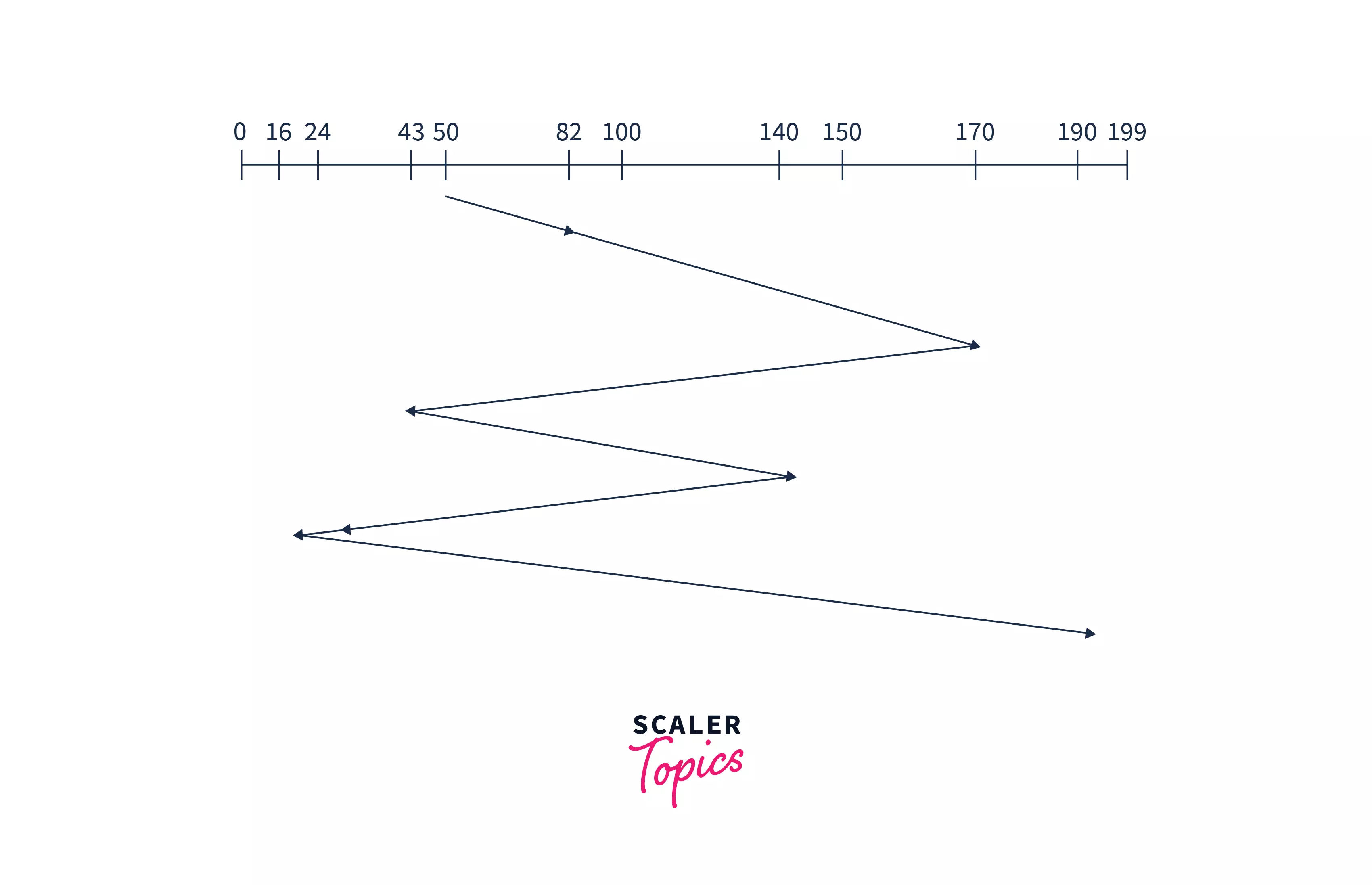
Explanation: In the above image, we can see the disk head starts from the current position 50 and moves to request 82. After serving them the disk arm moves towards the second request which is 170 and then to the request 43 and so on. In this algorithm,, the disk arm will be servicing requests in the order they arrive. In this way, all the requests are served in arriving order until the process executes.
“Seek time” will be calculated by adding the head movement differences of all the requests:
Seek time= “(82-50) + (170-82) + (170-43) + (140-43) + (140-24) + (24-16) + (190-16) = 642
- Advantages:
- Implementation is easy.
- No chance of starvation.
- Disadvantages:
- 'Seek time' increases.
- Not so efficient.
2. SSTF disk scheduling algorithm-
It stands for ‘Shortest seek time first SSTF’. As the name suggests, it searches for the request having the least ‘seek time’ and executes them first. This algorithm has less ‘seek time’ as compared to the FCFS Algorithm.
Example: Suppose a disk has 200 tracks (0-199). The request sequence(82,170,43,140,24,16,190) are shown in the given figure and the head position is at 50.
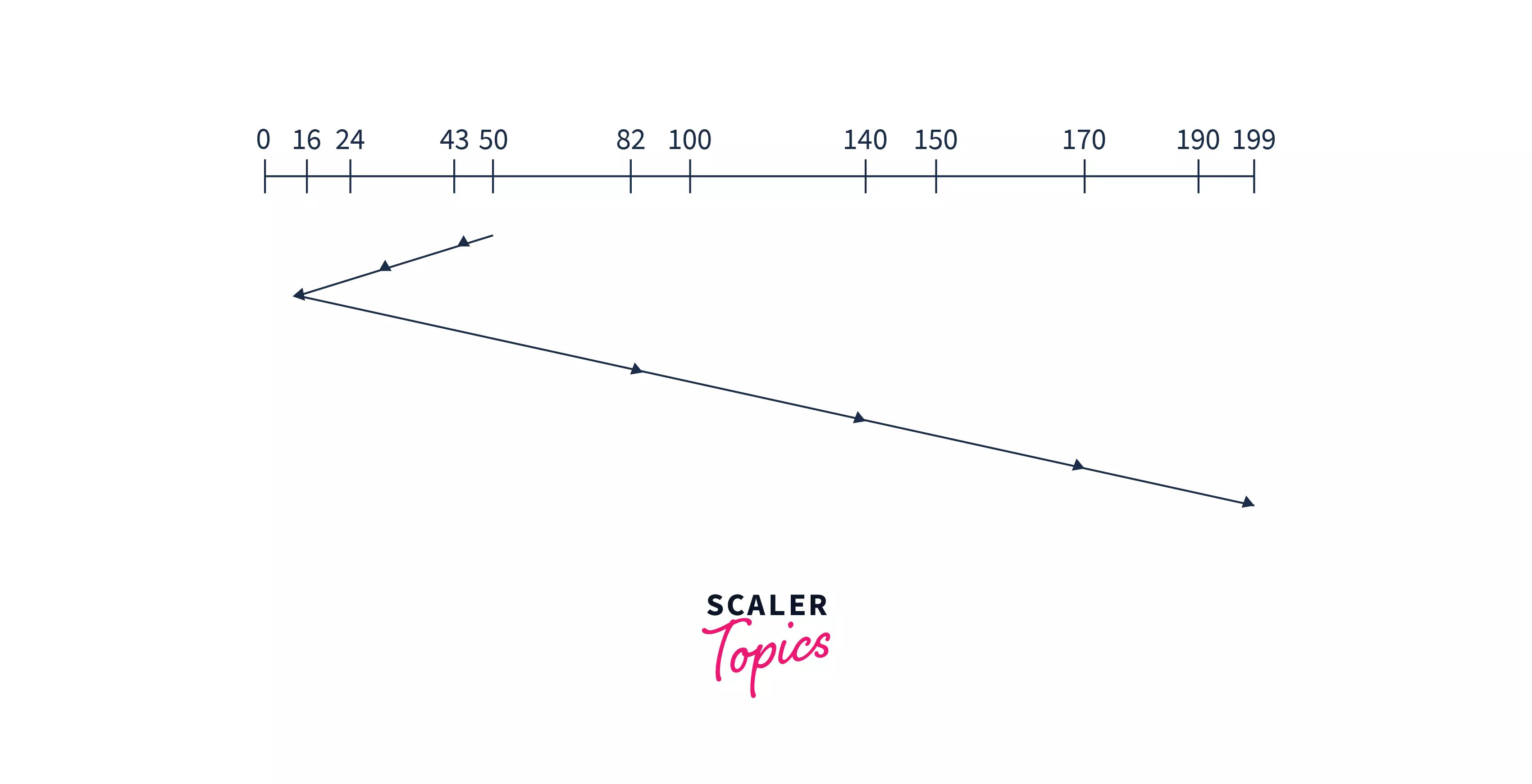
Explanation: SSTF selects the request closest to the current head position. So, the least difference is (50-43). Here the difference is not about the shortest value but it is about the shortest time the head will take to reach the nearest next request. So, after 43, the head will be nearest to 24, and from here the head will be nearest to request 16, After 16, the nearest request is 82, so the disk arm will move to serve to request 82 and so on.
Hence, Calculation of Seek Time = (50-43) + (43-24) + (24-16) + (82-16) + (140-82) + (170-140) + (190-170) = 208
-
Advantages:
- In this algorithm, disk response time is less.
- More efficient than FCFS.
-
Disadvantages:
- Less speed of algorithm execution.
- Starvation can be seen.
How Scaler Transformed Careers in Different Fields
Scaler learners achieved 2.5x salary growth with average post-Scaler CTC reaching ₹23L.
 Google
 Amazon
 Microsoft
 Flipkart
 Adobe1200+ more
3. SCAN disk scheduling algorithm:
In this algorithm, the head starts to scan all the requests in a direction and reaches the end of the disk. After that, it reverses its direction and starts to scan again the requests in its path and serves them. Due to this feature, this algorithm is also known as the “Elevator Algorithm”.
Example: Suppose a disk has 200 tracks (0-199). The request sequence(82,170,43,140,24,16,190) is shown in the given figure and the head position is at 50. The ‘disk arm’ will first move to the larger values.
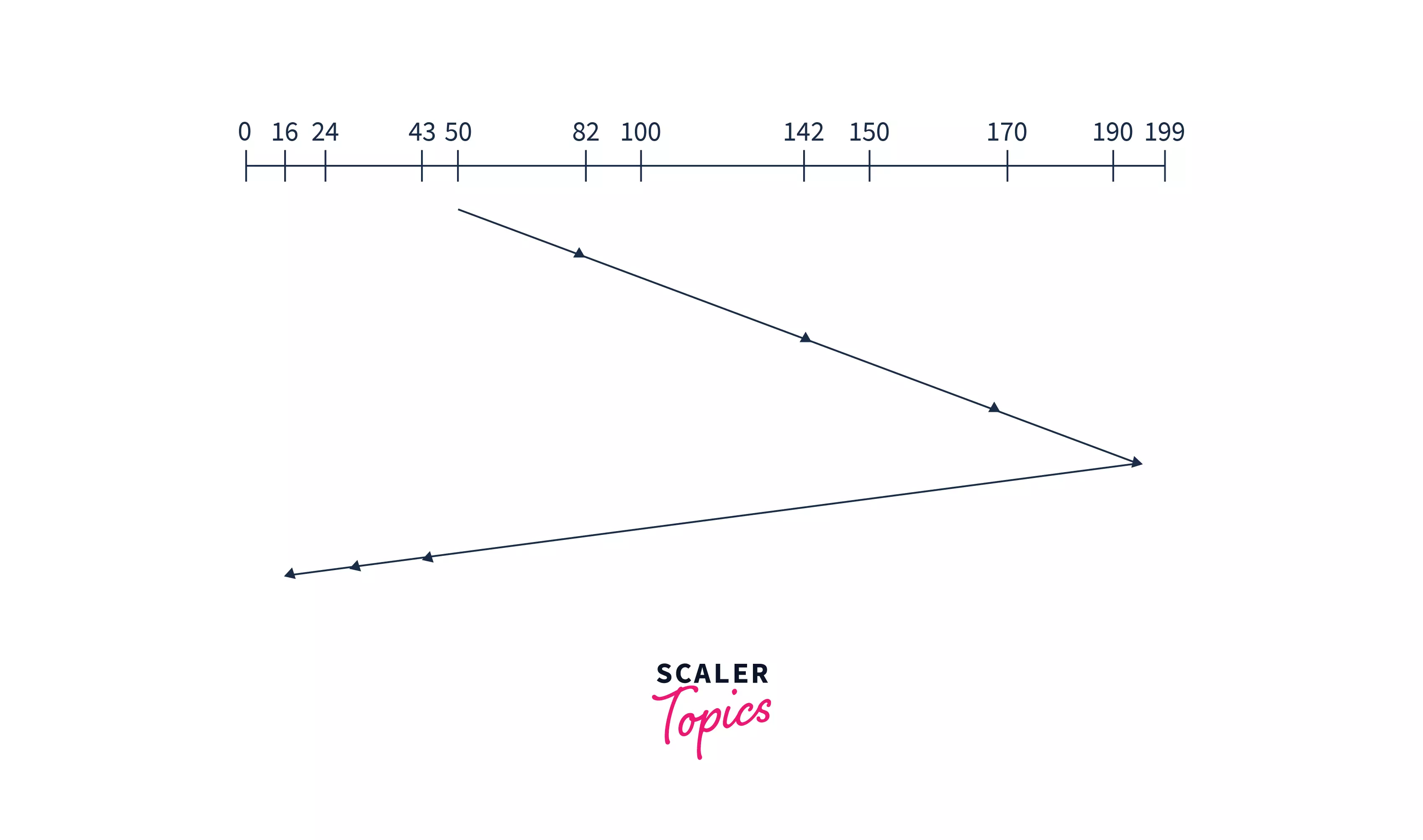
Explanation: In the above image, the disk head moves in one direction from position 50 to the end of the disk at request position 199, and then reverses to service requests in the opposite direction until it reaches the other end of the disk. This process keeps going on until the process is executed. Hence, the Calculation of ‘Seek Time’ will be like: (199-50) + (199-16) =332
-
Advantages:
- Implementation is easy.
- Requests do not have to wait in a queue.
-
Disadvantage:
- The head keeps going on to the end even if there are no requests in that direction.
4. C-SCAN disk scheduling algorithm:
It stands for “Circular-Scan”. The c scan scheduling algorithm is a circular form of scan scheduling in which the disk head moves in the same direction across cylinders, and when it reaches one end, it wraps around to the beginning. This c scan algorithm serves requests along its path and is designed to give a uniform wait time.
After reaching the end of the disk, the head returns to the beginning without servicing requests on the return trip, so overall it continues in the same direction. In practice, c scan performs well under heavy I/O load because it avoids bias toward middle cylinders.
Example: Suppose a disk having 200 tracks (0-199). The request sequence(82,170,43,140,24,16,190) are shown in the given figure and the head position is at 50.

Explanation: In the above figure, the disk arm starts from position 50 and reached the end(199), and serves all the requests in the path. Then it moves to the other end of the disk i.e.- 0 without serving any task in the path.
After reaching 0, it will again go move towards the largest remaining value which is 43. So, the head will start from 0 and moves to request 43 serving all the requests coming in the path. And this process keeps going.
Hence, Seek Time will be
- Advantages:
- The waiting time is uniformly distributed among the requests.
- Response time is good in it.
- Disadvantages:
- The time taken by the disk arm to locate a spot is increased here.
- The head keeps going to the end of the disk.
5. LOOK the disk scheduling algorithm:
In this algorithm, the disk arm moves to the last request in the current direction and services requests only up to that point for efficient disk servicing. After reaching the last request, it reverses direction and comes back toward the other side. It does not go to the physical end of the disk; instead, it goes only as far as the last request.
Example a disk having 200 tracks (0-199). The request sequence(82,170,43,140,24,16,190) are shown in the given figure and the head position is at 50.
Explanation: The disk arm is starting from 50 and starts to serve requests in one direction only but instead of going to the end of the disk, it goes to the end of requests i.e.-190. Then comes back to the last request of other ends of the disk and serves them. And again starts from here and serves till the last request of the first side. Hence, Seek time =(190-50) + (190-16) =314
-
Advantages:
- Starvation does not occur.
- Since the head does not go to the end of the disk, the time is not wasted here.
-
Disadvantage:
- The arm has to be conscious to find the last request.
Turn Learning into Career Growth
6. C-LOOK disk scheduling algorithm:
The C-Look algorithm is almost the same as the Look algorithm. The difference is that it moves in one direction only up to the last request, then jumps back to the last request on the other side and continues service from there without serving requests during the return.
Example: Suppose a disk having 200 tracks (0-199). The request sequence(82,170,43,140,24,16,190) are shown in the given figure and the head position is at 50.
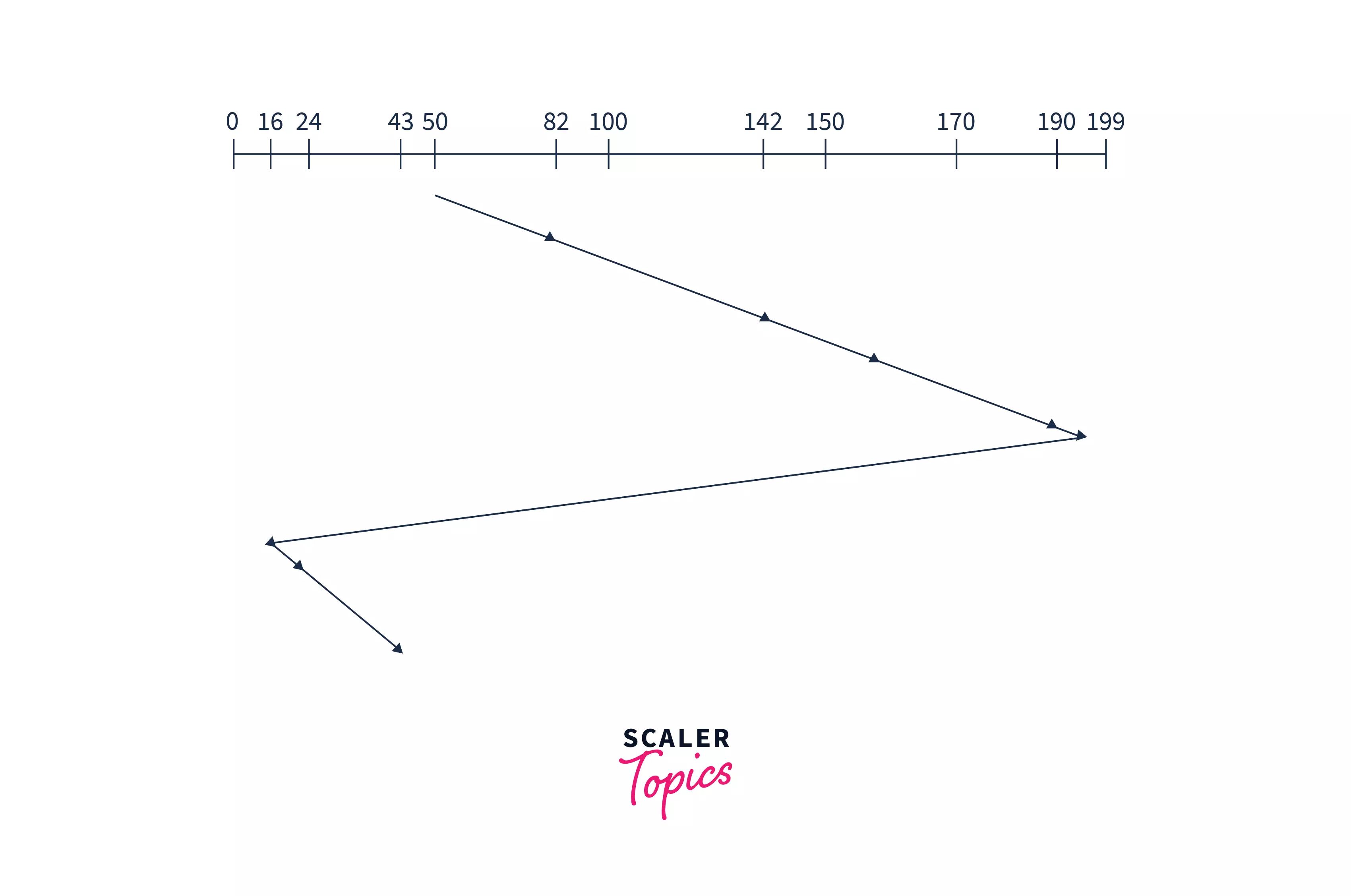
Explanation: The disk arm starts from 50 and starts to serve requests in one direction only but instead of going to the end of the disk, it goes to the end of requests i.e.-190. Then it comes back to the last request of the other end of the disk without serving any request during the return, and after reaching the other side, it again starts serving requests on its path. Hence, Seek Time =(190−50)+(190−16)+(43−16)=341= (190-50) + (190-16) + (43-16) =341
-
Advantages:
- The waiting time is decreased.
- If there are no requests till the end, it reverses the head direction immediately.
- Starvation does not occur.
- The time taken by the disk arm to find the desired spot is less.
-
Disadvantage:
- The arm has to be conscious about finding the last request.
Disk Scheduling Algorithms: Comparison Table
Here's how all six algorithms stack up on our standard example (200 tracks, head at 50, queue: 82, 170, 43, 140, 24, 16, 190):
| Algorithm | Total Head Movement (seek) | Starvation? | Fairness / Wait Time | Best Used When |
|---|---|---|---|---|
| FCFS | 642 | Never | Fair in arrival order | Very light load |
| SSTF | 208 | Yes (possible) | Low avg, high variance | Medium load, seek-time critical |
| SCAN | 332 | No | Uniform-ish, biases middle | Heavy load, needs fairness |
| C-SCAN | 391 | No | Most uniform wait time | Heavy load, uniform service |
| LOOK | 314 | No | Good, no edge travel | Clustered requests |
| C-LOOK | 341 | No | Good, one-direction + no edge travel | Clustered + uniform service |
Key takeaways from the table:
- SSTF wins on raw seek time (208) but can starve far-away requests.
- FCFS is the safest but slowest (642).
- SCAN-family and LOOK-family trade a bit of seek time for fairness and predictability which is what real systems usually want.
The Modern Angle: Disk Scheduling on HDDs vs SSDs
Everything above assumes a classic spinning hard disk (HDD) with a moving arm and rotating platters. On a Solid State Drive (SSD), there is no mechanical head and no rotational latency so the classic "seek minimization" problem largely disappears. This is why modern operating systems treat the two very differently. (Wikipedia: Solid-state drive)
In today's Linux kernel, the single-queue schedulers of the past (cfq, deadline, noop) were removed, and the block layer now ships multi-queue (blk-mq) schedulers: none, mq-deadline, bfq, and kyber. (Wikipedia, Linux Kernel documentation)
| Linux I/O Scheduler | What it does | Best for |
|---|---|---|
| none | No reordering passes requests straight through (FIFO) | NVMe SSDs hardware handles its own queuing; a software scheduler only adds overhead |
| mq-deadline | Deadline-based; sorts by sector but guarantees a request can't wait forever (prevents starvation) | Default for most block devices; SATA/SAS SSDs and HDDs |
| bfq (Budget Fair Queueing) | Gives each process a fair share of disk bandwidth | HDDs and interactive desktops |
| kyber | Self-tuning low-latency scheduler targeting fast devices | High-end SSDs/NVMe where read latency is critical |
Red Hat's guidance for RHEL 8 summarizes it neatly: use mq-deadline or bfq for traditional HDDs, none or kyber for high-performance SSDs, bfq for desktops/interactive tasks, and mq-deadline for virtual guests. For NVMe devices specifically, the default is none, and Red Hat recommends leaving it that way. (Red Hat documentation)
Notice the beautiful connection: mq-deadline and bfq are direct descendants of the ideas in SCAN/LOOK. mq-deadline reorders requests in sector (LBA) order to approximate an elevator sweep while enforcing deadlines; BFQ extends the idea with per-process fairness. So even on modern hardware, the concepts you learned above reorder for locality, but never let a request starve are exactly what production schedulers implement. (Linux Kernel documentation, Ubuntu Wiki)
You can check your own Linux system in seconds:
# Which scheduler is active for a device (the one in brackets)?
cat /sys/block/sda/queue/scheduler
# Is this device an HDD (1) or SSD (0)?
cat /sys/block/sda/queue/rotational
This is a great command to run while revising it makes a textbook concept tangible on your own machine.
To go deeper on how the OS handles storage as a whole, see our guide to Disk Management in OS; and for the CPU-side counterpart of these schedulers, check out Process Scheduling in Linux.
How to Choose the Right Disk Scheduling Algorithm
There is no single "best" algorithm the right choice depends on the workload: (this is a different beast from CPU scheduling, which decides which process runs next on the processor; disk scheduling decides which I/O request the storage device serves next).
- Low disk load → FCFS. With only one or two requests queued, reordering is pointless.
- Medium load, throughput matters → SSTF. Lowest seek time, but accept the starvation risk.
- Heavy load, fairness matters → SCAN or C-SCAN. Predictable, starvation-free.
- Clustered requests, want efficiency → LOOK or C-LOOK. Skip the empty edge travel.
- Real systems (Linux) → mq-deadline (SSD/HDD), bfq (HDD/desktop), none (NVMe). The OS already bakes these decisions in. (Red Hat documentation)
Performance always depends on the number and type of requests which is why the disk scheduler is written as a swappable module in the OS, so administrators can pick a different algorithm per device.
Conclusion
Disk scheduling algorithms are the operating system's way of managing the queue of I/O requests to the disk. Because a hard disk is one of the slowest parts of the computer dominated by seek time and rotational latency the order in which requests are served can change performance by 3× or more (FCFS's 642 tracks vs SSTF's 208 on the same example).
- FCFS is simple and fair but inefficient.
- SSTF minimizes seek time but risks starvation.
- SCAN / C-SCAN add fairness and predictable wait times, at the cost of edge-to-edge travel.
- LOOK / C-LOOK refine SCAN/C-SCAN by stopping at the last request instead of the disk edge.
On modern SSDs the mechanical seek problem vanishes, and operating systems shift to multi-queue schedulers (mq-deadline, bfq, kyber, none) but the core ideas of elevator-style ordering and deadline fairness live on. An algorithm with minimal starvation and balanced movement is what makes a system feel fast and responsive.
For the bigger picture on how the OS schedules everything from processes to I/O, see our overview of Scheduling Algorithms in OS.




