


File Management in Operating System: Types, Functions & Examples
Overview
File management is one of the basic but important features provided by the operating system. File management in the operating system is nothing but software that handles or manages the files (binary, text, pdf, docs, audio, video, etc.) present in computer software.
The file system in the operating system is capable of managing individual as well as groups of files present in the computer system. The file system in the operating system tells us about the location, owner, time of creation and modification, type, and state of a file present on the computer system.
What is File Management in an Operating System?
Before learning about the file system in the operating system, let us first get a good grasp of operating systems and files.
Files is a collection of co-related information that is recorded in some format (such as text, pdf, docs, etc.) and is stored on various storage mediums such as flash drives, hard disk drives (HDD), magnetic tapes, optical disks, and tapes, etc. Files can be read-only or read-write. Files are simply used as a medium for providing input(s) and getting output(s).
Now, an Operating System is nothing but a software program that acts as an interface between the hardware, the application software, and the users. The main aim of an operating system is to manage all the computer resources. So, we can simply say that the operating system gives a platform to the application software and other system software to perform their task.
Refer to the diagram below to understand the value and working of the operating system.
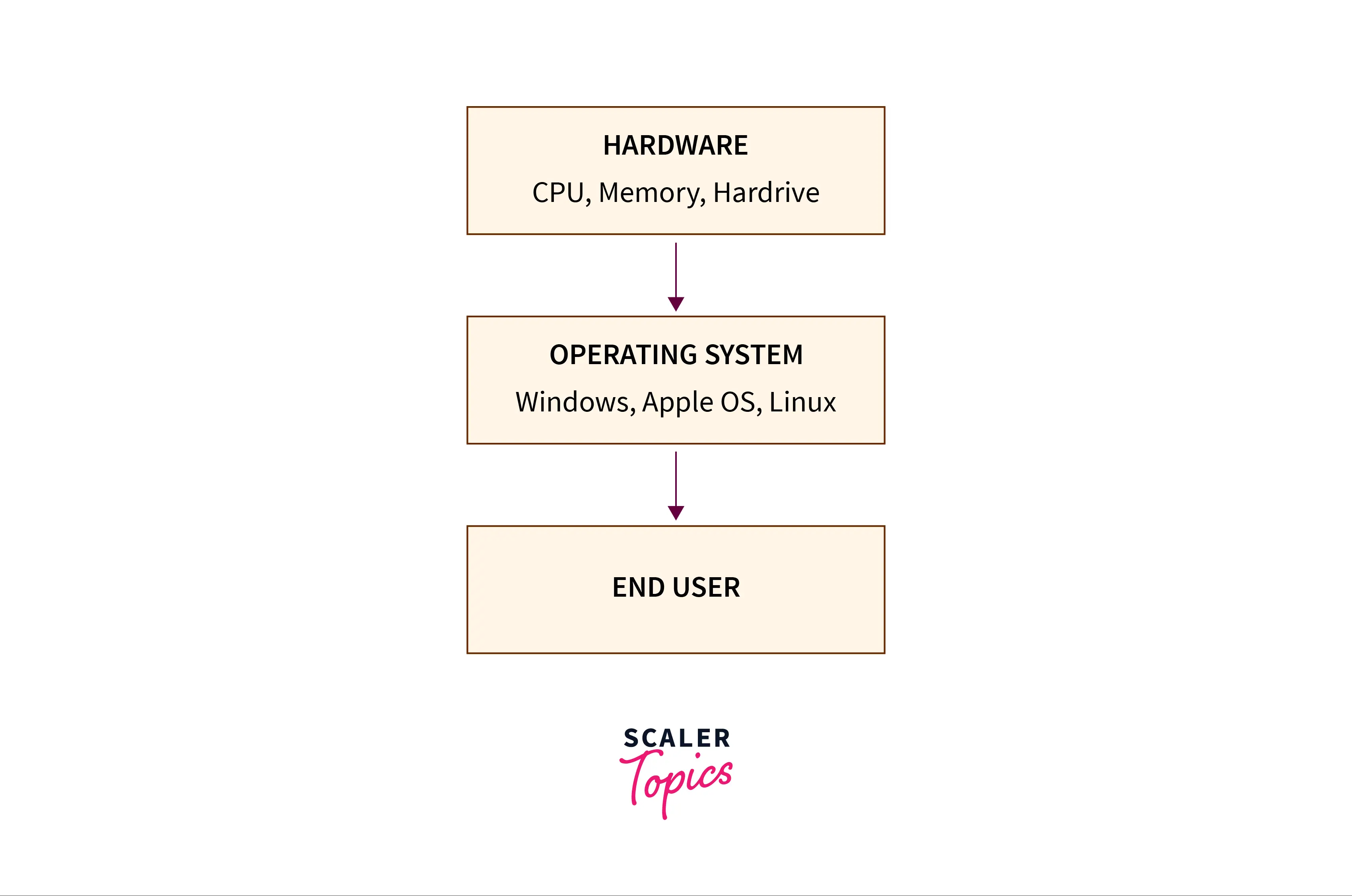
The features of an operating system are:
- Provide security to system and application software.
- memory management.
- disk management.
- I/O operations.
- file management, etc.
So, file management is one of the basic but important features provided by the operating system. The file management in the operating system is nothing but software that handles or manages the files (binary, text, pdf, docs, audio, video, etc.) present in computer software. The file system in the operating system is capable of managing individual as well as groups of files present in the computer system.
The file management in the operating system manages all the files present in the computer system with various extensions (such as .exe, .pdf, .txt, .docx, etc.)
We can also use the file system in the operating system to get details of any file(s) present on our system. The details can be:
- location of the file (the logical location where the file is stored in the computer system)
- the owner of the file (who can read or write on the particular file)
- when was the file created (time of file creation and modification time)
- a type of file (format of the file for example text, pdfs, docs, etc.)
- state of completion of the file, etc.
For file management in the operating system or to make the operating system understand a file, the file must be in a predefined structure or format. There are three types of file structures present in the operating systems:
-
text file: A text file is a non-executable file containing a sequence of numbers, symbols, and letters organized in the form of lines.
-
source file: A source file is an executable file that contains a series of functions and processes. In simple terms, we can say that a source file is a file that contains the instructions of a program.
-
object file: An object file is a file that contains object codes in the form of assembling language code or machine language code. In simple terms, we can say that object files contain program instructions in the form of a series of bytes and are organized in the form of blocks.
Build an AI-First Career, Master the Complete Skillset
Choose from our industry-leading programs designed for career success
Modern Software and AI Engineering Program
Master full-stack development with AI integration


 +1000 more
Modern Data Science and ML with specialisation in AI
Advanced data science techniques with AI specialization
+1000 moreAdvanced AIML with Specialisation in Agentic AI
Deep dive into AIML with focus on Agentic systems
+1000 moreDevOps, Cloud & AI Platform Engineering
Build and manage AI-powered cloud infrastructure
+1000 moreAI Engineering Advanced Certification by IIT-Roorkee
Premier AI engineering certification from IIT-Roorkee

AI Forward Deployed Engineer Program
Full-stack engineering, production AI and client-facing consulting
+1000 moreFile System vs File Management: What's the Difference?
This is the most important distinction on the page, and the one most likely to appear in exams.
File management is a service the OS performs. A file system is a format written on the disk.
File management is the kernel subsystem that decides how files are named, opened, shared, protected and allocated it lives in memory and runs as code. A file system is the on-disk data structure and layout superblock, inode table, allocation bitmaps, journal, data blocks that persists on the volume and can be read by any OS with the right driver. One OS manages many file systems at once; one volume is formatted with exactly one.
| Aspect | File Management | File System |
|---|---|---|
| What it is | An OS service/subsystem that controls how files are created, accessed, shared and protected | The on-disk format and data structures that define how file data and metadata are laid out on a volume |
| Where it lives | In the kernel, as running code (logical file system + file-organisation module) | On the storage device itself, plus a driver in the kernel that understands the format |
| What it deals in | Files, directories, users, permissions, system calls, open-file tables | Blocks, extents, inodes, superblocks, allocation bitmaps, journal entries |
| Scope | Policy what should happen when a user opens, writes or deletes a file | Mechanism how those bytes are physically arranged and recorded |
| Persistence | Mostly in-memory structures, rebuilt at mount/boot time | Persists on disk; survives reboot and is portable across machines |
| How many at once | One file-management layer per OS | Many each mounted volume carries its own (ext4 on /, FAT32 on a USB stick, simultaneously) |
| Examples | Linux VFS, open()/read()/chmod(), Windows file operations | ext4, NTFS, FAT32, exFAT, APFS |
File management is the layer that operates the file system. Students who only get the contrast walk away thinking they're alternatives. In fact, the file management subsystem is the active component it reads the file system's structures, enforces the permissions, and presents the file abstraction to programs.
The file system is the passive data structure on disk that it reads from and writes to.
Types of File Systems
File systems differ on three axes that drive every practical decision: maximum file and volume size (a 5 GB video won't fit on FAT32); crash recovery (journaling vs no journaling); and cross-platform compatibility (FAT32 works everywhere, NTFS mostly does not).
Here are the eight file systems most likely to appear in an exam or interview. Source: Microsoft exFAT Specification
| File System | Used By | Max File Size | Max Volume Size | Journaling | Typical Use |
|---|---|---|---|---|---|
| FAT32 | Windows, Linux, macOS; USB drives, SD cards, EFI system partitions | 4 GB (4 GiB − 1 byte) | 2 TB with 512-byte sectors (Windows' own format tool caps new FAT32 volumes at 32 GB state both) | No | Small removable media and EFI system partitions where universal readability matters more than size |
| exFAT | Windows, macOS, Linux (kernel 5.4+); SDXC cards | 16 EB (architectural limit) | 128 PB | No | Large flash drives and SDXC cards shared between operating systems—FAT32 without the 4 GB ceiling |
| NTFS | Windows (default since Windows XP) | 16 TB with default 4 KB clusters; up to 8 PB with 2 MB clusters (newer Windows builds only) | 256 TB default; up to 8 PB | Yes metadata journaling via $LogFile | Windows system and data volumes; permissions, compression, encryption |
| ext4 | Linux (default on Ubuntu, Debian, Fedora) | 16 TiB | 1 EiB | Yes configurable (journal, ordered, writeback) | General-purpose Linux root and data volumes; the default answer for a Linux server |
| XFS | Linux (default on RHEL/CentOS/Rocky/AlmaLinux) | 8 EiB | 8 EiB | Yes metadata journaling | Very large files and high-throughput parallel I/O; enterprise Linux and media workloads |
| Btrfs | Linux (default on Fedora Workstation, openSUSE) | 16 EiB | 16 EiB | No copy-on-write plus checksums instead of a journal | Snapshots, subvolumes, built-in RAID and data-integrity checksumming |
| APFS | macOS 10.13+, iOS, iPadOS, watchOS | 8 EiB | 8 EiB | No copy-on-write metadata scheme instead | Flash/SSD-optimised Apple devices; instant cloning, snapshots, native encryption |
| HFS+ | macOS 8.1–10.12 (legacy) | 8 EiB ⚠️ | 8 EiB ⚠️ | Yes HFS+J, default since Mac OS X 10.3 | Legacy Mac volumes and older Time Machine backup drives |
Why Journaling Matters
When a crash or power failure interrupts a write, the file system's metadata directory entries, free-space bitmaps, inode records can be left in an inconsistent state. A journal (used by NTFS, ext4, XFS) records a transaction before applying it: if the system crashes mid-write, the journal is replayed (completing the operation) or discarded (rolling back the partial operation), restoring consistency in seconds rather than running a full fsck scan that can take hours on large volumes. Source: Linux Kernel Documentation ext4
Copy-on-write (COW) is the modern alternative to journaling, used by Btrfs and APFS. Instead of overwriting blocks in place, the file system writes a new copy and updates pointers atomically. A crash in the middle leaves both the old and new states intact no journal needed, and snapshots are essentially free. Source: Btrfs documentation
This is why a 5 GB video file won't copy onto a FAT32 USB stick, and why the fix is reformatting to exFAT or a file-system your OS supports. FAT32's maximum file size is 4 GB minus 1 byte, and that limit is baked into the on-disk format there is no workaround that preserves FAT32.
File System Structure in an Operating System
The file system is not a flat list of files on disk. It is a layered architecture, each layer abstracting the one below it so that the layers above don't need to know anything about hardware.
How Scaler Transformed Careers in Different Fields
Scaler learners achieved 2.5x salary growth with average post-Scaler CTC reaching ₹23L.
 Google
 Amazon
 Microsoft
 Flipkart
 Adobe1200+ more
The Six-Layer Stack
| Layer | What It Does | Works in Terms of |
|---|---|---|
| Application programs | Issue file operations on behalf of the user | File names and paths |
| Logical file system | Manages metadata, directory structure, protection and the FCB/inode; resolves a path name to a file identifier | Files, directories, permissions |
| File-organisation module | Translates logical block numbers into physical block addresses; manages free space | Logical → physical blocks |
| Basic file system | Issues generic commands to read/write physical blocks; manages buffers and caches | Physical block numbers |
| I/O control | Device drivers and interrupt handlers that turn commands into device instructions | Device-specific commands |
| Devices | The physical disk, SSD or flash medium | Sectors, tracks, cells |
Each layer exists so that the one above it doesn't need to know about the hardware. Applications don't deal in sectors; they deal in file names. The logical file system doesn't deal in disk geometry; it deals in files and directories. The I/O control layer doesn't deal in file systems; it deals in device commands.
This modularity is why Linux can run ext4, XFS, Btrfs and NTFS simultaneously all four speak the same abstract interface to the layers above. Source: Silberschatz, Galvin & Gagne, Operating System Concepts, 10th Edition
On-Disk and In-Memory Structures
On disk, a file system contains:
- Boot control block (boot block / partition boot sector): The first block of the partition, containing the code the BIOS reads to boot the OS. Empty on non-boot partitions.
- Volume control block (superblock in UFS/ext, Master File Table in NTFS, superblock in ext4): Global metadata total blocks, free-block count, inode table size, mount state, journal location.
- Directory structure: Maps file names to file identifiers (inodes in UNIX/Linux, MFT entries in NTFS).
- Per-file FCB / inode: The file control block stores file attributes and pointers to the data blocks. On Linux, this is the inode a fixed-size record identified by an inode number. Source: Linux inode(7) man page
In memory, the OS keeps:
- Mount table: Which file systems are mounted, where, and with what options
- Directory-structure cache: Recently accessed directory entries to speed up path resolution
- System-wide open-file table: One entry per open file instance across all processes, pointing to the FCB/inode
- Per-process open-file table: Each process has its own table; the entry index returned to the process is the file descriptor
- Buffer cache: Recently read/written disk blocks kept in RAM to reduce I/O
The open() → file descriptor walkthrough: When a process calls open("/home/user/notes.txt", O_RDONLY):
- The logical file system searches the directory-structure cache for the path, locates the inode number
- The file-organisation module reads the inode from disk into the buffer cache
- The system-wide open-file table gets an entry pointing to this inode
- The per-process open-file table gets an entry pointing to the system-wide entry
- The index into the per-process table an integer like 3, 4 or 7Iis returned to the program
That integer is the file descriptor. Every subsequent read(fd, ...) and write(fd, ...) passes the file descriptor; the kernel uses it to look up the entry in the per-process table, find the system-wide entry, locate the inode, translate the logical block to a physical block, and perform the I/O.
Turn Learning into Career Growth
Properties of File Management in Operating System
After learning about the properties of file management in operating systems, let us now learn about the properties of file management in operating systems.
-
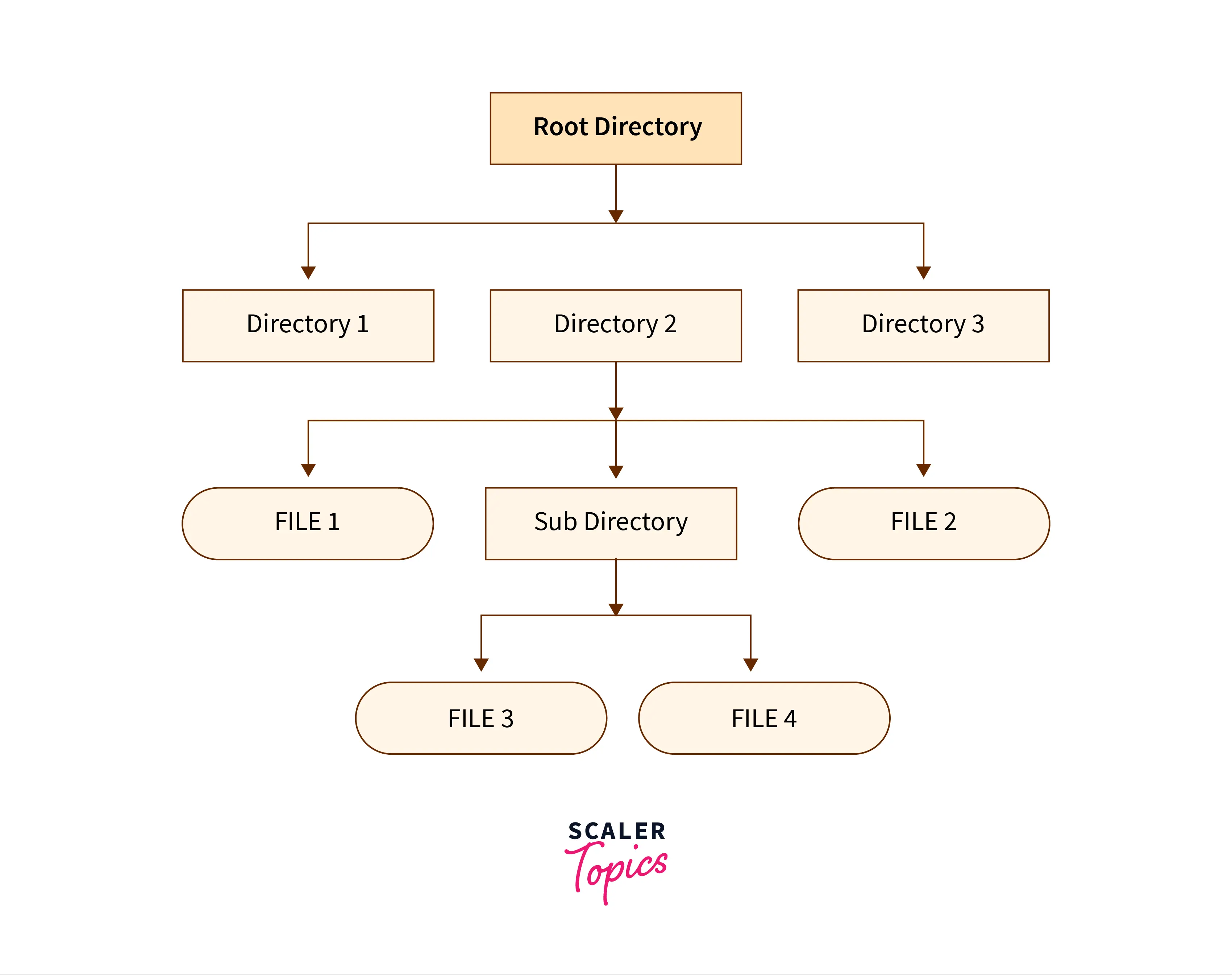
The files are arranged or grouped into a more complex structure i.e. tree which reflects the relationship between the various files. File systems work in a similar way to the way that libraries organize books. Hierarchical file systems usually have a special directory at the root. It can be imagined to be similar to a tree.
Refer to the structure provided below for better visualization.

-
Every file is associated with some name and some access permissions that tell us who can access the files in which mode (read or write).
Refer to the example below for a better understanding.
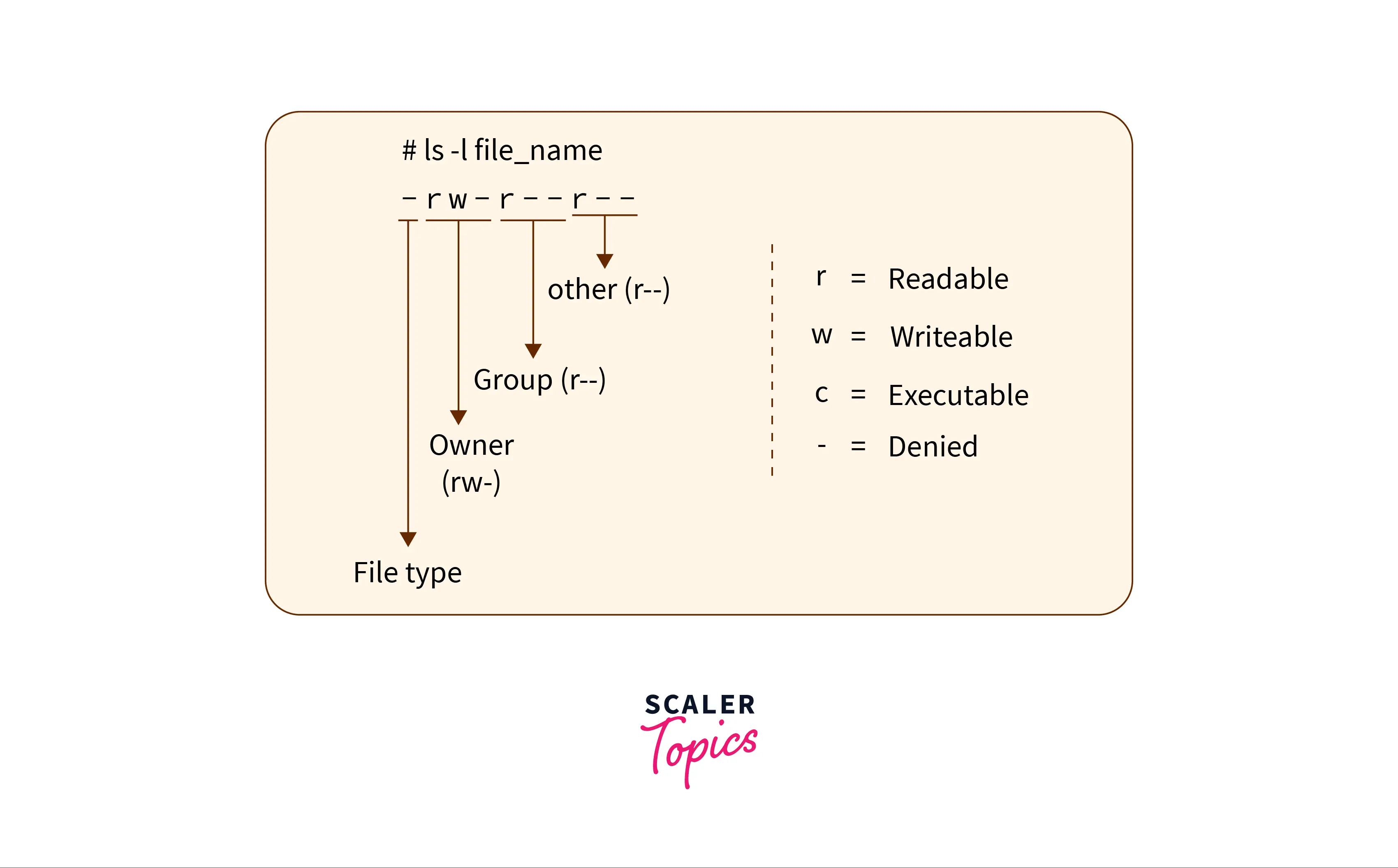
In the example above, we have the access permission depicted for a particular file. Here r tells that the file is readable, w tells that the file is writeable, and x tells us that the file is executable. While the dash (-) symbol says no permission is given.
Now as we know in LINUX-based OS, there are three permission groups (owner, group, and other). The first character tells us the type of file (either file or directory). Now the next three characters represent the permission of the owner, the next three represent the permissions of a group and the last three characters represent the permissions of the other.
-
Whenever a user logs off then the file stored on the secondary storage device does not get erased. If the data is stored in the primary memory like RAM the data gets lost.
Functions of File Management in Operating System
Now let us talk about some of the most important functions of file management in operating systems.
- Allows users to create, modify, and delete files on the computer system.
- Manages the locations of files present on the secondary memory or primary memory.
- Manages and handles the permissions of a particular file for various users and groups.
- Organizes the files in a tree-like structure for better visualization.
- Provides interface to I/O operations.
- Secures files from unauthorized access and hackers.
Objectives of File Management in Operating System
In the last section, we gained a good basic understanding of files, operating systems, and file management in operating systems. Let us now learn some of the objectives of file management in operating systems.
-
The file management in the operating system allows users to create a new file, and modify and delete the old files present at different locations of the computer system.
-
The operating system file management software manages the locations of the file store so that files can be extracted easily.
-
As we know, process shares files so, one of the most important features of file management in operating systems is to make files sharable between processes. It helps the various processes to securely access the required information from a file.
-
The operating system file management software also manages the files so that there is very little chance of data loss or data destruction.
-
The file management in the operating system provides input-output operation support to the files so that the data can be written, read, or extracted from the file(s).
-
It also provides a standard input-output interface for the user and system processes. The simple interface allows the easy and fast modification of data.
-
The file management in the operating system also manages the various user permissions present on a file. There is three user permission provided by the operating system, they are: read, write, and execute.
-
The file management in the operating system supports various types of storage devices such as flash drives, hard disk drives (HDD), magnetic tapes, optical disks, tapes, etc., and it also allows the user(s) to store and extract them conveniently.
-
It also organizes the files in a hierarchal manner in the form of files and folders (directories) so that management of these files can be easier from the user's perspective as well. Refer to the diagram below for better visualization.
Advantages of File Management in OS
Some of the main advantages that the file system in the operating system provides are:
-
Protection of the files from unauthorized access.
-
Recovers the free space created when files are removed or deleted from the hard disk.
-
Assigns the disk space to various files with the help of disk management software of the operating system.
-
As we know, a file may be stored at various locations in the form of segments so the file management in the operating system also keeps track of all the blocks or segments of a particular file.
-
Helps to manage the various user permissions so that only authorized persons can perform the file modifications.
-
It also keeps our files secure from hackers with the help of security management in the operating system.
Disadvantages of File Management in OS
Some of the main advantages that the file system in the operating system provides are:
-
If the size of the files becomes large then the management takes a good amount of time due to hierarchical order.
-
To get more advanced management features, we need an advanced version of the file management system. One of the advanced features is the document management feature (DMS) which can organize important documents.
-
The file system in the operating system can only manage the local files present in the computer system.
-
Security can be an issue sometimes as a virus in a file can spread across the various other files due to tree-like (hierarchal) structure.
-
Due to the hierarchal structure, file accessing can be slow sometimes.
Examples of File Management in Operating System
An example of file management in the operating system is a file manager or a file browser. File browsers are user interface that is developed to manage various files and folders present in the operating system.
Some of the most common operations provided by the file browser of almost every operating system are:
- file creation.
- file modification.
- file deletion.
- file transfer.
- file renaming.
- file copying and moving.
- changing file creation.
Examples of file browsers are:
- Windows file manager (This PC).
- Finder.
- Dolphin.
- One Drive.
- GNOME Files, etc.
Take your first step towards mastering operating systems. Enroll in our Free Operating System course and develop a comprehensive understanding of OS.
Conclusion
- File management is one of the basic but important features provided by the operating system. File management in the operating system is software that handles or manages the files present in computer software.
- The file system in the operating system is capable of managing individual as well as a group of files present in the computer system.
- The file system in the operating system tells us about the location, owner, time of creation and modification, type, and state of a file present on the computer system.
- The file management in the operating system allows users to create a new file, and modify and delete the old files present at different locations of the computer system.
- Processes share files so the file management in the operating system makes files sharable between processes. It helps the various processes to securely access the required information from a file.
- The file management in the operating system provides input-output operation support to the files so that the data can be written, read, or extracted from the file(s).
- It organizes the files in a hierarchal manner in the form of files and folders (directories) so that management of these files can be easier from the user's perspective as well.




