


5 min
6 min
5 min


HTML, or HyperText Markup Language, is the standard markup language used to structure content on the web; it defines headings, paragraphs, links, images, and every other element you see on a webpage. This HTML tutorial for beginners covers HTML from the ground up: tags, document structure, semantic elements, forms, tables, and multimedia. Since 2019, HTML has been maintained as a single, versionless "Living Standard" by WHATWG, continuously updated rather than released as numbered versions like HTML5 or a future "HTML6", so any modern HTML you write today is simply following the current Living Standard. This HTML tutorial pairs naturally with CSS for styling and JavaScript for interactivity, the two companion technologies every front-end developer learns alongside HTML. Using semantic tags correctly also improves accessibility for screen readers and helps search engines understand your page's structure, making HTML knowledge directly useful for both usability and SEO. Whether you're starting a career in front-end development or just want to understand how the web works, this tutorial builds every concept step by step, from your first "Hello World" page through forms and multimedia embedding.
What is HTML?
Building a website is a cumulative process. In daily life, we encounter many kinds of websites, some simple pages with basic information, others complex platforms storing user data or streaming video. One thing is common across all of them: HTML. The front-end of virtually every website is built on top of HTML.
This HTML tutorial is designed to take you from zero to confident with HTML, whether you're aiming to become a front-end developer or simply want to understand how web pages are built.
Common HTML Tags You Should Know
A solid grip on HTML basics starts with knowing the core tags you'll use in almost every page:
| Tag | Purpose |
|---|---|
| <html> | Root element wrapping the entire document |
| <head> | Contains metadata, title, links, meta tags |
| <body> | Contains all visible page content |
| <h1>–<h6> | Headings, in order of importance |
| <p> | Paragraph text |
| <a> | Hyperlinks |
| <img> | Images |
| <div> / <span> | Generic containers for block and inline content |
| <ul> / <ol> / <li> | Unordered/ordered lists and list items |
| <table> | Tabular data |
| <form> | User input forms |
Each of these is covered in depth across the modules above, with dedicated lessons and examples.
History of HTML
The HTML was created in 1991 by Berners-Lee. Then onwards HTML has a lot of development.
- In 1991, the first version of HTML was created.
- In 1995, the first standard HTML specification was published. It is also known as HTML 2.0
- In 1999, the first major version of HTML was published. It is also known as HTML 4.01.
- In 2012, the HTML was improvised in order to support semantic tags, additional attributes etc. This version is known as HTML 5 and is the latest version of HTML.
- 2008-2014: HTML5 was introduced, adding support for semantic tags, multimedia elements, and additional attributes, it first went public in 2008 and reached full W3C Recommendation status in October 2014.
- 2019 onward: W3C and WHATWG agreed to stop maintaining separate numbered HTML versions. HTML is now published as a single, continuously updated HTML Living Standard - see the section below for what this means in practice.
HTML5 and the HTML Living Standard Today
A common misconception is that HTML5 is still "the latest version" of HTML, with a future "HTML6" on the way. That's no longer accurate. Since 2019, HTML has been maintained by WHATWG as the HTML Living Standard, a single, versionless specification that's updated continuously as the web evolves, rather than released in discrete numbered versions.
In practice, this means:
- There is no numbered "HTML6" and none is planned - the standard itself is always current.
- "HTML5" is now used more as a general term for modern HTML capabilities than a specific version number.
- Using the standard <!DOCTYPE html> declaration ensures your page follows the current Living Standard, without needing to track version numbers.
This HTML tutorial teaches HTML as it exists today, the Living Standard, so what you learn stays accurate regardless of future spec updates.
Why Learn HTML?
HTML is the backbone of web pages. Following are some reasons to learn HTML:
- To create websites: HTML is used as the standard markup for creating websites, thus we need to learn HTML in order to create the front-end of the websites.
- To become a front-end web developer: To become a front-end web developer, it is necessary to learn HTML irrespective framework we are working on.
- To improve our web page: It is necessary to learn HTML in order to enhance the quality of our web application.
If any of this sounds like where you want to head, this HTML tutorial for beginners is built for exactly that starting point.
HTML Example
Here's a basic example of an HTML page:
<!DOCTYPE html>
<html>
<head>
	<title>My HTML Page</title>
</head>
<body>
	<h1>Hello, World!</h1>
	<p>This is a simple HTML page.</p>
	<ul>
		<li>Item 1</li>
		<li>Item 2</li>
		<li>Item 3</li>
	</ul>
</body>
</html>
Structure of HTML Page
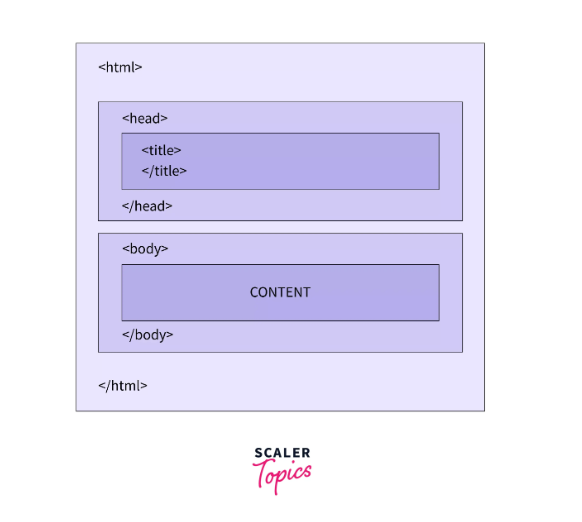
The basic structure of an HTML document consists of the following elements:
- The <!DOCTYPE> declaration, which specifies the version of HTML being used.
- The <html> element, which encloses the entire document and contains two main sections: the head and the body.
- The <head> element, which contains information about the document such as its title, links to external stylesheets and scripts, and meta tags.
- The <body> element, which contains the main content of the document such as text, images, videos, and other HTML elements.
Applications of HTML
HTML is the standard markup for web documents. Following are some major applications of HTML:
- Creating web pages: HTML is used to create static web pages. These pages can be further enhanced by adding CSS, JS etc.
- Making the website responsive: The semantic tags introduced in HTML is used to make a website responsive, i.e. the webpage automatically adjusts spacing and orientation according to the size of the screen.
- Drawing graphics: HTML can be used to draw graphics using the canvas.
- Providing offline support: Once loaded in the browser, the HTML document can exist without the internet thus providing offline support to the users.
- Internet navigation: The hypertext feature of HTML can be used to navigate from one location to another over the internet.
Audience
This HTML tutorial will be beneficial for the audience who:
- Wants to get started with web development.
- Is a beginner or intermediate in HTML and wants to level up to expert level.
- Wants to revise their HTML concepts.
- Needs reference material for HTML
Prerequisite
To get started with this HTML tutorial, you'll want:
- A text editor
- A web browser
- The basic idea of creating files and folders on the computer.
- The basic idea of navigating through different files and folders on the computer.
- Understanding image and video formats.
How to learn HTML?
Following are some ways to learn HTML:
- Documentation: We can learn HTML through documentations on websites.
- Self-guided tutorials: HTML can also be mastered through self-guided HTML basic tutorials, HTML beginner tutorials or articles available on the internet.
- Books: We can also refer to books to learn HTML.
- Video tutorials or courses: over the internet can also be referred to learn HTML.
- Projects: We can also learn HTML by making a project of our own.
What will you Learn in This HTML Tutorial?
In this HTML tutorial we'll learn about:
- What is HTML, it's applications
- Detailed explanation of various HTML tags
- Learn how to apply the code in real project scenarios setting up the requisite IDE (VS Code) for working with HTML.
- Installing and launching the live server, pre-processors like HAML and their pros and cons, Handlebars and HTML, etc.
How Long Does It Take to Learn HTML?
Most learners can grasp HTML basics, tags, structure, and simple pages in 1 to 2 weeks of consistent practice, since HTML has a much shallower learning curve than a full programming language. Reaching a comfortable, job-ready level, semantic HTML, forms, accessibility basics, and pairing HTML with CSS and JavaScript, typically takes 1 to 2 months. This HTML tutorial is structured to move you through that path in order, rather than leaving you to piece it together from scattered resources.
Career Opportunity of Learning HTML
Common career options after you learn HTML include Web Developer, Frontend Designer, Web Architect, Graphic Designer, and UI Developer. In practice, HTML is rarely the only skill these roles require; it's almost always paired with CSS, JavaScript, and increasingly, accessibility and performance best practices, but it remains the non-negotiable starting point for all of them.
FAQs
Is this a good HTML tutorial for beginners with no coding experience?
Yes, this HTML tutorial for beginners starts from the fundamentals and assumes no prior coding experience, just basic computer familiarity.
What are the HTML basics I should learn first?
The HTML basics include core tags like <html>, <head>, <body>, headings, paragraphs, links, and lists, all covered early in this tutorial before moving into forms and semantic HTML.
Is HTML5 still the current version of HTML?
Not exactly. Since 2019, HTML has been maintained as a single, versionless "Living Standard" rather than numbered releases like HTML5, so there's no HTML6 coming, and "HTML5" now mostly refers to modern HTML capabilities in general.
How long does it take to learn HTML?
Most learners pick up the basics in 1-2 weeks, and reach a comfortable, practical level, including semantic HTML and basic accessibility, in 1-2 months.
Do I need to learn CSS and JavaScript along with HTML?
Not at the very start, but you'll want to soon after. This HTML tutorial focuses on HTML itself, which is the right first step before layering in CSS for styling and JavaScript for interactivity.
Where can I learn HTML for free?
This HTML tutorial is completely free, covering everything from basic tags through semantic HTML, forms, and multimedia, no signup required to start reading.
Start Learning HTML with Scaler
Once you've worked through this HTML tutorial, the natural next step is pairing HTML with CSS and JavaScript to build real, interactive websites. Scaler's Modern Software and AI Engineering program builds on exactly this foundation with mentor-led, project-based learning.
::
What is HTML?
Building a website is a cumulative process. In our daily lives, we encounter multiple kinds of websites, some being a simple web page having some information, some being really complex websites storing user data, providing us information, streaming moves etc. In all these websites, there is one thing common, HTML. The front end of these websites is built upon HTML.
History of HTML
The HTML was created in 1991 by Berners-Lee. Then onwards HTML has a lot of development.
- In 1991, the first version of HTML was created.
- In 1995, the first standard HTML specification was published. It is also known as HTML 2.0
- In 1999, the first major version of HTML was published. It is also known as HTML 4.01.
- In 2012, the HTML was improvised in order to support semantic tags, additional attributes etc. This version is known as HTML 5 and is the latest version of HTML.
Why Learn HTML?
HTML is the backbone of web pages. Following are some reasons to learn HTML:
- To create websites: HTML is used as the standard markup for creating websites, thus we need to learn HTML in order to create the front-end of the websites.
- To become a front-end web developer: To become a front-end web developer, it is necessary to learn HTML irrespective framework we are working on.
- To improve our web page: It is necessary to learn HTML in order to enhance the quality of our web application.
HTML Example
Here's a basic example of an HTML page:
Structure of HTML Page
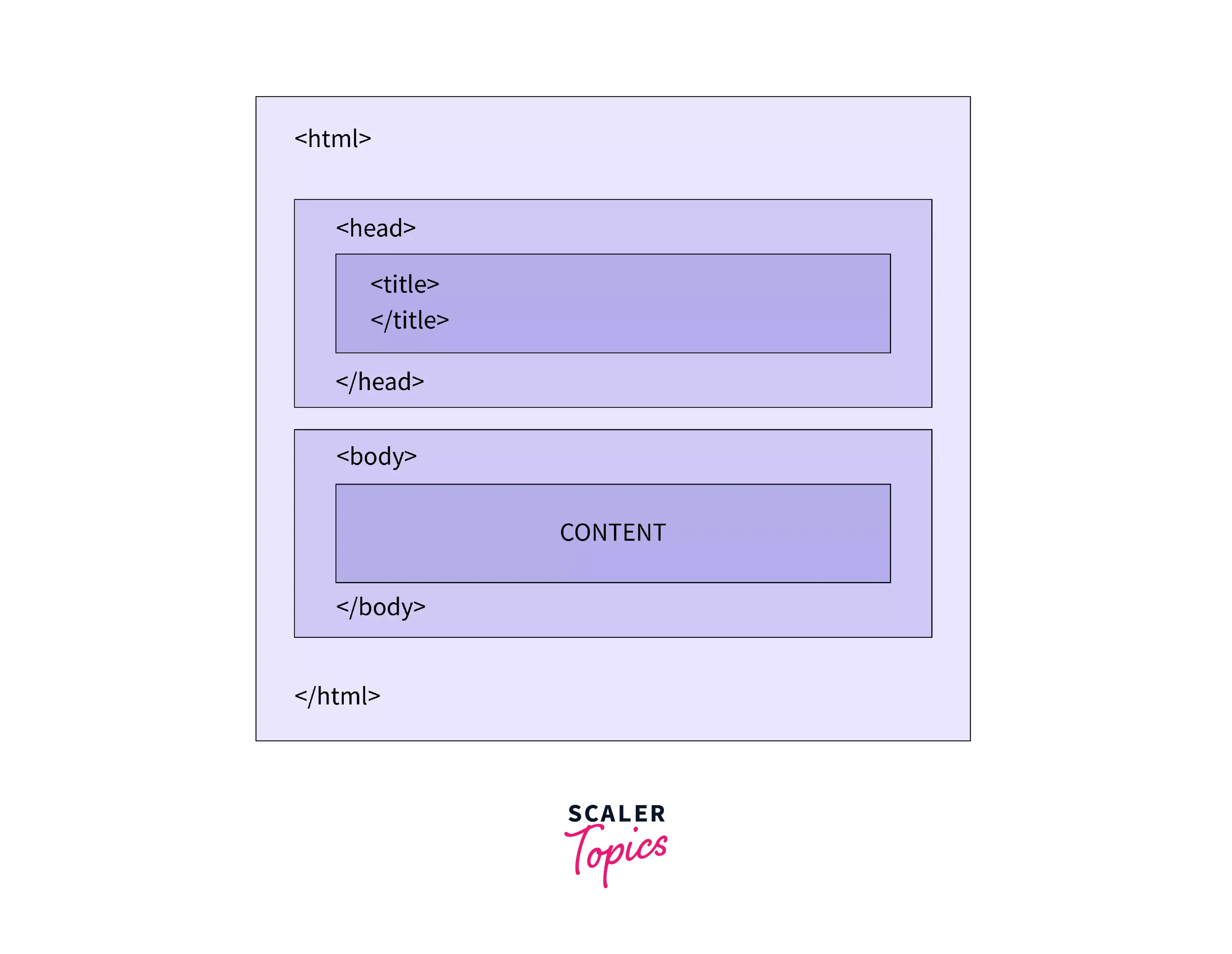
The basic structure of an HTML document consists of the following elements:
- The <!DOCTYPE> declaration, which specifies the version of HTML being used.
- The <html> element, which encloses the entire document and contains two main sections: the head and the body.
- The <head> element, which contains information about the document such as its title, links to external stylesheets and scripts, and meta tags.
- The <body> element, which contains the main content of the document such as text, images, videos, and other HTML elements.
Applications of HTML
HTML is the standard markup for web documents. Following are some major applications of HTML:
- Creating web pages: HTML is used to create static web pages. These pages can be further enhanced by adding CSS, JS etc.
- Making the website responsive: The semantic tags introduced in HTML is used to make a website responsive, i.e. the webpage automatically adjusts spacing and orientation according to the size of the screen.
- Drawing graphics: HTML can be used to draw graphics using the canvas.
- Providing offline support: Once loaded in the browser, the HTML document can exist without the internet thus providing offline support to the users.
- Internet navigation: The hypertext feature of HTML can be used to navigate from one location to another over the internet.
Audience
This HTML tutorial will be beneficial for the audience who:
- Wants to get started with web development.
- Is a beginner or intermediate in HTML and wants to level up to expert level.
- Wants to revise their HTML concepts.
- Needs reference material for HTML
Prerequisite
Following are the pre-requisites to get started with this HTML tutorial:
- A text editor
- A web browser
- The basic idea of creating files and folders on the computer.
- The basic idea of navigating through different files and folders on the computer.
- Understanding image and video formats.
How to learn HTML?
Following are some ways to learn HTML:
- Documentation: We can learn HTML through documentations on websites.
- Self-guided tutorials: HTML can also be mastered through self-guided HTML basic tutorials, HTML beginner tutorials or articles available on the internet.
- Books: We can also refer to books to learn HTML.
- Video tutorials or courses: over the internet can also be referred to learn HTML.
- Projects: We can also learn HTML by making a project of our own.
What will you Learn in This HTML Tutorial?
In this HTML tutorial we'll learn about:
- What is HTML, it's applications
- Detailed explanation of various HTML tags
- Learn how to apply the code in real project scenarios setting up the requisite IDE (VS Code) for working with HTML.
- Installing and launching the live server, pre-processors like HAML and their pros and cons, Handlebars and HTML, etc.
Career Opportunity of Learning HTML
Some common career options after learning HTML are Web developer, Frontend designer, Web architect, Graphic designer, UI developer etc.
