


3 min
19 min
26 min
9 min
13 min
9 min
10 min
12 min
6 min
6 min
10 min
7 min
8 min
14 min
7 min
13 min
11 min
6 min
21 min
9 min
10 min
12 min
14 min
10 min
8 min
19 min
15 min


CSS, or Cascading Style Sheets, is the language used to style and lay out HTML content on the web, controlling color, spacing, typography, positioning, and responsiveness. Without CSS, every website would look like plain, unstyled text stacked on a page.
This CSS tutorial for beginners covers everything from basic syntax and selectors to the box model, Flexbox, Grid, and animations, building up to real, practical page layouts. Modern CSS has changed significantly in recent years: features like the
This CSS tutorial pairs naturally with HTML, since CSS has nothing to style without it, and with JavaScript for interactivity beyond what CSS alone can do. Whether you're aiming to become a front-end developer or just want to make your own web projects look polished, this tutorial builds every concept step by step, from your first styled element through responsive, modern layouts.
CSS Tutorial
What is CSS?
HTML alone is just some information. Information alone can’t stand in this world where people want easier accessibility. So, here comes the CSS technology to make that information attractive and easily accessible.
CSS explained: CSS stands for Cascading Style Sheets. As the name suggests, it is a kind of styling that is applied to our plain boring information, HTML.
CSS gives our HMTL all the creative and designing stuff, be it color, alignment, positioning, making the web page responsive (Responsive means making the same website fit different screen sizes without making a completely separate website for each screen size), font styles, animations, and many more. Whatever creativity you can think of can be done with CSS.
Why learn CSS?
Well, let me give you just ONE picture. That itself will make everything clear.
Below is your favorite Google homepage with almost all of the CSS removed. It has got every “information” you need to perform your search operation. It doesn’t look very usable, does it? Neither does it look very organized.
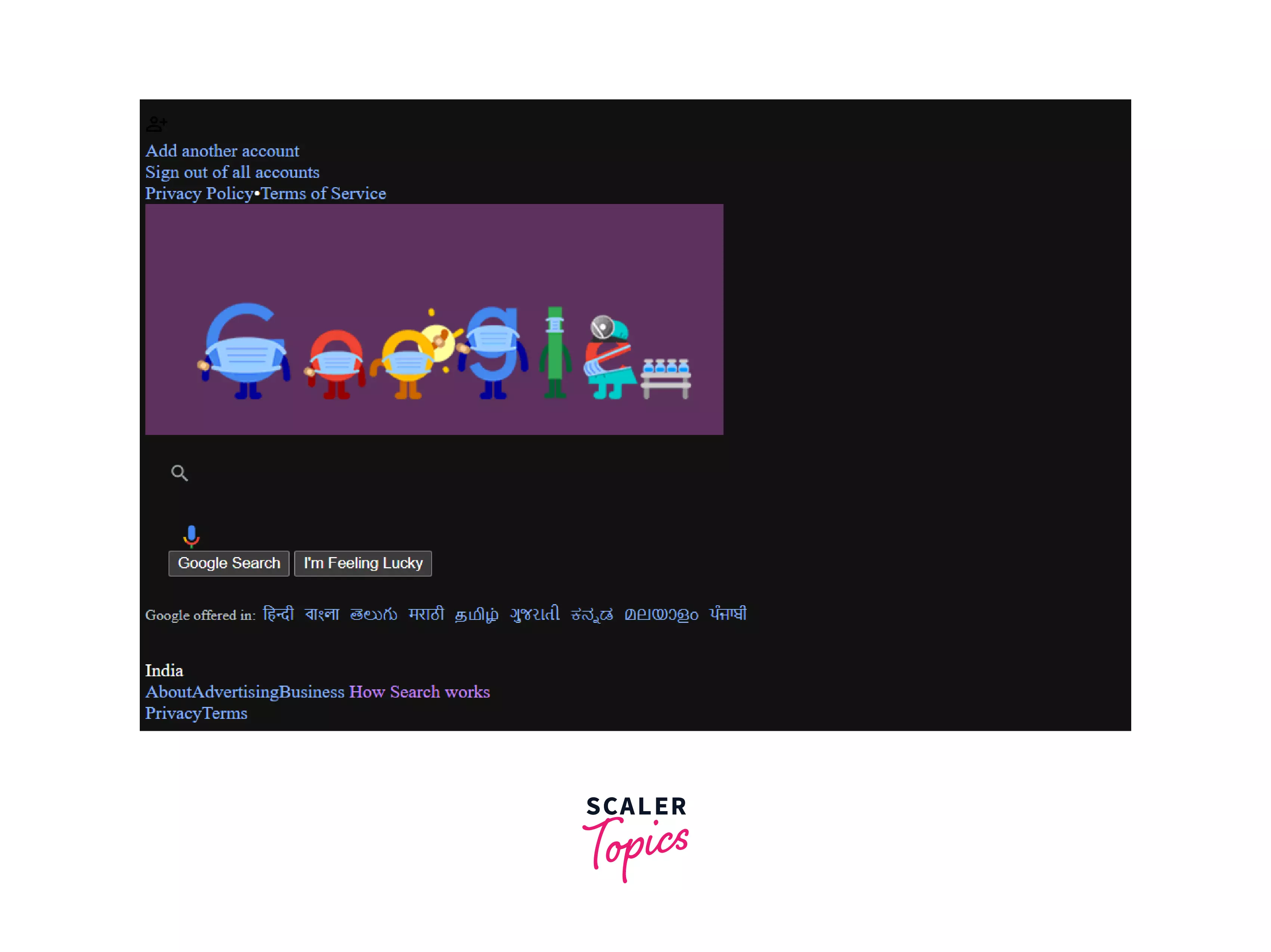
Well, that picture was a good example to show why it is so important to learn CSS and what a huge difference CSS can make to your websites :).
It is evident, CSS is not only needed to beautify your webpage but also to make the user experience (UX) and user interface (UI) enriched. It becomes a good website only when it has all the information one needs and is, as well, easily accessible.
Applications of CSS
- Amazing designs & animations: With all other advantages CSS provides you with the best designs you can get for your websites. Starting with basic designs to animations, CSS has got you covered!
- Reusability: CSS code once written can be applied to multiple HTML files thus making templating easy. We can apply the same class names and ids to the HTML element when we want to make another similar-looking page, thus saving a lot of our time.
- Responsiveness: Without CSS the responsiveness of the webpages would have only been an imagination! The media queries, the several CSS frameworks like bootstrap, the dynamic units, etc make the webpages responsive and accessible to several devices without making completely separate pages for desktop and mobiles.
- World wide standards for web design: HTML and CSS have been globally accepted for making wonderful websites. Thus to make your website futureproof, CSS and HTML are a must skill to have.
- Faster loading of websites: A single CSS property can be applied to multiple elements using the same class name or same id. This saves us from writing the same styles for each element, making the amount of code less and less code means faster loading of the webpage!
How JavaScript makes HTML build-website better
Apart from CSS, JavaScript plays a crucial role in enhancing the functionality and interactivity of websites built with HTML. With JavaScript, developers can create dynamic web pages that update content in real-time without requiring a page refresh.
For example, consider an online store where products are added to the cart dynamically without redirecting the user to a new page. JavaScript can make this possible by handling the cart functionality in the background and updating the UI accordingly.
Similarly, JavaScript can be used to create interactive elements such as dropdown menus, image sliders, and pop-ups that greatly enhance the user experience of a website. By adding JavaScript to HTML and CSS, developers can build more engaging and user-friendly websites.
CSS Examples
Let us take an example: HTML:
<body>
<div class="div1">
<h1>Hello World!</h1>
</div>
<div class="div2">
<p>This is my first time experience in CSS!</p>
<h2>Feeling excited!!</h2>
</div>
</body>
Let us have a look at what a site without CSS looks like: site without CSS
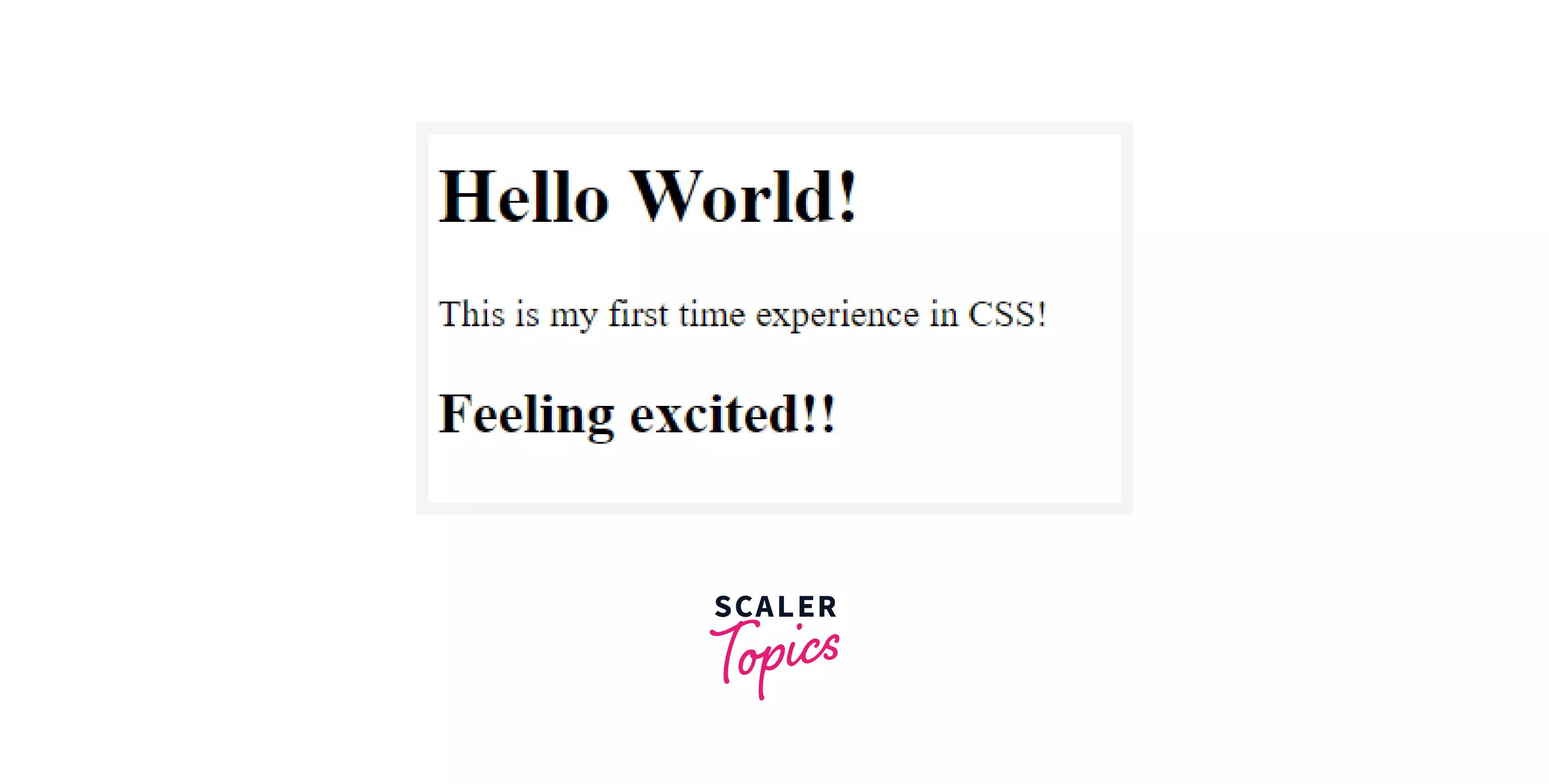
That’s it, just some plain text stacked one on top of another.
Now let’s apply some basic CSS to the above HTML:
.div1{
text-align: center;
color: darkslategray;
background-color: #FFE162;
padding: 10px;
}
.div2{
background-color: #FF6464;
color: #EEEEEE;
font-size: larger;
padding: 1%;
color: midnightblue;
}
Now let’s see how it looks after applying some very basic CSS.
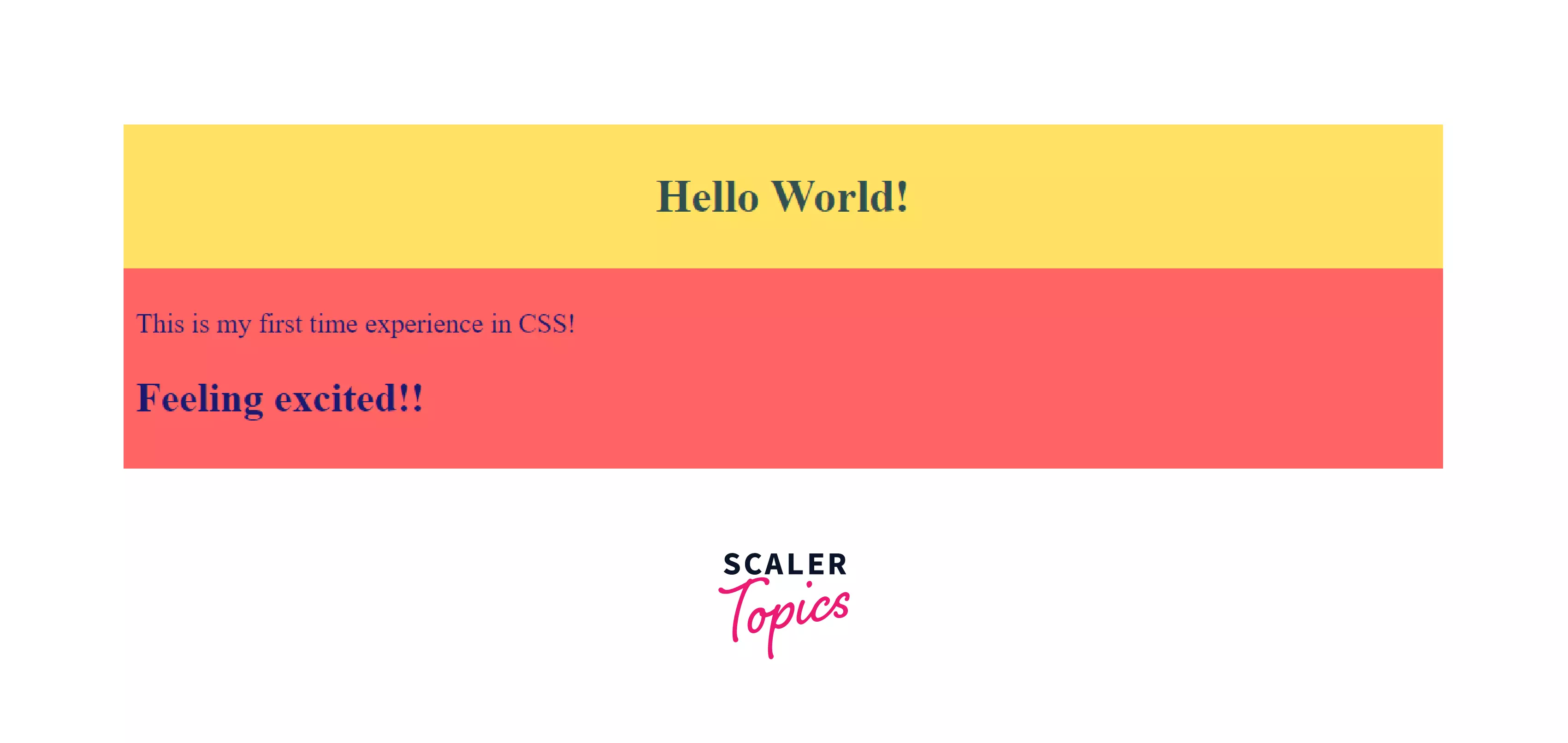 That’s looking much better with some colors and some padding and styling. Well, you can do many more cool things, let’s look at the various CSS properties.
CSS Properties
These are some of the basic CSS properties that are very frequently used:
- height
- width
- margin
- padding
- background-color
Positioning properties:
- Absolute
- Relative
- Fixed
- Static
- Sticky
Font properties:
- font-color
- font-size
- font-family
- Font-style
Color & background
- background-color, background-image
- Color
Typography
- Font-family
- Font-size
- Font-style
- font-weight
There are multiple more CSS properties that you will learn as you go through more practical experiences and face hurdles while some real development. Cause, in the end, we developers learn the best only while developing! :)
Modern CSS in 2026: Do You Still Need Sass?
Sass (covered in the SASS module above) has been the standard way to get variables, nesting, and mixins in CSS for over a decade. That's changed significantly:
- Native CSS nesting is now supported across all major browsers, letting you nest selectors directly in plain CSS without a build step.
- The
() selector lets you style a parent element based on its children, something that used to require JavaScript, and reached full browser support in 2026. - Container queries let components respond to the size of their container rather than the whole viewport, which is a more flexible foundation for responsive design than media queries alone.
For most projects in 2026, native CSS covers what Sass used to be needed for. Sass still adds value for more advanced features, like mixins, functions, and loops, that native CSS doesn't fully replicate, so it's still worth learning, just no longer strictly required for the basics this CSS tutorial covers.
Audience
Web developers, designers, and anyone else interested in building aesthetically pleasing and useful web pages would typically benefit from a CSS tutorial. For making web designs that are both aesthetically pleasing and simple to navigate, CSS, or Cascading Style Sheets, is a crucial tool.
The look and organisation of web pages are defined by CSS, which enables designers to separate the design and organisation from the content. This facilitates website performance improvement and makes updating and maintaining web pages simpler. This CSS tutorial for beginners can help you develop your skills and produce more effective web designs regardless of your level of experience as a developer.
Pre-requisite
Before starting to learn CSS, it is important to have a good grasp of HTML and web design concepts such as typography, color theory, and layout. Knowledge of programming concepts such as variables, functions, and conditional statements can also be helpful.
Access to a text editor and a web browser is also necessary to write and test CSS code. With these prerequisites in place, learners can effectively start learning and applying CSS to create visually appealing and functional web pages.
How Long Does It Take to Learn CSS?
Most learners can grasp CSS basics, selectors, the box model, and simple styling, in 2 to 3 weeks of consistent practice. Reaching a comfortable, job-ready level, including Flexbox, Grid, and responsive design, typically takes 1 to 2 months. This CSS tutorial is structured to move you through that path step by step, from simple styling through modern, production-ready layouts.
Career Opportunity of Learning CSS
Here's a quick look at the career paths available once you learn CSS well:
You can be a UI/UX designer or a front-end developer in any software company. Your main task will be to stylize the websites and work on the front-end of the website enriching the UX and UI.
Well, considering the fact that there’s a lot of competition in the industries, knowing only CSS won’t be enough for becoming a front-end developer. Along with CSS, you need to know HTML and JavaScript as well, the two most in-demand technologies in front-end development.
CSS is one of the 3 basic building blocks for becoming a front-end engineer. And the demand for a truly good front-end engineer is much higher than that back-end engineer in the current industry.
FAQs
Is this a good CSS tutorial for beginners with no prior experience?
Yes, this CSS tutorial for beginners starts from the fundamentals and only expects basic familiarity with HTML, no prior CSS experience is required.
What are the CSS basics I should learn first?
The CSS basics include selectors, the box model, colors, and typography, all covered early in this tutorial before moving into Flexbox, Grid, and animations.
Is this CSS tutorial free?
Yes, this CSS tutorial is completely free, covering everything from basic syntax through modern layout techniques like Flexbox and Grid.
Do I still need to learn Sass if I know modern CSS?
Not strictly for the basics, native CSS nesting and features like
How long does it take to learn CSS?
Most learners pick up the basics in 2-3 weeks, and reach a comfortable, practical level, including Flexbox and Grid, in 1-2 months.
Should I learn CSS before or after JavaScript?
Learn CSS after HTML and before diving deep into JavaScript. Once CSS is explained and makes sense, JavaScript's role, adding interactivity on top of your structure and styling, becomes much easier to understand.
Start Learning CSS with Scaler
Once you've worked through this CSS tutorial, the natural next step is pairing CSS with HTML and JavaScript to build real, responsive websites. Scaler's Modern Software and AI Engineering program builds on exactly this foundation with mentor-led, project-based learning.
